---
title: "Create AI WhatsApp Chatbot for Business"
description: "Learn how to create a WhatsApp chatbot that automates support tasks effortlessly. SleekFlow makes it easy to deploy AI chatbot models for WhatsApp Business."
canonical: "https://sleekflow.io/blog/how-to-create-a-whatsapp-chatbot"
html_lang: "en"
date_modified: "2026-04-13T06:26:47.399Z"
og_title: "How to Create an AI WhatsApp Chatbot for Your Business"
og_description: "Learn how to create a WhatsApp chatbot that automates support tasks effortlessly. SleekFlow makes it easy to deploy AI chatbot models for WhatsApp Business."
og_image: "https://images.ctfassets.net/tu2uwzoyozk8/jv7U36Ukh9EPuG26vYfRg/37254a153c2feca5c6b003922293bf06/Website-Cover-SleekFlow.jpg?w=1200&q=90"
---
```json
{
"@context": "https://schema.org",
"@type": "BlogPosting",
"headline": "How to Create an AI WhatsApp Chatbot for Your Business",
"description": "Learn how to create a WhatsApp chatbot that automates support tasks effortlessly. SleekFlow makes it easy to deploy AI chatbot models for WhatsApp Business.",
"url": "https://sleekflow.io/blog/how-to-create-a-whatsapp-chatbot",
"dateModified": "2026-04-13T06:26:47.399Z",
"image": "https://images.ctfassets.net/tu2uwzoyozk8/jv7U36Ukh9EPuG26vYfRg/37254a153c2feca5c6b003922293bf06/Website-Cover-SleekFlow.jpg?w=1200&q=90",
"breadcrumb": {
"@type": "BreadcrumbList",
"itemListElement": [
{
"@type": "ListItem",
"position": 1,
"name": "Home",
"item": "https://sleekflow.io"
},
{
"@type": "ListItem",
"position": 2,
"name": "Blog",
"item": "https://sleekflow.io/blog"
},
{
"@type": "ListItem",
"position": 3,
"name": "How to Create an AI WhatsApp Chatbot for Your Business",
"item": "https://sleekflow.io/blog/how-to-create-a-whatsapp-chatbot"
}
]
}
}
```
# Create AI WhatsApp Chatbot for Business
*Danesh Ramuthi — Content Writer*
## Summary
- WhatsApp’s 98% open rate makes it a powerful channel for scalable, real-time customer engagement through chatbots.
- To build one without coding, apply for WhatsApp Business API via an official provider, then use a no-code platform like SleekFlow to design flows, automate replies, and integrate CRM.
- Plan FAQ flows, enable human handover, test before launch, and continuously optimize using analytics and conversion tracking.
- Chatbots provide 24/7 support, personalized messaging, marketing automation, multilingual communication, and can handle up to 79% of routine queries.
- Real cases show strong results: higher conversions, improved efficiency, faster response times, and better-qualified leads through automated workflows.
Providing exceptional customer service is essential for any brand looking to grow. WhatsApp has a 98% open rate, making it one of the most effective platforms for customer communication. To capitalize on this, businesses are turning to WhatsApp chatbots to:
- Handle conversations at scale
- Respond faster
- Improve customer satisfaction
In this guide, you’ll learn **how to build a WhatsApp chatbot** and why you should start looking to create one.
## **How to set up a WhatsApp chatbot for your business without coding?**
Setting up a[ WhatsApp chatbot](/blog/whatsapp-chatbot) for your business is **straightforward and requires no coding**. Here’s how you can build a WhatsApp bot for your business that will automatically respond to WhatsApp messages from your customers.
### **Step 1: Apply for WhatsApp Business API through a WhatsApp Business Solution Provider**
To create a WhatsApp chatbot, you will need access to the [WhatsApp Business API](/blog/whatsapp-business-api). **Choose an official**[** ****WhatsApp Business Solution Provider**](/blog/official-whatsapp-business-solution-provider), such as SleekFlow, to help you with your application.
With an official WhatsApp Business API provider like SleekFlow, you get access to essential features like:
- **Verified badge eligibility:** Subject to Meta’s review, a verified badge can help customers recognise your business as an official presence.
- **Official business name display:** Your company name appears even if the contact hasn't saved your number.
- **Reliable performance:** Get uninterrupted access and more advanced chatbot functionalities.
To apply for [WhatsApp API](/channels-integrations/whatsapp), you’ll need to provide:
- Your **company name**
- **Website** URL
- **Contact details** of a company representative
The verification process can take up to four weeks, depending on Meta's review timeline. During this period, your business information will be validated to ensure compliance with WhatsApp's policies. For the complete process, read this[ step-by-step guide on how to apply for WhatsApp Business API](/blog/apply-whatsapp-business-api#how-to-apply-for-whatsapp-cloud-api-through-sleekflow).
### **Step 2: Set up your chatbot on a no-code platform**
Building an [auto-reply WhatsApp chatbot](/blog/whatsapp-auto-reply-bot) from scratch can be overwhelming, especially for inexperienced users. It's best to use a no-code platform like SleekFlow to simplify the process and avoid unnecessary roadblocks.
With SleekFlow, you can:
- Automate marketing drip campaigns, conversation routing, and data collection **using a visual**[** ****flow builder**](/flow-builder).
- Customize quick replies, call-to-actions, and opt-in buttons **directly within WhatsApp chat threads**.
- Streamline customer interactions by automating responses while allowing human intervention when needed.
- Even without programming skills, you can create a structured and seamless chatbot experience for your customers. While automation is the ultimate goal, with **SleekFlow’s AI agent** you can:
- Auto-qualify leads based on budget/timeline
- Route conversations to the right team
- Collect data while answering questions
- Track conversion rates in real-time
#### How Pest Killer boosted conversions with SleekFlow's WhatsApp chatbots
[Pest Killer](/customer-stories/pest-killer), an environmental services provider in Hong Kong, was struggling with operational inefficiencies as it expanded.
The company relied on manual data entry causing slow response times. There was also a disconnect between office staff and field technicians, which further delayed services.
They used the SleekFlow's WhatsApp API to create chatbots for 24/7 instant responses. They also integrated a unified inbox gave field staff direct access to customer information.
- **Conversion rates increased by 16%** by eliminating response delays.
- Overall **operational efficiency improved by 23%**.
- Service **delivery time was reduced by 22%**.
### **Step 3: Visualize & plan the dialogues in your flows**
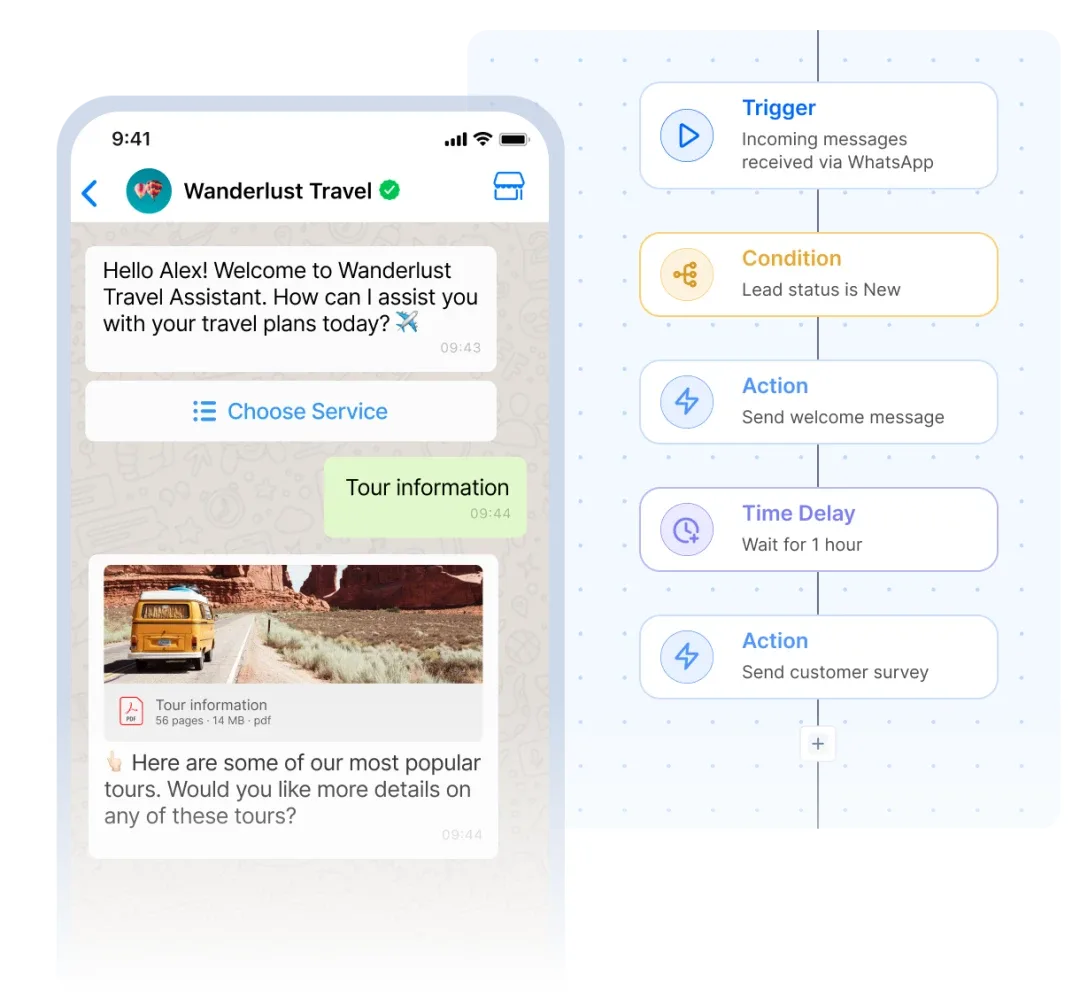
With SleekFlow, building a WhatsApp chatbot is as simple as setting a few automation rules. The chatbot will provide quick, consistent replies—but first, you need to decide what kind of conversation flow you want to create for your chatbot.
Here’s how:
- **Plan responses to frequently asked questions** (FAQs). These responses should be brief and straight to the point to keep interactions efficient.
- **Prepare a smooth handover message** for situations where a human agent needs to take over the conversation.
**SleekFlow also offers ready-made templates** to help you get started quickly:
1. Go to *Automation*.
1. Select *Apply a Template*.
1. Configure the triggers and actions.
Once set, your chatbot is ready to engage with customers effortlessly.
### **Step 4: Test & deploy your WhatsApp chatbot**
Never roll out a new feature without testing it first.
- **Run your chatbot through multiple test scenarios** to check its responses.
- **Ensure it follows the planned flows** and integrates well with other systems.
- **Carefully review its performance**, as any overlooked issue could impact the customer experience.
Once you’re confident that everything works as expected, deploy your WhatsApp chatbot. With SleekFlow, your chatbot will be up and running in no time, helping you deliver faster, more reliable customer support.
### **Step 5: Monitor and optimize your chatbot based on data**
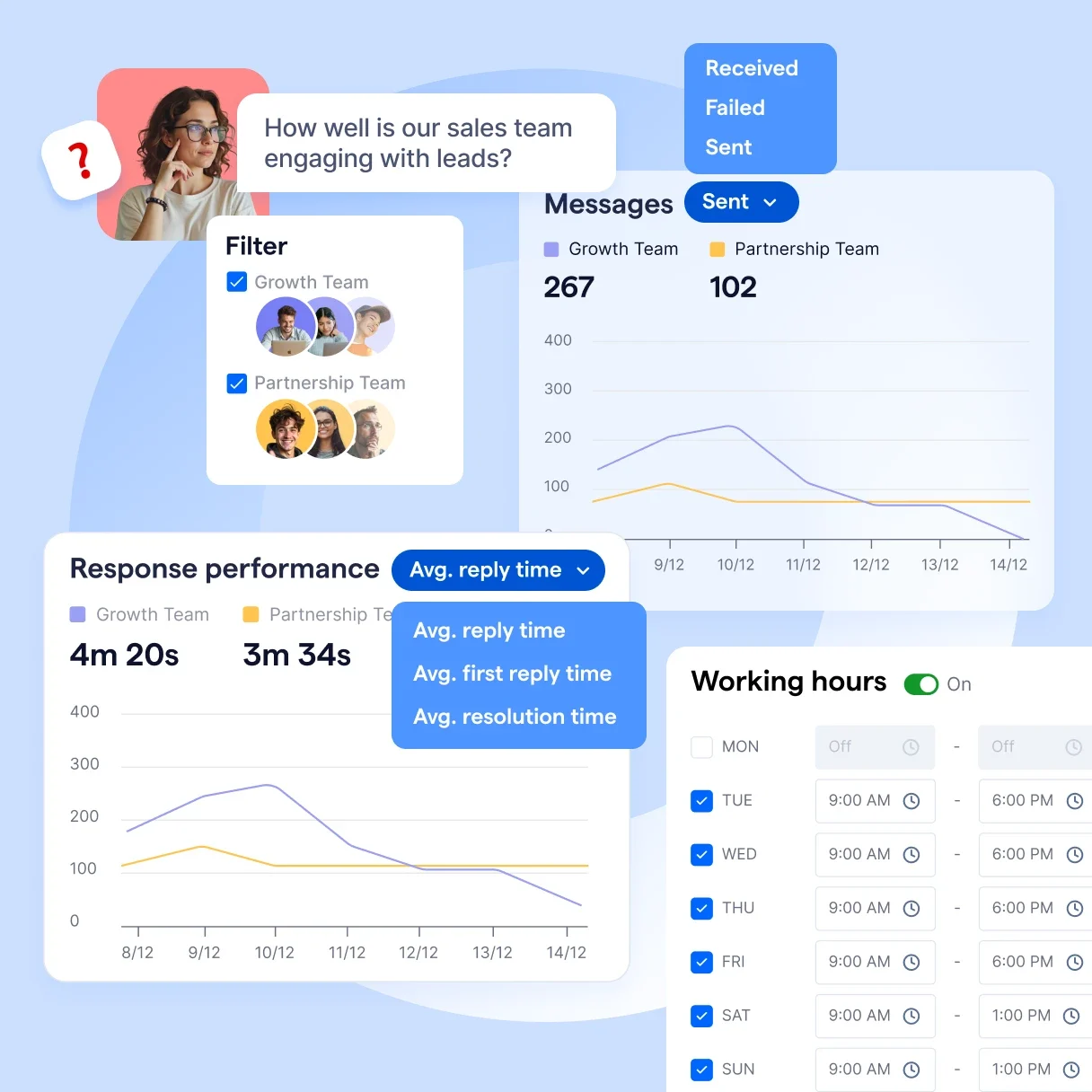
You need to monitor your WhatsApp bot’s performance and make data-driven improvements. With [SleekFlow’s built-in analytics features](/analytics), you can effortlessly track, analyze, and optimize your chatbot's performance.
When you use SleekFlow to [build your WhatsApp chatbot](/solutions/whatsapp-chatbot-platform), you can access detailed insights from every chat and campaign. The analytics dashboard helps you track how conversations contribute to conversions, monitor agent performance, and customize metrics that align with your goals.
Here’s how SleekFlow’s analytics features can help you optimize your WhatsApp chatbot:
- **Track actions** like website visits or booking confirmations and automatically log how customers progress through their journey in chats.
- **Filter conversions** by period and audience segments, such as location and lead source, to refine your campaign targeting and achieve better results.
- **Visualize drop-off and conversion rates**, identify bottlenecks, and highlight high-performing touchpoints to optimize your chat conversion funnel.
Additionally, SleekFlow allows you to track which campaigns contribute most to your contact base growth. You can attribute new leads to their source, analyze the factors driving inquiries, and double down on what works best.
## Want to outcompete your peers with SleekFlow's help?
Book your personalised demo with SleekFlow today and unlock the potential of seamless communication
[Book a Demo](https://sleekflow.io/book-a-demo)
[View Pricing](https://sleekflow.io/pricing)
## **Why are WhatsApp chatbots a must for businesses?**
[88% of users have engaged in at least one conversation with a chatbot](https://masterofcode.com/blog/chatbot-statistics), and **80-90% of users describe their experience as engaging**. People have grown familiar with chatbots and trust them to handle their queries. Also,[ chatbots can answer up to 79% of routine questions](https://adamconnell.me/chatbot-statistics/), freeing up your team to focus on more complex tasks.
Here’s why every business should start using WhatsApp chatbots:
### 1. Better customer service – 24/7 availability
Chatbots are commonly used in customer support, with[ 37% of businesses relying on them](https://www.intercom.com/blog/the-state-of-chatbots/). If you don’t adopt this technology soon, your competitors will leave you behind.
A WhatsApp chatbot can simplify your customer support process by:
- **Automatically handling simple and repetitive tasks**.
- **Working around the clock** to provide instant responses at any time.
- **Transferring more complicated questions smoothly** to a human agent.
Here’s why every business should start using WhatsApp chatbots:
| **Feature** | **WhatsApp chatbot** | **Human-agent** |
| --- | --- | --- |
| Availability | 24/7, no downtime | Limited by working hours |
| Response Time | Instant replies for FAQs | Can be delayed during busy hours |
| Cost Efficiency | Cost-effective for repetitive tasks | More expensive for high-volume support |
| Scalability | Easily scales with increased demand | Requires hiring more agents for scaling |
| Consistency | Provides consistent responses | rone to human error |
### **2. Personalized customer experiences**
Personalization is no longer a luxury; it’s expected.[ 71% of consumers want companies to deliver personalized interactions,](https://www.mckinsey.com/featured-insights/mckinsey-explainers/what-is-personalization) and WhatsApp chatbots can do exactly that.
With WhatsApp chatbots, you can:
- **Address customers by name** during conversations.
- **Tailor messages based on past interactions**, such as order history or frequently asked questions.
- **Send personalized offers and recommendations** based on customer behavior.
- **Segment users** by location, purchase behavior, or engagement to deliver relevant promotions and updates.
This level of personalization helps build stronger relationships and enhances customer satisfaction.
### **3. Improved marketing campaigns**
To convert prospects effectively, you need to respond quickly—and that’s where WhatsApp chatbots excel.
WhatsApp chatbots can:
- **Send instant replies** to inquiries, ensuring you don’t miss potential leads.
- **Automate follow-up messages** for promotions, product launches, or abandoned carts.
- **Engage customers throughout the conversion funnel**, optimizing each touchpoint for better results.
- **Broadcasting to Targeted Segments** – Businesses can [send bulk messages](/blog/a-complete-walkthrough-for-whatsapp-broadcast) while ensuring they’re personalized and relevant to different customer groups.
With chatbots handling initial interactions, your team can focus on nurturing high-intent leads and closing deals.
### **4. Multi-language support**
WhatsApp chatbots are designed to communicate with customers in multiple languages, making them ideal for businesses with a global reach. They help strengthen connections across different markets by:
- **Automatic detection**: They can detect and respond in a customer’s preferred language.
- **Natural interactions**: This ensures conversations feel personalized and localized.
- **Eliminating barriers**: By removing language hurdles, businesses can effectively engage and strengthen connections across different markets.
*Take a look at how *[*successful businesses use WhatsApp chatbots*](/blog/malaysia-whatsapp-chatbot#successful-whatsapp-chatbot-examples-from-malaysian-businesses)* to improve customer engagement.*
## **Best practices for an effective WhatsApp chatbot**
Source: Pexels
Creating a WhatsApp chatbot is just the beginning. To ensure it **provides real value to your customers and supports your business goals**, follow these best practices:
**1. Clearly define use cases**
Start by identifying the primary purpose of your chatbot.
- Will it handle **customer support**?
- Is it for **lead generation**?
- Will it drive **sales**?
- Or is it simply there to answer **FAQs**?
This will help you build better conversation flows and ensure users get the answers they need without confusion.
### **2. Personalize conversations**
Personalization makes conversations more engaging and strengthens connections. When possible:
- Use **customers' names**.
- Reference **past interactions**.
A simple message like, *“Hi Sarah, your order has been shipped!”* adds a personal touch that customers appreciate.
### **3. Provide clear instructions**
WhatsApp is a quick, casual communication channel, so clarity is key. **Let users know exactly what they can do** with the chatbot. For instance:
- *"Type '1' for Order Status"*
- *"Type '2' for Product Info"*
- *"Type '3' to Speak to a Human"*
### **4. Enable handoff to a human agent**
Chatbots are great for routine tasks, but some situations require human support. Make sure your chatbot can hand over the conversation to a live agent when needed. This **ensures customers don't get stuck** when dealing with more complex questions.
### **5. Offer quick replies & buttons**
Make navigation as intuitive as possible by **using interactive buttons**. Instead of asking users to type everything, provide quick reply options like:
- *"Check Order Status"*
- *"View Product Catalog"*
- *"Speak to Support"*
### **6. Offer easy opt-out**
Respect your customers' preferences by making it easy to opt-out. **Allow users to unsubscribe** by sending simple keywords like:
- *"Stop"*
- *"Unsubscribe"*
This builds trust and ensures compliance with messaging regulations.
## **Why is SleekFlow the smart choice for your WhatsApp chatbot?**
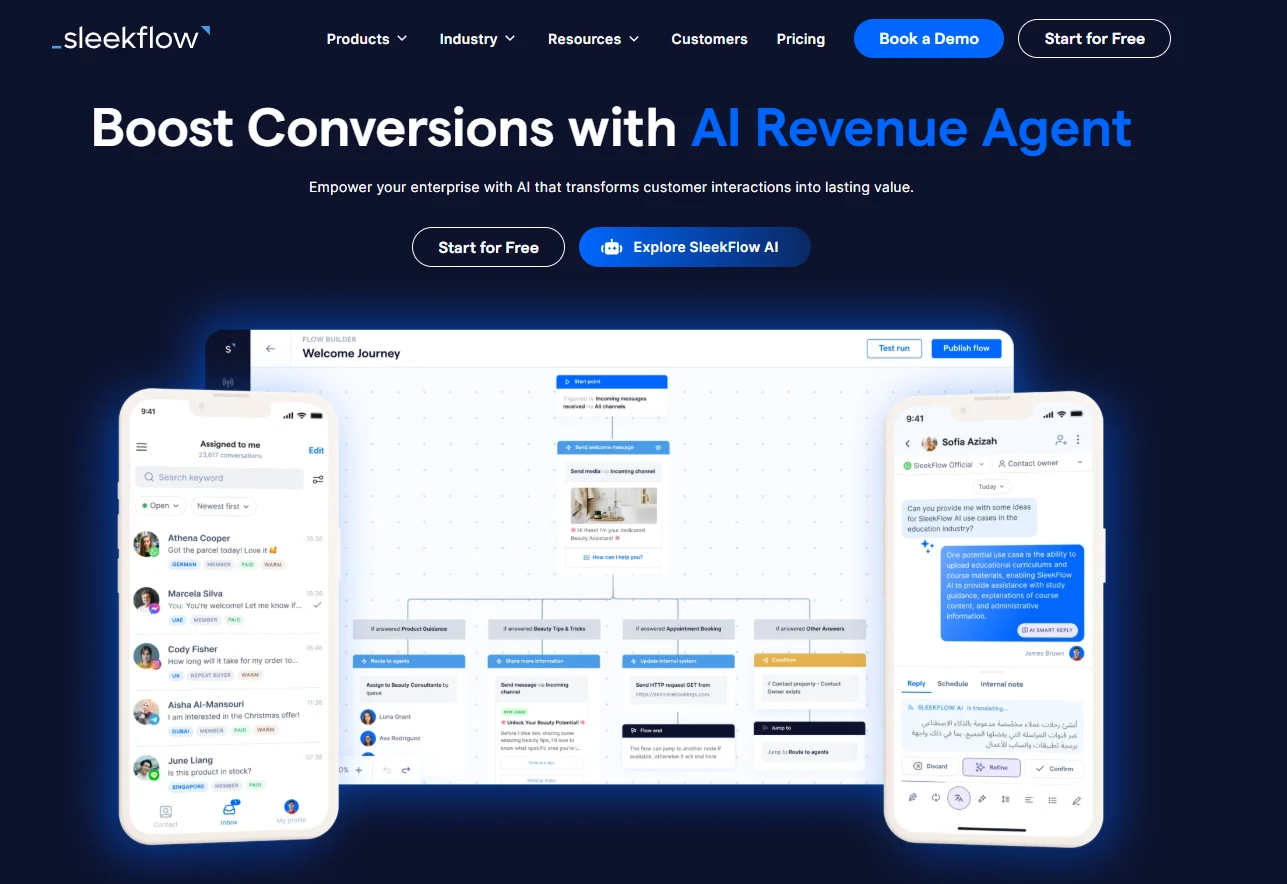
[Building a WhatsApp chatbot](/solutions/whatsapp-chatbot-platform) is no longer a complex, time-consuming task. With the right tools, you can automate conversations, improve customer interactions, and personalize experiences effortlessly. SleekFlow makes this process simple with its intuitive, no-code steps.
By choosing SleekFlow, you get more than just a chatbot—you get a reliable, scalable, and easy-to-use platform that helps you:
- **Stay connected with your customers 24/7**
- **Utilize automated responses**
- **Create **[**personalized interactions**](/broadcast-campaign)
- **Access actionable analytics**
- **Qualify leads, recommend products, schedule meetings, or update your CRM with **[**AI agents**](/agentflow)
SleekFlow equips your business with the tools needed to thrive in today’s messaging-first world.
### YouTuber Mingjai (700K subscribers) built an engaging, gamified chatbot with SleekFlow
[Mingjai](/customer-stories/mingjai), a Hong Kong YouTuber with over 700,000 subscribers, launched a premium storytelling course, "How to Achieve Billions of Views on YouTube".
Traditional communication methods like email and static video failed to maintain engagement. High traffic created logistical challenges, making lead qualification inefficient.
The team created a gamified WhatsApp chatbot via SleekFlow to guide prospects through a workflow, filtering high-intent users. Data collected was used for automated drip campaigns.
- **57% of users completed the full game** sequence.
- **70% inquiry rate**, creating a highly qualified lead pool.
- **200 early bird seats sold out** in 48 hours.
> Quote: Storytelling is more about what the audience takes away than what we say. Our gamified WhatsApp chatbot ensures potential customers carry the course experience home.

**MingJai**
Hong Kong renowned Youtuber
## Automate your business growth with Flow Builder
Streamline sales, marketing, support, and operation workflows in the era of hyper-personalization.
[Start free](https://app.sleekflow.io/en?screen_hint=signup)
[View pricing](https://sleekflow.io/pricing)
### Can I create a WhatsApp chatbot for free?
No, you need to apply for the WhatsApp Business API through a provider, which involves a fee. Use a WhatsApp Business API Pricing Calculator to estimate the cost. Check out the API provider plan of your choice for more details.
### How do I create an auto-reply bot on WhatsApp?
To create an auto-reply bot on WhatsApp, apply for the WhatsApp Business API through a provider and set up your chatbot on a no-code platform. Plan your chatbot’s dialogue flow, test and deploy it, and continuously monitor and optimize it based on user interactions.
### Can I connect my WhatsApp chatbot to my CRM or e-commerce store?
Yes, with SleekFlow, you can connect your chatbot to your CRM and e-commerce store. Then, you can use the customer information for remarketing and retargeting campaigns.
### Can I program my WhatsApp chatbot to answer FAQs?
Yes, this is a key feature. You can design the chatbot’s flow to recognize common questions and provide instant, automated responses using predefined rules.
### How do I train my chatbot to improve its responses?
Train your chatbot by analyzing user queries, identifying gaps, and improving response accuracy with real-world data. Continuously test and refine its conversation flow based on user feedback and engagement metrics.
### Is it worth paying for an AI chatbot?
It depends on your needs. Paid AI chatbots often offer advanced features like better accuracy, customization, 24/7 support, and integration with tools, making them ideal for businesses. Free versions may suffice for basic use but often come with limitations.
### What is the best chatbot for WhatsApp?
The best chatbot for WhatsApp depends on your needs, but SleekFlow is an excellent choice for businesses. It integrates seamlessly with WhatsApp, offers AI-powered automation, allows multi-agent collaboration, and provides analytics to enhance customer engagement.
### What is the difference between a bot and chatbot?
A bot is a broad term for any software programmed to perform automated, repetitive tasks. A chatbot is a specific type of bot designed to simulate human conversation through text or voice. While all chatbots are bots, not all bots are chatbots; some may index web pages (crawlers) or monitor server performance behind the scenes.