---
title: "WhatsApp Marketing ROI and Metrics for Business Analytics"
description: "Maximize your WhatsApp marketing ROI by monitoring key performance metrics. Learn how to utilize business analytics to understand customer behaviors."
canonical: "https://sleekflow.io/blog/whatsapp-marketing-roi"
html_lang: "en"
date_modified: "2026-05-11T10:54:14.161Z"
og_title: "WhatsApp Business Analytics: How to Track Marketing ROI"
og_description: "Maximize your WhatsApp marketing ROI by monitoring key performance metrics. Learn how to utilize business analytics to understand customer behaviors."
og_image: "https://images.ctfassets.net/tu2uwzoyozk8/jv7U36Ukh9EPuG26vYfRg/37254a153c2feca5c6b003922293bf06/Website-Cover-SleekFlow.jpg?w=1200&q=90"
---
```json
{
"@context": "https://schema.org",
"@type": "BlogPosting",
"headline": "WhatsApp Business Analytics: How to Track Marketing ROI",
"description": "Maximize your WhatsApp marketing ROI by monitoring key performance metrics. Learn how to utilize business analytics to understand customer behaviors.",
"url": "https://sleekflow.io/blog/whatsapp-marketing-roi",
"dateModified": "2026-05-11T10:54:14.161Z",
"image": "https://images.ctfassets.net/tu2uwzoyozk8/jv7U36Ukh9EPuG26vYfRg/37254a153c2feca5c6b003922293bf06/Website-Cover-SleekFlow.jpg?w=1200&q=90",
"breadcrumb": {
"@type": "BreadcrumbList",
"itemListElement": [
{
"@type": "ListItem",
"position": 1,
"name": "Home",
"item": "https://sleekflow.io"
},
{
"@type": "ListItem",
"position": 2,
"name": "Blog",
"item": "https://sleekflow.io/blog"
},
{
"@type": "ListItem",
"position": 3,
"name": "WhatsApp Business Analytics: How to Track Marketing ROI",
"item": "https://sleekflow.io/blog/whatsapp-marketing-roi"
}
]
}
}
```
# WhatsApp Marketing ROI and Metrics for Business Analytics
*Esther Fong — Product Marketing Manager*
## Summary
- WhatsApp marketing leverages 2B+ users and high engagement to drive stronger ROI comparing to other traditional channels.
- Track core KPIs: delivery, open, engagement, CTR, and conversion rates to measure campaigns performance.
- Advanced metrics like revenue per recipient, cost per recipient, and return on campaign spend reveal true profitability.
- Use UTMs, GA4, and Google Tag Manager to track website conversions and WhatsApp lead sources accurately.
- Optimize ROI with segmentation, A/B testing, automation, and CRM integrations via the WhatsApp Business API.
- Case studies show up to 40X ROAS and 13X ROI using personalized broadcasts and automation tools like SleekFlow.
With WhatsApp's vast user base of over 2 billion and its[ higher engagement rates](https://business.whatsapp.com/blog/marketing-messaging-quick-guide), businesses are increasingly exploring its potential as a powerful marketing tool. If you're questioning the effectiveness of WhatsApp marketing and the benefits of the [WhatsApp Business API](/blog/whatsapp-business-api), this guide is tailored for you. We'll explore key metrics and strategies to maximize your **WhatsApp marketing ROI**.
## **Key Performance Indicators (KPIs) for WhatsApp Marketing**
KPIs are essential for **measuring the success of your WhatsApp marketing campaigns**. These indicators not only track performance but also evaluate the cost-effectiveness of the WhatsApp Business API. Here are the crucial KPIs to monitor:
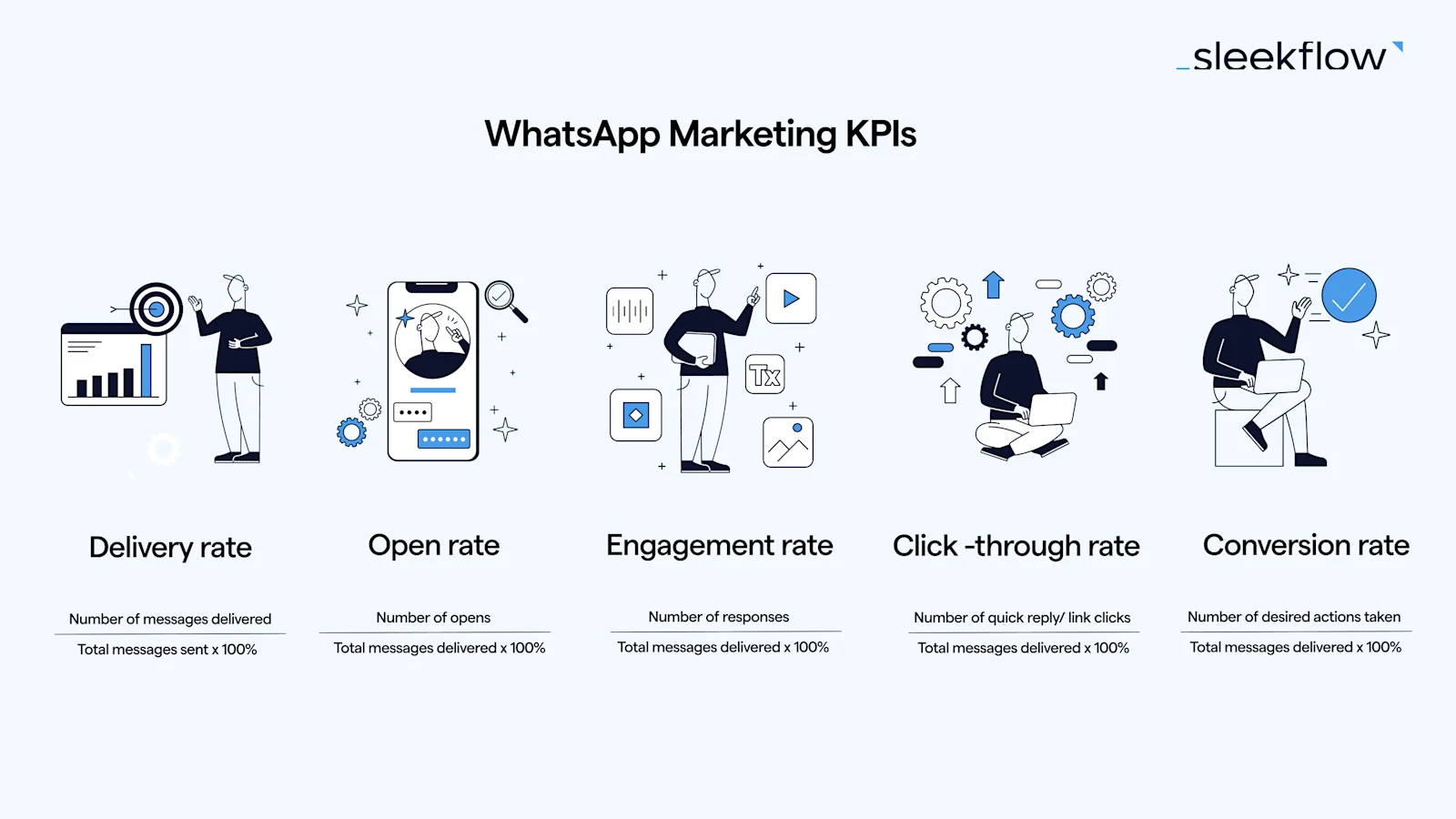
### Delivery rate
**Measures the efficiency of your message delivery**, ensuring content reaches your audience.
*Formula: (Number of messages delivered / Total messages sent) x 100%*
### Open rate
**Reflects how compelling and relevant your content** is to recipients.
*Formula: (Number of opens / Total messages delivered) x 100%*
### Engagement rate
**Gauges how many recipients interacted** with your content.
*Formula: (Number of responses / Total messages delivered) x 100%*
### Click-through rate (CTR)
**Assesses the effectiveness of your call-to-actions** (CTAs) within the message.
*Formula: (Number of clicks / Total messages delivered) x 100%*
### Conversion rate
**Tracks recipients who took a desired action**, such as making a purchase or signing up for a newsletter.
*Formula: (Number of desired actions / Total messages delivered) x 100%*
## 3 advanced WhatsApp marketing metrics
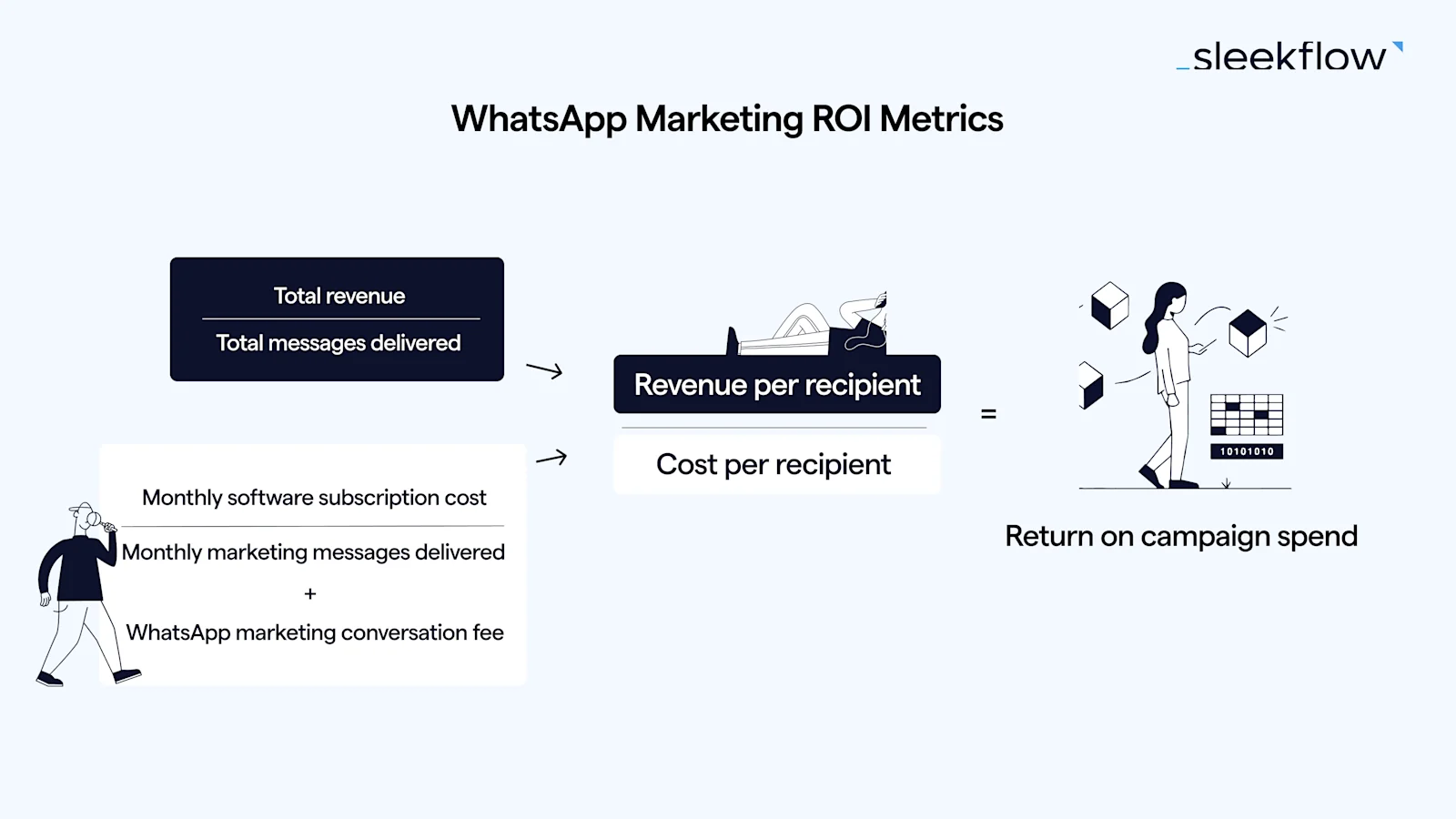
**For a deeper analysis**, consider these advanced metrics to evaluate your WhatsApp marketing ROI and campaign profitability:
### 1. Revenue per recipient
This metric provides **insights into the average revenue generated from each recipient** you engage with through your campaign
*Formula: Total revenue / Total messages delivered*
### 2. Cost per recipient
To understand the efficiency of your WhatsApp marketing campaign spending, this metric **breaks down the average cost you incur for each recipient**. When calculating the total campaign cost, consider the following:
- WhatsApp marketing conversation cost: the fee you pay to WhatsApp for delivering [a marketing template message](https://www.youtube.com/watch?v=zQJsHetYSkM) to a particular country or region.
- Software provider cost: a fixed monthly subscription cost. To accurately distribute this fixed cost, estimate the number of campaigns you'll run in a month. Then, for each campaign, determine how many messages you'll deliver. By dividing the monthly software cost by the total messages delivered in a month, you can ascertain the software cost per recipient.
| Region/Country | Conversation cost (per marketing conversation) |
| --- | --- |
| Hong Kong | US$ 0.0732 |
| Singapore | US$ 0.0732 |
| Malaysia | US$ 0.086 |
| United Arab Emirates | US$ 0.0499 |
| Brazil | US$ 0.0625 |
| Indonesia | US$ 0.0411 |
*source:*https://business.whatsapp.com/products/platform-pricing
To calculate your cost per recipient, you need to understand the cost-effectiveness of your campaign in reaching potential buyers. This is known as[ Cost Per Reach](https://agencyanalytics.com/kpi-definitions/cost-per-reach), which measures how much it costs to reach each person in your target group.
*Formula: WhatsApp marketing conversation cost + (Software provider monthly subscription cost / Total number of marketing messages delivered in a month)*
### 3. Return on campaign spend
This metric gives **a holistic view of the profitability of your WhatsApp marketing campaign** by comparing the revenue generated per recipient to the cost incurred per recipient.
*Formula: Revenue per recipient / cost per recipient*
#### **TKD Lingerie earned a 40X return on ad spend using SleekFlow’s WhatsApp Broadcast**
[TKD Lingerie](/customer-stories/tkdlingerie-use-case), a boutique retailer specializing in D-K cup sizing, sought to improve the effectiveness of its marketing efforts and overcome the inefficiencies of email outreach.
Email-based campaigns were struggling with low visibility and engagement due to inbox clutter, limiting the brand’s ability to effectively reach and convert its audience.
TKD Lingerie used SleekFlow’s WhatsApp Business API to launch a personalized promotion. Over seven days, 4,500 segmented customers received targeted messages via WhatsApp.
- Achieved a **40X Return on Ad Spend** (ROAS).
- Delivered a **74% open rate** and **78 Online-to-Offline (O2O) sales conversions**.
> A lot of people prefer being contacted via their mobiles over email. We have seen a better open rate with SleekFlow Broadcasting and a really good return on Broadcasting messages.

**Kate Kikano**
Founder of TKD Lingerie
## **Tracking WhatsApp campaign performance for website conversions**
## Connect to WhatsApp Business API now\!
Connect to WhatsApp Business API and unlock powerful tools to engage your audience.
[Connect Now](https://sleekflow.io/channels-integrations/whatsapp)
You can track leads originating from WhatsApp links **using a combination of URL parameters and analytics tools**. Here's a step-by-step guide:
### Step 1: Prepare UTM parameters
UTM (Urchin Tracking Module) parameters are tags you add to a URL. When someone clicks on a URL with UTM parameters, those tags are sent back to your analytics tool, and you can track where your traffic came from.
For example, if you have a website[ *https://example.com*](https://example.com), you can add UTM parameters to it like this:
[https://example.com/?utm\_source=whatsapp&utm\_medium=social&utm\_campaign=my\_campaign](https://example.com/?utm_source=whatsapp&utm_medium=social&utm_campaign=my_campaign)
- **utm\_source**: Identifies which site sent the traffic. In this case, "whatsapp".
- **utm\_medium**: Identifies the medium. E.g., "social", "email", etc.
- **utm\_campaign**: Identifies your specific campaign.
### Step 2: Share the link on WhatsApp
Once you have your shortened URL with UTM parameters, you can share it on WhatsApp. You can **embed the link as a**[** call-to-action interactive button**](/blog/whatsapp-interactive-message) so customers can react easily.
### Step 3: Analyze the traffic
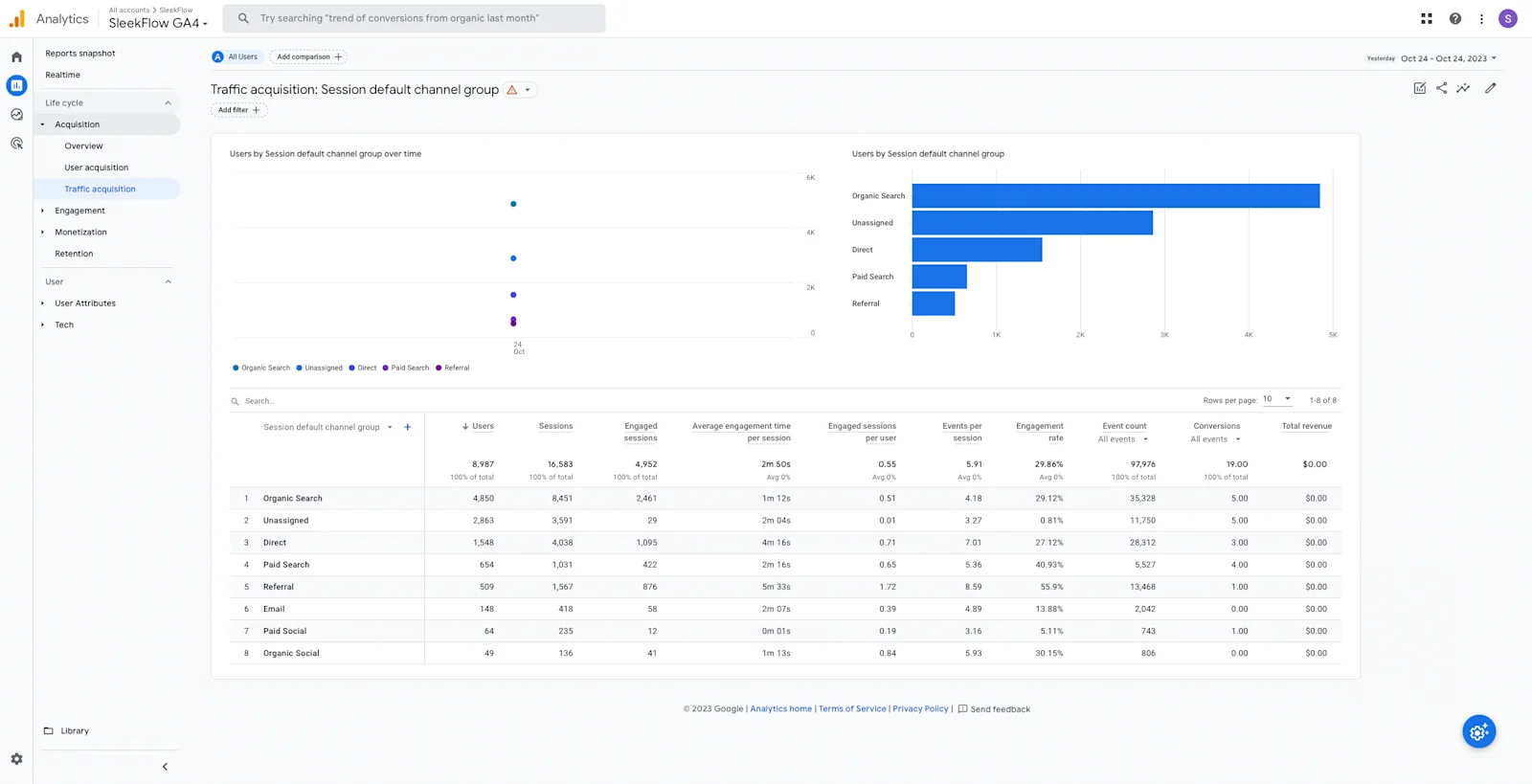
In Google Analytics 4, you can go to **Reports > Acquisition > Traffic Acquisition** to see the traffic from "whatsapp /social".
## **Identifying WhatsApp lead sources**
Determine **the origin of contacts** using these methods:
### Method 1: Customize the initial message
If you're using a link to initiate a WhatsApp chat, you can customize the initial message based on the platform or campaign. Here’s how you can tailor the message:
- **Email Campaigns**: Use a message like, "Hello! I'm reaching out from the email campaign."
- **Website Links**: Use a message such as, "Hello! I found you on your website."
*Explore more about*[* **how to customize your WhatsApp link*](/blog/whatsapp-link#2-direct-link-with-pre-filled-messages)*.*
### Method 2: Use Google Tag Manager
[Google Tag Manager (GTM)](https://tagmanager.google.com/) is a powerful tool that can help you track clicks on a "Chat with us on WhatsApp" link or button on your website. By **setting up tags and triggers in GTM**, you can send this data to Google Analytics to determine the lead source.
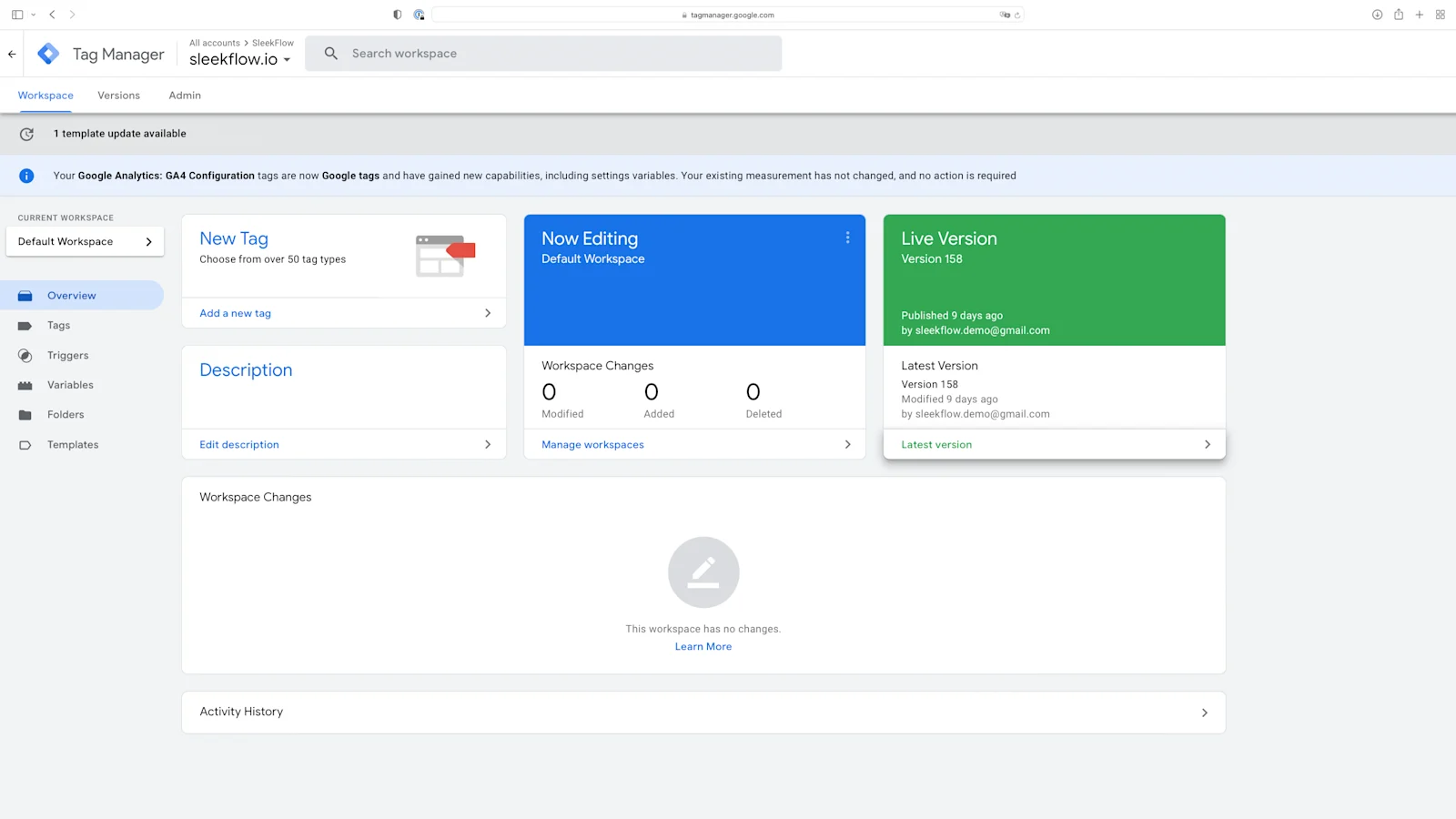
Here's a step-by-step guide on how to track WhatsApp link clicks using Google Tag Manager:
#### Step 1: Create a new tag
- Log in to your GTM account.
- click on "**Tags**" in the left sidebar, then click on "**New**".
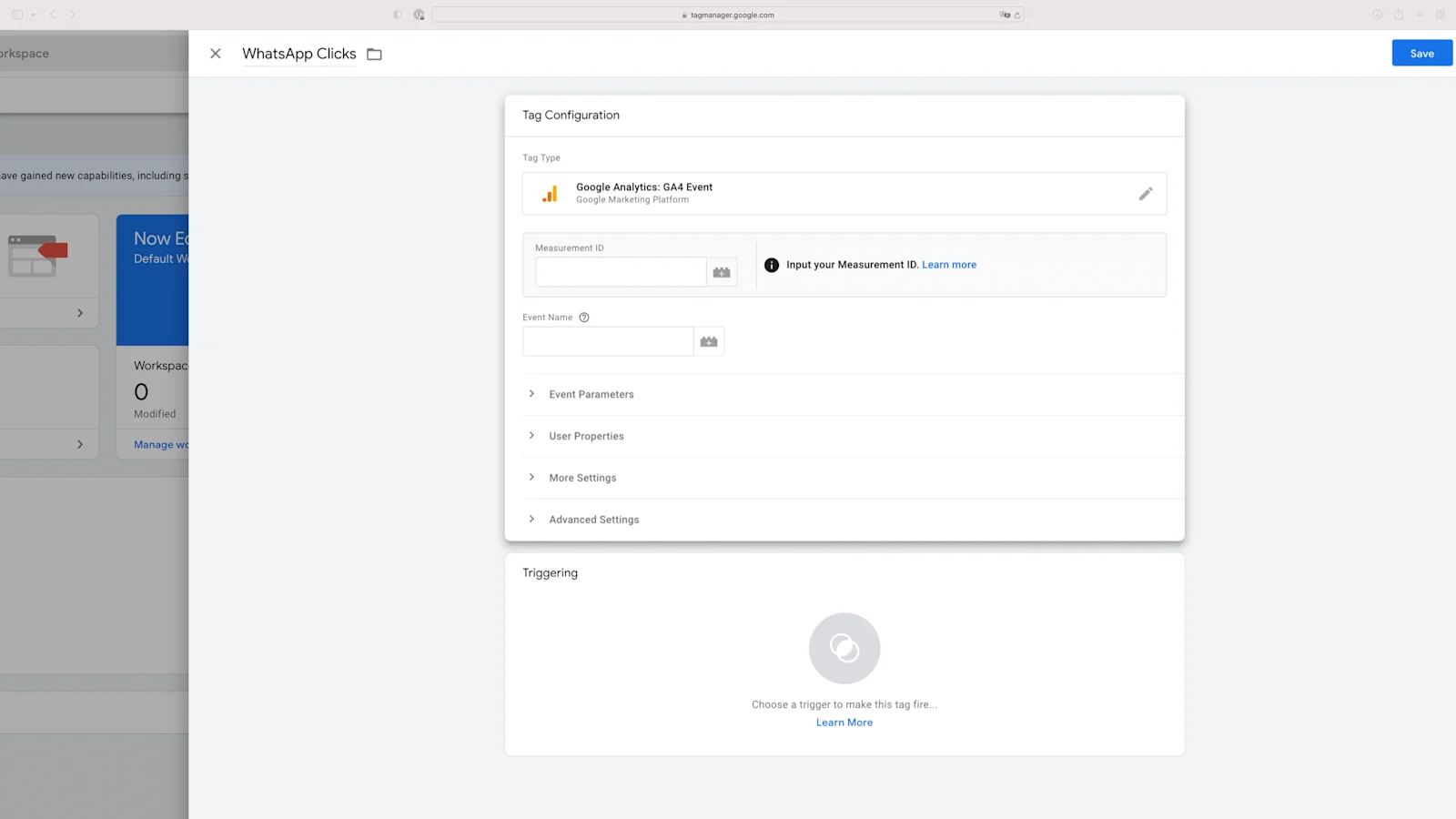
- Name the tag (e.g., "WhatsApp Clicks").
Click on "**Tag Configuration**" and choose "**Google Analytics: GA4 Event**" as the tag type
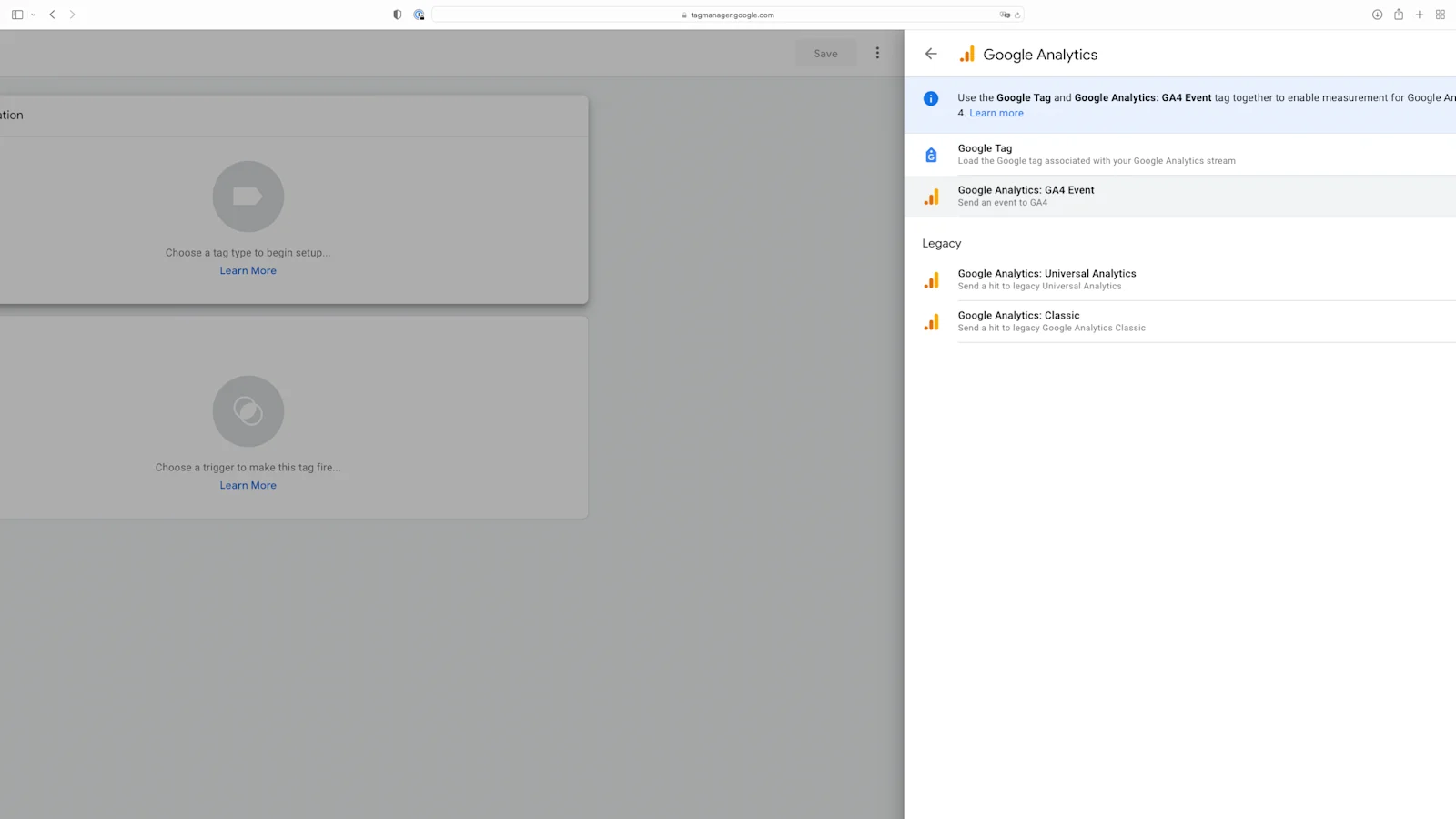
- Click on “**Configuration Tag**” and choose “**None- Manually Set ID**” in the dropdown menu
- Copy your GA4 Measurement ID from your GA4 account and paste it into the required field.
- Name your event (e.g., "whatsapp\_clicks")
#### Step 2: Create a new trigger
- Click on "**Triggering**" below the “**Tag Configuration**”
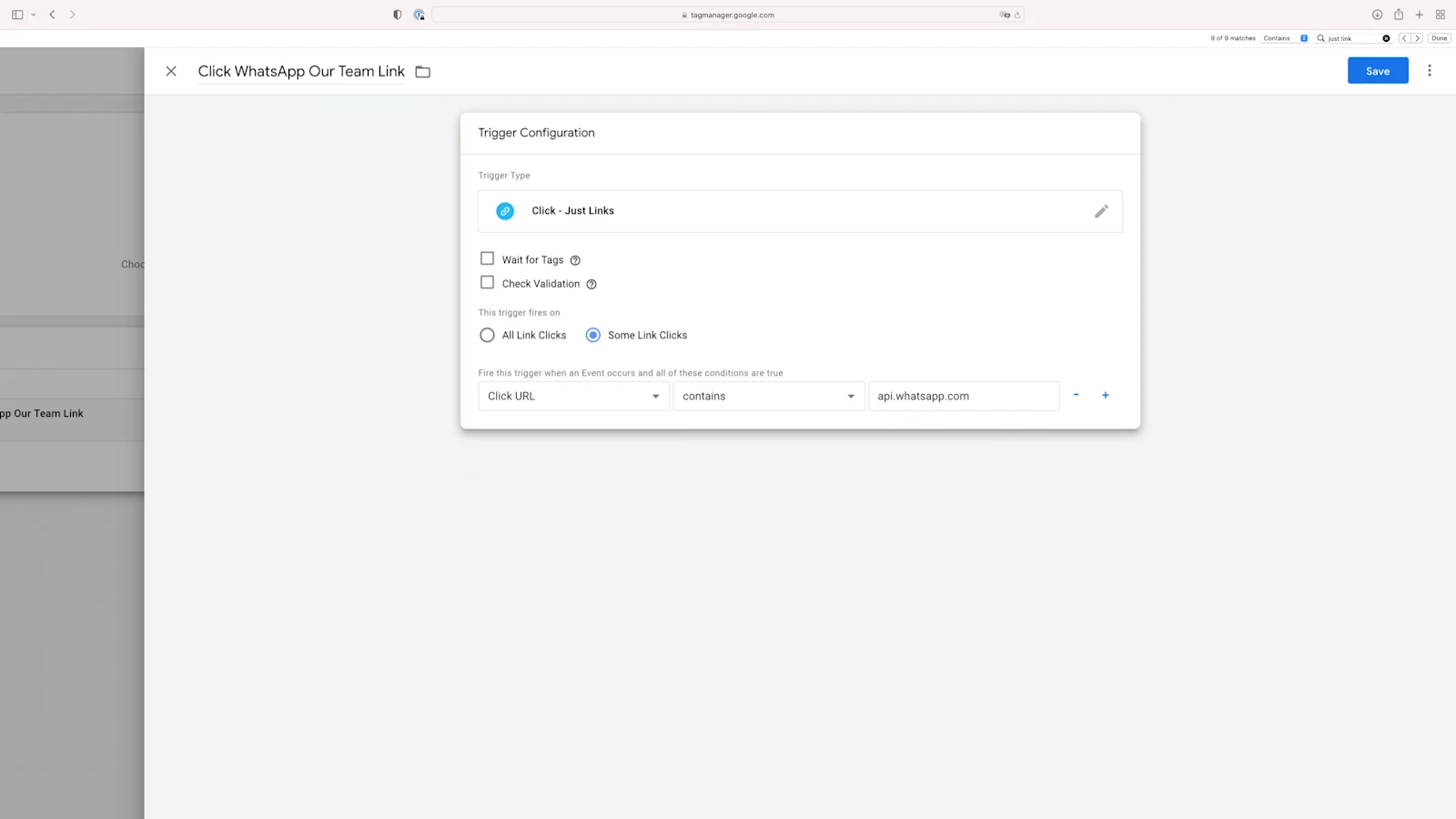
- Name the trigger (e.g., "WhatsApp Clicks").
- Click on "**Trigger Configuration**" and choose "**Just Links**" as the trigger type.
- Choose "**Some Link Clicks**" for “**This trigger fires on**” and set the conditions. For instance, you might set it to trigger when the "**Click URL**" contains "[wa.me](http://wa.me)" or "[api.whatsapp.com](http://api.whatsapp.com)".
#### Step 3: Publish changes
Once you've set up the tag and trigger, click on "**Save**”, “**Submit**” and “**Publish**” in the upper right to publish the changes to your live website.
#### Step 4: Check in Google Analytics 4
After some time, you can go to Google Analytics to review the events being tracked. Here's how to do it:
1. Navigate to **Report > Engagement > Events**.
1. Look for the event named "**whatsapp\_clicks**", assuming you set it up as described.
With this event data, you can:
- Segment the events by source/medium.
- Identify where users were before clicking on the WhatsApp link.
This can give you insights into which channels or campaigns are driving the most WhatsApp interactions.
## **WhatsApp Marketing vs. Email Marketing**
When comparing WhatsApp and email marketing for ROI, consider these factors:
| Criteria | WhatsApp Marketing | Email Marketing |
| --- | --- | --- |
| Open rate benchmark | [98% (WhatsApp satistics)](https://business.whatsapp.com/blog/use-whatsapp-business-goals) | [21.33%(Mailchimp statistics)](https://mailchimp.com/resources/email-reporting/) |
| Reach | Over 2 billion users globally, especially strong in regions like Latin America, India, and parts of Europe | Universal reach, but can be oversaturated |
| Opt-in requirement | Users must provide explicit consent | A subscriber only has to enter their email address |
| Visibility issues | Less likely to be ignored | Risk of landing in spam or promotions folders |
| Scalability | Restrictions on broadcast numbers, scales automatically based on phone number quality ratings | Can be sent to vast numbers without the same limitations |
The question, "What is the success rate of WhatsApp marketing?" really depends greatly on the quality and creativity of the campaigns. This applies similarly to email marketing.
However, WhatsApp has undeniable potential as a powerful marketing tool, especially with the WhatsApp Business API offering several advantages over the [free WhatsApp Business App](/blog/whatsapp-business) for WhatsApp ROI optimization.
## **Optimizing WhatsApp ROI**
To enhance WhatsApp ROI, **leverage the**[** ****WhatsApp Business API**](/channels-integrations/whatsapp) with these strategies:
### Method 1: Audience segmentation
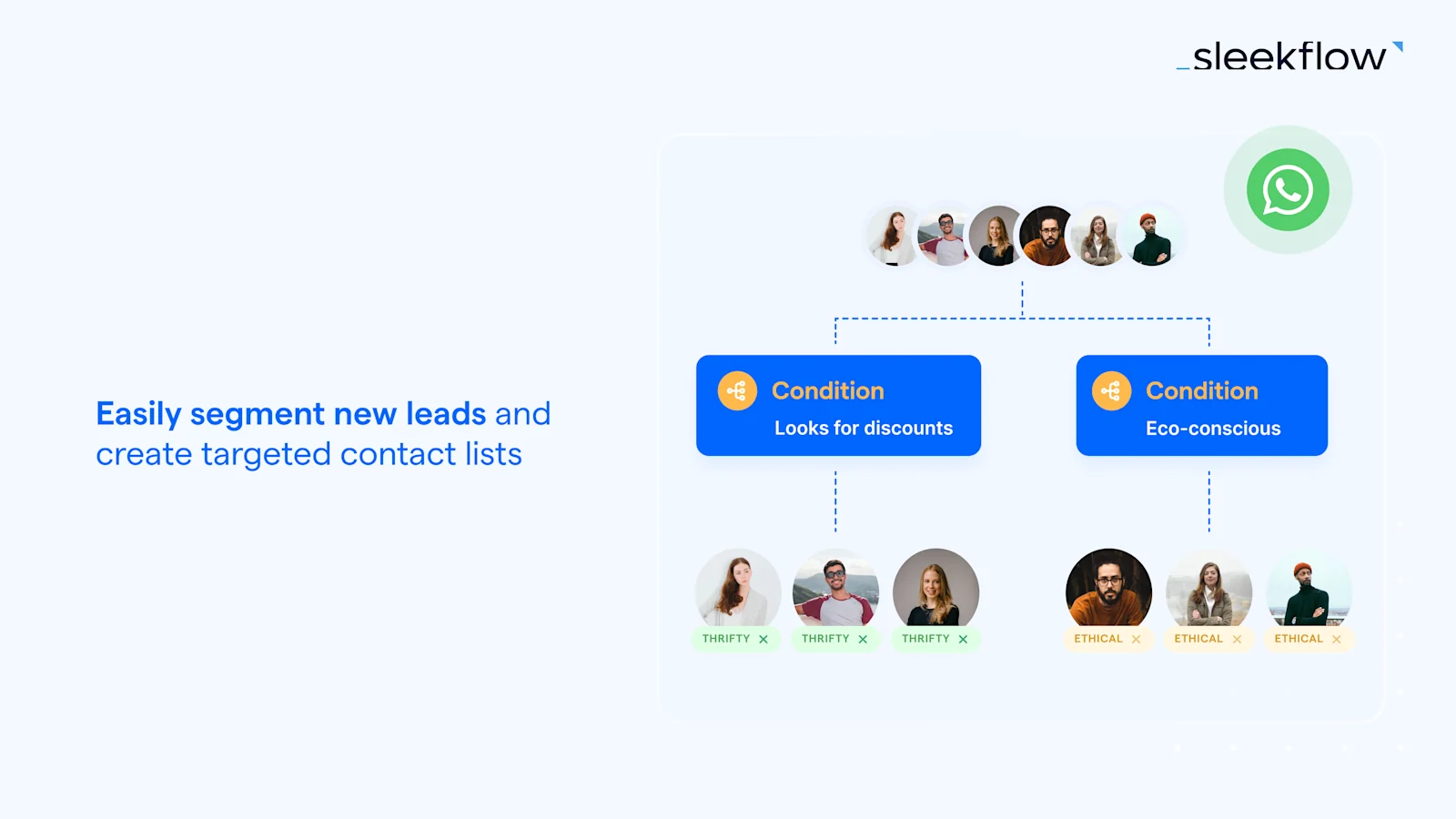
The WhatsApp API also enables businesses to target specific audiences more effectively. For example, if a broad targeting approach fails to engage customers, businesses can create a more tailored audience list based on **conversation histories** and **customer interests**.
You can then test the effectiveness of different messages for specific groups based on:
- **Demographics**
- **Interests**
- **Behavior**
By doing this, you can refine your targeting and messaging strategies to better resonate with your intended audience.
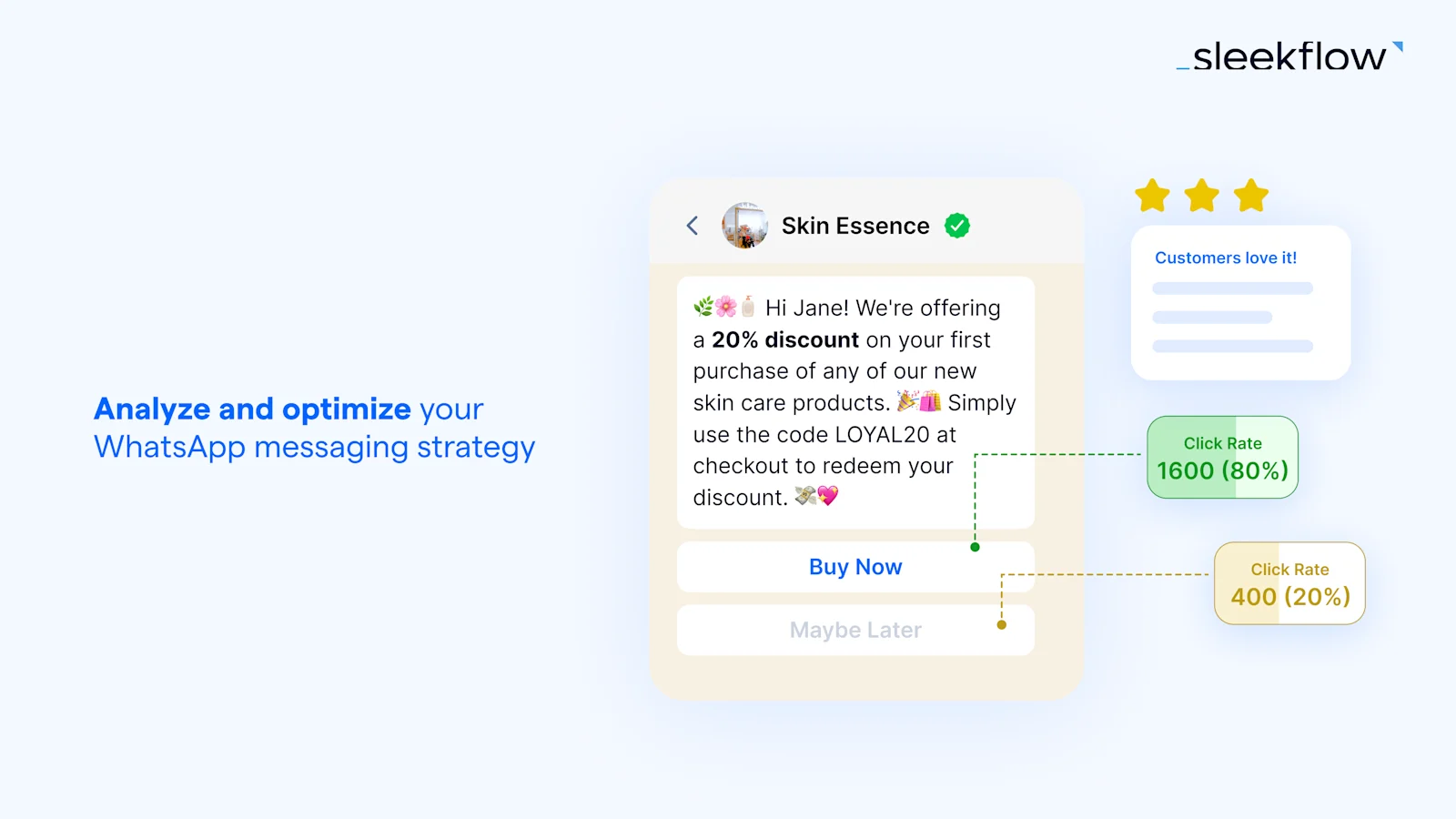
### Method 2: A/B testing
Businesses can evaluate the effectiveness of various elements in driving conversions, including:
- **CTAs (Call-to-Actions)**
- **Message content**
- **Visual elements**
- **Timing**
- **Frequency**
This iterative process empowers businesses to continually improve their conversion rates and achieve better results in their WhatsApp marketing efforts.
### Method 3: Automated engagement
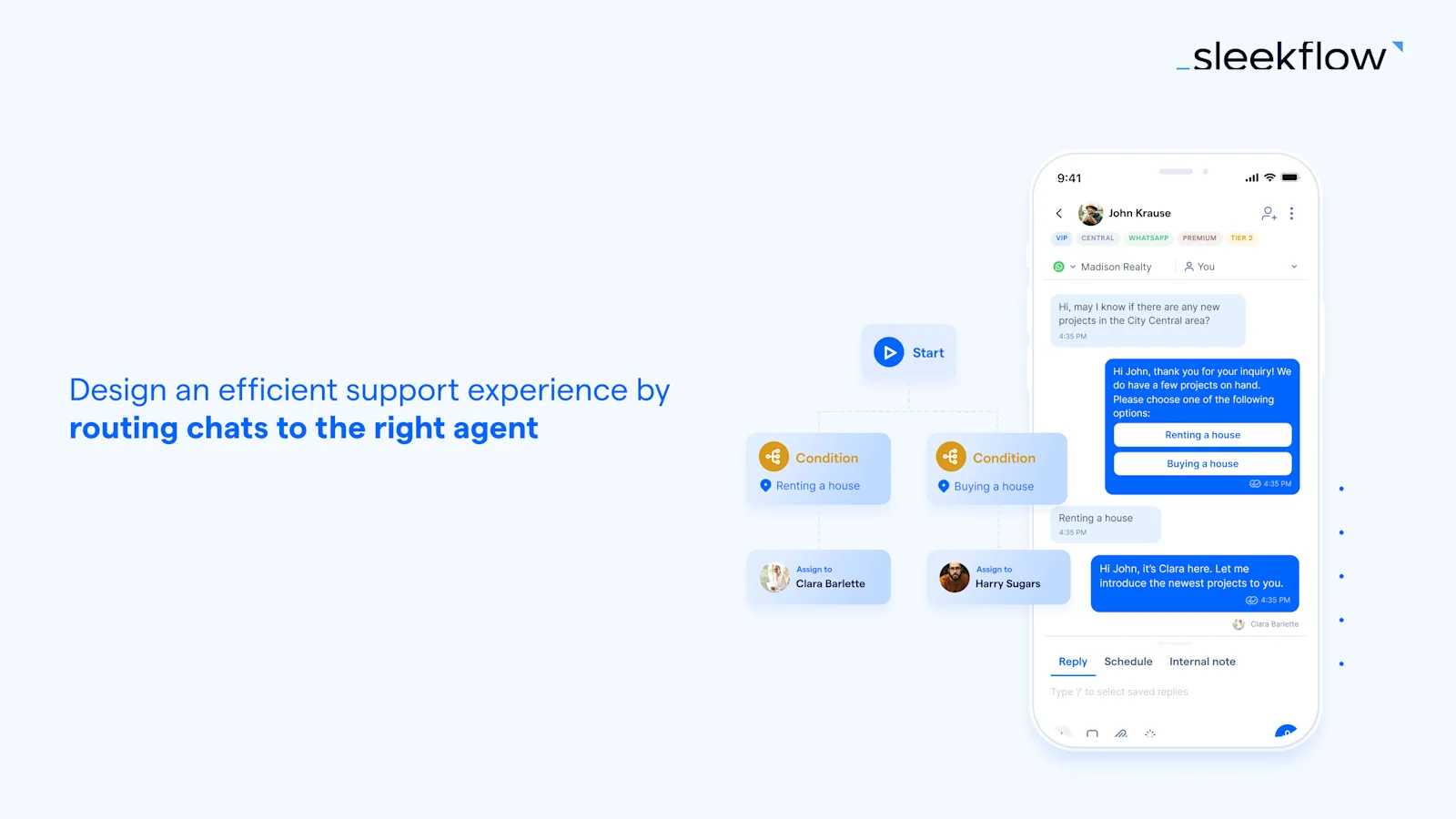
WhatsApp Business API can help businesses establish automated conversation flows and guide users on the next steps depending on the replies.
Here’s how it works:
1. Design **message templates with button-based responses**.
1. Provide customers with **quick, convenient reply options**.
1. Ensure a seamless and **user-friendly communication experience**.
This step-by-step approach encourages customers to take desired actions
### Method 4: Integration with existing tech infrastructures
Integrating WhatsApp with existing systems offers several benefits for businesses:
- **Provides rapid access to customer data**, ensuring agents have the most up-to-date information.
- **Enables agents to serve customers more effectively** by avoiding repetitive or redundant questions.
- **Streamlines communication processes**, leading to improved overall customer satisfaction.
- Integrate and automate with AI agents, to improve efficiencies and support existing teams
## SleekFlow: WhatsApp Marketing Software With Business Analytics Dashboard
Still on the fence about using WhatsApp for your business? The key is to embrace a platform that streamlines your entire marketing funnel. That’s where SleekFlow comes in.
As an[ official WhatsApp Business Solution Provider](/blog/official-whatsapp-business-solution-provider) (BSP), SleekFlow is a comprehensive platform designed to turn your conversations into conversions.
SleekFlow's WhatsApp Business API helps you engage customers, automate workflows, and drive sales effortlessly. Here’s a glimpse of what you can do:
- **Automate with AI**: Deploy[ specialized AI agents](/agentflow) to handle lead qualification, recommend products, and update your CRM 24/7. Never miss a lead again.
- **Build Smart Workflows**: Use a simple[ drag-and-drop chatbots builder](/flow-builder) to design automated customer journeys for everything from abandoned cart reminders to lead nurturing campaigns. No coding required.
- **Capture Every Lead**: Turn website visitors into WhatsApp contacts with an[ intelligent live chat widget](/live-chat) that continues the conversation even after they leave your site.
- **Send Personalized Campaigns**: Reach thousands of customers with[ targeted broadcast messages](/broadcast-campaign), achieving open rates of up to 98%.
- **Track Your Success**: Get a clear view of your marketing performance with a powerful[ analytics dashboard](/analytics) that tracks everything from first contact to final sale.
- **Unify Customer Data**: Consolidate all your customer interactions from different channels into a single, powerful[ social CRM](/social-crm).
*Want to see how this works in action? Watch our complete WhatsApp marketing strategy guide below.*
[The Complete WhatsApp Marketing Strategy \(2026 Update\)](https://www.youtube.com/watch?v=agPUnHIMMm0)
### How Pristine Aroma achieved a 13X ROI on WhatsApp marketing with SleekFlow
[Pristine Aroma](/customer-stories/pristine-aroma), a home fragrance brand, was primarily using traditional email marketing to reach its customers.
The brand noticed that their email campaigns were failing to connect with their audience. They needed a more direct way to capture their customers' attention.
Pristine Aroma switched to SleekFlow's WhatsApp Business API. This allowed them to send personalized broadcast messages directly to customers' WhatsApp inboxes.
- A **13X WhatsApp marketing return on investment** (ROI).
- An **18% conversion rate** from the broadcast.
- High engagement metrics, including a **56% open rate** and a **16% click-through rate**.
## Connect to WhatsApp Business API now\!
Connect to WhatsApp Business API and unlock powerful tools to engage your audience.
[Connect Now](https://sleekflow.io/channels-integrations/whatsapp)
### What are the key performance indicators (KPIs) for WhatsApp marketing?
The essential KPIs for measuring WhatsApp marketing success include:
- Delivery Rate: (Number of messages delivered / Total messages sent) x 100%
- Open Rate: (Number of opens / Total messages delivered) x 100%
- Engagement Rate: (Number of responses / Total messages delivered) x 100%
- Click-through Rate (CTR): (Number of clicks / Total messages delivered) x 100%
- Conversion Rate: (Number of desired actions / Total messages delivered) x 100%
### What advanced metrics can provide deeper insights into WhatsApp marketing ROI?
Advanced metrics include:
- Revenue per Recipient: Total revenue / Total messages delivered
- Cost per Recipient: WhatsApp marketing conversation cost + (Software provider monthly subscription cost / Total number of marketing messages delivered in a month)
- Return on Campaign Spend: Revenue per recipient / Cost per recipient
### How can I track leads originating from WhatsApp links?
Use URL parameters and analytics tools. Steps include:
1. Prepare UTM Parameters: Tag your URL with UTM parameters.
2. Share the Link on WhatsApp: Embed the link in a call-to-action button.
3. Analyze the Traffic: Use Google Analytics 4 to track traffic from "whatsapp /social".
### How can I identify the sources of WhatsApp leads?
Methods to identify lead sources include:
- Customizing the Initial Message: Use different initial messages based on the campaign source.
- Using Google Tag Manager (GTM): Set up tags and triggers in GTM to track clicks on WhatsApp links and send data to Google Analytics.
### What are the benefits of WhatsApp marketing compared to email marketing?
Key differences include:
- Open Rate: WhatsApp (98%) vs. Email (21.33%).
- Reach: WhatsApp has over 2 billion users, strong in specific regions.
- Opt-in Requirement: Explicit consent for WhatsApp vs. email address entry.
- Visibility: WhatsApp messages are less likely to be ignored.
- Scalability: WhatsApp has restrictions on broadcast numbers, while email can be sent to vast numbers without such limitations.
### How can I optimize WhatsApp ROI using the WhatsApp Business API?
Strategies to enhance WhatsApp ROI include:
- Audience Segmentation: Target specific audiences based on conversation histories and interests.
- A/B Testing: Test different CTAs, message content, visual elements, timing, and frequency.
- Automated Engagement: Use automated conversation flows and button-based responses to guide users.
- Integration with Existing Tech Infrastructures: Ensure agents have up-to-date customer data for more effective service.
### How do I set up Google Tag Manager (GTM) to track WhatsApp link clicks?
Steps to set up GTM include:
1. Create a New Tag: Configure a GA4 Event tag.
2. Create a New Trigger: Set conditions to trigger when a WhatsApp link is clicked.
3. Publish Changes: Save and publish the tag and trigger.
4. Check in Google Analytics 4: Navigate to Report > Engagement > Events to see the tracked events.
### What is a reasonable marketing ROI?
If you’re aiming for solid marketing results, a 5:1 revenue-to-cost ratio is a good starting point, but you should expect much higher efficiency from WhatsApp campaigns, especially with its 98% open rates. While channels like ads or emails often struggle with ad fatigue and overcrowded inboxes, WhatsApp campaigns—when done right with tools like SleekFlow’s automated broadcasts—can deliver incredible ROIs of 13x or more.
### How do I start a WhatsApp marketing campaign?
To start, build a high-intent audience with compliant opt-ins from website pop-ups, QR codes, or "Click-to-WhatsApp" ads. Then, upgrade from the standard WhatsApp Business App to the WhatsApp Business API with a provider like SleekFlow for unlimited broadcasting, advanced automation, and multi-agent access. Finally, create a smart campaign strategy by segmenting users based on behaviors like cart abandonment. Use pre-approved templates with clear call-to-action buttons to drive engagement and results.
### What is the future of WhatsApp marketing?
The future of WhatsApp marketing is conversational commerce, with the entire sales funnel unfolding in a single, AI chat. Smart AI agents will handle everything from complex sales and in-chat payments to customer support without human intervention, transforming the chat window into a full-fledged storefront. With hyper-personalized interactions integrated with your CRM on platforms like SleekFlow, most of the customer journey will happen right inside the messaging app, making external websites obsolete.