---
title: "WhatsApp Pay and business payment alternatives when native features are unavailable"
description: "Discover what WhatsApp Pay is & uncover how it transforms sales. SleekFlow guides your business through chat transactions within conversational commerce."
canonical: "https://sleekflow.io/blog/whatsapp-pay"
html_lang: "en"
date_modified: "2026-05-05T04:21:25.340Z"
og_title: "What is WhatsApp Pay & how does it work for business payments"
og_description: "Discover what WhatsApp Pay is & uncover how it transforms sales. SleekFlow guides your business through chat transactions within conversational commerce."
og_image: "https://images.ctfassets.net/tu2uwzoyozk8/jv7U36Ukh9EPuG26vYfRg/37254a153c2feca5c6b003922293bf06/Website-Cover-SleekFlow.jpg?w=1200&q=90"
---
```json
{
"@context": "https://schema.org",
"@type": "BlogPosting",
"headline": "What is WhatsApp Pay & how does it work for business payments",
"description": "Discover what WhatsApp Pay is & uncover how it transforms sales. SleekFlow guides your business through chat transactions within conversational commerce.",
"url": "https://sleekflow.io/blog/whatsapp-pay",
"dateModified": "2026-05-05T04:21:25.340Z",
"image": "https://images.ctfassets.net/tu2uwzoyozk8/jv7U36Ukh9EPuG26vYfRg/37254a153c2feca5c6b003922293bf06/Website-Cover-SleekFlow.jpg?w=1200&q=90",
"breadcrumb": {
"@type": "BreadcrumbList",
"itemListElement": [
{
"@type": "ListItem",
"position": 1,
"name": "Home",
"item": "https://sleekflow.io"
},
{
"@type": "ListItem",
"position": 2,
"name": "Blog",
"item": "https://sleekflow.io/blog"
},
{
"@type": "ListItem",
"position": 3,
"name": "What is WhatsApp Pay & how does it work for business payments",
"item": "https://sleekflow.io/blog/whatsapp-pay"
}
]
}
}
```
# WhatsApp Pay and business payment alternatives when native features are unavailable
*Anne Marie — Content Writer*
## Summary
- WhatsApp Pay allows users to send and receive money securely right inside a chat.
- The feature isn't universally available to businesses yet, as it's being rolled out in phases to navigate the financial regulations of different countries.
- You can use it in India (via UPI), Brazil (via Meta Pay), and Singapore (via Stripe).
- If WhatsApp Pay isn't an option for you, you can use a tool like SleekFlow to create secure payment links directly in your chats.
**WhatsApp Pay** is an innovative payment service integrated into the popular messaging app, WhatsApp. It's a game-changer for businesses, enabling them to collect payments directly within chat conversations, making transactions more convenient than ever before.
With a massive user base of more than [3 billion active users across 180 countries](https://www.whatsapp.com/about), WhatsApp Pay has become a major player in the digital payment world. This widespread adoption means that businesses can leverage this feature to improve their payment processes, ultimately enhancing the customer experience.
## What is WhatsApp Pay?
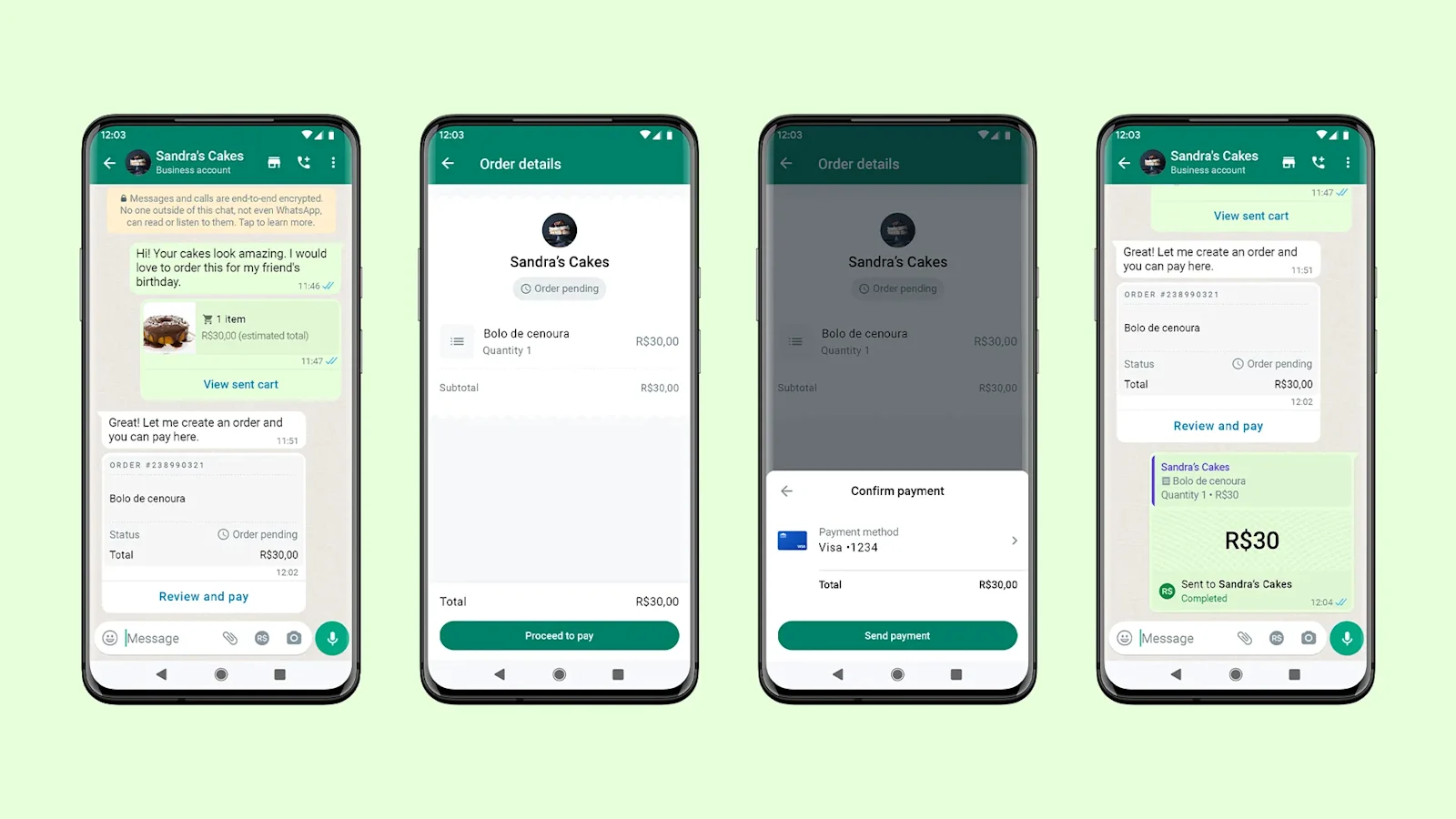
Image from [WhatsApp Blog](https://blog.whatsapp.com/now-you-can-pay-a-small-business-in-brazil-on-whatsapp)
WhatsApp Pay is **a convenient payment service integrated into WhatsApp**, allowing businesses to accept payments without navigating external websites or separate gateways. Transactions can be initiated and completed directly within the chat window, making the payment process seamless and efficient.
When a customer wants to make a payment, the business can generate a payment request or send a payment link within the chat. The customer follows the instructions, selects their preferred payment method, and completes the transaction without leaving the chat interface. This simplicity and convenience:
- Reduces friction in the payment process.
- Saves customers valuable time.
### How does WhatsApp Pay work?
To utilize WhatsApp Pay, businesses and customers must first have a WhatsApp account linked to their mobile phone number. Here's how it works:
- Businesses using WhatsApp Pay can **generate a payment request or send a payment link** to their customers through the chat conversation.
- The customer **receives the payment request or link** within the WhatsApp chat.
- Customer **selects preferred payment method** such as bank transfers, credit or debit cards, or mobile wallets.
- The customer **follows the prompts provided by WhatsApp Pay** to complete the payment. The process is secure and takes place within the WhatsApp platform.
- Once the payment is completed, the business **receives a notification**, and the details of the transaction are recorded within the chat conversation.
### Steps to set up WhatsApp Payment
Follow these steps to set up WhatsApp Payment:
- Open the menu by tapping on the **three vertical dots**.
- Choose "**Settings**," then go to "**Payments**" and select "**Add payment method**."
- Accept WhatsApp's Terms of Service.
- Select your bank from the list.
- Verify via SMS by selecting "**Allow**".
- Choose the bank account to add.
- Tap "**Done**" to complete the process.
### Pay through WhatsApp
Customers can make payments using WhatsApp by following these steps:
- Launch WhatsApp.
- Open the chat with the recipient.
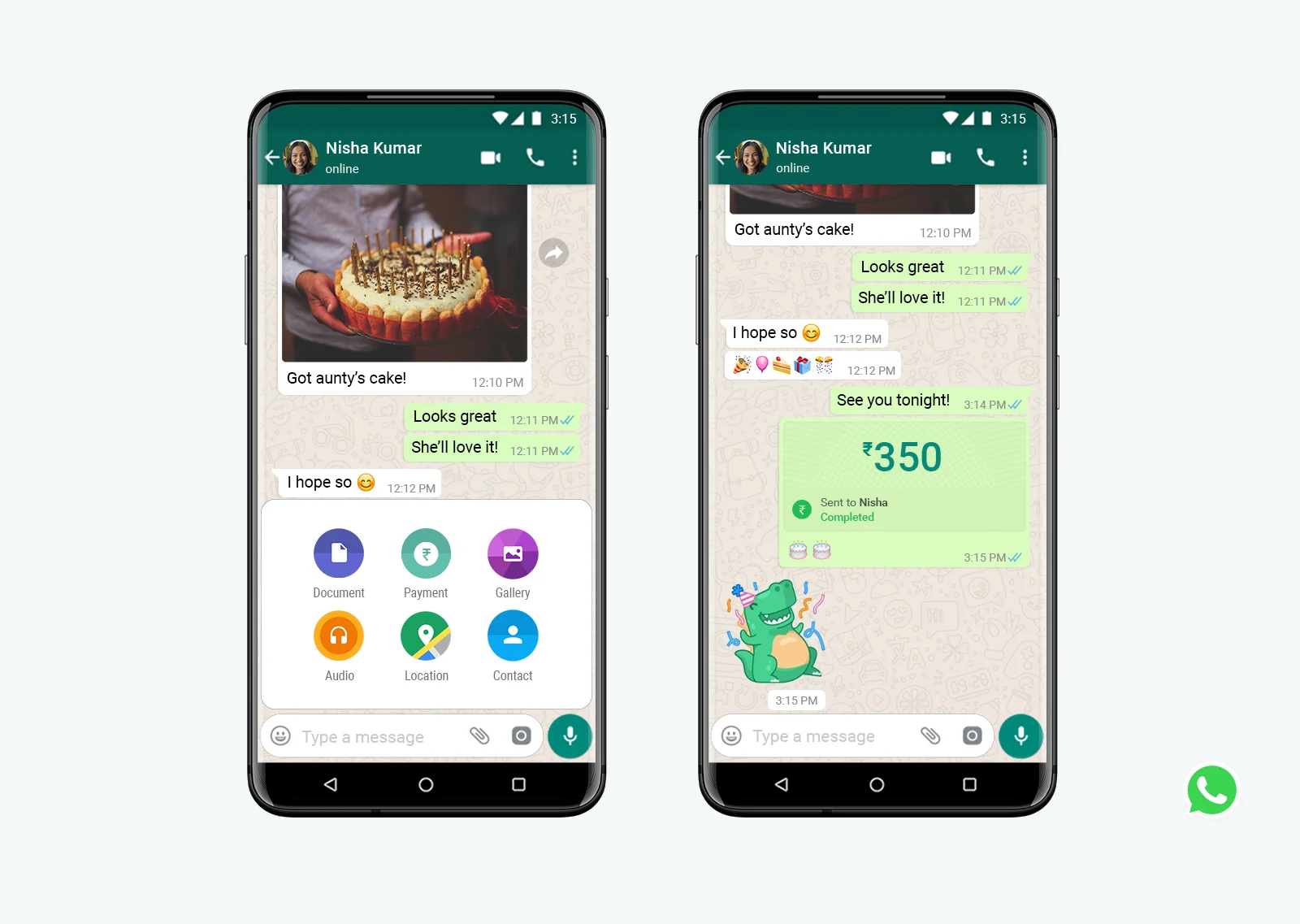
- Click on the **attachment icon** located to the right of the text box.
- Choose "**Payment**".
- Enter the desired amount and optional note.
- Tap "**Pay**" and input your security pin or verification method.
*Heard of*[* Meta Pay or Facebook Pay*](/blog/facebook-pay)*? Find out how to utilize it for business and streamline your business’s payment process.*
### To receive WhatsApp payments:
- **Activate WhatsApp Pay:** Follow the setup instructions.
- **Let contacts know:** Let your contacts know you accept payments through WhatsApp.
- **Share payment details:** Provide your payment details, including your phone number, UPI ID, or any other payment identifier linked to your WhatsApp Pay account.
- **Ask for payment:** Ask the sender to initiate the payment.
- **Receive the payment: **Once processed, you'll receive a notification in the chat.
## P2P Payments vs. Business Payments vs. Payment Links
In WhatsApp, you'll find three main methods for financial transactions. While all three aim to make paying as easy as sending a voice note, they work very differently in terms of mechanics, fees, and requirements.
Here’s how they operate in the real world:
- **P2P (Peer-to-Peer) Payments:** Think of this as the digital way to hand cash to a friend. It connects to local financial systems, letting you securely link a personal bank account to the app. Sending money is as simple as adding an attachment, so you no longer need to ask for bank details or open a separate banking app.
- **Business Payments:** This feature helps prevent cart abandonment by turning your WhatsApp chat into a mini-storefront. A customer can look through a product catalog, add items to their cart, and pay right inside the app with a registered debit card, credit card, or another local payment method.
- **Payment Links:** If your business is in a region that doesn't officially support WhatsApp Pay, payment links offer a flexible solution. Platforms like SleekFlow or other third-party gateways let you generate a secure checkout link to share in a chat. After the customer pays on the external page, the receipt and confirmation can be sent back to the WhatsApp thread, keeping the conversation going smoothly.
This breakdown will help you understand the distinct pathways for each transaction:
| | P2P Payments | Business Payments | Payment Links |
| --- | --- | --- | --- |
| Primary Use Case | Splitting a dinner bill, paying rent, or sending money to family and friends | Customers paying a registered merchant directly for goods, services, or catalog items. | Generating a secure checkout URL to accept payments globally. |
| User Experience | Completely frictionless; happens entirely within the native WhatsApp interface. | Highly integrated; checkout and order confirmation remain inside the chat thread. | Requires the user to tap a link and briefly leave the app to enter payment details on a secure, hosted webpage. |
| Target Audience | Everyday consumers using standard, personal WhatsApp accounts. | Official businesses utilizing the WhatsApp Business App or API. | Businesses operating in regions where native WhatsApp Pay is unavailable, or those needing diverse payment options. |
| Associated Fees | Typically completely free for the consumer. | Businesses are generally charged a standard processing fee per transaction (often around 3.99%). | Dependent entirely on the third-party payment gateway used (e.g., Stripe, PayPal, local providers). |
## What are the supported countries for WhatsApp Pay?
Money transfers demand strict compliance with local banking laws, data protection rules, and advanced anti-fraud systems. For these reasons, Meta is rolling out native WhatsApp Pay in strategic phases. It isn't a universal feature just yet.
Currently, true native, in-chat payments are officially [supported in only a few primary markets](https://faq.whatsapp.com/1293279751500598?helpref=faq_content). Here's a look at how it works in each one:
| | **Supported Payment Types** | **How It Works** |
| --- | --- | --- |
| **India** | Peer-to-Peer (P2P) & Business Payments | Integrated with the government's Unified Payments Interface (UPI) system. Users can link any UPI-enabled bank account for instant and secure transactions. |
| **Brazil** | Peer-to-Peer (P2P) & Business Payments | Powered by Meta Pay and local financial partnerships (including Pix). Users can pay verified businesses directly in the chat. |
| **Singapore** | Business Payments Only | Partnered with Stripe to enable secure payments to local merchants via credit/debit cards or PayNow. P2P transfers are not supported. |
Meta continues to explore expansions into other markets, with pilot programs running in places like Indonesia and Mexico. For now, however, India, Brazil, and Singapore are the only countries with official, native payment support.
### What if your country isn't on the list?
Even if WhatsApp Pay hasn't launched in your region (like the United States, the UK, or Malaysia), you can still leverage [conversational commerce](/blog/conversational-commerce). This is where integrating a solution like SleekFlow's in-chat payment links becomes essential.
Here’s how you can still offer a seamless payment experience:
- **Generate secure links:** You can create payment links through local gateways (like FPX in Malaysia) or global processors (like Stripe).
- **Replicate an "order-and-pay" flow:** This method gives your customers a modern and convenient checkout experience, no matter where they are.
*Learn more about*[* **WhatsApp Business API*](/blog/whatsapp-business-api)* and how to*[* **integrate your WhatsApp business account*](/channels-integrations/whatsapp)* with SleekFlow.*
## Upgrade to an omnichannel AI platform
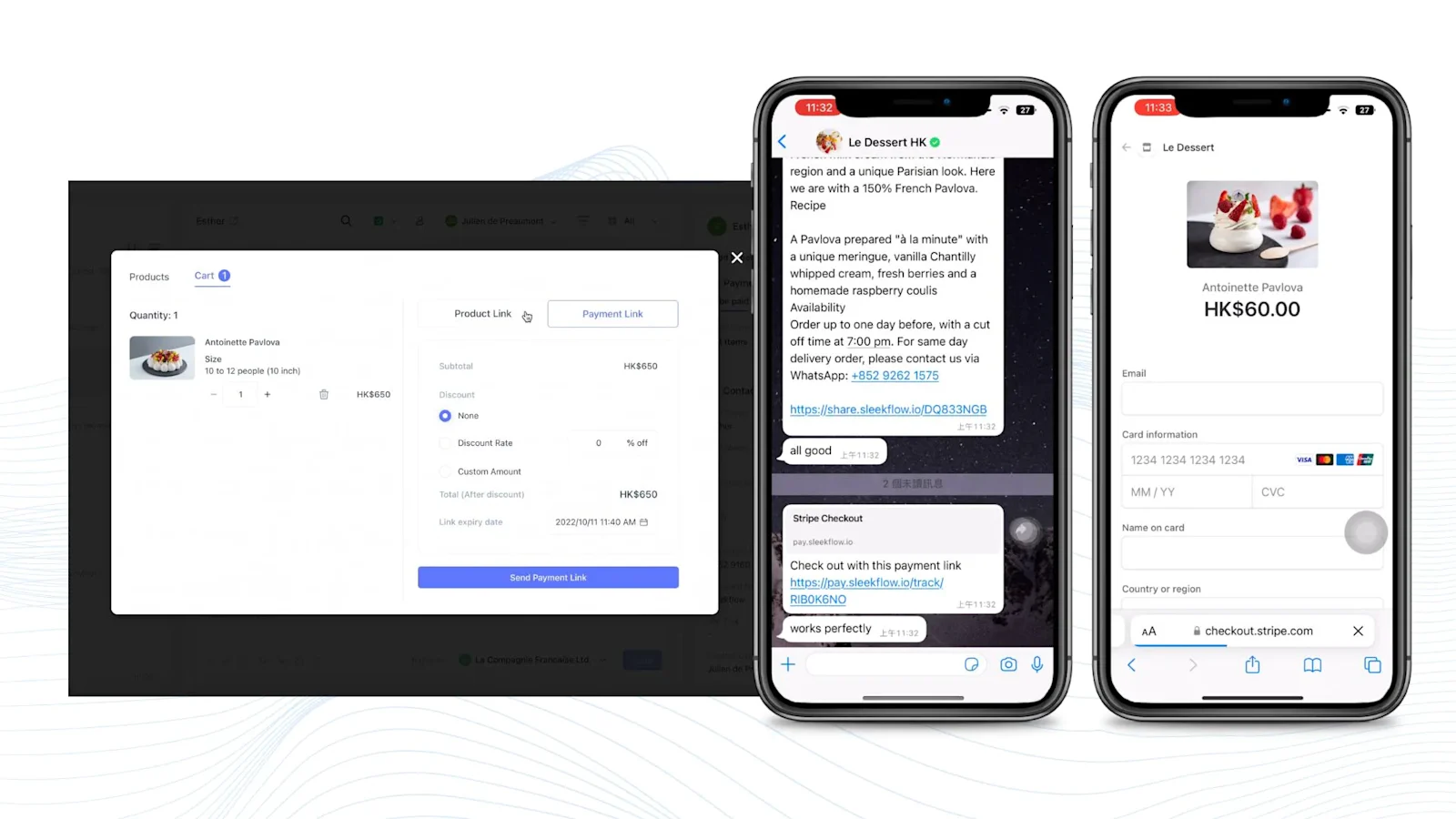
SleekFlow is more than just a third-party platform; it's an omnichannel AI ecosystem powered by [AgentFlow](/agentflow). It features useful tools like[ in-chat payment links](/payment-links). Here’s how SleekFlow can transform your WhatsApp checkout:
- **AI-driven in-chat payments**: Deploy specialized [AI agents](/blog/what-are-ai-agents) that analyze conversational intent to recommend personalized products and generate frictionless payment links around the clock.
- **Autonomous sales conversions**: You can guide prospects smoothly through the sales funnel and process transactions directly within WhatsApp, putting the buyer's journey on autopilot.
- **Smooth lead handoffs**: If a human touch is needed, AgentFlow automatically routes the lead to a human agent, providing them with a concise chat summary and actionable AI insights.
- **Consistent cross-platform experience**: AgentFlow provides a uniform payment experience across various messaging apps, including[ Facebook Messenger](/channels-integrations/facebook) and[ LINE](/channels-integrations/line), giving customers the flexibility to pay through their preferred channel.
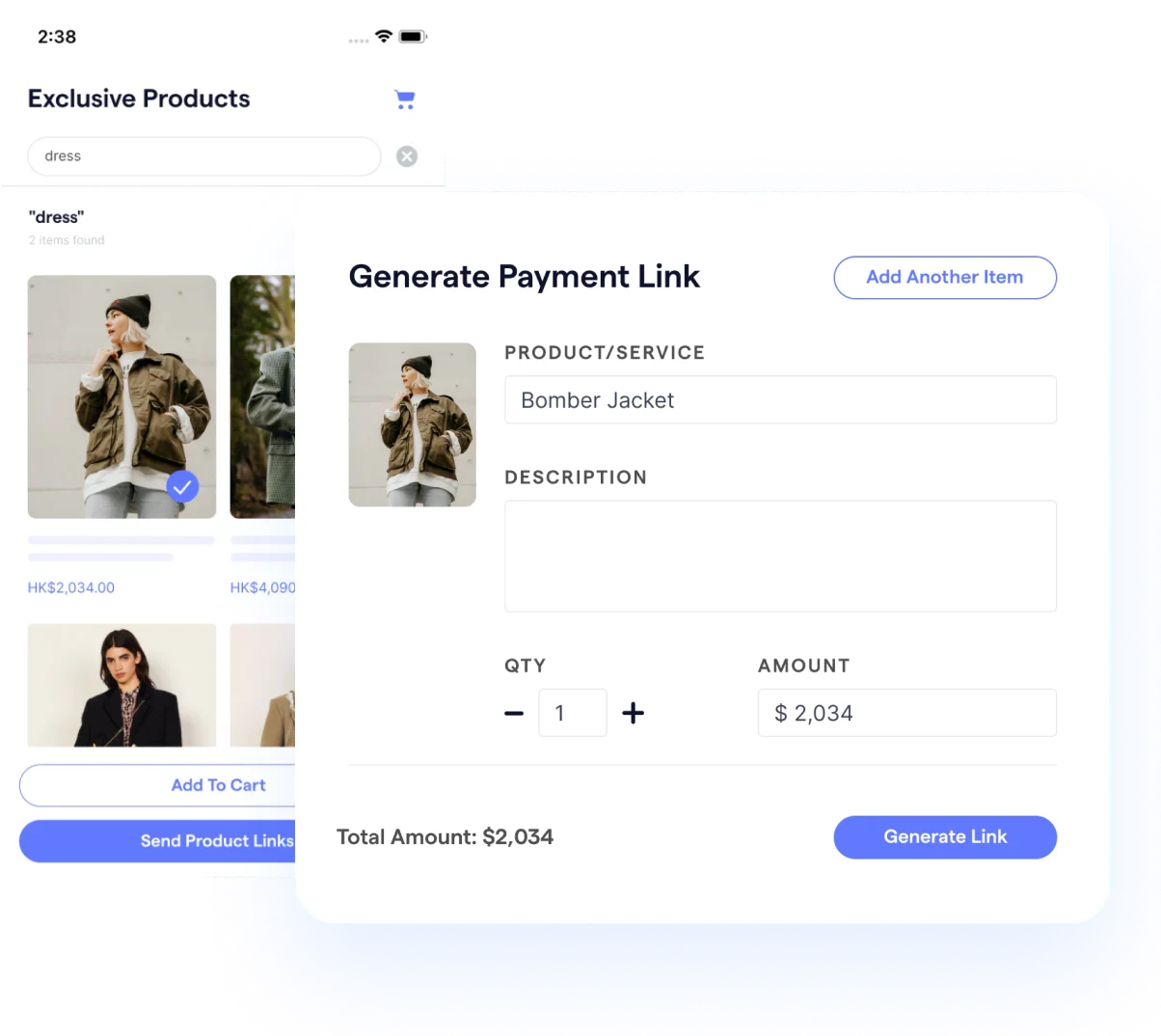
If you want to close more deals automatically, it's time to consider an AI-driven platform like SleekFlow.
- **Agentic AI workflows:** You can build smart AI workflows with minimal setup. Train specialized AI agents on your own knowledge base, and they'll handle inquiries and payments all on their own.
- **Omnichannel CRM sync:** See how your customers behave, what they buy, and what they're interested in across WhatsApp and other channels. Everything is tracked in one CRM, which helps you fine-tune your AI's performance.
- **Smarter segmentation and broadcasts:** Group your audience based on where they are in the customer lifecycle. This allows you to launch targeted campaigns for promotions or abandoned carts at just the right time.
- **Inbox Co-Pilot:** Help your sales reps solve tricky billing questions in an instant. They can generate accurate, on-brand responses with a single click.
### How Le Dessert sent shopping cart links for payment on WhatsApp
[Le Dessert](/customer-stories/ledessert-use-case), a French pâtisserie, needed a better way to serve its local and international customers.
Their checkout process was clunky. It forced customers to leave their chat conversation and go to a separate website, creating friction that hurt sales.
To fix this, Le Dessert integrated its Shopify store with SleekFlow. This allowed their "dessert concierges" to build personalized orders and send custom shopping carts with secure payment links right inside a WhatsApp chat. The system also automates fulfillment by syncing every payment and transaction status back to Shopify.
| | **Before SleekFlow** | **After SleekFlow** |
| --- | --- | --- |
| **Drafting Orders** | Concierges had to manually draft orders on Shopify and redirect customers away from WhatsApp. | Concierges draft personalized shopping carts and share them directly within the WhatsApp chat. |
| **Payment Capabilities** | Limited to local bank transfers (FPS) and digital wallets (Payme). Lacked international credit card support on WhatsApp. | Seamless integration for global credit cards, Google Pay, and Apple Pay, which contributed to 15% growth in overseas customers. |
| **Customer Friction** | High friction; customers were forced to navigate digital aisles on the website to complete transactions. | Zero friction; the entire discovery, cart review, and payment process happens within the messaging app. |
| **Backend Updates** | Required manual updates to order status and repetitive administrative tasks. | Fully automated payment capture and real-time fulfillment status updates directly in Shopify, contributed to a 100% growth in sales. |
### Anigma Technologies used SleekFlow to handle Shopify declined transactions
[Anigma Technologies](/customer-stories/anigma-computer), an e-commerce platform, faced a high number of failed transactions from its Tabby "Buy Now, Pay Later" gateway.
This often happened when a purchase exceeded a customer's installment limit, leading to 10 to 15 canceled Shopify orders every day. The team tried to manually monitor and contact customers about these declined payments, but the process was too slow to recover the sales.
To solve this, Anigma Technologies integrated SleekFlow with their Shopify store to automate how they handle declined payments. Now, the system instantly detects a "voided" order and sends a personalized WhatsApp message to the customer. This alert allows an agent to step in right away and offer other payment options, like splitting the cost between cash and a credit card, to successfully complete the purchase.
| | **Traditional Approach** | **SleekFlow Automated Integration** |
| --- | --- | --- |
| **Transaction Monitoring** | Required tedious, manual daily checks of Shopify payment gateways. | Achieved a 13% abandoned cart recovery rate through real-time, automatic detection of voided or failed financial statuses. |
| **Customer Outreach** | Delayed follow-ups meant the outreach happened too late, resulting in lost sales. | Instantaneous, automated WhatsApp messages offering dedicated support, contributing to a 25% customer growth rate. |
| **Recovery Strategy** | Reactive troubleshooting with consistently low success rates. | Proactive, conversational engagement offering flexible alternatives like split payments, leading to a 70% canceled order recovery rate. |
## Want to outcompete your peers with SleekFlow's help?
Book your personalised demo with SleekFlow today and unlock the potential of seamless communication
[Book a Demo](https://sleekflow.io/book-a-demo)
[View Pricing](https://sleekflow.io/pricing)
### Are Meta Pay and WhatsApp Pay the same?
No, Meta Pay and WhatsApp Pay are not the same. WhatsApp Pay is a payment service offered by WhatsApp, while Meta Pay is a payment solution used on Facebook, Instagram, and Messenger. The WhatsApp Pay feature is also enabled by Meta Pay.
### Where is WhatsApp Pay available?
WhatsApp Pay is currently available in India, Brazil, and Singapore. However, in Singapore, it is limited to payments to businesses only and peer-to-peer transactions are not supported.
### How to pay through WhatsApp?
To pay through WhatsApp, businesses will send you a payment link or generate a payment request within the chat conversation. You can follow the instructions provided, select your preferred payment method, and complete the transaction within the WhatsApp platform.
### Is WhatsApp Pay secure?
Yes, WhatsApp Pay prioritizes the security and privacy of user transactions. It incorporates strong encryption and authentication measures to ensure the safety of financial information during the payment process.
### Are there any transaction limits with WhatsApp Pay?
Transaction limits may apply based on the regulations and policies set by the respective countries. It's advisable to review the terms and conditions provided by WhatsApp Pay or consult with your bank for any specific limits or restrictions.
### Does WhatsApp Pay require a bank account?
Yes, you need an active bank account to send and receive money through WhatsApp Pay. The service links directly to your existing bank account rather than acting as a digital wallet that holds cash. It works on financial networks like the Unified Payments Interface (UPI) in India or connects with bank cards in places like Brazil. To make a transaction, you have to link a verified bank account that is associated with your WhatsApp phone number.
### What happened to WhatsApp Pay?
WhatsApp Pay has grown into a key payment service in countries like India, Brazil, and Singapore. Regulatory challenges initially slowed its expansion, with authorities such as the National Payments Corporation of India (NPCI) setting caps on the number of users. Now that these limits are gone, the service is expanding to millions of people. Powered by the Meta Pay system, its focus is now on making in-chat purchases seamless. This allows businesses to use omnichannel tools like SleekFlow to handle customer payments right in the chat, so there's no need to send them to external websites.