---
title: "AI Agent CRM Integration: How Agents Read, Decide and Act on Your CRM"
description: "n this article, learn about AI agent CRM integration for Salesforce, HubSpot and Zoho: how agents read, decide and act, not just reply. Compare tools and setup steps."
canonical: "https://sleekflow.io/en-sg/blog/ai-agent-crm-integration"
html_lang: "en-sg"
date_modified: "2026-07-28T10:52:16.008Z"
og_title: "AI Agent CRM Integration: Read, Decide, Act on Deals"
og_description: "n this article, learn about AI agent CRM integration for Salesforce, HubSpot and Zoho: how agents read, decide and act, not just reply. Compare tools and setup steps."
og_image: "https://images.ctfassets.net/tu2uwzoyozk8/jv7U36Ukh9EPuG26vYfRg/37254a153c2feca5c6b003922293bf06/Website-Cover-SleekFlow.jpg?w=1200&q=90"
---
```json
{
"@context": "https://schema.org",
"@type": "Article",
"headline": "AI Agent CRM Integration: Read, Decide, Act on Deals",
"description": "n this article, learn about AI agent CRM integration for Salesforce, HubSpot and Zoho: how agents read, decide and act, not just reply. Compare tools and setup steps.",
"url": "https://sleekflow.io/en-sg/blog/ai-agent-crm-integration",
"dateModified": "2026-07-28T10:52:16.008Z",
"image": "https://images.ctfassets.net/tu2uwzoyozk8/jv7U36Ukh9EPuG26vYfRg/37254a153c2feca5c6b003922293bf06/Website-Cover-SleekFlow.jpg?w=1200&q=90",
"breadcrumb": {
"@type": "BreadcrumbList",
"itemListElement": [
{
"@type": "ListItem",
"position": 1,
"name": "Home",
"item": "https://sleekflow.io/en-sg"
},
{
"@type": "ListItem",
"position": 2,
"name": "Blog",
"item": "https://sleekflow.io/en-sg/blog"
},
{
"@type": "ListItem",
"position": 3,
"name": "AI Agent CRM Integration: Read, Decide, Act on Deals",
"item": "https://sleekflow.io/en-sg/blog/ai-agent-crm-integration"
}
]
}
}
```
# AI Agent CRM Integration: How Agents Read, Decide and Act on Your CRM
*Julian Wong — Content Strategist*
## Summary
- AI agent CRM integration lets an agent read your CRM data, decide within your guardrails, then write updates back, not just reply from a script.
- Singapore's SME AI adoption tripled from 4.2% to 14.5% in one year, and CRM integration is where that shows up in daily sales work.
- SleekFlow, Wati's Astra, and DIY or Zapier integration mainly differ on read and write depth, not price alone.
- The real risks are duplicate records, over-automation, and unclear permissions, managed through guardrails and human handoff.
- Connecting an agent to Salesforce, HubSpot, or Zoho takes four steps: authenticate, set guardrails, train the knowledge base, then launch.
A lead messages you on WhatsApp at 9 PM asking about pricing. Your chatbot gives the same FAQ answer it gives everyone, and the conversation stalls until someone opens a laptop the next morning. Meanwhile, the lead's deal stage and purchase history sit in Salesforce or HubSpot, a few clicks away.
That gap, between what the CRM knows and what the chat window can act on, is what AI agent CRM integration closes. Get it wrong, and you've built a duplicate-data problem. Get it right, and the agent qualifies the lead, updates the deal, and only wakes a rep when the guardrails say so.
## **What is AI agent CRM integration?**
AI agent CRM integration is the connection between a conversational AI agent and a CRM platform, such as Salesforce, HubSpot, or Zoho, that lets the agent read live contact and deal data, apply your guardrails, and write updates back without anyone re-typing anything.
A chatbot without this connection can still sound clever. It just can't act: it answers from a script, and whatever it learns disappears when the tab closes.
[Gartner's February 2026 survey found 91% of customer service leaders are under executive pressure to implement AI in 2026](https://www.gartner.com/en/newsroom/press-releases/2026-02-18-gartner-survey-finds-ninety-one-percent-of-customer-service-leaders-under-pressure-to-implement-ai-in-2026), and for most, the CRM connection is where that pressure becomes a real project. For a Singapore team on WhatsApp or Instagram alongside Salesforce or HubSpot, the question is whether the agent sees the deal stage your reps see, and updates it correctly.
## **Does an AI agent replace your CRM?**
No, it operates on top of your CRM. The CRM stays the system of record for contacts, deals, and history, while the agent becomes a new interface that reads and writes to that record, the way a rep would, just faster and around the clock.
[Gartner projects agentic AI will autonomously resolve 80% of common customer service issues by 2029](https://www.gartner.com/en/newsroom/press-releases/2025-03-05-gartner-predicts-agentic-ai-will-autonomously-resolve-80-percent-of-common-customer-service-issues-without-human-intervention-by-20290), up from a negligible share today. That's a forecast about resolution rates, not about who owns the record: the CRM stays Salesforce, HubSpot, or Zoho.
## **How an agent reads, decides, and acts on your CRM**
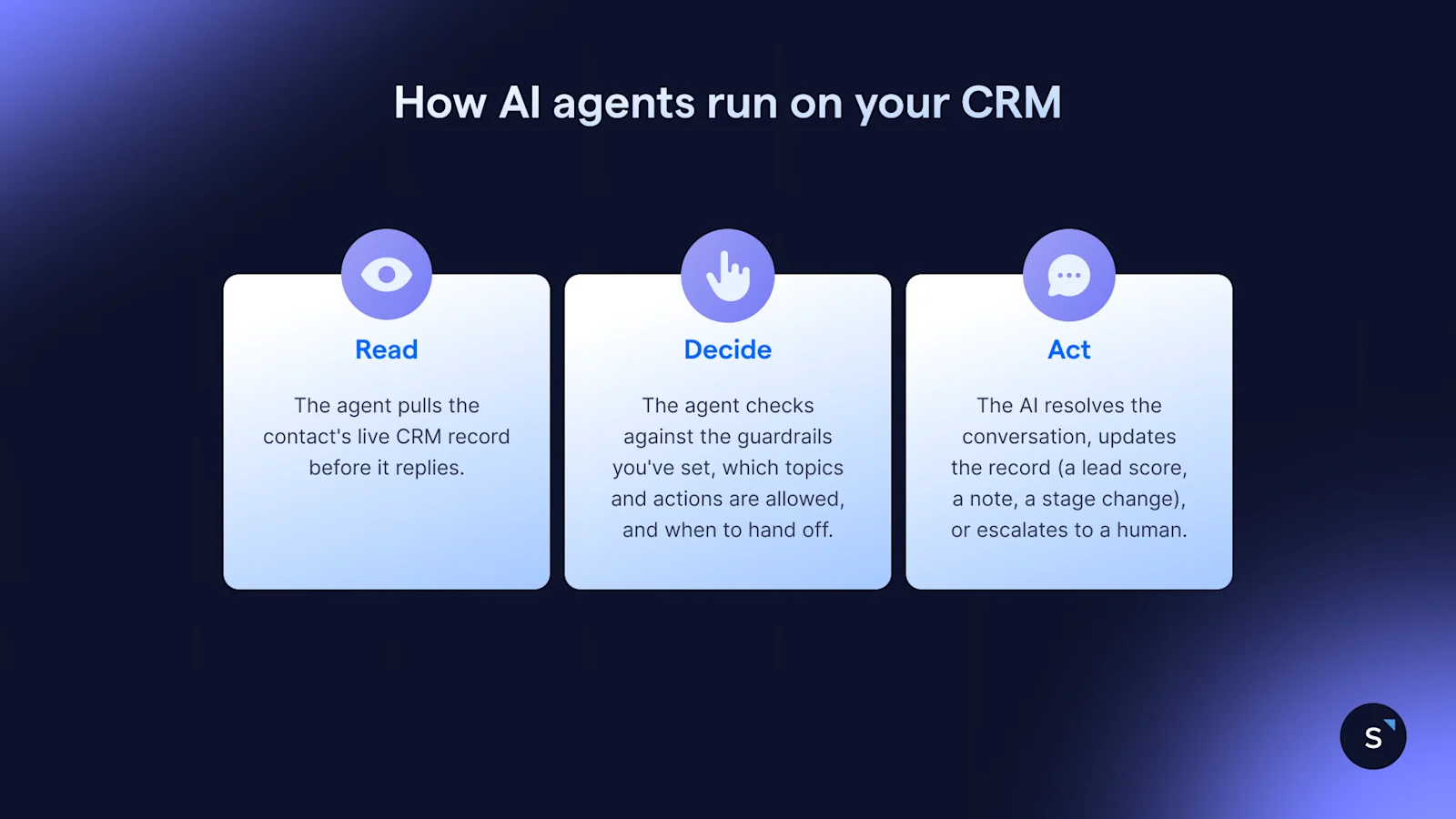
This runs on three steps every time: the agent reads what the CRM already knows, decides what it's allowed to do with that, then acts, updating a record, escalating to a person, or resolving the conversation.
**Read.** The agent pulls the contact's live CRM record before it replies: past purchases, deal stage, last conversation, mapped custom fields, not a script written months earlier.
**Decide.** It checks that against the guardrails you've set, which topics and actions are allowed, and when to hand off, keeping it from acting outside its brief.
**Act.** It resolves the conversation, updates the record (a lead score, a note, a stage change), or escalates to a human with full context, depending on what decide allowed.
## **What can an agent actually do once it's connected?**
The clearest use cases share a pattern: a trigger, an action the agent takes, and a measurable change in how the work gets done.
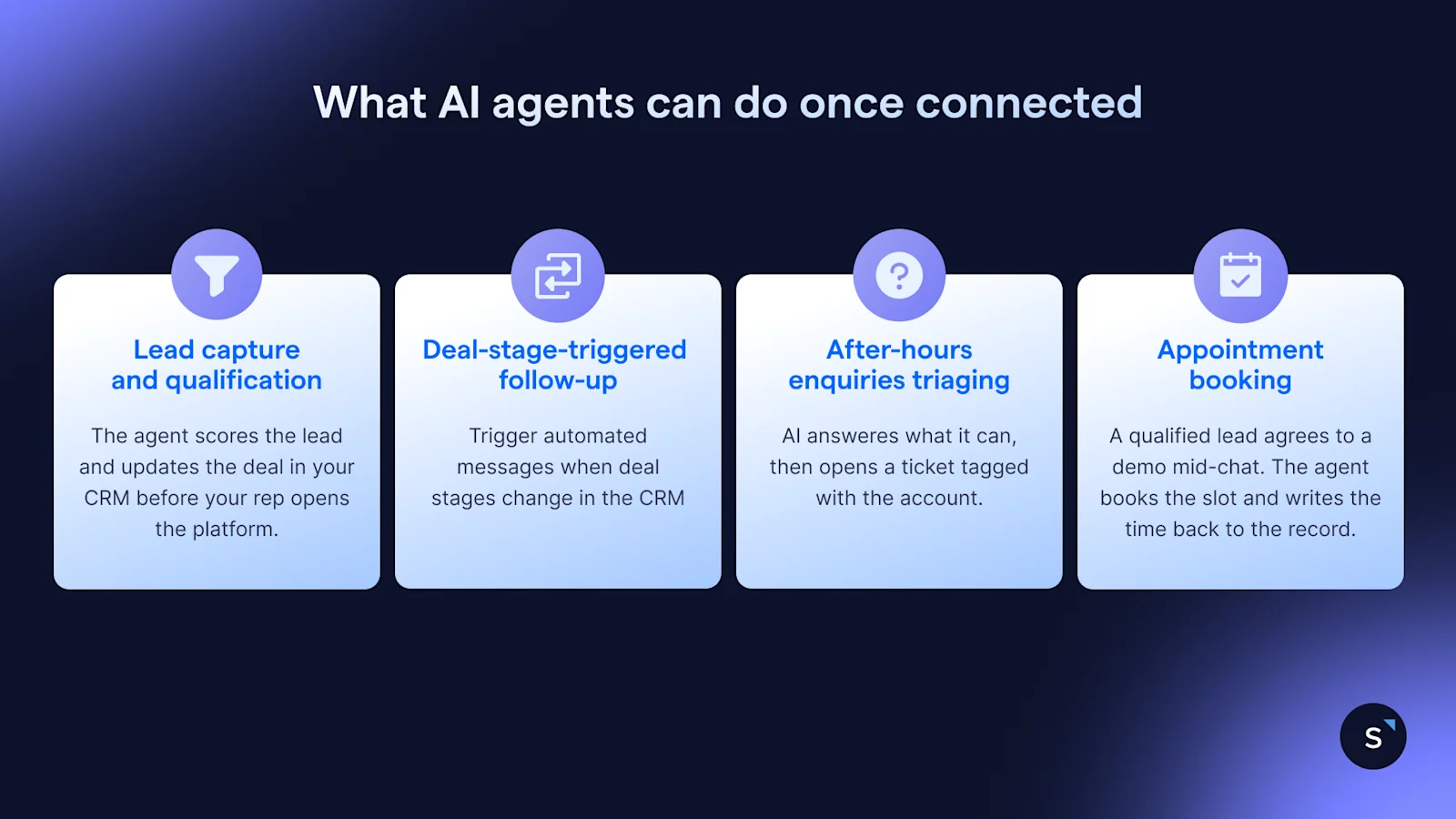
**Lead capture and qualification.** A prospect messages on WhatsApp after hours about pricing. The agent scores the lead and updates the deal in Salesforce, HubSpot, or Zoho. **Leads land pre-scored, before a rep opens the CRM.**
**Deal-stage-triggered follow-up.** A deal moves to "proposal sent" in HubSpot.This triggers a WhatsApp follow-up referencing the actual quote. **Follow-ups go out in minutes, not the next morning.**
**After-hours enquiries are triaged into a ticket.** A customer messages at 11 PM about an issue the agent can't resolve. It answers what it can, then opens a[ ticket](/en-sg/ticketing) tagged with the account. **The morning queue arrives pre-triaged, not a flat inbox.**
**Appointment booking with write-back.** A qualified lead agrees to a demo mid-chat. The agent books the slot and writes the time back to the record. **The calendar and the CRM agree, nothing retyped.**
## **AI Agent CRM Integration Tools Compared**
Astra and AgentFlow are both dedicated AI agents built to connect to a CRM out of the box. The third path is building the connection yourself, natively through each CRM's own API or glued together with Zapier, with no dedicated agent in between.[ Gartner predicts 40% of enterprise apps will embed task-specific AI agents by the end of 2026, up from under 5% in 2025](https://www.gartner.com/en/newsroom/press-releases/2025-08-26-gartner-predicts-40-percent-of-enterprise-apps-will-feature-task-specific-ai-agents-by-2026-up-from-less-than-5-percent-in-2025), so fewer teams are choosing that third path by default.
| **Criteria** | **Wati (Astra)** | **SleekFlow** | **DIY: Native API or / Zapier** |
| --- | --- | --- | --- |
| CRM platforms | Salesforce, HubSpot, Zoho, and Pipedrive | Salesforce, HubSpot, and Zoho CRM | Any CRM with an API |
| Read/write depth | Reads, updates fields via API syncs | Bidirectional, real-time, both ways | One field per workflow built |
| Guardrails | Permission-based actions, handoff rules | Per-agent guardrails, role-based access on Premium+ | Whatever logic you build in |
| Channels | WhatsApp and voice calls | WhatsApp, Instagram, Messenger, SMS, live chat, voice and email | Whichever channel the app supports |
| Pricing tier | Add-on from US$99 atop a Wati plan | From US$149/month, yearly (Pro Plan) | Free to build, plus Zapier's task pricing |
The real difference is whether the connection reads and writes in real time with built-in guardrails, or that logic lives in a workflow you maintain. Choose native and bidirectional when the agent acts unsupervised; choose Zapier for one narrow automation you already maintain.
## **What goes wrong if you connect the wrong AI agent?**
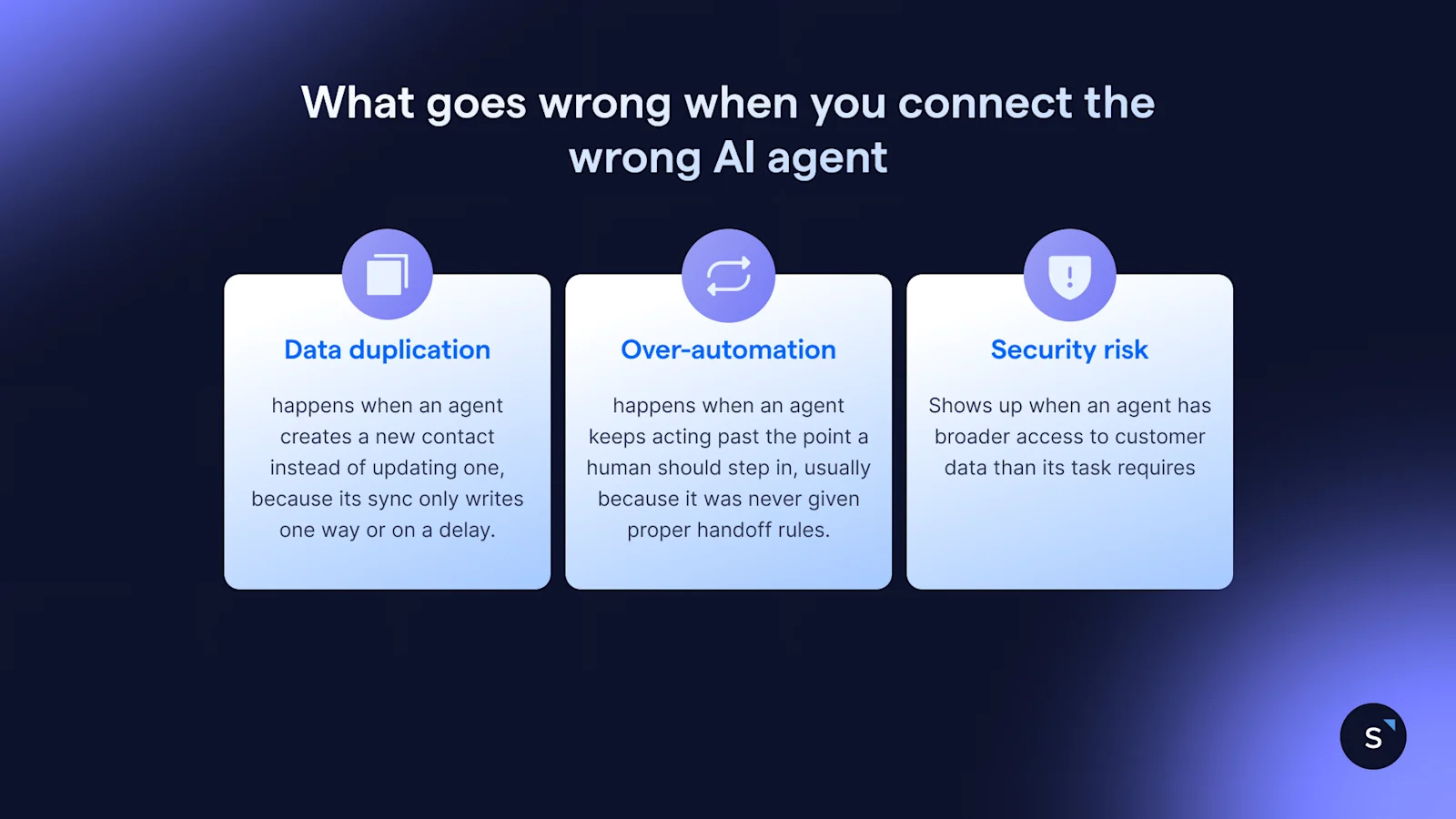
The three risks that come up most— duplicate records, over-automation, and unclear permissions, trace back to which agent you connect and how it's set up: a shallow sync, missing guardrails, or wider access than the job needs, not the idea of an agent touching your CRM at all.
**Data duplication** happens when an agent creates a new contact instead of updating one, because its sync only writes one way or on a delay. A real-time, bidirectional connection with matching rules on email or phone avoids it.
**Over-automation** happens when an agent keeps acting past the point a human should step in, usually because it was never given proper handoff rules.[ Gartner predicts over 40% of agentic AI projects will be canceled by the end of 2027](https://www.gartner.com/en/newsroom/press-releases/2025-06-25-gartner-predicts-over-40-percent-of-agentic-ai-projects-will-be-canceled-by-end-of-2027), largely from unclear guardrails set at the start. Per-agent guardrails and monitored handoff rates prevent it.
**Security risk** shows up when an agent has broader access to customer data than its task requires. Permission-based authentication, role-based access, and PII masking keep an agent's reach matched to its job, something you configure upfront, not a tradeoff you accept.
## **Connecting SleekFlow's AI agent to Salesforce, HubSpot and Zoho**
It takes four steps, usually one setup session, no developer or coding required.
1. **Authenticate.** Connect[ Salesforce](/en-sg/channels/salesforce),[ HubSpot](/en-sg/channels-integrations/hubspot), or Zoho through SleekFlow's guided login.
1. **Configure actions and guardrails.** Choose what the agent can do and where it hands off.
1. **Train the knowledge base.** Add your own docs and answers.
1. **Test, then launch.** Run it through SleekFlow's built-in performance testing first.
SleekFlow is the AI suite for revenue-driving conversations. AgentFlow, its AI agent product, connects natively to Salesforce, HubSpot, and Zoho, reading a record and writing back in the same conversation.
### Real-life example: How Taylor’s University achieved 4x higher lead-to-enrolment rate by connecting SleekFlow to their CRM
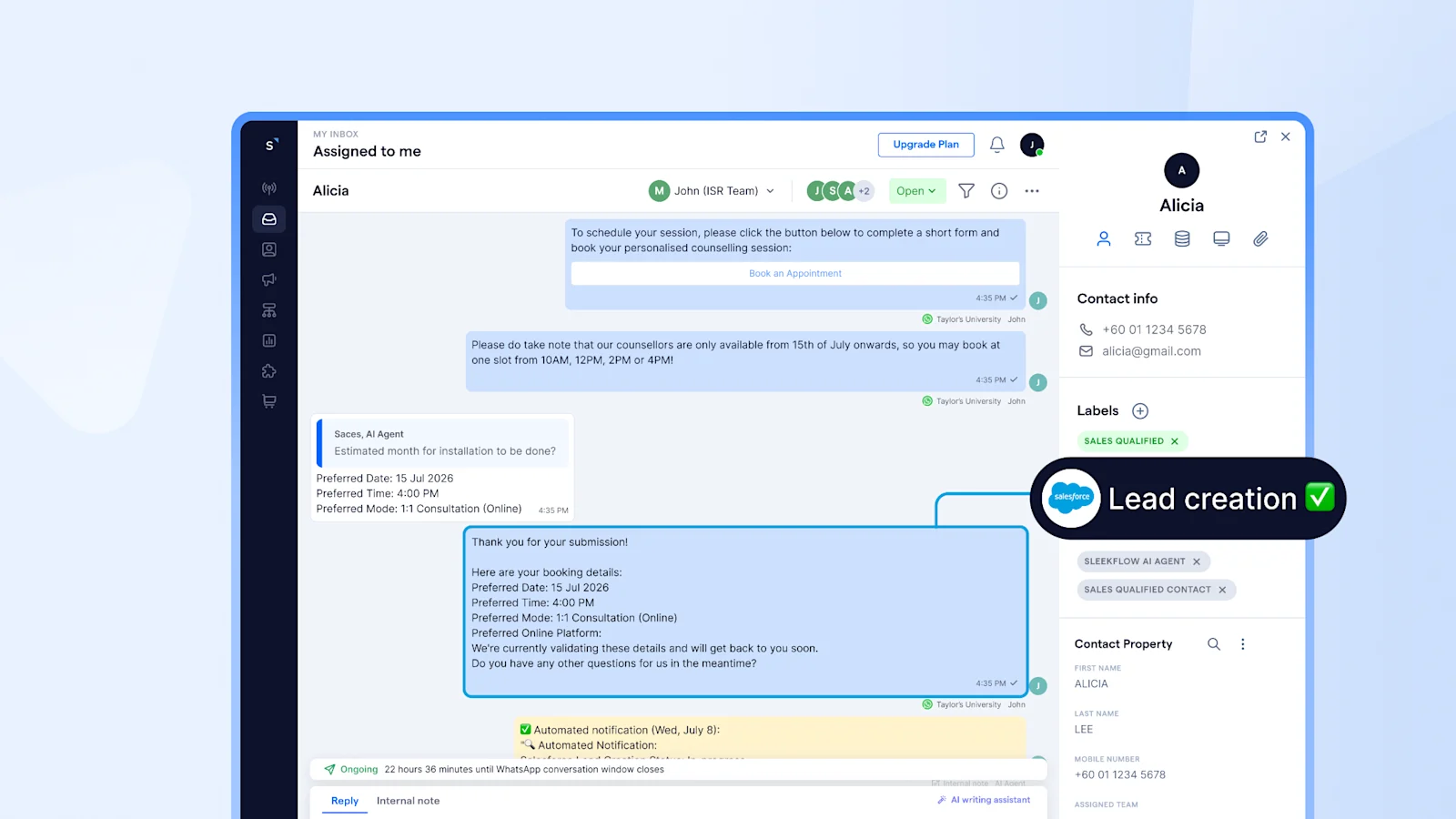
Taylor's University used to review, extract, and manually enter conversation details into Salesforce, adding workload and risking incomplete records. They connected SleekFlow's AgentFlow natively to Salesforce so conversation data syncs with context, giving recruitment staff a connected view of each prospective student's journey.
"By integrating SleekFlow with Salesforce, we've connected conversations with student data, giving our teams a more complete view of each prospective student's journey while reducing manual effort and improving follow-up," says Lee Ann June, Head, Digital Experience at Taylor's University.
## Want to outcompete your peers with SleekFlow's help?
Book your personalised demo with SleekFlow today and unlock the potential of seamless communication
[Book a Demo](https://sleekflow.io/en-sg/book-a-demo)
[View Pricing](https://sleekflow.io/en-sg/pricing)
### Does an AI agent replace my CRM?
No. The CRM stays your system of record. The agent is a new interface on top of it, reading the record before it replies and writing back updates like a lead score or stage change, just continuously.
### Which CRMs does SleekFlow's AI agent integrate with?
AgentFlow connects natively to Salesforce, HubSpot, and Zoho CRM, alongside Shopify and Google Sheets, syncing records and deal stages in real time.
### Is AI agent CRM integration secure?
Security depends on how narrowly the agent's access is scoped, not the integration itself. SleekFlow uses permission-based authentication per connection, with role-based access and PII masking, which is above the industry standard for security..
### What happens when the agent can't resolve something itself?
It should hand off to a human agent. You set the conditions in advance, a topic it shouldn't touch, a negative sentiment cue, a qualified lead, and the agent passes the conversation to a human with full context attached.
### Can I test SleekFlow’s AI agent before it talks to real customers?
Yes. SleekFlow's built-in performance testing runs the agent through sample conversations and CRM actions first. Most teams then test a small batch of real enquiries, check how it reads, decides, and acts, and expand once the guardrails hold up.