---
title: "7 WhatsApp campaign mistakes that kill your delivery"
description: "7 WhatsApp campaign mistakes that wreck delivery, from quality-rating traps to template rejections, and exactly where to check each one."
canonical: "https://sleekflow.io/en-sg/blog/whatsapp-campaign-mistakes"
html_lang: "en-sg"
date_modified: "2026-09-14T05:23:45.341Z"
og_title: "7 WhatsApp campaign mistakes that kill your delivery"
og_description: "7 WhatsApp campaign mistakes that wreck delivery, from quality-rating traps to template rejections, and exactly where to check each one."
og_image: "https://images.ctfassets.net/tu2uwzoyozk8/2xMVhVFhQsDvl6JOyF3mF/36c811e4bc43e981fe5894775efc2dca/7_WhatsApp_campaign_mistakes_that_kill_delivery.png?fm=webp&q=90&w=1200"
---
```json
{
"@context": "https://schema.org",
"@type": "Article",
"headline": "7 WhatsApp campaign mistakes that kill your delivery",
"description": "7 WhatsApp campaign mistakes that wreck delivery, from quality-rating traps to template rejections, and exactly where to check each one.",
"url": "https://sleekflow.io/en-sg/blog/whatsapp-campaign-mistakes",
"dateModified": "2026-09-14T05:23:45.341Z",
"image": "https://images.ctfassets.net/tu2uwzoyozk8/2xMVhVFhQsDvl6JOyF3mF/36c811e4bc43e981fe5894775efc2dca/7_WhatsApp_campaign_mistakes_that_kill_delivery.png?fm=webp&q=90&w=1200",
"breadcrumb": {
"@type": "BreadcrumbList",
"itemListElement": [
{
"@type": "ListItem",
"position": 1,
"name": "Home",
"item": "https://sleekflow.io/en-sg"
},
{
"@type": "ListItem",
"position": 2,
"name": "Blog",
"item": "https://sleekflow.io/en-sg/blog"
},
{
"@type": "ListItem",
"position": 3,
"name": "7 WhatsApp campaign mistakes that kill your delivery",
"item": "https://sleekflow.io/en-sg/blog/whatsapp-campaign-mistakes"
}
]
}
}
```
# 7 WhatsApp campaign mistakes that kill your delivery
*Julian Wong — Content Strategist*
## Summary
- A new WhatsApp number starts capped at 250 messages a day, and exceeding that limit is the top cause of stalled delivery.
- Meta retired the "Flagged" quality status in Oct 2025, so a poor rating now blocks tier upgrades, not your current limit.
- Marketing templates bill on every send under Meta's per-message pricing model, which took effect on 1 Jul 2025.
- The widely quoted "98% WhatsApp open rate" figure has no credible source behind it.
You launch the broadcast at 9am, watch the delivered count climb, and by lunchtime the replies still haven't started. Or the campaign stalls at 40% sent, no error banner, no explanation. Most of the time, the cause is mechanical: a messaging limit, a quality rating, a template category, a missing opt-in trail. Fix the mechanic and the campaign you already wrote starts landing. Below is what to check before you touch the copy again.
## **Why do WhatsApp campaigns underperform?**
WhatsApp campaign underperformance is nearly always a mechanical failure inside Meta's business messaging infrastructure, not a content problem. The platform scores every business number on quality and volume before letting a broadcast reach recipients, and a campaign stalls when it collides with one of those checks: a quality-rating drop, a messaging-limit ceiling, a miscategorised template, or a consent gap.
Quality rating, messaging limit, and template category all move independently, and Meta checks a template against its actual content, not the label chosen. One of these breaking is why the campaign looks broken, not the offer.
Match your symptom against the table below, then check the setting it points to.
| **Symptom** | **Likely mechanic** | **Where to check** |
| --- | --- | --- |
| Low delivery on a new number | Still on Meta's starting tier (250 messages in 24 hours), and volume exceeds it | Messaging limits under WhatsApp Manager > Phone numbers |
| Silent partial delivery | Recipients blocked the number, revoked opt-in, or went inactive, and the summary shows no alert | Per-recipient delivery status in WhatsApp Manager or your BSP dashboard |
| Campaign stopped mid-send | The number hit its daily messaging-limit ceiling and moved into a restricted state | Phone number status in WhatsApp Manager |
| High block rate | Broadcasts are too frequent, too broad, or irrelevant to the segment | Quality rating and blocked-by-user count in WhatsApp Manager |
| Replies unanswered | No agent or routing rule is watching the inbox once the window opens | Inbox assignment rules and response-time reports |
| Unexpectedly high bill | Marketing templates bill per send, and a broad, low-intent list multiplies cost | Message-category cost breakdown in your BSP's billing dashboard |
| Template rejected | Content doesn't match the declared category, most often marketing copy submitted as utility | Template status and rejection reason in WhatsApp Manager |
## **Mistake 1: sending volume your number isn't rated for**
A new WhatsApp Business number is not fully trusted from day one. Meta starts every portfolio at[ 250 messages in a 24-hour window](https://developers.facebook.com/documentation/business-messaging/whatsapp/messaging-limits), and it scales up only once you've delivered messages to real recipients using high-quality templates. Send a 5,000-contact broadcast on day two and most of it queues or fails.
Reaching the next tier takes 2,000 delivered messages to unique numbers outside the service window, using high-quality templates, within a rolling 30-day period. After that, the limit scales automatically if quality holds and you're using at least half of it within a week. Ramp new numbers deliberately: warm contacts first, cold lists later.
## **Mistake 2: trusting the delivered report**
"Delivered" means Meta's servers accepted the message, not that the recipient can act on it. A block, an uninstalled app, or a revoked opt-in still counts as delivered on most broadcast summaries, so a healthy-looking report can hide a shrinking, disengaged list.
Check the per-recipient status, not the campaign total.[ Meta retired the "Flagged" quality status in Oct 2025](https://learn.turn.io/l/en/article/uvdz8tz40l-quality-ratings-and-messaging-limits): a falling rating no longer cuts your current sending limit, it only blocks a move to a higher one. Good for continuity, bad for anyone still waiting on a status change to raise the alarm.
## **Mistake 3: getting the template category wrong**
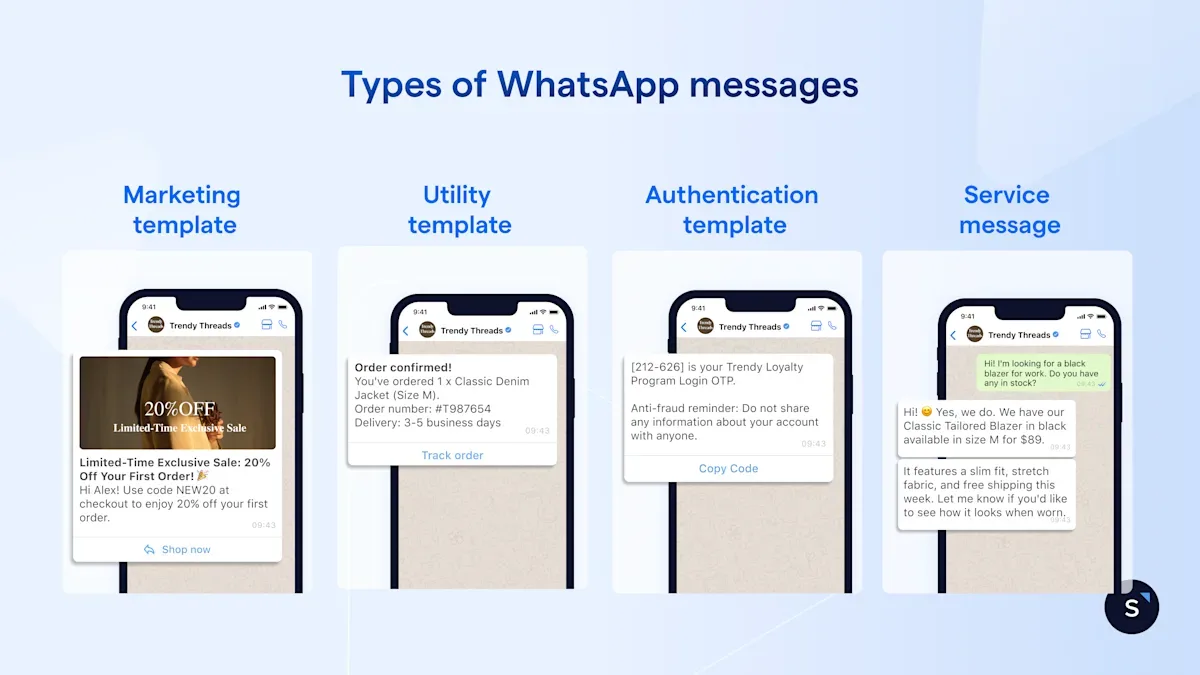
WhatsApp templates fall into three categories, marketing, utility, and authentication, and Meta checks your choice against the actual content, not just the label you picked.[ Submit promotional copy as utility](https://developers.facebook.com/documentation/business-messaging/whatsapp/templates/template-categorization) and the template either gets rejected as an incorrect category or waved through and recategorised later.
A utility template must be non-promotional and tied to something the customer already did, an order update or a safety alert, never a discount. Repeated miscategorisation earns a written warning, then a 7-day block on new utility templates, then 30. Marketing templates also bill on every send under Meta's current pricing model, so a miscategorised, broad-audience template compounds the cost. Check your category mix on SleekFlow's[ WhatsApp pricing calculator ](https://sleekflow.io/en-sg/whatsapp-pricing-calculator)first.
## **Mistake 4: launching without a staffed reply path**
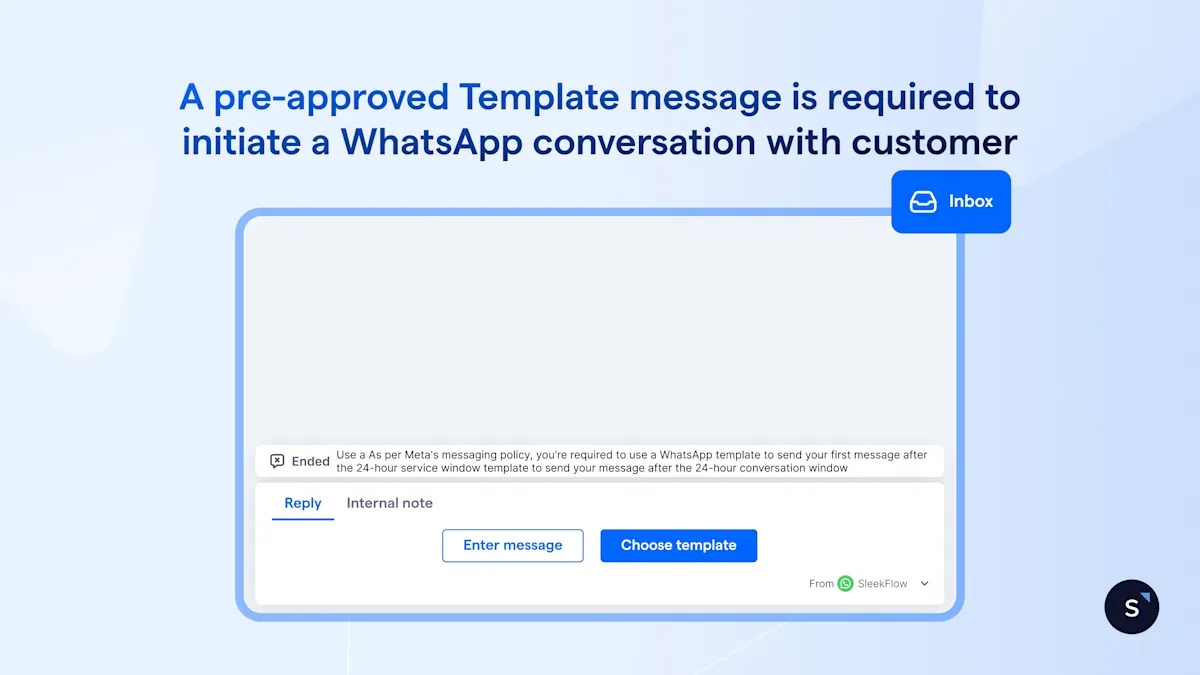
A campaign that gets replies and leaves them unanswered performs worse than one that gets none at all. Once a customer responds, you get a 24-hour service window to reply for free in plain text. Miss it, and you're back to paying for a template just to reopen the conversation.
Broadcasts and inboxes are usually owned by different people, marketing schedules the send, support staffs the queue, and replies sit unassigned until someone finds them. SleekFlow's[ message opt-in feature](https://help.sleekflow.io/whatsapp/whatsapp-message-opt-in) automates the reopening template so a late reply doesn't need a manual resend, but a routing rule still has to exist before the campaign goes out.
## **Mistake 5: treating opt-in as a Meta checkbox**
Meta's own rule is that a person must[ directly confirm to your specific business](https://developers.facebook.com/documentation/business-messaging/whatsapp/getting-opt-in) that they want messages from you, naming your business and what they're opting into. A checkbox buried in a signup flow, or a list bought from a partner, doesn't meet that bar even if the number is technically reachable.
Singapore adds a second layer. Under the[ Do Not Call provisions](https://www.pdpc.gov.sg/overview-of-pdpa/do-not-call-registry/business-owner/do-not-call-registry-and-your-business), a business needs either a Do Not Call Registry check or clear, unambiguous consent before marketing messages reach a Singapore number, though PDPC's guidance doesn't say whether WhatsApp counts the same as SMS. Treat it as if it does, and get compliance to confirm before scaling.
## **Mistake 6: no working opt-out path**
An opt-out that only works by typing "STOP" into a broadcast the recipient can't reply to isn't a working opt-out. Singapore gives a business 21 days to honour an opt-out once it's received, but that clock doesn't help if the request never reaches a system that acts on it.
Every marketing template needs a real, tested path out, a quick-reply button or a keyword your flows actually catch, that updates the contact's status everywhere it's used. An agent who keeps messaging someone who opted out through a broadcast is the fastest way to a block, and blocks drag your quality rating down in the first place.
## **Mistake 7: judging the campaign on open rate**
The widely quoted "98% WhatsApp open rate" has[ no credible source behind it](https://chatarmin.com/en/blog/whatsapp-statistic) and has circulated across marketing blogs for years unchanged. One messaging platform's own data, drawn from hundreds of measured accounts, puts it closer to 79%, a vendor-reported figure, not an industry standard, and a recipient who's turned off read receipts never registers as "read."
One of SleekFlow's own retail campaigns landed a 68% WhatsApp open rate against 30% for the same audience on email, a strong result, not proof that opens are close to universal. Judge the campaign on what happens after the open: replies, clicks, and completed orders, none of which a read receipt can fake.
## **How SleekFlow helps with your WhatsApp marketing campaigns**
SleekFlow is the AI suite for revenue-driving conversations, and its[ broadcast campaign tools](https://sleekflow.io/broadcast-campaign) build the checks above into the send itself.
Segmentation pulls from Shopify, HubSpot, or Salesforce, templates preview before submission, and open, click, and reply analytics sit on the same dashboard as the inbox.
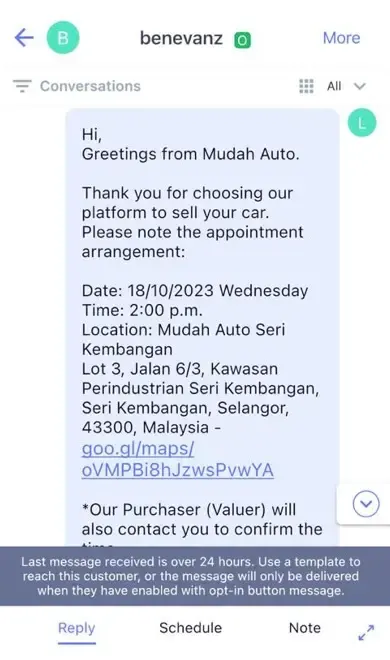
Mudah.my, Malaysia's largest online marketplace, was fielding inquiries across millions of listings through eDM and SMS broadcasts that barely got a response, and its previous WhatsApp provider couldn't support more than one agent on a conversation at once. It moved to SleekFlow's WhatsApp Business API with a verified green tick, automated flows, and broadcast campaigns built around interactive buttons.
Results:
- 70% average read rate on WhatsApp broadcasts
- 30% increase in reply rate after adding interactive message buttons
- 646 leads collected in 3 months
[Read the full case study →](https://sleekflow.io/customer-stories/mudah-my)
## Want to outcompete your peers with SleekFlow's help?
Book your personalised demo with SleekFlow today and unlock the potential of seamless communication
[Book a Demo](https://sleekflow.io/en-sg/book-a-demo)
[View Pricing](https://sleekflow.io/en-sg/pricing)
### Why is my new WhatsApp Business number not delivering messages?
A new number starts on Meta's lowest tier, 250 messages in a 24-hour window, scaling up only after real recipients receive high-quality templates. A large broadcast before that happens is the most common reason delivery looks low. Warm it up gradually.
### What is a WhatsApp quality rating and how do I check mine?
Your quality rating (green, yellow, or red) reflects recent recipient response, blocks and spam reports pull it down. Since Meta retired the "Flagged" status in Oct 2025, a falling rating blocks scaling to a higher limit rather than cutting your current one. Check it under phone number settings in WhatsApp Manager.
### Why was my WhatsApp message template rejected?
Usually a mismatch between your declared category and the actual content, most often promotional copy submitted as utility to dodge marketing costs. Utility templates must be non-promotional and tied to something the customer already did. Resubmit under the right category, or request a review within 60 days.
### Do I need consent before sending WhatsApp marketing messages in Singapore?
Yes. Meta requires a customer to directly confirm to your business that they want messages from you, and Singapore's Do Not Call provisions separately require a registry check or clear, unambiguous consent before marketing messages reach a Singapore number. Confirm the detail with compliance first.
### Is WhatsApp open rate a reliable way to measure campaign success?
Not on its own. Recipients can turn off read receipts, and the commonly quoted "98% open rate" figure has no credible source behind it. Track replies, clicks, and completed actions alongside open rate, since the recipient controls that setting and a vendor can't inflate it.