---
title: "WhatsApp follow up: how to follow up without breaking the rules"
description: "Learn how to do a WhatsApp follow up inside Meta's 24-hour window and Singapore's consent rules, with timing, templates and examples."
canonical: "https://sleekflow.io/en-sg/blog/whatsapp-follow-up"
html_lang: "en-sg"
date_modified: "2026-10-27T04:30:04.500Z"
og_title: "WhatsApp follow up: rules, timing and templates"
og_description: "Learn how to do a WhatsApp follow up inside Meta's 24-hour window and Singapore's consent rules, with timing, templates and examples."
og_image: "https://images.ctfassets.net/tu2uwzoyozk8/3JbdbtaZZCQkm5f3RLVf1g/7e525d7cfcecfdbb01588ceb6a1ad277/Ilustration_WhatsApp_follow_up__how_to_follow_up_without_breaking_the_rules.png?fm=webp&q=90&w=1200"
---
```json
{
"@context": "https://schema.org",
"@type": "Article",
"headline": "WhatsApp follow up: rules, timing and templates",
"description": "Learn how to do a WhatsApp follow up inside Meta's 24-hour window and Singapore's consent rules, with timing, templates and examples.",
"url": "https://sleekflow.io/en-sg/blog/whatsapp-follow-up",
"dateModified": "2026-10-27T04:30:04.500Z",
"image": "https://images.ctfassets.net/tu2uwzoyozk8/3JbdbtaZZCQkm5f3RLVf1g/7e525d7cfcecfdbb01588ceb6a1ad277/Ilustration_WhatsApp_follow_up__how_to_follow_up_without_breaking_the_rules.png?fm=webp&q=90&w=1200",
"breadcrumb": {
"@type": "BreadcrumbList",
"itemListElement": [
{
"@type": "ListItem",
"position": 1,
"name": "Home",
"item": "https://sleekflow.io/en-sg"
},
{
"@type": "ListItem",
"position": 2,
"name": "Blog",
"item": "https://sleekflow.io/en-sg/blog"
},
{
"@type": "ListItem",
"position": 3,
"name": "WhatsApp follow up: rules, timing and templates",
"item": "https://sleekflow.io/en-sg/blog/whatsapp-follow-up"
}
]
}
}
```
# WhatsApp follow up: how to follow up without breaking the rules
*Julian Wong — Content Strategist*
## Summary
- A WhatsApp follow-up moves a lead to the next step, within Meta's window and Singapore's consent rules.
- Four in five people in Singapore use WhatsApp every month, according to the Digital 2026 report.
- After 24 hours from a customer's last message, only an approved template can reach them on WhatsApp.
- Add something new to every follow-up, and stop when the customer replies, converts, or opts out.
- Marketing follow-ups to Singapore numbers need consent or a Do Not Call Registry check first.
You sent the quote on Monday and by Thursday there's still no reply. Another message could close the deal, or it could get you blocked. Meta restricts what you can send once a chat goes quiet, and Singapore's rules cover marketing messages on apps like WhatsApp. This guide sets out what to send, when, and how often, so a follow-up helps the customer instead of annoying them.
## **What is a WhatsApp follow-up, and why does it matter?**
A **WhatsApp follow-up** is a message a business sends after an earlier conversation, enquiry or purchase to move the customer to the next step, such as replying, booking or buying. It covers sales, post-purchase checks and win-back, and it has to follow Meta's messaging rules and local consent law.
Customers are already in the app and replies are conversational, so a follow-up can read as a continuation of the chat. In We Are Social's Digital 2026 report, WhatsApp ranks as Singapore's most-used platform, with[ four in five people](https://wearesocial.com/sg/blog/2025/11/digital-2026-top-digital-and-social-media-trends-in-singapore/) using it every month.
## **Can you follow up on WhatsApp after 24 hours?**
Yes, but only with an approved message template. The **customer service window** opens when a customer messages you and stays open for 24 hours after their latest message. Within this window, you can send free-form messages. Outside of it, you need a template, and the customer's reply opens a new window. Our guide to the[ WhatsApp message template](https://sleekflow.io/en-sg/blog/whatsapp-business-template) covers how to write and submit one.
### **What follow-ups you can send, and how much they cost**
| **Situation** | **What you can send** | **Template category** | **Billing from 1 Oct 2026** |
| --- | --- | --- | --- |
| Customer messaged in the last 24 hours | Free-form messages, no template needed | None (non-template) | Billable per message |
| Window closed, no reply | Approved template only | Utility or marketing, set by content | Charged per template, by category |
| Customer replies to your template | Free-form messages again, in a new 24-hour window | None for replies | Template charged by category; replies billable |
| Entry from a click-to-WhatsApp ad, within 72 hours | Free-form while a 24-hour window is open; templates any time in the 72 hours | Any | Delivery free in the 72-hour window (confirm the current length) |
| Transactional follow-up (order or booking) | Utility template, or free-form if the window is open | Utility | Charged per message, even inside an open window |
| Promotional follow-up | Marketing template, to opted-in contacts only | Marketing | Charged per message; pricing unchanged |
Rates vary by recipient country and change over time, so confirm current rates on[ Meta's pricing page](https://developers.facebook.com/documentation/business-messaging/whatsapp/pricing) before you budget.
### **What changed on 1 Oct 2026?**
Meta now charges for messages that used to be free:
- **Free-form replies inside the window** are billable per message. Several providers report a monthly free allowance per business number, so confirm yours with Meta or your provider.
- **Utility templates inside the window** are billable too.
- **Marketing template pricing** is unchanged.
- **The free window for ad entry points** stays. Meta says the[ 72-hour free entry point window](https://developers.facebook.com/documentation/business-messaging/whatsapp/pricing/non-template-messages) is unchanged for message delivery.
Meta can also reclassify templates. A utility template that carries offers or upsells can be treated as marketing, so[ keep utility templates free of promotional content](https://developers.facebook.com/documentation/business-messaging/whatsapp/templates/template-categorization).
*WhatsApp messaging fees are subject to change from time to time based on Meta's official pricing and rate structures, as well as other factors determined by SleekFlow.*
## **What should you say in each WhatsApp follow-up?**
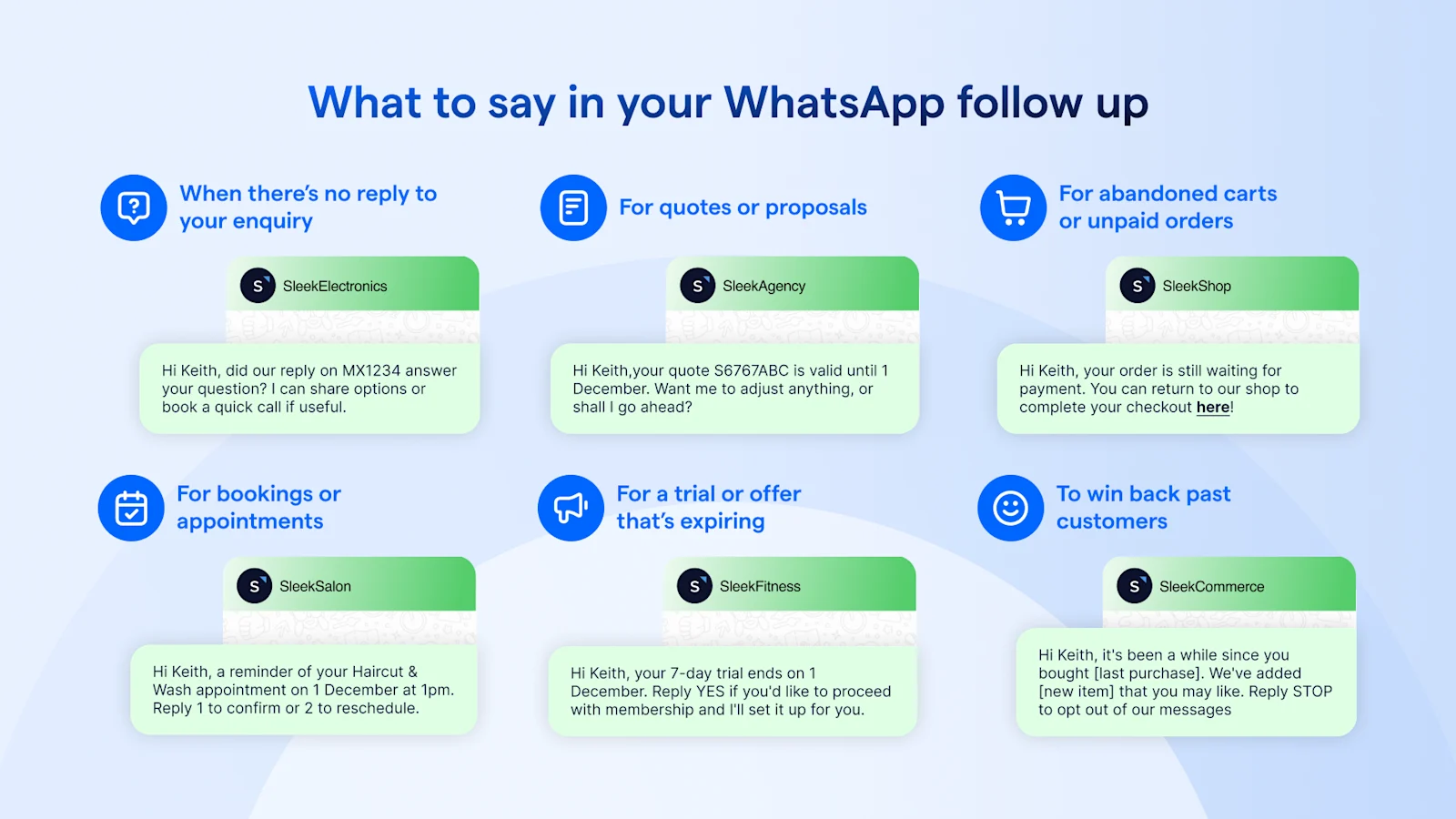
Match each follow-up to its situation. An unanswered enquiry needs a next step, a booking needs a reminder, and a lapsed customer needs a reason to return. The timings below are recommended starting points to test, not benchmarks. Meta sets the final template category, so check it before you submit.
### **Types of follow-up message to use for each scenario**
| **Scenario** | **Timing (starting point)** | **Goal** | **Example message** | **Template category to check** |
| --- | --- | --- | --- | --- |
| No reply to an enquiry | Inside the 24-hour window, then 2 days later | Re-open the chat with something useful | Hi [name], did our reply on [product] answer your question? I can share options or book a quick call if useful. | Free-form in the window; after it, likely marketing |
| Quote or proposal sent | 2 to 3 days after sending | Get a decision or a question | Hi [name], your quote [quote number] is valid until [date]. Want me to adjust anything, or shall I go ahead? | Likely marketing |
| Abandoned cart or unpaid order | A few hours after the cart or payment stalls | Remove the last obstacle | Hi [name], your order [order number] is still waiting for payment. You can complete it here: [payment link] | Unpaid order: check utility. Abandoned cart: likely marketing |
| Booking or appointment | 24 hours before, and on the day | Cut no-shows | Hi [name], a reminder of your [service] appointment on [date] at [time]. Reply 1 to confirm or 2 to reschedule. | Utility |
| Trial or offer expiring | 2 to 3 days before it ends | Prompt a decision | Hi [name], your [trial or offer] ends on [date]. Reply YES if you'd like to continue and I'll set it up. | Marketing |
| Past customer win-back | After a quiet period you set, such as 60 days | Restart the conversation | Hi [name], it's been a while since [last purchase]. We've added [new item] at [business]. Reply STOP to opt out. | Marketing, opted-in contacts only |
### **When should the first follow-up go out?**
Plan the first touch around the 24-hour window. A first follow-up sent before the window closes can be free-form, and one sent after needs a template. Our guide to[ WhatsApp for sales](https://sleekflow.io/en-sg/blog/whatsapp-for-sales) has more follow-up plays.
## **How many follow-ups should you send before you stop?**
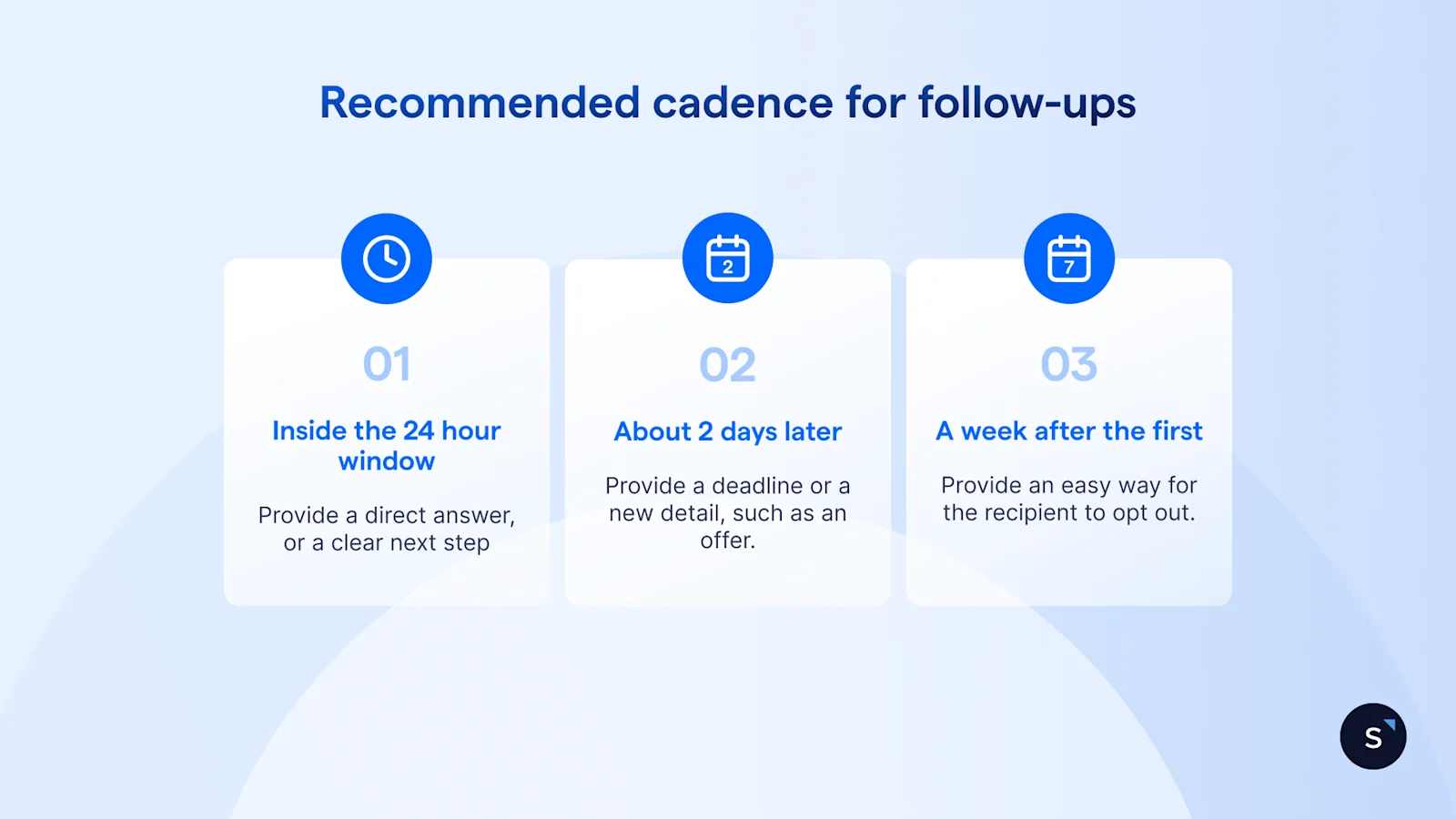
There is no fixed number. Each WhatsApp follow up message should add something new, such as an answer to a likely objection, a deadline or a next step, and you should stop when the customer replies, converts or opts out. Meta also limits how many marketing templates each person receives, so repeating the same nudge risks not being delivered at all.
That cap changes with each person's engagement and Meta doesn't publish it. A blocked message fails with[ error 131049](https://developers.facebook.com/documentation/business-messaging/whatsapp/support/error-codes), and Meta advises waiting at least 24 hours before you retry. Its[ per-user limits guide](https://developers.facebook.com/documentation/business-messaging/whatsapp/templates/marketing-templates/per-user-limits) says retrying sooner can extend the block.
A recommended starting cadence, to test rather than copy:
- **Follow-up 1:** inside the 24-hour window, with a direct answer or next step.
- **Follow-up 2:** about 2 days later, by template if needed, with a deadline or new detail.
- **Follow-up 3 (optional):** about a week after the first, with an easy way to opt out.
- **Then stop,** and revisit only with a different, opted-in campaign.
## **Do you need consent to follow up on WhatsApp in Singapore?**
For marketing follow-ups, generally yes. Singapore's **Do Not Call rules** cover marketing messages sent to Singapore numbers on apps such as WhatsApp, and WhatsApp's own policy requires opt-in permission. Service follow-ups, such as answering a request or confirming a booking, are treated differently. This is not legal advice, so confirm with your compliance adviser.
### **Which follow-ups count as service messages, and which as marketing?**
PDPC's[ Advisory Guidelines on the Do Not Call provisions](https://www.pdpc.gov.sg/-/media/Files/PDPC/PDF-Files/Advisory-Guidelines/Advisory-Guidelines-on-the-DNC-Provisions-1-Feb-2021.pdf) apply the rules to data applications such as WhatsApp that use a Singapore telephone number.
- **Service follow-ups:** a message whose sole purpose is to complete or confirm a transaction the customer already agreed to, or to deliver goods or services, is excluded. Add an offer and it may no longer qualify.
- **Marketing follow-ups:** promotions, upselling and win-back are specified messages. Before sending you need a DNC Registry check (results are valid for 21 days) or clear and unambiguous consent.
### **How do you capture consent and handle opt-outs?**
Ask at the first enquiry, keep the marketing opt-in separate from the enquiry, and record when and how it was given. PDPC says consent should come through some form of positive action, and a failure to opt out is unlikely to be enough.
PDPC sets a 21-day limit for giving effect to a withdrawal, and WhatsApp's[ Business Messaging Policy](https://business.whatsapp.com/policy) says to respect all requests to opt out. Stop marketing sequences straight away, and include your business name and contact details in each marketing message.
### **Can you message existing customers without fresh consent?**
Only within a narrow exception. PDPC's ongoing relationship exclusion covers messages whose sole purpose relates to the relationship, such as a change in terms or features, a change in the customer's status, or periodic account information. A once-off purchase is not enough to create one, and PDPC's own example of a message promoting an extra member discount falls outside it. Treat upsell and win-back messages as marketing.
This section covers Singapore. Malaysian numbers fall under Malaysia's own personal data rules, so have those checked separately.
To keep a send to opted-in contacts,[ broadcast campaigns](https://sleekflow.io/en-sg/broadcast-campaign) let you segment by labels or conditions.
## **How do you automate follow-ups without sounding automated?**
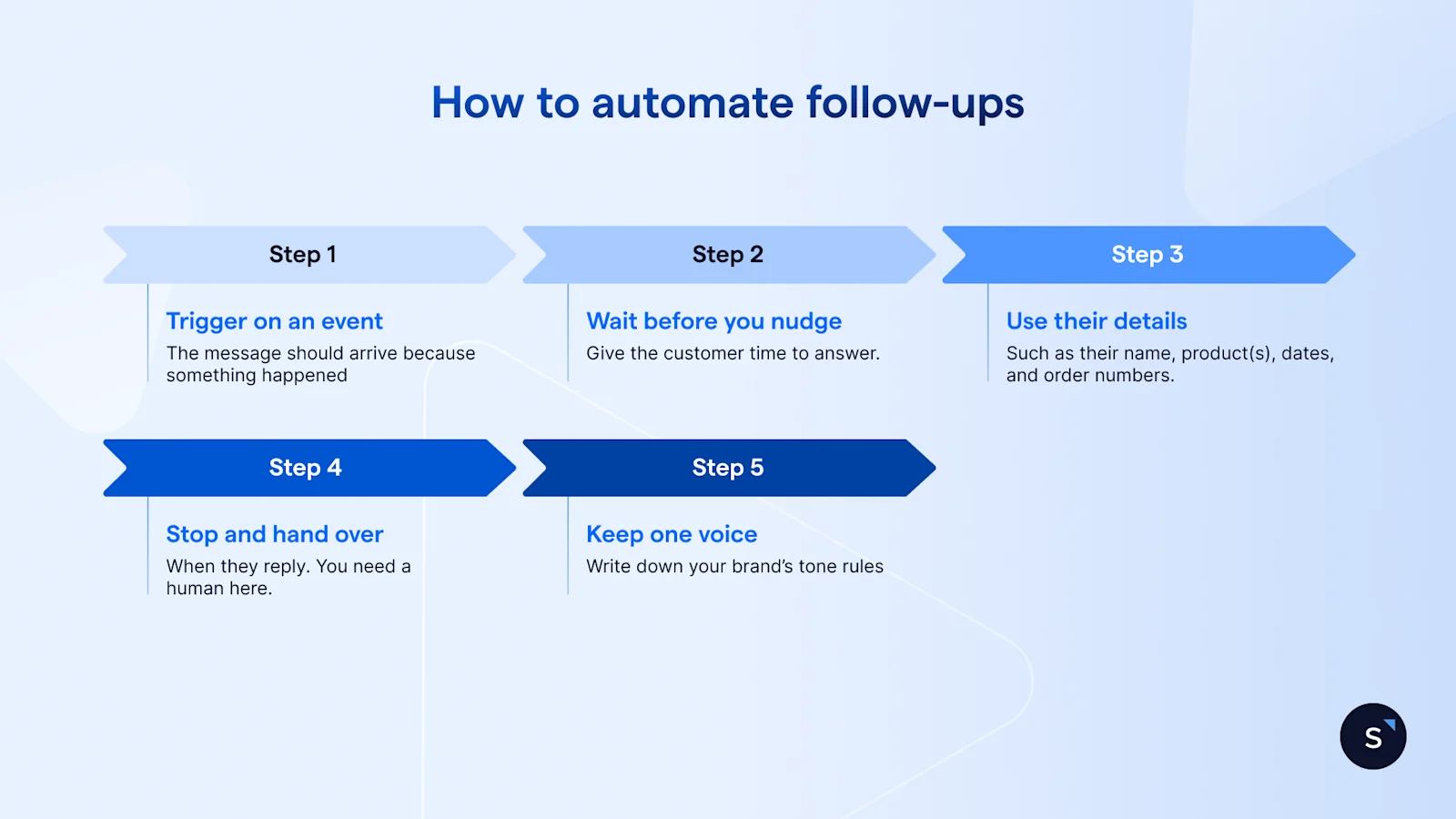
Trigger each follow-up on a real event, such as an enquiry, a quote sent or an abandoned cart, then wait for a reply before sending the next message. Use customer details in the text, stop the sequence the moment the customer replies, and hand the chat to a person.
- **Trigger on an event,** not a calendar, so each message arrives because something happened.
- **Wait before you nudge,** so the customer has time to answer.
- **Use their details,** such as a name, product or order number.
- **Stop and hand over** when the customer replies.
- **Keep one voice,** with tone rules written down once and reused.
## **How to automate WhatsApp follow-ups in SleekFlow**
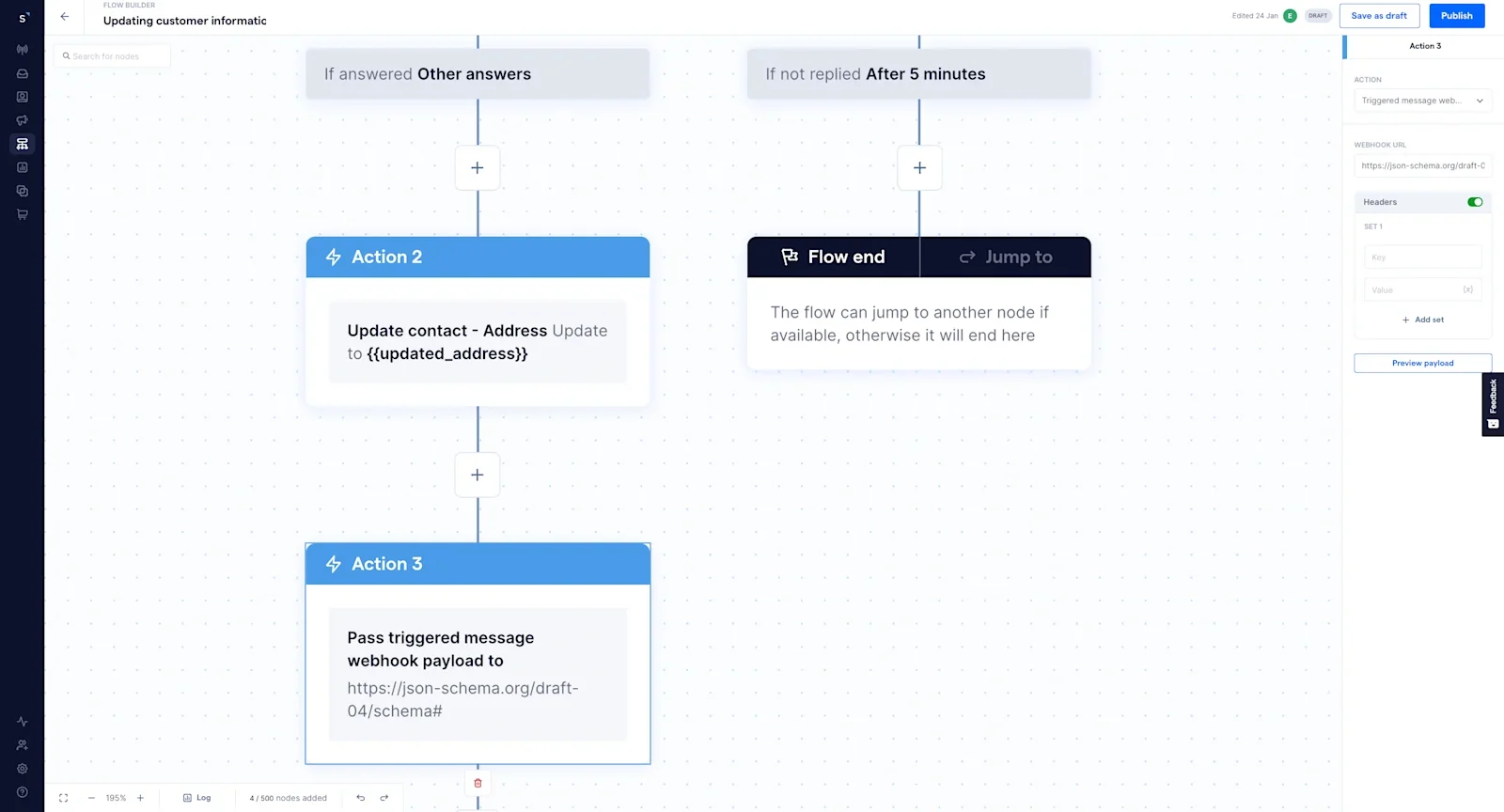
In SleekFlow, you build follow-ups in Flow Builder. A trigger enrols the contact, a Send message node sends the check-in, and a Wait for message reply node pauses until the customer answers or a timeout you set runs out. A No reply received branch then sends the follow-up.
1. Start from the[ Follow up with inactive customers](https://help.sleekflow.io/en_US/configure-follow-up-with-inactive-customers-flow-template) flow template, or build your own, and set enrolment conditions.
1. Add a Send message node and choose a template or manual message type. Templates are required outside the 24-hour window, and choosing a specific channel, rather than the incoming channel, makes them available.
1. Add a Wait for message reply node and set a timeout in seconds, minutes, hours or days.
1. Branch the flow. A reply goes to your team, and the No reply received branch sends the follow-up.
Flow Builder also supports time-delay follow-ups after a broadcast campaign, and timeout messages that nudge customers who don't respond. For a one-off reminder,[ schedule a message in Inbox](https://help.sleekflow.io/inbox/replying-module/schedule-message) with the clock icon. Our[ chat flow templates guide](https://sleekflow.io/en-sg/blog/whatsapp-chat-flow) lists ready-made patterns, and the[ Flow Builder](https://sleekflow.io/en-sg/flow-builder) and[ Inbox](https://sleekflow.io/en-sg/inbox) pages show the rest.
## **How do you measure whether follow-ups work?**
Track 5 numbers: reply rate, time to reply, conversations reopened, deals recovered, and opt-out or block rate. The first four show whether a WhatsApp follow up message works, and the last shows what it costs in goodwill. Set your own baseline first and compare each change against it.
[Analytics](https://sleekflow.io/en-sg/analytics) shows team response times and conversion funnels by lead source. For the rest, label conversations that reopen and deals you recover, so you can count them each month.
## **What follow-up automation looks like for real teams**
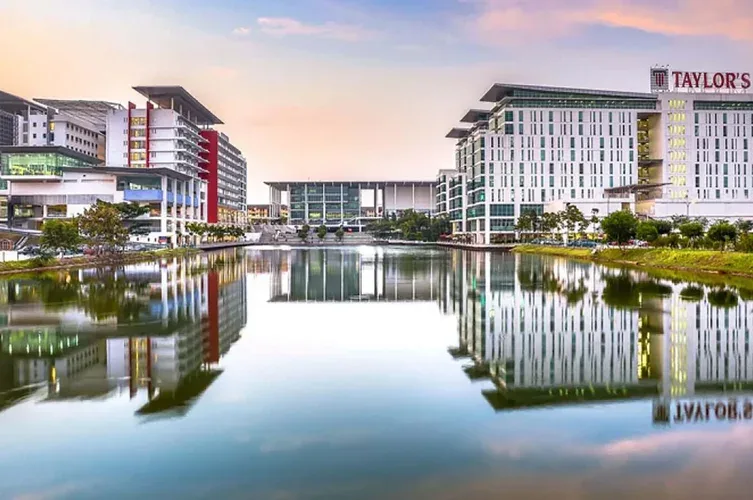
Taylor's University, one of Malaysia's leading private universities, engages thousands of prospective students across Facebook, Instagram, TikTok and WhatsApp. Conversations sat in separate channels and follow-ups were delayed. It now runs an AgentFlow agent that answers common admissions questions and routes enquiries, alongside a shared Inbox, so counsellors pick up each conversation with the history in view.
Results:
- First response time fell from 1 hour 20 minutes to 17 minutes year on year.
- Overall reply rates rose from 71.5% to 79.3%.
- Conversational channels reached an 11% lead-to-enrolment rate, against 2.7% across the university's wider online lead base.
[Read the full case study →](https://sleekflow.io/customer-stories/taylors-university)
Want a follow-up flow built around your own sales cycle?[ Book a demo](https://sleekflow.io/en-sg/book-a-demo) and bring the follow-ups you send today.
## Want to outcompete your peers with SleekFlow's help?
Book your personalised demo with SleekFlow today and unlock the potential of seamless communication
[Book a Demo](https://sleekflow.io/en-sg/book-a-demo)
[View Pricing](https://sleekflow.io/en-sg/pricing)
### How do I follow up on WhatsApp if a customer hasn't replied?
If the customer last messaged you within 24 hours, send a short message that adds something new, such as an answer to a likely question or a clear next step. After 24 hours, you can only send an approved template. Keep it relevant, make opting out easy, and stop if they ask you to.
### Can I send a follow-up message on WhatsApp after 24 hours?
Yes, with an approved message template. Free-form messages are only allowed within 24 hours of the customer's last message. Outside that window, you send a template in the right category, and marketing templates go only to opted-in contacts. If the customer replies to the template, a new 24-hour window opens.
### How many times should I follow up on WhatsApp?
There is no fixed number. Meta limits how many marketing templates each person receives and doesn't publish the cap, so repeated promotional follow-ups may not be delivered. A sensible starting point is two or three follow-ups, each adding something new, then stop. Track replies and opt-outs and adjust.
### Do WhatsApp follow-up messages cost money?
On the WhatsApp Business Platform, yes. Template messages are charged per message by category. Since 1 Oct 2026, free-form replies inside the 24-hour window are billable too, and providers report a monthly free allowance per number. Rates vary by country, so check Meta's pricing page or your provider's calculator.
### Do I need consent to send follow-up messages in Singapore?
For marketing follow-ups, generally yes. Singapore's Do Not Call rules cover marketing messages sent to Singapore numbers, including on WhatsApp, and WhatsApp's policy requires opt-in permission. A reply to a customer's own enquiry is different from a promotion. Confirm your obligations with your compliance adviser; this is not legal advice.
### Can I automate WhatsApp follow-ups?
Yes. A flow can send a check-in message, wait for a reply, and send a follow-up if none arrives within a time you set. Outside the 24-hour window the follow-up must be an approved template. Keep a human in the loop: stop the sequence when the customer replies and hand the conversation to your team.