Designing AI Booking Agents for Modern Appointment Workflows


TL; DR: Quick Summary
- Slow replies = lost revenue: Customers expect instant responses on messaging channels; delays of even minutes can cost bookings.
- AI booking agents act as 24/7 digital front desks, handling availability checks, slot suggestions, confirmations, and reminders automatically.
- Manual workflows fail due to scattered tools, repetitive admin, and inconsistent communication, leading to missed opportunities and errors.
- AI brings structure and speed by capturing booking data, applying rules, triggering actions, and centralizing conversations across channels.
- AI brings structure and speed by capturing booking data, applying rules, triggering actions, and centralizing conversations across channels.
- Best results come from hybrid workflows, AI handles routine tasks while humans manage complex, high-risk, or high-value cases.
A customer sends a quick message: “Do you have a slot today?” While your team is juggling calls, emails, and ongoing appointments, that message sits waiting. If the reply is delayed, the customer may simply book somewhere else. Today, response time directly impacts revenue.
People no longer want to fill long forms or wait for callbacks. They prefer messaging on WhatsApp, SMS, website chat, or social platforms, and they expect fast answers. That’s why many businesses are turning to AI booking agents that can respond instantly, 24/7.
An AI appointment booking agent acts like a digital front desk. It checks availability, suggests time slots, confirms bookings, and sends reminders automatically. In travel, it can even assist with flights and schedule changes.
This article explores how AI-agents driven booking automation works, where it delivers the most value, and when human teams should step in.
Why Manual Booking Workflows Fail (and Where AI Agents Make a Difference)
Most booking problems do not start with technology. They start with slow responses and scattered workflows.
Think about a typical day in a service business or travel desk. Messages arrive through WhatsApp, website chat, calls, and emails at the same time. Staff switch between tools just to check availability or confirm a slot. During busy hours, replies slow down, and customers move on.
Common Problems in Manual Booking Workflows
Slow responses cost bookings
Customers often message multiple businesses before choosing one. If a reply takes even 10–15 minutes, they may book elsewhere. This happens daily in clinics, salons, travel services, and restaurants.
Admin work eats up time
Teams spend hours answering the same availability questions, checking calendars manually, confirming slots one by one, and updating multiple systems.
No-shows and last-minute changes
Without clear confirmations and automated reminders, customers forget appointments or cancel at the last minute.
Inconsistent communication
Different staff members respond in different ways across branches and channels, leading to mixed messages and uneven customer experiences.
Scattered conversations and data
Messages sit in one tool, calendars in another. When systems aren’t connected, teams lose context and mistakes happen.
This is where centralizing conversations using SleekFlow Inbox helps teams manage all customer messages in one place.
The Real Issue: Response Time
Most booking failures are response-time problems, not demand problems. Customers are ready to book, but businesses cannot respond fast enough.
An AI booking agent works as an operational layer that handles incoming requests instantly instead of acting like a simple FAQ chatbot.
Before vs After: How AI Changes Booking Operations
With workflow automation built using tools like SleekFlow Flow Builder, businesses can move from inbox chaos to structured booking management.
In simple terms, AI agents allow teams to focus on service delivery while booking coordination runs continuously in the background.
What an AI Booking Agent Actually Does (and Doesn’t Do)
Many businesses hear the term AI booking agent and assume it is just another chatbot. In reality, it works very differently.
In simple terms, an AI booking agent is a rules-aware assistant that can understand customer requests, collect booking details, apply business logic, trigger actions, and involve human teams when required. It does not replace operations. It helps run them in a structured way.
What an AI Booking Agent Can Reliably Do
A well-configured AI appointment booking agent or travel booking AI agent handles repeatable booking tasks with consistency.
1. Collect structured booking information
Date and time preference
Service or travel selection
Customer details
Special requests
Instead of free-form chats, the AI converts conversations into usable booking data.
2. Apply business rules automatically
The agent follows predefined conditions such as:
Operating hours
Advance booking limits
Deposit requirements
Staff or resource availability
This prevents invalid bookings before confirmation.
3. Trigger downstream actions
Once conditions are met, the AI can:
Create bookings or tickets
Update CRM records
Assign internal labels
Notify teams automatically
4. Operate within guardrails
AI agents work through defined decision paths rather than guessing outcomes. These workflows can be configured through systems like AgentFlow automation
What an AI Booking Agent Should Not Do Alone
AI works best when boundaries are clear.
It should not:
Make irreversible booking or refund decisions without validation
Handle legal, medical, or regulated cases independently
Override policies defined by the business
Human review is still necessary for exceptions.
How Businesses Reduce Risk
Reliable AI booking automation depends on proper controls.
Mitigation usually includes:
Defined guardrails and approval logic
A verified knowledge base for responses
Escalation thresholds when confidence is low
Integration with calendars, CRM, and source-of-truth systems
When these elements are in place, a booking AI agent becomes a dependable operational assistant rather than an uncontrolled automation tool.
Channel Strategy for AI Agents: What to Automate Where
An AI booking agent does not behave the same way on every communication channel. Customers interact differently on WhatsApp, SMS, and voice calls. A booking flow that works well in one channel may feel frustrating in another.
Successful AI agent booking systems adapt their behavior based on where the conversation happens.
Why Channel-Specific Automation Matters
Customers expect natural interactions based on the platform they use. Copying the same booking workflow across all channels often leads to drop-offs or incomplete bookings.
Instead, a travel booking AI agent or AI appointment booking agent should adjust how information is collected, confirmed, and escalated.
How AI Booking Agents Should Operate Across Channels
Key Channel Design Considerations
1. Consent and opt-out expectations
Customers should always have clear options to stop messages, especially on SMS and messaging platforms.
2. Business identity and trust signals
Verified business profiles, clear sender names, and confirmation messages increase booking confidence.
3. Message timing
AI agents should respect:
Working hours
Customer time zones
Reminder timing before appointments
4. Escalation rules
Not every conversation should stay automated. A good booking AI agent transfers chats to humans when:
Customer intent is unclear
Policy exceptions appear
High-value bookings are involved
Messaging covers most booking traffic, but calls still come in, and they come from the customers least likely to message: urgent reschedules, older demographics, and anyone tapping the number on a Google listing. A complete AI voice agent like Zeeg answers those calls in natural speech, checks live calendar availability during the conversation, and confirms the slot before hanging up. An inbound call then ends the same way a WhatsApp thread does, with a booking on the calendar rather than a message for someone to action later.
The same agent works outbound. It can call to confirm an appointment the day before, offer an alternative when someone cancels work down a waitlist when a cancellation frees capacity, or create reactivation or engagement campaigns. That is the voice equivalent of the smart reminders in Step 6, for customers who never reply to a text.
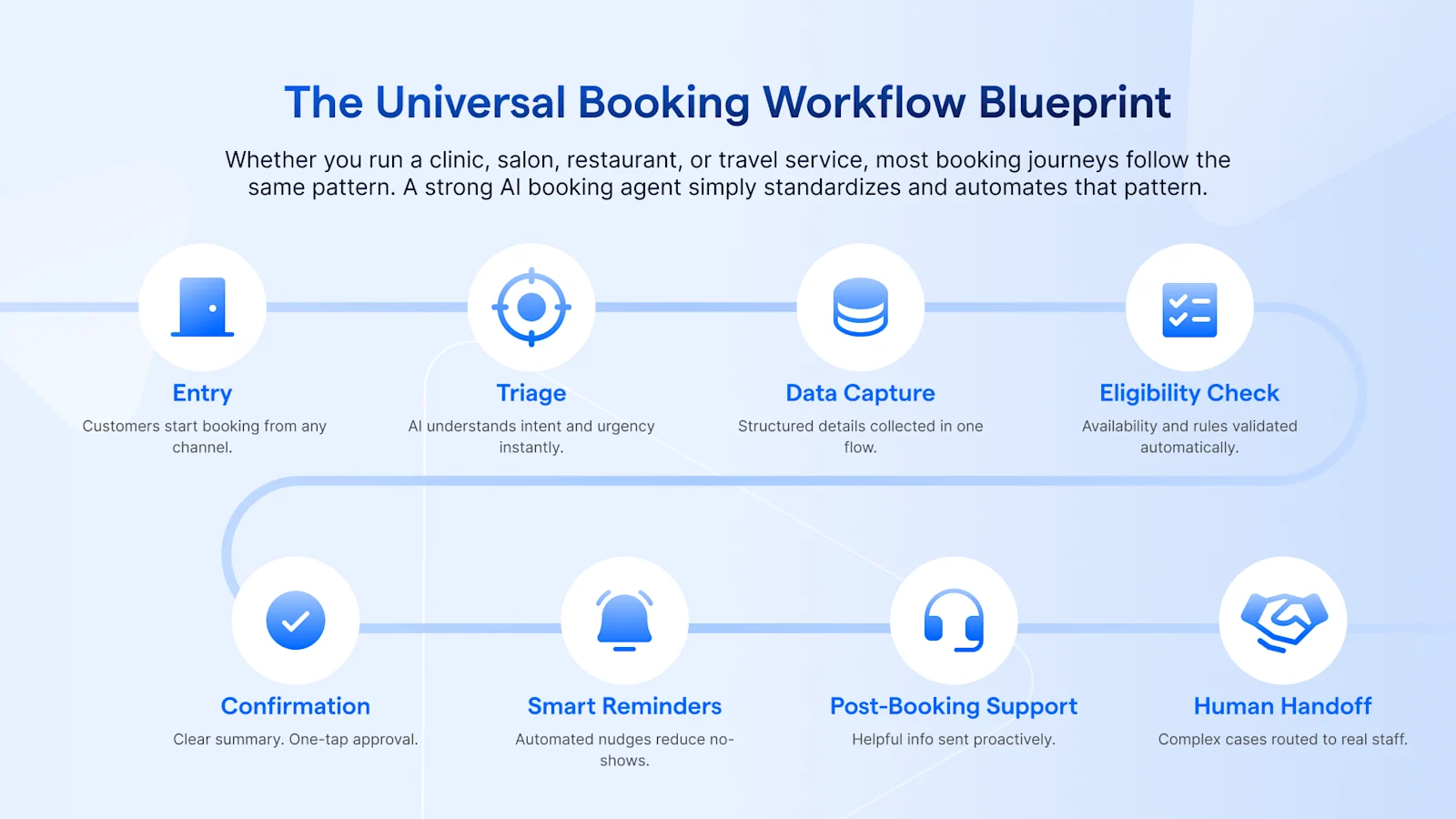
The Universal Booking Workflow Blueprint
Whether you run a clinic, salon, restaurant, or travel service, most booking journeys follow the same pattern. A strong AI booking agent simply standardizes and automates that pattern.
Below is a practical blueprint you can apply across industries.
Step 1: Entry Point
Customers enter the booking flow through:
Step 2: Triage
The booking AI agent identifies:
What the customer wants
Urgency
New or existing customer
Example (WhatsApp)
“Hi! Are you booking for today or another date?”
Clear. Short. No confusion.
Step 3: Structured Data Capture
The AI appointment booking agent collects:
Preferred date and time
Service or travel type
Party size
Location
Contact details
Example (SMS)
“Reply with: DATE, TIME, SERVICE. Example: 15 March, 4pm, Consultation.”
Minimal back and forth.
Step 4: Eligibility Rules
The system checks:
Operating hours
Staff or seat capacity
Deposit rules
Lead time requirements
Cancellation policy
If conditions fail, the AI suggests alternatives instead of rejecting silently.
Step 5: Confirmation
Once validated, the agent sends a summary:
Example (WhatsApp)
“Booking summary:
Dental Cleaning, 15 March at 4pm, Clinic: Bandra
Reply YES to confirm or type CHANGE.”
Customers see exactly what they are agreeing to.
Step 6: Smart Reminders
Automated reminders reduce no-shows:
24 hours before
2 hours before
Reschedule option included
Example (SMS)
“Reminder: Appointment tomorrow at 4pm. Reply R to reschedule or H for help.”
Step 7: Post-Booking Support
After confirmation, the AI agent for booking appointments can send:
Directions
What to bring
Add-on suggestions
Feedback request
This improves preparedness and satisfaction.
Step 8: Human Handoff
Not every case should stay automated.
Escalation triggers:
VIP customers
Complex travel itineraries
Special medical or regulatory requests
Customer types “Speak to agent”
Example
“I’m connecting you to a team member now.”
The handoff must feel visible and smooth.
AI Agents for Travel & Hospitality: Managing Complexity Without Chaos
Travel bookings involve multiple decisions, changing prices, and supplier rules. A strong AI travel booking agent should guide customers clearly without overwhelming them while keeping operations structured behind the scenes.
Handle complex inquiries with structure. Travel questions often involve itineraries, date changes, refunds, visas, add-ons, and group discounts, not simple one-click bookings.
Follow a guided booking flow. Start with basics (destination, dates, budget, number of travelers), then offer next steps like requesting a quote, booking a consultation, or viewing shortlisted packages.
Collect detailed information at the right time. Ask for passport or full traveler details only after interest is confirmed to reduce drop-off.
Plan for dynamic changes. Account for cancellations, rebookings, supplier rules, and group approvals, escalating complex cases to human agents when needed.
Manage price and inventory volatility. Add “subject to availability” disclaimers, reconfirm pricing before payment, and sync with booking systems whenever possible.
Support, not replace, consultants. AI filters casual inquiries, structures incomplete requests, sends summaries and reminders, and escalates high-value itineraries, freeing travel advisors to focus on planning and relationships.
When designed well, AI brings order to travel complexity without removing the human touch where it matters most.
Flight Changes & High-Risk Requests: Where AI Must Escalate
Not every request should be handled automatically. Flight changes involve fare rules, penalties, and airline restrictions, areas where an AI travel booking agent must prioritize accuracy over speed.
Acknowledge, don’t promise. When a customer requests a change, confirm you’ll check options, never guarantee availability or pricing upfront.
Collect essential details first. Capture booking reference, passenger name, current flight, preferred new timing, urgency, and flexibility before escalating.
Set clear expectations. Explain that changes depend on fare rules and seat availability, and that the request will be verified with the travel team or airline system.
Avoid assumptions. Do not confirm seats, quote final prices, or approve changes without live validation.
Provide a visible next step. Let customers know when they’ll receive an update (e.g., within 30 minutes) and offer an “URGENT” option if time-sensitive.
Escalate with structured data. By collecting complete information before handoff, human agents can focus on resolving the issue instead of gathering missing details.
In high-risk travel scenarios, responsible escalation protects both the customer experience and your operational integrity.
AI Agents for Restaurants: Automating Reservations & Waitlists
Restaurant decisions happen quickly. If confirmation takes too long, diners choose another place. A well-designed AI booking agent helps manage reservations, peak traffic, and waitlists without overloading the host desk.
Handle common requests instantly. Party size, date and time, seating preference, menu questions, deposits, and wait times can all be managed in a structured flow.
Guide bookings step by step. Capture guest count → show available slots → confirm seating preference → apply deposit rules (if needed) → send a clear booking summary with an easy “CHANGE” option.
Automate reminders and late notices. Send reminders 24 hours and 2 hours before, plus simple replies like “LATE” to hold a table briefly or “C” to cancel.
Manage waitlists dynamically. When fully booked, add guests to a waitlist, share estimated wait times, and notify them automatically when a table opens up.
Support multi-branch routing. Ask which location the guest prefers and route the booking to the correct branch calendar.
Escalate complex cases. Large groups, private events, or holiday bookings can trigger a handoff to the events team after the AI collects initial details.
The result: faster confirmations, fewer no-shows, smoother peak-hour operations, and a better guest experience.
AI Agents for Sales: Booking Qualified Consultations, Not Just Meetings
In sales, the goal isn’t to fill calendars, it’s to book the right conversations. A well-designed AI booking agent connects qualification with scheduling so meetings happen only when there’s real intent.
Qualify before showing calendar slots. Ask simple but important questions - timeline, problem to solve, team size, budget range, to filter serious prospects from casual inquiries.
Link qualification to smart routing. After capturing key details, the AI routes leads to the right rep based on territory, expertise, or round-robin rules.
Apply intelligent calendar guardrails. Respect time zones, minimum notice periods, buffer times, and daily meeting limits to prevent rep burnout and scheduling chaos.
Automate reminders and preparation. Once confirmed, the AI sends calendar invites, shares a short agenda, collects relevant documents, and follows up with reminders (e.g., 24 hours and 1 hour before).
Set clear expectations. Confirmation messages summarize the meeting purpose, time, and host, with an easy reschedule option to reduce no-shows and confusion.
When qualification and scheduling work together, booking becomes part of the sales conversion process, not just calendar management.
Designing AI Agents That Feel Like Concierge, Not Chatbots
Customers can instantly sense whether they’re talking to a rigid chatbot or a thoughtful AI booking agent. The difference isn’t just automation, it’s tone, clarity, and structure.
Keep prompts short and natural. Use simple questions like “What date works best for you?” instead of long, formal sentences. Short prompts reduce friction and keep things moving.
Offer structured replies. Use quick-reply buttons or clear options (e.g., Today / This weekend / Next week, or “Reply 1 for Consultation”). This minimizes typing and confusion.
Summarize before confirming. Restate key details, service, date, time, location and provide a clear confirmation option (e.g., YES to confirm, CHANGE to edit). This builds confidence and prevents mistakes.
Make human support visible. A simple line like “Type HUMAN to speak with a team member” reassures customers that help is available.
Stay polite, direct, and efficient. Ask one question at a time, guide the flow logically, and avoid unnecessary fluff, whether booking a facial treatment or a return flight.
When designed this way, an AI agent feels less like a script and more like a digital concierge guiding the customer smoothly from inquiry to confirmation.
Responsible AI Booking: Trust, Privacy & Operational Safety
Automation increases speed. Trust keeps customers coming back. A reliable AI booking agent must be designed with privacy, security, and clear accountability from day one.
Responsible booking automation is not about adding disclaimers at the end. It is about setting rules before the first message is sent.
Get clear consent. Customers should know why they’re being contacted, what updates they’ll receive, and how to opt out (e.g., “Reply STOP to unsubscribe”). Consent must be explicit and documented.
Collect only what’s necessary. An AI booking agent should request just the information required to complete the reservation, nothing more. Extra details can be gathered later if needed.
Control access and protect data. Define who can view conversations, edit bookings, process refunds, and access branch-level data. Centralized access control is key for safe scaling.
Be transparent about availability and pricing. If systems aren’t synced in real time, say so. Never guess on inventory or fares, confirm before finalizing.
Set clear escalation rules. Refund disputes, medical concerns, VIP cases, travel disruptions, or distressed customers should automatically trigger a visible handoff to a human agent.
Responsible automation is not about slowing down booking. It is about making sure speed does not come at the cost of trust.
How SleekFlow Powers AI Booking Agents Across Various Channels
Booking automation only works when conversations, workflows, and systems are connected. This is where SleekFlow fits in.
Booking automation only works when conversations, workflows, and systems are connected. Here’s a simplified breakdown of how SleekFlow enables that:
Unifies conversations across channels. An omnichannel inbox brings WhatsApp, SMS, Instagram, and web chat into one workspace, reducing missed messages and improving response times.
Automates booking workflows. With no-code Flow Builder, teams can capture details, apply business rules, route requests, and send confirmations automatically, cutting manual admin work.
Uses AI to manage triage. AgentFlow classifies intent, answers FAQs, labels contacts, and escalates complex cases, helping teams focus on serious booking requests.
Structures conversations to reduce back-and-forth. Guided replies, buttons, and forms keep chats clear and shorten booking cycles.
Connects with core systems. Integrations with calendars, CRMs, and payment tools keep availability, customer data, and booking status aligned, reducing errors and double handling.
The result: faster responses, cleaner workflows, and more accurate bookings across channels.
Real AI Booking Workflows in Action - SleekFlow Case studies
Below are real examples of how businesses use AI booking agents to convert conversations into confirmed bookings.
How Sun and Moon Converted Daily Inquiries into Confirmed Appointments with SleekFlow (Beauty & Wellness)
Sun and Moon, a beauty and wellness brand, was managing a steady flow of daily appointment inquiries through messaging channels. The team manually responded to each request, checked availability across branches, and confirmed slots individually. This created delays during peak hours and increased pressure on front desk staff. To streamline operations, Sun and Moon implemented SleekFlow’s omnichannel inbox and automated booking workflows. The system captured service type, preferred timing, and branch location in a structured format, then routed each inquiry to the correct team. Automated confirmations and reminders reduced repetitive coordination and improved booking accuracy.
Results:
Faster response times to daily inquiries
Achieving a 30% conversion rate with improved efficiency
Reduced manual routing across branches
1,500 monthly new contacts
How LUBUDS Group Streamlined Multi-Location Restaurant Reservations with SleekFlow (Restaurant Reservations)
LUBUDS Group operates multiple restaurant brands, each with different locations and reservation needs. Managing bookings across these outlets required careful coordination, especially during busy dining hours. Customers often needed guidance to select the correct restaurant before confirming their reservation. LUBUDS implemented a structured WhatsApp reservation workflow using SleekFlow. The system guided diners through restaurant selection, branch choice, party size, date, and seating preference before sending confirmation messages and automated reminders. Each reservation was routed to the appropriate branch automatically, reducing confusion and manual sorting.
Results:
Centralized reservation handling across multiple brands
Reduced manual coordination during peak hours
Improved visibility of bookings at branch level
How Travel Expert Group Increased Qualified Travel Bookings with SleekFlow
Travel Expert Group received a high volume of travel inquiries, but response delays and incomplete information slowed the booking process. Consultants often had to follow up multiple times to collect basic travel details before progressing toward a confirmed itinerary. By implementing SleekFlow’s AI lead capture and routing workflows, the company structured inbound conversations from the start. The system collected destination, travel dates, and traveler count before assigning each inquiry to the relevant consultant. Qualification questions helped prioritize serious prospects, reducing time spent on low-intent inquiries.
Results:
25% shorter response time
3X more qualified leads captured with automation
More chats converted into scheduled consultations
Increased confirmed travel bookings
Conclusion:
AI booking agents turn inbound conversations into structured, confirmed, and policy-compliant appointments automatically.
They reduce response time.
They standardize booking rules.
They help teams focus on service instead of coordination.
But automation must remain responsible. That means:
Clear consent mechanisms
Limited data collection
Accurate availability checks
Defined escalation policies
Human involvement for high-risk cases
When implemented with guardrails, an AI booking agent becomes a dependable digital front desk rather than a risky experiment.

