How to add live chat widgets to your website for revenue growth


TL; DR: Quick Summary
- Most websites lose conversions due to poor engagement, not lack of traffic; visitors leave without taking action.
- Live chat captures high-intent users in real time, turning passive browsing into active conversations and conversions.
- Modern chat combines AI, automation, and human support to qualify leads and guide users seamlessly.
- Key benefits: instant responses, reduced friction, higher conversions, and better user experience.
- Features like omnichannel messaging, CRM sync, and in-chat payments help close deals faster.
- Best practices include timing prompts smartly, asking qualifying questions, and enabling conversions within chat.
- Automation ensures 24/7 engagement and lead capture, even outside business hours.
- With the right setup, live chat becomes a powerful revenue-driving channel, not just a support tool.
Most websites don’t have a traffic problem—they have a conversion leak. Visitors land on your site, browse for a few seconds, hesitate, and leave. No form submission. No demo booking. No sale.
In fact, the majority of website visitors will never take action unless you engage them at the right moment. That’s where live chat changes everything. Instead of waiting for visitors to reach out, you can start the conversation when intent is highest—and guide them toward conversion in real time.
When used strategically, live chat isn’t just a support tool. It becomes one of your most effective revenue channels.
What does it mean to add a live chat to a website?
At its core, adding a live chat means placing a chat widget on your website so visitors can message your business in real time. But modern live chats go far beyond simple messaging. Today’s high-performing setups combine:
AI chatbot responses
Automated workflows
Real-time human conversations
This combination allows you to engage visitors instantly, qualify leads automatically and convert interest into action effortlessly. If you’re still relying on a “Contact Us” page alone, you’re likely losing high-intent visitors.
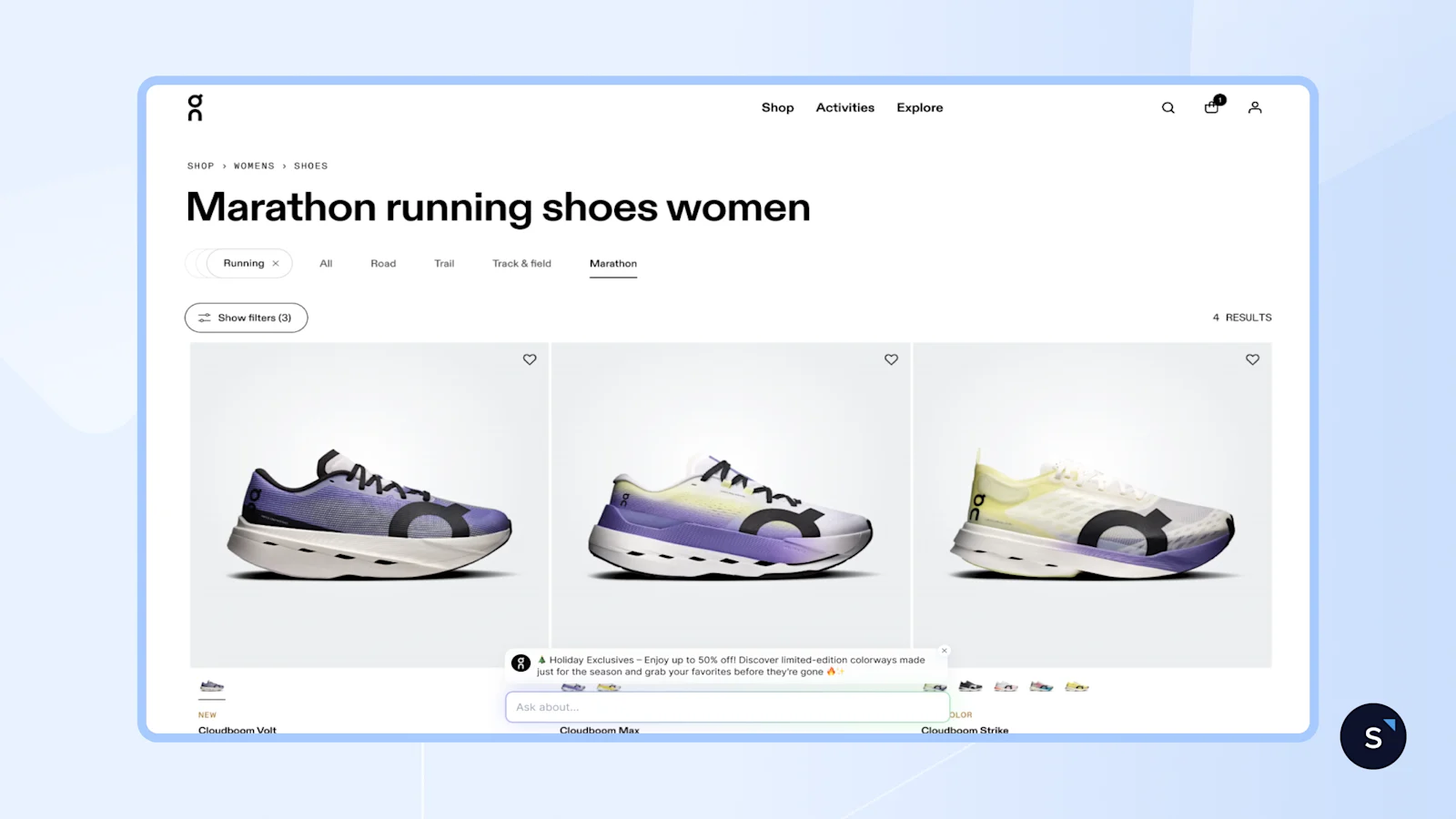
Why businesses are adding live chats to their website
Buyers today expect quick answers. If they do not get one from you, they will likely get one from a competitor. That’s why more companies are investing in chatbots for business solutions that engage users immediately and guide them toward a decision.
When you add a live chat to your website, you can:
Reduce friction: Let visitors get answers instantly without leaving your site.
Capture intent in real time: Understand their needs and recommend the right product immediately.
Increase conversions: After answering their questions, guide them to complete payment directly in the chat.
If you want a deeper breakdown of the differences between live chats and chatbots, this guide is worth exploring.
How to add a live chat to your website
Step 1: Choose a platform built for revenue, not just support
Not all live chat tools are built the same. Some are designed mainly for customer support, while others are built to help you capture leads and grow revenue. If your goal is conversion, look for a platform that offers:
AI automation that goes beyond basic scripts: It should understand natural language and respond with context, not just follow rigid if-then rules.
Omnichannel conversations: Chats should continue even after a visitor leaves your website, whether the conversation moves to WhatsApp, Instagram, SMS, or another channel.
CRM integration: Qualified leads should flow straight into your pipeline automatically, so your team can follow up without manual work.
Conversion analytics: You should be able to see which conversations influence leads, bookings, and revenue.
In-chat payments: The best platforms let customers complete the next step, like booking a demo or making a payment, without leaving the conversation.
SleekFlow's AI Growth Widget is built with all of this in mind. It brings together AI agents, omnichannel messaging, CRM integration, and conversion tracking in one place, while connecting with channels like WhatsApp, Instagram, and SMS through a single inbox.
Step 2: Sign up and enable the widget
Start a free SleekFlow account—no credit card required. Once inside, navigate to Channels in the left sidebar and click AI Growth Widget to enable it.
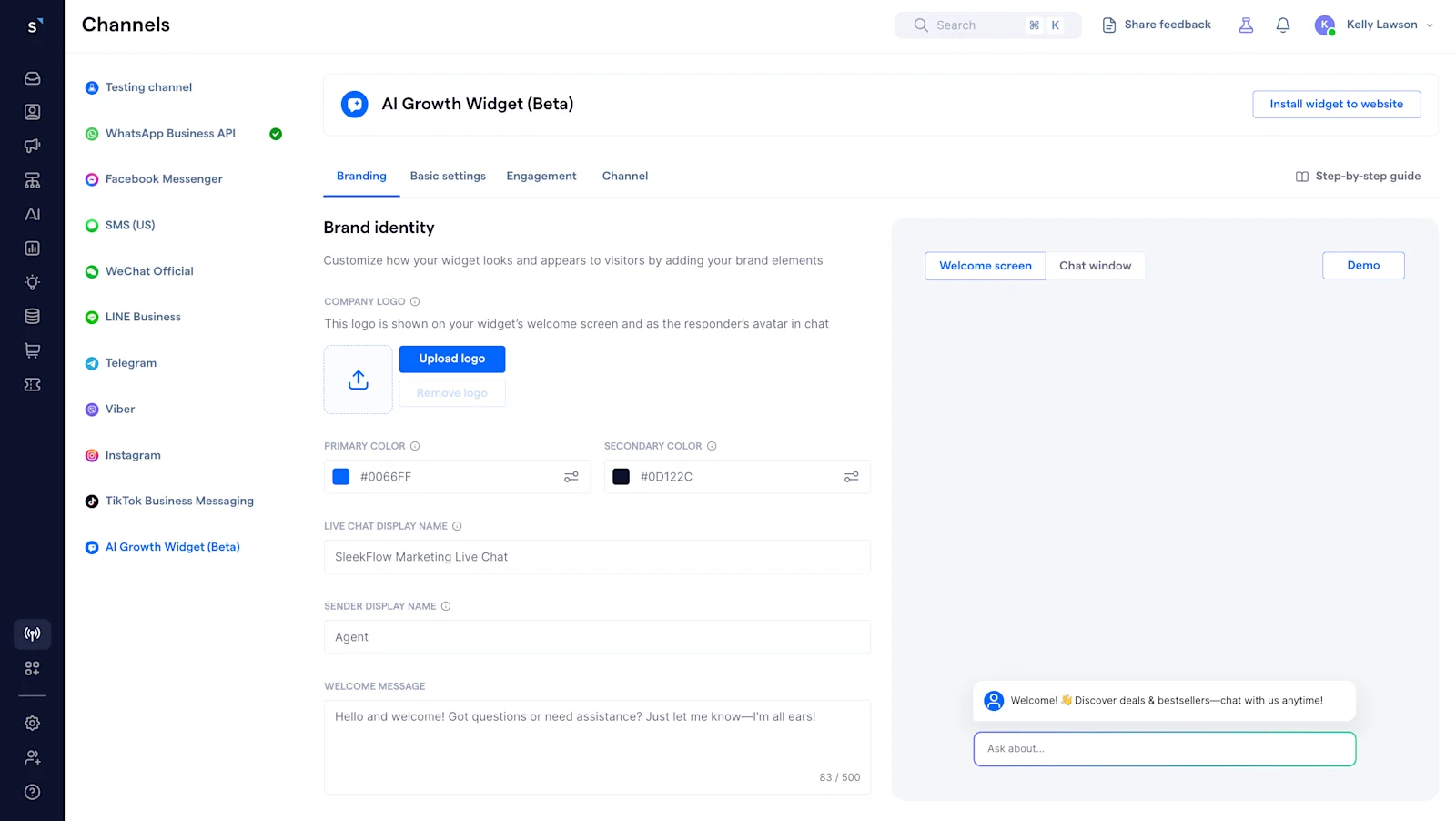
Step 3: Customize your widget setup
Use the setup wizard to configure your widget's appearance and behavior:
Branding: Upload your logo and choose the brand colors for your chat widget.
Basic settings: Customize the chat widget display mode and select your supported languages.
Engagement: Create targeted pop-up messages that appear based on specific URLs or time spent.
Channel: Set up contact forms to capture leads and enable your messaging channels.
Step 4: Get your embed code
Click "Get code snippet" in the top-right corner of the AI Growth Widget settings page. The code will be copied to your clipboard.
Step 5: Install on your website
For custom websites:
Paste the snippet before the </body> tag on every page where you want the widget to appear, or place it in the global <header> or <footer> to show it on all pages.
To install SleekFlow’s live chat widget on other platforms, follow this step-by-step guide:
Step 6: Build automated retargeting workflows
Use SleekFlow’s Flow Builder to automate what happens after a visitor interacts with your live chat. For example, you can use the AI Growth Widget contact form received trigger to start a follow-up workflow as soon as a visitor submits their details, then automatically send a WhatsApp message to continue the conversation.
Flow Builder is visual and no-code, non-technical teams can easily create, launch, and adjust these workflows without developer support.
Step 7: Connect your CRM
Integrate SleekFlow with your existing CRM or e-commerce tools so every qualified lead is automatically synced with your pipeline. This helps your team follow up faster, keep customer data organized, and make sure no opportunity gets missed.
Explore the full capabilities of SleekFlow’s AI Growth Widget and how it drives conversions.
Best practices for a high-converting chatbot for business
1. Trigger at the right moment, not the same moment everywhere
A visitor on your pricing page has very different intent from someone reading a blog post. For example, a pricing page prompt might appear after 3 seconds, while a blog prompt might wait 25 seconds. Your timing should match the visitor’s intent.
2. Ask one qualifying question before offering anything
A simple question like “Which service are you interested in?” or “What’s your budget range?” gives the conversation useful context. This helps route visitors more effectively and gives your sales team warmer leads instead of generic form submissions.
3. Enable conversion inside the chat
The highest-performing websites with live chat close the loop inside the conversation itself—booking demos, sending payment links, confirming appointments—without pushing the visitor to a separate form or page. SleekFlow's catalog and payment link features make this possible directly within the chat widget.
4. Define your human handoff rules before you go live
AI handles volume; humans handle value. Set clear escalation triggers—negative sentiment, billing questions, explicit "I want to talk to a person"—so the handoff happens smoothly, with full conversation context shared so the customer never has to repeat themselves. See how to set up live chat automation with the right escalation logic before you go live.
5. Turn off-hours into a conversion opportunity
Your visitors do not only browse during business hours, and they do not wait for your team to come online. A chatbot on your website can engage visitors, answer questions, and capture leads even at midnight. A contact form simply collects details. Chat keeps the conversation moving and helps turn after-hours traffic into real revenue. Learn how to set up automated live chat that works around the clock.
Page-specific setup playbook for your live chat widget
This is where many businesses miss conversion opportunities. Using the same welcome message on every page treats a pricing-page visitor the same as a first-time blog reader.
Your website chat should adapt to each page and the visitor’s intent.
Here’s how to set it up in SleekFlow’s AI Growth Widget:
How to see if your chat is driving revenue
Knowing whether your AI chatbot for your website is earning its place requires the right metrics. SleekFlow’s AI Growth Widget provides comprehensive tracking to measure conversions, performance, and revenue impact.
Adding live chat to your website is not just about improving support. It is about turning more visitors into leads and customers. With the right setup, you can engage high-intent visitors in real time, reduce drop-offs, automate follow-up, and create a smoother path to conversion. Done well, live chat becomes more than a widget. It becomes a revenue channel.
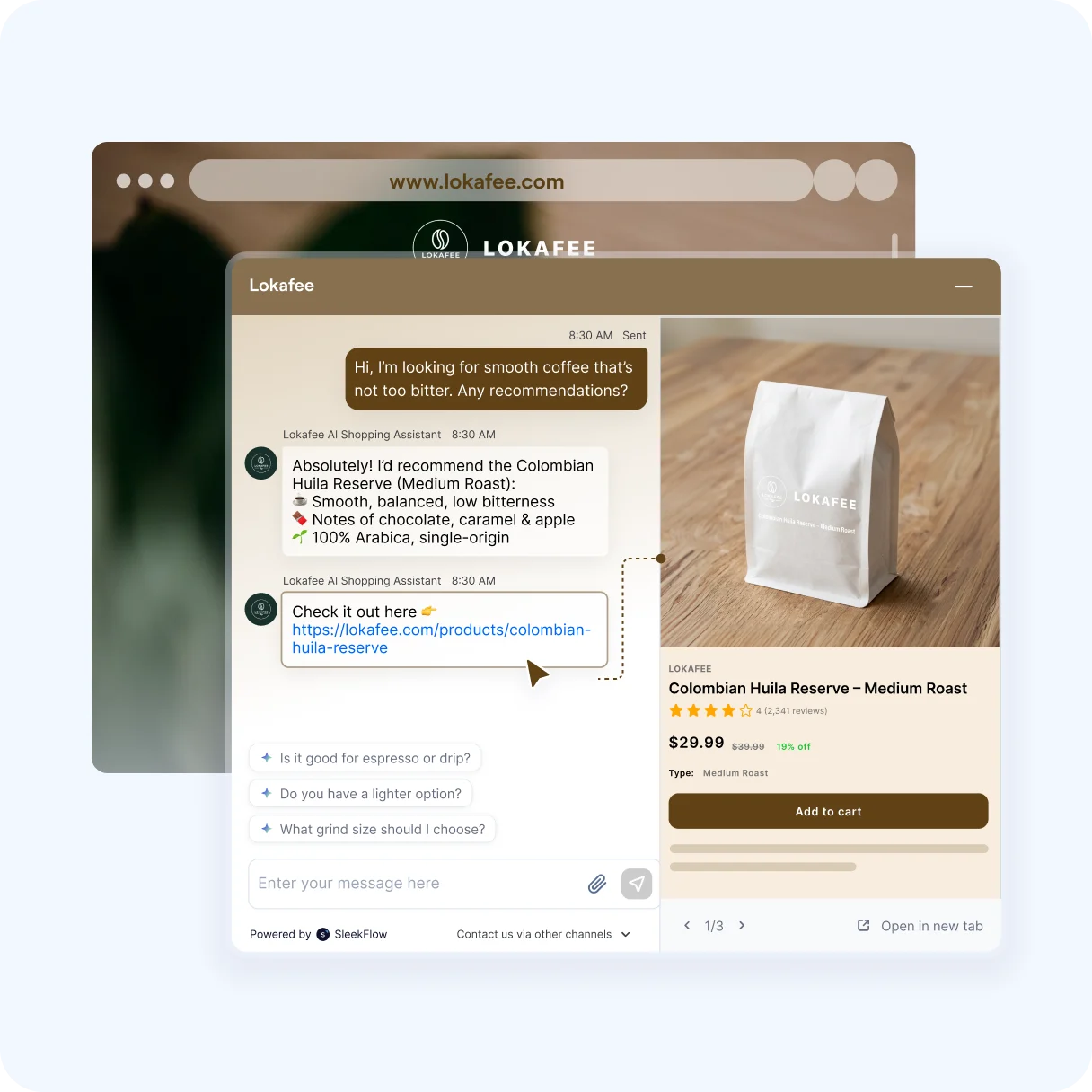
Turn your website into a conversion engine
Capture more leads, engage visitors in real time, and convert faster with SleekFlow’s AI Growth Widget. Get started in minutes.


