The ultimate guide for Salesforce-WhatsApp integration


TL; DR: Quick Summary
- Integrating WhatsApp with Salesforce centralizes chats, automates workflows, and personalizes sales and support at scale.
- Eliminates manual exports/imports by enabling two-way sync, unified inbox, and real-time activity tracking.
- Choose between native Salesforce tools or a BSP for more flexibility, omnichannel messaging, and faster setup.
- Ensure WABA approval, templates, compliance (GDPR/TCPA), and Digital Engagement access before launch.
- BSPs like SleekFlow offer no-code integration, automation, AI agents, and reduced onboarding time.
- Case studies show higher qualified demos, faster responses, time savings, and measurable revenue growth.
With over 3.3 billion active users, WhatsApp is easily one of the most popular communication tools worldwide. Integrating it with your Salesforce CRM can be a total game-changer for your team.
Salesforce WhatsApp Integration opens up exciting possibilities for businesses to enhance their customer communication. By combining Salesforce's powerful CRM platform with WhatsApp's widely used messaging capabilities, organisations can:
Streamline interactions
Manage conversations
Track customer engagement
Deliver personalised experiences
Whether it's supporting a sales pipeline or improving customer service, this partnership is transforming how companies connect with their audience.
What is Salesforce WhatsApp integration?
A Salesforce WhatsApp integration is about building a user-friendly, intuitive chat interface that lets Salesforce users interact with customers and manage WhatsApp communication easily.
WhatsApp is a powerful channel for reaching new leads, nurturing prospects, and closing deals worldwide. However, the manual process of sending a WhatsApp message to every Salesforce contact is repetitive and time-consuming. It involves:
Exporting contacts from Salesforce
Importing contacts into WhatsApp
Logging WhatsApp messages as activity in Salesforce
6 Key Considerations Before Integrating WhatsApp with Salesforcee
Looking to invest in a new Salesforce integration software? Want to build your own system with WhatsApp API and Salesforce API? Here are 6 things to consider for a successful Salesforce WhatsApp integration.
Use case: Where in your funnel will you use WhatsApp? For example, your customer service team might send booking details via WhatsApp. Make sure the tool integrates smoothly with your existing scheduling software (e.g., Vcita). If you plan to close deals on WhatsApp, check whether your Salesforce integration provider supports payment processing.
Omnichannel messaging: 71% of customers use multiple channels. If you want to engage Salesforce contacts across platforms, consider an omnichannel solution that brings all conversations into one place. This allows your team to switch seamlessly between WhatsApp, Viber, LINE, Telegram, and more.
Native vs. custom integration: Some businesses prefer a Salesforce-native integration to keep data within the platform. However, native solutions can be rigid. Many integration partners offer limited flexibility when adapting to specific workflows—for example, extending the setup to include other CRM tools like HubSpot.
Budget: Do you have the resources to build a custom integration? Beyond the initial development cost, you’ll also need ongoing maintenance and optimization. Factor in both short-term and long-term investment.
Pricing model: If you’re using a subscription-based integration, review the pricing structure carefully. Per-user pricing is simple but can become costly as you scale. Flat-rate pricing with flexible add-ons can offer better cost control and more predictable ROI.
Template management: WhatsApp API requires templates for messages sent after 24 hours of inactivity. How will you create, manage, and deploy these templates? Consider whether your team needs features like quick-reply templates or centralized approval workflows.
How to integrate WhatsApp with Salesforce and skip all the manual work of exporting and importing contacts into different systems? There are 2 options: Salesforce's products and third-party vendors.
TD; LR, here is a comparison table:
How to implement Salesforce WhatsApp integration?
Salesforce's WhatsApp integration has grown significantly since its launch. The introduction of Unified Conversations for WhatsApp transformed one-way messaging into dynamic, two-way conversations, all from a single WhatsApp number, powered by Salesforce Data Cloud, so marketers and service agents share the same unified customer profile.
The integration has since expanded further, with enhanced WhatsApp channels supporting advanced routing and AI bot features via Agentforce, alongside clearer API pricing differentiated by message category—utility, marketing, authentication, and service.
To integrate WhatsApp with Salesforce, you need to fulfill a few prerequisites:
A Salesforce org with Digital Engagement: Required for native WhatsApp messaging inside Service Cloud and Marketing Cloud.
A verified WhatsApp Business Account (WABA): Approved by Meta, with a dedicated phone number. Businesses must also comply with Meta's latest WhatsApp channel requirements to avoid service interruptions.
Access to the WhatsApp Business API via a BSP: This is where SleekFlow comes in. As an official Meta BSP, SleekFlow handles your API access, WABA onboarding, and template approvals, so you're not navigating Meta's approval process alone.
Admin access to Salesforce: To configure messaging channels, routing rules, and automation flows.
Pre-approved message templates: Required for all outbound proactive messages.
Compliance readiness: Current rules require recorded opt-ins (GDPR), opt-out options (TCPA), and restrict promotional messages in certain regions. Make sure your opt-in flows are set up before going live.
How to use Salesforce Marketing Cloud WhatsApp integration?
L'Oréal group is one of the first few Salesforce enterprises to extend their CRM strategy into WhatsApp. The group sends coupons and offers to customers who have abandoned shopping carts.
WhatsApp API features such as personalized broadcasts, list messages, and chat buttons make customer re-engagement easy.
For example, a brand can:
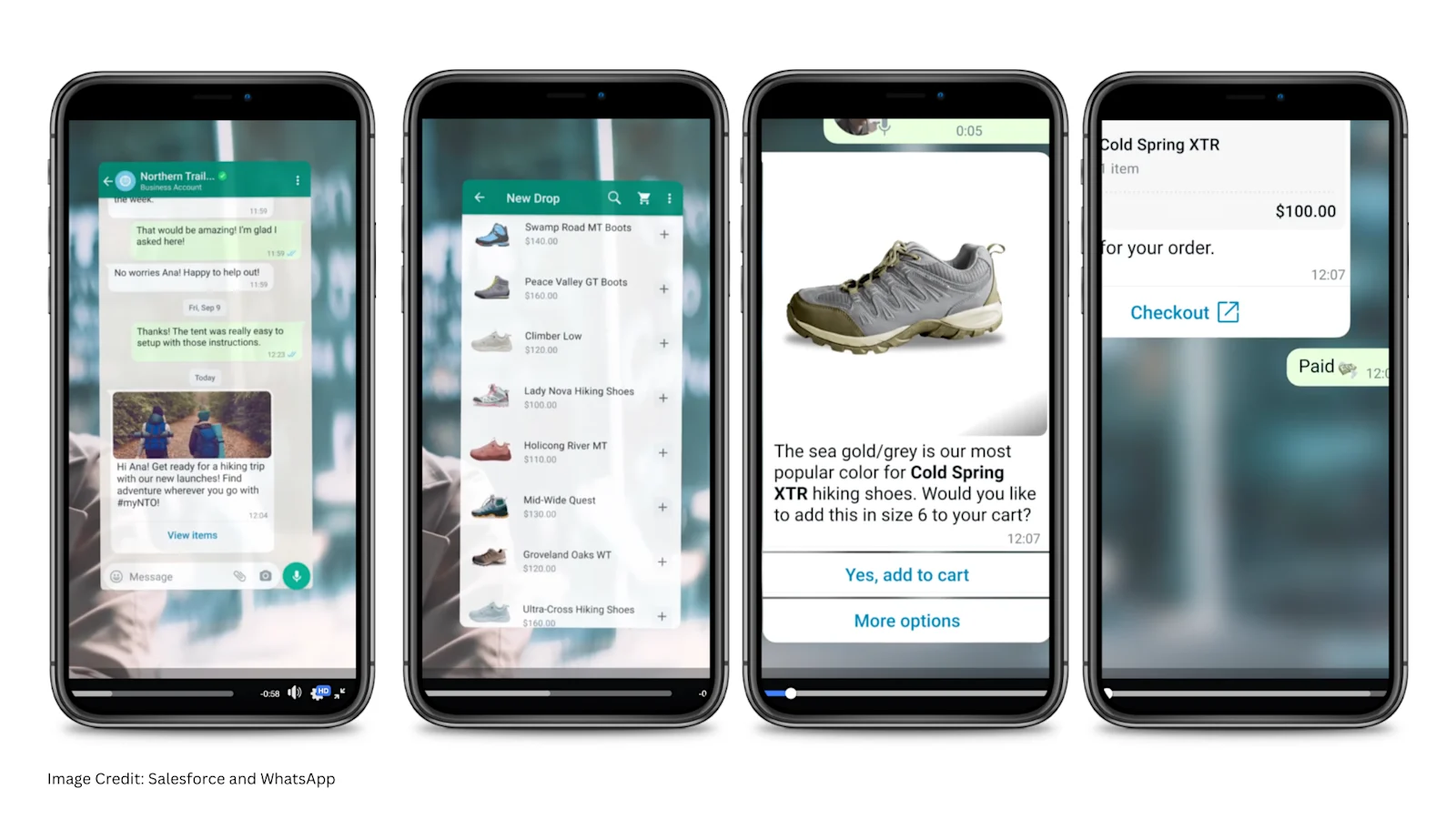
Embed a List Message in a personalized greeting to let customers browse their catalog.
Confirm the customer's order by setting up two quick reply chat buttons: 'Add to Cart' or 'More Options.'
Use a call-to-action 'Checkout' button to direct customers to pay on its e-commerce website.
The entire marketing journey happens within Salesforce, helping to maintain a single source of truth for the brand's customer data. Brands can deliver personalized customer service when they also use Service, Sales, and Commerce Cloud.
Follow our step-by-step setup guide in the SleekFlow Help Center to connect SleekFlow with Salesforce Marketing Cloud.
Find out more about what WhatsApp API can do from our ultimate guide to WhatsApp Business API.
Benefits of Salesforce integration services from WhatsApp Business Solution Provider
If you want to save development and maintenance costs for building your own WhatsApp API, consider paying for an ongoing subscription to a WhatsApp Business Solution Provider (BSP). Working with BSP comes with the following benefits:
No code integration solution
These partners feature software/ apps with pre-built features:
Team inbox
Bulk messages
Payment integration
Commerce integration
Other no-code tools to save you money in system development
They also provide a pre-built WhatsApp template manager to set up auto replies and auto-messages. BSPs also have a team of customer success specialists to help your business.
Cellini used SleekFlow’s CRM integration to drive sales through context-rich interactions
Cellini, a furniture designer in Southeast Asia. The brand struggled with fragmented communication across WhatsApp, Facebook, and website chats, leading to lost leads.
Without a unified view of the customer journey, sales agents struggled to provide personalized service and connect online chats with in-store visits.
Using SleekFlow’s CRM integration, Cellini moved all conversations into a single workspace. They used automated workflows to route and capture lead data instantly within the chat.
The system managed 1k+ monthly inquiries while maintaining a personalized touch.
It saved the team 90% of their time.
A single social media campaign generated nearly 500 high-intent leads.
Over SGD 10,000 in revenue was achieved for one showroom.
Shorten onboarding time
BSPs implement embedded signup on their platform and allow businesses to onboard to the WhatsApp Business Platform (access to WhatsApp Cloud API) directly from their website. If you choose the DIY method, the process involves multiple steps:
Connecting your WhatsApp Business Manager account
Creating WhatsApp Business Accounts (WABA)
Verifying phone numbers on different platforms
Working with a BSP reduces onboarding time from days to minutes by simplifying the process and making it happen in one place.
Specialized AI agents
Integration services enable you to deploy a team of specialized AI agents for specific roles, such as Lead Qualification or Customer Support.
Action execution: These agents don't just talk; they do. They can autonomously update CRM fields, schedule meetings, and process transactions.
Knowledge ingestion: You can upload your own PDFs, Excel sheets, and website URLs into a dedicated knowledge base. This ensures your agents provide accurate, brand-specific answers rather than generic AI responses.
Smart handoffs: When a query gets complex, the system manages the move from AI to a human. The agent hands over the chat along with a summary so your team doesn't have to ask the customer to repeat themselves.
Inbox Co-Pilot: This feature acts as a sidekick for your human staff, helping them draft responses, refine their tone, and summarize long chat histories to boost productivity.
How Checkmob boosted qualified demos with SleekFlow's direct CRM sync
Checkmob relied on WhatsApp to engage potential customers. Their Sales Development Representatives (SDRs) were responsible for managing initial conversations.
Manual data entry created a major bottleneck for the team. This administrative burden slowed the sales cycle, resulting in high-potential leads often falling through the cracks.
Checkmob used SleekFlow to automate data transfer between AI agents and their CRM. Conversation history and contact details sync instantly, giving SDRs full context for meetings.
A 20% increase in qualified demos
A massive 70% reduction in response times by utilizing AgentFlow
Connect Salesforce to WhatsApp with a BSP like SleekFlow
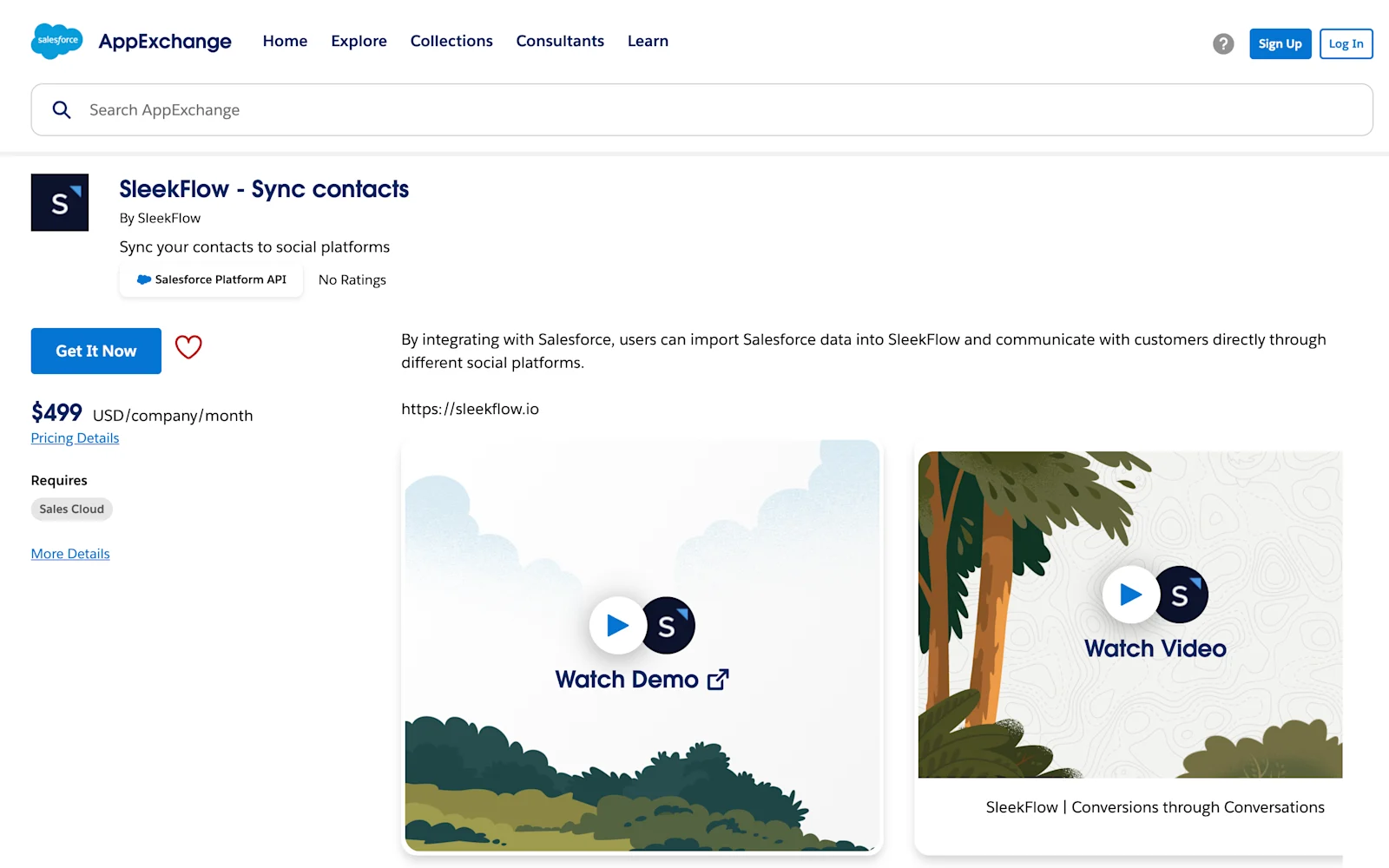
The integration method varies depending on which WhatsApp Business Solution Provider (BSP) you're working with. Some third-party vendors use the HTTP request method to retrieve data from Salesforce API. You will need to map the response manually. There are some potential failures in executing HTTP requests, such as invalid authorization.
Here's an example workflow of a user-friendly Salesforce integration solution designed by BSPs like SleekFlow:
Grant access to the WhatsApp Business platform to obtain data on a connected Salesforce account
Map Salesforce properties to the WhatsApp Business platform
Select the WhatsApp Business platform contact properties that would be synced back to Salesforce whenever there are updates
Map Salesforce accounts to the WhatsApp Business platform users
Define import conditions with custom filters
As an official Meta BSP with a native Salesforce integration, SleekFlow gives you everything you need in one place. Explore the key features and capabilities of our Salesforce WhatsApp integration here.
What to look for in a WhatsApp Salesforce integration solution
When searching for a way to integrate WhatsApp with Salesforce, there are a few key factors to keep in mind regarding your WhatsApp Business Solution Provider (BSP).
Automated contact filtering, mapping, and syncing
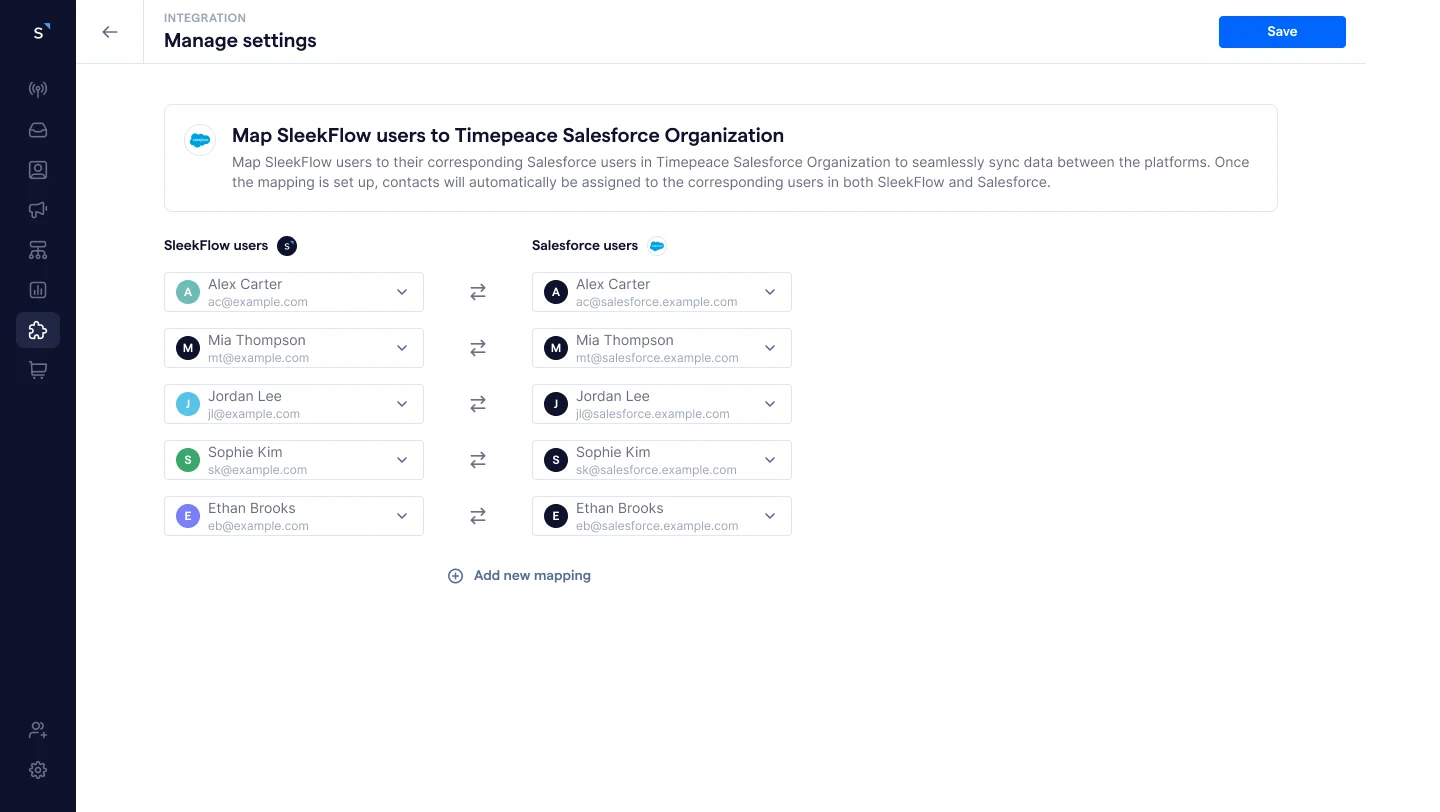
SleekFlow lets you sync contacts between Salesforce and SleekFlow, with support for creating and updating Salesforce object types, including Contact, Lead, Opportunity, Account, and Campaign. Any updates will sync automatically across both platforms, so your data is always current without manual intervention.
Matching Salesforce account owners to the WhatsApp Business Platform users
When a new contact is synced from Salesforce, it is automatically assigned to the corresponding SleekFlow user based on your mapping settings. Likewise, when a contact is created in Salesforce, the contact owner in SleekFlow will be assigned accordingly when the contact syncs over.
Offering two-way contact sync to mirror any contact information updates on the WhatsApp Business platform or Salesforce
The "Update Salesforce record" action node keeps customer data consistent across both platforms. For example, if a customer updates their phone number in SleekFlow, the change is automatically reflected in Salesforce. The same applies in reverse, ensuring neither platform ever falls out of date.
Ready to explore the power of Salesforce and WhatsApp integration? SleekFlow offers a free trial for the Salesforce integration add-on to all subscribers.
Frequently Asked Questions
How does Salesforce integrate with WhatsApp?
What CRM integrates with WhatsApp?
What is the WhatsApp CRM feature?
What are WhatsApp CRM best practices?
How does WhatsApp integration work?
Which WhatsApp business API is best?
Recommended for you


