WhatsApp usernames are coming: What your business needs to know


TL; DR: Quick Summary
- WhatsApp is rolling out optional usernames for both individual and business users, so people can chat without sharing phone numbers.
- Handles are globally unique and follow strict rules (3–35 chars, letters required, no “www”, no domains).
- Business usernames add brand discovery, not privacy. Your number still powers WABA onboarding and registration.
- Meta may reserve your display name as a username and let businesses to reserve a username early (often your brand name). Claiming early protects brand consistency before public rollout.
- If customers hide numbers, Meta uses BSUIDs to keep threads and automations intact, and the Contact Book can link BSUID to phone later.
- To collect numbers with consent, use “Share Contact Info” templates or WhatsApp Flows, then explain the reason clearly.
For over a decade, your phone number has been your digital "passport" on WhatsApp. But that’s about to change. As shared recently by Meta, WhatsApp is preparing to launch one of its most requested features: Usernames.
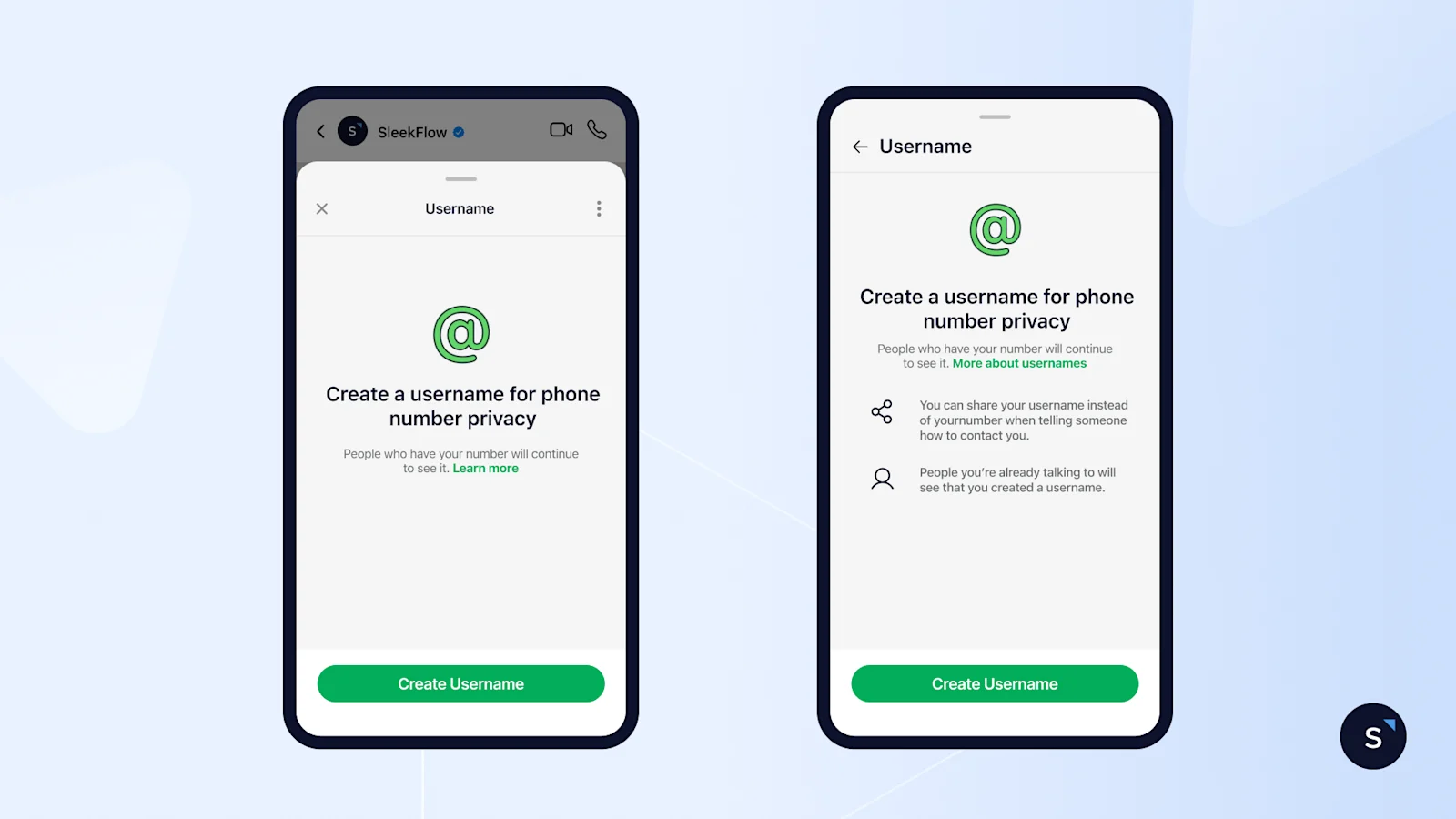
If you're using WhatsApp to engage with customers, this update deserves your attention. Here's everything you need to know about what's changing and why it matters for your business.
What is a WhatsApp username?
WhatsApp usernames are unique handles (e.g., @yourbusiness) that give users an alternative way to connect without sharing phone numbers. Similar to how usernames work on Instagram or Telegram, this feature adds a layer of privacy and convenience to WhatsApp conversations.
Usernames are optional. Both individuals and businesses can choose whether to use them. When enabled, your username lets people find and message you—whether in 1:1 chats, group conversations, or even voice and video calls, without ever needing to know your actual phone number.
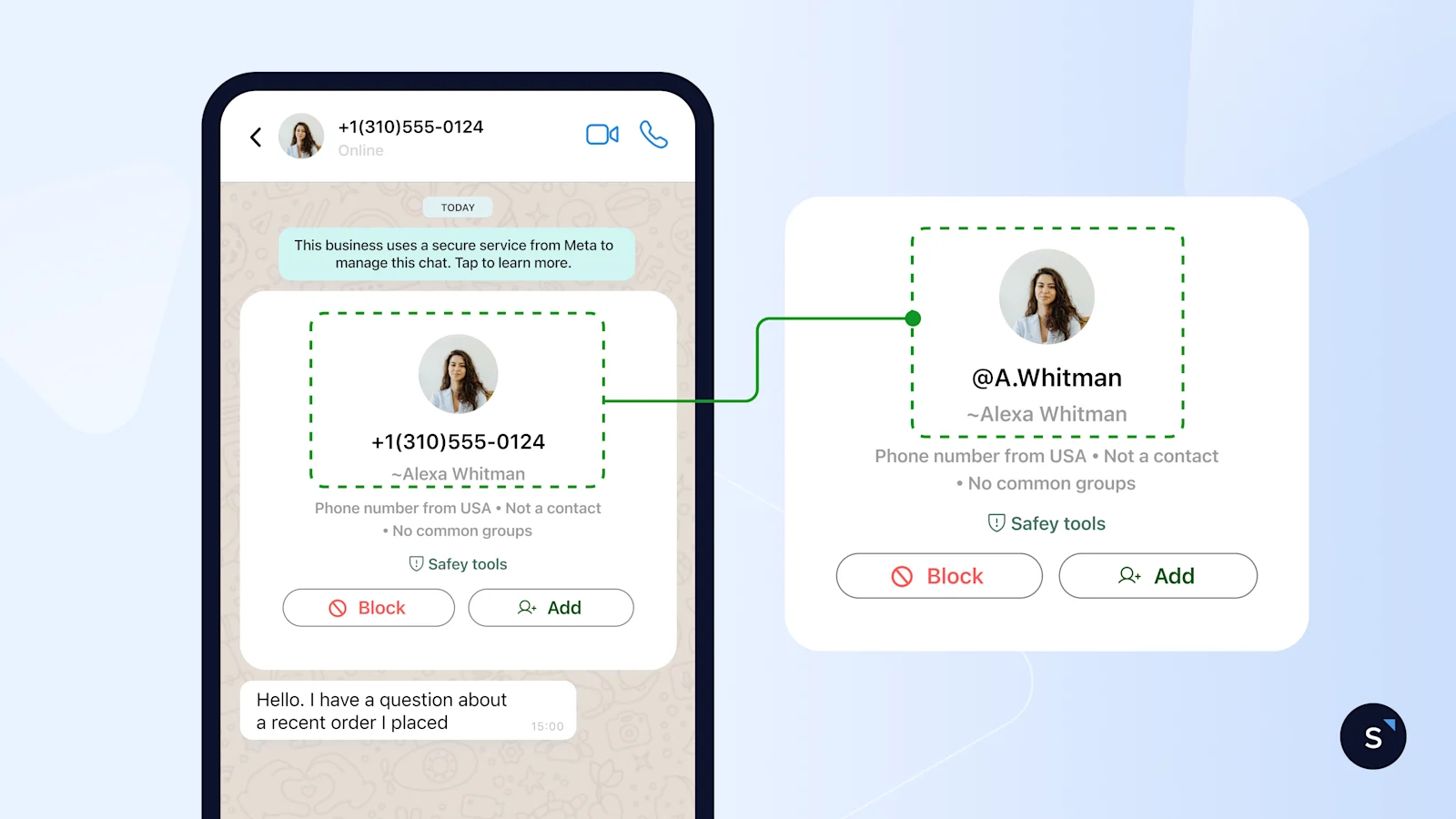
For businesses, this means you can build your WhatsApp presence around your brand name rather than a phone number, making it easier and more intuitive for customers to reach you.
What's the difference between “User” usernames vs. business usernames?
WhatsApp usernames apply to both individual users and businesses, but they serve different purposes and work slightly differently.
“User” usernames (for individual WhatsApp users)
A user's username is a unique, optional name that a WhatsApp user can set to represent themselves in WhatsApp chats, groups, and message content, keeping their personal number private.
For businesses, this also means a customer’s phone number may not always be shared by default when they message or call your business.
Some key things to know:
Each WhatsApp user can have one username at a time
Usernames can be changed periodically
Changing a username does not affect:
The user’s phone number
Their ability to message businesses or other users
Existing conversations or messaging history
Business Usernames (for WhatsApp Business/WABA accounts)
Businesses will also be able to adopt a business username, giving them a clearer, more brand-forward identity on WhatsApp. However, business usernames are for brand visibility, not privacy.
Adopting a business username does not hide your business phone number in the WhatsApp or WhatsApp Business app, and phone numbers are still required for WhatsApp Business API onboarding and registration. The username works as an additional identifier, not a replacement for your phone number.
A business username is:
Mapped to one specific business phone number
Restricted so that no two phone numbers (consumer or business) can share the same username
Business usernames must adhere to the following format:
may only contain English letters (a-z), digits (0-9), period (.), and underscore (_) characters
must be between 3-35 characters in length
must contain at least one English letter (a-z, A-Z)
must not start or end with a period or have 2 consecutive periods
must not start with www
must not end with a domain (e.g., .com, .org, .net, .int, .edu, .gov, .mil, .us, .in, .html, etc.)
case is ignored when comparing usernames, but period and underscore characters are not; for example, myID and myid are the same *username, but myid,
my.id, and my_id are all distinct
This ensures clarity, consistency, and trust so customers can be confident they’re chatting with the right business.
Business usernames vs display names
Business usernames and display names are often confused, but they serve different purposes on WhatsApp.
In short, your display name helps customers recognize your business in a chat, while your business username helps customers find and start a conversation with your business more easily.
Additionally, Meta may reserve your existing display name as your WhatsApp username by default, holding it for you before another business can grab it.
Username reservation: Securing your brand identity early
Meta already reserves certain usernames for businesses based on assets you've verified: your WhatsApp display name, Official Business Account name, Meta Verified name, connected Facebook Page, or Instagram Business handle. If one of those matches, you claim it. If not, you create a new one, as long as it's available and meets Meta's naming rules.
Claiming your username early still protects your brand: the moment it goes live, it points customers straight to your verified account instead of leaving your name open for a copycat to grab first.
To set it up:
Open Meta Business Suite (or WhatsApp Manager) and go to your WhatsApp Business Account.
Select the phone number you're setting up.
Open its Profile tab and find the Username section.
Click Create, then enter your preferred username or choose from Meta's suggested options.
Save. Meta confirms right away, and you can check back under Username anytime to see what's live.
You'll need admin access to the account, a phone number already connected to WhatsApp Business Platform, and a business that's completed (or eligible for) Meta Business Verification. Username availability also depends on Meta's rollout in your country or region.
For the full walkthrough, including both Meta Business Suite and WhatsApp Manager paths and what to do if a username won't save, see our full guide on creating or claiming a WhatsApp username.
BSUID: How customer identification works without phone numbers
When a customer opts to use a username instead of sharing their phone number, Meta automatically generates a Business-Scoped User ID (BSUID) for that customer-business pair.
Think of it as a private customer ID unique to your relationship with that specific user. It lets your contact records, automations, and conversation history stay intact regardless of whether a customer is identified by phone number or username.
How BSUIDs work:
It's unique per user within your business. No two customers share the same BSUID on your platform.
It's business-scoped. The same customer messaging two different businesses gets two different BSUIDs. You can't share or compare BSUIDs across accounts.
What is Meta's Contact book?
The contact book is a Meta feature that keeps phone numbers and BSUIDs connected on Meta's side.
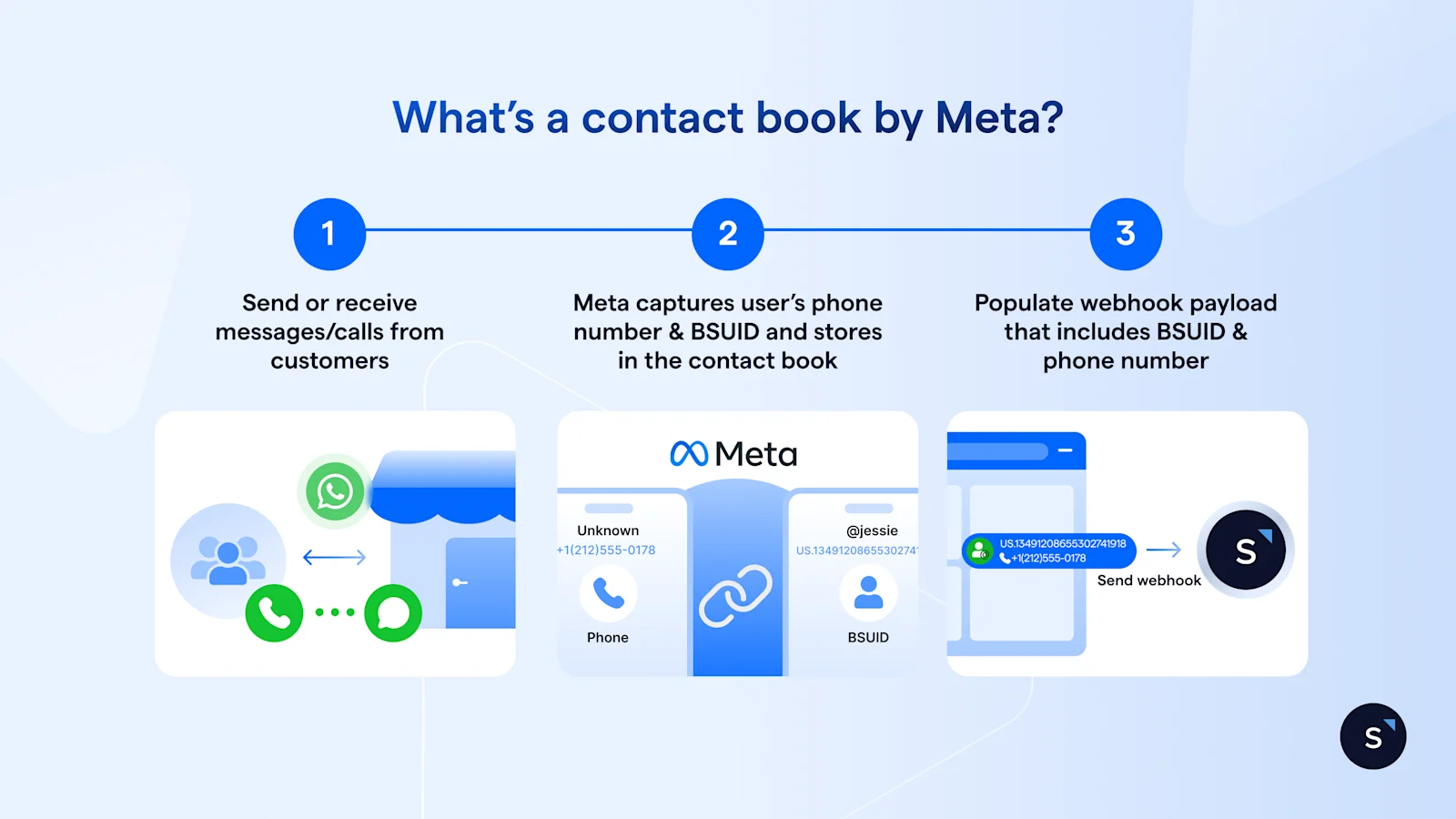
Businesses are encouraged to keep it enabled in the Meta Business Suite. When your business has previously sent or received messages or calls using a customer's phone number, WhatsApp can store that phone number and BSUID pair. The phone number may be included in future webhooks (subject to Meta's eligibility rules) to sync the phone number to your WhatsApp CRM like SleekFlow or other platforms, even if the customer later adopts a username.
How to collect a customer's phone number if they use a username?
Many businesses have real reasons to collect them: SMS fallback, order confirmations, account verification, or syncing records across platforms.
There are two ways to get customer consent to share their phone number with you on WhatsApp
1. Use the "Share Contact Info" button in message templates
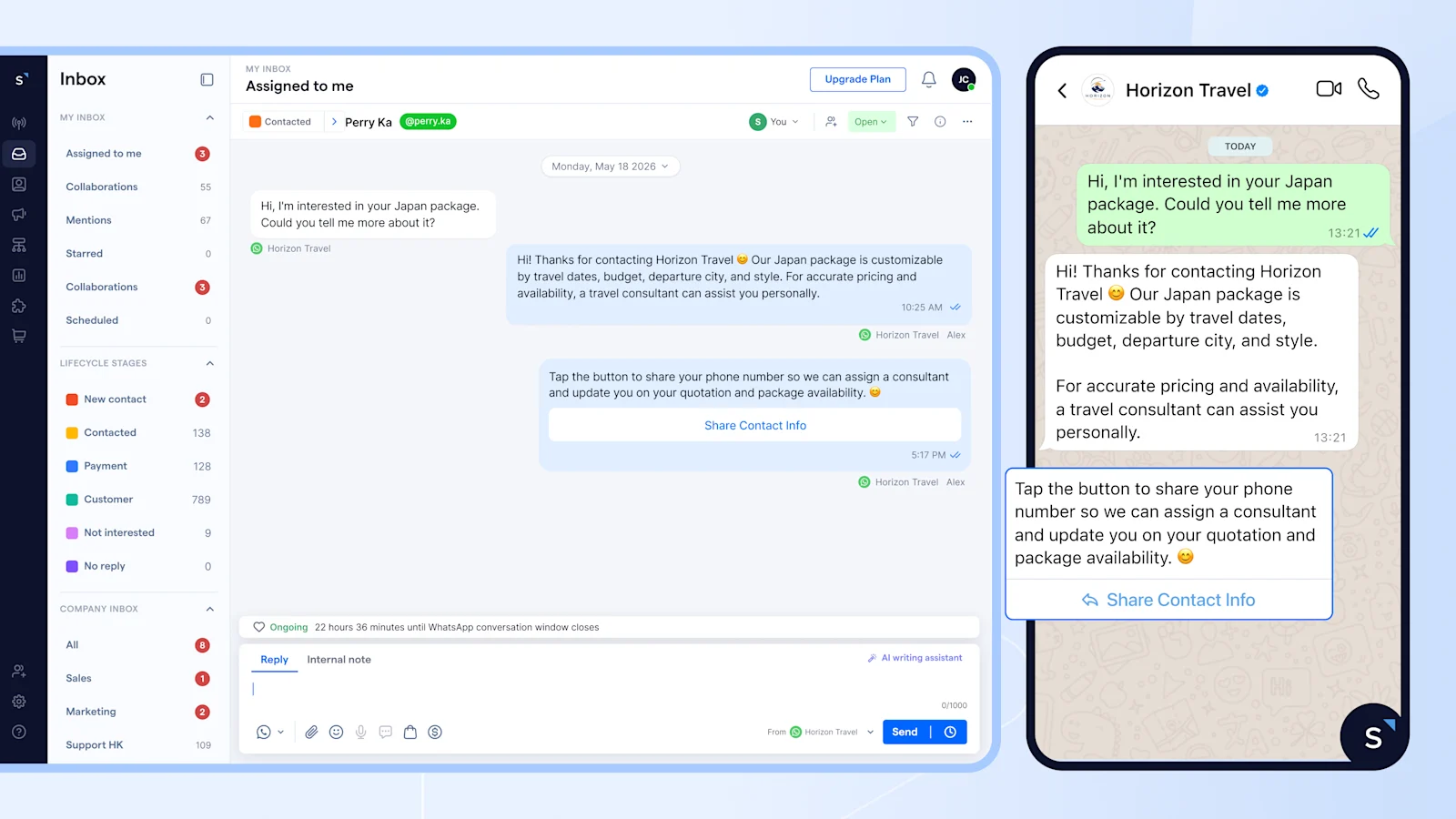
Businesses can use the "Share Contact Info" button available in SleekFlow to ask customers to share their contact information in the chat. Once the customer taps it, their phone number is automatically captured.
2. Use an interactive WhatsApp message or automation flow
For a more structured collection experience, businesses can use WhatsApp Flows to build in-app form or design an automation flow that prompts customers to share their details at the right moment in their journey.
Whichever method you use, always tell customers why you need their number. Customers who understand the reason are far more likely to respond.
For example: "Share your number to verify your identity and connect your account." converts. "Please share your phone number" does not.
Why do WhatsApp usernames matter for businesses on WhatsApp
So what does this updates actually mean for your day-to-day customer engagement on WhatsApp?
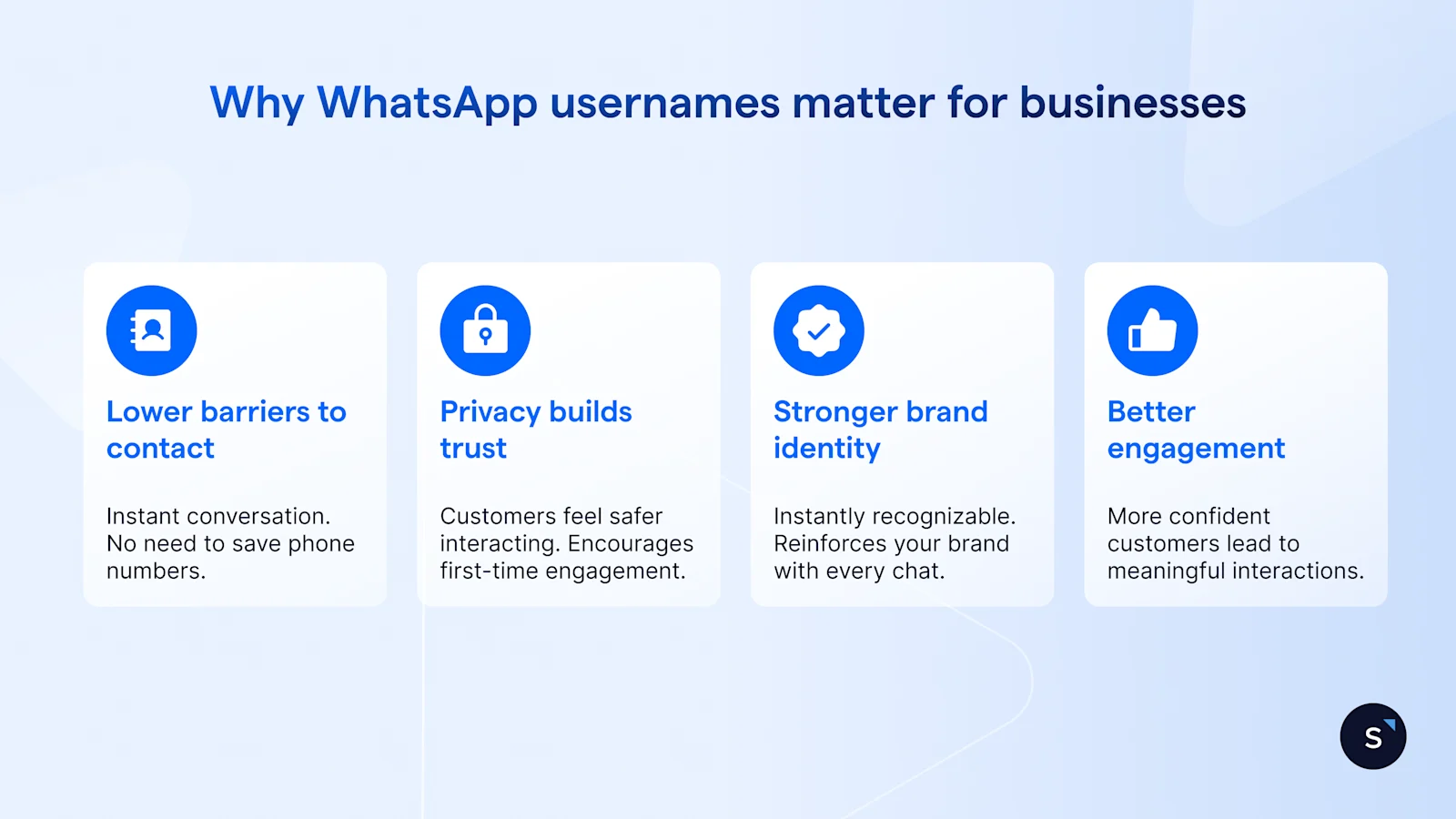
1. Lower barriers to first contact
Right now, potential customers need your phone number to message you. That creates friction—they need to save your number, or copy-paste it correctly. With usernames, the process becomes seamless. Customers can simply type @yourbusiness and start a conversation instantly.
How this simplifies your marketing:
Add your username to Instagram bios, Facebook posts, or business cards
Include it in email signatures or website footers
Share it verbally without the hassle of dictating a phone number
2. Privacy builds trust
According to recent research, 75% of consumers will refuse to buy from a business they do not trust with their data, and 48% have abandoned brands entirely over privacy concerns. This shows that customers are more comfortable engaging with businesses when they feel their personal information is protected. When usernames become available, everyone will have the option to use them, offering a balance between safety and simplicity.
This is particularly important for:
First-time customers who are still building trust with your brand
Privacy-conscious buyers who hesitate to share phone numbers
Younger audiences who expect privacy-first digital experiences
When customers know their phone number stays private unless they choose to share it, they're more likely to initiate that first conversation with your business.
3. Stronger, more memorable brand identity
Your phone number doesn't communicate anything about your brand. But @SleekFlowSupport or @YourCoffeeShop? That's instantly recognizable and reinforces your brand with every interaction.
For businesses managing multiple WhatsApp numbers (e.g., different departments or product lines), usernames can help organize and clearly distinguish these channels for customers.
4. Better engagement
People feel more confident engaging with businesses when their personal information stays private, while still retaining the choice to share their number if they wish. This confidence translates to:
More inbound customer inquiries
Higher engagement rates on WhatsApp campaigns
Better conversion from awareness to actual conversations
How WhatsApp usernames affect SleekFlow users
There's no action needed. SleekFlow is built for full backward compatibility ahead of the June 2026 rollout, so your existing workflows, contacts, and automations keep running without any changes from your team.
Contacts match by BSUID when a phone number isn't present, so conversation history stays intact and duplicates don't form.
New contacts can be created using BSUIDs, and linked to a phone number automatically if one becomes available later
Your automated WhatsApp workflows in Flow Builder keep triggering normally, whether a customer is identified by phone number or BSUID.
Broadcasts messages will still reach customers who adopt usernames using their BSUIDs, so these customers can continue to be included in your broadcast lists even when phone numbers are unavailable.
Frequently Asked Questions
Do WhatsApp usernames replace phone numbers?
Can I still capture customer phone numbers if they use a username?
What if my preferred username is already taken?
Can each of my business phone number have its own username?
Will I lose my conversation history if customers switch to usernames?
Do multiple WABAs under different business portfolios get different BSUIDs for the same contact?
- If a customer messages two of your WhatsApp accounts that sit under different portfolios, they'll have a different BSUID for each.
- If both accounts are under the same portfolio, the same BSUID applies across them.
- For businesses with multiple portfolios, Meta offers a parent BSUID that works across all enrolled portfolios.


