Shopify WhatsApp integration for your store


TL; DR: Quick Summary
- 69% of shoppers are more likely to complete purchases when they can chat via WhatsApp.
- WhatsApp–Shopify integration enables real-time support, automated order updates, and abandoned cart recovery.
- Personalized broadcasts and rich media drive higher engagement, conversions, and repeat sales.
- Official WhatsApp API offers deep automation, CRM sync, and scalable team access.
- SleekFlow centralizes chats, automates workflows, and provides actionable analytics.
- Brands report higher open rates, improved efficiency, and strong ROI from WhatsApp-driven campaigns.
Over 69% of consumers are more likely to finish a purchase from e-commerce sites that allow them to interact via WhatsApp.
If you haven’t started using a WhatsApp Shopify integration for your online store, SleekFlow is here to give you the ultimate how-to guide.
What is the WhatsApp Shopify integration?
The WhatsApp Shopify integration is a powerful tool that enables Shopify store owners to connect their online stores with WhatsApp, allowing for seamless communication with customers.
Key features of the WhatsApp Shopify integration
This integration leverages WhatsApp’s widespread usage and convenience to enhance customer engagement, improve support, and boost sales. Here are the key features and benefits of the WhatsApp Shopify integration:
Real-time Customer Support:
Store owners can provide instant customer support through WhatsApp, addressing inquiries, resolving issues, and assisting with purchases directly within the chat.
Order Notifications:
Customers receive automated notifications about their orders, including order confirmation, shipping updates, and delivery status, ensuring they are always informed about their purchase status.
Personalised Marketing:
Businesses can send personalised marketing messages, promotional offers, and product recommendations to customers, leveraging WhatsApp's high open and response rates.
Abandoned Cart Recovery:
The integration can send reminders to customers who have abandoned their carts, encouraging them to complete their purchases and thus reducing cart abandonment rates.
Increased Sales and Conversions:
By facilitating direct and personalised communication, the integration can help increase sales and conversions, as customers are more likely to make purchases when they receive prompt and relevant responses.
Overall, the WhatsApp Shopify integration offers a seamless way to enhance customer experience, streamline communication, and drive sales, making it a valuable addition for Shopify store owners looking to leverage the popularity and convenience of WhatsApp.
Why integrate WhatsApp with Shopify?
Integrating WhatsApp with Shopify offers numerous benefits for businesses, enhancing both customer communication and marketing efforts.
Improved Customer Communication and Support
Streamlines customer communication and enhances support.
Provide real-time assistance, addressing inquiries and resolving issues quickly.
Leads to higher customer satisfaction and loyalty.
Automated order confirmations, shipping updates, and delivery notifications keep customers informed and reduce uncertainty about purchases.
Enhanced Marketing Efforts
Elevates marketing efforts with personalized promotions, product recommendations, and cart recovery reminders.
Messages are delivered directly to customers' WhatsApp inboxes, leveraging high open and response rates to drive conversions.
Utilizes rich media like images and videos for a more engaging and interactive shopping experience.
Pristine Aroma used SleekFlow-Shopify integration to boost conversion rate via WhatsApp
Pristine Aroma, a Singapore-based home fragrance brand, found email marketing had low engagement and struggled to connect with their audience effectively.
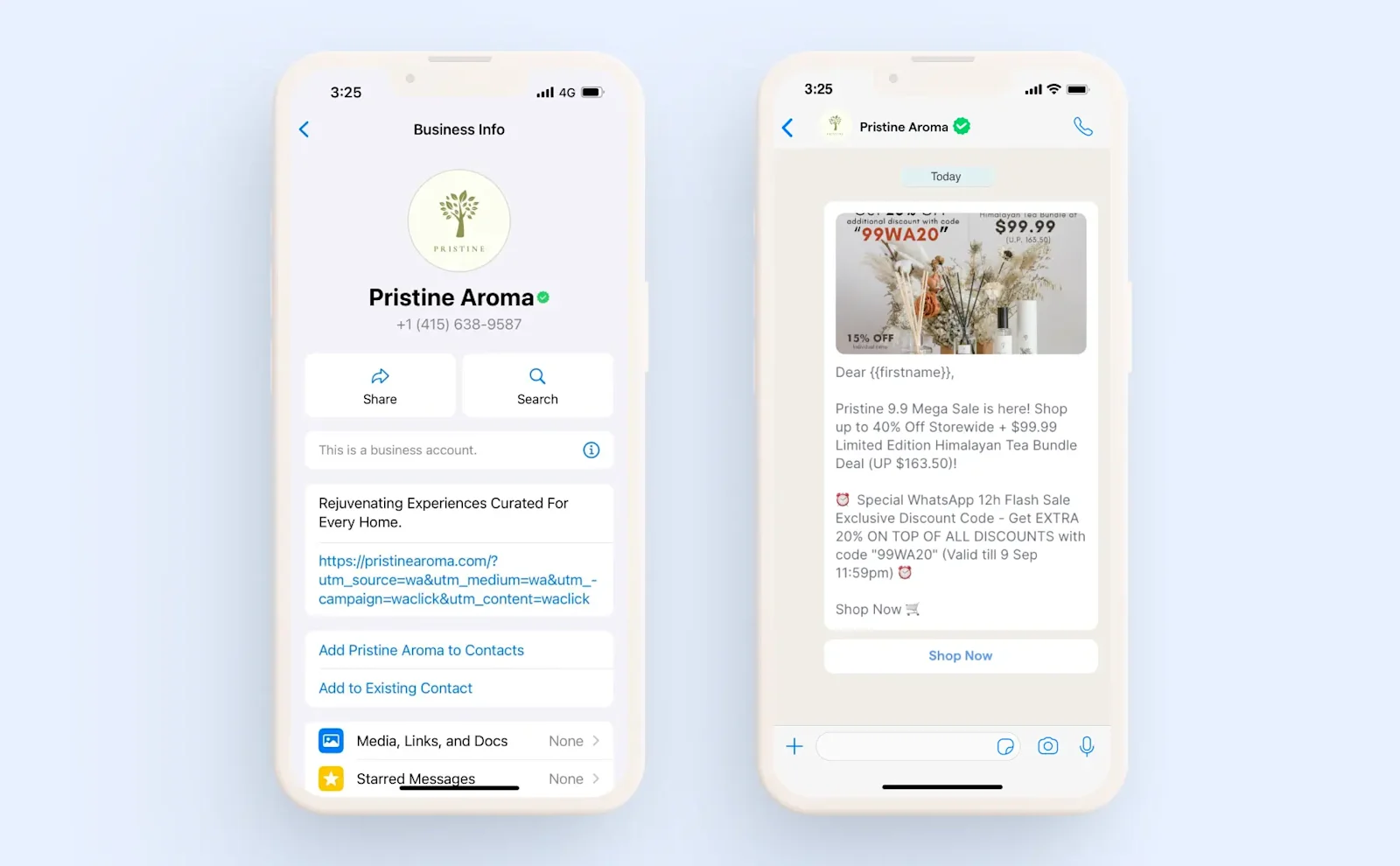
The brand needed a direct way to communicate with customers to boost conversions. Their customer service was inefficient, with the team managing inquiries from multiple platforms.
They integrated their Shopify with WhatsApp via SleekFlow. This allowed them to send targeted promotional broadcasts and automate lead generation from social media.
18% conversion rate and a 13x return on investment during a major sales campaign.
90% improvement in operational efficiency by centralizing all customer communications into a single inbox.
56% open rate and a 16% click-through rate for the campaign.
Easy Integration and Data-Driven Insights
Setting up the integration is simple and requires minimal technical expertise.
Gain access to analytics and insights to track customer interactions and campaign performance.
This data-driven approach helps optimize marketing strategies, boosts sales, and strengthens customer relationships.
3 ways to add WhatsApp to Shopify: Why SleekFlow is the best option
Integrating WhatsApp with your Shopify store opens up a world of possibilities for communication, customer support, and marketing. However, not all WhatsApp integrations are created equal.
1. Simple WhatsApp button on Shopify
The simplest way to add WhatsApp to Shopify is to embed a WhatsApp button on your store. This button lets customers easily start a chat with you. It’s a straightforward solution, especially for small businesses or those just starting out.
Pros: Quick setup and easy to use.
Cons: Limited to basic messaging. There’s no automation for abandoned cart recovery or order updates, so you’ll have to manage customer interactions manually.
2. WhatsApp integration via middleware tools (e.g., Zapier)
Middleware tools like Zapier allow you to create workflows that connect Shopify with WhatsApp. This can automate certain actions, such as sending a message to customers when they abandon their cart. While middleware tools offer more flexibility than a simple button, they still have limitations when it comes to deep integration with your Shopify store.
Pros: Greater flexibility in creating custom workflows between Shopify and WhatsApp.
Cons: Middleware tools can be complex to set up and require ongoing maintenance. They also don’t offer the depth of integration needed for more advanced automation features, like order status updates or personalized messaging.
3. Official WhatsApp API Integration
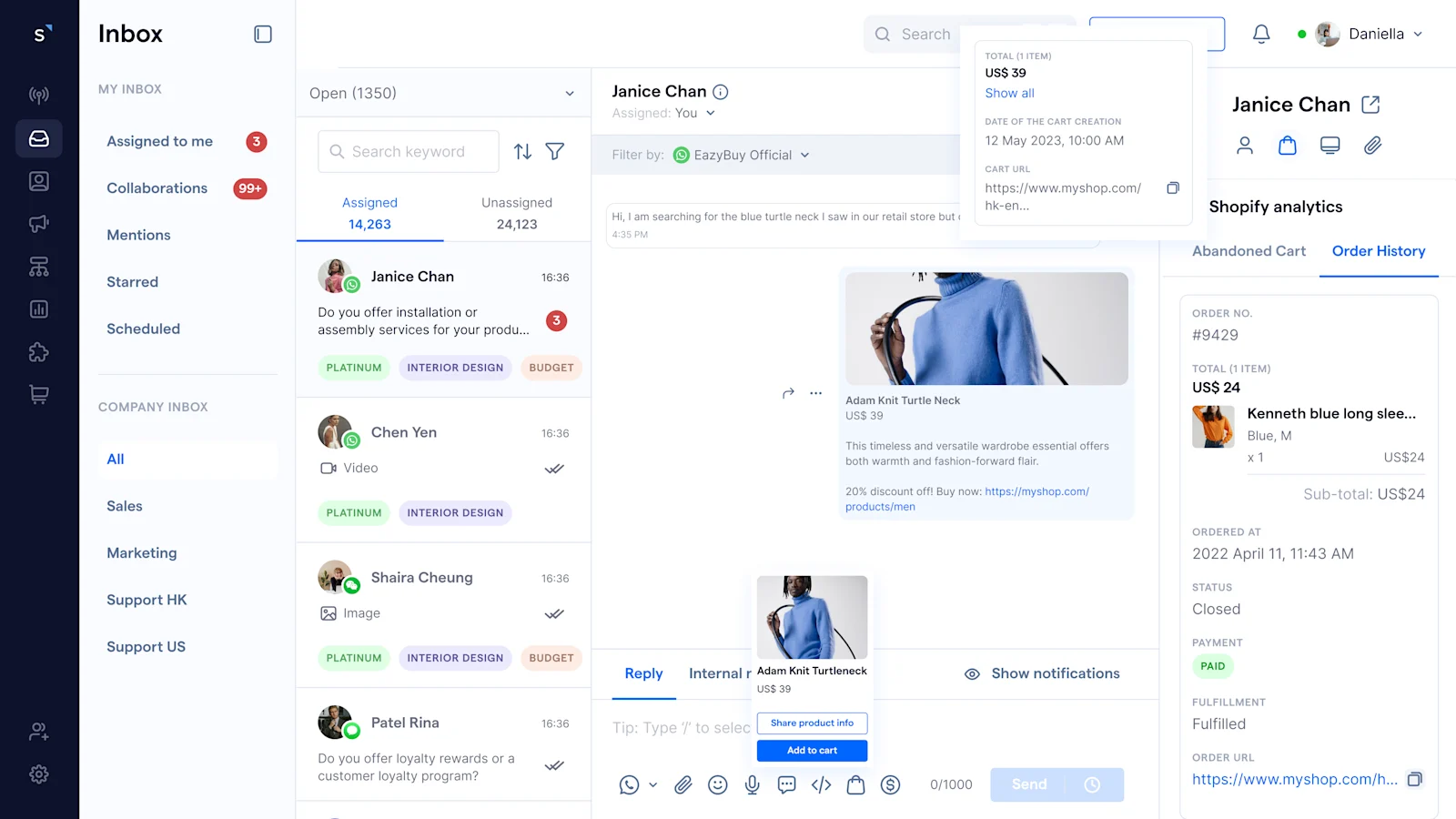
The most advanced and feature-rich way to integrate WhatsApp with Shopify is through the official WhatsApp API. SleekFlow is a fully approved WhatsApp Business API solution that offers the most powerful integration capabilities for Shopify merchants. It’s built to automate customer interactions using real-time Shopify data.
Pros:
Deep Shopify Integration: Automates processes like order updates, abandoned cart recovery, and marketing campaigns.
Personalized Customer Experience: Uses Shopify’s order data to send targeted, automated messages that are relevant to each customer.
Efficient Automation: Allows for full automation of customer support, ensuring no message is missed and no customer is left behind.
Scalability: As your store grows, SleekFlow can scale with your business to manage more customer interactions without increasing your workload.
Cons:
Setup: Setting up the official WhatsApp API integration may require a bit more effort upfront than simple button solutions, but the benefits far outweigh this initial effort.
Why SleekFlow is the best WhatsApp Shopify integration
SleekFlow is the most scalable, no-code solution for Shopify merchants looking to automate WhatsApp communication. With its official WhatsApp API integration, you can easily automate key processes such as order tracking, abandoned cart recovery, and personalized campaigns, with minimal setup.
SleekFlow offers a seamless, integrated experience that saves you time and enhances customer service, with no coding required and quick implementation.
How to integrate the WhatsApp Official API to Shopify?
To start using a WhatsApp Shopify integration, you are first going to need a WhatsApp Business API account.
WhatsApp Business app allows businesses to create a profile to display their company name, logo, website, location, working hours and product catalogue. It offers some basic tools to automate replies and check messaging statistics.
Medium to large companies often use the WhatsApp Business API, a powerful tool designed to handle business communications at scale. This allow:
A large team of customer service representatives can access one WhatsApp Business account at the same time.
Develop marketing automation tools to broadcast personalised messages at scale.
Integrate with your existing e-commerce store to send targeted messages like order notifications and shipping updates.
Blue verified badge and company name displayed on the profile even if the customer has not saved the business in their contact list, giving customers a confidence boost and reducing spam complaints.
Create advanced chatbots with AI agents.
Step 1: Create an Official WhatsApp API account through a WhatsApp Partner
Contact a WhatsApp Business API official provider like SleekFlow, and apply. Make sure you have the following before you submit your application:
A valid phone number
A Facebook Business Account
The whole process could take up to 2 weeks.
Read our guide if you want to know more about WhatsApp Business API?
Step 2: Connect your official WhatsApp Business account to SleekFlow
Once your Official WhatsApp API account is approved and provisioned, connect it to SleekFlow and manage WhatsApp messages in the inbox.
Other than being a WhatsApp manager, SleekFlow also allows you to connect to other channels, including:
Instagram DM
Your live chat widget
You can check incoming messages from all your existing channels in one place.
Step 3: Integrate Shopify to SleekFlow
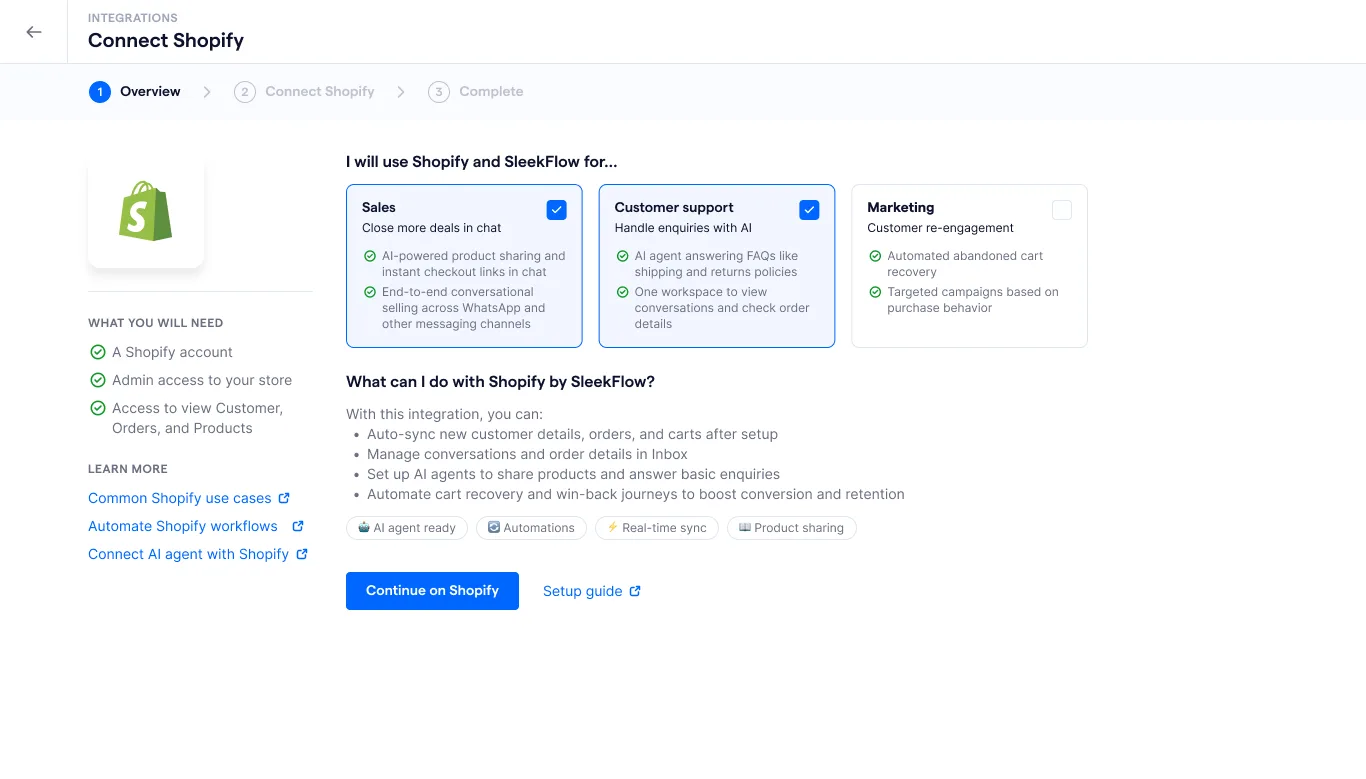
To start integrating your Shopify store with SleekFlow, follow these steps for a smooth and successful connection. Before you begin, make sure you've prepared the following:
Admin access to your Shopify store
You are logged in to the correct Shopify account
Granted read access to Products, Customers, and Orders
Once you've confirmed these requirements, follow the steps below:
Navigate to the Integration Page: Click on the integration icon in the left-sided navigation bar to access the “Integration” page.
Find Shopify Integration: Under the “E-commerce” section on the Integration page, locate “Shopify” and click on it.
Connect Shopify to SleekFlow: Click “Connect” to open the “Connect Shopify” page.
Authorize Connection: On the next screen, click “Continue on Shopify”. You will be redirected to Shopify, where you need to log in and approve the access permissions.
Successful Integration: After completing the authorization, you’ll be redirected back to SleekFlow’s Shopify integration dashboard. Here, you will see the status of your connected store updated to “Connected”.
Step 4: Send Shopify order updates through WhatsApp
Use SleekFlow’s Flow Builder to send order updates to your customers using WhatsApp messages. Create an automation rule that runs based on event triggers, for example:
Send order confirmation message once the customer has paid
Send order shipping status update once the order is delivered
Step 5: Send abandoned cart reminder through WhatsApp
Use the following 3-step sequence to recover abandoned carts and encourage customers to complete their purchase on Shopify via WhatsApp.
Message 1: Reminder + cart link (send 30-60 minutes after abandonment)
Start by reminding the customer about their abandoned cart. Include the link to their cart for easy access, so they can quickly pick up where they left off.
Example message:
"Hi [Customer Name], it looks like you left some items in your cart. Don’t worry! Your cart is still waiting for you: [Cart Link]. Feel free to finish your purchase whenever you're ready!"
Message 2: Handle objections (send 24 hours after abandonment)
If the customer hasn't returned to complete the purchase, follow up with a message addressing common objections like shipping costs, delivery times, or returns. Offer reassurance to overcome these barriers.
Example message:
"Hi [Customer Name], we noticed you haven’t completed your order yet. Just to clarify, we offer free shipping on all orders over $X, and your items will arrive by [ETA]. Plus, returns are easy if you're not satisfied! Here’s the link to complete your purchase: [Cart Link]."
Message 3: Incentive / urgency (optional, send 48 hours after abandonment)
Create a sense of urgency or offer an incentive, such as a discount or limited-time offer, to encourage the customer to finalize the purchase. This message should be sent only if compliant with your policies.
Example message:
"Hi [Customer Name], we wanted to remind you that your cart is about to expire! Complete your order within the next 24 hours and enjoy a 10% discount with code [DISCOUNT CODE]. Don’t miss out! [Cart Link]"
Benefits of using the WhatsApp API Shopify integration
Turning casual visitors into paying customers—and keeping them coming back—is one of the biggest challenges for online stores. However, Shopify store owners can integrate WhatsApp to extend their sales efforts beyond the e-commerce site. Here’s how WhatsApp can help:
Provide instant support – Answer customer questions in real time to remove purchase doubts.
Encourage quick action – Help customers make faster decisions with immediate, helpful responses.
Enhance customer service – Send real-time order updates, shipping confirmations, and fulfillment alerts.
Ensure secure conversations – Chat with end-to-end encryption for added data protection.
Understand customer behavior – Gain insights into purchase intent and habits to boost retention.
What does WhatsApp Business API pricing model look like? Check out our WhatsApp API pricing guide for details.
5 practical ideas to use WhatsApp to boost Shopify shop sales
Looking for ways to increase sales on Shopify using WhatsApp? Here are five practical strategies to drive conversions and improve customer engagement.
Recover abandoned carts with WhatsApp reminders
Ever wonder why customers leave items in their cart? It usually comes down to unexpected costs, slow delivery times, or a checkout process that’s just too complicated.
To win those customers back, you can:
Set up event-driven automation to send checkout reminder messages the moment a cart is abandoned.
Use chatbots to identify customer concerns and offer solutions—like an instant, time-limited promo code—to encourage them to complete their purchase.
Send automated transactional update messages
Keep customers informed with:
Automated order confirmations
Dispatch notifications
Delivery updates
This is especially useful for handling:
Delays
Cancellations
Ensuring transparency and reducing customer frustration.
Simplify checkout with one-click payment links
Make purchasing seamless by:
Sharing shopping cart details and sending a direct payment link via WhatsApp.
Allowing customers to check out with no need for new account sign-ups.
This creates a frictionless checkout process, leading to higher conversion rates.
Manage customer relationships through WhatsApp CRM
Juggling multiple platforms for customer interactions can be inefficient. A Shopify-WhatsApp integration allows you to:
View a customer’s WhatsApp chat alongside their Shopify purchase history and order status.
Provide faster, more personalized responses, improving customer satisfaction and retention.
Collect data and analyse shopping behaviour
Segment customers based on their Shopify purchase history and send targeted WhatsApp messages.
Use upselling, such as suggesting a phone with better camera features.
Try cross-selling, like recommending a phone case for a recent phone purchase.
Track WhatsApp engagement metrics and link them to actual Shopify sales, turning messaging insights into actionable sales data.
How Nutrition Kitchen used SleekFlow’s integration to boost sales via WhatsApp
Nutrition Kitchen is a healthy meal delivery service, they needed a modern way to keep up with their expanding customer base while maintaining a personalized touch.
The company struggled with low engagement rates on email and phone. They specifically faced high rates of abandoned carts and a support team overwhelmed by routine inquiries.
They moved to the WhatsApp API via SleekFlow. This allowed them to automate abandoned cart reminders and sync order history directly into a unified inbox for faster support.
A 98% open rate on messages.
A significant "bump up" in recovered sales.
SleekFlow is definitely suitable for any direct-to-consumer business, or anyone who needs to have regular communication with customers.

Wilfred Belsey
Head of Retention & CX


