WhatsApp routing: How to distribute conversations and leads with chatbots or AI agents


TL; DR: Quick Summary
- Round-robin routing shares leads evenly among your agents in a sequential order.
- Skill-based routing sends inquiries to agents who have the specific expertise needed, which helps you prioritize high-quality conversions.
- Cherry-pick routing lets sales reps choose their own leads from a shared pool. Just be sure to monitor it so no lead gets left behind.
- SleekFlow's Flow Builder supports all three methods. It includes features like keyword triggers, timed chat reassignment, and CRM integration. You can also use a chatbot to ask qualifying questions and automatically route conversations to the right team.
Picture this: It's a typical day in the life of a sales team. Your WhatsApp inbox is overflowing with messages from potential leads, each one a golden opportunity. But amidst this sea of prospects, the challenge looms large: how do you ensure that each lead is promptly and effectively handled by the right team member? This isn't just about responding quickly; it's about connecting each lead with the sales representative best equipped to turn that initial interest into a successful deal.
In this guide, we'll show you how to use SleekFlow's Flow Builder to create a WhatsApp routing system that intelligently distributes leads. Then, we'll explore how AgentFlow's AI Inbound Agent can qualify leads before they even reach your team. This frees up your sales reps to focus on what they do best: closing deals, not screening prospects.
What is WhatsApp lead routing?
WhatsApp lead routing refers to the strategic process of managing and distributing sales leads that come in through WhatsApp. This method represents a significant shift from the traditional practice of using personal WhatsApp accounts by sales agents to a more centralized and coordinated approach utilizing the WhatsApp Business API solution.
The WhatsApp API solution provides a shared team inbox that supports multiple agent log-ins and collects all incoming leads in one place. Consequently, it becomes easier to assign chats to the most appropriate sales representatives based on their expertise, availability, or specific sales territories.
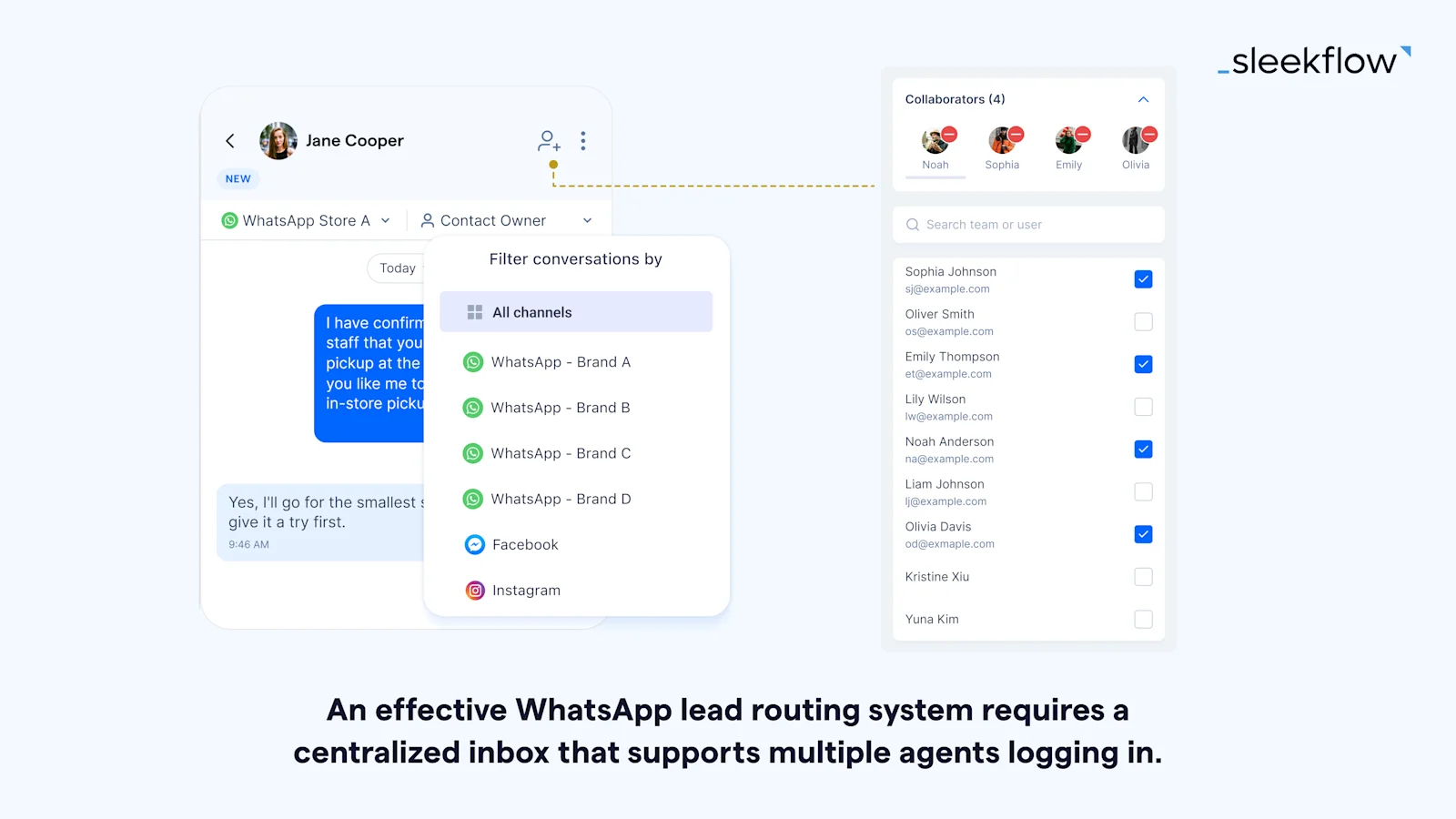
While traditional routing is a great starting point, it mainly focuses on distributing leads, not qualifying them. This means your best agents could be spending valuable time on low-interest inquiries while high-intent customers are kept waiting.
To make your lead routing more effective, try adding an AI layer. An AI agent, for instance, can instantly engage with every new conversation. It will ask qualifying questions to assess a lead's urgency and intent, automatically building a profile. The conversation is only handed off to a human agent once the lead is properly qualified, making your routing system smarter, not just faster.
Why WhatsApp lead routing matters for sales teams
In today's sales world, speed and precision are everything, especially when you're managing a flood of leads through a shared WhatsApp number. Without a solid routing system, two common problems arise. Either one agent gets swamped with too many leads and burns out, or leads get ignored because everyone assumes someone else will handle them. Both scenarios lead to slow responses, frustrated customers, and lost sales.
WhatsApp lead routing tackles these issues head-on, making it a crucial strategy for boosting sales performance. Here are the main benefits:
Improved Response Time: Automation instantly assigns leads to the right agent, dramatically increasing the chances of qualifying them.
Higher Conversion Rates: When you route leads to agents with the right expertise, you're more likely to close the deal.
Team Accountability: With clear assignments, you can easily track performance, coach your team, and spot any problems in the pipeline.
Scalability: As your lead volume grows, an automated system can handle it efficiently, avoiding the chaos of manual processes.
Better Customer Experience: Quick, informed responses make a great first impression and build strong customer relationships from the start.
WhatsApp compliance checklist for routing and automation
To build a successful WhatsApp automation system, you have to follow Meta's messaging policies every step of the way. If you don't, you risk getting warnings, number restrictions, or even a permanent ban, which would seriously disrupt your sales operations. Before you launch, use this checklist to make sure you're compliant.
Opt-in consent
Every contact in your routing flow needs to have opted in to hear from your business. Since November 2024, Meta has accepted a general opt-in that does not name WhatsApp specifically, as long as you comply with local law. Channel-specific consent is still the safer standard, and under regimes like GDPR a generic opt-in may not be enough for contacts in that region.
Make sure you have:
Specific WhatsApp Consent: Each contact must confirm they want to receive messages on WhatsApp.
Clear Opt-In Method: You need to get consent through a clear action, like a web form, a checkbox, a keyword reply, or even a physical sign-up sheet. Pre-checked boxes, consent buried in terms of service, and consent assumed from a purchase do not qualify.
Transparent Language: State the type of content you'll be sending, like promotions or order updates. Naming WhatsApp is no longer a Meta requirement, but it remains best practice and may be required under local data protection law.
Retrievable Records: You need to be able to provide proof of opt-in if Meta ever asks for it.
Verified Imports: If you import contacts, you must have verifiable proof that they opted into WhatsApp messaging.
Message template
Your automated messages must follow these rules:
Use Approved Templates: Any message you send to start a conversation outside the 24-hour service window has to use a Message Template that Meta has already approved.
Categorize Correctly: You need to categorize your templates as Marketing, Utility, or Authentication. This ensures they're delivered correctly and you're charged the right amount.
Populate Variables Accurately: The variables in your templates should always contain relevant information. Using personalization fields for the wrong purpose is a violation of policy.
Ensure Compliant Content: Your templates can't include prohibited content. Things like adult material, promises of financial returns, or drug references are all off-limits according to Meta's policies.
Review Regularly: Keep an eye on your templates and their quality ratings. This helps you avoid getting flagged due to negative user feedback.
24-hour messaging window
Your automation needs to know the difference between conversations happening inside and outside the 24-hour service window. Here's how to stay on the right side of the rules:
Within 24 Hours: You can send free-form automated messages, like chatbot questions, only within this window.
Outside 24 Hours: If you want to follow up with a customer who messaged you more than 24 hours ago, you have to use an approved message template.
Re-engagement: If you have flows designed to re-engage inactive contacts, they must use templates and stick to Meta's rules about how often you can send marketing messages.
Agent Training: Your agents need to understand that they can't send free-form messages to contacts who haven't messaged in the last 24 hours. The system must use a template to re-initiate contact.
Opt-out and unsubscribe
Your opt-out process needs to be simple and immediate. Here’s what to do:
Simple opt-out: Every automated message should include clear instructions on how to unsubscribe, like "Reply STOP to opt out."
Automated detection: Your system should be set up to recognize keywords like "STOP" and automatically take that person off your active lists.
Real-time processing: Make sure you honor opt-out requests instantly. Don't add delays or ask for re-confirmation.
3 types of WhatsApp chat routing techniques
In sales environments, especially those utilizing WhatsApp for communication, the effectiveness of lead routing techniques can significantly impact customer engagement and sales success.
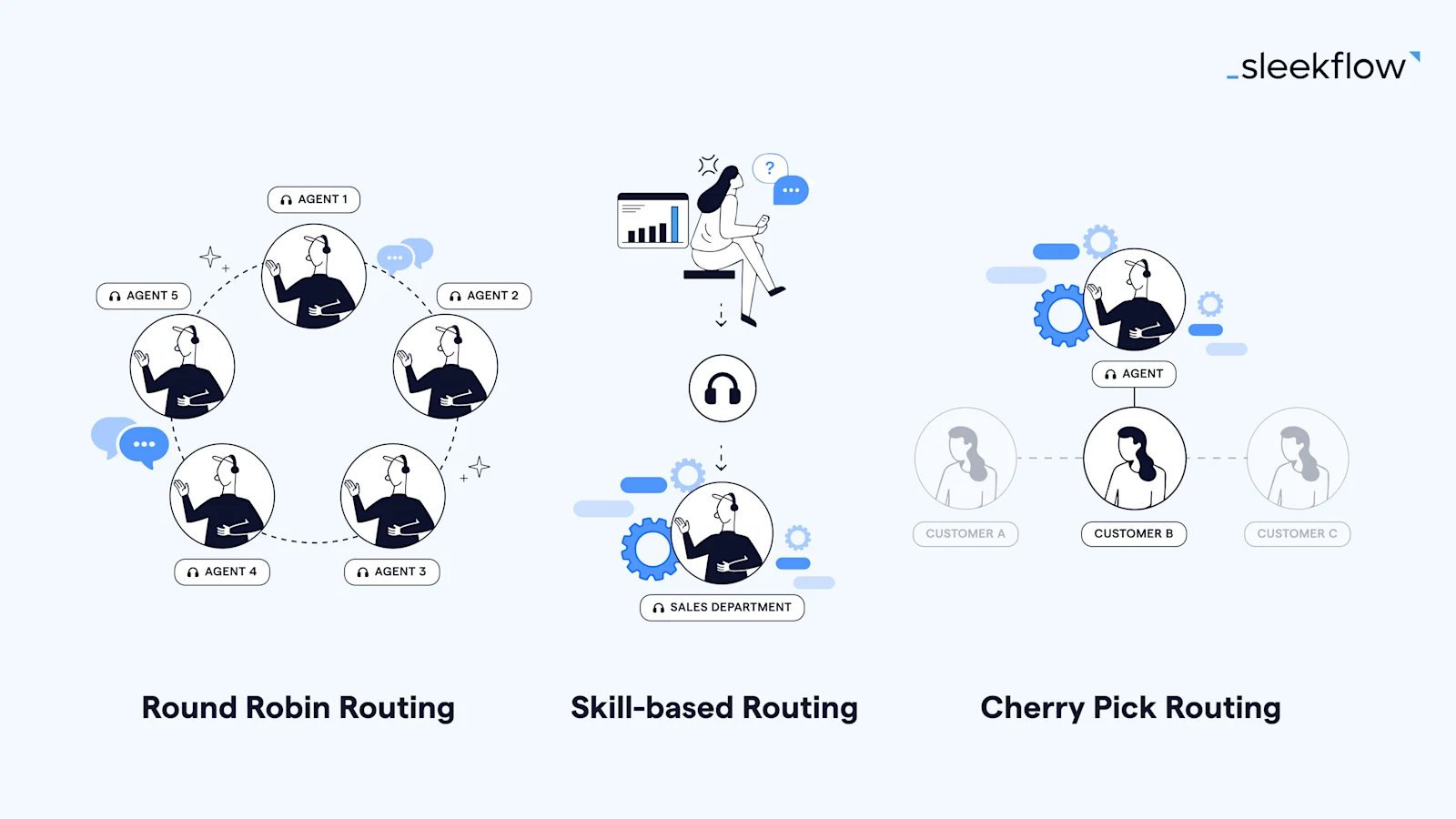
Let's explore three key types of WhatsApp lead routing techniques:
1. Round-robin lead routing
This method involves the even distribution of incoming leads among available sales representatives in a sequential manner. It's focused on fairness, ensuring that each team member gets an equal share of leads. While round-robin routing in WhatsApp is great for equal workload distribution, it might not always account for the unique sales skills or product knowledge of each representative.
You can make this method even better by pairing it with an AI-powered system like AgentFlow. The AI pre-qualifies leads before they enter the round-robin rotation by filtering out low-intent inquiries. This ensures that the leads distributed to your agents are already screened and come with a detailed profile. This way, you maintain a fair workload while also boosting the quality of leads each agent receives.
Pearl Holiday Travel & Tour turned on the setting to route WhatsApp conversations
Pearl Holiday Travel & Tour is a travel agency that was managing a high volume of inbound customer inquiries using the free WhatsApp Business App.
Relying on the free app meant their messages appeared from an unknown number. Customers, unable to identify the sender, would often report or block them. This led to frequent account bans, damaged their brand reputation, and forced them to constantly start over with new phone numbers. The agency needed a more structured, scalable, and reliable system to handle customer communication.
Pearl Holiday adopted SleekFlow and implemented its smart conversation routing feature. They used a round-robin system to automatically and evenly assign incoming WhatsApp conversations to available agents, ensuring prompt customer service and fair workload distribution. This was part of a larger WhatsApp strategy that included using broadcasts for event invitations, QR codes at events to capture leads, automated chat flows for instant engagement, and a live chat widget on their website to centralize all communications.
The combination of smart routing and automation created a highly effective customer engagement system.
Generated 2,000 new leads from a single travel fair campaign
Achieved an 80% reply rate and 90% delivery rate for their broadcast messages
Successfully sent bulk messages to over 10,000 contacts without being blocked
I would recommend SleekFlow to businesses that are looking to send WhatsApp broadcast messages to their customers. It comes in handy.

The Marketing Team
Pearl Holiday
2. Skill-based lead routing
Here, customer inquiries on WhatsApp are directed to sales representatives based on their specific skill sets, like expertise in a certain product line or experience with particular customer segments. This approach aims to increase sales conversions by leveraging the strengths and specializations of each team member. It requires a good understanding of each representative's skills to be effective.
A more advanced version of this method uses AI to improve the process. For instance, AgentFlow's AI Inbound Agent assesses a customer's intent through natural conversation, not just a chatbot menu. This helps it route leads based on a genuine understanding of their needs. The result is more precise matching, smoother handovers, and a better customer experience.
How Animes-Pro chose AI routing and automated workflows for operational efficiency
Animes-Pro was managing 80 to 200 daily customer inquiries across WhatsApp, Facebook, and Instagram with only a single staff member.
This created significant operational strain, leading to communication bottlenecks. Key issues included excessive time spent on manual replies for logistics, costly inventory checks across branches, error-prone and lengthy after-sales service, and skilled staff being tied up with repetitive administrative tasks instead of focusing on high-value sales.
Animes-Pro implemented SleekFlow's WhatsApp Business API, consolidating all communication channels into one inbox. They established three automated workflows: AI-powered intent recognition for initial inquiry segmentation, automatic routing of conversations to the correct sales or service departments, and a labeling system to track the status of long-term after-sales cases.
The implementation of these workflows led to measurable improvements in efficiency and sales growth.
Inquiry handling time was reduced by 50%.
Annual e-commerce sales have grown steadily by over 10%.
SleekFlow's biggest advantage is freeing our staff from the sea of messages, allowing them to focus on high-value tasks like sales and building customer relationships.
Richard Leung
Marketing Director, Anime-Pro
3. Cherry-pick lead routing
In this scenario, sales representatives have the autonomy to select their own leads or customer inquiries from a shared pool on WhatsApp. This method puts the choice in the hands of the sales staff, allowing them to pick leads they feel most confident in handling. While it empowers representatives, cherry-pick routing necessitates careful monitoring to ensure all leads are addressed and evenly distributed.
This method is ideal for experienced teams who can quickly make smart decisions. AgentFlow gives your team the context they need from the very beginning. Before a lead even hits the shared pool, our AI Inbound Agent gathers crucial details like budget, intent, and timeline, then adds this information to the contact's profile. This allows your agents to browse the unassigned inbox and make informed choices based on structured, AI-generated insights, instead of just guessing. The result is better assignments, faster responses, and fewer missed opportunities.
How to set up round-robin chat routing with SleekFlow
To set up round-robin chat routing in SleekFlow, proceed to the Flow Builder and follow the steps below:
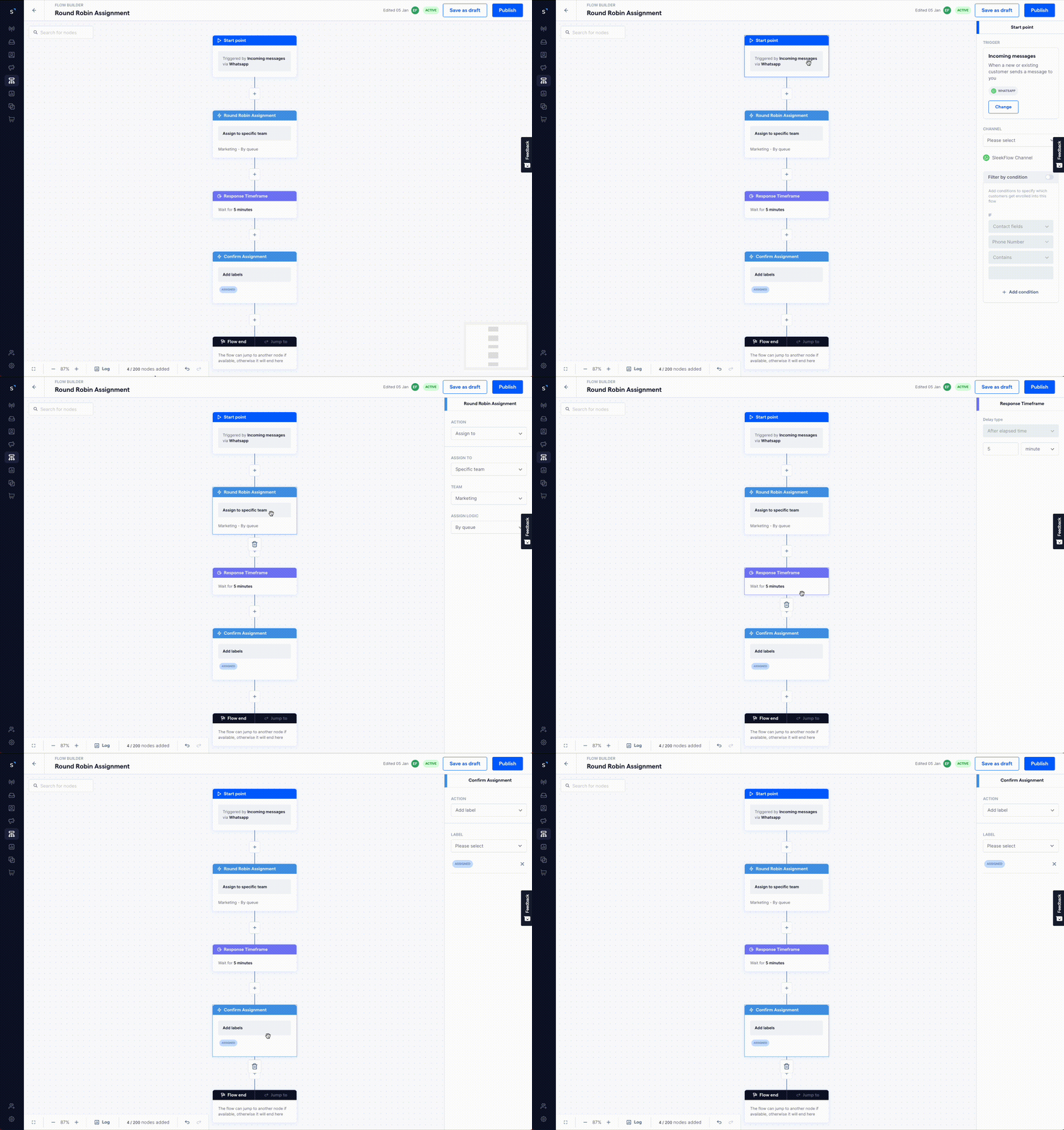
Click Create new flow > Start from scratch.
Choose Messages from new contact as the trigger to ensure the flow activates when a new contact initiates a chat.
Create an action to assign chats by queue, distributing them evenly among all agents marked as ‘appear online,’ following the round-robin approach.
Add a wait time (e.g.: 5 minutes) to give the assigned agent some time to reply.
The next action should be to apply a label such as 'Assigned' to the chat, as we assume the agent will respond within the set timeframe.
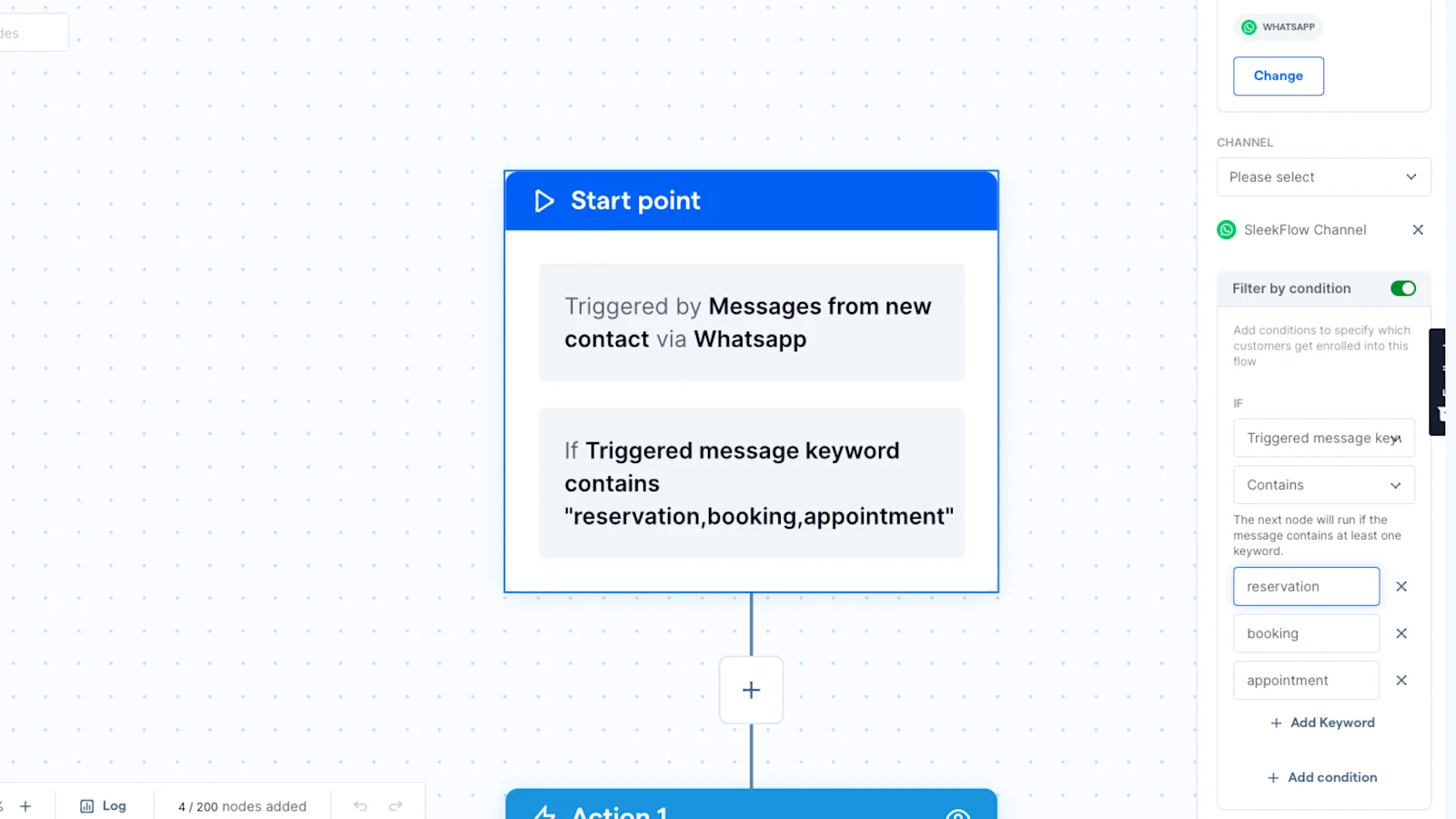
Pro tip: If you want only contacts who mention specific keywords to be enrolled in the chat routing flow, enable the Filter by condition in the start point. Select if triggered message keyword contains and then add the desired keywords.
Next, create a secondary flow for reassigning chats if the agent doesn't respond within this period. At the starting point of this new flow, search for contacts that meet the following criteria:
Have the 'Assigned' label.
Last contact from you is not within the predetermined response timeframe. (Last contact from you is a system-generated contact field - it records the most recent time any SleekFlow users initiated contact.)
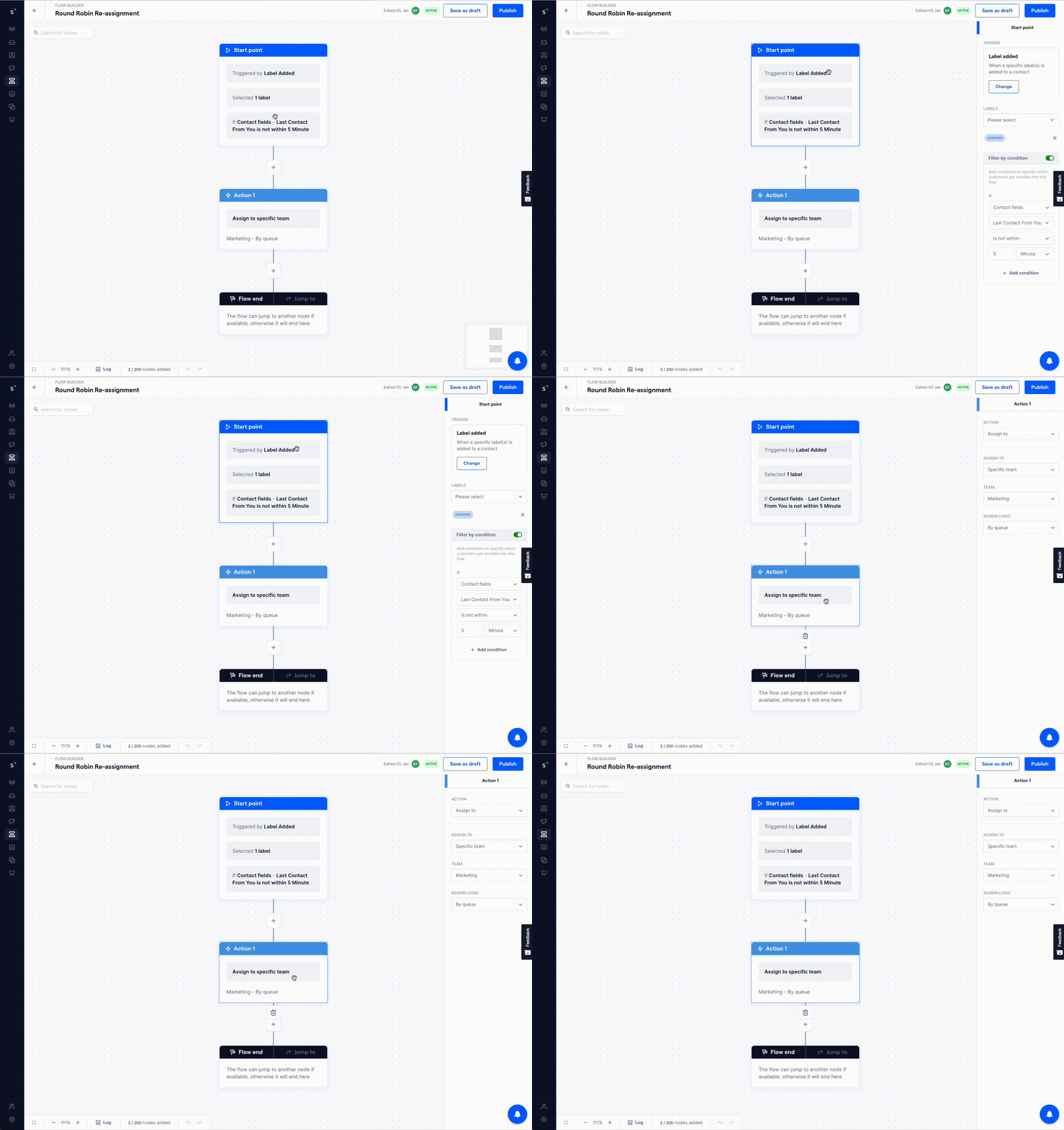
Then, set up an action to reassign these chats by queue again. This ensures that if the initially assigned agent hasn't responded within the allotted time, the chat is automatically rerouted to the next available agent.
This setup creates a fair and organized way to distribute incoming chats across your team. For even better results, try using AgentFlow as the first point of contact. This pre-qualifies leads before they even enter the queue, ensuring your agents' time is spent on conversations that matter.
How to set up skill-based chat routing with SleekFlow
In skill-based chat routing, the primary focus is aligning customer inquiries with sales representatives based on their expertise. This approach involves using initial chatbot questions to guide customers in expressing their needs and matching them to your services.
Therefore, it's important to understand common customer inquiries beforehand to draft questions that effectively segment them into different categories. Factors such as product interests, technical requirements, and language preferences can be taken into consideration.
For example, if you're a real estate company aiming to route rental inquiries, you might ask an initial question like "What type of property are you interested in?" with options such as "Residential", "Commercial", and "Luxury Properties". You would then assign inquiries to the respective teams based on these categories.
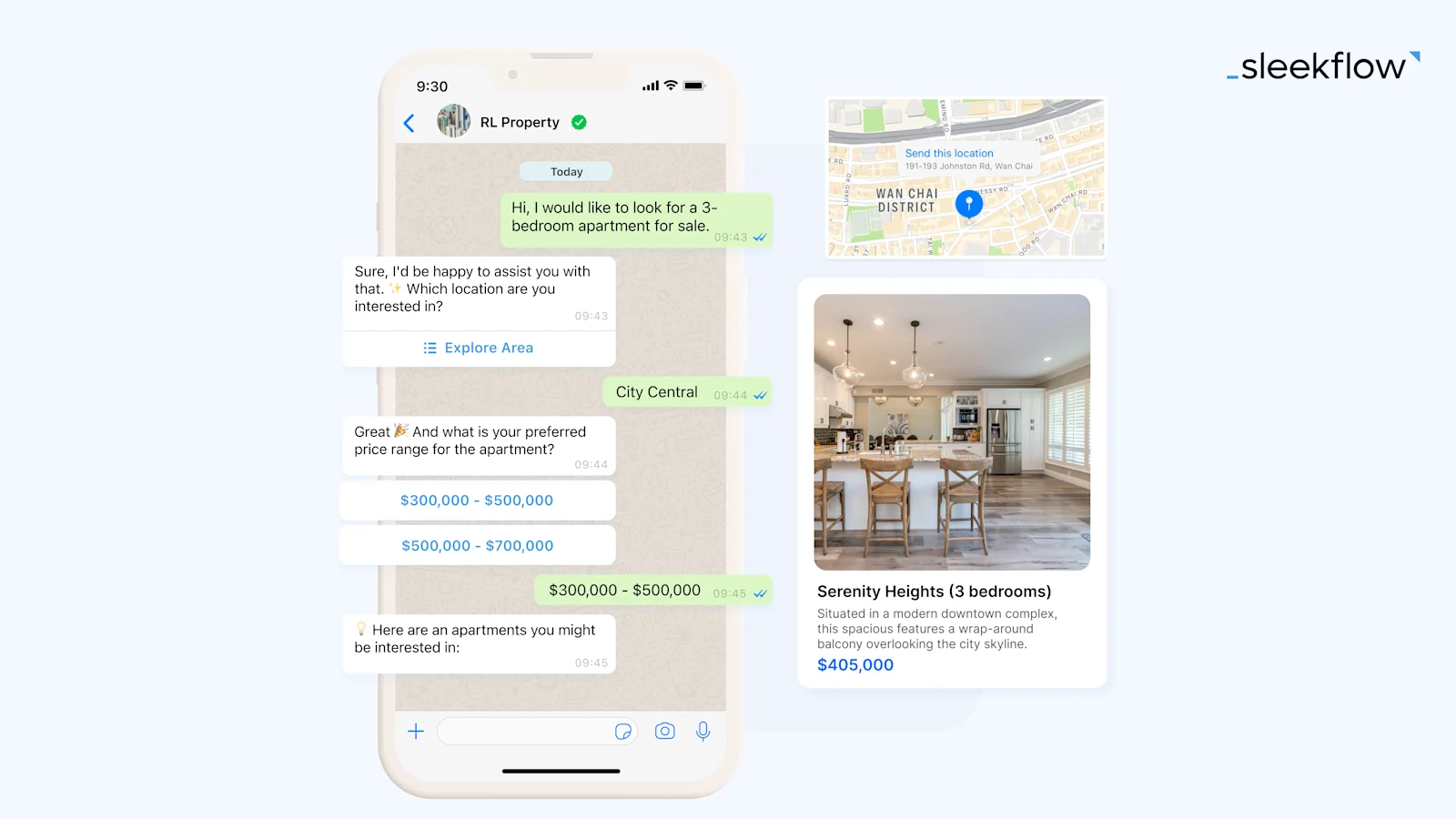
First, build different teams in SleekFlow's settings section and include agents handling chats for each property type. Once your teams are ready, use the Flow Builder in SleekFlow to set up your chat flow. Follow the following steps:
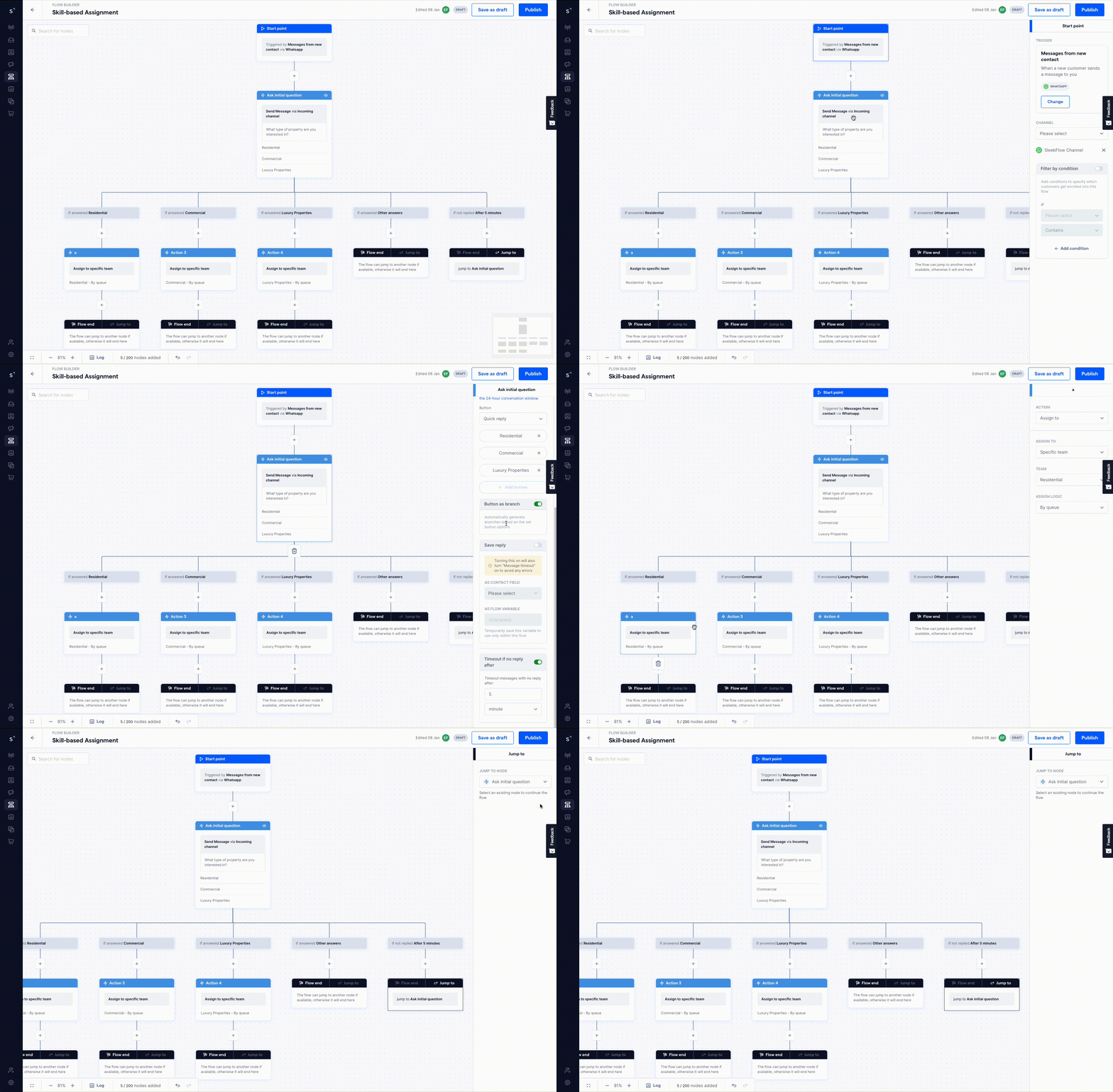
Create a new flow triggered by Messages from new contact.
The first action should be to Send message presenting the categorizing question, with options displayed as interactive buttons for easy customer selection.
To add selections for interactive buttons, use “Quick reply” or “List message”. For Quick reply, the customer will see a maximum of 3 options as buttons under the message. In List message, up to ten options can be displayed. SleekFlow's Flow Builder will create different branches for each option automatically.
Then, in each branch, appropriately assign the chats. You can achieve this by adding the Assign to specific team action and choosing the team with the relevant expertise. If you prefer to assign chats to a specific agent, opt for Assign to specific user.
In the Send message node, there are a few tricks that can help you engage better with contacts.
First, turn on the Timeout if no reply after option to nudge users to select an option if no input is received after a certain period. This feature helps bring the user back into the conversation and prevents drop-offs.
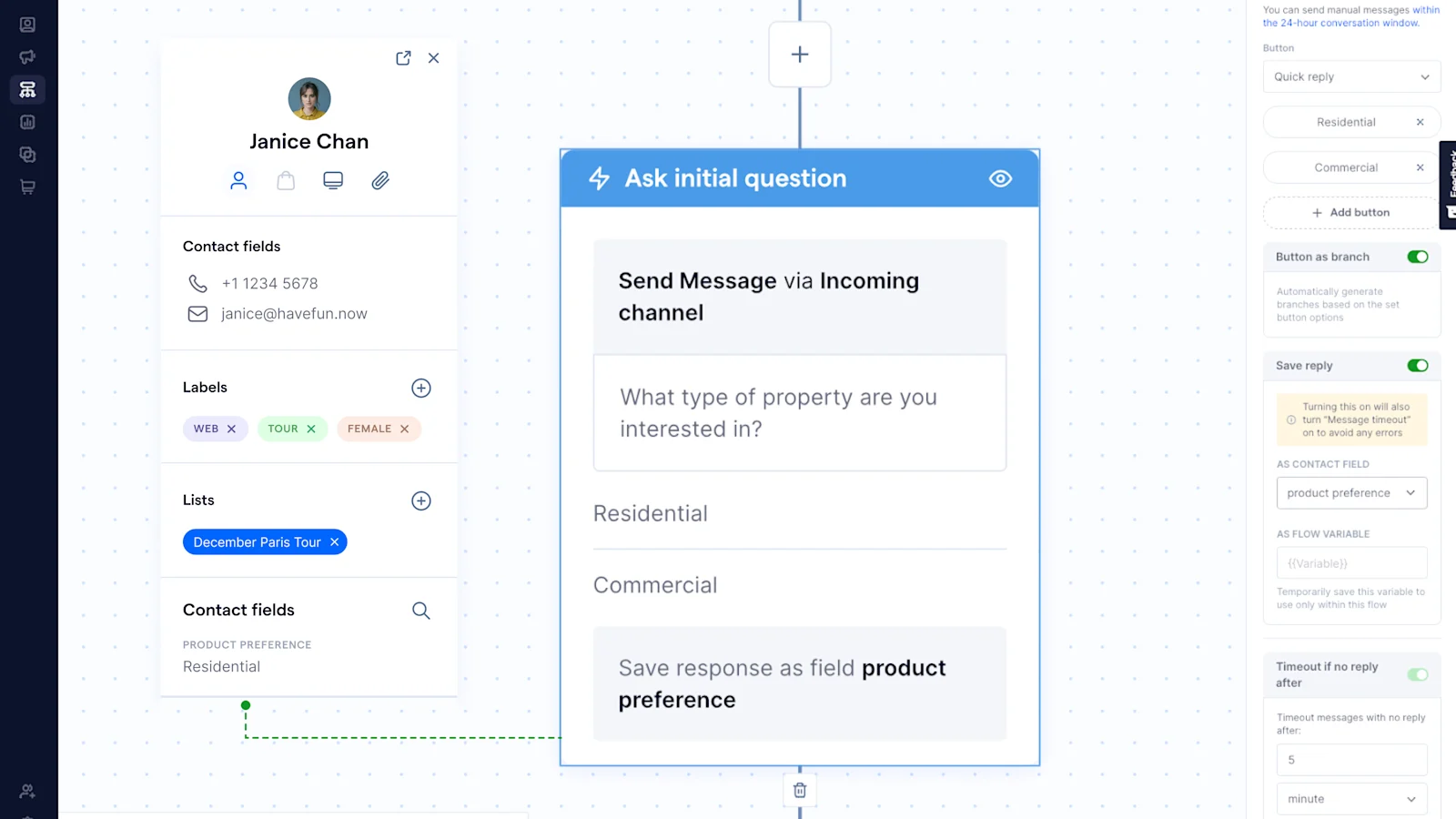
Additionally, you can enable the Save reply as contact field to store the customer's response for CRM reference and analysis. The available contact field name in the dropdown list corresponds to the contact column name used when importing contacts into SleekFlow.
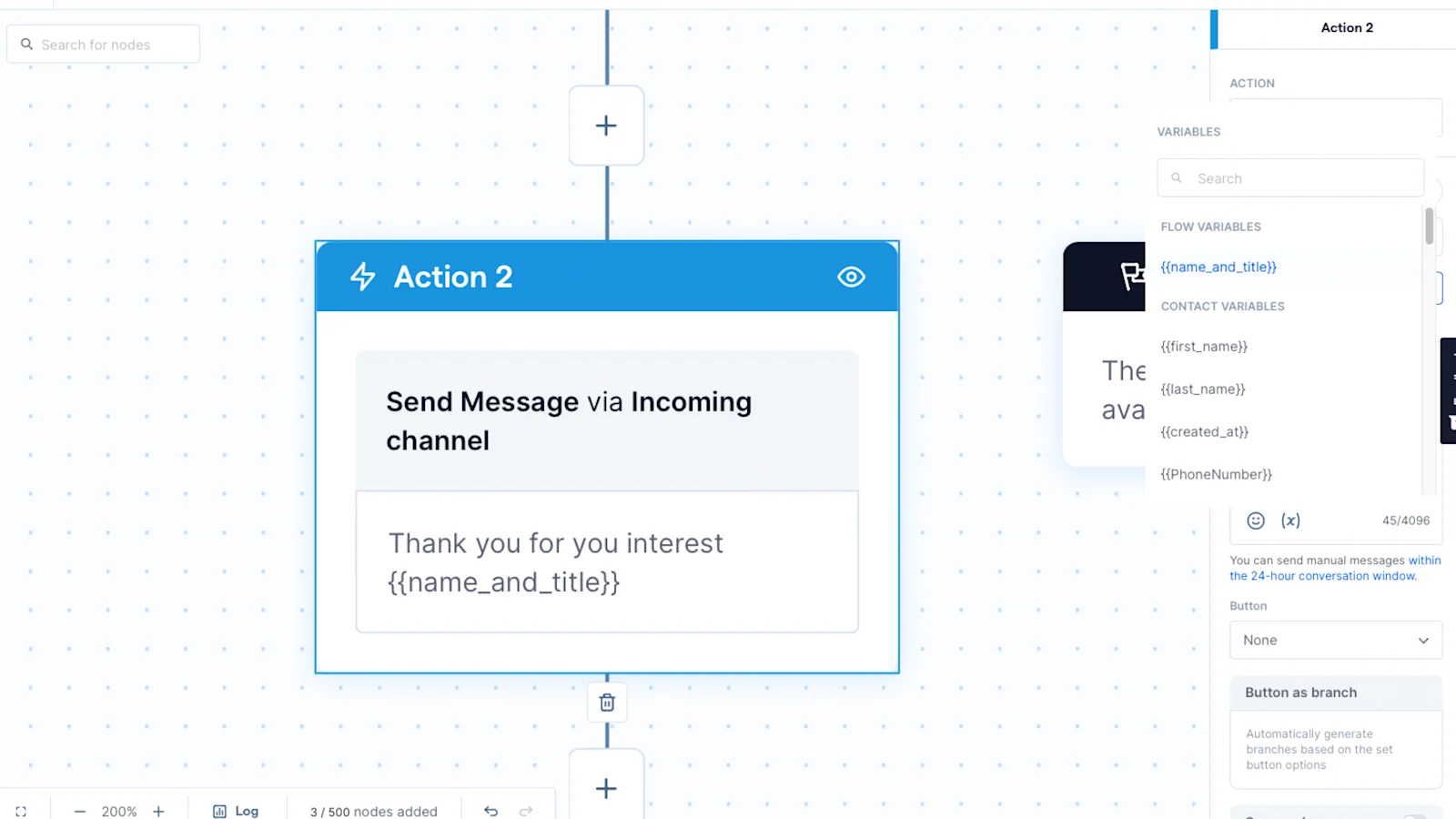
Furthermore, the Save reply as flow variable allows you to save the customer's response and use it as content in your next Send message node. This flow variable is specific to the current flow and is not stored in the SleekFlow contact database. For example, if you collect the customer's name and want to address them in a subsequent message, you can save their response as a flow variable named {{name_and_title}}. This variable can then be selected from the (𝑥) list in the message field.
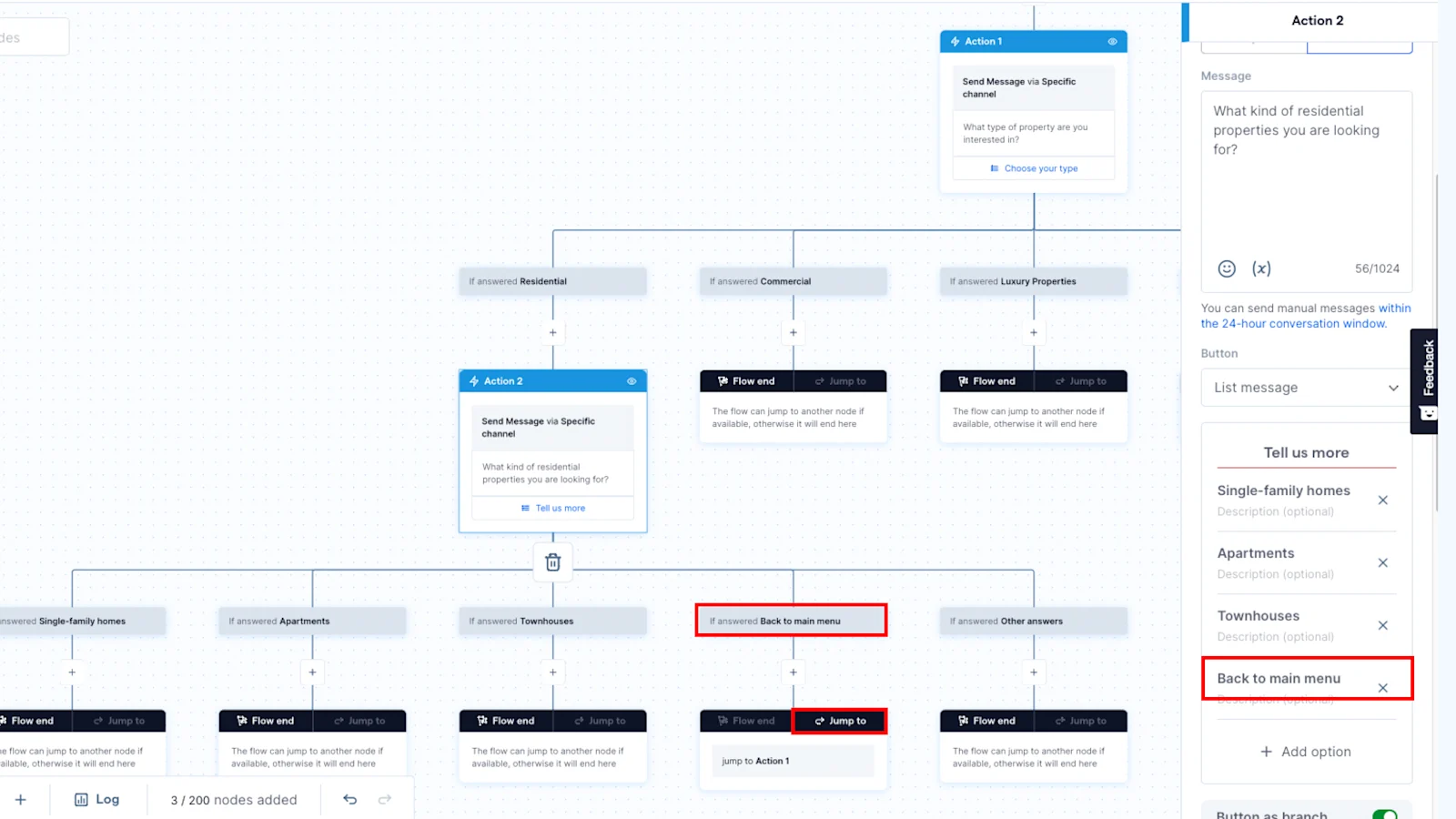
Finally, if your chatbot has multiple questions, it's always beneficial to include a "Back to Main Menu" button in each Send Message node. This allows customers to restart the conversation. In that branch, you can enable the Jump to feature and select the first action node where you present the initial options.
Skill-based routing goes one step further, matching a customer's specific needs with the agent best equipped to handle them. You can use your chatbot menu to segment these inquiries first, then assign them to the right person. For a more advanced setup, AgentFlow's AI Inbound Agent can analyze the conversation, understand what the customer wants without needing predefined categories, and route the chat accordingly.
Own or manage a real estate business? Explore how you can use WhatsApp Business API for sales, marketing, and customer support.
How to set up cherry-pick chat routing with SleekFlow
To implement cherry-pick routing in SleekFlow, start by creating a new flow and setting Messages from new contact as the trigger. Next, add an action to assign to specific team, but set the assignment logic to unassigned. This step directs the messages to the team’s collective pool without automatically assigning them to any particular member, leaving them in a shared, accessible team inbox for any team member to pick up.
The team should regularly check the SleekFlow inbox, paying particular attention to the Unassigned section in their respective team inbox under the Company Inbox section. This section contains all the incoming leads that have not yet been claimed.
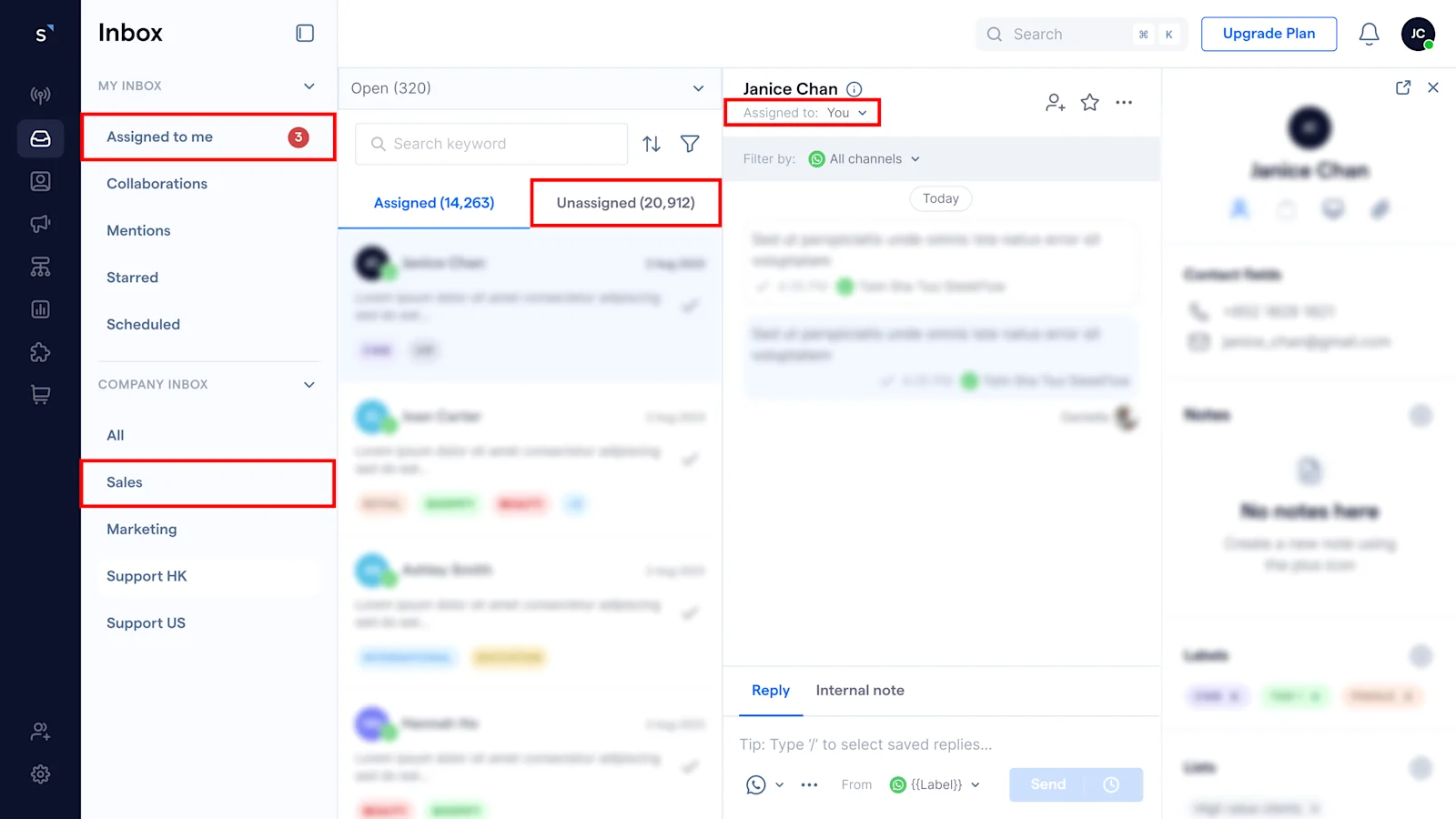
Sales representatives can click into the conversation from this Unassigned pool and click Assign to me. After selecting a lead, the sales agent can find the conversation in the Assigned to Me section under My Inbox, indicating they have taken responsibility for that lead.
Routing rules templates that enterprise teams actually use
To set up your routing system fast, you can start with proven rule templates and then customize them for your team. Here are five powerful routing rule configurations for different business situations.
1. Language-based routing
This is best for businesses in multilingual markets, like those in Southeast Asia, the Middle East, and Europe. Responding in the wrong language can quickly erode a customer's trust.
How it works: Begin the flow with a language selection menu (e.g., "Please select your preferred language / Silakan pilih bahasa Anda / 请选择您的语言"). Each choice then routes the conversation to an agent or team tagged with that language. In SleekFlow, you can use skill-based routing to automatically assign chats based on an agent's language proficiency tags.
Pro tip: Save the customer’s language choice as a contact field. This way, all future conversations and broadcasts are in their preferred language, and you won't have to ask again.
2. Region- or territory-based routing
This works well for businesses with geographically distributed sales teams, where agents manage specific territories. You see this a lot in real estate, insurance, and the automotive industry.
How it works: Ask customers for their city or region early on. Use this information to create routing branches for each territory, sending chats to the agent or team in charge of that area. You can also use existing location data from web forms or CRM imports to pre-populate the region.
Pro tip: In regions with high volume, combine territory routing with a round-robin assignment. This helps balance the workload among the regional team members.
3. Priority-based routing
This is perfect for businesses that tier leads by their commercial value or urgency. For example, you can route enterprise inquiries to senior account executives while sending SMB leads to junior agents.
How it works: Use a qualification question about company size or budget to sort contacts into priority tiers. Assign high-priority leads directly to a senior agent or specialist team, letting them bypass the general queue. Lower-priority leads can enter the standard round-robin pool. SleekFlow uses conditional branches triggered by a customer’s response, followed by an "Assign to specific user" or "Assign to specific team" action.
Pro tip: When assigning a high-priority lead, add an internal note that summarizes their budget and intent. This ensures the senior agent is fully briefed before they jump in.
4. VIP customer routing
This strategy is for businesses that want to give a premium, white-glove experience to repeat buyers or high-value customers.
How it works: When a contact messages you, the flow checks for a "VIP" label or if they meet criteria like "total orders > 5." If they qualify, the conversation bypasses the general queue and goes directly to a dedicated relationship manager or a VIP-only team. You can also add a step to identify and tag new VIPs for the future.
Pro tip: Before an agent even joins, have the flow send VIP contacts a personalized message that uses their name and references their history. This small touch shows them they're valued from the very beginning.
5. Shift-based routing
Shift-based routing is great for businesses with teams in different time zones or that operate with distinct day and night shifts.
How it works: Set up a time condition to route contacts based on your defined shift windows. For instance, during business hours (9 am–6 pm), assign conversations to the day shift team. After hours, route them to the night shift team. If no agents are online, you can trigger an automated after-hours message. In SleekFlow, you can do this using the "current time" condition in your flow's filter logic.
Pro tip: Combine shift-based routing with an escalation fallback. If a contact messages during a shift change and no one responds within a set time, automatically reassign the chat to any available online agent. This prevents leads from going cold.
KPIs to measure lead routing performance
To know if your lead routing is working, you need to track the right Key Performance Indicators (KPIs). These metrics will show you what’s working, highlight any friction, and help you make improvements. Here are the key KPIs for sales teams using WhatsApp routing:
First Response Time (FRT): How long does a lead wait for the first reply? This metric directly measures your routing speed.
Assignment Acceptance Rate: What percentage of assigned conversations gets a timely first reply? A low rate could mean issues with agent availability or your assignment rules.
Lead-to-Qualified Rate by Routing Method: Which routing method (like round-robin or skill-based) generates the most qualified leads? This helps you compare strategies.
Conversation-to-Conversion Rate by Agent: This tracks how well individual agents convert conversations into sales or other goals, showing you who might need extra coaching.
Reassignment Rate: How often are leads passed from one agent to another? A high rate might suggest your initial routing is off or availability isn't set correctly.
Average Handling Time (AHT): What's the average length of a conversation? This helps you find a good balance between being efficient and being thorough.
Unassigned Lead Age: In systems where agents pick their leads, how long do leads sit waiting? Tracking this helps you spot and prevent lost opportunities.
With AgentFlow, your team can tackle the unassigned queue with confidence. Instead of browsing blindly, agents see context-rich conversations from the start. Each one includes an AI-generated lead profile that details the prospect's intent, budget, urgency, and other key information gathered by the AI Inbound Agent. This allows your team to make informed choices and claim the leads they're best equipped to handle.
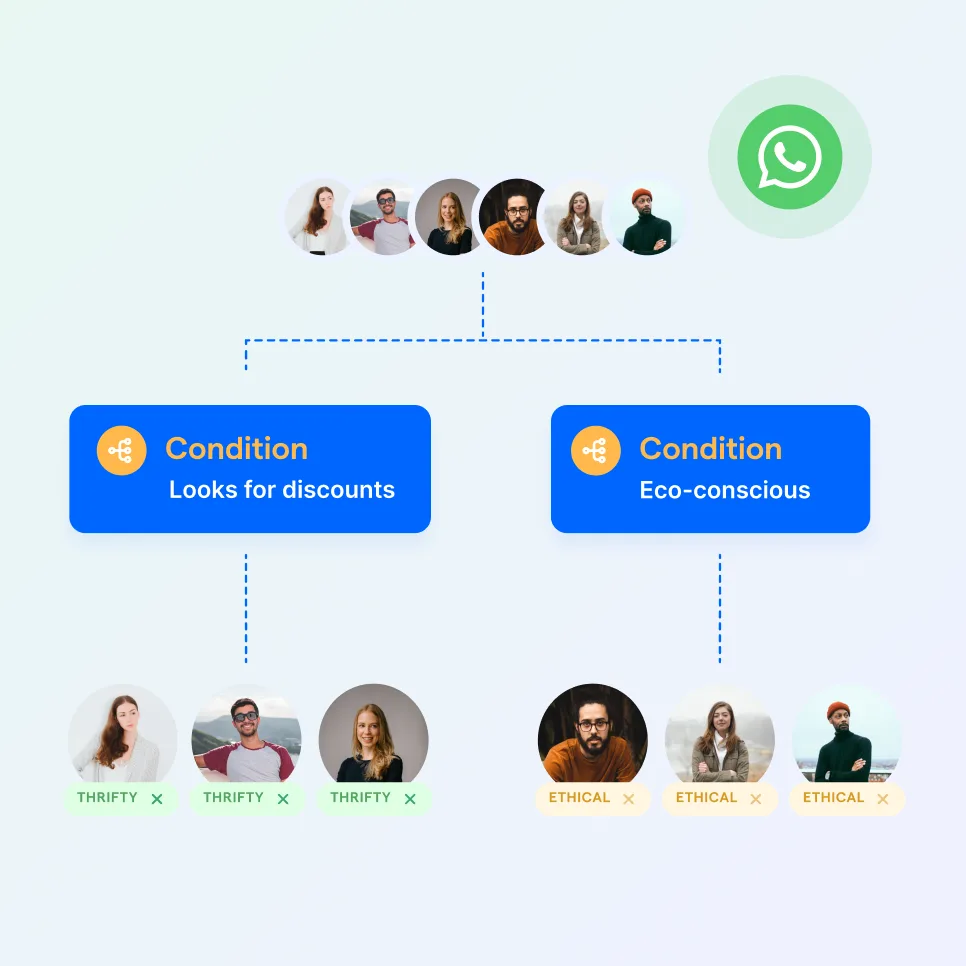
Automate your business growth with Flow Builder
Streamline sales, marketing, support, and operation workflows in the era of hyper-personalization.


