How WhatsApp chatbots work for businesses


TL; DR: Quick Summary
- WhatsApp chatbots automate customer support, sales & lead nurturing 24/7.
- Built via WhatsApp Business API or platforms like SleekFlow—no coding needed.
- Bots answer FAQs, capture leads, guide users, and hand off to humans when needed.
- Enhances brand consistency, speeds response time & boosts conversions.
- Steps: apply for API → plan flows → use bot/AI builder → test & refine.
- AI agents in SleekFlow can qualify leads, set guardrails & improve CX at scale.
Implementing a WhatsApp chatbot is one of the fastest ways of growing your WhatsApp marketing , an increasingly popular form of digital marketing, and almost every brand has a certain percentage of its budget dedicated to this strategy.
By using WhatsApp Business, companies can interact with customers via:
Greeting messages
Quick replies
Business profiles
Some may even partner with one of the WhatsApp Business API providers to access bonus features such as chatbots and CRM integrations.
Further reading: A quick read for understanding the WhatsApp Business API
Interested in creating a WhatsApp Chatbot but don’t know where to start? In this tutorial, we are going to show you how easy it is.
What is a WhatsApp Chatbot?

A WhatsApp chatbot is an automated conversational program that interacts with users on WhatsApp to answer questions, provide support, and complete tasks using predefined rules or AI/NLP. It connects to WhatsApp via the Business API (or verified providers) so businesses can offer 24/7, personalized, and scalable messaging. With a chatbot, you can:
Handle FAQs, orders, reminders, and more without human intervention.
Hand off conversations to human agents when needed.
Realistically mimic human conversational patterns.
Maintain a consistent tone and brand identity throughout the conversation.
Given that 73% of businesses either use or plan to use AI chatbots, integrating such technology into your business strategy can significantly enhance customer interactions and streamline communication processes. This is especially important in e-commerce as the bot can effectively engage with customers and save a lot of hassle in terms of customer support, marketing and sales.
Find out more about how you can use WhatsApp Business for e-commerce.
WhatsApp AI Chatbots
Beyond using AI to power your WhatsApp chatbot for instant, intelligent, and automated customer support directly within the world’s most popular messaging app, consider curating and deploying a team of AI agents into your customer interaction workflow.
Unlike traditional chatbots, an AI agent can:
Respond to queries
Nurture, score, and qualify leads
Hand off to human agents when your customer is ready to convert
This makes it an ideal solution for improving response times, engaging leads, and streamlining customer journeys. From answering FAQs and processing orders to scheduling appointments and collecting feedback, an AI agent helps businesses deliver 24/7 customer service while reducing operational costs and boosting customer satisfaction.
How BateriHub Cuts Spam Leads Using SleekFlow's AI Chatbot Platform
BateriHub is the top automotive battery retailer in Malaysia, but their communication was decentralized, making it hard to manage customer interactions efficiently.
The company was struggling with a high volume of spam and unqualified leads from their ad campaigns. They also had slow response times for emergency roadside assistance requests.
BateriHub turned to SleekFlow’s AI platform. They connected their Click-to-WhatsApp Ads to an AI chatbot that guided potential customers before passing the lead to a human agent.
Spam leads dropped to less than 1%.
Response times improved 17x, from 17 minutes to near-instant replies.
Conversions increased by 22% within three months.
Why do you need your own WhatsApp Chatbot?
1. Enhance customer service
A chatbot using WhatsApp Business can help simplify the customer support process as it can automatically take over simple and repetitive tasks while transferring complicated questions to human agents smoothly.
2. Establish a strong brand identity
WhatsApp chatbots are highly customizable. Set greeting messages, quick replies, and visual elements to match the brand’s voice and style.
Bots are emotion-neutral: Unlike humans, bots don’t experience emotions, meaning they consistently reflect your brand personality in every single interaction.
Defined scripting: By setting a clear tone and scripting style, your bot leaves a positive impression that strengthens customer loyalty.
Research published by Emerald indicates that a clearly distinguishable brand identity can significantly increase customer engagement and sales.
3. Improve marketing campaigns
Most teams chase “more leads, more sales,” but getting people to follow on social or join an email list is hard. Optimize every touchpoint in the conversion funnel to reduce drop-off.
When running a “click to WhatsApp” campaign, never leave prospects waiting. Research indicates that responding within five minutes dramatically improves lead conversion. Aim to reply immediately.
Instant replies are hard for a solo marketer and expensive to staff with live agents around the clock. Using a WhatsApp chatbot can help by:
Greeting users instantly.
Answering common questions.
Guiding users through the next steps.
This keeps momentum high and improves
conversion rates.

Want to outcompete your peers with SleekFlow's help?
Book your personalised demo with SleekFlow today and unlock the potential of seamless communication
How to build a WhatsApp Live Chat - step-by-step guide
Step 1: Apply for WhatsApp Business API
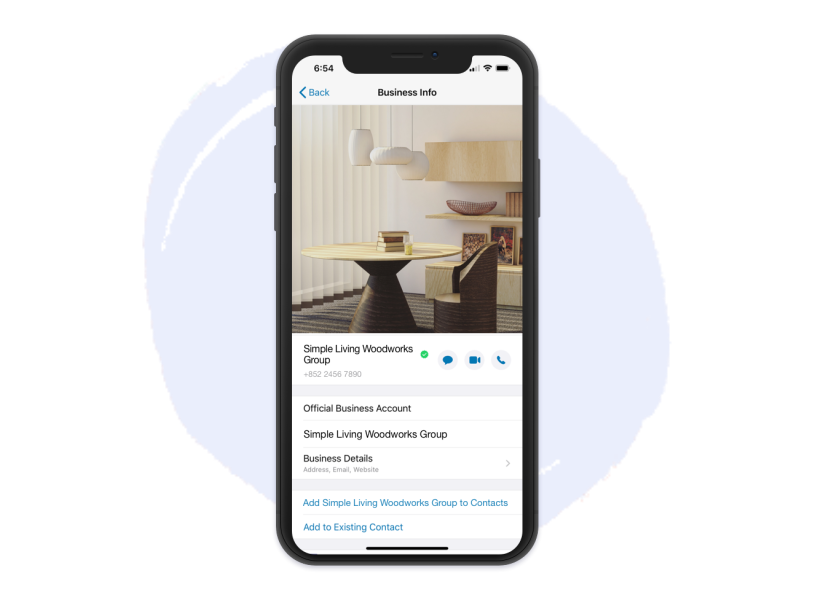
The very first thing you need to do to create a WhatsApp chatbot is to apply for the official WhatsApp Business API.
You have to submit:
your company name
website URL
name and contact details of a company representative.
The verification process might take up to 4 weeks, but once your application is approved, you can start to dig deeper into various functions of the official WhatsApp Business.
Step 2: Think about the dialogues in the live chat
To make sure the WhatsApp Chatbot can address your business needs, you then need to customize the conversation flow.
Since a chatbot is supposed to give quick replies, it is recommended to:
Include a list of responses to frequently asked questions that are brief and cut to the chase.
Prepare a smooth transition message in case a human agent needs to jump in and carry on the conversation thread.
There is no one perfect recipe for a chatbot with WhatsApp design as every business has its own style, so just keep your customer’s journey in mind when you map out your conversation elements and diagram.
Get replies samples from our templates for WhatsApp chatbot auto replies.
Step 3: Find a chatbot application
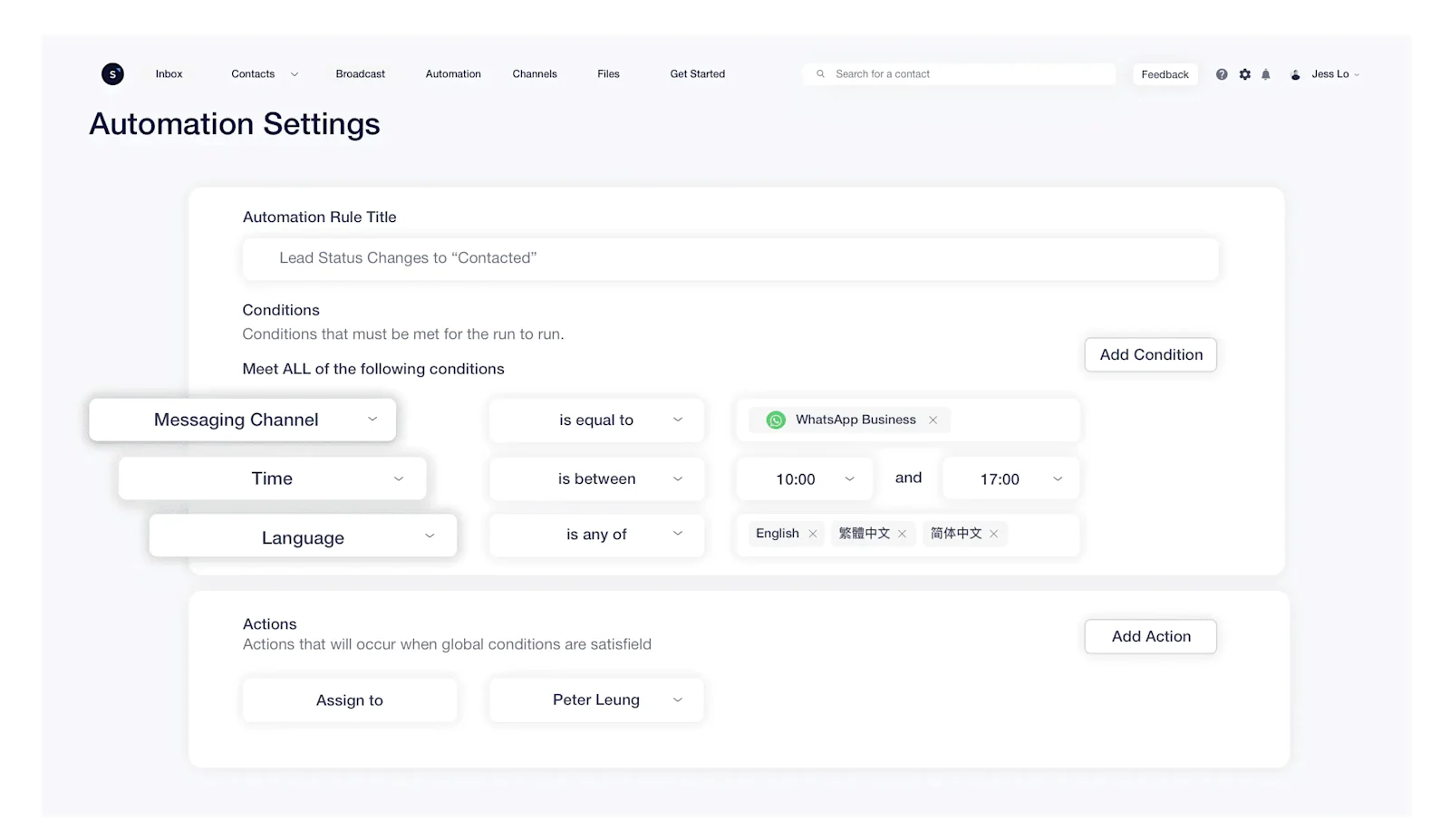
For inexperienced users, creating a WhatsApp Chatbot from scratch can be quite troublesome. Thus, to avoid unnecessary blockers, it is highly suggested to get help from a bot builder or an AI agent platform.
For instance, SleekFlow offers a range of products to help you build a chatbot or an AI agent to help you with customer queries.
Even with no programming skills, you can use AgentFlow to:
Build your own team of AI agents.
Deploy them into your workflows using our no-code Flow Builder.
Using an AI agent allows you not only to help your customer find answers, but it also guides them through your customer journey, it nurtures and scores your leads until they are ready to be handed over to your human team for the next step.
Looking for an AI chatbot? See how you can upload your knowledge base and get AI-generated responses tailored to your brand.
Step 4: Test your WhatsApp Chatbot
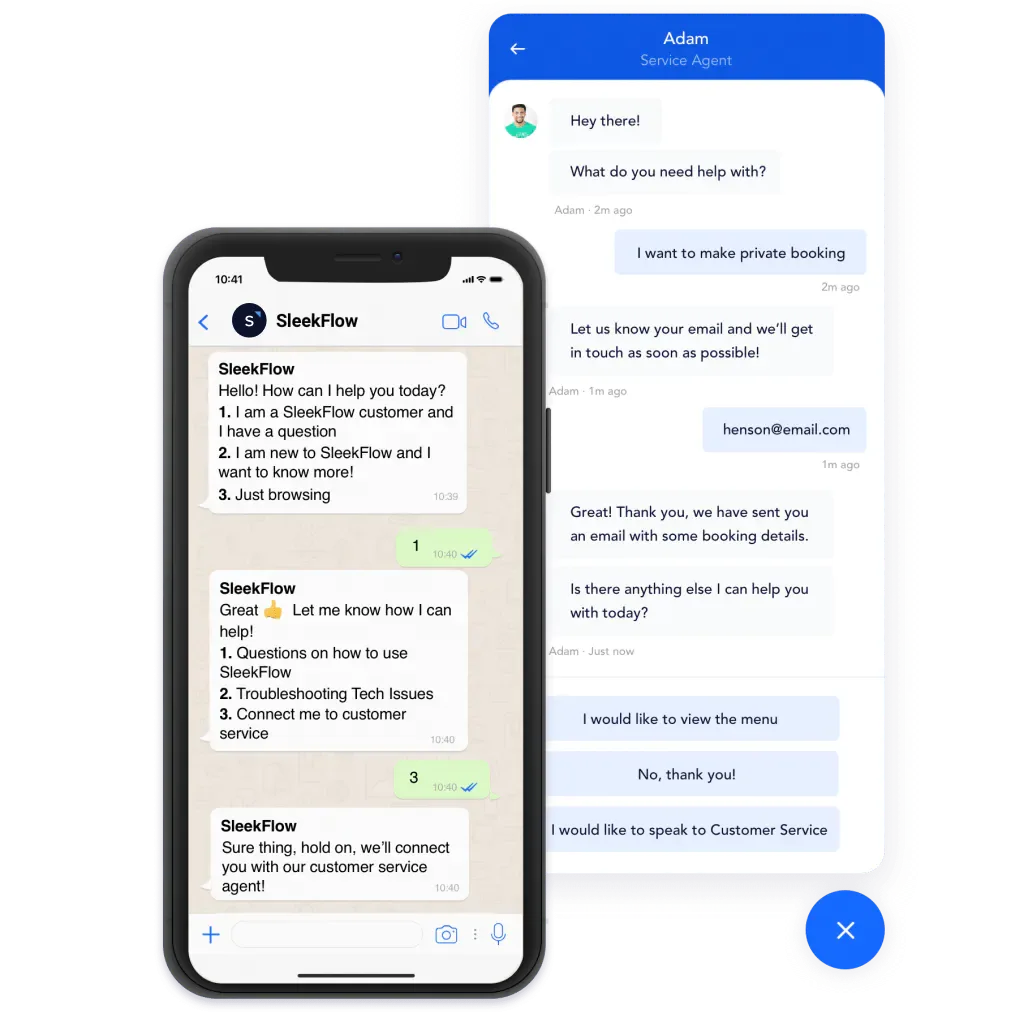
Never roll out a new feature until you have confirmed that everything works.
Test your WhatsApp AI Chatbot to see if it behaves as you wish on WhatsApp. Remember to review it carefully as it affects your final customer experience. By testing, you can:
Check up on integrations.
Catch possible errors before the official launch.
SleekFlow’s AgentFlow platform allows you to set guardrails to tell what you don’t want your AI agent to do, for example, you can tell your AI agent never to promise a discount to customers or reveal sensitive information.
De'Longhi leveraged a WhatsApp chatbot with SleekFlow for 24/7 customer support
De'Longhi, an Italian brand famous for high-end coffee machines, wanted to improve customer service and support its Online-to-Offline (O2O) marketing strategy.
Customers looking to buy appliances expect immediate, quality support. They often research online before visiting a physical store, but De'Longhi needed a way to bridge this gap.
De'Longhi built a WhatsApp chatbot with SleekFlow. This chatbot provides 24/7 automated answers to product questions and allows customers to book in-store coffee tasting sessions.
Reduced waiting times.
Increased foot traffic to physical stores.
WhatsApp empowers our customers to act upon their desires immediately, to secure a reservation for experiencing our products without delay. The WhatsApp Business solution has indeed played a significant role in our O2O operations.

Winnie Ho
Commercial Director, De'Longhi Hong Kong & Taiwan
1. Define clear objectives
Before implementation, identify the specific goals you want the chatbot to achieve, such as:
Improving customer service
Increasing sales
Enhancing user engagement
2. Create a natural conversational flow
Design your chatbot to understand and respond to user queries in a way that feels natural. This includes:
Using simple language
Anticipating user needs
Offering relevant options
3. Personalize the experience
Leverage user data to personalize interactions. This makes the experience more engaging and tailored by:
Using the user's name
Remembering past interactions
4. Provide quick and accurate responses
Ensure that the chatbot is equipped with accurate information and can provide responses quickly. If the query is beyond the chatbot's capabilities, make it easy for users to switch to a live agent.
5. Regularly update and train the chatbot
Continuously improve the chatbot's AI by:
Feeding it new data
Refining its responses based on user feedback and emerging trends
6. Monitor performance
Use analytics to track the chatbot’s performance, such as:
Response time
User satisfaction
Resolution rate
This data will help you make necessary adjustments to improve efficiency and effectiveness.
Real WhatsApp Flow Examples You Can Build with SleekFlow
To better understand how WhatsApp Flows work in practice, here are two real-world examples showing how businesses structure automated conversations using SleekFlow’s Flow Builder.
Example 1: E-commerce Product Discovery & Checkout Flow
Business goal: Guide customers from browsing to purchase while reducing manual support.
User journey flow:
Greeting message
“Hi! Welcome to [Brand Name]! What are you shopping for today?”
-Options: Men’s, Women’s, AccessoriesCategory selection (Condition node)
Customer selects Women’s
-Bot replies with sub-categories (e.g., Dresses, Shoes, Bags)Product suggestion (AI or product node)
Customer selects Dresses
-Bot shows featured products with quick-reply buttonsFAQ support
Options appear for: Shipping, Returns, Size GuideAdd-to-cart link
Bot sends secure product or checkout linkHuman handoff
If customer types “Help” or asks a complex question → Conversation is routed to a live agent
In SleekFlow’s Flow Builder:
Nodes used: Greeting / Start, Selection (buttons), Condition (branching), Product recommendation step (message/cards/link), FAQ/help step, External link, Agent handoff
You can view the path visually with nodes and branching conditions.
Use automated reply steps for each product choice.
Add a keyword rule (e.g., “help” or “support”) to trigger a human handoff step.
Example 2: Service-Based Booking & Location Capture Flow
Business goal: Capture customer details quickly and confirm service bookings.
User journey flow:
Greeting message
“Hi, need assistance? Please share your location.”Location capture
Customer shares GPS locationIssue type selection (Condition node)
-Options: Battery issue, Towing, OtherETA or booking confirmation
If Battery issue selected → Bot sends estimated arrival time + confirmation buttonEscalation (if required)
If Other selected → Automatically routed to a human agent
In SleekFlow’s Flow Builder:
Nodes used: Greeting / Start, Location capture, Multiple choice, Condition branching, Confirmation message, Agent handoff
Use a location capture step to collect the customer’s location.
Branch by issue type to show ETA/booking options.
Trigger handoff if the user selects “Other” or if the message doesn’t match expected options.
WhatsApp Chatbot limitations
While WhatsApp chatbots are effective for business messaging in many markets, there are important constraints to consider.
Compliance and regional restrictions: Regulatory requirements vary by country. In some jurisdictions (e.g., parts of the EU), specific uses of WhatsApp Business—such as certain transactional messaging or data handling practices—may be discouraged or restricted. If expanding into tightly regulated markets, plan an alternative compliant messaging option and consult legal guidance.
Account and team scalability: A single WhatsApp Business account can be hard to manage for larger teams. Without proper tooling, multiple agents cannot collaborate efficiently across devices. Mitigate this by using a team-friendly shared inbox that supports agent assignment, collision detection, and audit logs, so customer service departments can respond consistently at scale.
Conversation control and consistency: Bots handle routine queries well but struggle with ambiguous or complex issues. Ensure clear escalation paths to human agents, and maintain a conversation policy (tone, fallback messages, handoff triggers) to protect brand experience.
Rate limits and template rules: WhatsApp enforces messaging categories, templates, and quality ratings. Promotional outreach and time-bound responses have specific rules. Build workflows that respect template approvals, opt-in requirements, and session windows to avoid throttling or penalties.
Data privacy and storage: End-to-end encryption applies to transport on WhatsApp, but business-side storage, CRM syncing, and analytics introduce separate data responsibilities. Implement data minimization, retention controls, and access governance to align with internal policies and local laws.
While there isn't a single "best" option for every business, SleekFlow is widely considered a top contender for WhatsApp automation due to its official WhatsApp Business API integration. It allows you to create sophisticated automated flows and manage multiple agents from a single dashboard, making it ideal for scaling customer support and sales. SleekFlow’s focus on social commerce and its user-friendly interface make it a standout choice for those looking to streamline their messaging strategy.
WhatsApp Chatbot and live chat solutions can significantly improve an online business. They help startups and small to medium-sized companies deliver responsive customer engagement with minimal investment. By understanding the software, its features, and how to use it effectively, a business can elevate its customer experience and growth over the long term.
Want to outcompete your peers with SleekFlow's help?
Book your personalised demo with SleekFlow today and unlock the potential of seamless communication


