Stop sending surveys: AI text analysis reads your customer chats for you


TL; DR: Quick Summary
- Survey responses capture only the extremes, while most customers share honest feedback through everyday chat conversations on WhatsApp, live chat, and social DMs.
- AI text analysis turns chat transcripts into structured insights using sentiment analysis, theme clustering, and trend detection to uncover recurring issues and emerging problems.
- Unlike keyword search, AI understands context, detecting sarcasm, mixed sentiment, and new complaint themes without predefined categories.
- Real-time analysis helps teams act faster, identify CX issues early, and link customer sentiment to business outcomes.
- Teams can analyze chats using LLMs manually or automate insights with dedicated tools like SleekFlow’s Customer Experience Intelligence for continuous feedback tracking.
Your post-purchase survey went out to 2,000 customers last week. 86 responded.
The customers who responded were either very happy or very frustrated. The middle majority, the ones who messaged your team on WhatsApp, asked questions over live chat, complained quietly, and stayed anyway, said nothing on your survey. But they said plenty in your chat window.
That conversation data is feedback. Unsolicited, unfiltered, and already sitting in your system. AI text analysis reads it at scale, without a survey in sight. Here's how to use it.
Survey fatigue isn't just a response rate problem
Survey fatigue is not a new problem. It's a worsening one. In fact, public opinion surveys have seen a marked decline in participation, with Pew Research Center reporting a drop from a 36% response rate in 1997 to just 6% by 2018.
And the ones who do complete it are rarely a balanced sample. Extremely satisfied or extremely dissatisfied customers are the most likely to respond. The middle majority, customers with ordinary experiences and everyday friction, simply don't.
That's the real problem. Not the response rate number itself, but what it means for the decisions you make from it.
If your support team is adjusting customer experience workflows, updating scripts, or escalating issues based on survey data, you're acting on the loudest 5%. The other 95% of your customers left a paper trail in your chat window. They just didn't fill out your form.
The fix isn't a shorter survey or better timing. It's a different source of data entirely.
The feedback you already have but never read: chat transcripts
Every WhatsApp message, live chat conversation, Instagram DM, and Facebook Messenger thread your support team handles is unsolicited feedback. The customer didn't wait to be asked. They came to you with a problem, a question, or a frustration in real time. That's more honest than any survey response.
The patterns are usually obvious once you start looking. Customers ask the same question about your return policy five times a day because the answer isn't clear enough on your website. They message to ask where their order is because your tracking notifications aren't working. They complain about the same checkout step, in different words, across dozens of conversations. None of this shows up in your NPS score. All of it shows up in your chat transcripts.
The manual approach works at small scale. Pull 50 recent conversations, read them in one sitting, and tag each one by theme. Most CX leads who do this for the first time find 3 to 5 recurring issues within the first hour. That's actionable. That's enough to brief your team, fix an FAQ, or flag a product issue.
The limitation is volume. At 500 conversations a week, manual review isn't a workflow. It's a full-time job. Reading every transcript becomes impractical long before it becomes useless. That's where AI text analysis comes in.
When manual review doesn't scale: how AI text analysis works
AI text analysis does what a human reviewer does, just faster and across a volume no team can match manually. Feed it 5,000 chat transcripts, and it returns structured findings in minutes. Here's what it's actually doing under the hood.
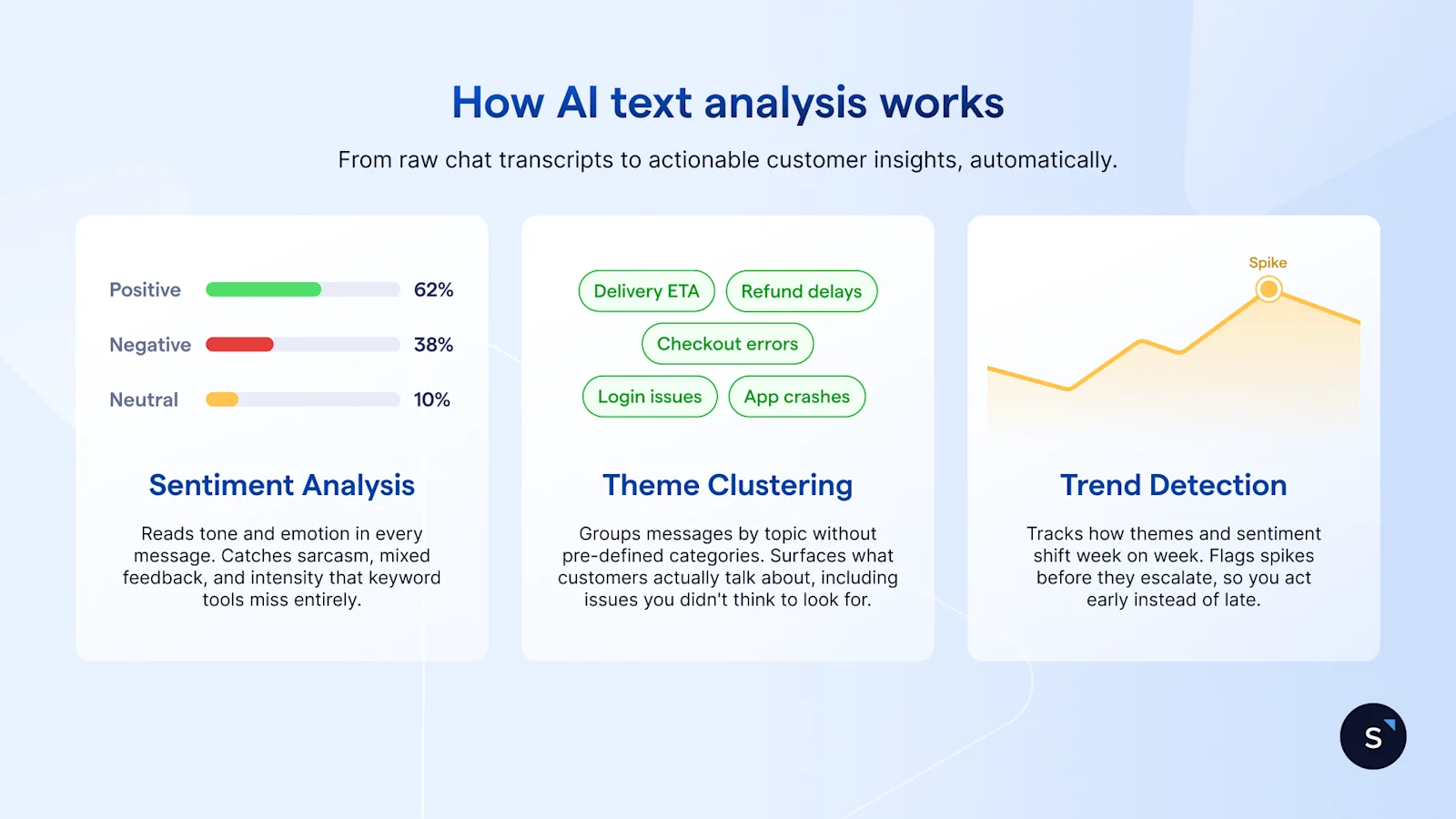
Sentiment analysis
Sentiment analysis classifies each message as positive, negative, or neutral. But it goes further than simple keyword matching. Take a customer saying, "Your agent was helpful, but this took way too long." That's not a positive message. It's mixed, with a specific complaint buried inside a compliment. AI sentiment analysis reads that context. A few things it catches that keyword tools miss:
Sarcasm: "Great, another delay" is negative, not positive
Mixed sentiment: praise for the agent, frustration with the process
Intensity: "a bit slow" vs "completely unacceptable" are not the same signal
Theme clustering
Theme clustering groups messages by topic without you pre-defining the categories. You don't tell the model to look for complaints about shipping. It finds them because enough customers are talking about them. The output typically looks like this:
Top theme: refund processing time, mentioned in 43% of negative messages
Second theme: delivery estimate accuracy, 28%
Third theme: app checkout errors, 19%
This is where NLP text analysis adds real value. It surfaces what customers are actually concerned about, including issues you didn't think to ask about on your last survey.
Trend detection
Trend detection tracks how themes and sentiment shift over time. Patterns worth catching include:
A spike in negative sentiment about checkout in the two weeks after an app update
A gradual increase in questions about a specific product feature, suggesting that onboarding material isn't working
A drop in complaints about delivery after a logistics partner change, confirming the fix worked
None of these patterns is visible if you're reading transcripts manually or waiting for quarterly survey results. Together, these three capabilities turn a backlog of unread conversations into a structured, repeatable view of what your customers are actually experiencing. No survey required.
AI text analysis vs. basic keyword search: what's the difference?
If your team is already tagging support tickets or running keyword searches across chat logs, that's a start. But there's a meaningful gap between finding words and understanding meaning. Here's where the difference shows up.
A keyword tool tells you how many customers used the word "slow" this month. Machine learning text analysis tells you that "slow" appears almost exclusively in conversations about mobile checkout, not desktop, and that it started spiking three weeks ago after your last app update. One is a count. The other is a diagnosis.
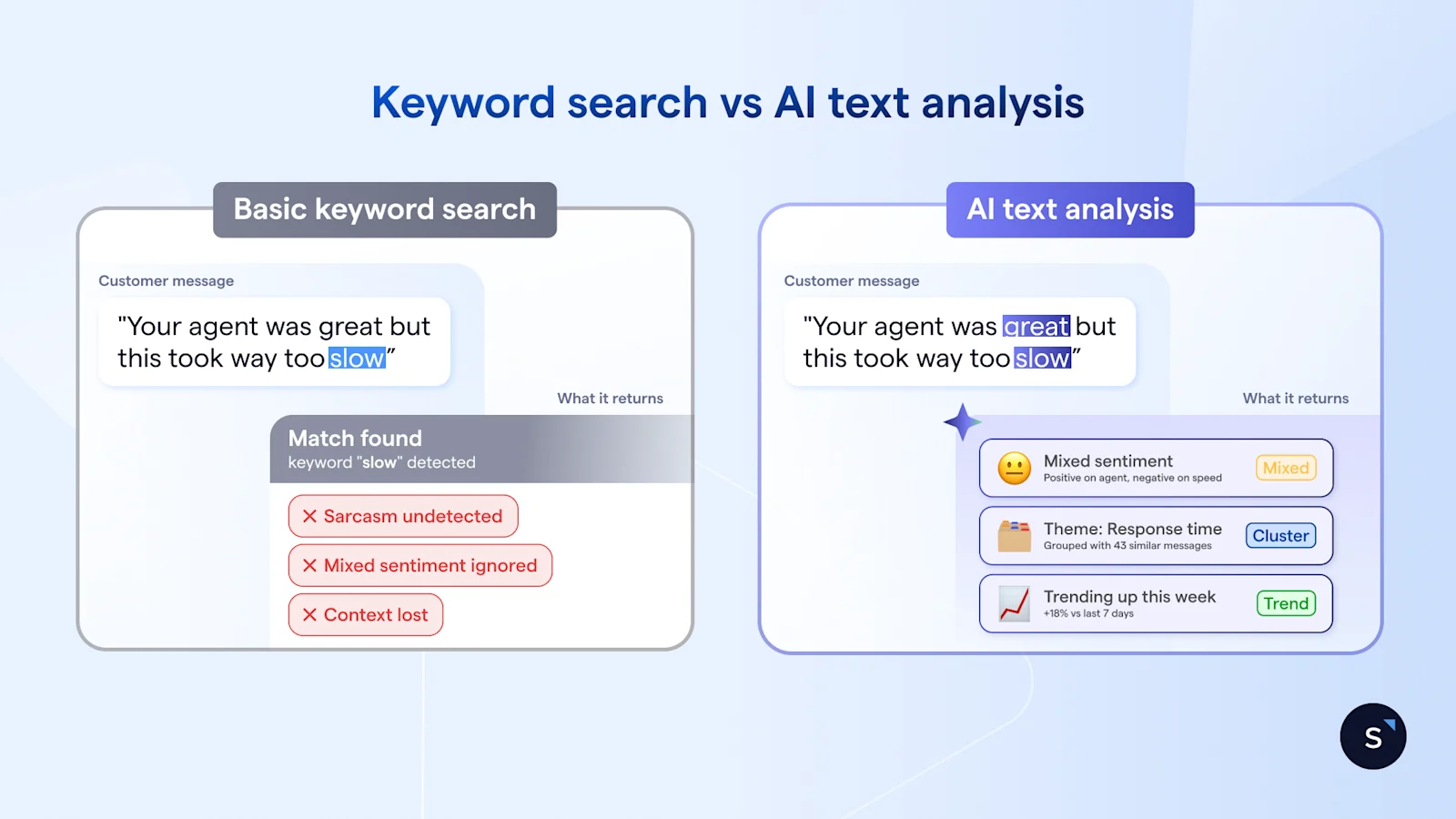
The distinction becomes clearer in a direct comparison:
A few practical implications of that gap:
A customer saying "I guess I'll just wait forever" gets logged as neutral by a keyword tool. Machine learning text analysis reads it as negative.
A new complaint category you've never seen before won't appear in keyword results because you didn't think to search for it. Theme clustering finds it anyway.
Keyword tools require someone to maintain the category list. As your product evolves, that list goes stale. Machine learning text analysis adapts without manual upkeep.
The right choice depends on your volume and what you need from the findings. For occasional, low-volume analysis, a keyword search is fine. For teams handling hundreds of conversations a week and tracking trends over time, machine learning text analysis is the more reliable option.
How Airbnb stopped relying on NPS surveys and built its own AI sentiment analysis model
Airbnb ran into the same wall most CX teams hit eventually. NPS, their primary measure of customer satisfaction, had two problems: only a fraction of users responded to the survey, and results took at least a week to appear. For a company running continuous A/B tests across its customer service operation, waiting a week to interpret results meant slower iteration and slower improvements.
Their solution wasn't a better survey. Airbnb built an AI sentiment aanalysis model to complement NPS, applying it directly to customer support conversations. Instead of waiting for customers to fill in a form, the model reads what customers are already saying in their interactions and returns a sentiment score in real time.
Three things changed immediately:
Coverage: Every customer interaction got a sentiment score, not just the fraction who completed a survey
Speed: Results appeared in real time, making it possible to detect a problem during an A/B test rather than after it concluded
Revenue signal: Guests with higher sentiment scores generated significantly more revenue over the subsequent 12 months, giving the team a direct line between support quality and business outcomes.
Two ways to run AI text analysis to extract customer insights
Airbnb had an engineering team to build its AI sentiment analysis model from scratch. Most CX teams don't, and they don't need to. The same outcome, turning conversation data into structured AI customer insights, is accessible without a data science department. There are two realistic ways to get there.
Do it yourself with an LLM
Tools like ChatGPT, Claude, or Gemini can run a solid analysis on a batch of chat transcripts with the right prompts. This works well for teams doing occasional analysis on lower volumes, say, a few hundred conversations at a time.
The process is straightforward:
Export a batch of chat transcripts from your support platform
Paste them into the LLM in chunks, keeping each input manageable
Use specific prompts to direct the analysis
The quality of your output depends almost entirely on how well you prompt. Vague instructions return vague findings. These three prompts produce reliable, structured results:
"Review these customer messages and identify the top 5 recurring complaints. For each, provide a representative quote and an estimated frequency."
"Classify each of the following messages as positive, negative, or neutral. For any negative message, identify the primary reason for dissatisfaction."
"What product or service gaps are customers describing in these transcripts? List them in order of how frequently they appear."
The honest limitation: this approach is manual by nature. You're exporting, pasting, and prompting each time. There's no trend tracking, no dashboard, and no way to compare this week's findings with last month's without repeating the whole process. For a one-off audit, it works well. As a weekly workflow, it gets old fast.
A dedicated AI text analysis tool for customer feedback
For teams handling 200 or more conversations a week, a purpose-built tool makes more sense. The core difference is automation. Instead of exporting and pasting, the tool connects directly to your chat channels, WhatsApp, live chat, Instagram DM, Facebook Messenger, and runs analysis continuously.
What to look for when evaluating options:
Native integrations with the channels your team actually uses
Automated analysis runs, daily or weekly, without manual input
Trend tracking that lets you compare sentiment and themes over time
Exportable reports your team can share across departments
For AI-native support teams on SleekFlow, this is handled by SleekFlow's Customer Experience Intelligence, an AI agent that automatically analyzes every conversation across WhatsApp, live chat, Instagram DM, and Facebook Messenger without any manual export or tagging. It does three things a generic tool doesn't:
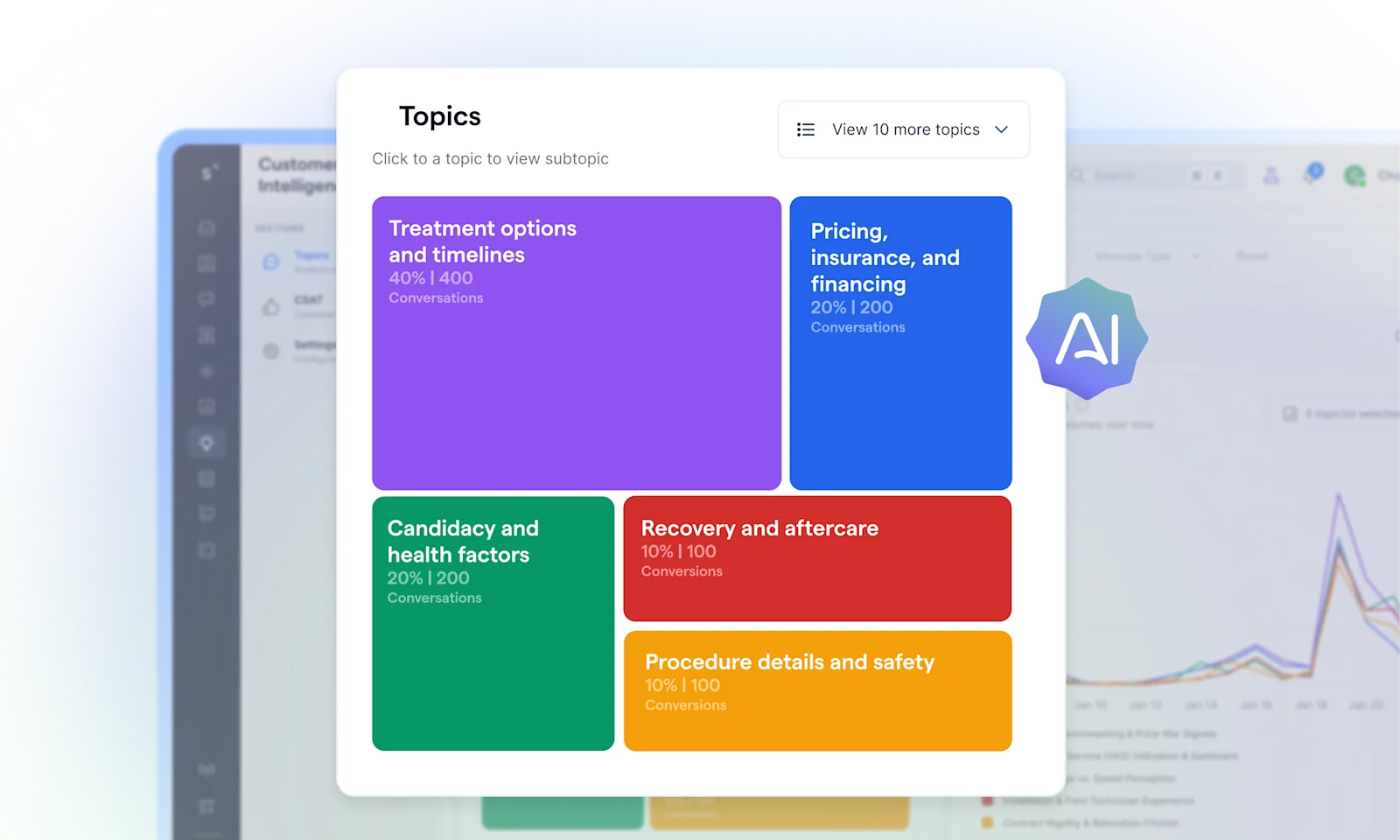
Surfaces trending topics before they become problems: It detects recurring themes across all conversations, tracks their volume over time, and flags what's gaining frequency so your team can act early rather than react late.
Goes deep on each topic: For any issue it surfaces, it breaks down agent performance, customer sentiment, and root causes tied to that specific theme. You know not just what customers are talking about, but why.
Traces every insight back to the source: Click into any topic to see every relevant conversation, then open individual chats to read exactly what customers said in their own words. No aggregated summaries without evidence.


