SleekFlow Pricing
Empower customer-centric businesses to engage, convert, and support customers 24/7 with AI agents.

Essential
Bring all your chat, call and email channels into one inbox
US$ 49/month
Key features
Essential Plan is currently rolling out by country. Talk to us to find the best plan for your business.
Pro
Put AI agents to work on your customer conversations
US$ 109/month
Everything in Essential, plus
Premium
Connect AI agents to your booking, order, and CRM systems
US$ 279/month
Everything in Pro, plus
Enterprise
Get SleekFlow experts to build and run your omnichannel AI tech stack
Custom
Everything in Premium, plus


Basic AI agent replies
Unlimited
Unlimited
Unlimited
AI credits for advanced AI agent replies
3,000 / month
(About 100-200 advanced replies)
15,000 / month (About 500-1,000 advanced replies)
Custom
AI credits add-on
US$ 20 / 5,000 credits (About 165-330 advanced replies)
US$ 20 / 5,000 credits (About 165-330 advanced replies)
US$ 20 / 5,000 credits (About 165-330 advanced replies)
AI agent knowledge base
Upload files, index webpages, add custom answers
Upload files, index webpages, add custom answers, live web search
Upload files, index webpages, add custom answers, live web search
AI agent procedures
1
5
Custom
AI agent lead scoring
AI agent takes actions in SleekFlow
Update contact property, add label, create custom object record etc.
AI agent takes actions in Shopify
AI agent makes API calls
Monthly active contacts
Starts with 500
Starts with 500
Starts with 1,000
Custom
Monthly active contacts add-on
Unlimited
US$ 20 / 100 MACs
US$ 20 / 100 MACs
US$ 20 / 100 MACs
Contact storage
Unlimited
Unlimited
Unlimited
Unlimited
User seats
3
10
10
Custom
User seats add-on
US$ 15 per seat
US$ 25 per seat
US$ 25 per seat
US$ 29 per seat
(Volume discount available)
Number of channels
5
10
10
Unlimited*
Supported channels


WhatsApp Business API Platform and SMS each have monthly hosting and per-message fees.
Inbox (Web & Mobile)
AI Writing Assistant in inbox
AI Smart Reply in Inbox
AI Smart Summary in Inbox
Simple automations
Lifecycle management
Lifecycle kanban
AI-powered lifecycle movement
Broadcast (Web & Mobile)
Broadcast message cost
Flow Builder active flows
50
100
200
Flow Builder usage
Unlimited
Unlimited
Unlimited
Ticketing
Custom Catalog
Custom Objects
WhatsApp catalog
Stripe payment link
Google Sheets
Facebook Lead Ads
Shopify
VTEX
Zapier
Make.com
SleekFlow API Access
HTTP request & webhook
HubSpot
Zoho CRM
TikTok Instant Forms
Meta Conversion API (CAPI)
Salesforce (including Marketing Cloud)
Conversation dashboard
Performance dashboard
Campaign dashboard
Sales dashboard
Conversion dashboard
CX Intelligence
Add-on
Add-on
Add-on
User management
WhatsApp QR code
Team management
Dedicated channels
Role-based access control
IP allowlisting
Multiple workspaces
PII (Personally identifiable information) masking
Export SleekFlow chats
Help centre documentation
24/7 AI chat support
Email support
Group onboarding sessions
Local expert chat support (APAC, EMEA and LATAM office hour)
60-day dedicated onboarding
Dedicated customer success manager
Service-level agreement (SLA)
Grow faster with AI insights
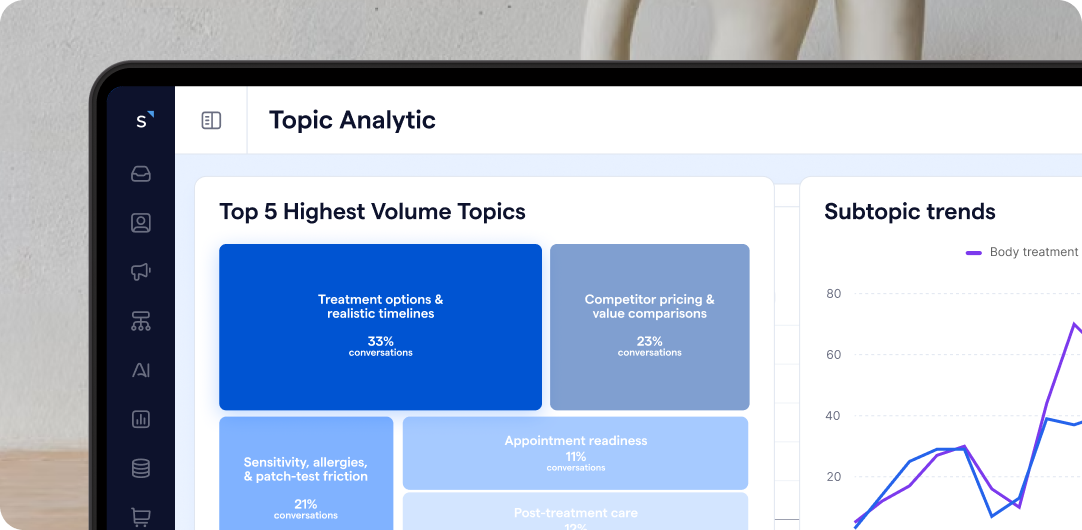
CX Intelligence
Turn every chat, email, and call into actionable customer experience intelligence.
- Track hot topics and root causes across every channel
- Score every conversation for CSAT without surveys
- Ask AI and get custom charts and recommendations

60-day Dedicated Onboarding
Included in Premium Plan: 1:1 support from a dedicated expert to build your omnichannel stack and accelerate leads, sales, and satisfaction.
- Train AI agent on your data and review your customer journey
- Centralize WhatsApp API, chats, calls and emails into one inbox
- Build routing, escalation and integrated automations
Build your engagement stack, pay as you go


Frequently Asked Questions
What are monthly active contacts (MAC)?
Monthly Active Contacts (MACs) are at the heart of our fair pricing model. Instead of charging you for every contact in your SleekFlow database, we only count a contact as 'active' if they send you a message, or if you send them a message using the SleekFlow Inbox, Flow Builder, AI Agent, WhatsApp Co-existence, or API calls within a single billing month.
This means contacts you simply store in your list, or those who receive a one-way broadcast without replying, are not counted towards your allowance and are free of charge. This approach ensures your costs are always directly tied to real, two-way engagement, not just the size of your contact list.
What counts as an active contact?


✅ A contact who sends any message to you.


✅ A contact who receives a message from you via Inbox, Flow Builder, AI Agent, API calls or WhatsApp co-existence.


❌ A contact who receives a one-way broadcast from you but does not reply or give a reaction.


❌ A contact who is only stored in your database (e.g., added manually, imported, or synced from a CRM).
How do I estimate my monthly active contacts (MAC)?
June 2025

1 June 2025
Amily messaged You

10 June 2025
Jason messaged You
18 June 2025
You messaged Amily
Think about the average number of unique customers your team chats with each day. For example, a business that chats with 20 unique customers per day will typically use about 450 MAC for the entire month. This number is not higher because many of those daily chats are with repeat customers.
What happens if I exceed my monthly active contact (MAC) limit?
SleekFlow automatically adds 100 MACs at a time to keep your messages, automations, and broadcasts running without interruption, even during a busy month. These extra MACs only last for that billing month. Your MAC limit resets at the start of your next billing month, so you're only charged more when you actually need it.
How do I choose between the Essential, Pro, Premium and Enterprise plans?
Start with one question: do you need AI agents and bulk messaging yet? If not, Essential covers you. If you do, the choice between the other three comes down to how deeply AI agents need to reach into your other systems, and how much governance you need around them.
Essential suits teams that want every customer conversation in one place. You get the omnichannel inbox and simple automations to route and answer chats faster. It doesn't include AI agents or Broadcast, so it works best when your team replies to customers one by one.
Pro suits teams running sales through conversations for the first time. An AI agent answers from your knowledge base and hands over to your team when a conversation needs a human. You also get Broadcast for bulk messaging, Flow Builder for no-code automation, and connections to Stripe, Zapier, Make.com, and the SleekFlow API access.
Move to Premium when agents need to act inside your other systems, not just talk to customers. It adds HubSpot and Zoho sync, custom API integrations and webhooks so agents can update orders or bookings, role-based access control, and 60-day onboarding with our team. Analytics go deeper too: revenue by funnel milestone or campaign.
Enterprise is built for multi-brand or multi-region operations with a high compliance bar. Salesforce and Marketing Cloud sync, PII masking, data export, single sign-on (SSO), and more. Your AI solution engineer and customer success manager design the workflows with you, under structured UATs and contractual SLAs.
If you're between two plans, talk to sales, and we'll size it against your monthly active contacts.
How does the free trial work?
Every new user gets a full 7-day Pro plan trial, no credit card required. That means 500 monthly active contacts and every Pro feature, unlocked from day one. A simple countdown keeps you posted as the trial winds down. Your workspace pauses if you miss day 7 without subscribing, no messages in or out, no automations, no API calls. Your data stays safe and waiting for you. When you're ready, you'll see exactly what Pro unlocks, with a one-click way to subscribe.
What are group onboarding sessions?
We host two weekly live sessions open to all customers, led by a Customer Success Manager (CSM) to guide you through account setup.
Session 1 (Getting Started): Covers WhatsApp API template creation, inbox messaging, contact management, sending broadcasts, and reading conversation analytics.
Session 2 (Automation & AI Masterclass): Covers building Flow Builder workflows and deploying AgentFlow AI agents.
Sessions are free for Pro plan users and available in English, Cantonese, Brazilian Portuguese, and Bahasa Indonesia.
What does the 60-day dedicated onboarding include?
Premium plan users get a dedicated onboarding specialist for about 60 days. We start with a discovery call to identify the use case that matters most to your business, whether that's Inbox, Broadcast, or AgentFlow. From there, we connect your first channel, co-build and train your team on that workflow, and guide you through launch. By the end, we review the business outcomes it's driven, like conversions and engagement, and hand you off to our Customer Success team for ongoing support.
Does SleekFlow provide ongoing customer support?
Yes. Every user gets 24/7 AI chat support and office hour email support, so help is always a message away. Upgrade to Premium for human chat support Monday to Friday, 9 AM to 6 PM APAC (GMT+8), EMEA (GMT+4), and LATAM (GMT-3).
How can I estimate the WhatsApp Business Platform messaging fees?
WhatsApp charges a messaging fee for each template message sent, as set by Meta. To estimate how much you'll pay, use our WhatsApp Pricing Calculator.
What payment methods does SleekFlow accept?
We accept all major credit and debit cards through our secure payment gateway partner, Stripe, including Visa, MasterCard, American Express, and China UnionPay. For invoices exceeding $10,000 USD, we also offer alternative payment options, such as bank transfers or cheques.
How does SleekFlow support high-volume businesses as they scale?
SleekFlow is designed from the ground up to support businesses as they grow. A key part of this is offering unlimited usage on many core features, so you don't have to worry about low ceilings on things like broadcast messages and automations.
To ensure a consistently fast and reliable experience for all our high-volume users around the globe, we maintain a Fair Usage Policy (FUP). This policy is in place to prevent platform abuse and ensure that system performance remains stable for our entire customer community.
The FUP affects less than 1% of users and is not intended to impact normal business operations. For the vast majority of businesses, you will never have to think about it. If you'd like to see the specific details, you can review our full Fair Usage Policy here.
How does AI agent pricing work on SleekFlow?
Your SleekFlow AI agent gives two kinds of replies. Basic replies answer everyday questions by directly using information from your knowledge base, and they don’t use any AI credits. Advanced replies handle work that needs more than looking up information, and they use AI credits from your plan’s monthly AI credits allowance.
SleekFlow checks every customer message and matches it to the reply type the interaction actually needs. Want to see how this works with your own conversations? Book a demo, and we’ll show you how many credits your setup is likely to use.
What are basic AI agent replies, and what do unlimited basic replies mean for my business?
Basic AI agent replies happen when your AI agent can find the answer directly in your knowledge base and reply to the customer straight away. For example, answering FAQs, sharing business hours, location and contact details, giving product information, and handling greetings and short follow-ups. On Pro, Premium, and Enterprise plans, basic AI agent replies are unlimited and don’t use any AI credits.
What that means for your business:
- Handle busy periods with confidence. When a sale or campaign brings a rush of common inquiries, your AI agent keeps answering with basic replies, and your AI credits stay untouched.
- Make your AI credits go further. Your monthly AI credits allowance is saved for the advanced replies that need more work, such as calculating prices, reading files, or completing a workflow.
- Answer customers 24/7. Your AI agent stays on duty around the clock, and it keeps answering everyday questions even after your AI credits for advanced replies run out.
What are advanced AI agent replies, and how many credits do they use?
Advanced AI agent replies happen when your AI agent needs to do more than look up information in your knowledge base before responding to customers. There are two types.
The first type is when your AI agent needs to work something out from the customer’s message. For example, working out a price (“How much for 3 at 10% off?”), checking whether a purchase date is still within your return window, reading product photos or screenshots, or processing files like PDFs, receipts, and invoices.
The second type is when your AI agent completes a multi-step workflow, such as qualifying leads in a set order, taking a chain of Shopify actions (like searching your catalog and building a cart) to recommend products, or calling your other systems’ APIs. You can set up these workflows as Procedures in AgentFlow, so your AI agent follows the same steps every time.
An advanced reply typically uses 15 to 30 credits, depending on how complex the task is. You can see how many credits each reply used at any time in your SleekFlow workspace’s AI Wallet.
What are AI agent procedures used for?
Procedures give your AI agent step-by-step instructions for a specific task, and it follows those steps in the order you set. Use them for conversations you need handled the same way every time, for example:
- Qualifying leads by asking the same questions in the same order before passing them to your sales team
- Handling a return by checking the purchase date, confirming the item’s condition, and then sending a return label
- Booking an appointment by checking availability, collecting details, and then confirming
- Completing a workflow that updates your other systems, such as Shopify or your CRM
What happens if I use up my AI credits for advanced replies?
Your AI agent keeps answering customers who only need basic replies. When a customer needs an advanced reply, the conversation is handed over to your team with an AI summary as an internal note, so your team can follow up quickly and the customer still gets a response.
You’re never charged for extra AI credits unless you choose to be. You decide what happens next:
- Buy more AI credits as an add-on whenever you need them.
- Turn on auto top-up in your AI Wallet, and set how many credits it adds and how often.
- Wait for your monthly AI credits allowance to reset at the start of your next billing month.
Which plan is right for my AI needs?
Choose based on the kind of work you want your AI agent to do, not how many conversations you get, because basic replies are unlimited on Pro, Premium, and Enterprise plans.
- Essential: your team replies faster with AI Inbox Co-pilot, which drafts and improves replies. AI agents aren’t included.
- Pro: your AI agent answers product and store questions, recommends products and builds a Shopify cart, and qualifies leads before handing them to your sales team. Try it free before you decide.
- Premium: your AI agent books or reschedules appointments in your booking system, checks the latest information on your website, and updates your other systems, with 5 procedures to keep each workflow consistent.
- Enterprise: your AI agent runs as many workflows as your business needs, across teams, brands, and markets, with custom AI credits and a custom number of procedures. Dedicated customer success manager and forward-deployed engineers work with you to design and deploy your AI agents.
Not sure which plan fits? Book a demo, and we’ll match your use cases to the right plan.
Are basic AI agent replies really unlimited?
Yes. On Pro, Premium, and Enterprise plans, there’s no cap on the number of basic replies your AI agent sends, and they never use AI credits. Your AI agent can answer the same customer as many times as they need and answer every customer who messages you, up to your plan’s monthly active contacts (MAC) allowance.
Each customer your AI agent talks to counts once toward your MAC allowance for that month, regardless of how many replies they get. If you go over your allowance, SleekFlow automatically adds 100 more MACs, charged for that billing month only.
How many advanced replies do my credits cover?
Each advanced reply typically uses 15 to 30 credits, depending on how complex the task is. As a guide, here’s roughly how many advanced replies each plan’s monthly credits cover:
- Pro: 3,000 credits, about 100 to 200 advanced replies
- Premium: 15,000 credits, about 500 to 1,000 advanced replies
- Enterprise: custom credits, set to match your volume of advanced replies
Basic replies don’t count toward these numbers, since they never use credits.
Want to know your usage before you commit? Start a free trial of the Pro plan and set up your AI agent in AgentFlow. Run test chats or batch tests with your typical customer questions, and each test reply shows how many credits it used, so you can estimate your monthly usage before your AI agent talks to real customers.
Prefer to walk through it with us? Book a demo, and we’ll help you estimate it for your setup.