WhatsApp Business security: Enhance protection for users, data, and connections


TL; DR: Quick Summary
- While standard WhatsApp encryption offers a solid baseline, growing businesses require more advanced security to prevent data misuse and protect customer info.
- Use Role-Based Access Control (RBAC) to manage permissions so team members can only access the chats, contacts, and features they need for their jobs.
- For complete protection, integrate a security suite that includes data masking, IP whitelisting, and two-factor authentication (2FA).
- As you scale, structuring your WhatsApp Business security around centralized, team-based access helps streamline workflows and maintain compliance with regulations like GDPR and HIPAA.
With WhatsApp Business becoming the go-to communication tool for enterprises, security concerns are rising. Every day, businesses exchange sensitive customer data—transaction details, personal information, and confidential conversations on WhatsApp. But is your business truly protected? Here are the top challenges businesses face and why securing every layer of your WhatsApp Business security matters.
Why data security matters for businesses
In conversational commerce, your messaging apps are digital storefronts where customers constantly share sensitive information. Think about it: they send home addresses, phone numbers, and sometimes even payment details right in the chat. For your business, this data is a double-edged sword.
If you fail to secure this information, the stakes are high.
Financial Penalties: A 2025 IBM report found the average global cost of a data breach has soared to $4.4 million. Violating regulations like GDPR can also lead to harsh financial penalties.
Loss of Customer Trust: The real cost is losing customer trust. A single compromised chat can destroy a brand reputation you've spent years building.
On the flip side, making data security a priority gives you a competitive edge. Customers feel safer buying from brands that prove they can protect their information.
WhatsApp Business app security checklist
If your team manages customer chats on the native WhatsApp Business app, your first line of defense is securing your devices and account settings. The standard app doesn't have enterprise-level controls, so you need to be disciplined. Here’s a checklist to help you safeguard your account:
Enable Two-Step Verification (2FA): This is non-negotiable. Set up a custom PIN that's required to register your phone number on any new device. This stops bad actors from hijacking your account.
Audit Linked Devices Frequently: Regularly check the "Linked Devices" menu in your settings. If you see any unrecognized browsers or apps, log them out immediately. Don't forget to unlink old devices before you get rid of them.
Control Physical Access: Since the app decrypts messages on the device itself, the physical phone is your biggest vulnerability. Use strict biometric locks (Face ID or fingerprint) or a complex passcode on any company phone.
Disable Unencrypted Cloud Backups: By default, your chat backups to Google Drive or iCloud might not be end-to-end encrypted. To secure your archives, you have to manually turn on "End-to-end encrypted backup" in your settings.
Train Your Frontline Staff: Teach your team how to spot phishing scams, malicious links, and social engineering tricks. Make sure they know never to share the WhatsApp SMS registration code with anyone.
Common WhatsApp Business security risks
1. Data security and compliance challenges
Handling sensitive customer data, intellectual property, and financial records on WhatsApp Business can be risky. Without robust access management, employees might accidentally or maliciously access information they shouldn’t, leading to potential data breaches. This is especially critical for industries such as:
E-commerce
Healthcare
Finance
A data breach not only jeopardizes customer trust but also risks substantial fines for failing to comply with regulations like GDPR, HIPAA, or SOC 2.
2. Disruptions to Autonomous AI Workflows
As your chat volume grows, manually managing team permissions and customer handoffs becomes inefficient and risky. You can use specialized AI agents to guide sales conversations and qualify leads 24/7, but you still need to keep your unified CRM secure. Without strict role-based controls, unauthorized employees might disrupt your AI settings. This can slow down your revenue engine and create compliance risks you don't need.
3. Scaling security with growing teams
As your business grows, managing access securely across different teams, roles, and locations becomes increasingly complex. This challenge is magnified by:
Distributed teams: Remote or distributed work setups make it harder to maintain centralized control over access.
Inflexible solutions: Many security solutions lack the flexibility to scale with your organization.
Chaotic permissions: This often results in disorganized permission structures that are difficult to track or update.
Why basic WhatsApp security isn’t enough
While WhatsApp Business provides some security layers like encryption, it doesn’t control internal access. Without advanced data protection, any employee with access to WhatsApp can view, edit, or export sensitive data. That’s where SleekFlow comes in.
SleekFlow is not just another WhatsApp Business API solution—it’s a comprehensive platform built with enterprise-grade security in mind. Whether you’re a small business or a large enterprise, SleekFlow’s security features are designed to scale with your needs, providing a secure environment for both your team and your customers.
Here’s a quick look at SleekFlow’s key security features:
Role-based access control (RBAC): Limit access based on roles and responsibilities.
Data masking: Hide sensitive information from unauthorized users.
IP whitelisting: Restrict access to specific IP addresses.
Two-factor authentication (2FA): Add an extra layer of login security.
What WhatsApp secures vs. what your business must secure
There’s a dangerous misconception that WhatsApp’s famous End-to-End Encryption (E2EE) is a catch-all security solution. The reality is more of a "Shared Responsibility Model".
Role-based access control (RBAC): A stronger WhatsApp Business security feature
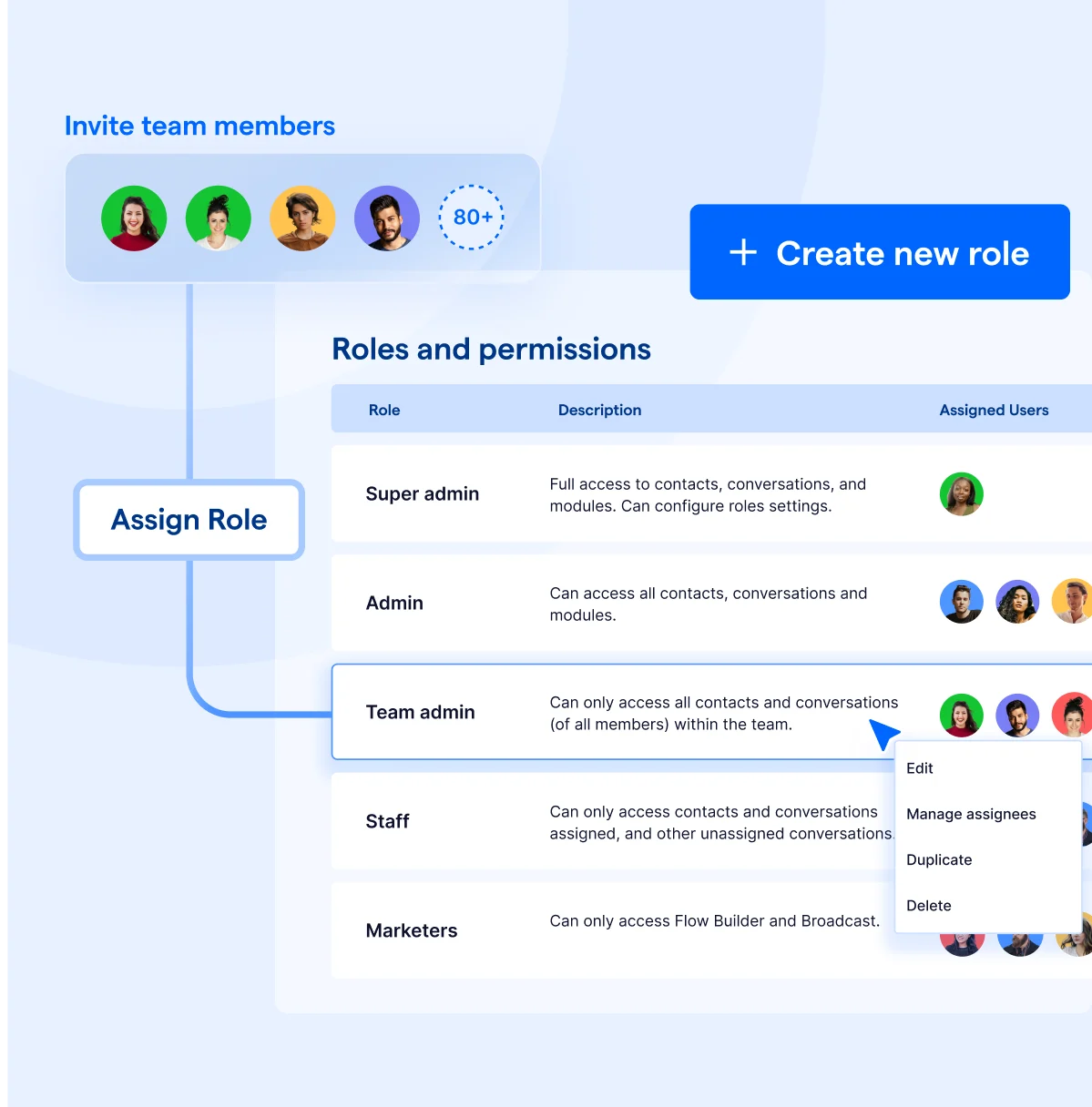
Role-based access control (RBAC) is a data security management framework that ensures employees can only access the information they need for their jobs. Instead of giving everyone full access to WhatsApp chats and customer data, RBAC limits permissions based on roles. Think of it as giving each team member a key to their own office—not the entire building.
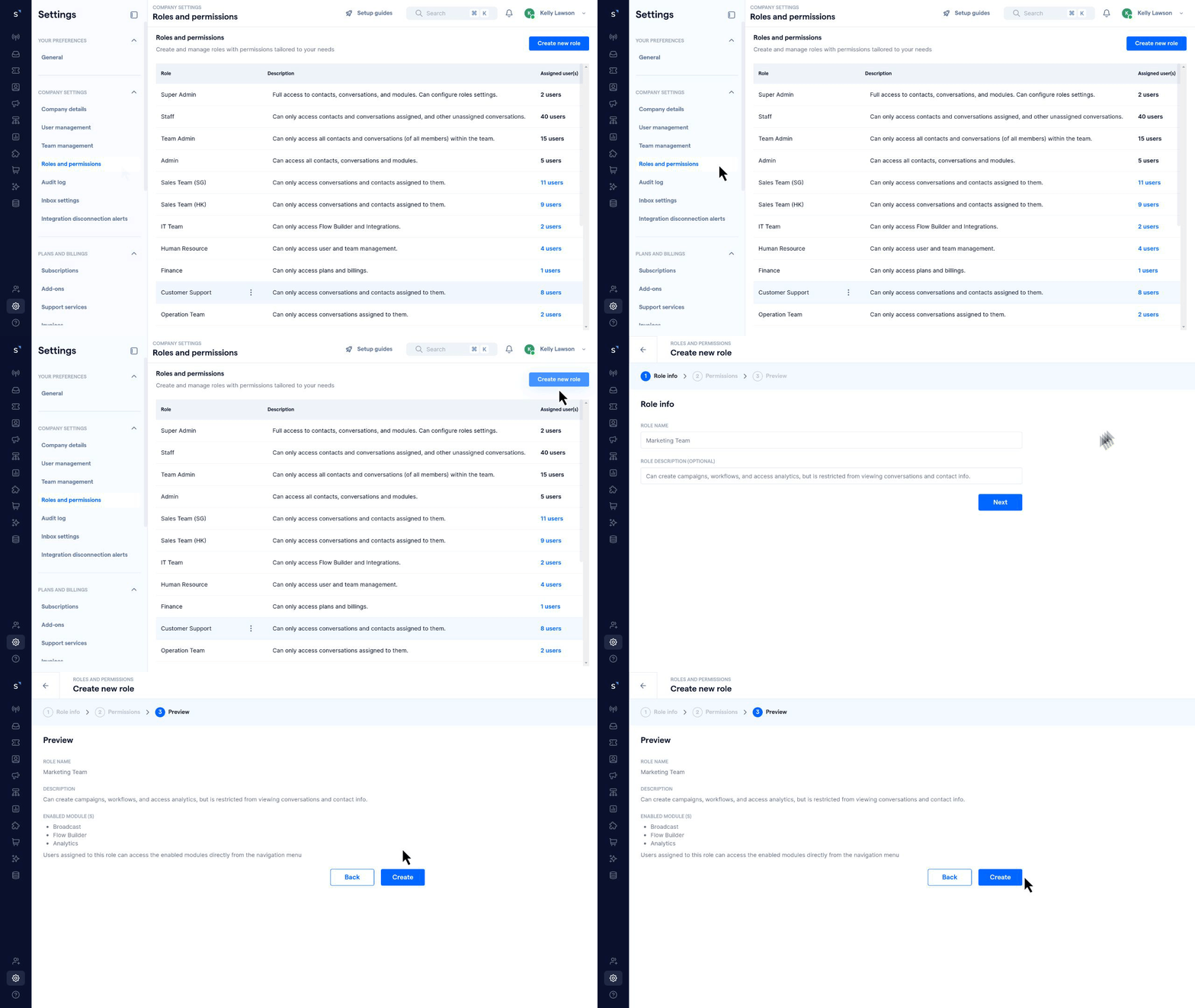
1. Role customization: Predefined roles for teams to simplify access management
Every department has its own responsibilities, so why should they all have the same access? SleekFlow’s RBAC lets you create custom roles for different teams, ensuring they only see and manage what’s relevant to their job. No more sales agents tinkering with marketing workflows or IT teams accessing sensitive customer data!
With role customization, you can secure your AI ecosystem:
Give sales teams access to monitor how AI agents proactively guide sales conversations, allowing them to seamlessly take over high-value leads during smooth handoffs without the ability to delete core data.
Let marketing teams utilize distinct customer lifecycle stages to dynamically segment audiences and launch highly targeted broadcast campaigns, while strictly restricting their access to sensitive payment information.
Enable support reps to resolve complex issues using 1-click AI-generated responses, without modifying the underlying AI agent logic or knowledge base.
By customizing permissions at the department level, you boost efficiency while minimizing the risk of unauthorized access or accidental data mishandling. It’s like giving each team their own toolbox—equipped with exactly what they need, nothing more, nothing less.
How FloorINC quickly identifies contact roles within the chatbox using SleekFlow
FloorINC, a massive flooring supplier, interacts with a wide range of stakeholders, including consumers, designers, and a network of over 300 authorized dealers.
Managing communications from these diverse groups through a shared inbox was leading to chaos, disorganization, and a lack of contextual relevance in conversations.
FloorINC implemented a Social CRM to segment contacts. They assign unique labels to each contact (e.g., dealer, designer, customer) directly within the chatbox. This allows agents to instantly identify who they are speaking with and automates access to sensitive documents based on the contact's role.
Completely eliminated communication friction, resulting in a 40% faster response time.
Ensured every stakeholder receives the exact level of service they require, leading to a 30% increase in conversions.
Provided immediate context for support agents, resulting in a 2X increase in operational efficiency.
Controlled access to sensitive information through automated workflows.
2. Feature-specific control: Protect your AI agents and workflows
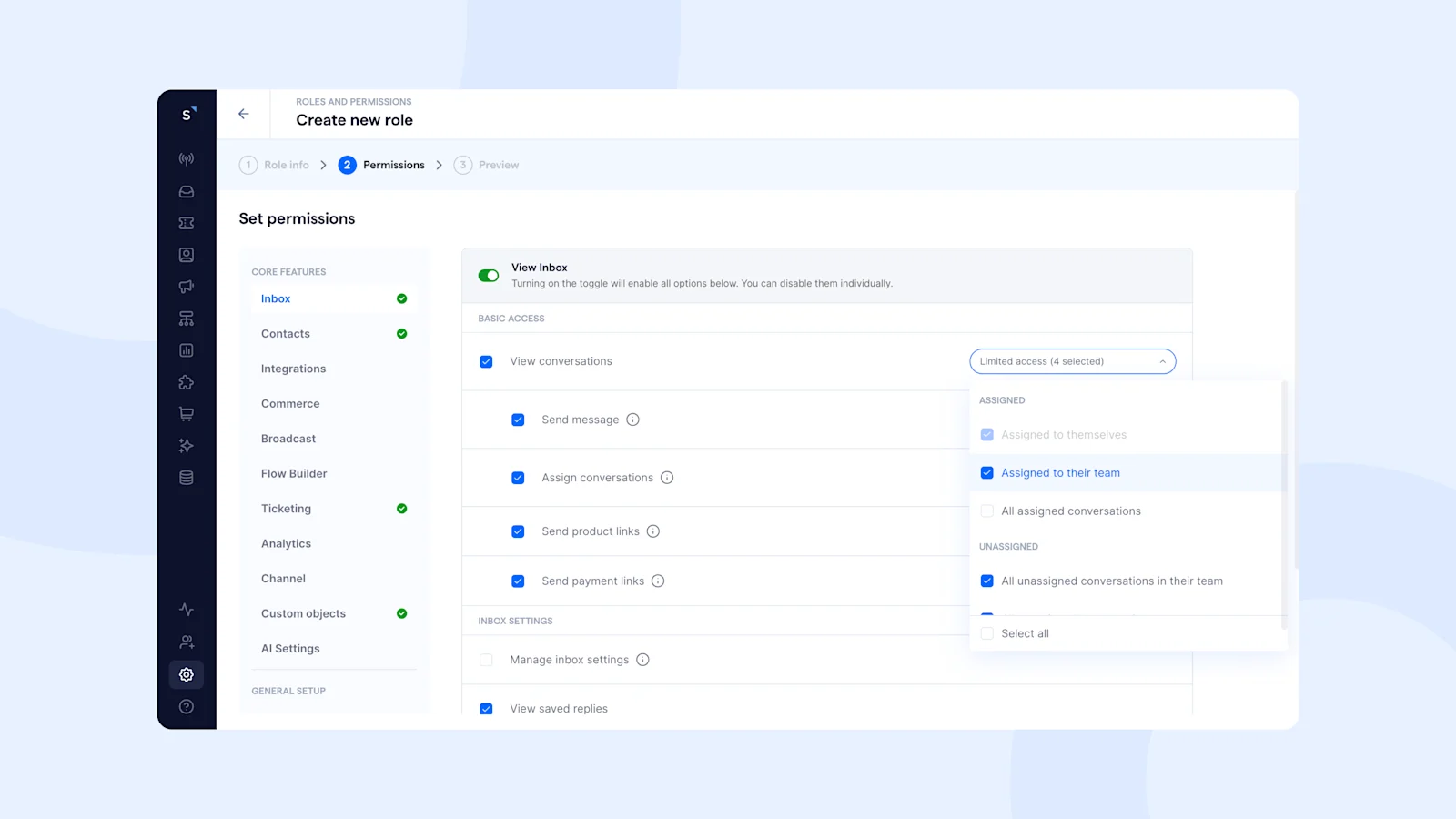
While role customization manages who can do what, feature-specific control protects the heart of your automation. Imagine a new hire accidentally changing your AI agent's custom knowledge base or deleting an intelligent workflow that handles 24/7 lead qualification.
With granular RBAC, you decide who has access to specific AI capabilities and CRM features. This ensures only authorized managers can create, train, or modify your specialized AI agents and automated broadcasts. Instead of a one-size-fits-all approach, this gives businesses precise control over key tools.
Granular permissions are available for these SleekFlow modules:
Core features: Inbox, Contacts, Integrations, Commerce, Broadcast, Flow Builder, Ticketing, Analytics, Channel, Custom Objects, AI Settings.
General setup: Company Settings, Plans and Billings.
With feature-specific control, you can ensure employees only access what’s necessary—reducing risk, improving efficiency, and keeping your data protected.
3. Team-based access: Keep assignments within the right team
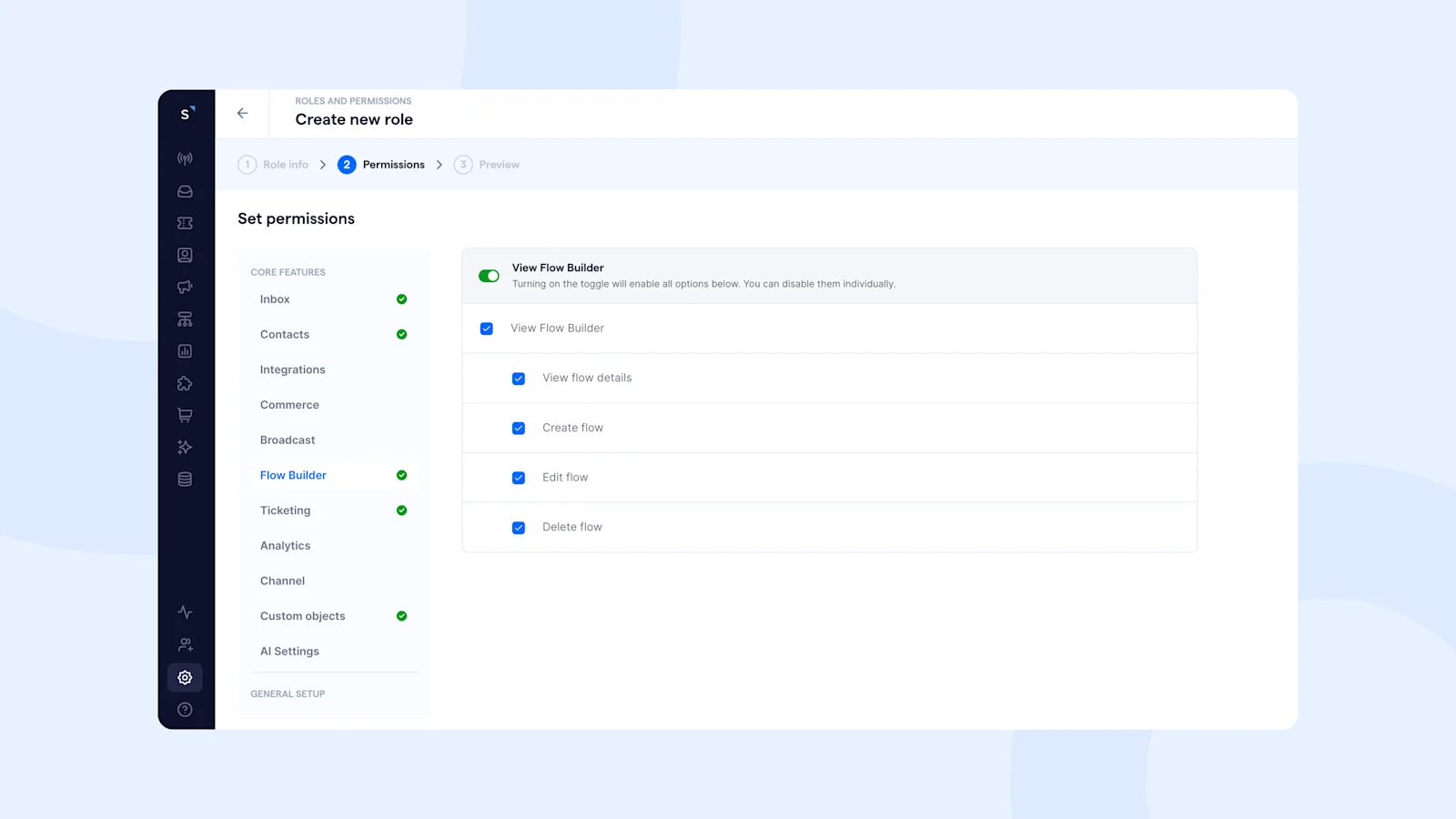
Team-based access ensures that employees can only manage conversations and contacts assigned to their own team, preventing cross-department mix-ups and unauthorized changes. This keeps workflows structured, improves data security, and ensures each team focuses only on their assigned customers.
Currently, team-based access control is available for:
Inbox (Conversations) – Users can view, send messages, and assign conversations only within their team, preventing unnecessary cross-department transfers.
Contacts – Users can view, edit, delete, and assign contacts only within their team, ensuring proper ownership and preventing unauthorized modifications.
STACCATO ensures every customer inquiry reaches the right team with SleekFlow’s solutions
STACCATO manages a massive network of retail stores and receives a high volume of customer inquiries via WhatsApp across various locations.
This heavy influx of messages led to disorganized workflows, fragmented communication, and delayed customer service. Standard messaging apps couldn't handle the complexity.
STACCATO adopted a centralized conversational commerce platform. This system consolidated all WhatsApp chats into one inbox, used automated routing rules to direct inquiries to the correct store's team, and implemented role-based access controls to ensure only trained staff handled specific conversations. It also allowed for seamless escalations using private internal notes.
STACCATO successfully transformed its customer service operations.
They empowered remote and in-store teams to collaborate efficiently.
The new system ensures every shopper receives prompt, specialized, and highly satisfying support.
Role-based access control use cases across industries
E-commerce: Prevent unauthorized access to customer order details and payment information by restricting access to only the sales and support teams.
Healthcare: Ensure compliance with HIPAA regulations by limiting access to patient conversations and medical data to authorized healthcare professionals.
Finance: Protect sensitive financial information by allowing only certified advisors to access client portfolios and transaction histories.
Retail: Safeguard customer data and inventory details by granting access only to store managers and inventory teams.
No matter the industry, role-based access control provides a flexible and secure way to manage access, ensuring that your business remains compliant and protected.
More than just RBAC: SleekFlow’s full security suite
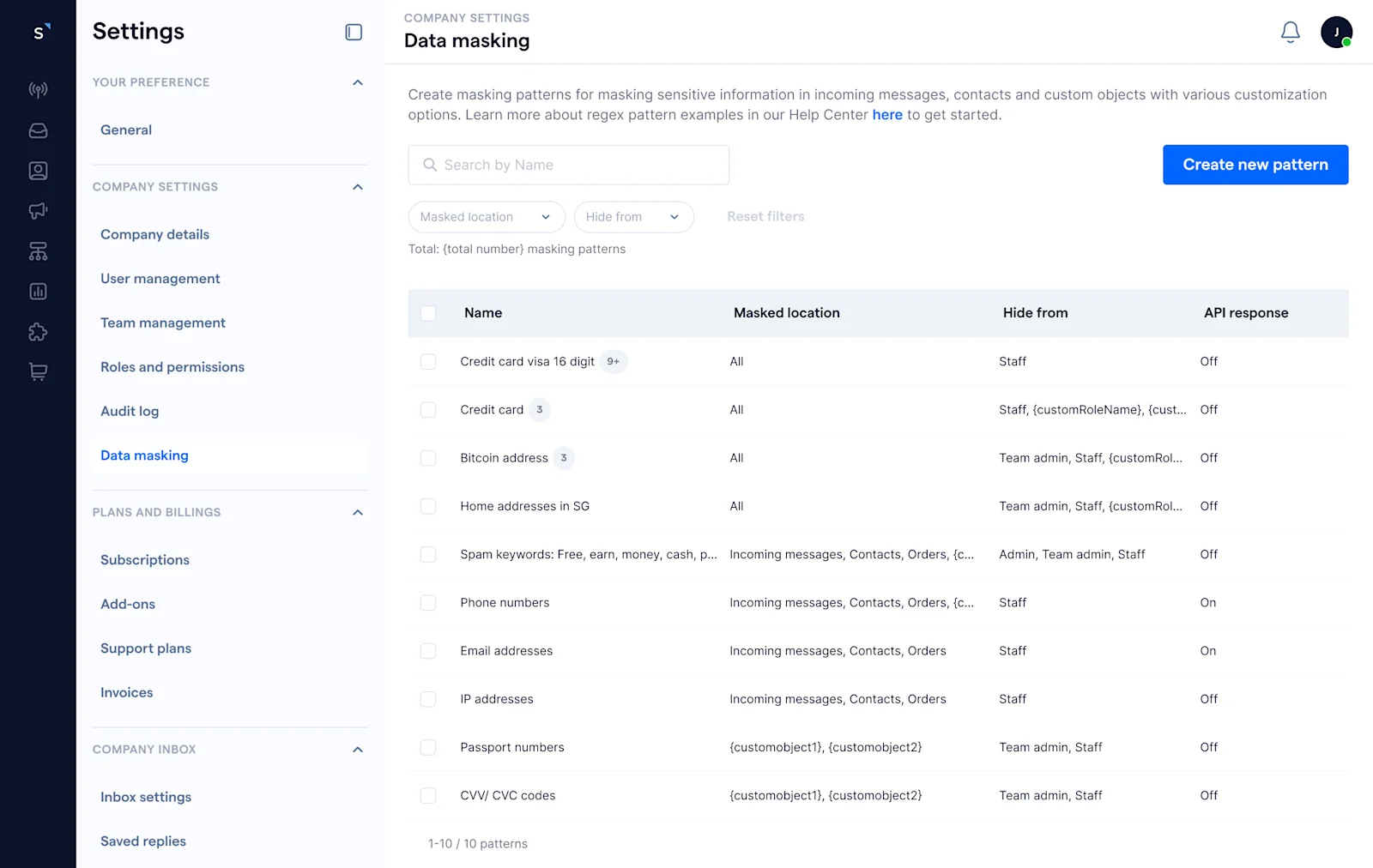
1. Data masking: Hide sensitive information
For businesses handling payment details, bank accounts, and personal identification numbers, PII masking ensures that sensitive information remains hidden from unauthorized users. For instance, when verifying a customer's credit card number, an agent might only see the last four digits, “**** **** **** 1234,” instead of the full card details. This approach offers two key benefits:
Prevents internal misuse: By masking sensitive data, you reduce the risk of it being intentionally or accidentally shared.
Enhances data security: It adds a layer of protection while still allowing employees to perform their daily tasks efficiently..
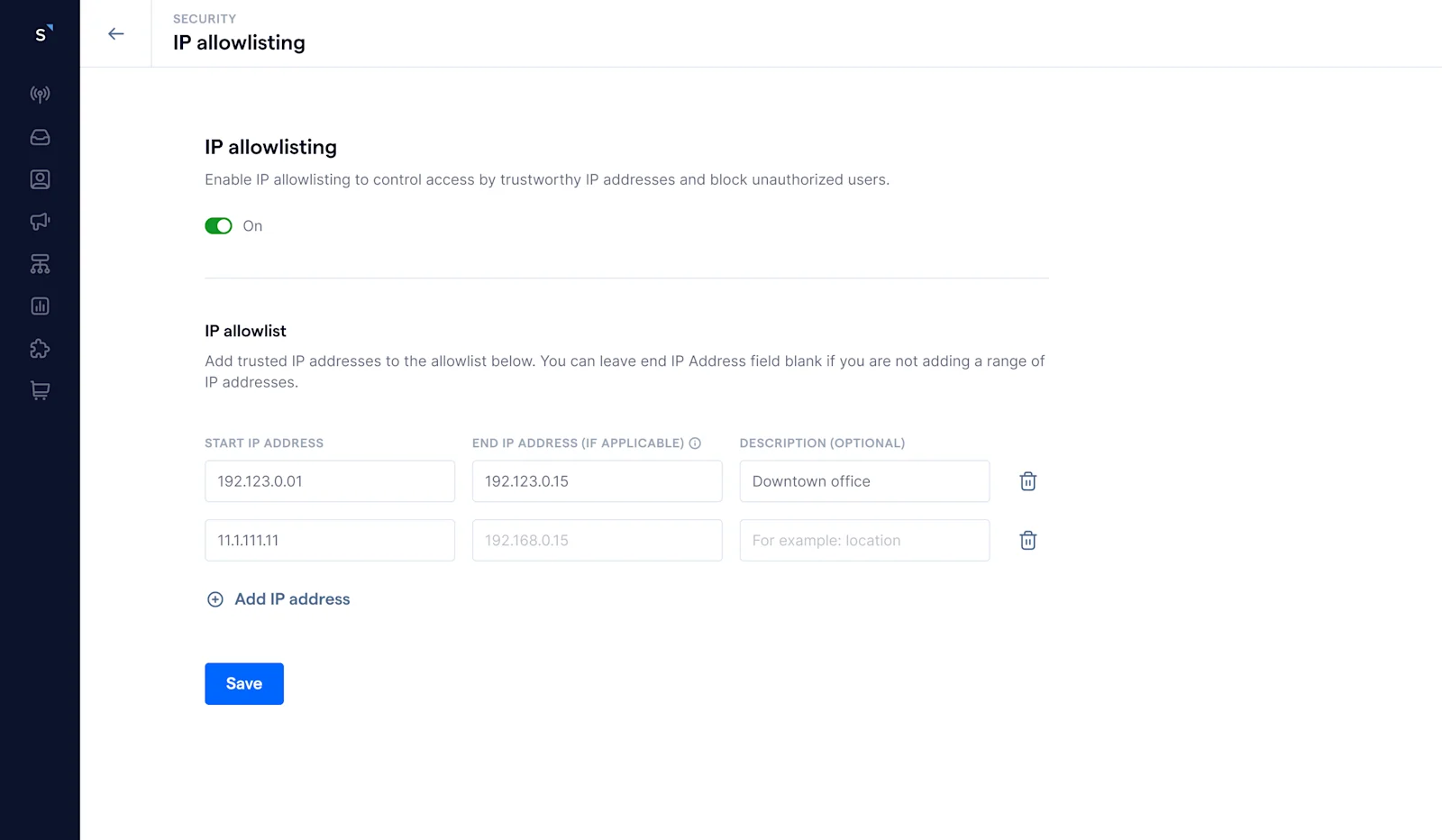
2. IP whitelisting: Restrict access to trusted locations
With remote teams working from different locations, controlling access to your system is crucial. IP whitelisting ensures that only authorized devices or office networks can log into SleekFlow, blocking unapproved access attempts from unknown locations. For example, if a remote customer support agent is required to log in from a company-approved network, any attempt to access the system from an unregistered IP will be denied, reducing the risk of unauthorized access.
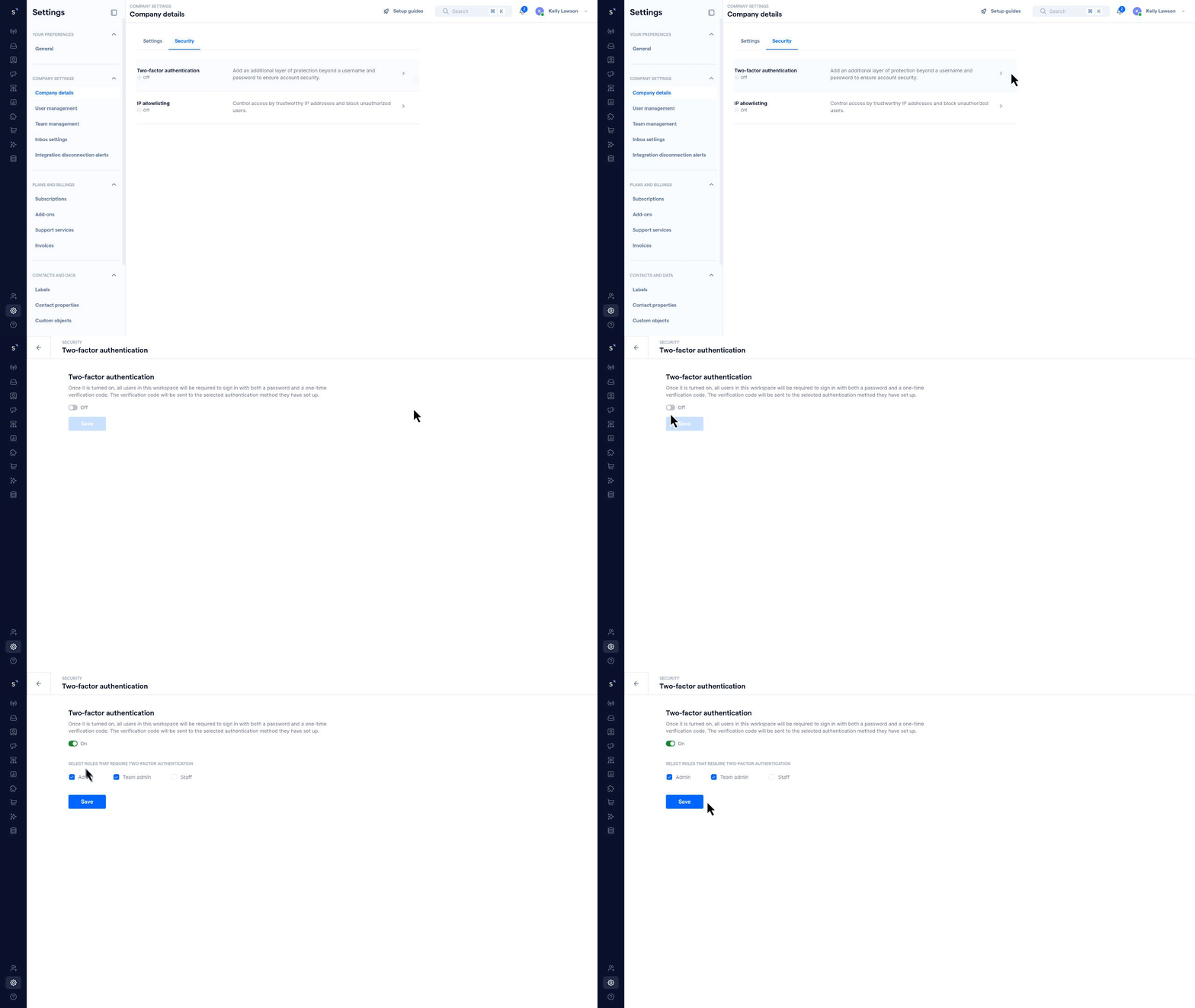
3. Two-factor authentication (2FA): Extra protection for logins
Two-factor authentication (2FA) strengthens your SleekFlow account security by requiring a second verification step in addition to your password. This typically involves:
Password: Your standard login credential.
One-time verification code: A unique code sent to your device for each login attempt.
Even if credentials are compromised, unauthorized users cannot access the account without the additional verification step, significantly reducing the risk of security breaches and ensuring compliance with enterprise security standards.
WhatsApp team security: SleekFlow vs. respond.io vs. Wati vs. Zendesk
When your business grows beyond a single phone, upgrading to an official WhatsApp Business Solution Provider (BSP) is the next logical step. But not all BSPs are built the same. While they all use secure APIs, they vary widely in their internal security certifications, access controls, and data masking features.
Here's a comparison to help you match a platform with your company's security needs:
Take your WhatsApp Business security to the next level with SleekFlow
In a world where data security management is non-negotiable, SleekFlow empowers enterprises to protect their WhatsApp Business communications with advanced data protection features like:
Role-based access control
PII masking
IP whitelisting
And more
By addressing the pain points of unauthorized access and data breaches, SleekFlow ensures that your business remains secure, compliant, and efficient.
Conversations should flow, not your data
Safeguard every conversation with enterprise-grade security features built for WhatsApp Business.


