WhatsApp Interactive Message for businesses


Do you know that there is an inseparable relationship between online shopping and social messaging platforms such as WhatsApp? How? Basically, it is because all online shopping platforms have their own inquiry and ordering methods provided to customers. Since WhatsApp is the most popular communication platform in the world, almost all e-commerce merchants will opt for WhatsApp Business to:
Integrate with e-commerce shops
Launch marketing campaigns
Handle customer service
According to Statista, there are over 764.38 million merchants who currently use WhatsApp for their business monthly.
“With a global user base exceeding 3 billion, WhatsApp continues to be a leading platform for real-time, conversational engagement.”
While traditional text messages often feel like a one-way street., WhatsApp Business Interactive Message is absolutely indispensable for e-commerce merchants because the Interactive Message enables smoother conversations between merchants and customers and optimizes customer service.
“To seize each online business opportunity, you must first seamlessly bridge your social media and online stores, and you must never miss any customer’s inquiry.”
-SleekHack
Related Reading: How Singtel leverages WhatsApp Business to drive Customer Experience 3.0
What are WhatsApp interactive messages?
WhatsApp’s Interactive Message is a type of WhatsApp Business message that boosts interactions between you and your customers by replacing manual typing with clickable UI elements. This reduces friction, leading to higher conversion rates and cleaner data in your CRM.
Read more:Learn how to create a WhatsApp marketing strategy for your company .
Types of WhatsApp interactive messages to drive conversions
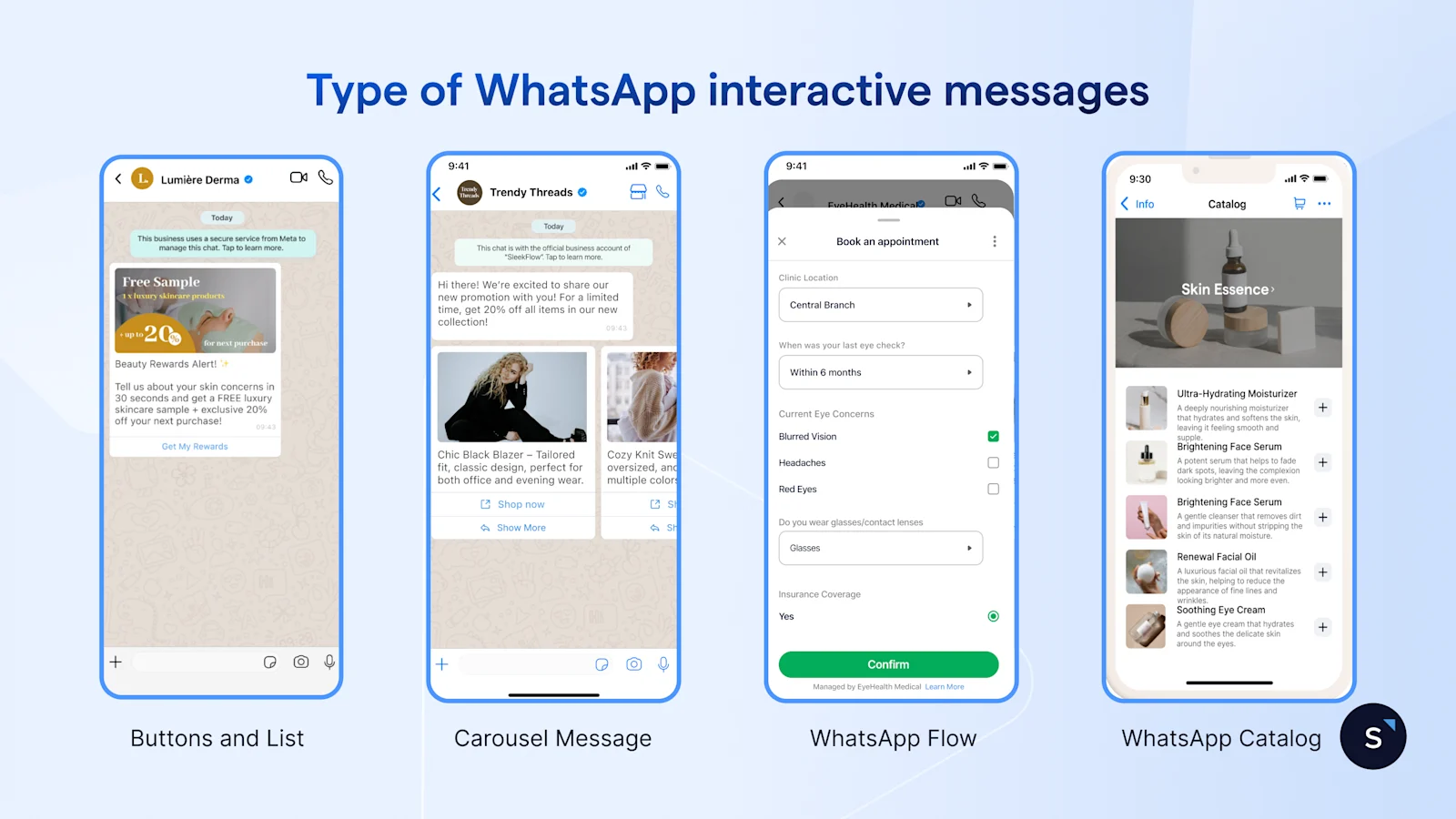
WhatsApp offers a range of interactive messaging formats that allow businesses to engage customers more dynamically than traditional text messages. Below are the types of WhatsApp interactive messages that you can use to enhance customer interactions.
1. List Message
Each list message can contain up to 10 options. You can customize the content of each option, including title, menu content, etc.
This format offers several benefits:
Convenience for customers: They can choose and reply instantly with a simple click.
Efficiency for merchants: You can reply to customers with the same text content every time, eliminating the need to copy and paste.
2. Quick reply buttons
Quick reply buttons function allows you to provide up to 3 options under each message.
For example, for the question “Welcome! What language do you prefer”, you can use the quick reply buttons to add three options “Traditional Chinese”, ” “Simplified Chinese” and “English” for customers to choose from.
With the quick reply button function, you can also customize the image, title and option name.
Buttons are the best way to convert a "lazy" customer by providing a single-tap path to a result. SleekFlow users typically utilize two types:
Here are some points to note when using List Messages or Quick Reply Button:
Your customers can only choose one option from either List Message or Quick Reply Buttons, and they can go back and reopen the previous message.
You can send a message with Quick Reply Buttons or a List Message within the 24-hour conversation window, with no template required; otherwise, you'll need to use a template message to reactivate the conversation window.
View the comparison of normal text messages and interactive messages:
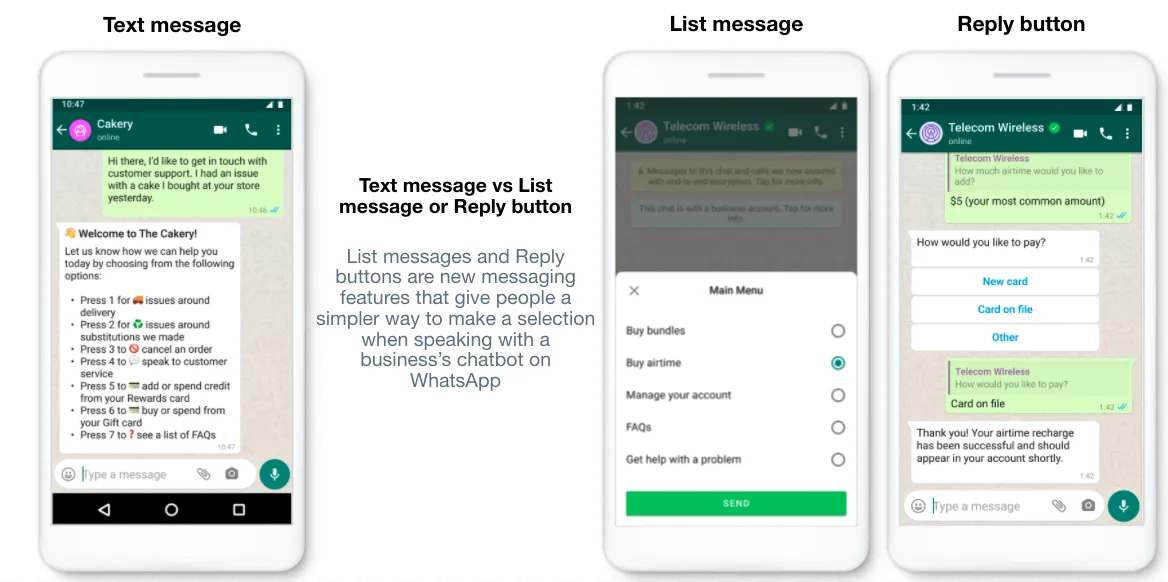
Want to know more about the auto-reply function: The quickest reply you can get. WhatsApp Chatbot Autoreply.
3. WhatsApp Catalog
While WhatsApp can be your digital storefront in chat. The WhatsApp Catalog message enables businesses to share their products directly in chat. Customers can browse products and inquire about specific items without ever leaving the app.
Best of it, Merchants can generate a customized cart based on a customer's inquiry and share a secure payment link directly within the conversation, turning a simple product query into a completed transaction.
4. WhatsApp Carousel Template
The WhatsApp Carousel Message format allows businesses to showcase up to 10 products or items within a single message, each with its own image, title, description, and URL. Users can swipe through the options to view different items.
Carousel messages provide a rich, interactive experience that catches the customer’s attention. It's best for:
Showcasing a range of products
Offering multiple event options
Displaying promotional campaign
Pro Tip: Use Carousels to display "Recommended Products" based on a customer's purchase history stored in your CRM.
5. WhatsApp Flows
WhatsApp Flows is a feature that allows businesses to create multi-step, interactive experiences directly within WhatsApp. Instead of a back-and-forth chat, customers can fill out a form in chat for appointment bookings, product customizations, event registrations, and more.
Why is an Interactive Message necessary?
Better user comprehensiveness
Interactive messages provide us with a more concise and consistent message format, rather than long-text messages. Thus, customers can ask and choose what they want from a business through interactive message buttons. Customers would be more familiar with this feature and have higher comprehension levels over time.
Increase sales and marketing results
Chatbots using Interactive Message features can automatically reply to the customer’s choice, which achieves significantly higher response rates. It would probably provide the customers with a better and more satisfactory shopping experience. We believe that it would bring higher conversion rates as well!
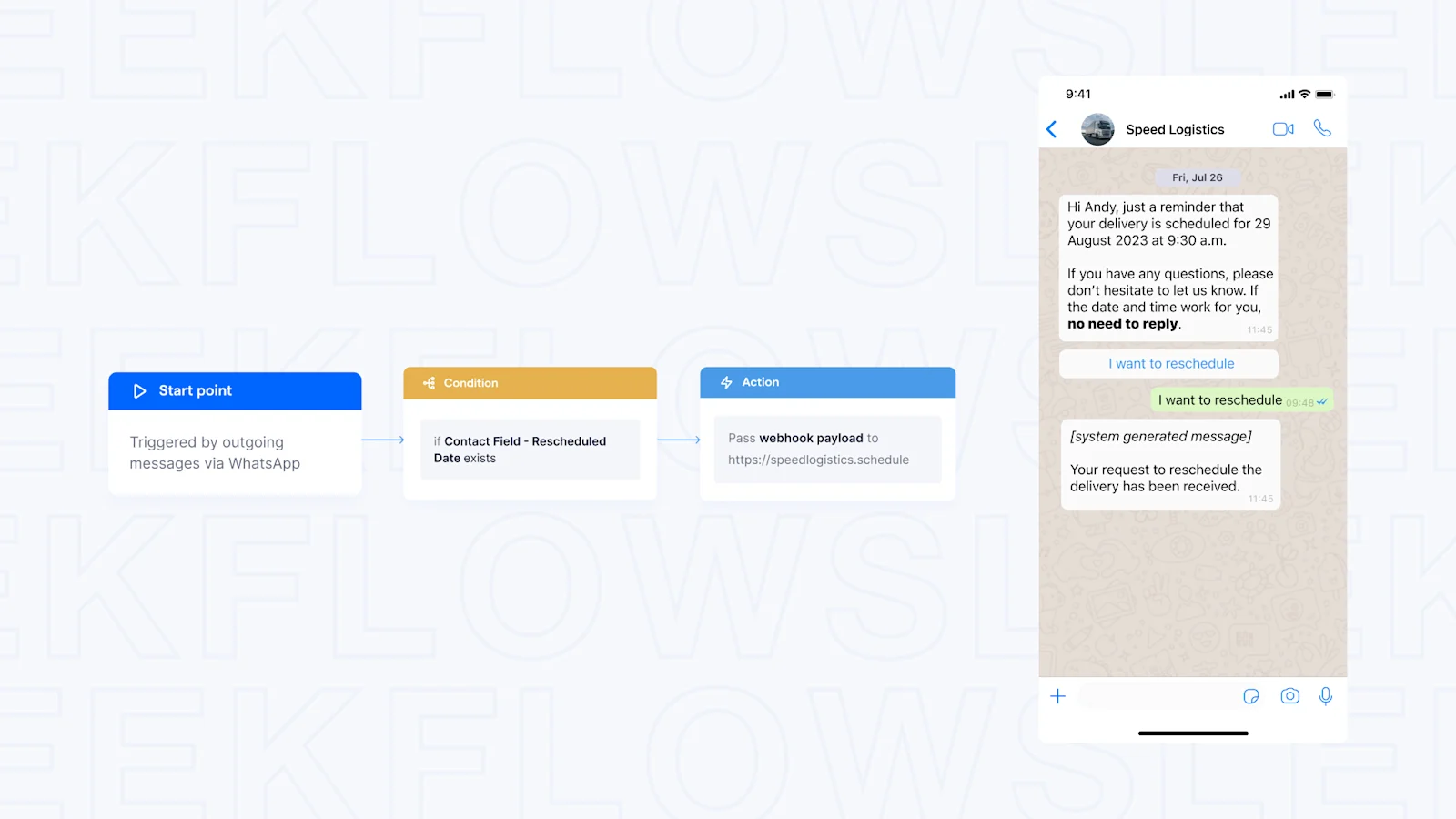
You can use Flow Builder to automate several processes, saving you time while ensuring customer service precision. For example, you can create an automated flow to:
Route customers to the right agent based on the list item they select.
Automatically send a WhatsApp confirmation message to a customer when their order is paid.
Create records in your CRM or ERP system when certain events occur, such as a new customer signup or a newly scheduled appointment.
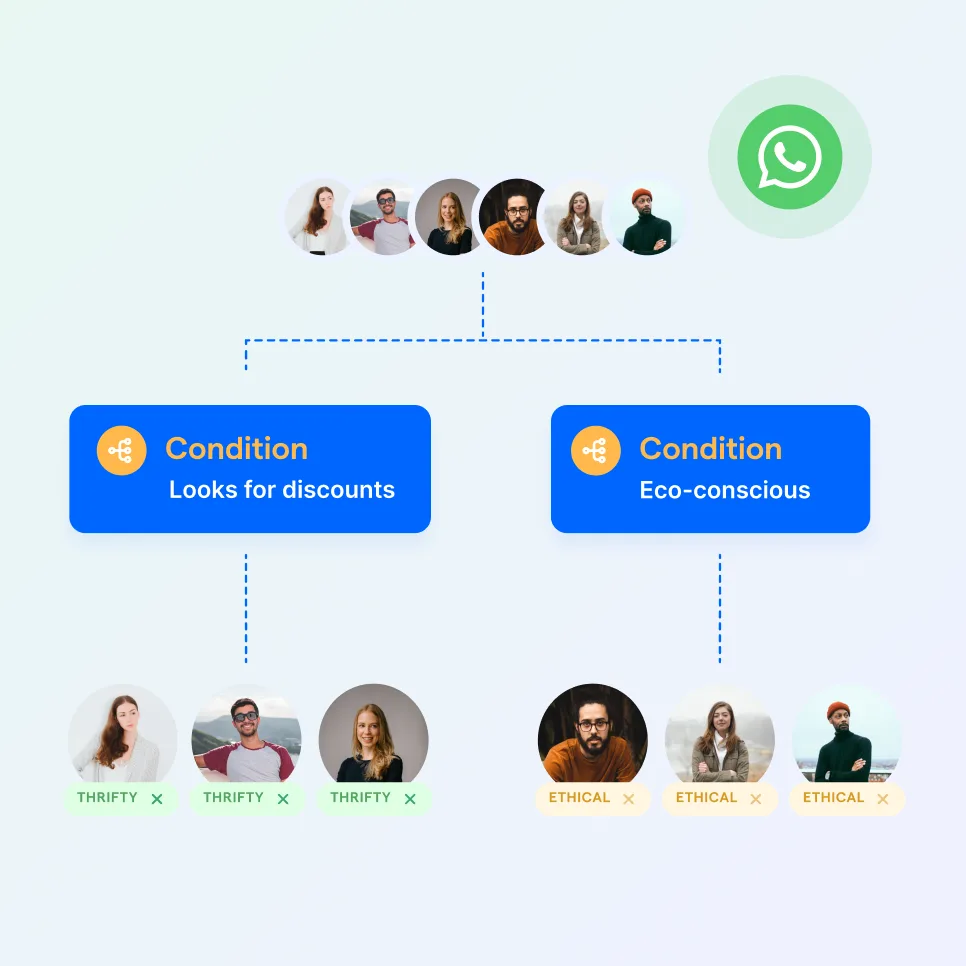
Automate your business growth with Flow Builder
Streamline sales, marketing, support, and operation workflows in the era of hyper-personalization.
Personalization means being closer to your customers
WhatsApp interactive messages can be used to guide customers through frictionless, predefined journeys. By syncing with SleekFlow, interactive messages can be populated in real time and personalized to customer needs or situations. Businesses can customize every message according to a customer's unique situation to provide a truly personalized experience.
When can we use Interactive Messages?
Only a WhatsApp Business account isn't enough if you want to scale your business, but with SleekFlow, you can do everything mentioned above! When chatting with customers, use the interactive message for them to engage with your business quickly. Once customers click the button, you can not only automatically reply with corresponding information within seconds but also save manpower!

Get free onboarding support with any paid plan!
Enjoy unlimited AI agents and Flow Builder with any SleekFlow AI plans. Onboard effortlessly with our free support!
Example use cases of Interactive Messages
No matter if you are from the beauty industry, education industry, traditional retail, or online shops, as long as you have to interact with customers frequently in social messaging Apps, Interactive Messages can be very useful. Have a look at the simple use cases below:
Pro tip: Use a specialized WhatsApp AI agent to qualify leads in real-time. By analyzing a customer's specific button selection or list response, the AI can provide tailored follow-up information or instantly escalate high-value prospects to your sales team, ensuring no opportunity is missed.
How CANVAS increased engagement with SleekFlow's interactive messages for WhatsApp marketing strategy
CANVAS, an organic skincare brand in Hong Kong and Australia, faced limitations with traditional CRM channels like SMS and email.
Static channels led to stagnant engagement and clunky operations. Email open rates were decent but lacked interactivity, while SMS provided no tracking of engagement.
CANVAS used SleekFlow to enable a 2-way WhatsApp interactive communication. Key features included Quick Reply Buttons, chatbots, and segmentation for targeted campaigns.
WhatsApp campaigns achieved a 68% open rate and a 6.8% reply rate, doubling email performance.
Gamified campaigns saw an 8% click-through rate, far exceeding the industry average.
Automation reduced manual response time by 90%, allowing staff to focus on complex queries.
During Typhoon Soala, WhatsApp marketing generated 60 orders in one day, driving six-figure sales despite store closures.
A VIP campaign for a product launch saw a 75% read rate, outperforming email by 2.5x and boosting store foot traffic.
Wasp Car Rental Boosted Sales Using SleekFlow's Interactive WhatsApp Messaging
Wasp Car Rental, a car rental company, was handling all its customer communication through a single WhatsApp account on one mobile phone.
Only one staff could respond to inquiries at a time, leading to slow response times. It was difficult for team members in different locations to have context on customer conversations.
They used SleekFlow’s WhatsApp API to implement a chatbot with interactive buttons to handle questions automatically. The system also provided a unified team inbox.
Proactive messaging to new app users via WhatsApp led to a consistent 20% month-over-month increase in sales.
The new automated workflow proved highly effective, helping the team capture and add 600 new contacts to their database every month.
How to set up WhatsApp Interactive Message Template using SleekFlow?
Interactive messages are typically used within WhatsApp’s 24-hour customer service window — meaning you can freely respond with interactive elements after a customer has messaged your business. However, if you want to initiate a conversation outside that 24-hour window, you must use a pre-approved WhatsApp message template.
Setting up a WhatsApp interactive message template on SleekFlow is a relatively straightforward process:
Go to settings.
Look for the template manager for WhatsApp templates.
Create a new template.
Fill in the fields, including Template name, Template Category, Button Type, Message and Button text.
Save and publish the template.
To get a more detailed tutorial on setting up WhatsApp interactive message templates on SleekFlow, I recommend referring to the video tutorial or visit out help guide for more detailed information.
How to drive customers to WhatsApp by adding WhatsApp widget on your website?
Believe it or not, every online store website must have an information column containing all the contact information, such as WhatsApp number, etc. Customers first need to type and save merchants’ phone numbers by themselves. Most customers will hesitate and give up enquiring or even buying, as this step is tedious and is not user-friendly at all!
Then, how do you seize each lead? If you have the same question, don’t miss the following information!
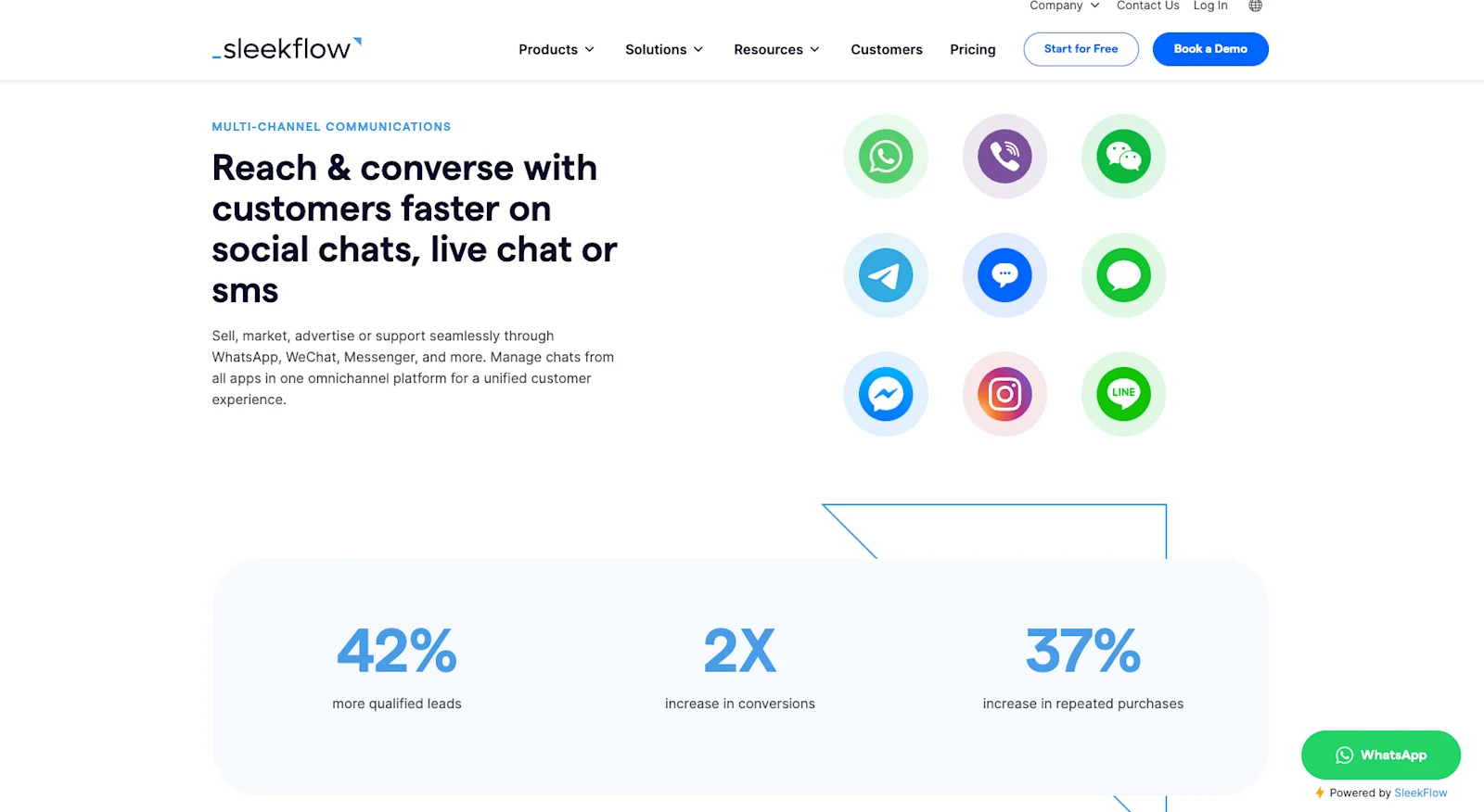
Without needing a programmer, you can embed a Live Chat button on your website with SleekFlow (check out the lower right corner of our website as an example).
Once installed, WhatsApp will automatically pop up a greeting message. Customers no longer need to store numbers or type messages manually—pop-up messages handle all of that for you.
When a new customer contacts you via WhatsApp, the SleekFlow platform will auto-save their number—you can also easily view existing customer information in one place.
With SleekFlow, you can streamline communication and ensure a more user-friendly experience for your customers!
Want to outcompete your peers with SleekFlow's help?
Book your personalised demo with SleekFlow today and unlock the potential of seamless communication


