WhatsApp for Sales: How to increase leads with WhatsApp?

Instant messaging is a vital part of our daily lives, and WhatsApp is definitely at the forefront of it.
Instant messaging is a vital part of our daily lives, and WhatsApp is definitely at the forefront of it.
Besides communications, WhatsApp is also a vital tool for many businesses. Many retail stores are using it to:
Better connect with their customers.
Support their commercial activities.
If you want to forge deeper relationships with your customers more efficiently as a business owner, using WhatsApp for sales is something you should consider.
What is WhatsApp for Sales?
WhatsApp for sales involves using the WhatsApp business tools to engage with customers and drive revenue. This can be done through two main channels: the WhatsApp Business App and the WhatsApp Business Platform (API).
Choose the right setup: Business App or Business Platform/API
Choosing the right tool depends on the size and needs of your business.
WhatsApp Business App: This free app is ideal for small business owners who manage customer communications themselves. It allows you to create a business profile, set up quick replies, and organize your contacts. It's perfect for handling a manageable number of customer chats directly from a single phone.
WhatsApp Business Platform (API): The API is designed for medium to large businesses that need to manage high volumes of messages. It integrates with your existing CRM and business software, allowing you to deploy chatbots, send automated notifications, and enable multiple agents to handle customer conversations. This is the solution for businesses looking to scale their sales and support operations on WhatsApp.
Not sure which one is right for you? If you're a solo entrepreneur or a small team just starting, begin with the Business App. If you're managing a larger team and need more advanced automation and integration, the API is the way to go.
Why should you use WhatsApp for sales?
WhatsApp users alone send over 140 billion messages per day. Integrating WhatsApp for sales and commercial activities helps build a personal connection with customers. When customers reach out to a shop for information, they usually encounter a customer-service email or hotline, which may take hours or even days to answer their questions. But with instant messaging systems like Whatsapp, they can communicate with the business in the same way they would talk to a friend.
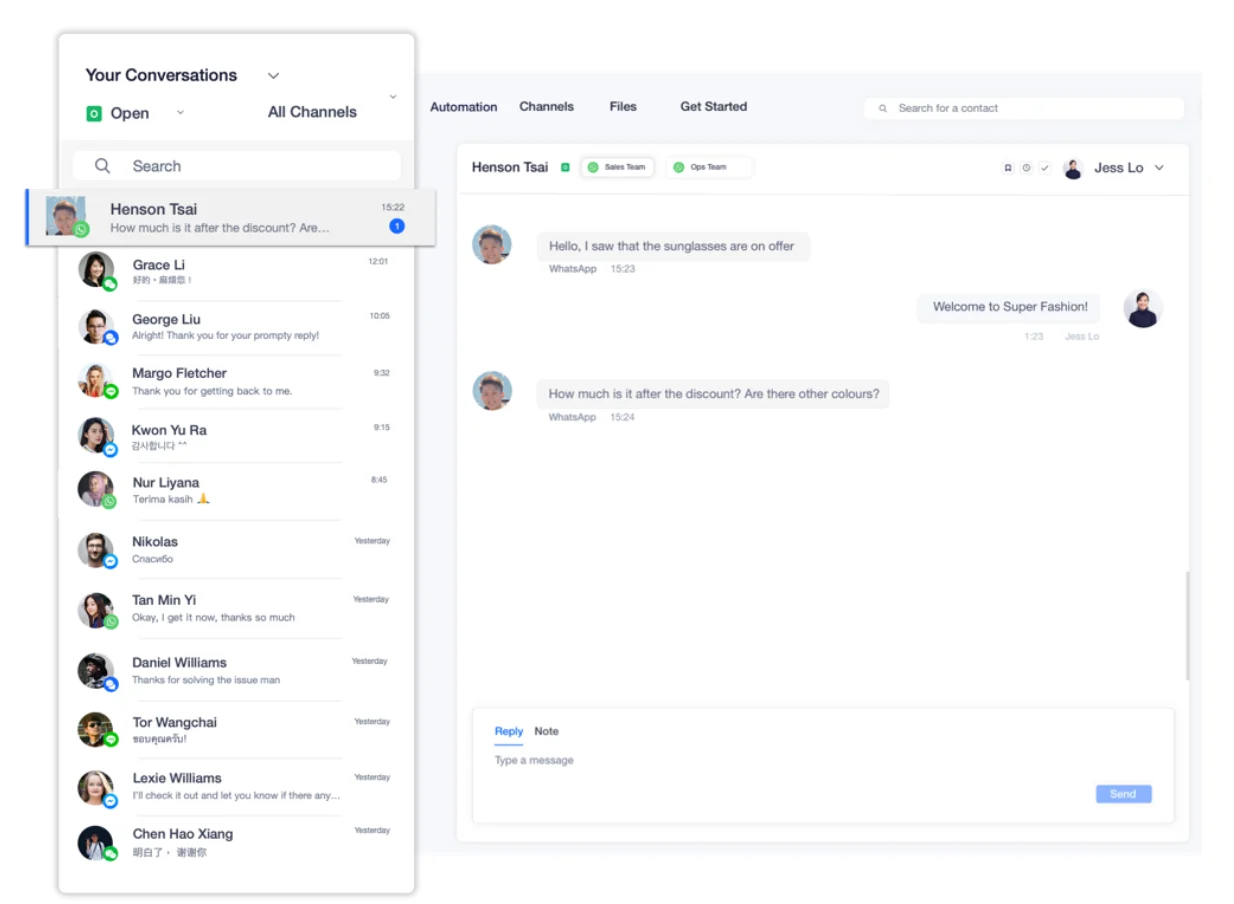
Let’s put yourself into your customers’ shoes for one second. Imagine you’ve found a very nice pair of shoes in an online store, or you’ve found a shop you’d really like to visit. Naturally, you’d want to ask more about the offers.
Without instant messaging: You would need to email them or find the “Contact Us” page, then wait for a response, which could take days.
With WhatsApp messaging: You can send a text to the shop instantly and expect an answer in hours or even minutes.
What’s even better is having chatbots. Simply by typing in the store’s or product’s name, you might even get an answer instantly. And for business owners, you can know that someone has contacted you straight away, so you can reach out to them easier than ever.
Given that people spend four hours their mobile phones on a daily average, integrating WhatsApp as a sales communication channel is a great way to sell.
What are the benefits of using WhatsApp for sales?
Cross-team collaboration at a time
Sales team members may often have only one set of login details, meaning only one person can log in at one time. However, with the WhatsApp Business API, multiple salespeople can access the businesses’ WhatsApp phone numbers at the same time.
Key benefits include:
Allowing more agents to serve more customers at the same time.
Enabling cross-functional team collaboration.
MEDILASE Streamlines Appointments and Boosts Conversions with SleekFlow
MEDILASE, a top-tier aesthetic laser treatment provider, was experiencing operational issues that were negatively affecting its premium brand image. Their staff were using personal phones to communicate with clients for appointments and follow-ups.
This "personal phone" approach created a trust deficit, as customers were hesitant to share sensitive information. It also led to fragmented data across multiple devices and a slow, manual booking process that created administrative bottlenecks.
MEDILASE adopted SleekFlow to centralize its communications, creating specialized teams for inquiries and bookings within a unified inbox. They also deployed a "smart" chatbot to automate scheduling and integrated SleekFlow with their internal CRM for a complete view of each customer's history.
The new strategy yielded impressive results across the board:
MEDILASE saw a 6x increase in conversions and a 25% boost in booking rates through the streamlined WhatsApp channel.
Automated reminders led to an 18% increase in customer show-up rates.
Targeted broadcast campaigns generated a significant 40% revenue uplift.
Customers are highly concerned about whether their personal information will be handled lawfully or leaked to unauthorized parties. SleekFlow fully supports us in this area, creating an ideal situation for both the company and our customers.
Ng Kai Chi
CEO of MEDILASE
Automate campaigns with WhatsApp Lead Generation
Mastering WhatsApp lead generation helps you cut through the noise and chaos of social media and overstuffed email inboxes. It's like a secret shortcut with several benefits:
Capture contact information easily: As long as you get prospects to send you the first message, you already have their phone number and name!
Understand customer interests: With a few more interactions, you can understand their interests and save this information in your database.
Craft resonant messages: Use the collected data to craft messages that truly resonate with them.
For an even more advanced approach, you can leverage SleekFlow’s Flow Builder for WhatsApp lead generation.
How Cellini’s Chat Campaign Drove Over SGD10K in Sales From a Single Showroom
Cellini, a major furniture brand in Southeast Asia, wanted to boost sales and capture high-intent leads for one of its Singapore showrooms. They needed a more direct and efficient way to engage potential customers in the competitive furniture market.
Traditional methods like directing ad traffic to static landing pages created friction, leading to lost leads and high manual effort for sales staff. This process was time-consuming and resulted in lower conversion rates compared to more immediate communication channels.
Cellini adopted a "chat-first" strategy using SleekFlow, running "Click-to-WhatsApp" ads on social media that opened a direct chat with the brand. They then used automation to instantly reply, qualify leads, and route inquiries to the correct teams, providing sales agents with customer history for personalized conversations.
Key outcomes include:
Generated over S$10,000 in sales in just one month.
Captured nearly 500 high-intent leads.
Saved 90% of manual follow-up time.
Achieved a 5.5x higher conversion rate compared to other channels.
In just six months, we handled nearly 7,000 customer queries automatically. Automation has significantly boosted our team’s productivity by eliminating repetitive tasks, enabling faster responses, and allowing us to focus on high-impact work.

Kristen Kiren
Marketing / Business Development Manager (Singapore)
How to drive sales with WhatsApp Business API features?
Despite the challenges, using WhatsApp for sales activities can help you communicate your promotion and offer plans, list out service options and increase your visibility. The level of clarity from segmentation and bulk broadcasting will be a great addition to your sales and engagement. In fact, platform integrations like Salesforce and Hubspot have profoundly impacted small businesses.
To make WhatsApp for sales viable, companies need an all-in-one platform to handle their customer base and messages. SleekFlow can do just that by:
Allowing businesses to manage conversation workflows with an AI flow builder.
Enabling sales teams to send and manage messages from all channels in one place.
Automating marketing and sales to create personalized touchpoints and grow revenue more easily.
Automated messaging rules using SleekFlow Flow Builder
Flow Builder can help you recover lost sales and boost conversions by setting time-sensitive automation to send messages and update customer details. You can create a series of WhatsApp message templates that are automatically triggered when a customer abandons their cart. These messages could include:
A reminder of the items in the cart.
A discount or limited-time offer.
A call-to-action to complete the purchase, along with a payment link.
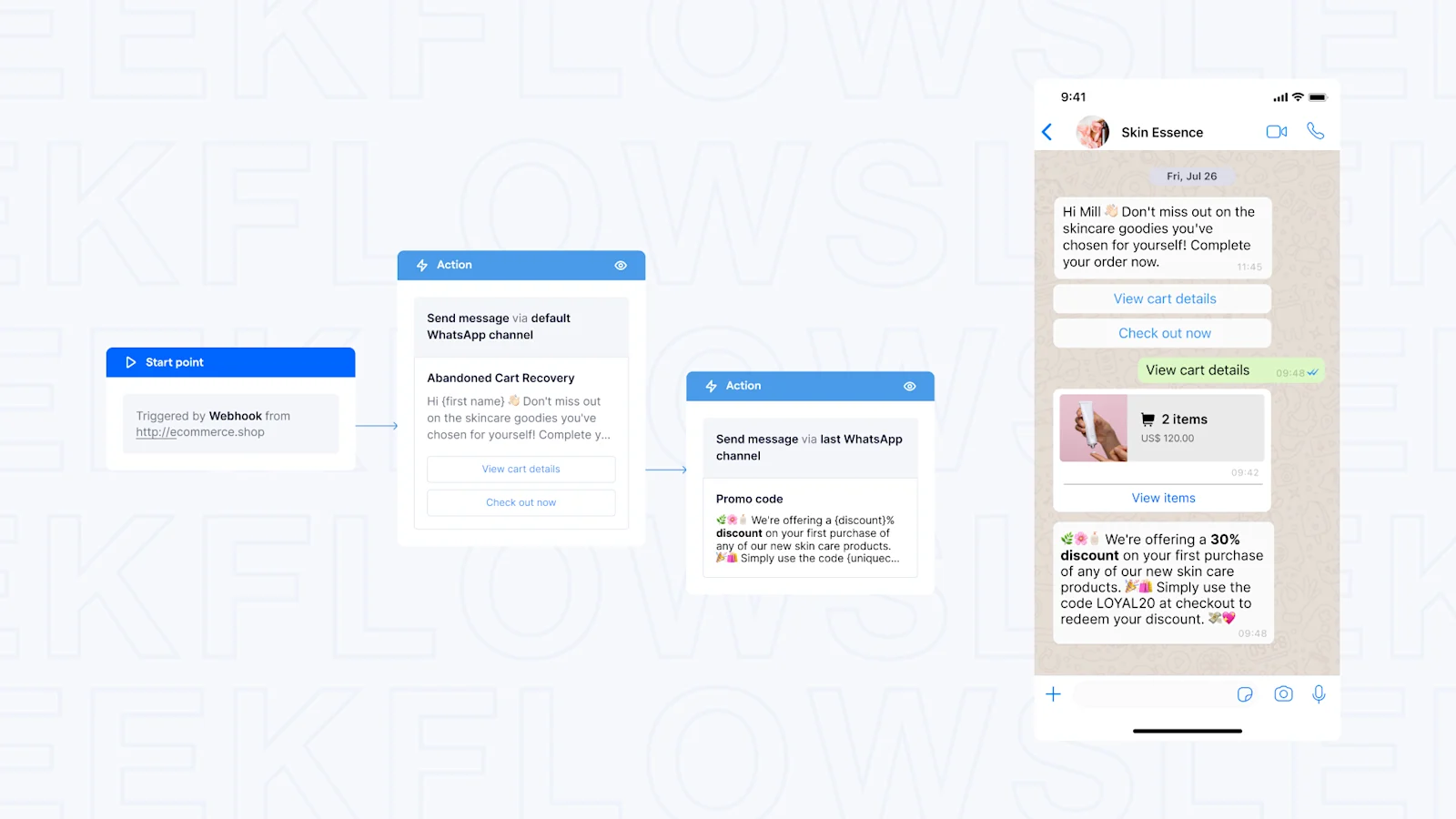
Additionally, you can segment your audience based on their browsing and purchasing history on your e-commerce website and suggest related or complementary products that they may be interested in. This increases the chances of converting leads into loyal customers.
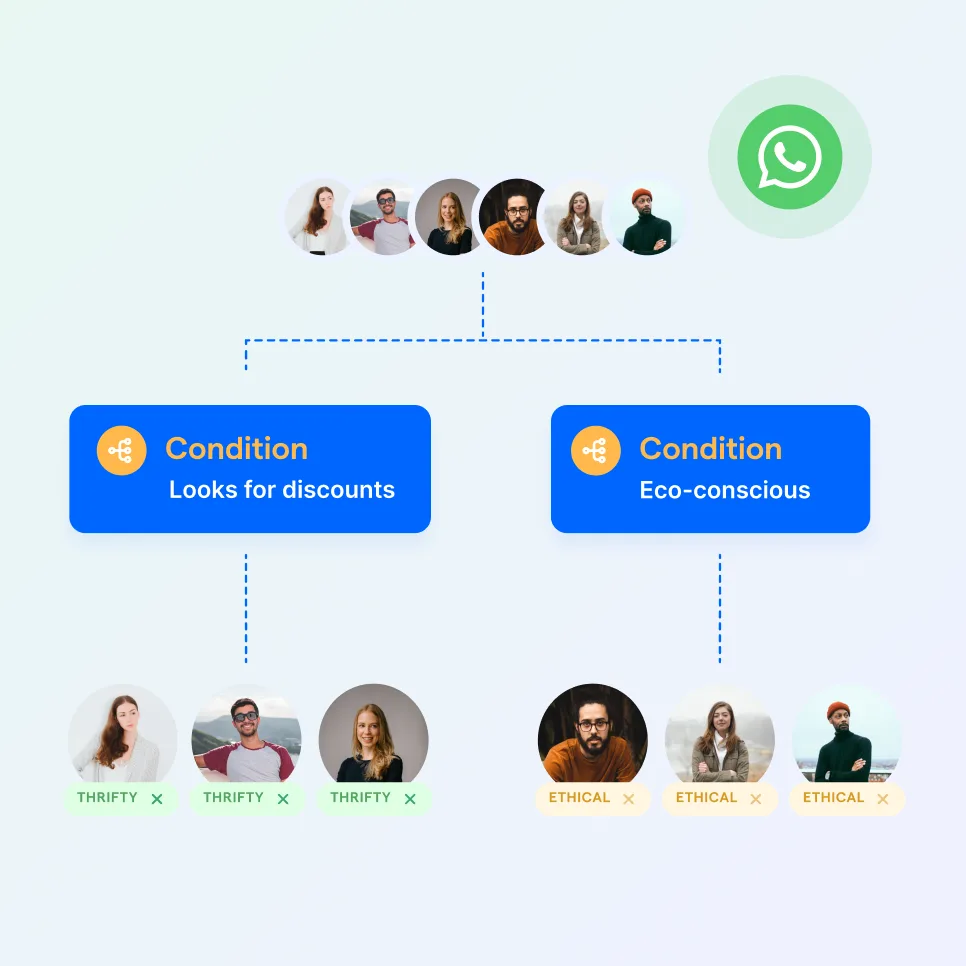
Automate your business growth with Flow Builder
Streamline sales, marketing, support, and operation workflows in the era of hyper-personalization.
Sell effectively with WhatsApp catalog
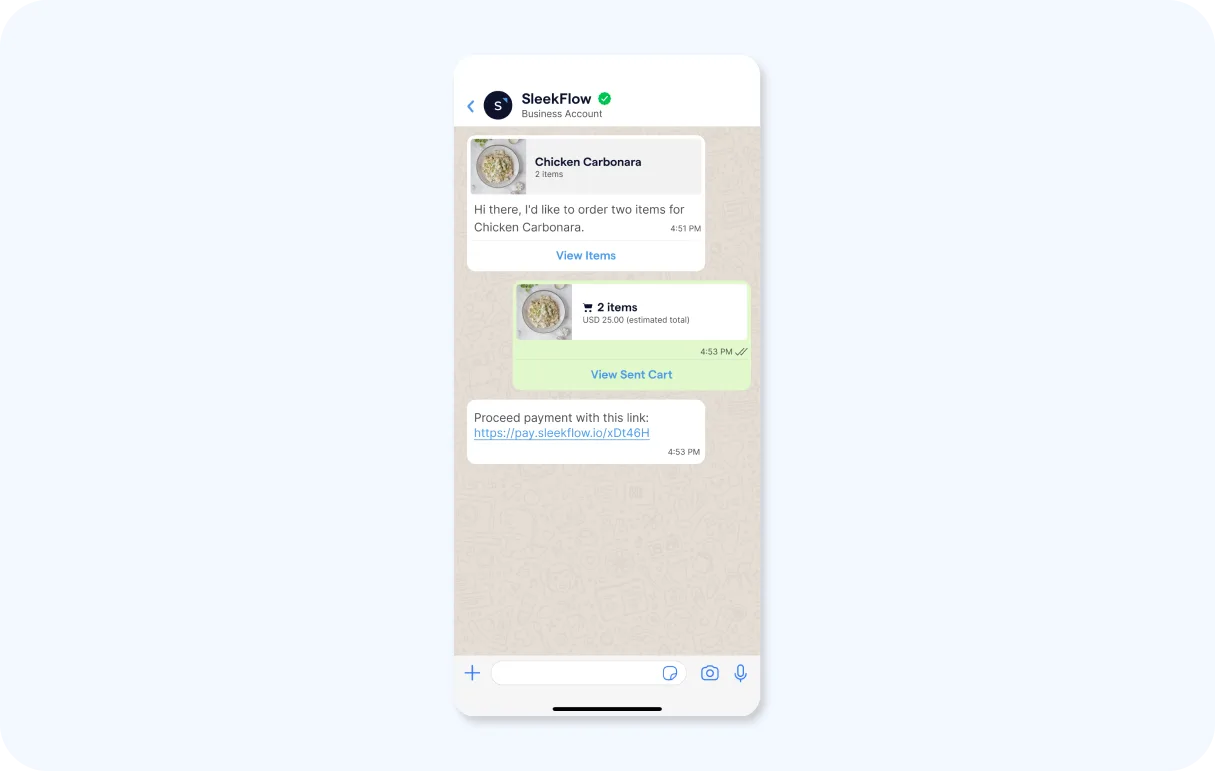
With WhatsApp Business API, businesses can create WhatsApp catalogs to showcase their products or services to potential customers on WhatsApp. It provides businesses with a platform to upload detailed information about their products or services, including:
Product name or title
Price
Description
Website link
Product code
This feature can encourage impulse shopping and, on top of that, offer consumers a faster, more efficient, and coherent buyer's journey. As they share their positive experience with others, you'll get marketing for free too!
Nurturing your WhatsApp leads afterwards
With leads generated, you would want to initiate a strategic lead-nurturing process. The first crucial step is to obtain their consent to receive further communications.
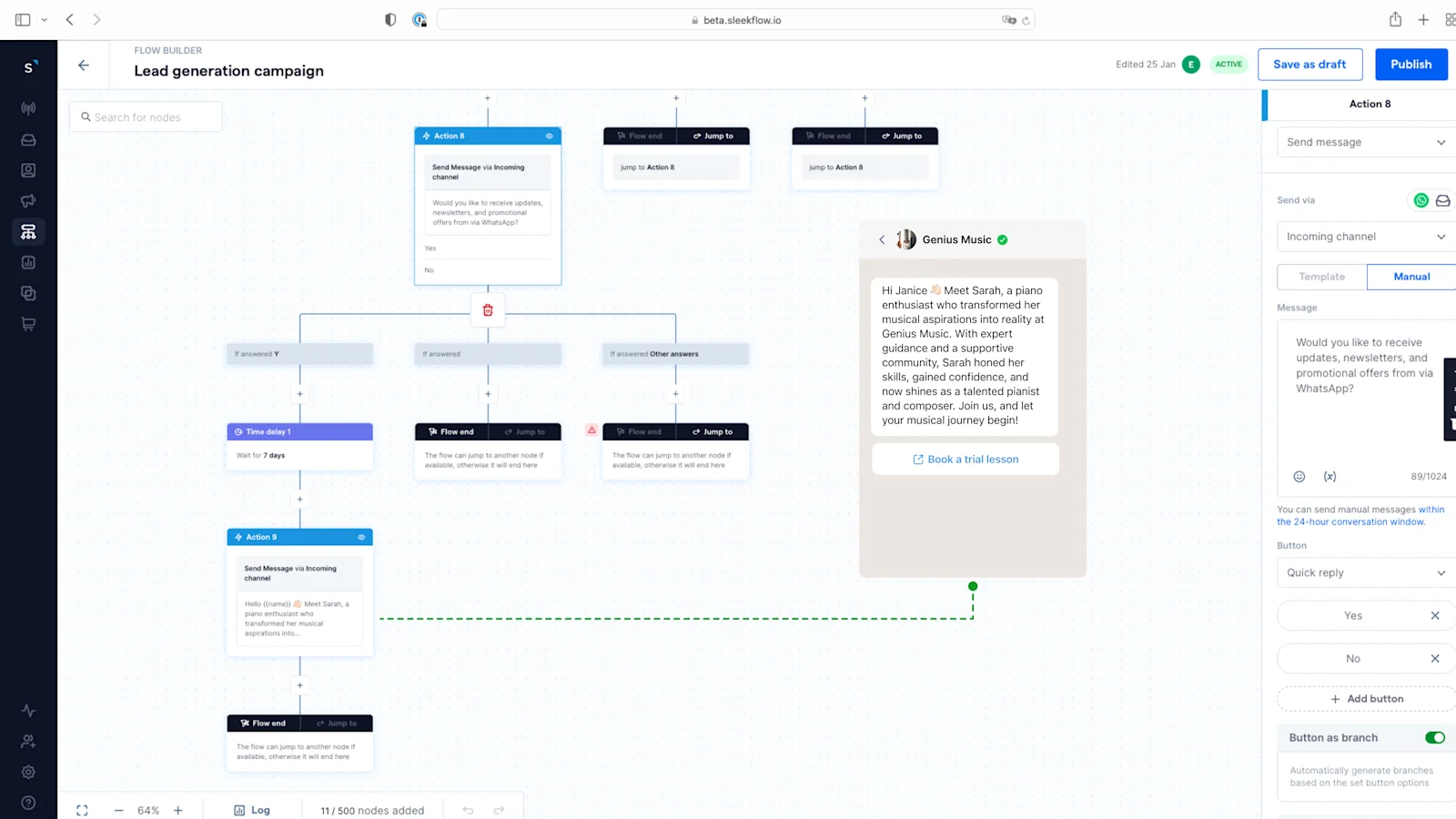
For example, you can create a new Send Message action asking, 'Would you like to receive updates, newsletters, and promotional offers via WhatsApp?' with 'Yes' and 'No' options.
Enable Button as branch. For those who click 'Yes,' set a waiting period of, let's say, 7 days. This interval allows leads the time they need to absorb the initial information and engage with your brand at their convenience.
Subsequent messages should be carefully crafted to provide value, offering insights, special offers, and relevant updates that cater to the lead's specific interests.
Learn more about how satisfying companies use WhatsApp to sell their products
How to Build a WhatsApp Sales Funnel
Building a WhatsApp sales funnel is crucial for businesses looking to engage with potential customers and drive conversions. It involves creating a series of messages that are sent at specific intervals to leads who have expressed interest in your products or services.
A WhatsApp sales funnel guides potential customers from initial awareness to making a purchase, all within the app. Here’s what a typical funnel looks like:
Automate Your Marketing Funnel With WhatsApp
As you can see, WhatsApp offers a variety of features and capabilities that can enhance your marketing funnel. But managing all these different interactions and messages manually can be time-consuming and inefficient.
That's where WhatsApp automation come in. These are automated workflows or sequences that you can set up to handle certain tasks and communications within your WhatsApp marketing funnel. They allow you to streamline your processes, save time, and ensure consistency in your messaging.
Here are 5 essential WhatsApp automation you can set up to streamline your sales process:
Automated Lead Routing: As soon as a new lead sends a message, automatically assign them to the right sales agent based on location, inquiry type, or team availability. This ensures every lead gets a fast, relevant response.
Abandoned Cart Reminders: A customer added items to their cart but didn't complete the purchase? Trigger an automated WhatsApp message after a few hours, reminding them of the items they left behind and offering assistance or a small discount to encourage conversion.
Quote and Proposal Follow-ups: After sending a quote, don't let the conversation go cold. Schedule an automated follow-up message for 2-3 days later to ask if they have any questions or need more information.
Appointment Booking and Reminders: Let customers book appointments or demos directly through WhatsApp. Once booked, automatically send a confirmation message and a reminder 24 hours before the appointment to reduce no-shows.
Reactivation Campaigns: Re-engage customers who haven't purchased in a while. Set up a campaign that automatically sends a personalized message with a special "we miss you" offer or a sneak peek at new arrivals to bring them back.
How to Create Sales Templates for WhatsApp Business
Now that you have a clear understanding of the different features and capabilities of WhatsApp Business, it's time to create some sales templates. These templates will help you save time, personalize messages, and ultimately increase conversions.
Welcome Message
Hello [Customer Name]! Thanks for reaching out to [Your Business Name]. How can we help you today?
Product Inquiry Response
Hi [Customer Name], thanks for your interest in [Product Name]. It’s available for [Price]. You can learn more about it here: [Link]. Let me know if you have any questions!
Discount Offer
Hi [Customer Name]! As a valued customer, we're offering you a special [Discount Percentage]% off your next purchase. Use code: [Discount Code] at checkout. Happy shopping! [Link]
Follow-Up on Abandoned Cart
Hi [Customer Name], we noticed you left some items in your cart. Don't miss out! Complete your purchase here: [Link].
Booking Confirmation
Your appointment with [Your Business Name] on [Date] at [Time] is confirmed. We look forward to seeing you!
Appointment Reminder
Gentle reminder: Your appointment with [Your Business Name] is tomorrow at [Time]. See you soon!
Order Confirmation
Hi [Customer Name], your order #[Order Number] has been received. We’ll notify you once it's shipped. Thank you for shopping with us!
Shipping Notification
Great news! Your order #[Order Number] is on its way. You can track its progress here: [Tracking Link].
Feedback Request
Hi [Customer Name], thank you for your recent purchase. We’d love to hear your thoughts! Could you take a moment to leave a review? [Link]
Reactivation Campaign
We miss you, [Customer Name]! Here’s a little something to welcome you back: get [Offer] on your next order. Shop our new arrivals: [Link].
New Product Announcement
Hi [Customer Name]! Big news! Our new [Product Name] has just launched. Be the first to check it out: [Link].
Lead Nurturing Follow-Up
Hi [Customer Name], just following up on our recent chat. Do you have any other questions about [Product/Service]? I'm here to help!
Demo Follow-Up
Hi [Customer Name], it was great showing you [Product Name] today. If you're ready to move forward or have more questions, just let me know!
Holiday Promotion
Happy [Holiday Name] from all of us at [Your Business Name]! Celebrate with our special offer: [Discount]. Shop now: [Link].
Out of Stock Alert
Good news, [Customer Name]! The [Product Name] you were interested in is back in stock. Grab yours before it's gone again! [Link].
WhatsApp campaign playbook for sales teams
Using WhatsApp for sales is not just about replying faster. The best results come from sending the right message to the right audience at the right time. Below are four practical WhatsApp campaign plays that help sales and marketing teams turn conversations into revenue without relying on generic blasts.
1. Click-to-chat lead capture play
Use this play for paid ads, landing pages, social campaigns, or website buttons that drive prospects into WhatsApp.
The goal is to qualify inbound interest quickly. Once a lead starts a chat, send a welcome message, ask one or two simple questions, and route the conversation to the right rep while intent is still high.
Best for: Click-to-WhatsApp ads, website CTAs, lead generation campaigns
What to send: Welcome message, qualifying questions, next-step prompt
What to automate: Auto-replies, lead tagging, routing, CRM sync
Main KPI: Qualified lead rate
Watch out for: Asking too many questions too early can reduce reply rates
2. Product launch and promotion play
This play works well for new product launches, seasonal promotions, limited-time offers, and VIP campaigns.
Instead of messaging your full contact list, start with warm audiences such as past buyers or leads who already showed interest. Keep the message short, highlight the offer clearly, and make it easy for customers to reply or speak to sales.
Best for: Launch campaigns, flash sales, VIP offers, warm audience retargeting
What to send: Offer announcement, product highlight, limited-time CTA
What to automate: Audience segmentation, campaign scheduling, follow-up reminders
Main KPI: Reply rate and assisted conversions
Watch out for: Sending broad promotional blasts without segmentation can hurt engagement
3. Offline-to-WhatsApp QR play
Not every sales opportunity starts online. Customers may first discover your business in a store, showroom, event, brochure, or product packaging.
Use a QR code to open a WhatsApp chat with a pre-filled prompt. From there, guide the customer to the next action, such as viewing a catalog, requesting a quote, booking a consultation, or talking to sales.
Best for: Retail stores, showrooms, events, pop-ups, brochures, packaging
What to send: Welcome message, campaign-specific prompt, offer or consultation CTA
What to automate: Source tagging, contact capture, lead assignment, follow-up flows
Main KPI: New conversations started and offline lead conversion rate
Watch out for: Treating all QR traffic the same instead of tailoring the follow-up to the campaign source
4. High-intent inquiry recovery play
Some leads show clear buying intent but still do not convert. They may ask for pricing, request details, or start a quote conversation, then go quiet.
This play helps re-engage them with something useful instead of sending another generic follow-up. A relevant answer, case study, comparison, or simple check-in can move the conversation forward without sounding pushy.
Best for: Quote requests, product inquiries, consultation leads, warm prospects
What to send: Helpful follow-up, objection-handling content, clear next step
What to automate: Timed follow-ups, owner reminders, lead status updates
Main KPI: Re-engagement rate and conversion recovery rate
Watch out for: Repeating the same sales message instead of addressing the customer’s likely hesitation
How can SleekFlow help you in selling on WhatsApp?
SleekFlow has user-friendly web and mobile versions that integrate well with the WhatsApp Business API and other messaging apps. In addition, SleekFlow also has added capabilities of integrating with your existing CRM stacks to ensure a smooth onboarding process and experience. There will be more amazing features to come too!
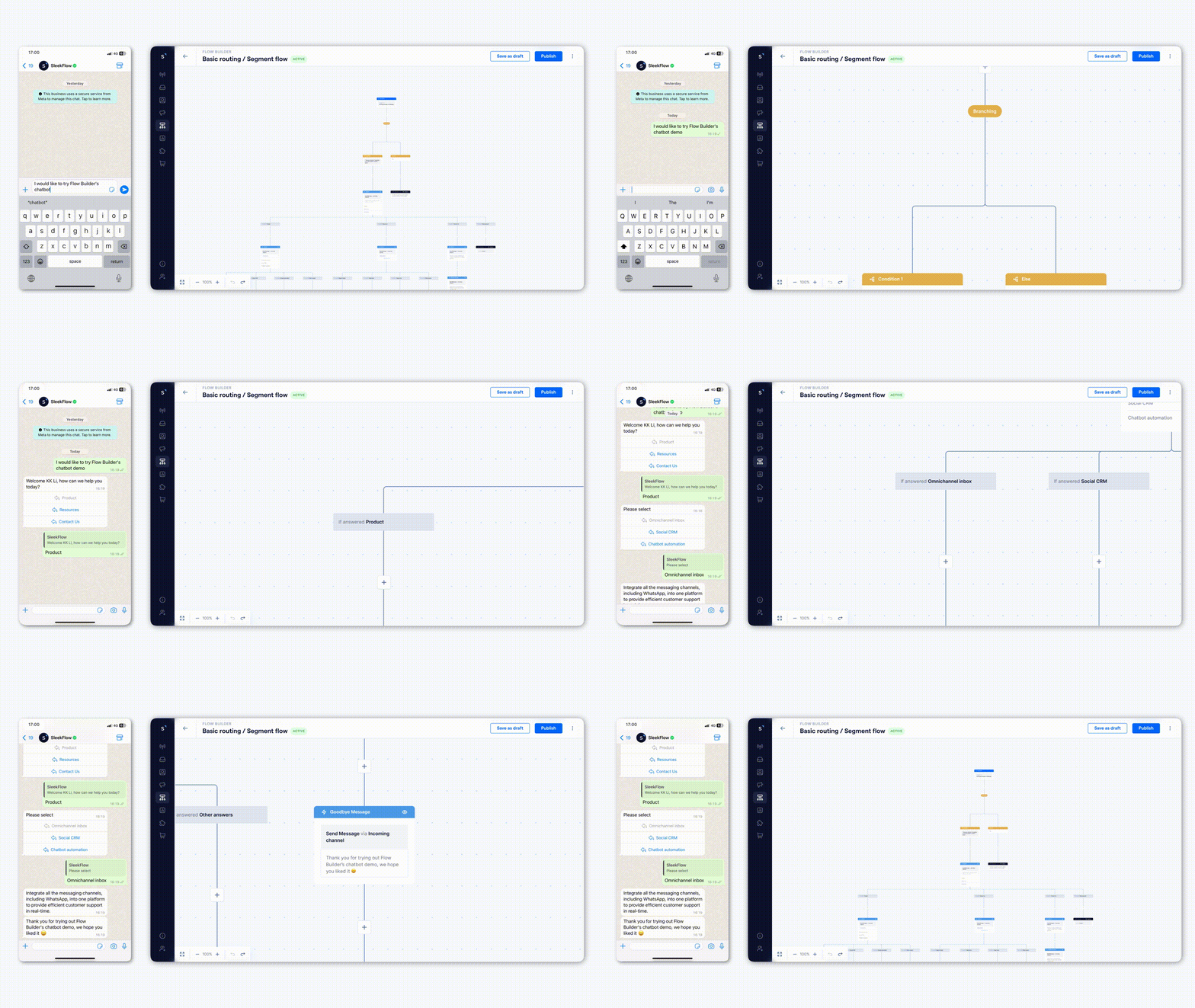
Seamless integration with other platforms
You can integrate SleekFlow’s WhatsApp sales function with a range of existing CRM and e-commerce platforms. Information from various programs like HubSpot, Salesforce, Calendly, and Google Sheets is fully compatible with our platform, so you can capture all the customer information you need.
Sync contacts: When you add a new contact on these platforms, it’s automatically added to your WhatsApp list.
Engage customers: Send welcome messages to customers from different platforms, assign them to tiers, and start interacting.
Track performance: Access analytics like response times and conversion trends to get a clear view of your performance and identify areas for improvement.
Internal collaboration
A sales platform will not be effective without supporting collaboration. SleekFlow enhances teamwork in several ways:
Internal Notes: Add internal notes to WhatsApp conversations to give other team members a heads-up when managing accounts. This feature ensures clarity and a consistent tone when multiple members work on the same accounts.
Team Administration: Staff can indicate their availability on the platform. If a team member is unavailable, the platform can automatically reroute the account to other members.
Important Alerts: You can broadcast notes to all team members, for example, to make them aware of a customer's birthday when they follow up.
Combined with the integration with other platforms, you can create a seamless WhatsApp for sales experience that no other businesses can produce.
Specialized AI Sales Agents
Unlike traditional chatbots that only react to keywords or follow a rigid script, AgentFlow uses Agentic AI. This advanced AI proactively works toward a specific business outcome, such as closing a sale or booking a meeting, instead of just answering FAQs.
Build a specialized AI team: Create a team of AI agents, each trained for a specific stage of your sales funnel, from lead qualification to scheduling meetings.
Streamline sales processes: The AI learns your product information and integrates with your workflows to qualify and nurture leads. It then provides human agents with smart summaries for seamless handoffs.
Enhance human agent performance: Use the AI "Co-Pilot" mode to assist your sales team by suggesting accurate replies and refining message tone.

Want to outcompete your peers with SleekFlow's help?
Book your personalised demo with SleekFlow today and unlock the potential of seamless communication
Further reading - Social CRM
Social CRM is a shortened form of Social Customer Relationship Management, meaning the integration of social media and instant messaging platforms such as Facebook Messenger, WhatsApp, and WeChat. Since customers can interact with businesses in whatever way they like, you open the door for them to initiate conversations with you, thus, boosting the customer base.
Compared with traditional email marketing, Social CRM outperforms in terms of engagement rate – social media and instant messaging gain 6x more open rates and 8x more click rates. Not to mention that customers are more willing to reply to messages directed to their phones.
Examples of successful CRM marketing
1. Automated customer support – Hello Chatbot
It is a chatbot created by Hipmunk, a travel site that helps users find deals on flights, hotels, and more.
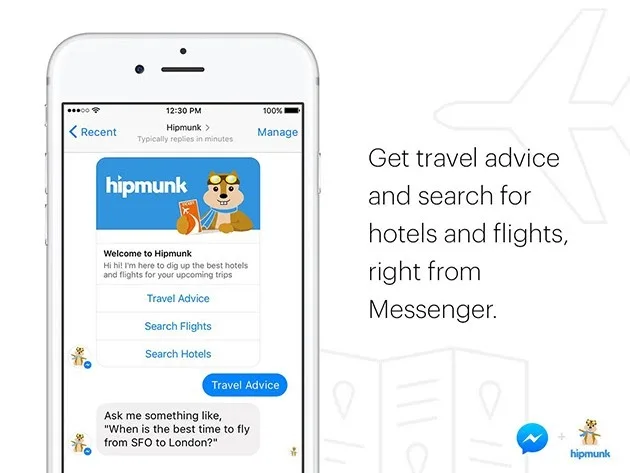
With an aim to reduce response times, Hello Chatbot is capable of answering general FAQs 24/7, preventing the loss of customers due to delayed customer service. Moreover, the bot can be integrated with various applications like Facebook and Skype, making it more convenient for customers.
2. Continuous engagement – Sephora
Maintaining seamless engagement with your customers can be a bit overwhelming. Still, it is crucial to customer satisfaction.
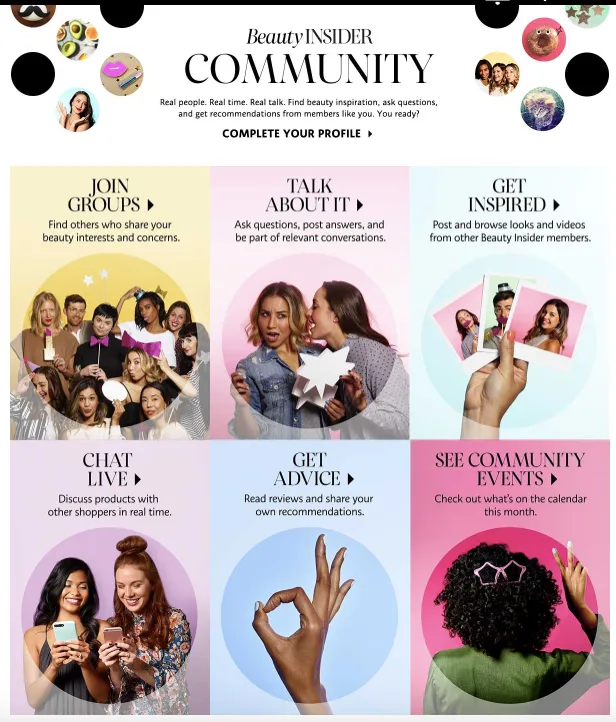
Sephora has, therefore, introduced a marketing CRM to handle this daunting task. Not only can the software automatically send a thank you email and an invitation to review, but it can also cross-sell or even upsell the products via personalized content. The program is a huge success in that Sephora has acquired 17 million more loyal members, and members account for almost 80% of its annual sales.


