WhatsApp broadcast list: how to create one, why messages fail, and when to switch to API


TL; DR: Quick Summary
- A WhatsApp broadcast list lets businesses send one message to multiple customers as private 1:1 chats, instead of a group message.
- A WhatsApp broadcast list is useful for sending private 1:1 messages to multiple contacts, but it works best for small, warm audiences rather than large-scale campaigns.
- One major limitation of a WhatsApp broadcast list in WhatsApp Business is the saved-number rule: customers usually need to save your business number first, or your messages may not be delivered.
- Other practical limits include the 256-contact cap, manual list management, and weak team collaboration features inside the WhatsApp Business app.
- For businesses in Singapore, it is important to get consent, audience targeting, and opt-out compliance right before sending any marketing broadcast.
- A WhatsApp broadcast list can work for simple updates, but businesses that need scale, CRM-based targeting, analytics, and automation should move to the WhatsApp Business API.
For many businesses in Singapore, WhatsApp is already where customer conversations happen. That matters because WhatsApp remains one of the country’s most-used social platforms, with 80.1% monthly usage in Singapore.
A WhatsApp broadcast list can work well when you want to message a small, warm audience from the WhatsApp Business app. But it is not the same as a scalable campaign system. If your team needs to send broadcast messages reliably, prove consent, personalise by CRM data, or track conversions, the app’s limits show up quickly.
How to create a WhatsApp broadcast list
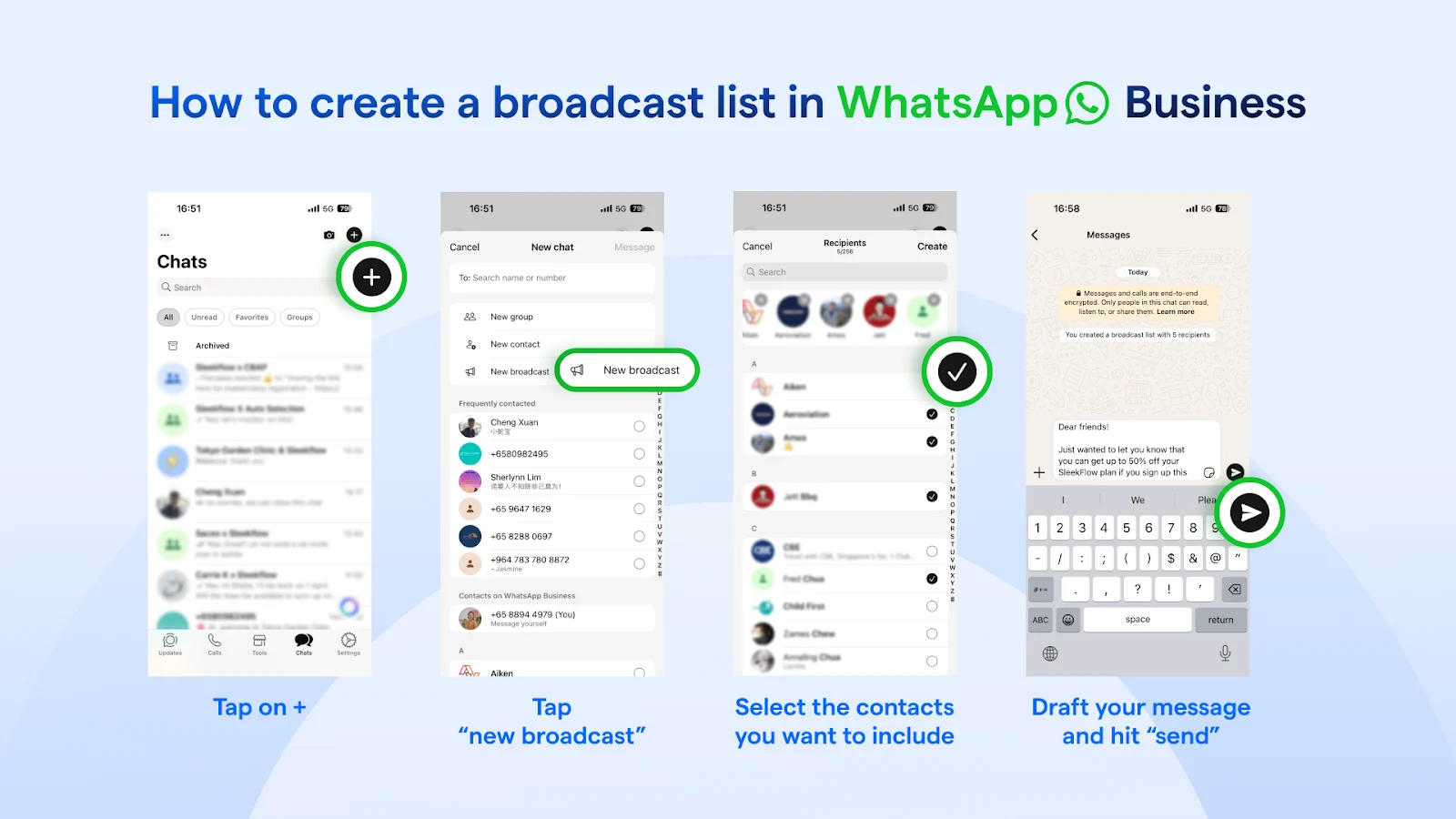
A WhatsApp broadcast list lets you send one message to multiple people as separate 1:1 chats. Recipients do not see each other, which makes it more private than a group chat. On the standard app, you can include up to 256 contacts in each list.
Creating a list in the WhatsApp Business app
The exact menu label can vary by device, but the flow is straightforward:
Open WhatsApp Business and go to Chats.
Tap More and choose the broadcast option shown on your device, such as Business Broadcast or New Broadcast.
Select the contacts you want to include.
Draft your message and send it.
Reuse the same list later for similar updates.
What to send with a broadcast list
A broadcast list is best for simple, relevant updates such as:
restock alerts
appointment reminders
event reminders
limited-time offers for opted-in customers
follow-ups for warm leads
Keep the message short, clear, and easy to act on. In Singapore, this also helps reduce the risk of complaints and makes your consent practice easier to defend.
What to know before creating a WhatsApp broadcast list
Use labels to build cleaner lists
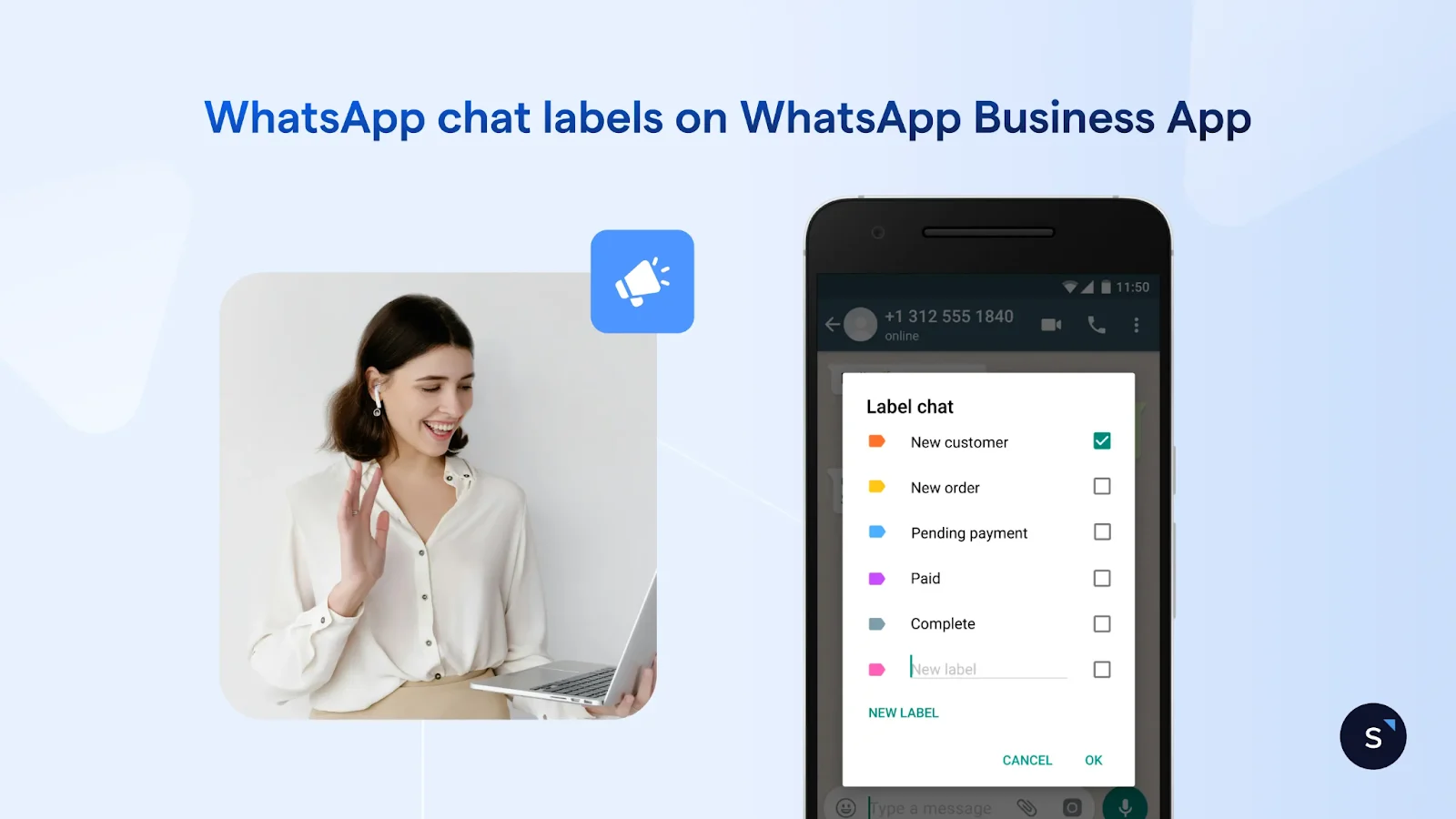
If you are managing customers inside the app, labels are the easiest way to create smaller, more relevant sends. WhatsApp’s help documentation confirms that you can open a label and use Message customers to send to that group.
Good label ideas for businesses
New enquiries
Past buyers
Appointment booked
VIP customers
Pending payment
Event registrants
Re-engagement segment
This is a good short-term workaround, but it is still manual. Labels do not replace CRM-driven segmentation based on order history, lead score, branch, or lifecycle stage.
Understand the saved-number rule before you send
This is the rule that causes the most confusion, and why messages fail to deliver: broadcast list messages on WhatsApp are only delivered to contacts who have saved your business number in their contacts. WhatsApp states this clearly in its help guidance.
That means a customer may have opted in on your website, filled in a form, or spoken to your staff before, but still not receive your broadcast messages if they never saved your number.
How to reduce failure from the saved-number requirement
Ask customers to save your number when they opt in.
Use QR codes in-store, on receipts, and at events.
Send a welcome message explaining exactly why they should save your number.
Keep your sender name consistent across your site, ads, and WhatsApp profile.
For small businesses, this can be manageable. For larger marketing teams, it becomes a major bottleneck in delivery.
Why WhatsApp broadcasts are not delivered
Not every failed send is a bug. Most delivery issues come from rules, not from the message itself.
WhatsApp says businesses may be unable to send broadcasts if the feature is unavailable to them or if their account has been flagged. It also states that restricted accounts may be linked to recent activity showing signs of spam, automation, or bulk messaging that violates its terms.
Common limitations of sending to a WhatsApp broadcast list
A WhatsApp broadcast list is useful, but it is still an app-first tool. These are the limits that usually push businesses to upgrade:
1. You are capped at 256 contacts per list
WhatsApp’s official help centre states that each broadcast list can include up to 256 contacts. That is fine for small batches, but restrictive for launches, branch-level campaigns, or lifecycle marketing.
2. Delivery depends on the saved-number rule
This is the main reason app-based broadcasting does not scale well for marketing. You can collect a contact number, but the message still may not land unless the customer saved you first.
3. The app is weak for team operations
Once several staff members need to collaborate, businesses usually need shared ownership, clearer accountability, and better controls. Platforms built on the WhatsApp Business API support multi-user access, assignment, automation, and reporting far more effectively.
4. You need templates for messages sent outside the service window
Meta’s developer documentation is clear: template messages are the only type of message that can be sent outside the customer service window. That matters for promotions, reminders, win-back campaigns, and other proactive outreach.
5. You need richer conversion journeys
If your goal is not just to send a message but to collect information, qualify leads, or move someone to checkout, the API is the better fit. Features such as SleekFlow’s WhatsApp Business API, and Flow Builder help teams trigger journeys, sync data, and keep customers inside the chat.
Troubleshooting checklist before you send again
Before blaming the channel, check these four items:
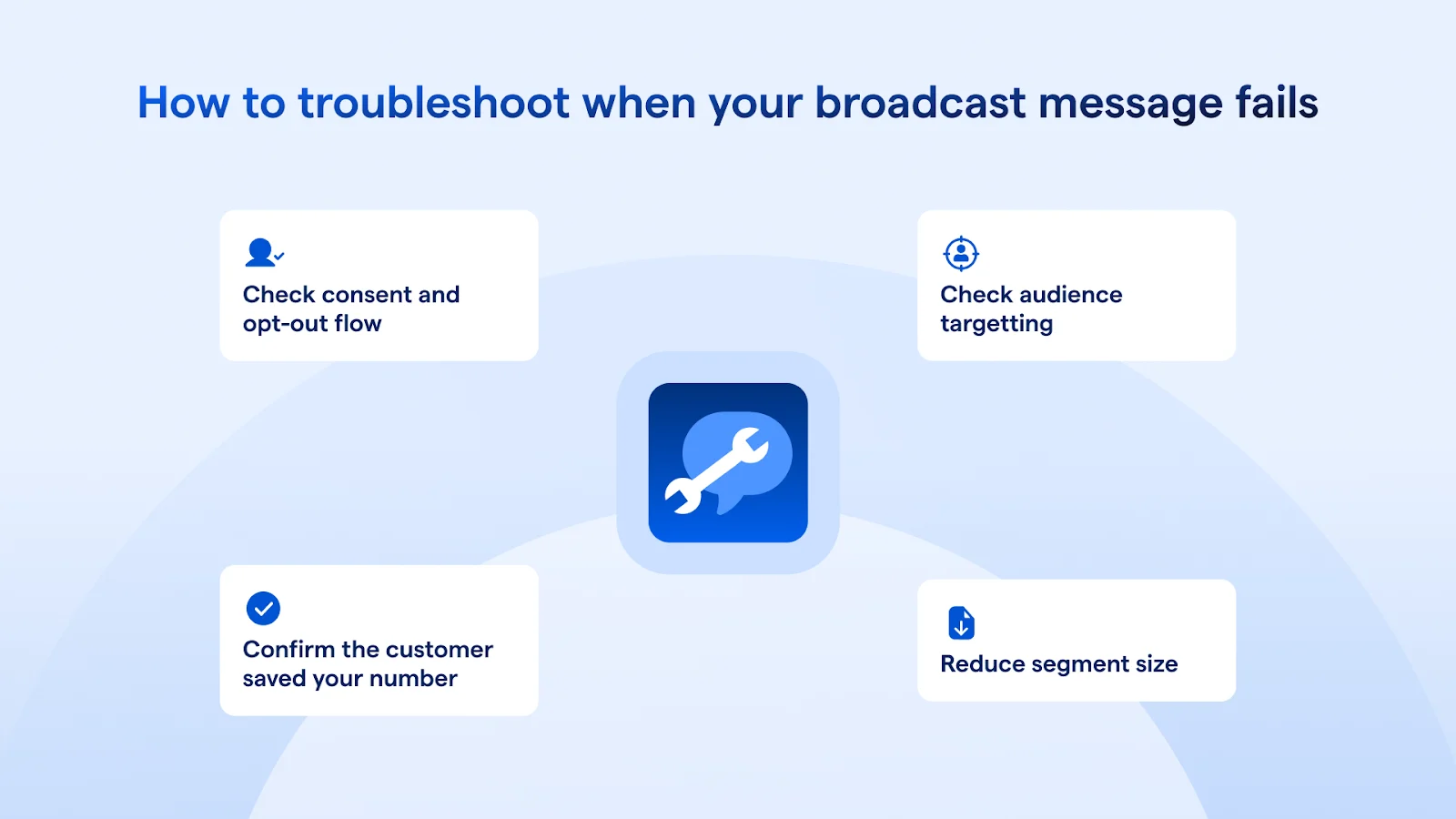
1. Confirm the customer saved your number
For app-based broadcasts, this is step one. No saved number, no delivery.
2. Check your consent and opt-out flow
Under Singapore’s DNC rules, organisations sending marketing messages to Singapore telephone numbers generally need either to avoid numbers on the registry or hold clear and unambiguous consent. They also need to provide an opt-out using the same medium and stop sending within 21 days after the opt-out request.
3. Check your audience targeting
Even if your message is technically allowed, poor targeting to a disinterested audience can trigger complaints, blocks, and lower send quality.
4. Start with a smaller segment
Test with a smaller batch first, confirm delivery and replies, then scale.
When to switch from broadcasting in the WhatsApp Business App to the WhatsApp Business API
Move from a WhatsApp broadcast list to the WhatsApp Business API when the problem is no longer “how do I send this?” and becomes “how do I send this reliably, compliantly, and at scale?”
Upgrade when you hit any of these signs
You regularly need to reach more than 256 people.
You need multiple teams or branches to share one business number.
You want campaign analytics, replies, and conversion tracking.
You need approved templates for proactive outreach outside the service window.
You want segmentation based on CRM data, purchase history, or lifecycle stage.
You want to use automation, buttons, product catalogues, or WhatsApp Flows.
Real-life example: Loft Home uses SleekFlow’s social CRM to send targeted, personalised broadcasts
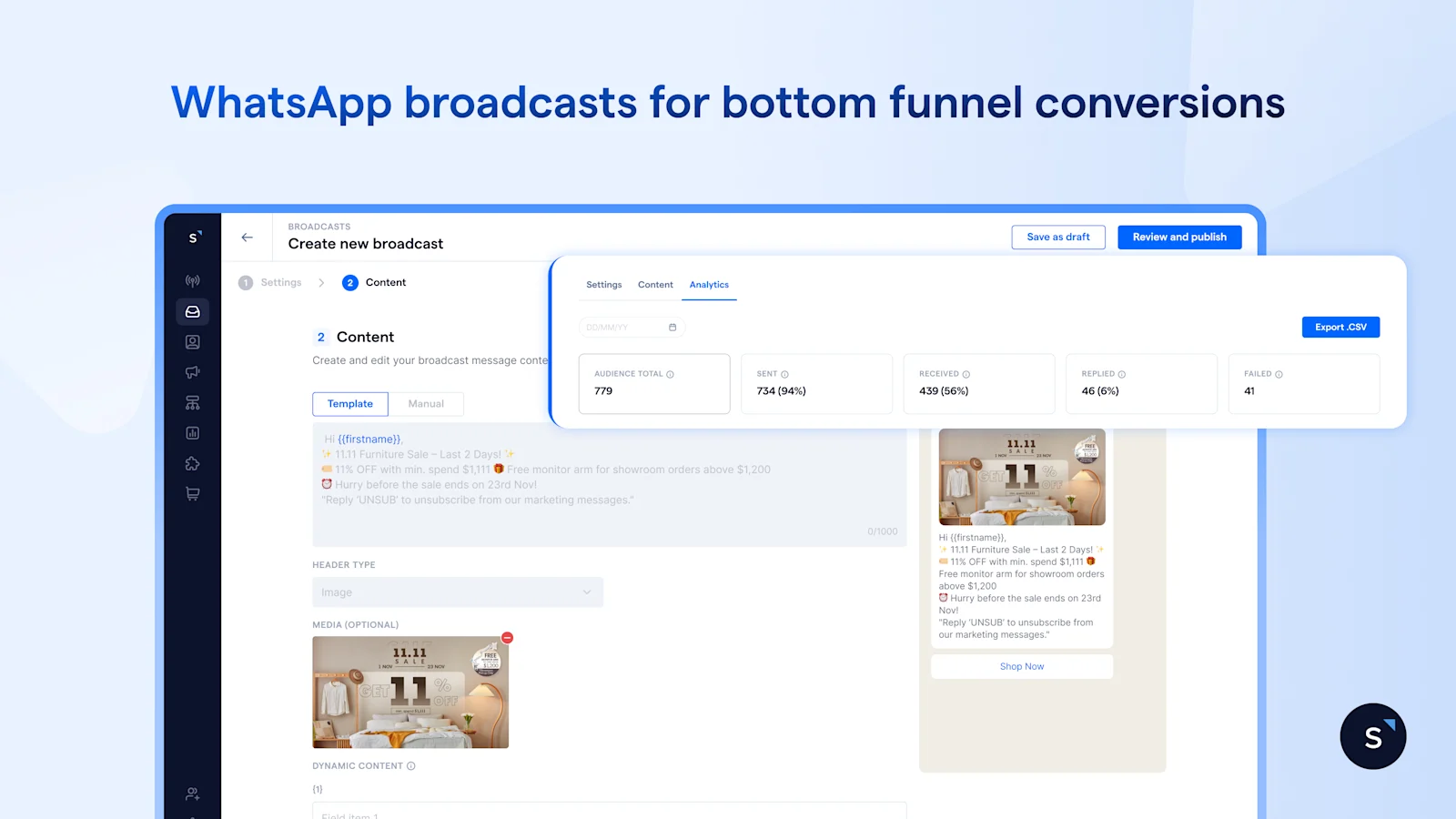
Loft Home, a leading furniture retailer in Singapore, switched from the WhatsApp Business App to SleekFlow’s WhatsApp Business API to keep up with their growth. They use WhatsApp broadcasts alongside email broadcasts for "bottom-of-the-funnel" conversions, where the stakes and purchase intent are higher.
By segmenting its database in SleekFlow, Loft Home identifies high-intent leads— such as customers who have engaged with the brand or visited the showroom in the past two months but haven’t yet made a purchase. Instead of sending these leads another email that might sit unread, they use SleekFlow to send targeted WhatsApp broadcasts.
Frequently Asked Questions
Can someone reply to a WhatsApp broadcast message, and will other recipients see it?
Can I edit or delete a WhatsApp broadcast list after creating it?
Will a contact receive my broadcast if they changed phones but kept the same number?
Can I send photos, videos or catalogue links through a broadcast list?
What happens if one person in my broadcast list blocks my business number?
Recommended for you


