How to get WhatsApp Business blue checkmark in 2026


TL; DR: Quick Summary
- The WhatsApp blue checkmark (which used to be green) shows customers your brand is the real deal, which builds trust and boosts engagement.
- There are two ways to get it: apply for a free Official Business Account (OBA) if your brand is well-known, or get a paid Meta Verified subscription, which starts at US$15 a month.
- To get a free OBA, your WhatsApp Business API account must be at least 30 days old. You'll also need to follow WhatsApp's policies, have two-step verification set up, and show proof of organic press coverage.
- If you're eligible, you can apply directly through the WhatsApp Manager or use a Business Solution Provider like SleekFlow to manage the application for you.
For years, the "Green Tick" was the ultimate status symbol on WhatsApp—a badge of authenticity that separated verified brands from the rest.
That era has evolved. As part of Meta's move to unify verification across its ecosystem (Facebook, Instagram, and WhatsApp), the green tick is now the blue checkmark.
While the color has changed, the value hasn't. In fact, with trust being the currency of the digital age, earning this badge is more critical than ever. It signals to your customers that you are exactly who you say you are.
But getting verified isn't just about applying; it's about knowing which path to take. Here is everything you need to know about the new WhatsApp blue tick and how to secure it for your business.
What is the WhatsApp blue checkmark?
The WhatsApp blue checkmark (formerly the green tick) is a badge that appears next to your business name in the WhatsApp interface.
It signifies that Meta has verified your account as an Official Business Account (OBA) or a Meta Verified business.
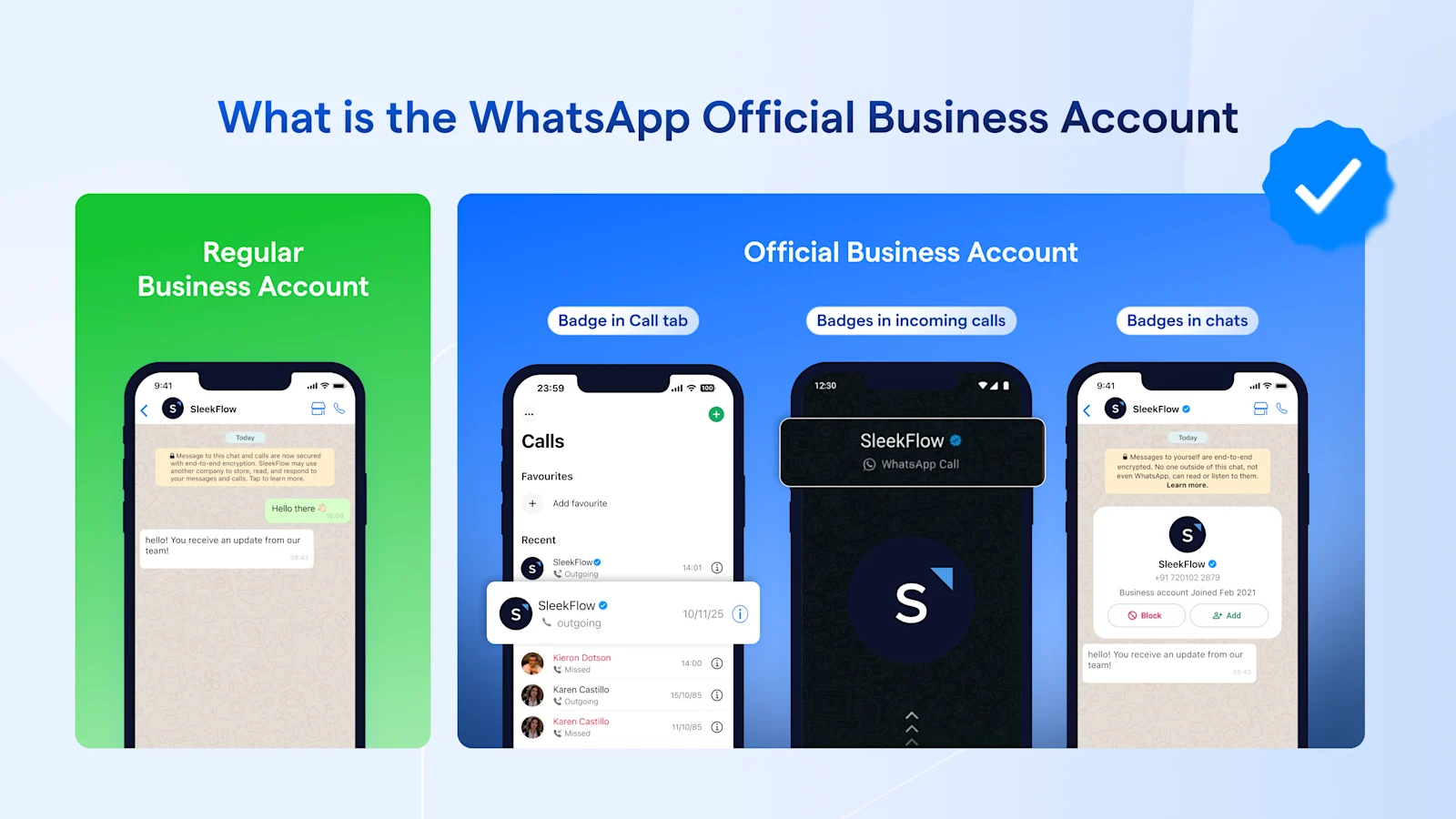
Why does the WhatsApp blue checkmark matter?
Trust & authenticity: The checkmark shows users that your account is authentic and belongs to a real brand. This builds immediate trust, making customers more comfortable interacting with your automated systems
Branding: Your business name appears in the chat list and headers even if the user hasn't saved your number.
Autonomous sales conversions: A blue checkmark builds instant credibility, making users much more likely to engage with your business. This allows your specialized AI agents to guide sales conversations, score leads, and hand off high-value prospects to your team 24/7.
How to get the WhatsApp blue checkmark?
This is where most businesses get confused. There are now two ways to get the WhatsApp Business blue checkmark. Let's break them down.
If you use the WhatsApp Business Platform (API), you can apply for an Official Business Account (OBA).
If you're on the WhatsApp Business app, you can pay for a Meta Verified subscription, though availability depends on your region and account type.
The OBA application is free but requires your brand to be well-known. In contrast, Meta Verified is a paid subscription that also provides extra features like better support and access on multiple devices.
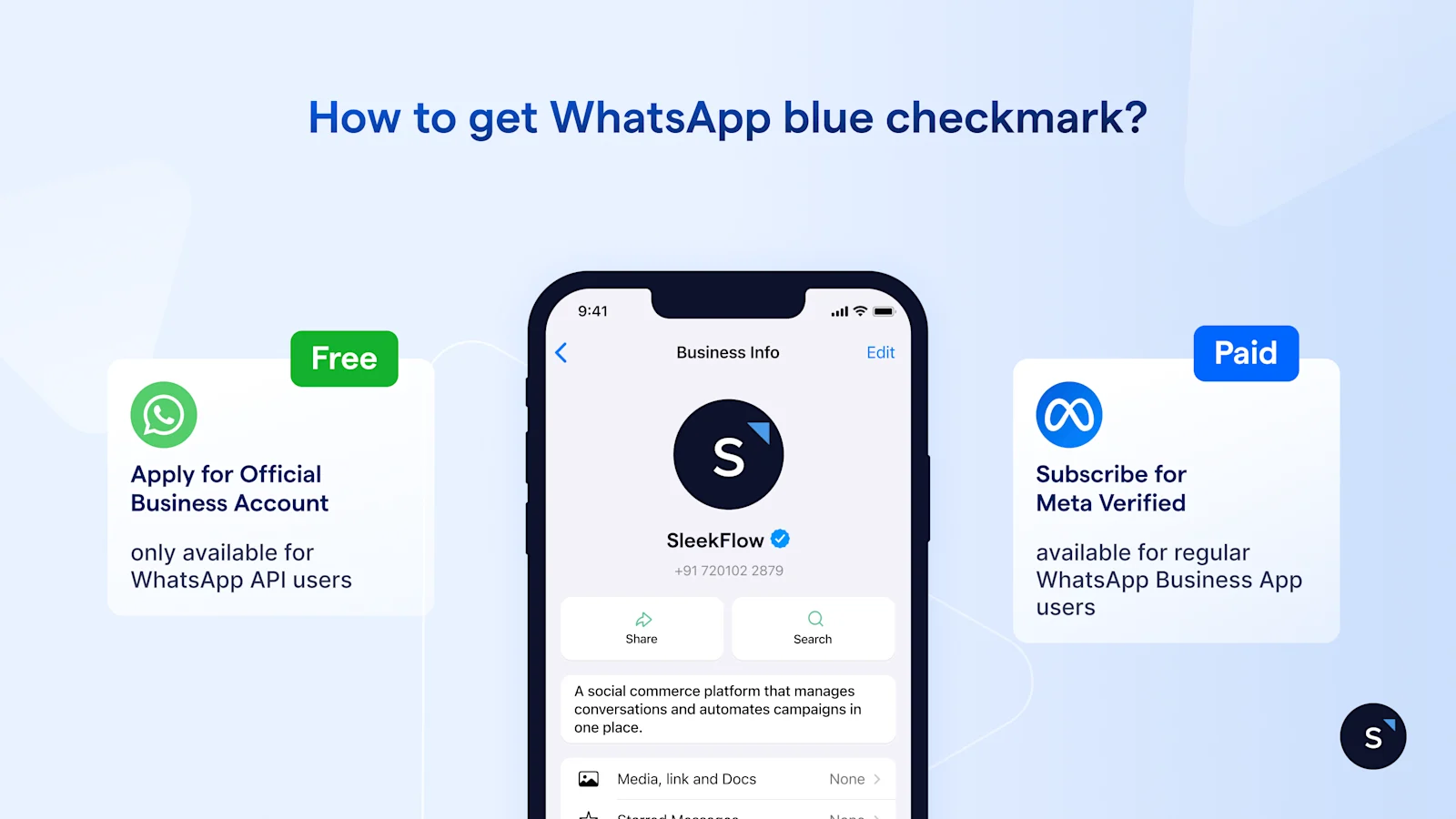
Path 1: Apply for Official Business Account (OBA)
Who is this for? Exclusive to WhatsApp Business API users connected to an omnichannel AI platform (like SleekFlow users).
Cost: Free to apply.
Requirement: The brand must have a strong public reputation and provide proof of media coverage.
Best for: Businesses that are serious about scaling their operations by deploying AI agents. Path 1 is ideal for those who want to build specialized AI agents, use customer lifecycle stages for smarter segmentation and targeted broadcasts, and scale their message volume via the API without losing that personal touch.
iBilik verified its WhatsApp Business account to boost tenant confidence with support from SleekFlow
iBilik, Malaysia's top co-living platform, needed a secure and trustworthy way to connect homeowners with tenants among its 800,000 monthly visitors.
Using unverified WhatsApp numbers undermined user confidence, made tenants hesitant to share sensitive information, and risked account suspension due to Meta's anti-spam policies.
iBilik partnered with a communication provider to get its WhatsApp Business account officially verified, earning the "Blue checkmark" to prove its authenticity.
The blue checkmark immediately confirmed iBilik's legitimacy, reassuring users they were interacting with a verified business with over 100,000 unit listings.
The verified badge reduced tenant anxiety, making them feel more secure discussing contracts and making payments.
iBilik could confidently send promotional messages to thousands of users, achieving a 98% open rate without fear of being flagged for spam.
Path 2: Pay for Meta Verified subscription
Who is this for? Available to WhatsApp Business App and WhatsApp Business API businesses.
Cost: Monthly subscriptions start at US$15. Pricing varies by tier: Standard, Plus, Premium, and Max.
Availability: Meta is rolling this out gradually to specific regions and business types. Open your WhatsApp Business App, go to Settings or Business Tools, if you do not see the Meta Verified option, it is currently not available for your account.
Best for: Small businesses or those who cannot meet the strict PR requirements of OBA.
How to get the blue checkmark with Meta Verified
Getting the blue checkmark with a paid Meta Verified subscription is much simpler than the tough OBA application process. If you're ready to invest in your brand's credibility, here's how to get started:
Prepare your Meta Business Manager: First, you need to fully verify your business in the Meta Security Center. You can do this by uploading your official business license, commercial register extract, or utility bills.
Activate security protocols: Make sure to turn on Two-Factor Authentication (2FA) for the phone number linked to your WhatsApp Business account.
Navigate to the Meta Verified Menu: Open the WhatsApp Business App and go to Settings (or Business Tools) > Meta Verified.
Choose your subscription: Pick the subscription tier that fits your business needs and follow the steps to set up your payment. Don't worry, Meta will refund this charge if your application doesn't get approved.
Confirm details: Submit your final business details for review. Once Meta confirms your identity, the blue checkmark will show up next to your display name, in your chats, and on your linked channels.
Who can apply for a WhatsApp Official Business Account
An Official Business Account (OBA) is a designation for brands that have achieved a certain level of market presence. Unlike the paid Meta Verified subscription, OBA is granted based on brand authority.
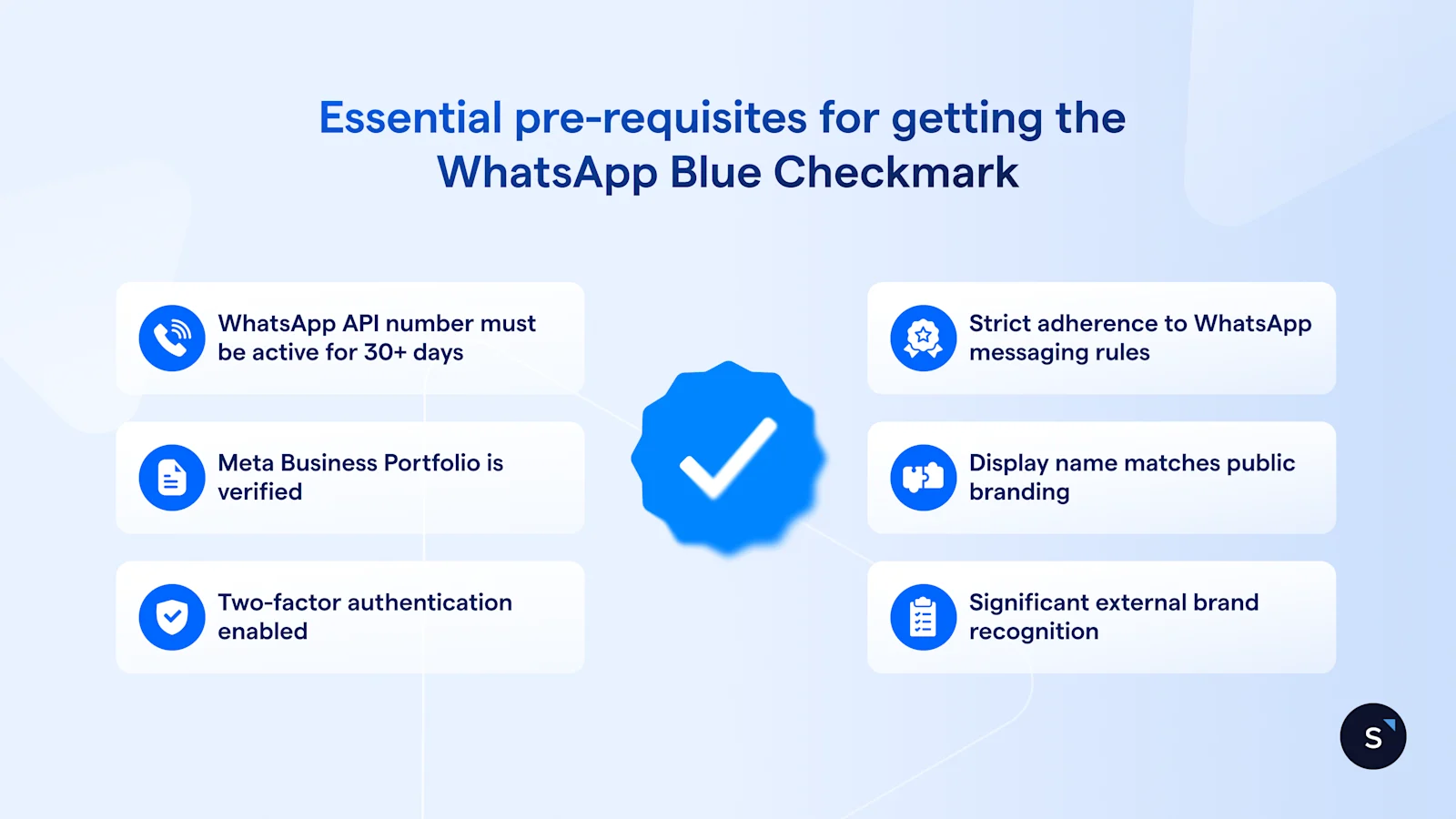
To qualify for OBA, you must meet the following prerequisites:
Tenure: Your WhatsApp Business Account (WABA) must be at least 30 days old.
Compliance: You must strictly adhere to the WhatsApp Business Messaging Policy.
Verification: Your Meta Business Portfolio must complete Business Verification.
Security: Two-step verification must be enabled on the WABA phone number.
Identity: Your WABA display name must be approved and match your external branding.
Notability: This is the hardest part. Your business must be a "well-known, often searched-for brand." Meta verifies this by looking for organic news coverage in reputable media outlets (paid PR or ads do not count).
How to apply for a WhatsApp Official Business Account
Path 1: Through WhatsApp Manager
Some businesses are eligible to apply directly through the WhatsApp Manager. Meta grants this access to select accounts based on internal criteria. You can easily check whether your business has this capability by logging in to your account.
Step-by-step guide:
Access WhatsApp Manager: Log in and navigate to the Overview section.
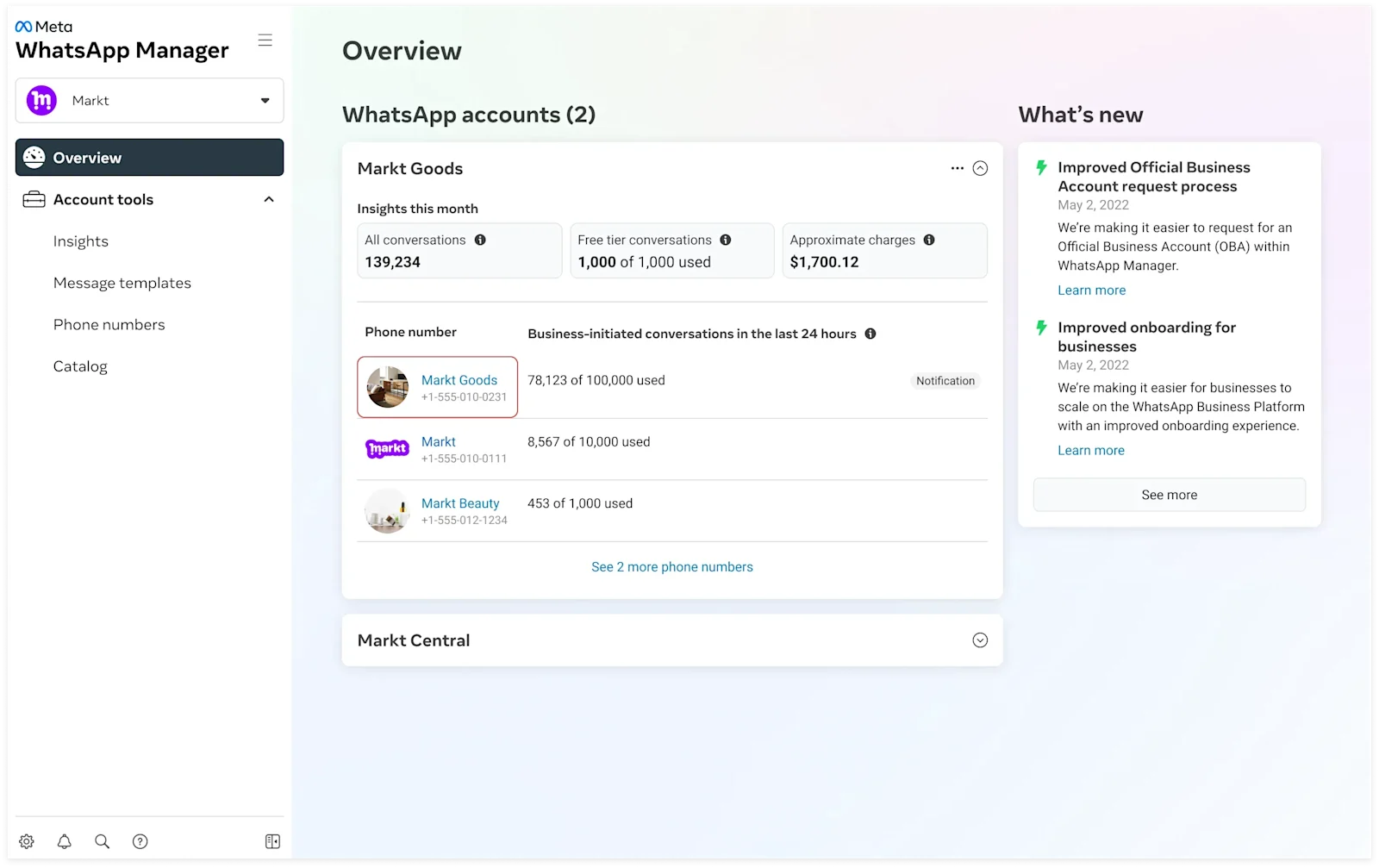
Select Phone Number: Click on the specific business phone number you want to verify.
Check 2FA: Ensure Two-Step Verification is already enabled for this number (this is a mandatory prerequisite).
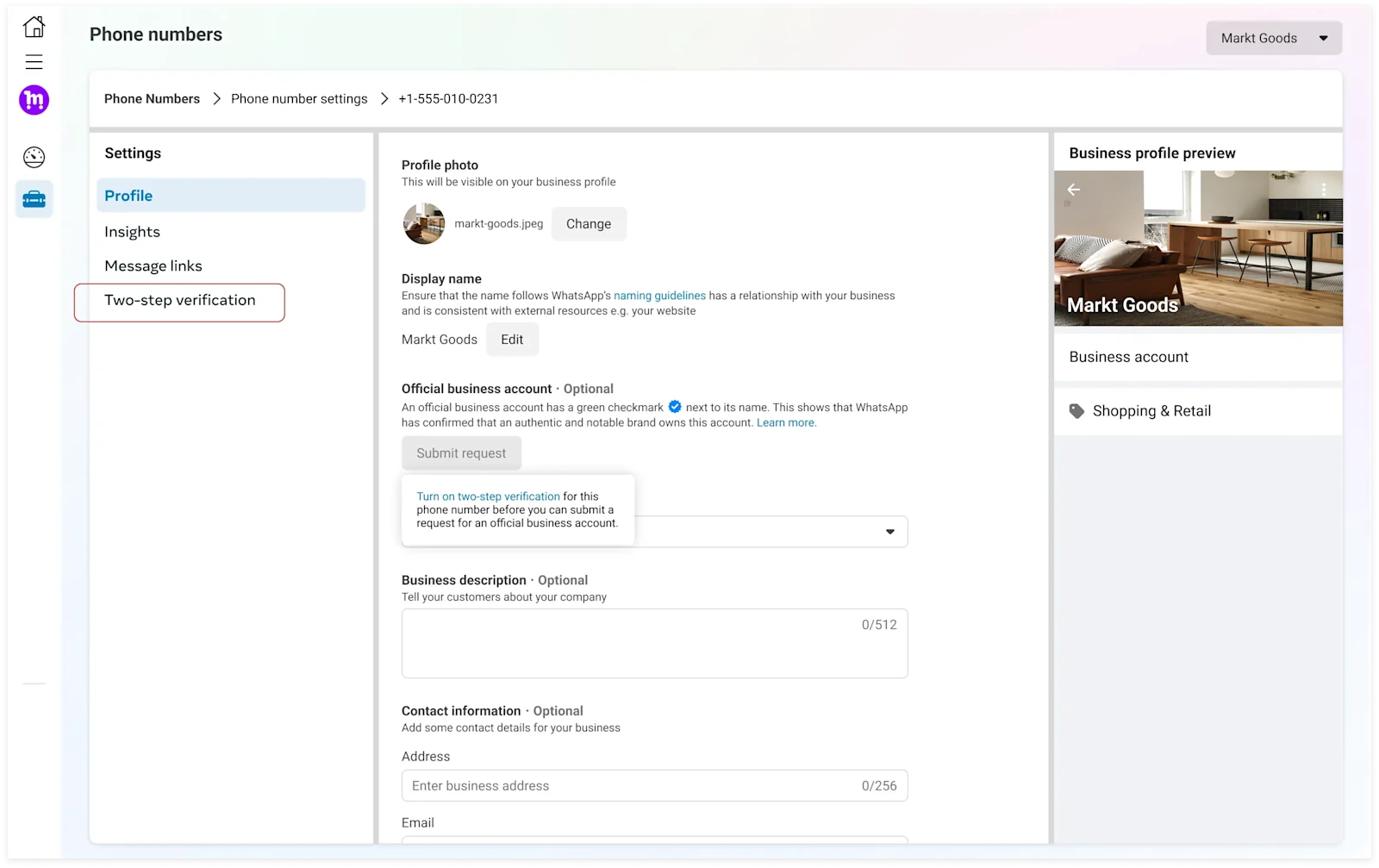
Submit Request: Look for the "Submit Request" button in the profile or settings area of that phone number.
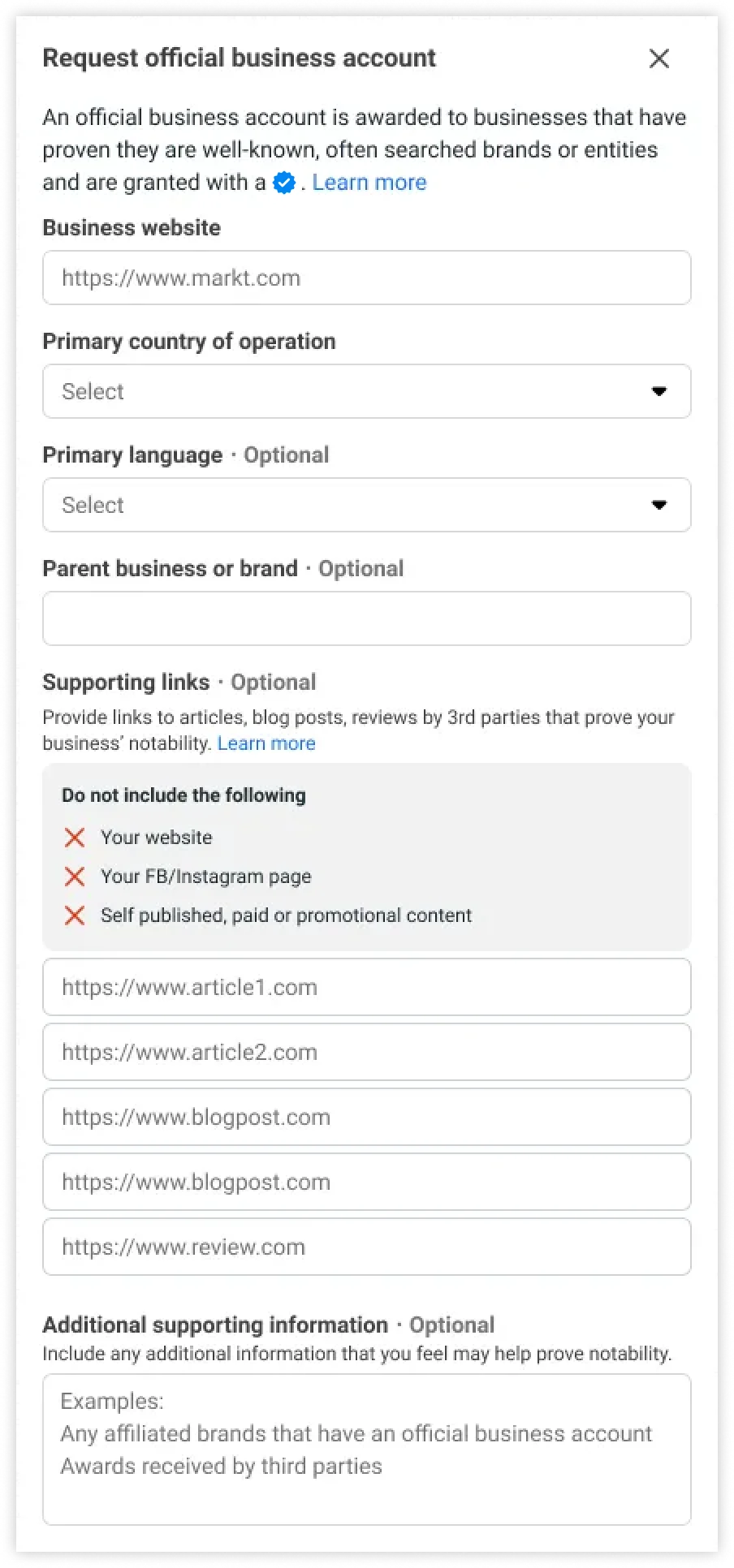
Fill Out the Form: You will need to provide specific details to prove your eligibility:
Supporting Links: You can submit up to 5 links from renowned publications (e.g., Wall Street Journal, Reuters, Business Insider, India Today) to demonstrate notability.
Brand Details: Fill in fields such as Country of Operation and Parent Business/Brand (especially if your WABA is part of a larger, well-known entity).
Primary Language: Specify the primary language of your brand communications.
Note: If you do not see the "Submit Request" button, you likely do not meet the eligibility criteria for direct application.
Path 2: Through a Meta Business Partner (SleekFlow)
For businesses without direct access to an application in WhatsApp Manager, working with a WhatsApp Business Solution Provider is the easiest way to submit your application. For example, SleekFlow can facilitate the OBA application for our users.
Which verification path should you choose?
Your business size, resources, and long-term goals will determine which verification path you should take. Each option offers unique advantages for different stages of business growth. Let's break down which path might be the best fit for you.
Solo Entrepreneur or Small Business: If you're a solo entrepreneur or run a small business, Meta Verified can provide immediate value (if it's available in your region). It offers a cost-effective way to build credibility, increase visibility, and establish trust without the complex requirements of an OBA. This route is perfect if you need a quick, straightforward way to improve your online presence.
Growing Team with Automation Needs: Is your business scaling up? Combining the Business Platform (API) with an attempt to get OBA status could be your best move. The API integration lets you automate customer interactions efficiently, while pursuing an OBA enhances your long-term credibility and builds industry trust as your company grows.
Multi-Brand Organization or Large Enterprise: For large enterprises managing multiple brands, a strategic approach is essential. You'll want to combine API integration, strong governance protocols, and support from a trusted partner. The API provides powerful automation and data-driven insights, while governance ensures compliance and brand consistency. An experienced partner can streamline the process of achieving OBA and maintaining a unified, credible presence across all platforms.
How HKBN boosted customer trust and engagement
Hong Kong Broadband Network (HKBN), a major telecom provider, operated in a fast-paced environment where traditional communication methods were failing.
HKBN found it increasingly difficult to reach customers through phone calls. A rise in phone scams made consumers distrust unknown numbers, and busy professionals often ignored non-urgent calls.
HKBN shifted its communication strategy to the WhatsApp Business API. They secured the official "Blue Tick" verification to build trust, created separate WhatsApp channels for different services to improve clarity, and used targeted broadcast campaigns to re-engage inactive users.
Revitalized customer trust and engagement by providing a secure, verified communication channel, achieving a 50% response rate.
Boosted customer willingness to engage safely by displaying a visible badge of authenticity, achieving a 35% conversion rate.
Successfully re-established a trustworthy connection with its audience, achieving a 95% read rate and transforming communications from a nuisance into a convenient digital service.
Improved customer experience by allowing users to instantly recognize the purpose of messages and seek tailored assistance.
How SleekFlow users can submit requests for OBA
At SleekFlow, we are an eligible WhatsApp Business Solution Partner authorized to submit OBA applications on behalf of our WhatsApp Business API users. As submission slots are limited, please follow the steps below to ensure your application is fully prepared and has the best chance of success.
Step 1: Self-Audit
Before contacting us, confirm you have green lights on all six prerequisites:
[ ] WABA active for >30 days
[ ] Notable brand presence (ready to provide 5 organic press links)
[ ] Compliant with Messaging Policy
[ ] Completed Meta Business Portfolio Verification
[ ] 2FA enabled for the WABA
[ ] WABA display name approved
Step 2: Reach out to SleekFlow
Once you have your documentation ready, contact your SleekFlow Customer Success or Support Manager. Our team will conduct a preliminary review of your eligibility to ensure your application is as strong as possible before submitting it to Meta.
Step 3: SleekFlow submission
After we validate your details, we will determine the most effective submission route for your business and handle the submission process.
While we ensure your application is submitted correctly and optimized for review, the final decision lies solely with Meta. Submission through a partner does not guarantee approval.
Why WhatsApp verification requests get rejected
If you’ve applied for the free Official Business Account (OBA) and been rejected, you’re not alone. The truth is, most applications are denied on the first try. Meta keeps its standards high to maintain the blue check's prestige.
Here are the most common reasons for rejection:
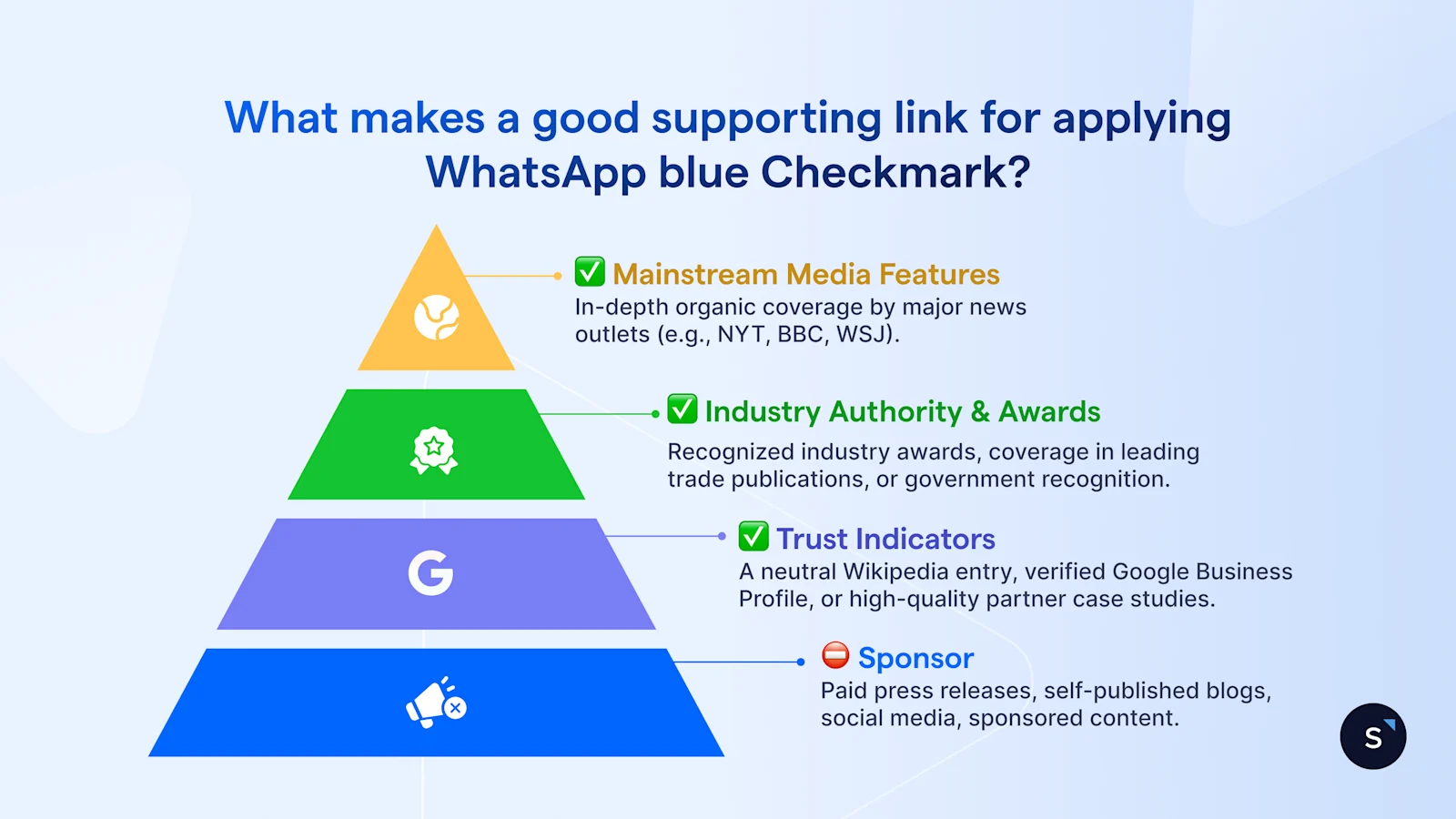
Lack of organic notability: This is the biggest hurdle for most businesses. Meta wants to see significant, organic press coverage from reputable and independent news outlets. Paid PR, sponsored articles, and promotional press releases simply won't cut it.
Incomplete business verification: Your application will be rejected immediately—before a person even sees it—if your Meta Business Manager isn't fully verified with the proper legal documents.
Display name mismatches: Meta flags accounts for inconsistency. Your WhatsApp display name needs to closely match your legal business name or the name your customers already know.
Low messaging volume: Accounts stuck in the lowest messaging tier (Tier 1) are rarely approved. Meta gives preference to businesses that actively engage with a high volume of users.
What to do if my WhatsApp blue checkmark request is rejected
It is important to remember that OBA status is a high bar to clear, and rejections do happen. If your application is denied, it does not mean you are permanently barred from verification.
If your request is rejected, you must wait 30 days before submitting a new application. Currently, request denials cannot be appealed. Meta enforces this strict cool-down period to prevent spamming the review queue.
How to strengthen your application before reapplying (not official requirements)
Instead of reapplying immediately with the same details, use the 30-day window to strengthen your case with these improvements:
Build more press: The most common reason for rejection is a lack of "notability." Focus on securing additional organic coverage in reputable news outlets.
Diversify your sources: Ensure your supporting links come from a variety of publications rather than relying on a single source.
Create a Google Business Profile: Claim and verify your profile on Google. A well-maintained listing with reviews and up-to-date contact info is a key external signal of your business's legitimacy.
Boost social proof: Work toward 10,000 organic Facebook likes or establish a Wikipedia entry. Both act as powerful indicators of brand legitimacy to Meta.
Upgrade your website: We recommend a multi-page site (rather than a single landing page) with a domain that matches your brand and your legal business entity name clearly displayed in the footer or contact section.

Get started today with SleekFlow’s WhatsApp Business API
Book a free demo to see how you can turn conversations to revenue with WhatsApp AI Agent.


