How to manage customer lifecycle on WhatsApp, SMS, and other messaging apps with SleekFlow?


Most businesses today sell through messaging. WhatsApp, TikTok, Instagram, and Facebook Messenger are the new storefronts because that is where your customers are.
But when every chat represents a potential deal, keeping track of who’s ready to buy, who needs follow-up, and who’s gone quiet becomes almost impossible. The sheer volume creates a messy web of threads, and valuable customers are slipping through the cracks.
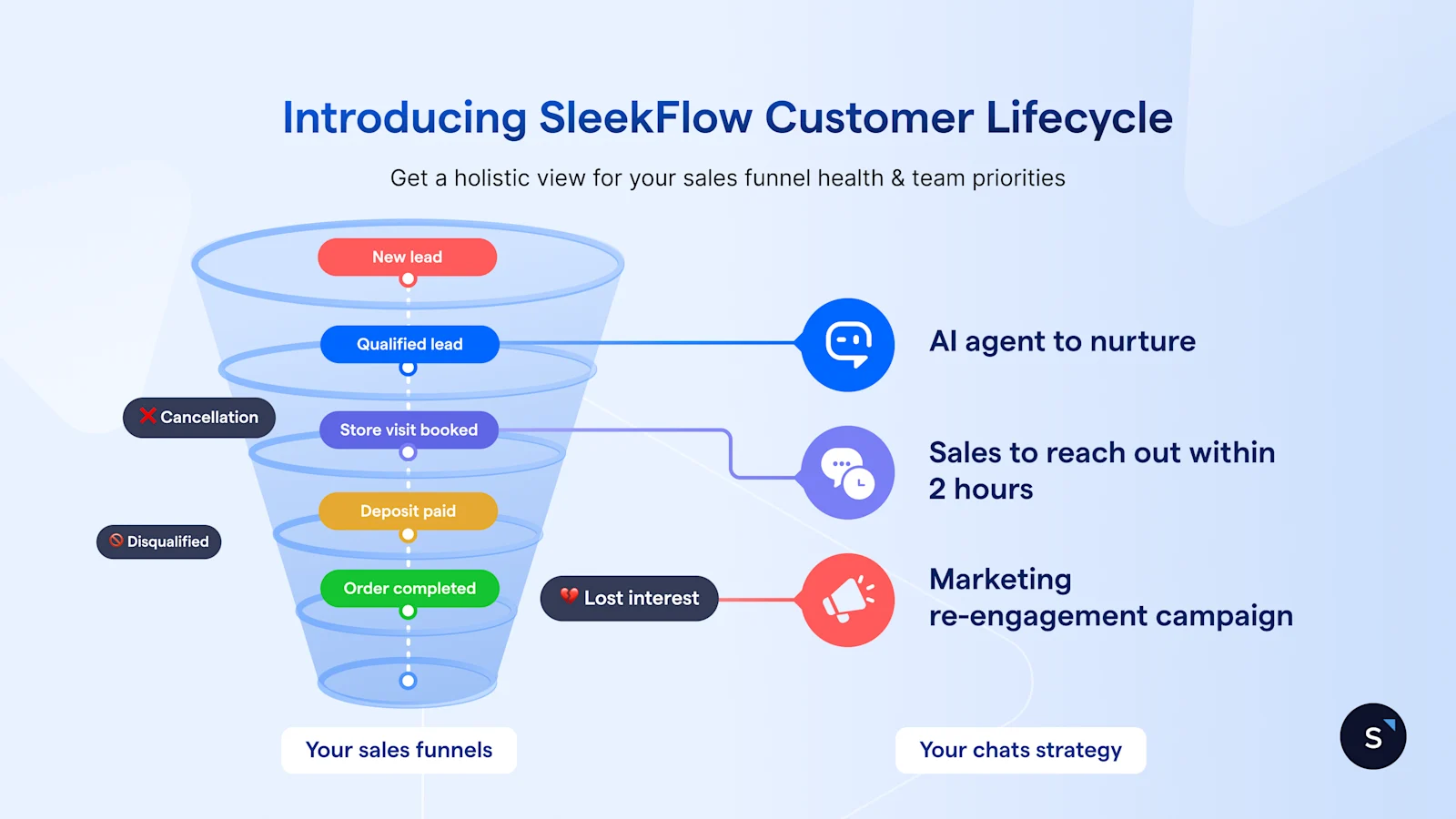
Enter SleekFlow Customer Lifecycle.
This tool gives businesses a smarter, more structured way to track and visualize every customer journey — right inside the conversations where selling and service actually happen.
Now, when your sales and support teams open the inbox, they don't have to guess which daily conversations to prioritize. Instead, they see an actionable sales funnel. Let's dive in to see how it works.
Why do you need an agile customer lifecycle management tool?
Modern selling involves multiple touchpoints and long conversations. For most businesses, that means juggling several tools — messaging apps, spreadsheets, and CRMs. Each helps in part, but none gives you a full picture of your sales process.
Sales agents scroll through endless chat threads, trying to figure out who’s ready to buy.
Marketers can’t tell which campaigns are bringing in real leads in conversations.
Managers rely on reports or spreadsheets that don’t match what’s happening in conversations.
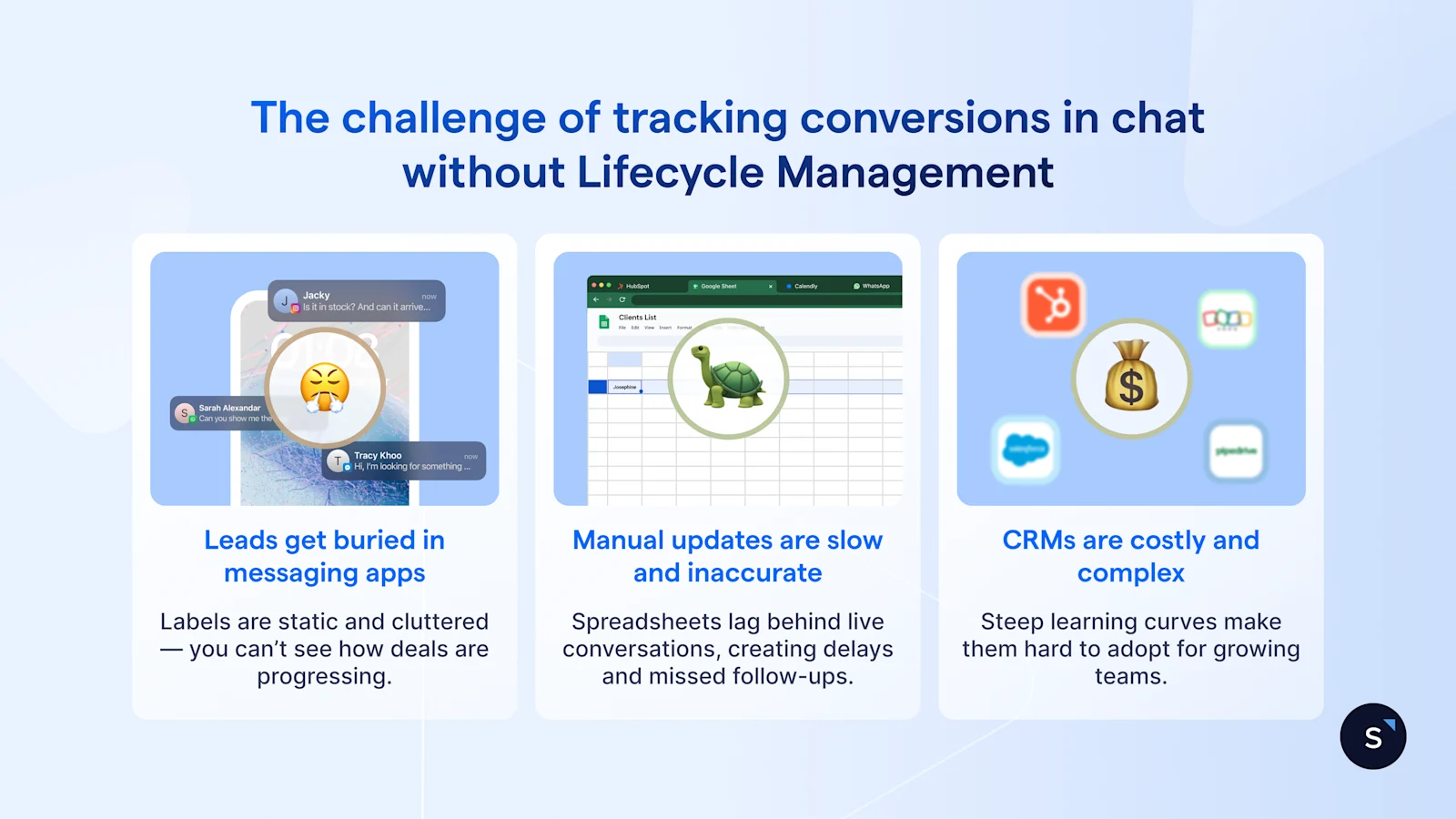
1. Messaging apps aren’t built to track conversations over long sales cycles
Messaging apps are great for engagement, but they lack the structure to manage a multi-stage sales funnel.
Take the WhatsApp Business App for example. You can label chats as “New Lead,” “Follow-up,” or “Closed,” but labels are static and disconnected. They don't show you that 50 people are stuck in "Follow-up" and that only two were moved to "Closed" this week.
Worse, teams often overload these labels for different purposes. Marketing might create an "Event" label to track leads, while Support creates a "VIP" label for SLAs. As your team grows, your labels are no longer a clear sales funnel, but instead become a disorganized set of segments that make it impossible to prioritize chats.
2. Manual tracking with spreadsheets kills speed and accuracy
Some teams try to move tracking to Excel or Google Sheets, but manual tracking can’t keep up with fast-moving sales. Updates get missed, follow-ups are delayed, and the data quickly becomes outdated.
There’s no chat automation or cross-team visibility, so the entire process stays reactive — always one step behind the customer.
3. Traditional CRMs for lifecycle management are heavy and expensive
CRMs like HubSpot, Salesforce, Marketo Engage, and Pipedrive do offer lifecycle management — but at a steep cost and steep learning curve.
For growing businesses, these tools are often too heavy to set up, too complex to maintain, and too costly to scale. Even after setup, they live outside your daily customer conversations. Reps end up switching tabs to update customer lifecycle stages — breaking the flow of real-time selling that actually drives conversions.
How to use SleekFlow’s Lifecycle Management to close more sales faster
Customer Lifecycle Management on SleekFlow bridges the gap between your conversations and your CRM. It gives your sales, marketing, and management teams a shared view of every customer journey — all within a lightweight messaging CRM platform you use to chat, automate, and sell.
From acquisition to retention, every step becomes visible, actionable, and automated — helping you close more sales and grow customer lifetime value (CLTV) with less effort.
1. Map your customer journey’s key touchpoints
Every business sells differently. SleekFlow lets you create your own customer lifecycle stages that reflect the actual milestones that matter to your business, rather than relying on preset statuses.
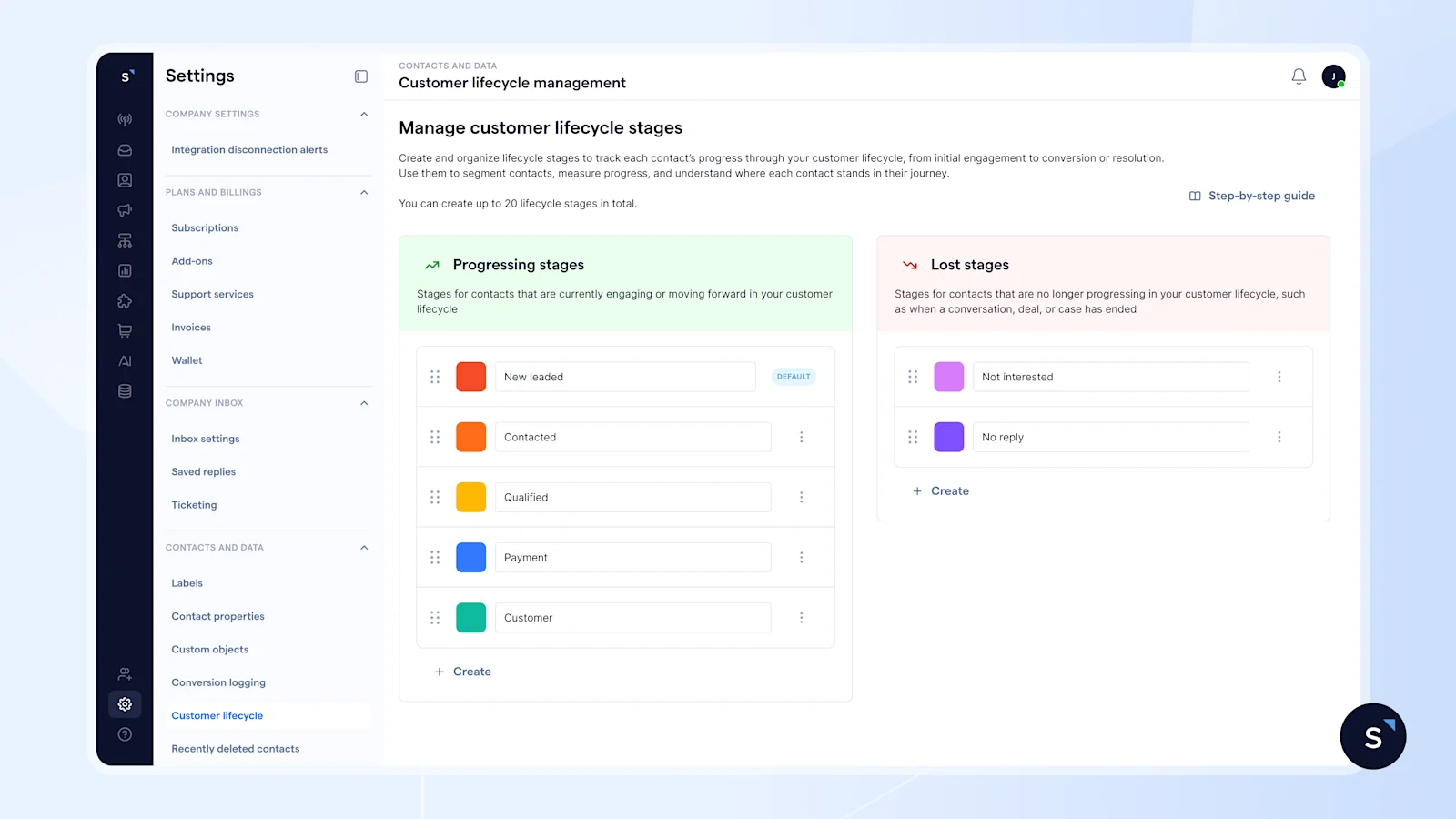
You can group stages into Progressing (for active leads) and Lost (for unresponsive or disqualified leads) so your team can focus on winning customers instead of chasing dead ends.
For example:
Define the criteria for each stage — and build your SOP around it
Stages only work when everyone agrees on what it takes to move a contact forward. Document the qualifying criteria for each stage: what the customer said, what actions they took, and what information has been collected.
For instance:
New Lead → Qualified: Customer has confirmed budget and expressed clear intent
Qualified → Quotation Sent: A proposal has been shared and acknowledged
Quotation Sent → Negotiation: Customer has responded with questions or a counter
These criteria form the foundation of your automated SOPs, ensuring every team works from the same playbook. This also makes it easier to coordinate across teams:
Marketing can use AI chatbot to nurture and qualify “New Leads” before handing them off to sales.
Sales can automate the round-robin distribution of “Qualified Leads” to the team.
Support can be automatically added to the conversation the moment a customer moves to the “After-sales Follow-up” stage.
2. Let the AI move contacts when the moment is right
When reps handle multiple conversations, stage updates are often delayed or missed.
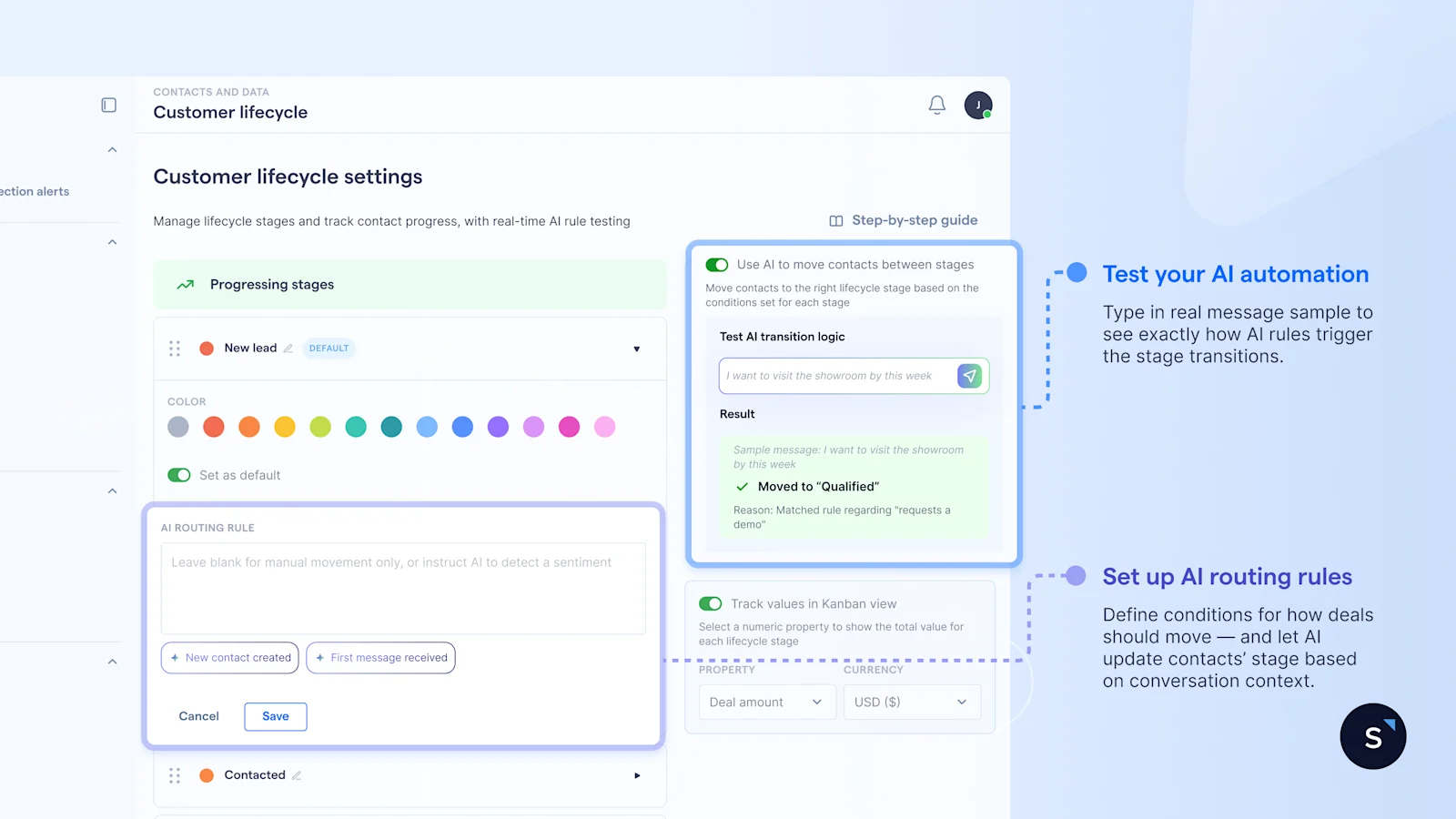
With clear criteria in place, you can set up AI routing rules to route contacts across lifecycle stage — move forward or backward — based on sentiment, conversation context and real customer signals. This reduces manual updates and keep your sales funnel accurate.
For example:
If a customer confirms their budget, the contact moves forward to "Qualified" automatically
If a lead requests a formal proposal, the stage advances to "Quotation Sent"
If a previously engaged lead expresses hesitation, the contact moves back to "Follow-up".
The catch is, customers rarely express intent in a perfectly structured way.
Before going live, you can test your AI routing rules by entering sample messages to check whether they execute the correct stage transition. This helps you refine your conditions so that they pick up real customer intent, even when it’s indirect or loosely phrased.
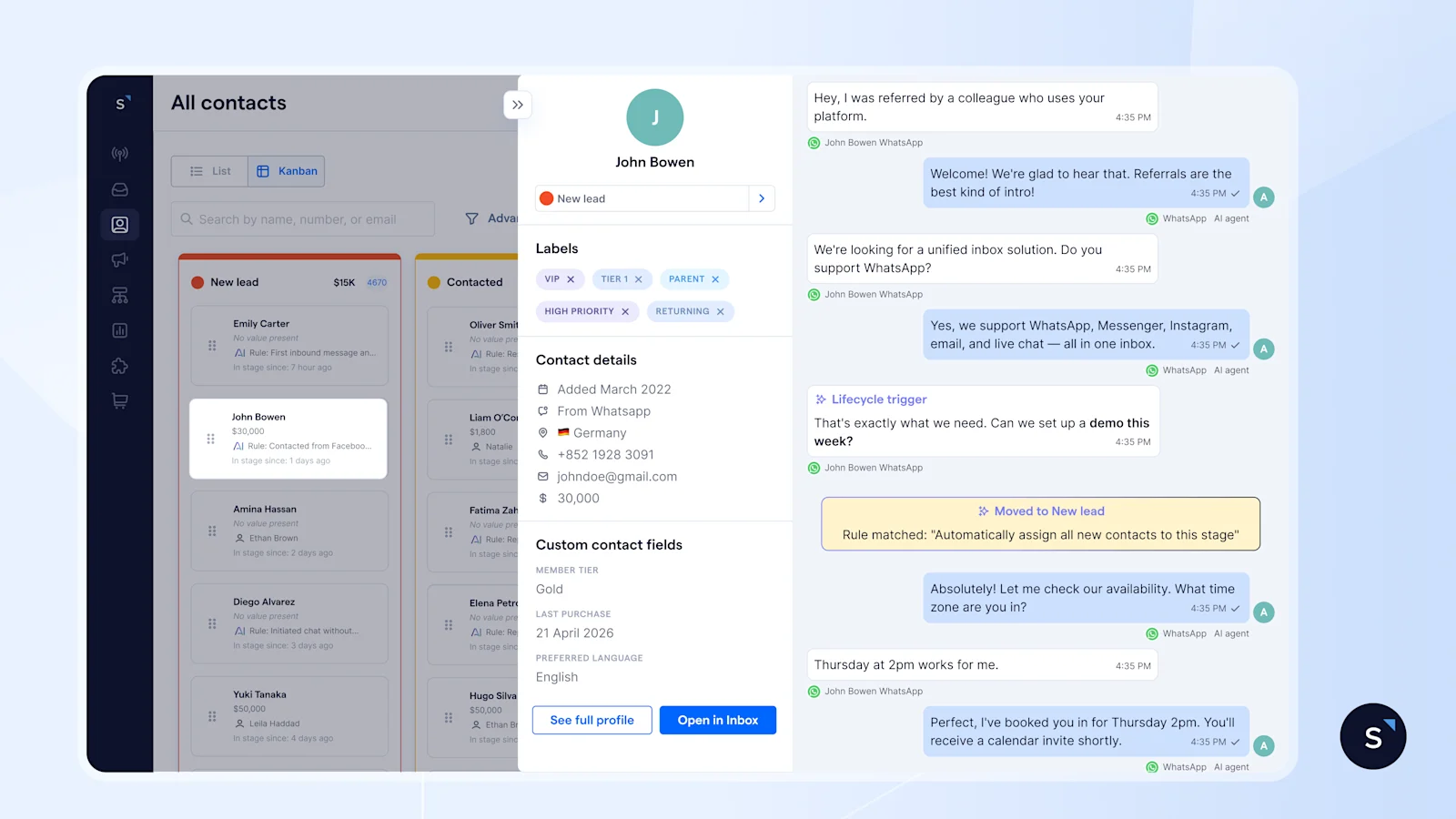
AI handles the routine updates, while reps stay in control. Every stage change, whether made by AI or a rep, is logged with the surrounding conversation. So, your team always has the context to understand what happened before and after the lifecycle stage transition, and step in when it matters.
3. Visualize your funnel health and what’s slowing down revenue
As contacts move through stages, the Kanban view shows where every contact stands.
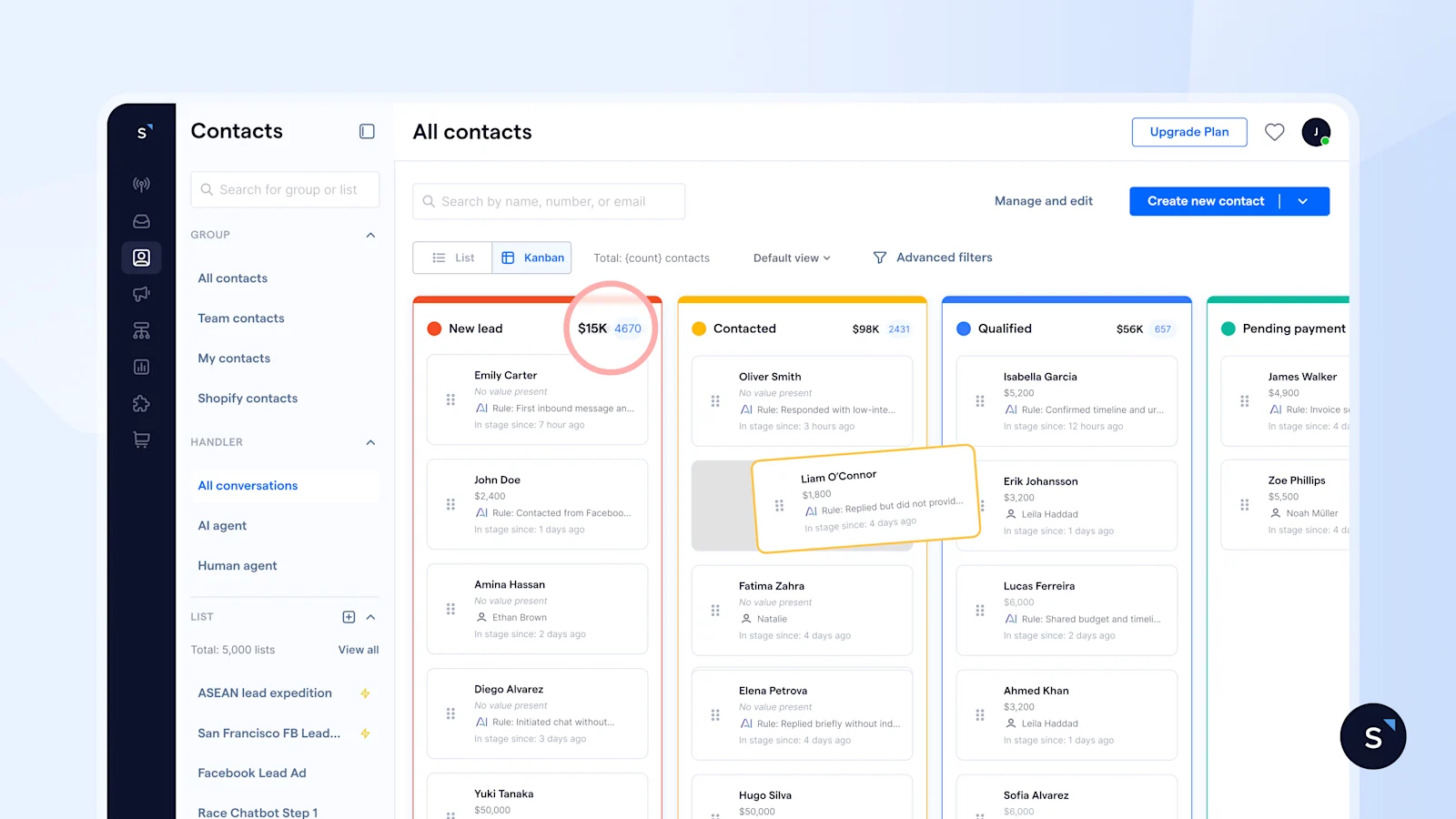
You can choose a numeric property to display on the Kanban, such as deal amount, order value, or loyalty points. This shifts your view from contact count to the value associated with each contact in each stage, so you can base your forecast on contacts that are actually progressing, not just sitting in the funnel.
For example, if a large share of your total deal value is sitting in “Quotation Sent” but not progressing, it signals stalled revenue dressed up as progress. Now you have something concrete to act on:
4. Automate customer journeys that drive conversions
Every stage change is an opportunity to act. With Flow Builder, actions are triggered the moment a contact enters a new stage.(coming soon).
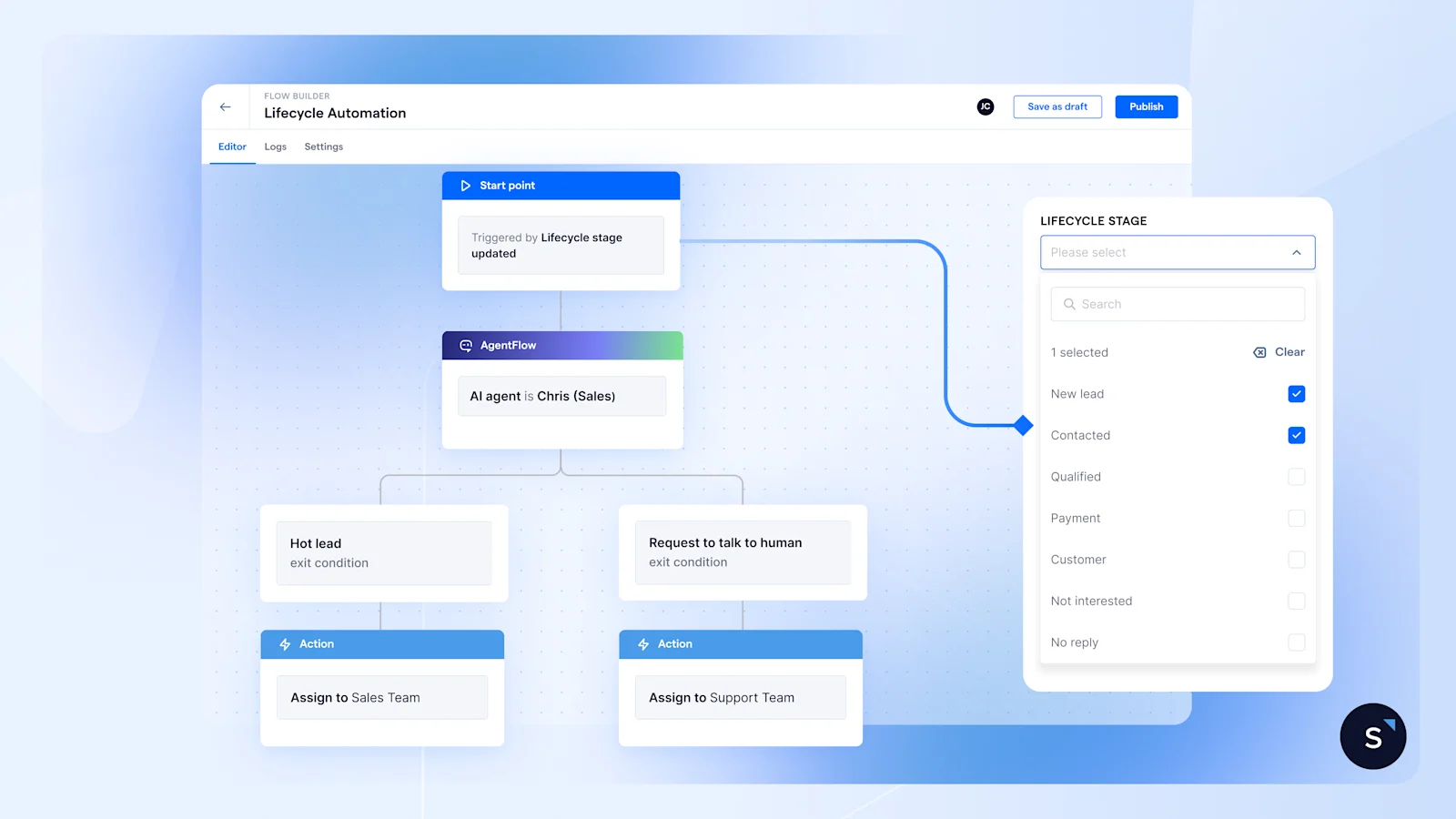
For instance:
Lead moves to Pending Payment?
Send an automatic payment reminder after 3 days if the payment hasn't been completed yet.
Contact turns Unresponsive?
Trigger a promotional message for to bring the conversation back to life.
Deal is Closed?
Trigger an onboarding or welcome flows automatically
Your funnel stays active 24/7, ensuring every lead moves forward — even when your team is offline.
5. View customer lifecycle alongside conversations
Now, whenever your team opens their inbox, they don't just see a list of messages—they see a prioritized pipeline. They can filter for "Qualified" leads immediately, engaging them while interest is high and preventing hot leads from cooling off.
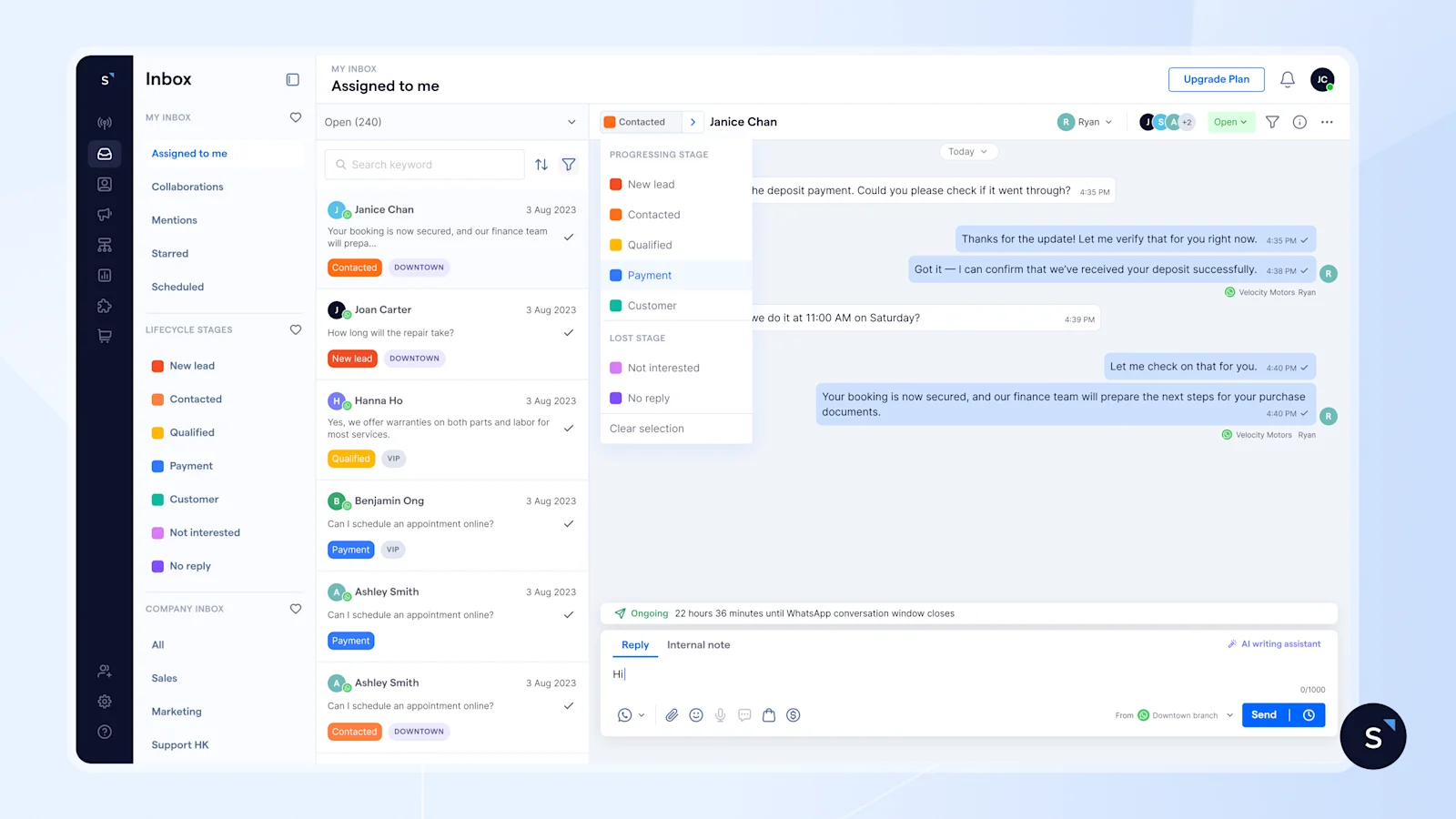
Of course, the customer journey isn’t always linear. Leads can jump forward, stall, or circle back at any time. That’s why sales and support agents can manually update lifecycle stages directly in the shared Inbox (on both web and mobile) with just one click. This keeps your funnel in sync with the actual conversation.
For example, if a lead returns after 6 months, ready to buy, the sales agent can instantly update them from “Lost” back to “Negotiation”—and schedule a meeting right within the chat, ensuring they follow the sales SOP for that specific stage.
This real-time visibility keeps your team aligned and ensures follow-ups happen exactly when they should.
6. Leverage lifecycle data to drive impactful campaigns
No more waiting for end-of-month reports or manually updating spreadsheets. With SleekFlow, you can track how many leads sit in each stage in real time to spot where deals are stalling and where momentum is building. Thus, managers can reallocate resources and adjust strategies early before opportunities fade.
Besides, you can segment leads by lifecycle stage and send targeted bulk re-engagement messages — such as a limited-time offer, a new product update, or a simple “Still interested?” — to revive cold or unresponsive leads at scale.
Benefits of using SleekFlow Lifecycle Management
SleekFlow gives you a clearer, faster, and more coordinated way to manage every customer journey. Your team always knows where each lead stands, what needs attention, and how to keep momentum going, without digging through chats.
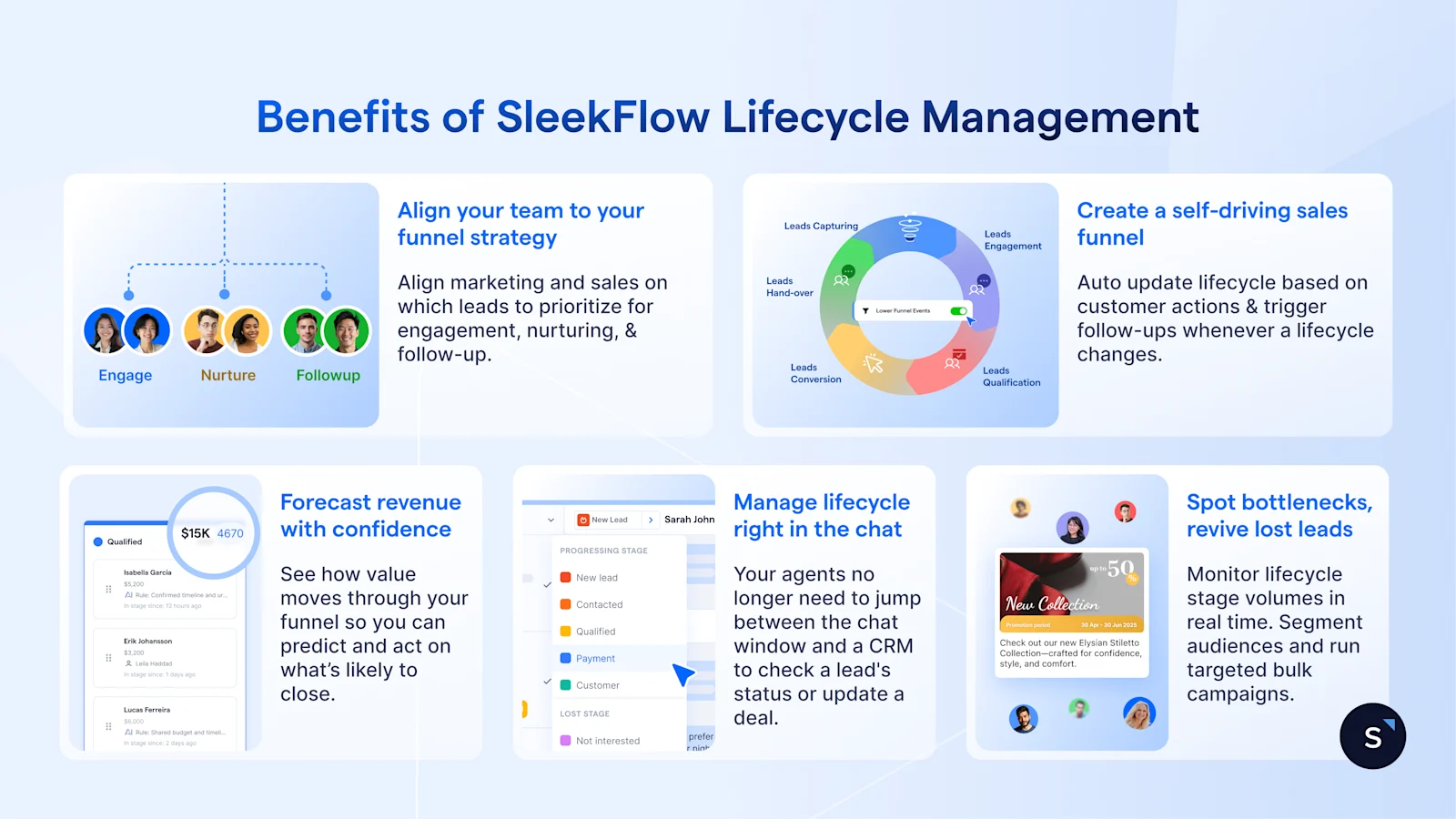
By powering your conversations with lifecycle data, you improve conversion rates, increase productivity, and make every action more intentional across the customer journey.
Stop guessing. Automate and speed up your funnel
See exactly where every lead stands, automate your follow-ups, and accelerate your sales cycle with Lifecycle Management.
Recommended for you


