WhatsApp for the beauty industry: a practical guide for salons and clinics


TL; DR: Quick Summary
- Singapore salons and aesthetic clinics use the WhatsApp Business API to qualify, book, remind, and rebook clients.
- Four in five people in Singapore use WhatsApp every month, according to We Are Social's Digital 2026 report.
- A booking chatbot collects treatment, therapist, and time, then a payment link holds the slot with a deposit.
- Licensed aesthetic clinics must check WhatsApp promotions against MOH rules that ban before-and-after photos and discount wording.
- Enquiry-to-booking, no-show, and rebooking rates show whether WhatsApp is actually filling a clinic's appointment book.
Your front desk spends the day answering the same WhatsApp questions: treatment prices, opening hours, whether there's a slot on Saturday. Plenty of those chats end without a booking.
The ones that do still need a deposit, a reminder, and sometimes a health check before the client sits down.
On one shared phone, all of that runs on memory. Replies wait until someone's free, enquiries fall through overnight, and no-shows leave paid therapists with empty slots.
This guide walks salons and clinics through WhatsApp for the beauty industry, step by step: qualifying leads, tracking which ads bring bookings, taking deposits, cutting no-shows, and rebooking clients. It also covers the part most guides skip, which is what Singapore's advertising rules let you say in a treatment promotion.
How do beauty businesses use WhatsApp?
Beauty businesses use WhatsApp to answer enquiries, qualify leads, confirm bookings, take deposits, send reminders, share aftercare, and invite clients back. At any real volume, this runs on the WhatsApp Business API, which a business accesses through a Business Solution Provider (BSP) rather than the free WhatsApp Business app on a single phone.
Enquiries: prices, opening hours, and outlet locations.
Lead qualification: what the client wants, before a consultant replies.
Bookings: slot selection and confirmation inside the chat.
Deposits: a payment link that holds the appointment.
Reminders: messages timed to cut no-shows.
Aftercare and rebooking: instructions, then a nudge when the next session is due.
SleekFlow is a Select Tier WhatsApp Business Solution Provider, so your team can run all of this on the WhatsApp Business API from one shared inbox. Your clients are already there: four in five people in Singapore use WhatsApp every month, which makes it the country's most-used app.
How to qualify a lead before it reaches the front desk
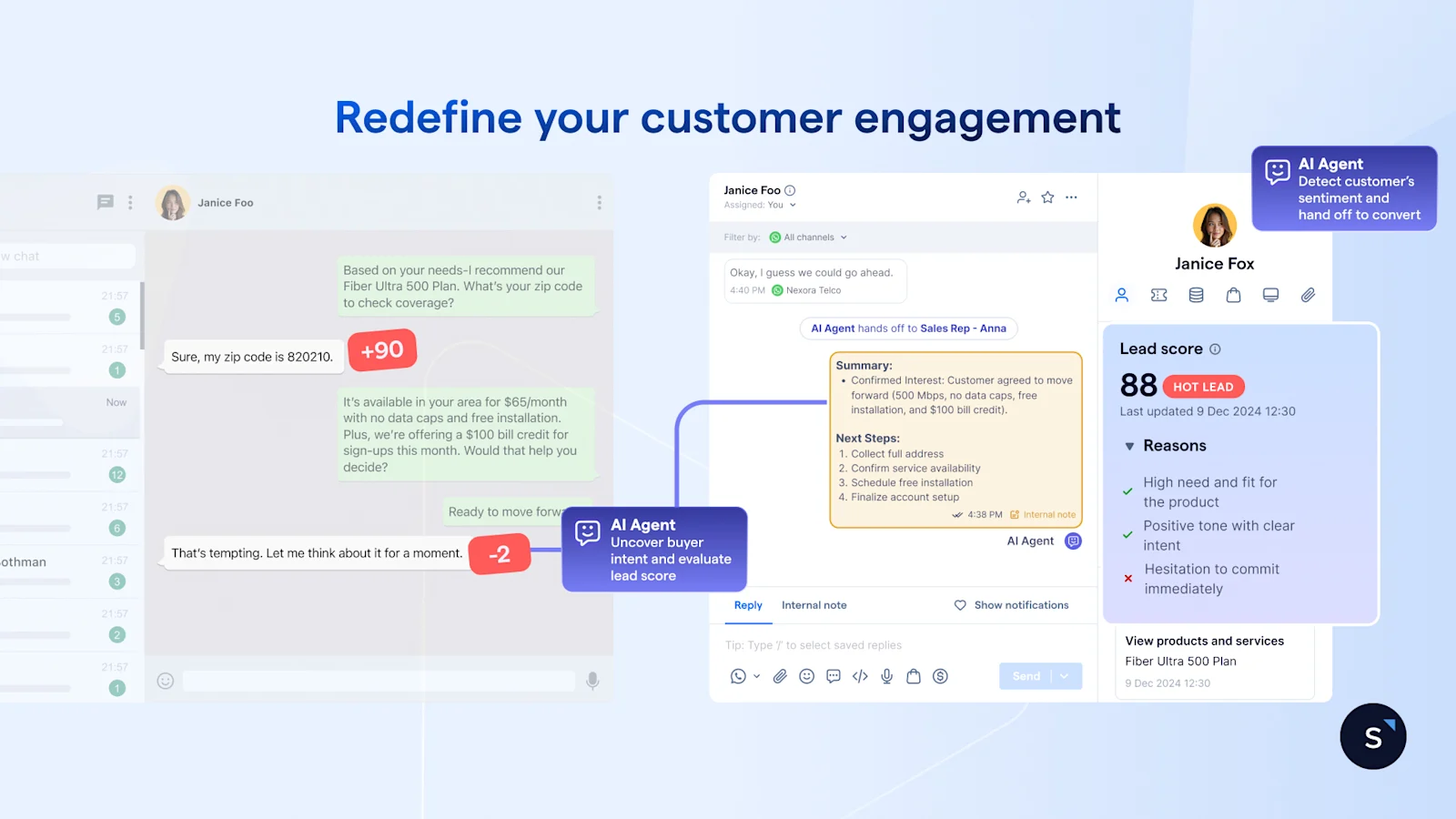
Qualify a lead with a WhatsApp chatbot that asks four things before a person replies: treatment type, any health conditions or contraindications, preferred therapist, and preferred date and time. Your consultant then opens a completed profile instead of starting from zero, and the chat lands with the right outlet or therapist.
Build the questions and the routing in Flow Builder, so a client who picks a particular outlet or therapist goes straight to that team.
Keep the health question to a yes or no. WhatsApp's Business Messaging Policy restricts requesting health-related information where local regulations require systems with stricter safeguards, so a "yes" should flag the chat for a consultant rather than collect details in the thread.
The bot never advises on whether a treatment suits someone. If you add an AI agent through AgentFlow, give it the same rule: prices, hours, and locations are its job, and suitability is your consultant's.
How to tell which ads bring in bookings
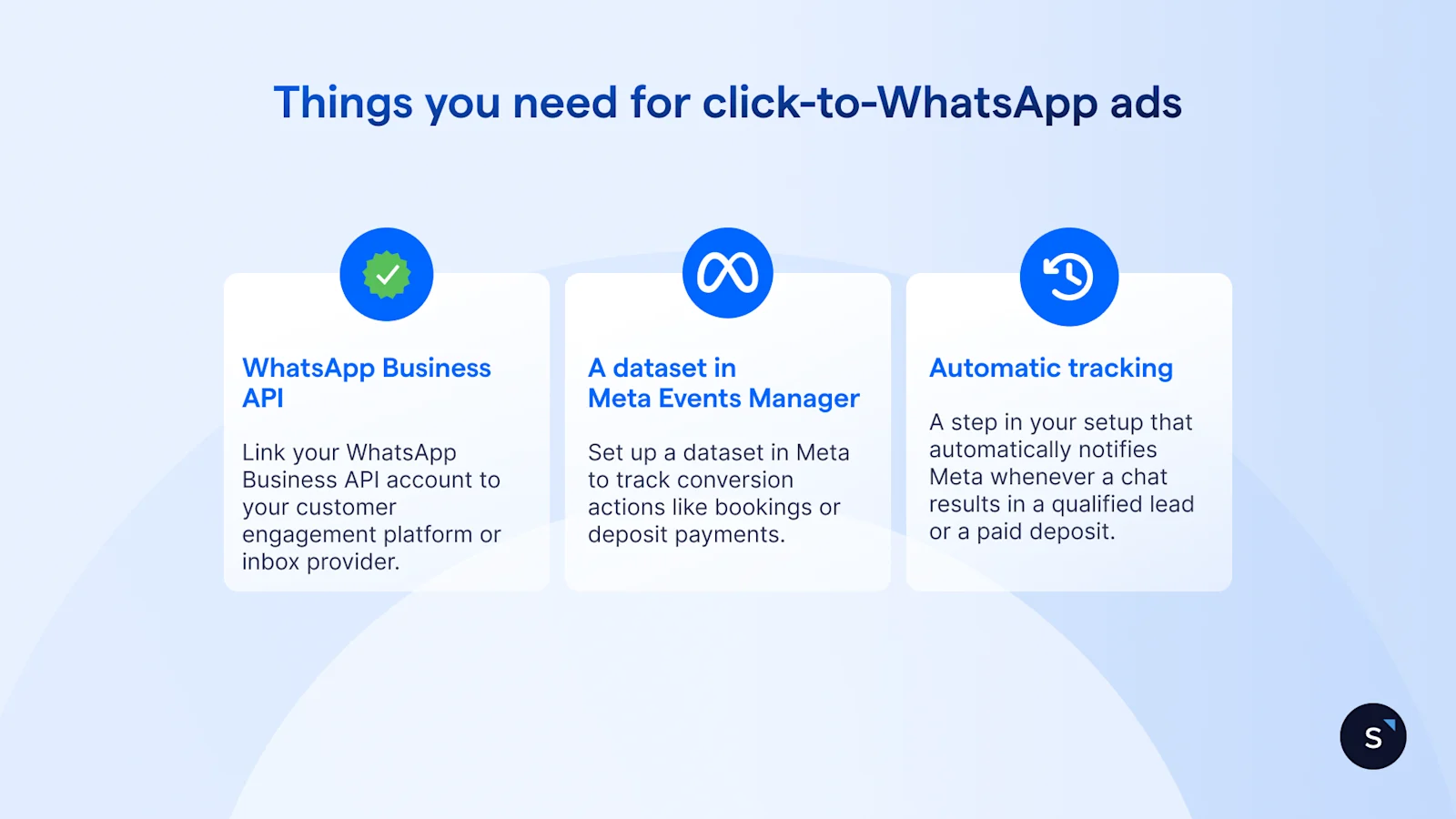
Pair Click-to-WhatsApp ads with Meta's Conversions API, so lead and purchase events from the chat go back to Meta. You then judge ad spend on enquiries that became qualified leads or paid deposits, not on clicks or chats that went nowhere. SleekFlow supports this setup.
To set it up for Click-to-WhatsApp ads, you need:
A connected account: Link your WhatsApp Business API account to your customer engagement platform or inbox provider.
A dataset in Meta Events Manager: Set up a dataset in Meta to track conversion actions like bookings or deposit payments.
Automatic tracking in your workflow: Add a step in your automation setup (such as SleekFlow's "Send Meta conversion event") that automatically notifies Meta whenever a chat results in a qualified lead or a paid deposit.
SleekFlow sends two event types, lead submitted and purchase, and Meta uses a 7-day attribution window for them, according to the SleekFlow Help Center.
How to book and take payment inside the chat
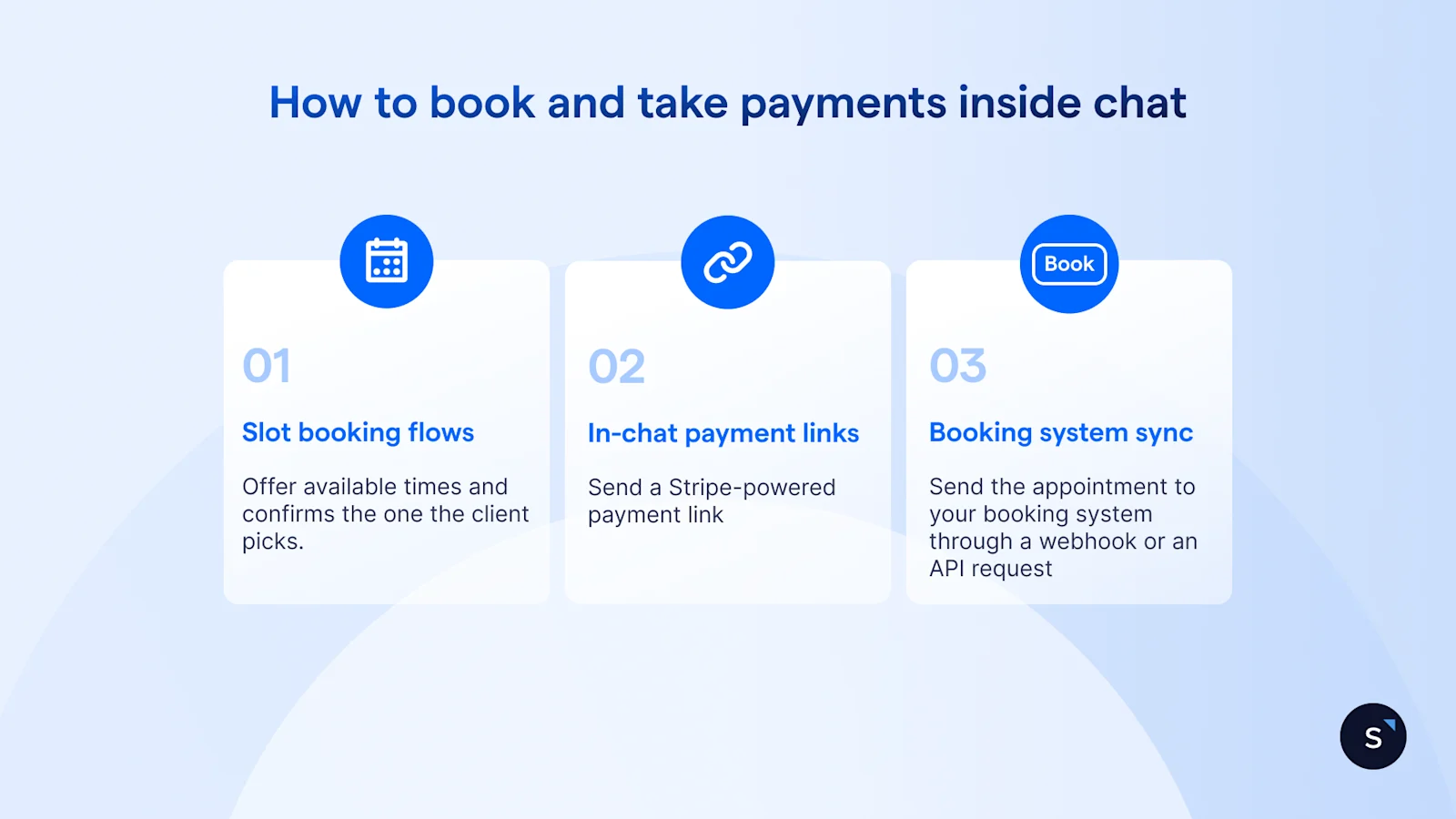
Clients can pick a slot, get a confirmation, and pay a deposit without leaving WhatsApp. The chatbot offers available times and confirms the booking in the thread, a payment link holds the slot, and a webhook or API request writes the appointment into the booking system your clinic already uses.
Slot booking: the flow offers times and confirms the one the client picks.
In-chat payment links: send a Stripe-powered payment link into the chat, available to businesses registered in Singapore.
Booking system sync: Send the appointment to your booking system through a webhook or an API request, provided that system has a public API.
How to cut no-shows with a reminder sequence
A short run of WhatsApp messages, from booking confirmation to a 2-hour reminder and a post-visit follow-up, gives clients several easy chances to confirm, pay, or reschedule before a slot goes empty. Treat the timings below as a recommended starting point, not a proven benchmark, and adjust them against your own no-show data.
Outside the 24-hour customer service window that opens when a client messages you, every outbound message needs a Meta-approved template.
OT&P Healthcare, a Hong Kong healthcare provider, reduced appointment no-shows by 11% year on year after automating its appointment reminders with SleekFlow.
What to send after the treatment
After a treatment, send three things: aftercare instructions on the day for any treatment with downtime, a short feedback request a few days later, and a rebooking nudge timed to the treatment cycle your practitioners recommend (for example, a month after a facial if that's your usual interval). Send aftercare and rebooking messages as broadcasts only to clients who've opted in to receive them, which WhatsApp's policy requires before you message anyone.
What you can and can't say in a WhatsApp promotion for treatments
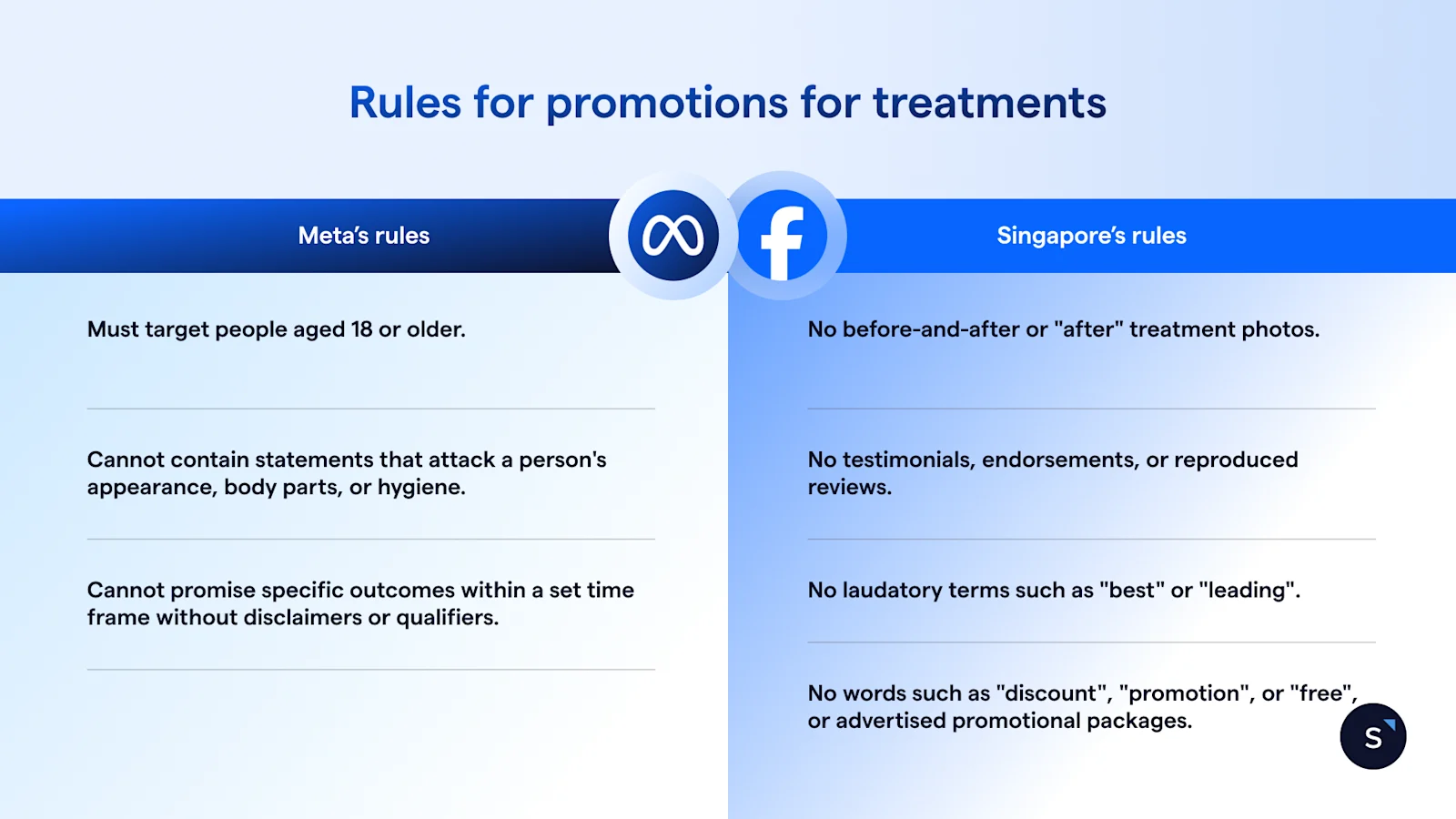
Two sets of rules apply. Meta's advertising standards govern any Click-to-WhatsApp ad for a cosmetic procedure, and Singapore's rules govern the promotion itself, with licensed aesthetic clinics under the Ministry of Health's advertising regulations. The two don't line up, so content Meta allows can still breach Singapore's rules.
What Meta's ad rules require
Meta's health and wellness ad standards set three conditions on ads for cosmetic procedures:
They must target people aged 18 or older.
They can't contain statements that attack a person's appearance, body parts, or hygiene.
They can't promise specific outcomes within a set time frame without disclaimers or qualifiers.
Meta does allow before-and-after images for cosmetic procedures in ads aimed at adults. Singapore's rules for licensed clinics don't.
What Singapore's rules say for licensed aesthetic clinics
Aesthetic procedures by licensed providers are medical procedures in Singapore, regulated under the Healthcare Services Act 2020. Their advertising falls under the Healthcare Services (Advertisement) Regulations 2021, and the Ministry of Health has said that non-medical businesses, influencers included, can't advertise licensable healthcare services without a licence.
Under MOH's FAQ on the regulations, a licensed clinic's promotions can't include:
Before-and-after or "after" treatment photos.
Testimonials, endorsements, or reproduced reviews.
Laudatory terms such as "best" or "leading".
Words such as "discount", "promotion", or "free", or advertised promotional packages.
The same FAQ says promotional messages pushed to phones need the recipient's prior written consent. That covers a rebooking message that promotes a treatment, not just a broadcast.
What applies to salons that aren't licensed clinics
For salons offering only non-medical services, such as facials or massages, the main reference is the Singapore Code of Advertising Practice. The Advertising Standards Authority of Singapore administers it, and it expects every ad to be legal, decent, honest, and truthful.
Rules change, and how they apply depends on your licence and services. Confirm with your regulatory adviser; this is general information, not legal advice.
Running one WhatsApp number across several outlets
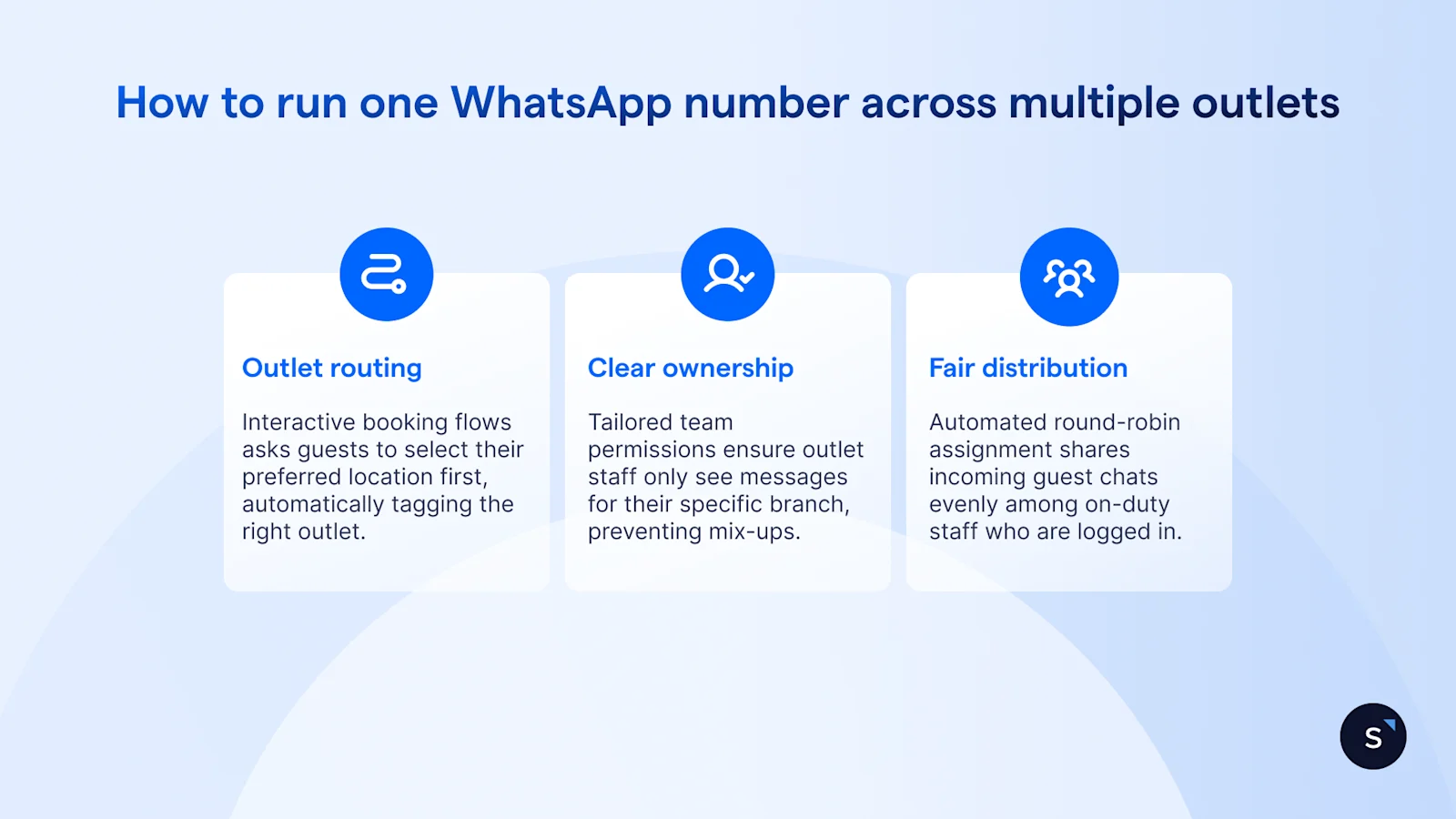
One WhatsApp number can serve every outlet when each chat is routed to its branch and owned by that branch's team. Clients message a single number, the flow asks which outlet they want, and each outlet's staff see their own conversations, so no enquiry gets answered twice or missed.
On Premium and Enterprise plans, custom roles and permissions can limit staff to conversations assigned to their own team, while managers keep the full view.
Hong Kong beauty brand Weirdo Beauty replaced a single shared work phone, where only one person could reply at a time, with a 24/7 virtual concierge on SleekFlow that answers questions such as treatment prices and opening hours.
Can clients still call you?
Yes. Clients can call your clinic, and your team can call them back, through SleekFlow's VoIP calling channel (this links to the page you sent). It runs separately from WhatsApp, because SleekFlow doesn't support native WhatsApp Business Calling, but your team takes calls in the same SleekFlow web app it uses for chats.
Inbound and outbound: agents call from the business number, not a personal phone, and incoming calls go to a team, an agent, or the contact's assigned owner.
Call history: past calls sit in the Calls section of the inbox and on each contact's profile.
Numbers: you can connect a Twilio number you already own, and Singapore numbers from SleekFlow are rolling out next.
How SleekFlow helps beauty businesses turn WhatsApp chats into booked appointments
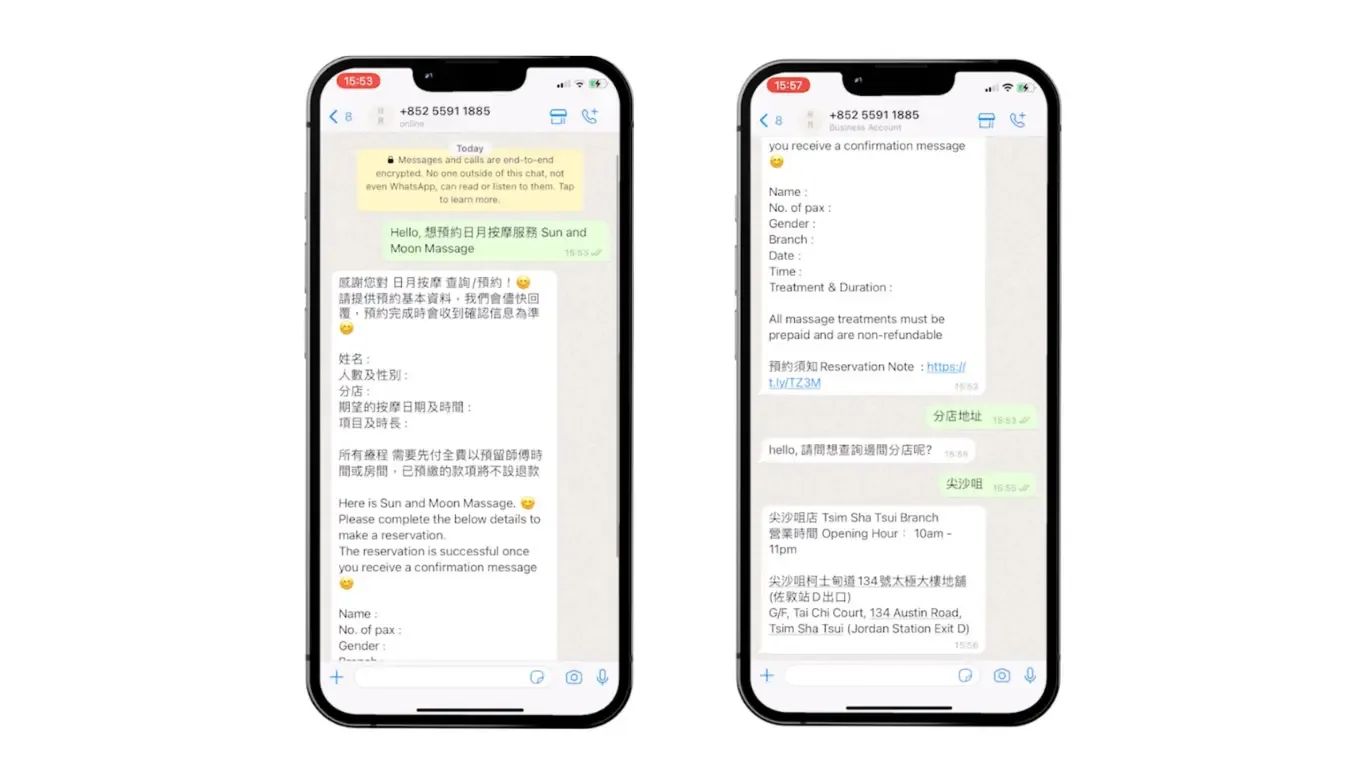
SleekFlow runs the WhatsApp booking path for salons and clinics in one place, from chatbot qualification and ad tracking to deposits, reminders, broadcasts, and outlet routing. Its beauty and wellness setup is built for salons, facial centres, aesthetic clinics, and spas, and follows the cycle from first enquiry to repeat booking.
Sun and Moon Massage, a Hong Kong wellness business with three branches, was turning only a small share of its daily WhatsApp enquiries into bookings, and messages piled up overnight. It connected all three branch numbers to one WhatsApp booking setup on SleekFlow, routed enquiries by branch, and used a chatbot to answer menu, pricing, and location questions before collecting booking details.
Results:
Up to 30% of daily enquiries now convert to bookings
1,500 new contacts a month
A customer database of over 20,000 within a year
What you can track on SleekFlow
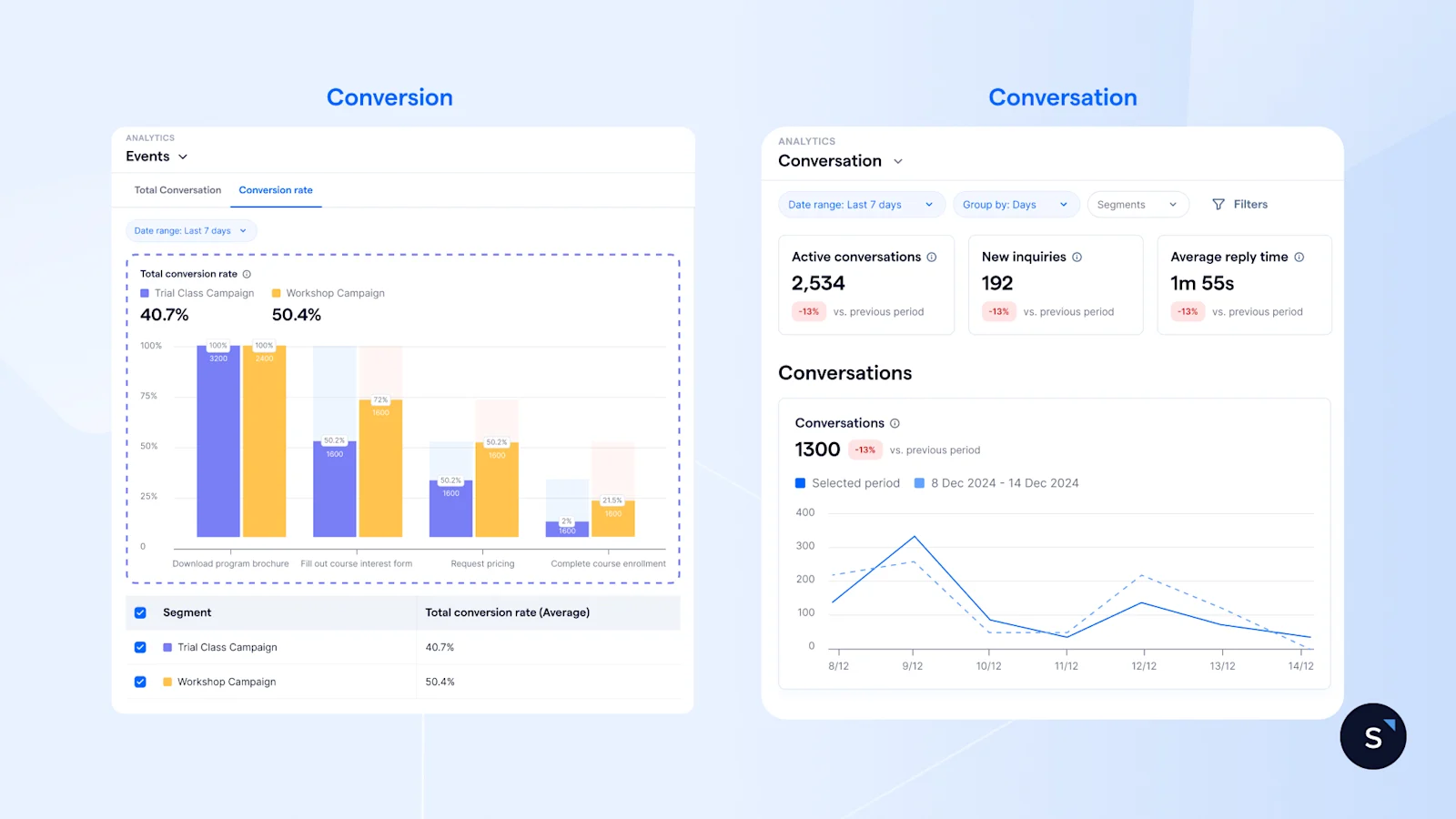
Enquiry-to-booking rate: the share of WhatsApp enquiries that become confirmed appointments.
No-show rate: booked appointments where the client didn't arrive.
Rebooking rate: clients who book their next session.
First response time: how long a new enquiry waits for its first reply.
Response times sit in SleekFlow's analytics dashboards, and booking and no-show figures come from your booking system.

Ready to take bookings on WhatsApp without adding staff?
Book your personalised demo with SleekFlow today and turn WhatsApp into your #1 revenue engine.


