Facebook E-commerce in Malaysia: A Practical Guide for Online Sellers


TL;DR: Quick Summary
- Facebook Shops enables businesses to create custom digital storefronts, enhancing product discovery, engagement, and conversions directly on the platform.
- Messenger chatbots automate customer support and sales, providing instant responses, personalized recommendations, and facilitating easy transactions through payment links.
- SleekFlow integrates Facebook Shops with CRM systems like Shopify, improving order management, customer engagement, and real-time data syncing, enhancing sales and efficiency.
- Businesses can leverage automated comment replies and personalized broadcasts to boost organic engagement, drive conversions, and optimize customer journeys.
- Omnichannel integration on SleekFlow allows businesses to manage customer conversations across WhatsApp, Instagram, Facebook, and more in one unified inbox.
Malaysia is one of the largest e-commerce markets In Southeast Asia. It has the highest percentage of digital consumers in the SEA region, with an even greater potential to grow in the coming years.
Facebook, for e-commerce, as one of the digital shopping platforms, has become a great revenue source as more customers begin to shop on Facebook.
Here are some insightful statistics about Malaysia’s e-commerce market from Statista:
Malaysia‘s e-commerce market revenue will reach US$7.88bn in 2024.
By the end of 2024, eCommerce revenue is forecasted to hit US$7.88 billion.
By 2029, the market is forecasted to grow at a CAGR of 11.24%, reaching US$13.43 billion.
User penetration is projected to grow from 31.4% in 2024 to 52.8% in 2029.
This data reveals that consumers in SEA, particularly Malaysia, value on-demand, convenient, reliable, and secure channels when buying products.
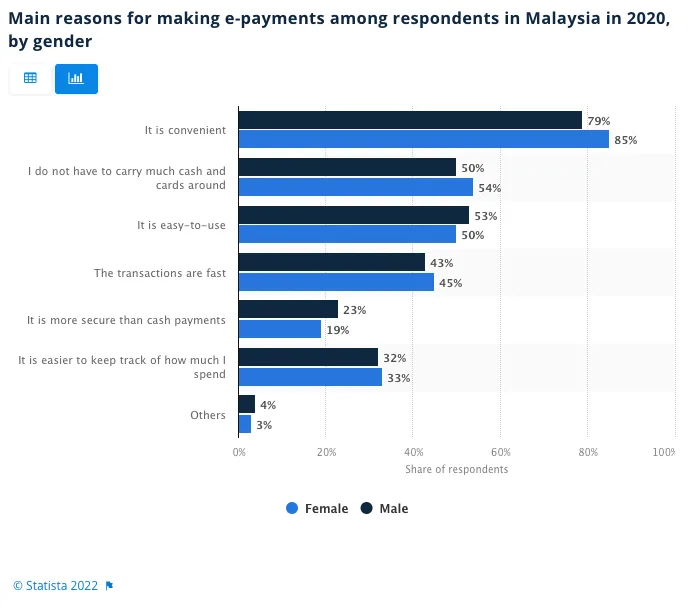
Source: Statista 2022
This data reveals that consumers in SEA, particularly Malaysia, value on-demand, convenient, reliable, and secure channels when buying products.
Considering that the average Malaysian consumer spends more than 8 hours daily, businesses can maximise selling opportunities by engaging customers via popular social media apps, i.e., Facebook and Instagram Shopping, and setting up online storefronts on Lazada and Shopee.
In this blog, we focus on how Facebook’s mobile-first features maximise conversion rates and provide reliable customer support throughout the e-commerce journey.
What is Facebook e-commerce?
Facebook e-commerce is the use of Facebook’s shopping, messaging, and advertising features to help customers discover products, ask questions, and move closer to purchase. Instead of using Facebook only for brand awareness, businesses can also use it as a sales channel by showcasing products, starting conversations in Messenger, running targeted campaigns, and guiding shoppers from interest to checkout.
In Malaysia, Facebook e-commerce works especially well for businesses that want to combine social discovery with chat-based selling. A customer might first see a product in their Feed, click into your catalog or shop, send a message to ask about price, sizing, or delivery, and then complete checkout on your website or through a connected e-commerce flow. This makes Facebook useful not just for promotion, but also for customer support, lead generation, retargeting, and conversion.
In simple terms, Facebook e-commerce helps businesses turn social engagement into real sales.
Can you sell directly on Facebook in Malaysia? How does it work?
Yes, but in practice, Facebook usually works as a product discovery and conversion channel, not a fully closed-in app storefront from start to finish. Customers can discover your products through Facebook Shop, posts, ads, or Live content, then browse your catalog and move toward purchase. Today, Meta says that Shops on Facebook and Instagram use website checkout, meaning the final payment step is typically completed on your website or connected store rather than entirely within Facebook.
For most online sellers in Malaysia, the typical buying journey looks like this: a shopper sees a product on Facebook, taps into your shop or catalog, asks questions via Messenger if needed, and then checks out on your website, Shopify store, or another connected e-commerce platform. Shopify’s current documentation describes this flow clearly: customers can add products from Facebook or Instagram and then choose Checkout on the seller’s website to complete the purchase.
That is why Facebook e-commerce works best when you treat Facebook as part of a wider sales journey. Facebook helps you generate discovery, engagement, retargeting, and conversations, while your website or connected commerce stack handles checkout, payment, and order completion. Meta Commerce Manager is designed around managing your catalog, shop, and sales setup across Facebook and Instagram, while platforms such as Shopify help sync products and route shoppers to checkout.
In simple terms, yes, you can sell through Facebook in Malaysia, but the strongest setup is usually: Facebook for discovery and conversion assistance, your website for checkout and order completion
Facebook Shop vs Marketplace vs Live vs Messenger: which should online sellers use?
Facebook offers several ways to support e-commerce, but they do not all do the same job. Some features are better for product discovery, others for conversations, and others for building trust before a customer buys. For most online sellers in Malaysia, the best results come from using them together rather than relying on just one.
To make it easier for you, here's a table
In practice, each Facebook feature supports a different stage of the buying journey. Facebook Shop works best as a structured storefront where customers can browse products, while Messenger helps businesses answer questions, handle objections, and guide shoppers toward purchase. This makes both tools especially useful for online sellers who want to combine product discovery with chat-based selling.
Facebook Live is better for creating demand than acting as a storefront. It works well for product launches, demos, festive campaigns, and limited-time offers because it encourages real-time engagement and helps customers see products in action. Facebook Marketplace, on the other hand, is more focused on listing visibility and discovery, but it is usually less suitable for brands that want a more controlled and scalable shopping journey.
For most e-commerce brands, the best approach is to use these features together. Use Facebook Shop to showcase products, Facebook Live to drive interest, and Messenger to support conversations that move customers closer to checkout. Marketplace can still be useful in some cases, but it is usually a secondary channel rather than the core setup.
Real-Life Example: The power of Facebook for e-commerce to drive sales in Malaysia
Here are some concrete examples of how businesses in Malaysia use Facebook for e-commerce.
Estée Lauder: reach more of the target market with less effort

Responding to Malaysia’s COVID-19 stay-at-home strategy, global luxury beauty company Estée Lauder partnered with e-commerce marketplace Lazada and used Facebook Collaborative Ads to boost online sales.
On Lazada’s Super Brand Day shopping event, the beauty brand experimented with a new creative strategy in Malaysia. Since their target audience was women, they utilised Facebook’s ad automation tools that enabled the ads to automatically display products people were more likely to purchase based on their Facebook profile activity.
Within the one week of ad launch, the brand achieved 42.5X Super Brand Day return on ad spend from prospecting audiences and 3.9X return on ad spend from remarketing audiences.
D+AF: uncover new international markets and revenue opportunities

D+AF is a Taiwanese shoe retailer that helps women find versatile shoes that match any outfit. As part of their global expansion strategy, the brand wanted to advertise to Asia, Europe and the US while maximising its return on ad spend, so they chose to do e-commerce with Facebook.
Facebook’s solution is to help them run multi-language and multi-country dynamic ads. These dynamic ads automatically converted to the right currencies and languages across targeted markets. This meant that all D+AF had to do was create one consolidated catalogue. Let Facebook’s automation and optimisation tools do the work.
And the localised content paid off. Within two weeks of ad launch, D+AF achieved a 57% higher return on ad spend with multi-language and multi-country dynamic ads than single-market catalogue dynamic ads and a 26% increase in conversion rates.
Kiehl’s: shop with confidence during the festive season

Leading skincare brand Kiehl’s launched an ad campaign during Ramadan to reach Malaysian customers. Kiehl’s opted for Facebook e-commerce to provide a full-funnel shopping journey for customers.
Also, as a response to COVID-19 lockdown restrictions in Malaysia, Kiehl’s invited beauty advisors to share skincare and beauty tips that would be useful during Ramadan on Facebook Live. During the streaming event, customers could comment a specific hashtag to express interest in the promoted product, which automatically opened a conversation in Messenger to guide customers to make a purchase.

In this seven-week full-funnel campaign that spanned from ads, Live events, News Feed and Stories posts, the brand experienced an 8X return on ad spend for campaign across Facebook and 59% of online sales were driven by traffic from Facebook and Instagram Shop, Messenger and Instagram Direct Messages.
How to integrate an e-commerce platform with Facebook for businesses
Wondering how your business can also elevate e-commerce with Facebook? Here’s how.
Facebook for WooCommerce: the ultimate e-commerce platform
Go to the Facebook for WooCommerce page on your WordPress to download the extension
Log into your WooCommerce account and open a new tab
Select Plugin in the right menu column and choose Add New
Select Upload Plugin
Click Choose File and click the facebook-for-woocommerce.zip file that you just downloaded
Select Install Now
Select Activate Plugin
Select Marketing and choose Facebook from the dropdown menu
Select Get Started
Verify your status
Shopify Facebook channel: the easiest way to connect with customers
Log into your Shopify account
Install the Facebook channel to connect Meta (includes Instagram Shopping, Facebook Shop, or Facebook Marketing for e-commerce) with Shopify
Add Meta Pixel in your Shopify admin.
For more data sharing, go to Data Sharing Settings and select “Enhanced” or “Maximum” to send data via Conversions API
Facebook extension for Magento: streamlined shopping experience
Install the extension (follow steps 2-8):
Go to your Magento root directory. For example: cd /var/www/html/Magento
To install the extension for the first time, run:
composer require facebook/facebook-for-magento2
To update the extension, run:
composer update facebook/facebook-for-magento2Enable the module:
php bin/magento module:enable Facebook_BusinessExtensionSetup/upgrade the database:
php bin/magento setup:upgradeCompile the Magento app:
php bin/magento setup:di:compileClear the Magento cache:
php bin/magento cache:cleanStart the cron jobs. Run this 3 times:
php bin/magento cron:runAfter installing the extension, connect Magento store to Meta (follow steps 10-14):
Log into your admin panel.
Click the Stores icon in the main menu.
Find the section named Facebook > Setup.
Click on Setup to go to the Extension Installation Page.
Click Get started and follow the onscreen instructions.
Start using Facebook for e-commerce with SleekFlow today

SleekFlow helps businesses turn Facebook engagement into actual sales by connecting conversations, customer data, and follow-up workflows in one place. Instead of managing comments, Messenger chats, and orders separately, teams can handle inquiries faster, keep context across touchpoints, and move shoppers from product discovery to checkout more smoothly.
For example, a customer might discover a product through Facebook Shop or Live, ask a question in Messenger, and then need help before making a purchase. With SleekFlow, businesses can automate replies, qualify leads, recommend products, share payment links, and route more complex inquiries to the right team member. This is especially useful for online sellers who want to reduce missed leads and shorten the path to purchase.
SleekFlow also supports a more connected social commerce setup by integrating Facebook with channels and tools such as WhatsApp, Instagram, and Shopify. That means businesses can centralize customer conversations, sync store data, and build follow-up journeys such as cart recovery, lead nurturing, and post-purchase messaging without switching between disconnected systems.
Achieve more on Facebook Messenger for businesses with SleekFlow
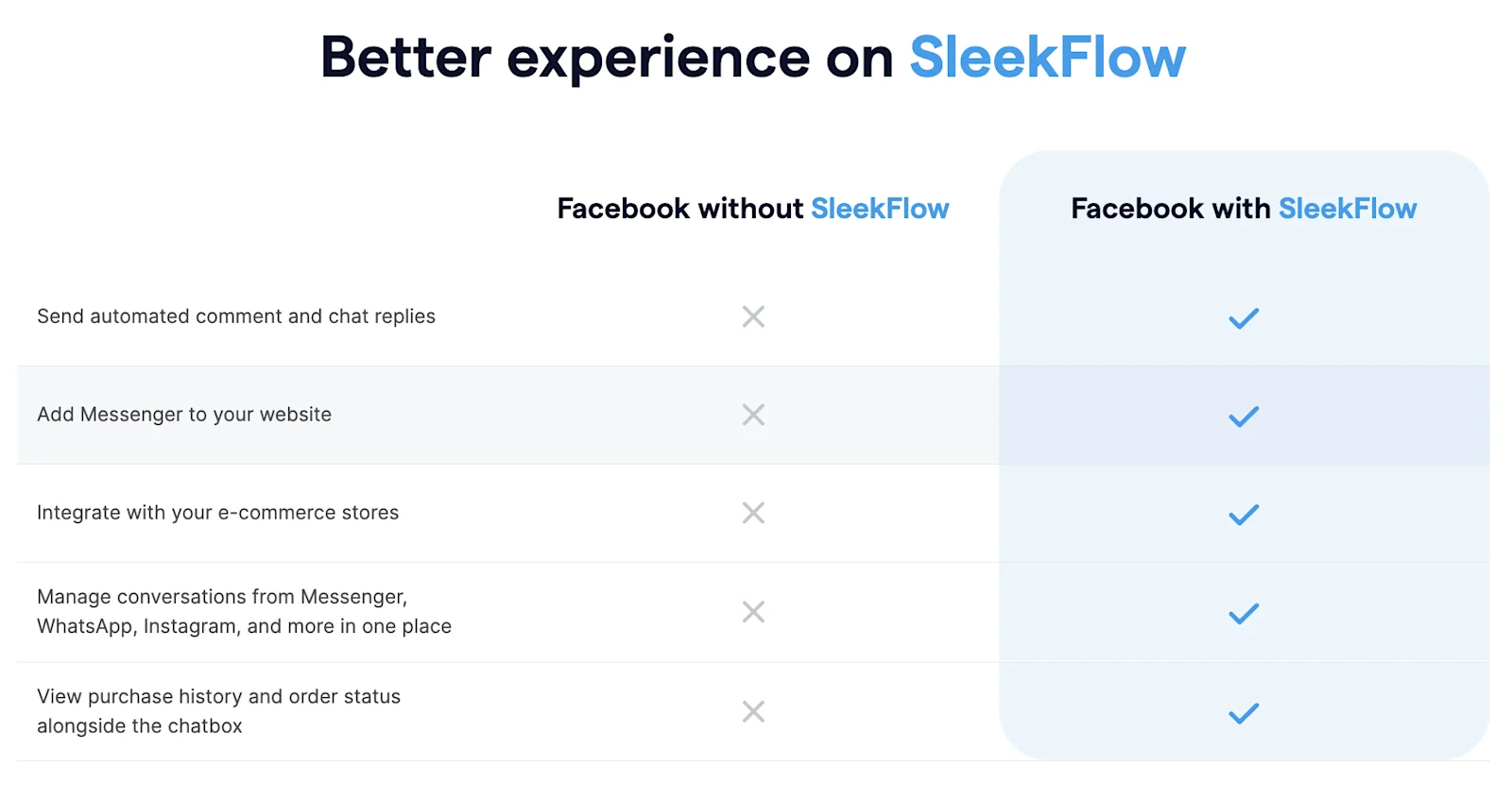
Gain access to SleekFlow’s auto reply feature in Facebook comments and chat and boost organic engagement with your customers without having to pay for ads. You can tailor intelligent workflows based on specific scenarios where messages are automatically triggered to enhance your business’ digital presence.
Furthermore, SleekFlow allows you to integrate with Facebook Lead ads to retrieve contact information.

Want to outcompete your peers with SleekFlow's help?
Book your personalised demo with SleekFlow today and unlock the potential of seamless communication
In-chat payment links and product catalogues
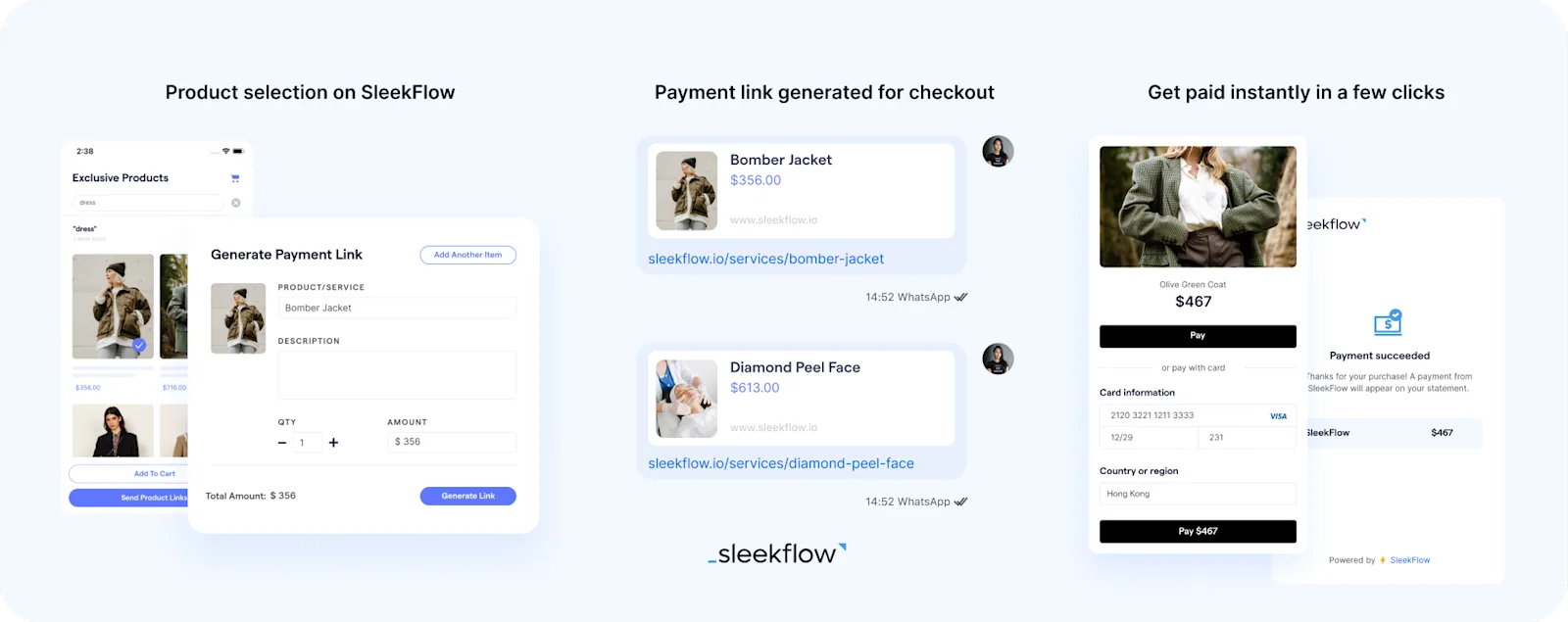
1 out of every 5 shoppers will abandon their cart if they find the checkout process too complicated or involves many steps. That’s why SleekFlow enables businesses to send product catalogues and payment links in chat to reduce friction in the customer journey.
All-in-one e-commerce integrations
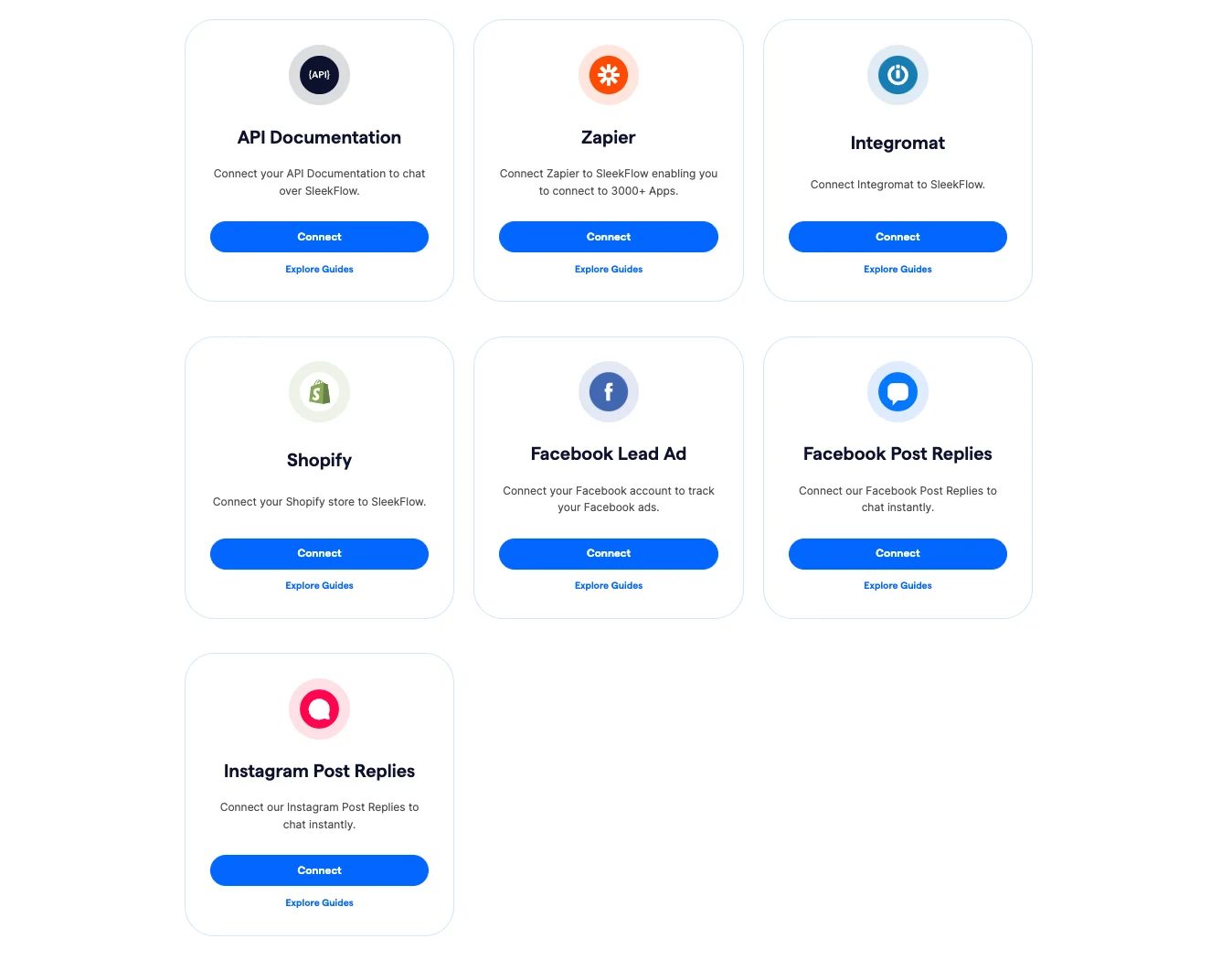
Businesses can integrate various e-commerce platforms,such as Shopify, Magento, Salesforce Commerce cloud, etc., to SleekFlow. Teams can maximise their productivity as customer data is centralised on a unified platform. The enhanced visibility across various communication channels enables businesses to retarget campaigns more effectively and develop solutions to overcome sales objections.
If your business uses Shopify for e-commerce, SleekFlow’s Shopify integration feature enables agents to draft orders in SleekFlow’s all-in-one inbox and generate a payment link for one-click checkout directly to the customer in chat. Once the customer has paid, the order would automatically a status update as paid on Shopify and in chat. Furthermore, the transaction fee is lower than Meta’s Commerce Manager selling fee. This feature will help you guide your customers from demonstrating interest to checkout seamlessly, increasing your conversion rates on social media immensely.
Interested to learn more? Check out our Shopify X SleekFlow integration and explore its many benefits now.
Integrate your existing tech stack with SleekFlow
Automate workflows with personalized experiences to delight customers and optimize resources effectively.


