Advocado integration: Turn loyalty data into repeat purchases with WhatsApp


TL; DR: Quick Summary
- Turn loyalty insights into relevant campaigns. Bring Advocado member data into SleekFlow to engage members on WhatsApp and drive repeat purchases.
- Spend less time preparing lists. Member information and segments sync daily, matched by phone number, with fewer manual exports.
- Give different members different reasons to return. Use ready-made segments to welcome, recognise and reconnect, or create your own for birthdays.
- Keep the conversation going. Campaign replies arrive in SleekFlow’s Omnichannel Inbox, and once configured with your business information, the AI Agent can answer common questions around the clock.
- Keep subscription preferences aligned. WhatsApp marketing opt-outs sync back to Advocado, while membership cancellations mark contacts as unsubscribed in SleekFlow on the next successful sync.
Getting customers to join your loyalty programme is only the beginning. The next challenge is giving them a reason to return.
Your programme already knows who’s new, who spends the most, and who hasn’t visited recently. But when loyalty data and messaging sit in separate platforms, turning those insights into relevant campaigns means manual exports and lists that can quickly become outdated.
The native Advocado integration with SleekFlow connects your loyalty data with WhatsApp engagement, so your team can spend less time preparing lists and more time creating campaigns that bring customers back.
What is the Advocado integration?
Advocado is an SME-focused loyalty and membership platform that powers over 1,900 food, beverage, and retail outlets' membership through both technology and Growth Consultants.
The native integration with SleekFlow syncs member information and customer segments daily, matching contacts by phone number and making those segments available as audiences for WhatsApp campaigns.
Each platform keeps doing what it does best: Each platform keeps doing what it does best. Advocado uses data to keep members coming back with attractive, relevant rewards, while SleekFlow turns those member insights into campaigns and conversations that drive repeat purchases.
Who is the Advocado integration for?
The integration is useful for retail and F&B businesses that use Advocado and want to make loyalty data part of their WhatsApp engagement.
It can help if your team:
Regularly exports member lists to prepare campaigns.
Sends similar promotions to customers with different spending or visit patterns.
Has useful loyalty segments but struggles to act on them consistently.
Wants to connect member campaigns with conversations handled by its team.
However large your member base, sync it in full without worrying about contact limits, then focus your campaigns on the members most likely to return.
Businesses already using SleekFlow can also connect Advocado and match existing contacts by phone number.
Five ways to turn loyalty data into repeat visits
With the integration, use your synced Advocado segments in SleekFlow to tailor WhatsApp campaigns to different member needs—from understanding their first reward to finding a reason to return.
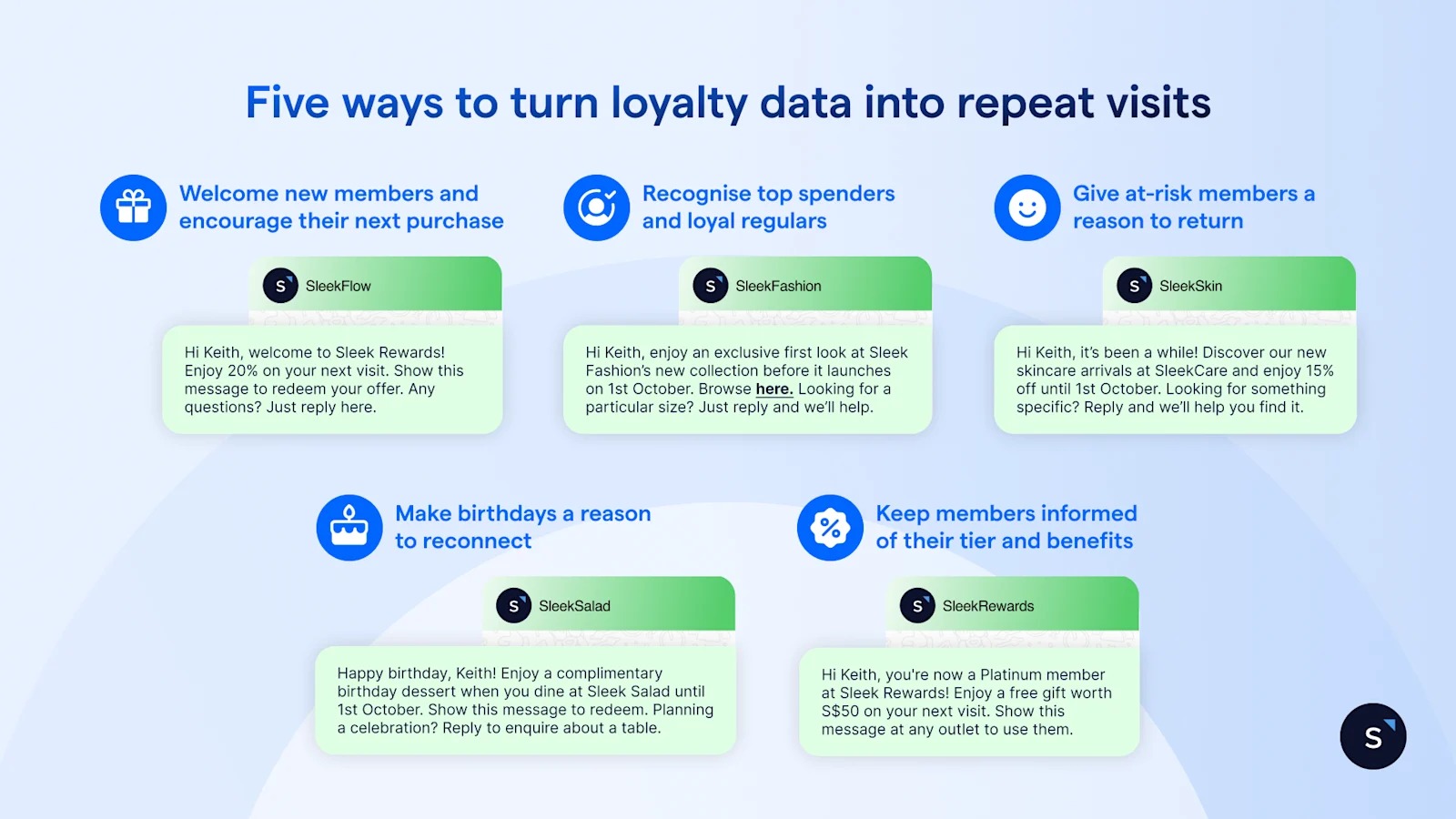
1. Welcome new members and encourage their next purchase
Help new members understand the value of joining. Once they appear in SleekFlow after the daily sync, send a welcome campaign that explains their benefits, how to redeem rewards and where to get help.
For example, a café could introduce a welcome reward that gives first-time customers a reason to stop by again.
Hi {{name}}, welcome to {{brand}} Rewards! Enjoy {{welcome reward}} on your next visit. Here’s how to redeem it: {{redemption details}}. Any questions? Just reply here.
2. Recognise top spenders and loyal regulars
Tailor your message to the relationship. Top spenders could receive early access to a collection or an exclusive event invitation. Loyal regulars could receive a thank-you message, a member-only experience or a reward available through your programme.
For example, a fashion retailer could invite selected members to preview a new collection and reply to ask about sizes or availability.
Hi {{name}}, enjoy an exclusive first look at {{brand}}’s new collection before it launches on {{date}}. Browse here: {{link}}. Looking for a particular size? Just reply and we’ll help.
3. Give at-risk members a reason to return
Use Advocado’s at-risk segment to prepare a focused re-engagement campaign in SleekFlow. Highlight something new, remind members of an eligible benefit or share an offer that encourages another purchase.
For example, a beauty retailer could introduce its latest skincare range alongside a member offer, inviting customers to ask for help choosing a product.
Hi {{name}}, it’s been a while! Discover our new skincare arrivals at {{brand}} and enjoy {{member offer}} until {{date}}. Looking for something specific? Reply and we’ll help you find it.
4. Make birthdays a reason to reconnect
Where birthday information is available, create a birthday segment in Advocado and use the synced list to prepare a campaign in SleekFlow.
For example, a restaurant could offer members a birthday dessert with their meal and invite them to enquire about a table. Explain the benefit, its validity and how to redeem it.
Happy birthday, {{name}}! Enjoy a complimentary birthday dessert when you dine at {{brand}} until {{date}}. Here’s how to redeem it: {{redemption details}}. Planning a celebration? Reply to enquire about a table.
5. Keep members informed of their tier and benefits
Help members know which tier they’re in and what it unlocks. With tier changes synced from Advocado, you can send tier-specific messages through SleekFlow that explain their benefits and encourage them to use those benefits on their next visit.
For example, a bubble tea chain could celebrate a member’s upgrade to Gold by showing them what’s new and how to redeem their benefits.
Hi {{name}}, you're now a {{tier}} member at {{brand}}! Enjoy {{tier benefits}} on your next visit. Just tell our friendly staff your phone number to use it!.
These are illustrative campaigns you can configure using synced audiences. Adapt the messages, offers and redemption terms to your own loyalty programme. Then choose when the campaign goes out and how you'll follow up with members who reply.
Turn campaigns into conversations and results
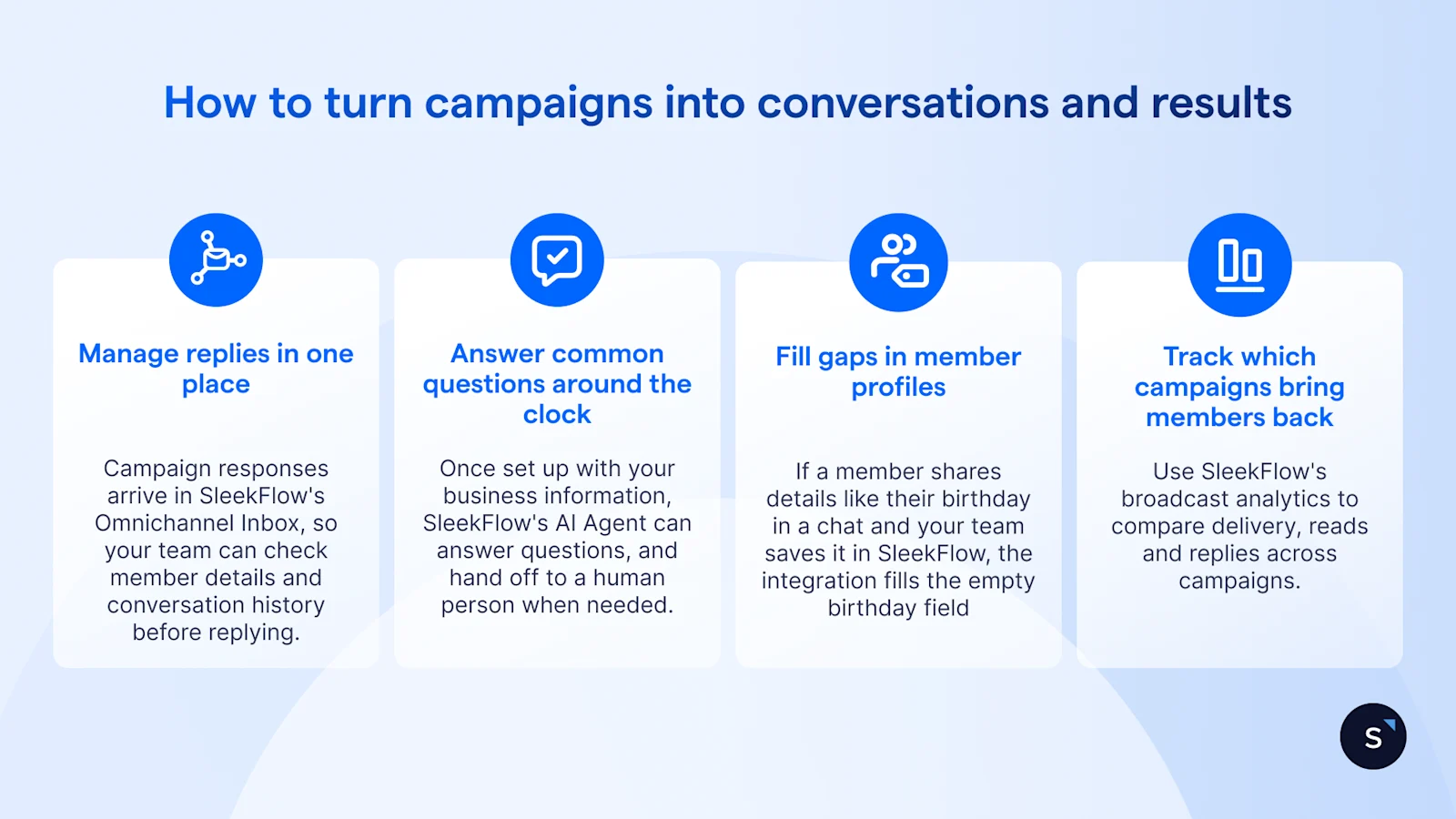
WhatsApp is two-way, so every loyalty message can become a conversation. Members can ask about a reward, check product availability or enquire about a table, giving your team an opportunity to help them take the next step.
Manage replies in one place. Campaign responses arrive in SleekFlow's Omnichannel Inbox alongside your WhatsApp, Instagram and live chat conversations, so your team can check member details and conversation history before replying.
Answer common questions around the clock. Once set up with your business information, SleekFlow's AI Agent can answer questions about opening hours, outlet locations and reward redemption, and hand it over to your team when a member needs a person.
Fill gaps in member profiles. If a member shares their birthday in a chat and your team saves it in SleekFlow, the integration fills the empty birthday field in Advocado, so they can be included in future birthday campaigns.
Track which campaigns bring members back. Use SleekFlow's broadcast analytics to compare delivery, reads and replies across campaigns. If you use campaign-specific redemption codes, check their use in Advocado to see which offers bring members back, then refine your next campaign.
What data syncs between Advocado and SleekFlow?
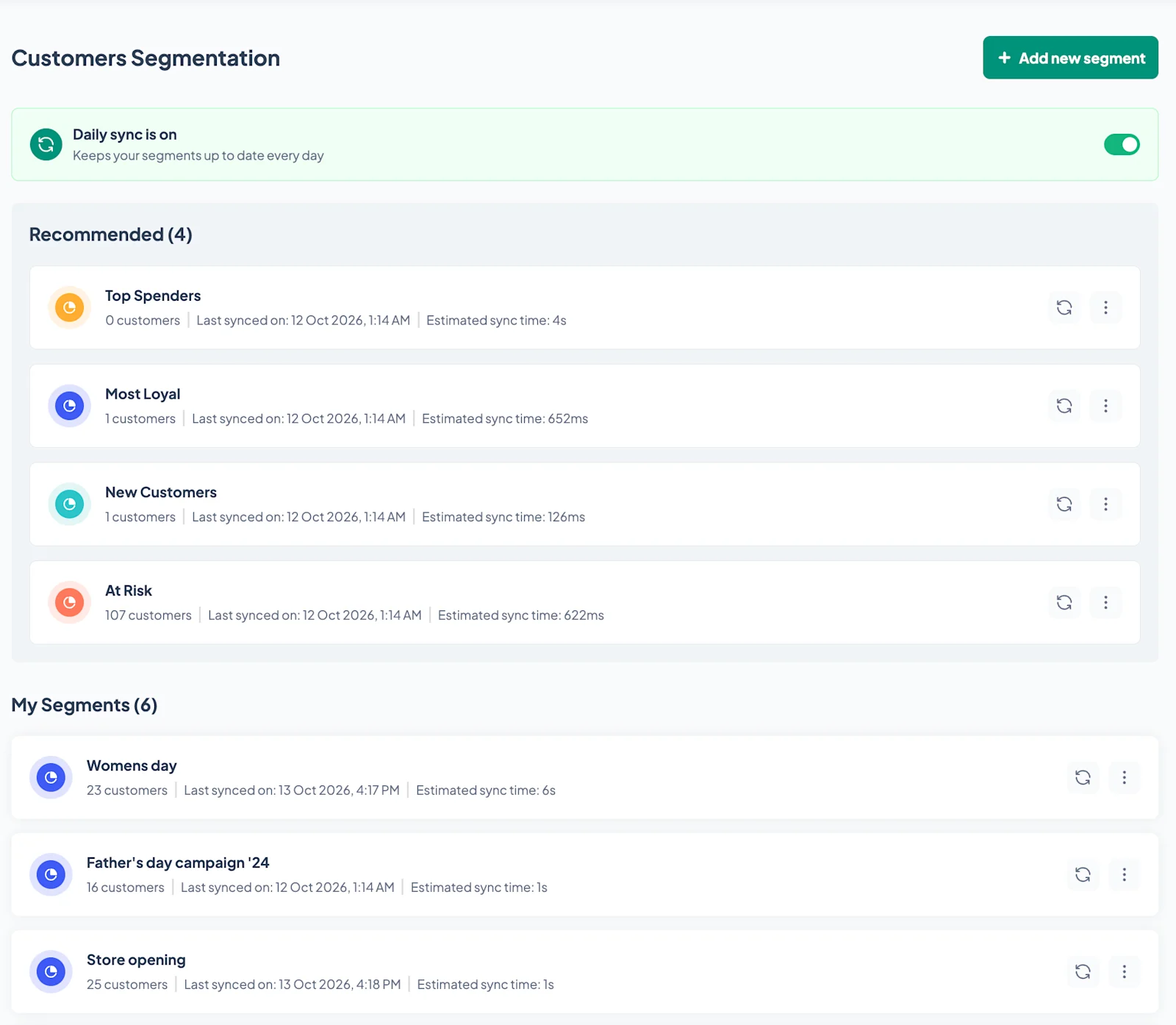
Advocado remains the main system for your loyalty membership, points, tiers and rewards. The integration syncs member information and ready-made segments into SleekFlow daily, reducing manual exports and list updates.
Changes become available after the next successful daily sync, so allow for this when planning time-sensitive campaigns. Creating a list in SleekFlow does not create an Advocado segment, and adding a contact directly in SleekFlow does not enrol them in your Advocado loyalty programme.
This integration reduces the need to reconcile member changes by hand. WhatsApp marketing opt-outs sync back to Advocado, while membership cancellations in Advocado mark the matching SleekFlow contact unsubscribed on the next successful sync. Contact records and conversation history remain available, helping your team keep campaign audiences aligned with member preferences.
How to connect Advocado to SleekFlow
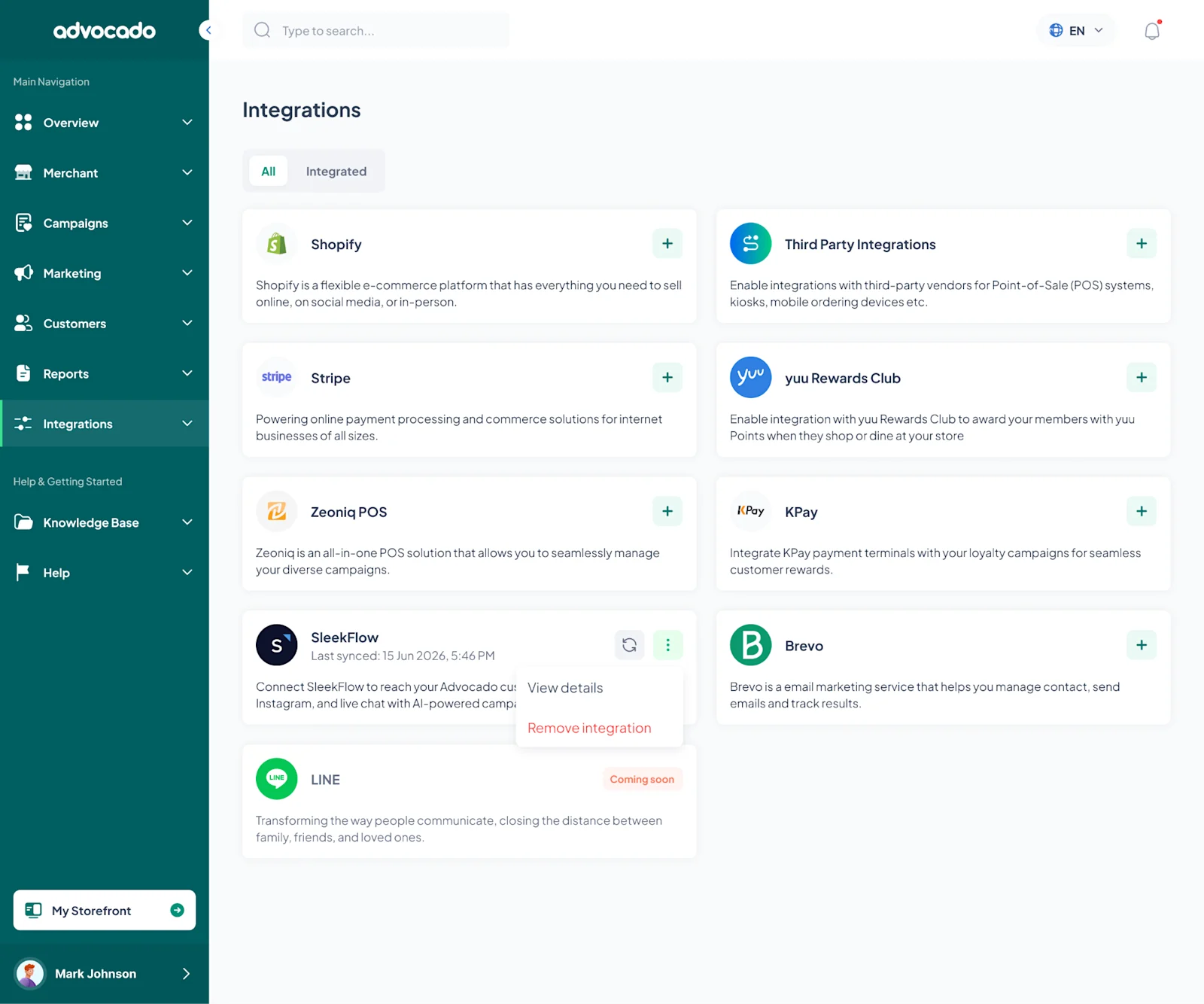
SleekFlow is available in Advocado’s integrations directory. To connect the platforms, you’ll need your SleekFlow Platform API key and a SleekFlow subscription with Platform API access.
In SleekFlow, open Settings and find Platform API under Direct API.
Access and copy your API key.
In Advocado, open Integrations and select SleekFlow.
Paste the API key into the connection field and validate it.
Run the initial sync to bring your member profiles and segments into SleekFlow.
Before launching your first campaign, check that your contacts and segments have synced correctly and review their marketing subscription status.
The integration keeps your member data and audience lists updated. In SleekFlow, you choose what messages to send, when to send them and which follow-ups to automate using Flow Builder. Disconnecting the integration stops future syncs without deleting your existing loyalty data or SleekFlow account.
Turn member insights into reasons to return
Connecting Advocado with SleekFlow puts your loyalty data to work through WhatsApp campaigns that welcome new members, recognise regulars and reconnect with those becoming less active. With audiences updated daily and replies managed in one place, your team can spend less time preparing lists and more time giving customers a reason to return.

See what we can do for your business with WhatsApp
Book a personalised demo with SleekFlow and see how you can turn WhatsApp into your #1 revenue machine


