7 best AI assistant apps for your business


TL; DR: Quick Summary
- AI assistants help businesses move faster where it matters most: replying on WhatsApp, drafting accurate responses, summarising handovers, and keeping CRM and ecommerce data usable.
- The strongest use cases are customer engagement, lead qualification, support resolution, follow-ups, and internal productivity.
- For businesses in Singapore, the key evaluation factors are data privacy, ease of rollout, workflow fit, and proof through published features, policies, and case studies.
- The main tool categories are customer conversation assistants, workplace productivity assistants, and knowledge or planning assistants.
- SleekFlow is the strongest fit for messaging-first teams, while Copilot, Gemini, ChatGPT, Zendesk AI, Notion AI, and Reclaim.ai each fit more specific internal productivity, support, knowledge, or scheduling needs.
- Start with customer-facing workflows first, then expand into internal AI once governance, knowledge sources, and handover rules are in place.
Teams don’t just “use AI” for novelty anymore—they use it to reduce response time on WhatsApp, draft accurate replies faster, summarise internal handovers, and keep customer data usable across CRM and ecommerce tools.
This guide showcases 7 AI assistant apps that work well for businesses operating in Singapore, based on:
Security & data controls (especially for customer conversations)
How quickly teams can adopt it (without a long IT backlog)
Workflow fit (sales, marketing, support, operations)
Evidence: published policies, documented features, and case studies
What is an AI assistant?
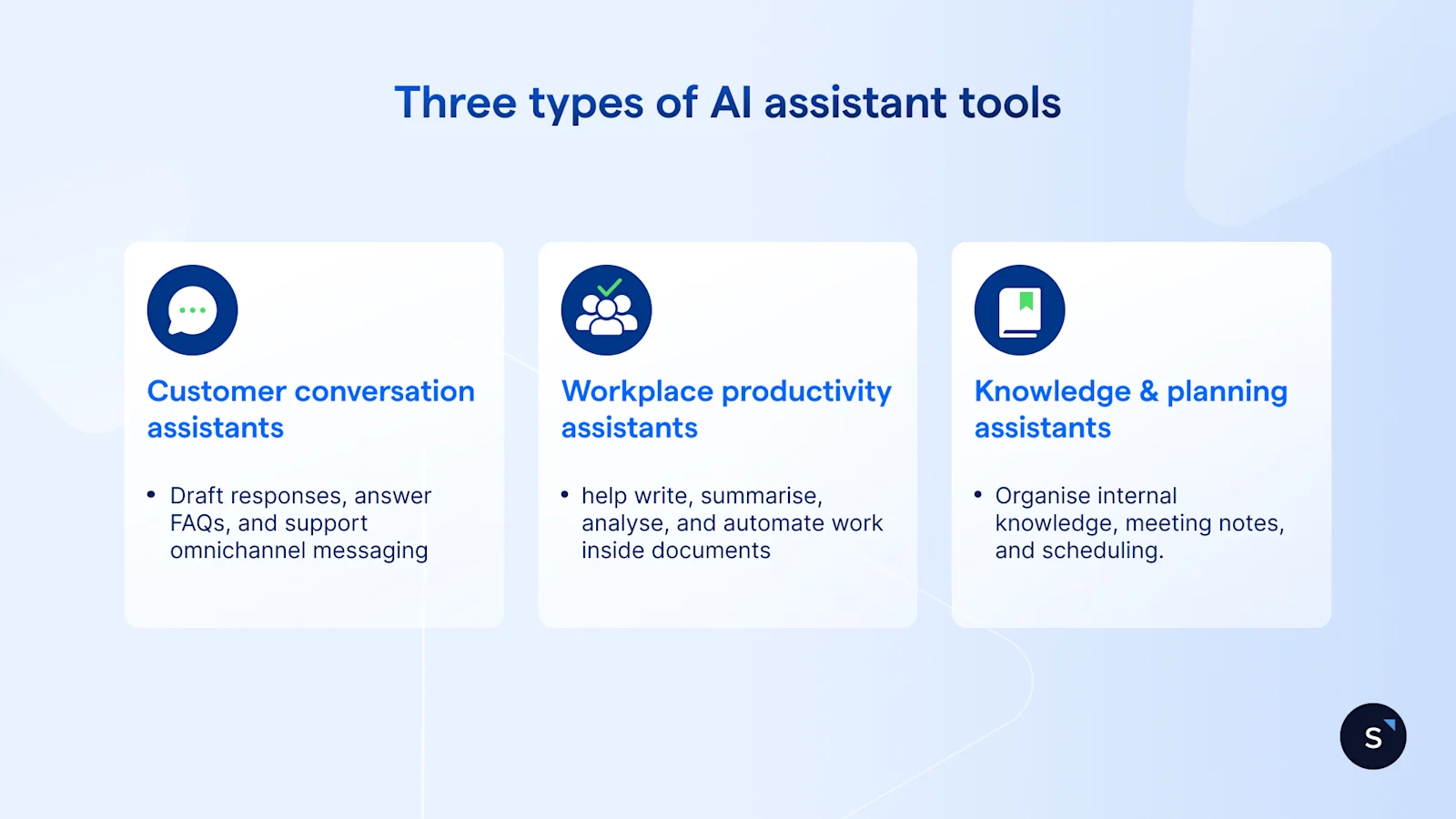
An assistant is software that uses AI to help people (or systems) complete work faster and more accurately—usually via chat, voice, or in-app prompts.
For businesses, AI assistant tools typically fall into 3 buckets:
Customer conversation assistants: draft responses, answer FAQs using approved knowledge, route chats, and support omnichannel messaging.
Workplace productivity assistants: help write, summarise, analyse, and automate work inside email/docs/spreadsheets.
Knowledge & planning assistants: organise internal knowledge, meeting notes, and scheduling.
In Singapore, “assistants” also need to be privacy-aware because they often touch personal data. The PDPC has published Advisory Guidelines on how the PDPA applies when organisations use personal data in AI recommendation and decision systems.
How can you utilise AI for your business?
Here are high-impact ways Singapore businesses use an AI assistant—without redesigning everything at once:
Customer engagement (WhatsApp, IG, web chat)
Reply suggestions that stay on-brand and accurate (grounded in your approved FAQs/knowledge)
Automated qualification (capture intent, product interest, budget, timeline)
Smart routing to the right team or branch
Post-chat summaries for handovers and QA
SleekFlow, for example, centralises WhatsApp and social conversations in one inbox and supports automation workflows via Flow Builder.
Sales and revenue operations
Lead follow-ups triggered by CRM changes (e.g., new lead created)
Product catalogue sharing and in-chat checkout links (where applicable)
Pipeline hygiene through tracked outcomes
Support and service ops
Faster resolutions with AI-drafted responses + knowledge suggestions
Ticketing to separate “real requests” from casual chat threads
Internal productivity
Response drafting, summarising, and analysis within your existing workspace tools
Scheduling and time-blocking to protect focus time
Quick implementation checklist
✅ Can it use your approved knowledge (not just generic internet answers)?
✅ Can you control access (roles/teams), exports, and retention?
✅ Can you measure outcomes (resolution rate, response time, conversion)?
✅ Is there a clear human handover path for edge cases?
Top 7 AI assistant apps for your business
1) SleekFlow (best AI assistant for customer conversations)
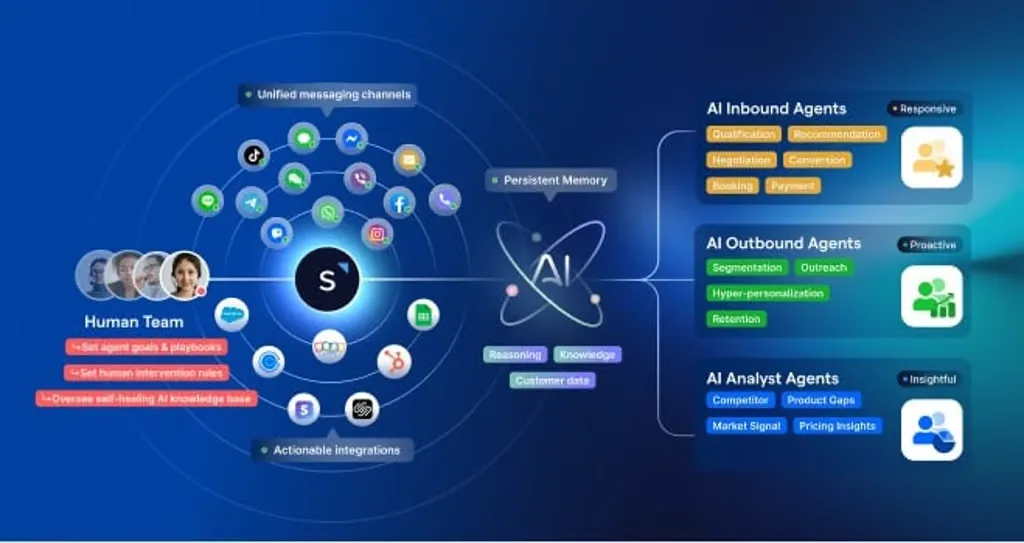
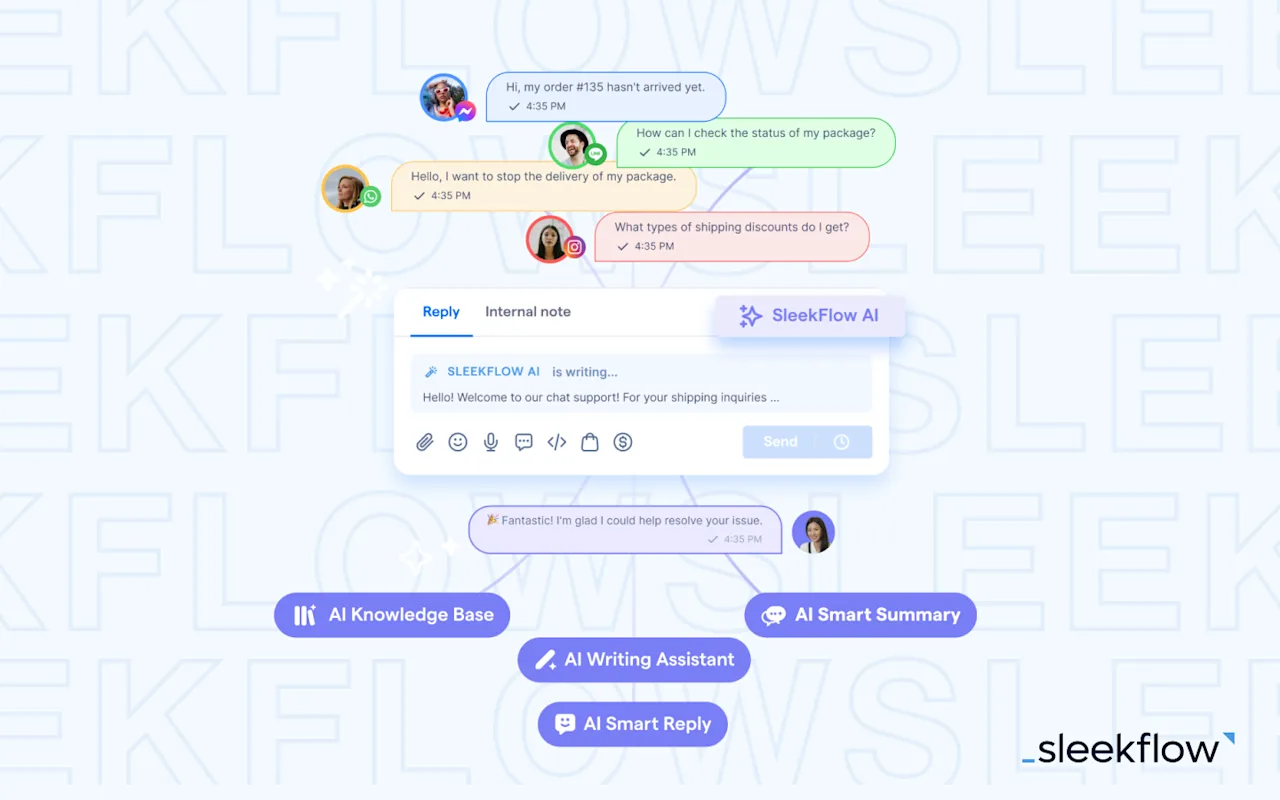
If your customers message you on WhatsApp and social channels (common in Singapore), SleekFlow is built for that reality: one inbox for multiple channels, automation flows, and AI assistance grounded in your own knowledge base.
Key AI assistant capabilities
AI Smart Reply: generates suggested replies using recent conversation context + your Global Knowledge Base
AI Writing Assistant: improves drafts with custom or built-in prompts (useful for tone, clarity, localisation)
Flow Builder: no-code automation to auto-reply, qualify, assign and trigger workflows across channels
Ticketing: turns long chat threads into trackable tickets (great for pre-sales/service workflows)
Integrations (example): Salesforce + WhatsApp workflows and data sync
How SleekFlow’s clients use our AI assistant features
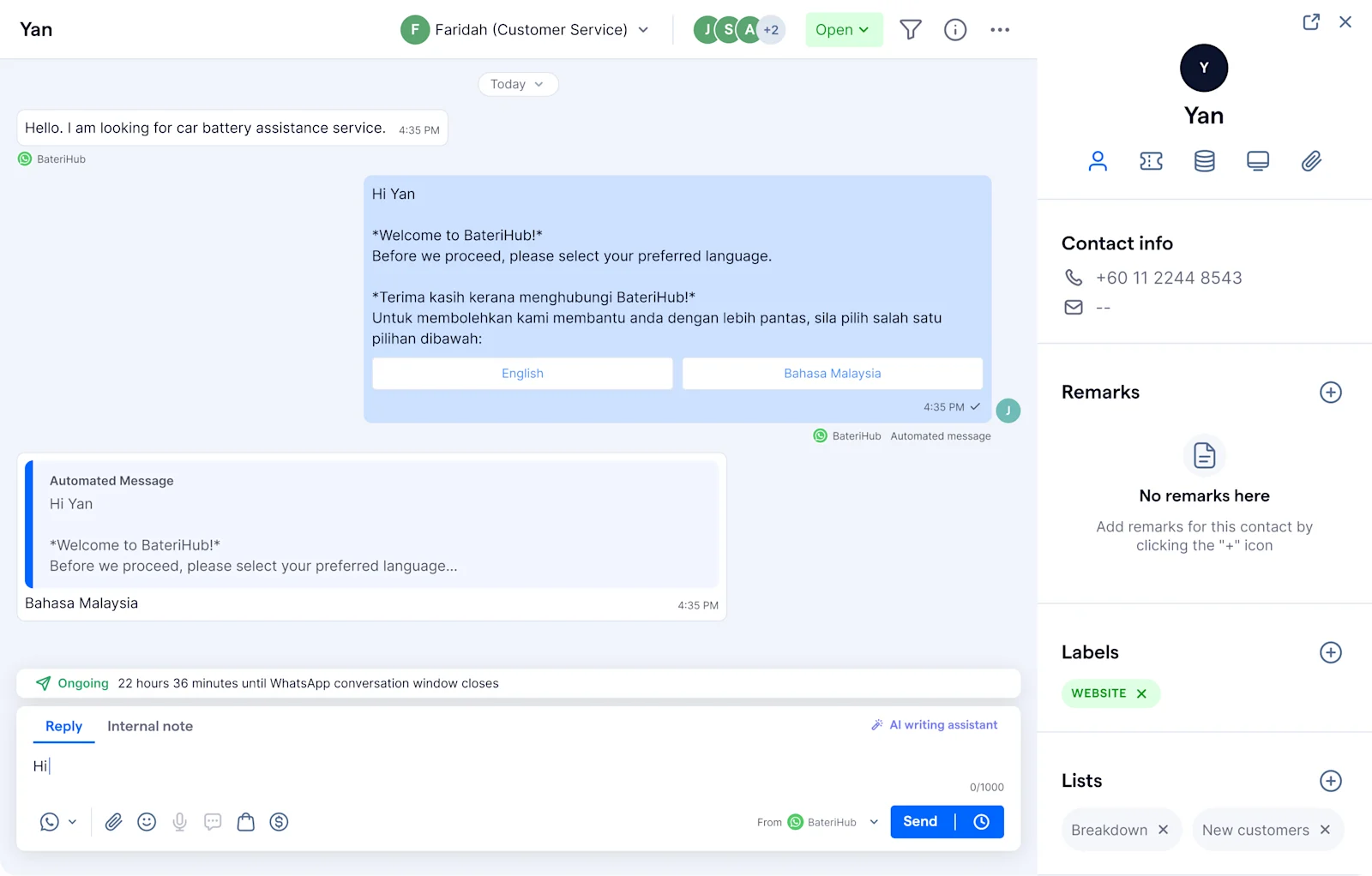
BateriHub uses SleekFlow’s AI assistant features to speed up WhatsApp conversations without sacrificing accuracy. With AI Smart Reply and a knowledge base of approved product and service information, agents can instantly generate consistent responses to common enquiries and quickly capture critical details (such as location and vehicle type) before handing over to a human when needed. This helps BateriHub maintain fast, standardised customer support at scale across many branches.
2) Microsoft Copilot (best for Microsoft 365 productivity)
For organisations living in Outlook, Teams, Word, and Excel, Copilot is a natural AI assistant layer— especially where governance matters.
Microsoft documents that prompts/responses and Microsoft Graph data used by Copilot aren’t used to train foundation models under enterprise data protection.
Best for: internal comms, document drafting, meeting follow-ups, spreadsheet insights
Things to watch out for: plan adoption around real workflows (not just “everyone try it”). Workflow redesign is a key factor for capturing AI value.
3) Google Gemini for Workspace (best for Google Workspace teams)
If your team runs on Google Workspace and uses apps like Gmail, Docs, Sheets, and Meet, Gemini can serve as a practical AI assistant—with clear privacy commitments for Workspace customers' data.
Best for: drafting, summarising, and getting help inside Workspace documents
Things to watch out for: governance depends on admin configuration and user training.
4) ChatGPT Business/Enterprise (best general-purpose AI assistant across teams)
When you need one assistant for marketing copy, internal enablement, analysis, and brainstorming, ChatGPT Business/Enterprise is often the most flexible option.
Best for: cross-functional use (marketing, ops, product, enablement)
Watch out for: set internal guardrails (what data can be pasted in, what must stay in CRM/helpdesk systems).
5) Zendesk AI (best for Zendesk-based support teams)
If Zendesk is your primary helpdesk, Zendesk AI serves as a support-focused AI assistant (agent assist, automation, and bots).
Best for: ticket-heavy support teams already standardised on Zendesk
Watch out for: it’s strongest inside Zendesk, and lss ideal if your “front door” is WhatsApp/social messaging-first.
6) Notion AI (best for internal knowledge and documentation)
Notion AI is a strong AI assistant when your company's knowledge already lives in Notion.
Best for: internal SOPs, meeting notes, knowledge-to-draft workflows
Watch out for: value depends on how disciplined your team is with documentation.
7) Reclaim.ai (best for scheduling and time protection)
Reclaim is a specialised AI assistant for calendars: auto-scheduling tasks, habits, and focus time.
Best for: leadership teams, sales teams, and ICs struggling with calendar overload
Watch out for: it won’t solve customer conversation workflows (pair it with a messaging assistant like SleekFlow).
How to decide which AI assistant you need
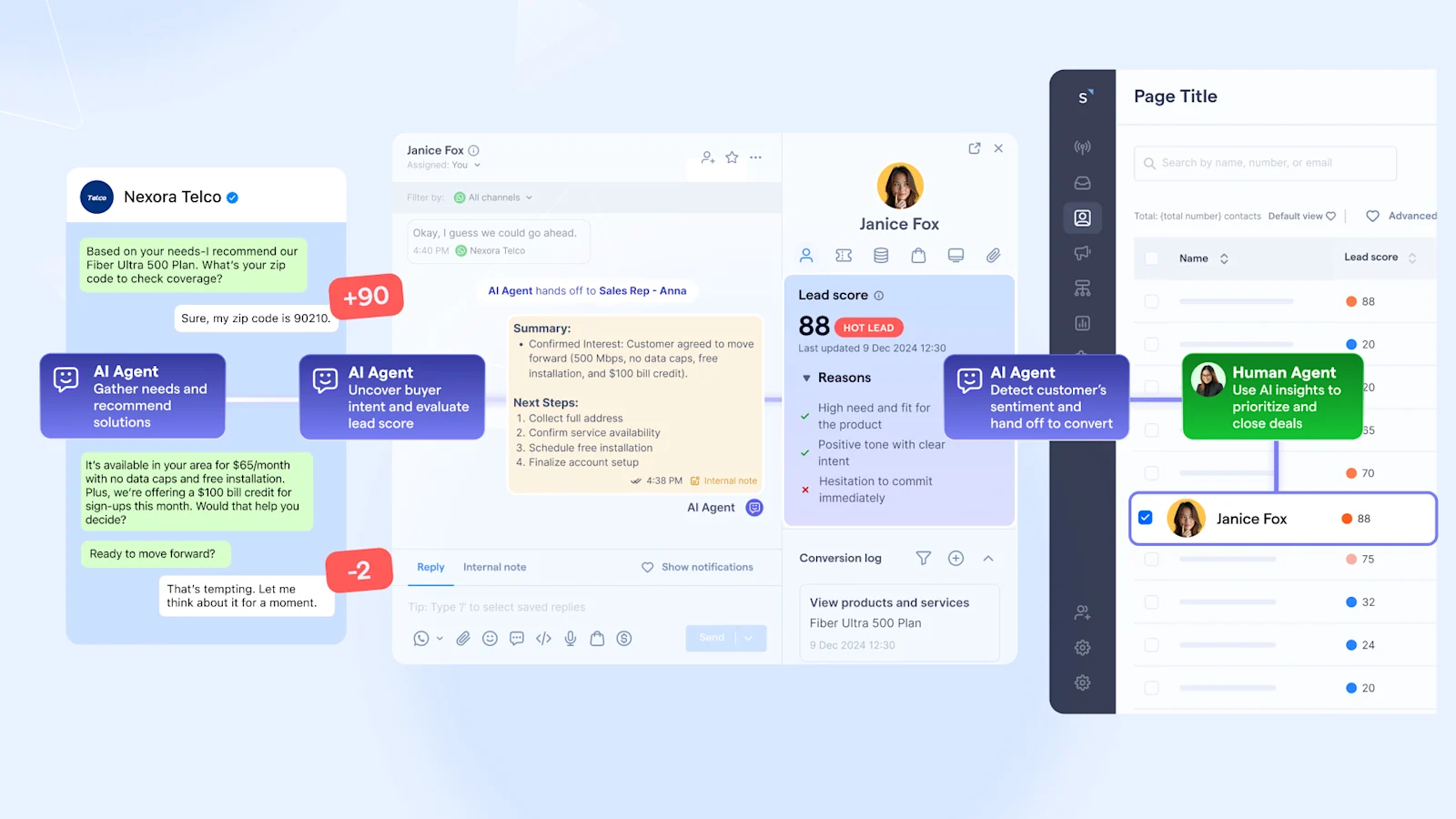
Choosing the right AI assistant comes down to where your work happens. If your customer engagement is messaging-led (WhatsApp, Instagram, live chat), prioritise a solution that can handle omnichannel conversations, automation, and knowledge-grounded replies—so your team moves faster without risking inconsistent or inaccurate responses. For most growing Singapore businesses, that means starting with customer-facing workflows first, then expanding AI into internal productivity and planning once governance is in place.
If you’re ready to operationalise AI in customer conversations, start by mapping your top 20 enquiries, defining escalation rules, and grounding AI responses in an approved knowledge base. With SleekFlow, you can unify channels, automate workflows, and deploy AI assist features in a way that keeps teams aligned and customer experiences consistent.
Want to see how SleekFlow can enhance your sales process?
Book a demo today and experience the power of AI-driven conversational intelligence firsthand.


