How to build AI agents for business: A beginner's guide


If your team is juggling WhatsApp, Instagram DMs, and live chat, response time becomes your biggest growth bottleneck. AI agents can automate these interactions, reduce friction, and boost efficiency. This is not a futuristic dream, it’s the reality that AI agents are making possible for businesses today. In this guide, we’ll walk you through how to build and implement AI agents to streamline your communication, automate workflows, and elevate customer experiences.
What are AI agents?
AI agent is an intelligent program designed to perceive its environment, make decisions, and take actions to achieve specific goals. Unlike traditional software, AI agents exhibit a degree of autonomy and are often driven by sophisticated AI models, allowing them to adapt and learn.
Chatbots vs. Automation tools vs. AI agents
While often used interchangeably, AI agents, chatbots, and basic automation tools serve distinct purposes. Understanding their differences is crucial for choosing the right solution for your business needs.
How Do AI agents work?
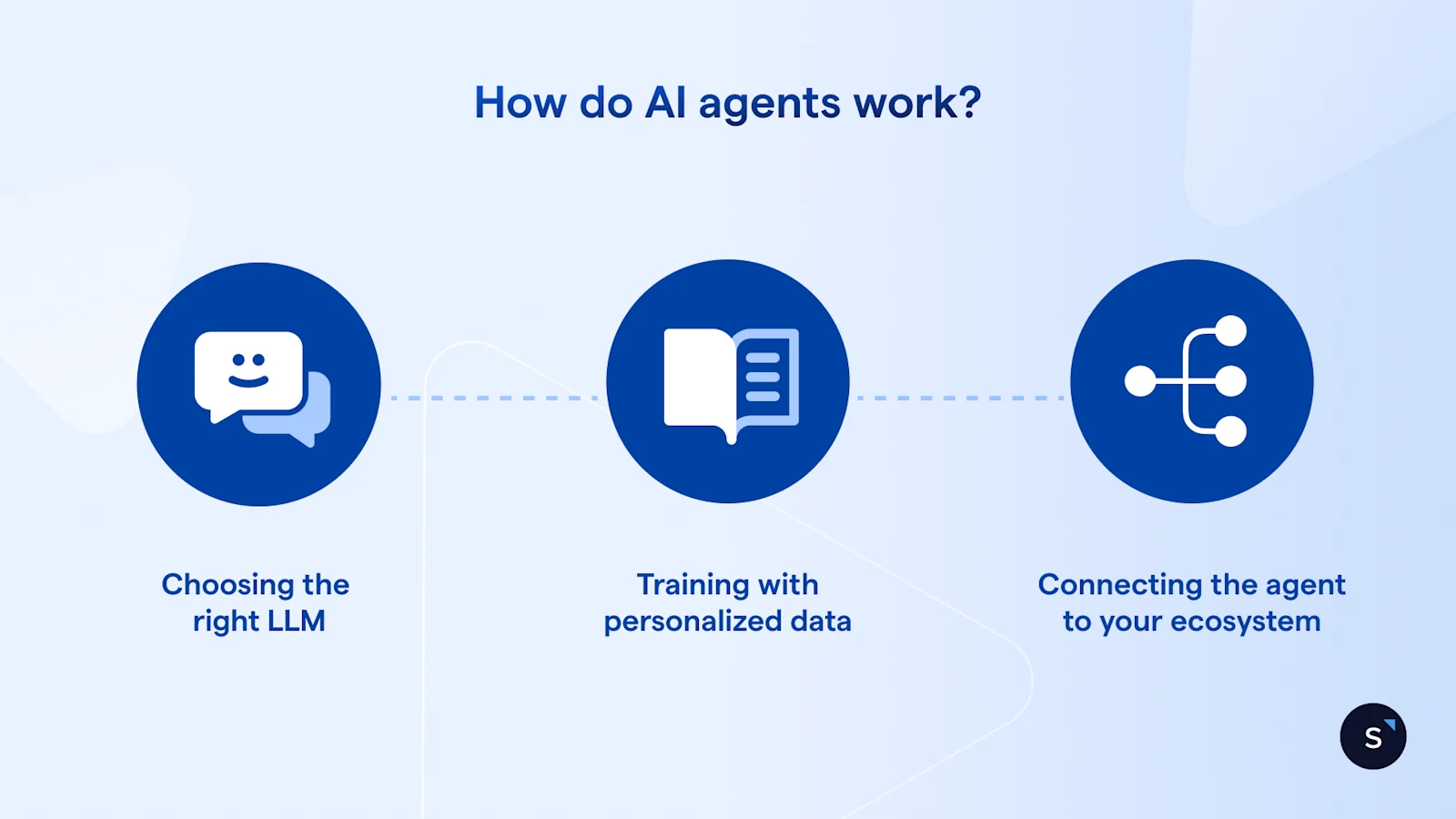
Building an AI agent might sound complex, but understanding its core components makes the process much clearer. Think of an AI agent as having a brain, a knowledge base, a set of tools, and a personality.
The brain: Choosing the right LLM
The "brain" of your AI agent is a large language model (LLM). These powerful models are trained on vast amounts of text data, enabling them to understand, generate, and process human language. Popular choices include:
GPT-4o (OpenAI): Known for its advanced reasoning, creativity, and multimodal capabilities.
Claude (Anthropic): Valued for its strong ethical guardrails and ability to handle long contexts.
Llama (Meta): An open-source option offering flexibility for custom deployments.
The choice of LLM will significantly impact your agent's capabilities, accuracy, and overall performance.
The knowledge base: Training with personalized company data
For an AI agent to be truly useful for your business, it needs to be trained on your specific information. This "knowledge base" typically includes:
FAQs and help articles: Common customer questions and their approved answers.
Product catalogs and specifications: Detailed information about your offerings.
Company policies: Returns, shipping, privacy, and other operational guidelines.
Website content: General information about your brand and services.
CRM data: Customer interaction history, preferences, and past purchases.
Internal documents: PDFs, spreadsheets, and other proprietary information.
By feeding your agent this personalized data, you ensure it provides accurate, on-brand, and relevant responses.
The tools: Connecting the agent to your ecosystem
An AI agent isn't an isolated entity; it thrives on connectivity. To take action, it needs to integrate with your existing business tools. This might include:
Messaging platforms: WhatsApp, Instagram, Facebook Messenger, SMS for customer communication.
CRM systems: Salesforce, HubSpot, Zoho CRM for updating customer records, creating leads, or scheduling follow-ups.
E-commerce platforms: Shopify, WooCommerce for checking order status or product availability.
Internal communication tools: Slack, Microsoft Teams for notifying team members.
Calendar tools: Google Calendar, Outlook Calendar for booking appointments.
These integrations allow the agent to perform real-world tasks, turning conversations into actionable outcomes.
The persona: Defining the brand voice and "guardrails"
Just like a human employee, your AI agent needs a defined persona and clear boundaries.
Brand voice: Should the agent be friendly, formal, empathetic, or witty? Aligning its tone with your brand's voice is crucial for consistent customer experience.
Guardrails: These are explicit instructions and rules that prevent the agent from going "off script." This includes defining what it should and should not do, topics it should avoid, and when to escalate to a human agent.
Why businesses need AI agents
The adoption of AI agents for business is growing rapidly, driven by tangible benefits that impact efficiency, customer satisfaction, and revenue.
24/7 availability: Unlike human teams, AI agents never sleep. They can provide instant support and engage with customers around the clock, regardless of time zones or holidays. This means no more missed leads or frustrated customers waiting for business hours.
Consistency: AI agents deliver consistent information and service quality every single time, eliminating variations that can occur with human agents.
Scalability: As your business grows, AI agents can easily handle increased volumes of inquiries without the need for proportional staffing increases. This is particularly valuable during peak seasons or sudden surges in demand.
Reduced manual workload: By automating repetitive tasks, customer support, and administrative functions, AI agents for business automation free up your human employees to focus on more complex problems, strategic initiatives, and personalized interactions.
Data-driven insights: AI agents generate valuable data on customer interactions, common queries, and pain points, providing insights that can inform product development, marketing strategies, and service improvements.
Real-World Results with SleekFlow
SleekFlow clients have seen remarkable improvements, demonstrating the real-world impact of AI agents:
10X Response Velocity: In the highly competitive education sector, institutions have achieved a 10x faster response rate by automating lead qualification flows to handle peak enrolment inquiries instantly.
5X Contact Base Growth: Innovative O2O retailers utilizing entry-point automations, such as scanning QR codes for showroom access, have witnessed their WhatsApp contact base grow by 5X while simultaneously increasing incoming inquiries by 98%.
80% Acquisition Surge: E-commerce marketplaces have recorded an 80% increase in customer acquisition by centralizing fragmented social media inquiries into a single automated flow.
How to build AI agents: A step-by-step guide for beginners
Build vs. Buy Decision
Before diving into the specifics of how to build AI agents, it’s important to evaluate the best approach for your needs. Whether you're looking to quickly implement a solution or customize something more complex, here’s a simple guide to help you decide:
If you need omnichannel + integrations + governance quickly → No-code/Low-code platforms
If you have an AI/engineering team + custom systems → Frameworks/Custom Development
If you're just starting with a single workflow or channel → Start with a simple, one-channel solution
Ready to dive in? This AI agents tutorial breaks down the process of how to build AI agents into manageable steps, perfect for AI agents for beginners.
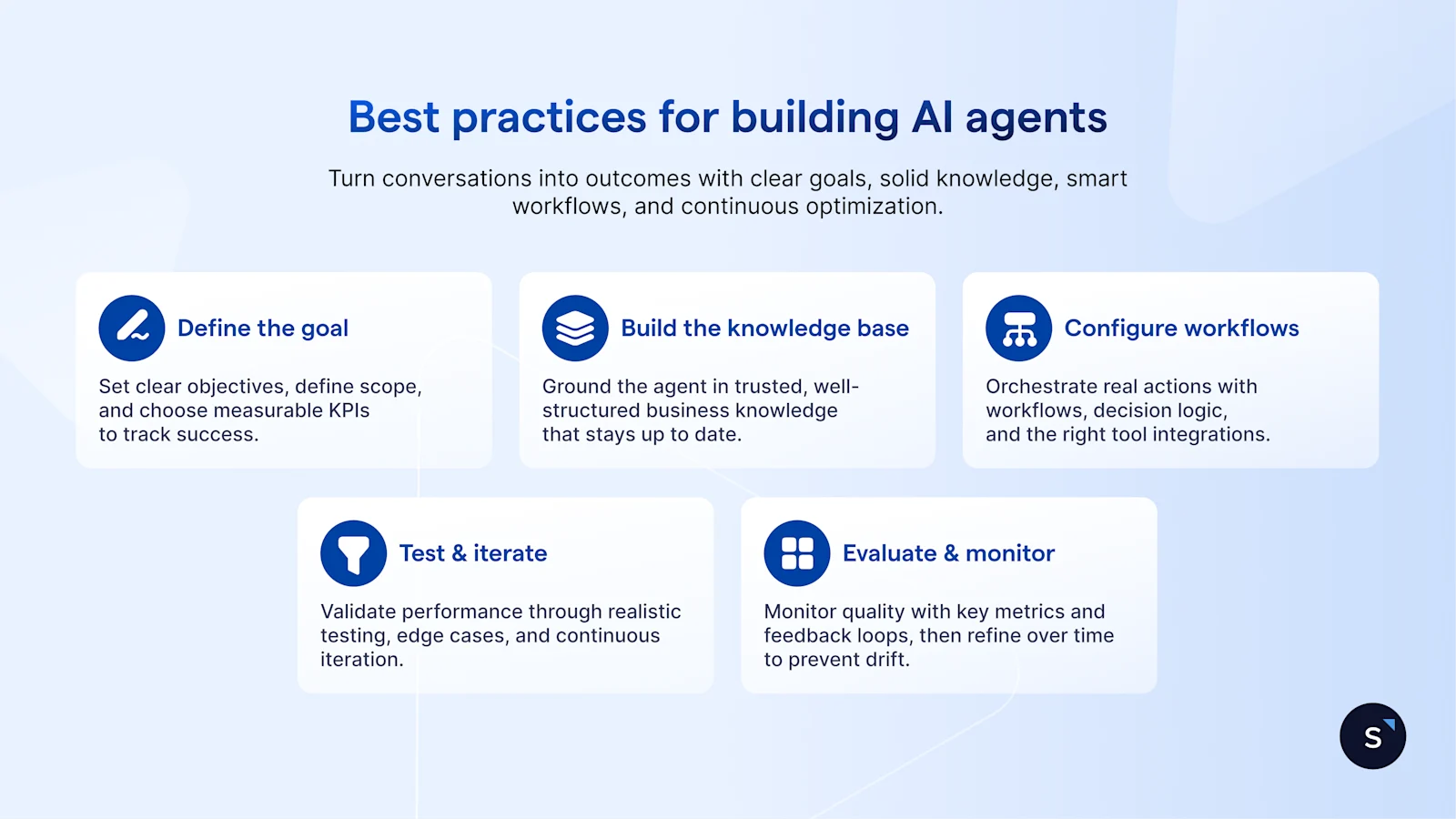
Step 1: Define the goal
Before you start building, clearly articulate what you want your AI agent to achieve. A well-defined goal will guide your entire development process.
Specific Outcome: For instance, the agent could aim to reduce customer support tickets by X%, qualify leads from social media, or automate appointment booking.
Pain Points to Solve: The agent should address issues like slow response times, high volumes of repetitive tasks, or inconsistent information being provided to customers.
Measuring Success: Success could be measured by metrics such as reduced response time, increased conversion rate, or higher customer satisfaction scores.
Step 2: Build up the knowledge base
This is where your AI agent learns about your business. The quality of your knowledge base directly impacts the agent's accuracy and helpfulness.
Gather all relevant business data: This includes FAQs, product descriptions, service details, company policies, shipping information, return policies, and marketing materials.
Organize your data: Structure your information logically (e.g., categorize by topic, use clear headings).
Format for AI consumption: While many platforms can ingest various formats (PDFs, website URLs, text files), ensure the information is clear, concise, and free of ambiguity.
Regularly update: Your business evolves, and so should your agent's knowledge. Schedule regular reviews and updates for your knowledge base.
Step 3: Configure the workflow
The workflow defines how your AI agent interacts and operates. This is where you map out the decision-making logic and actions.
Set Triggers: What initiates the agent's action? (e.g., an incoming message on WhatsApp, a specific keyword mentioned, a form submission).
Define Actions: What should the agent do in response? (e.g., reply with information, ask a follow-up question, update a CRM record, assign a task to a human agent, send a notification).
Add Decision Logic: Use conditional statements (if/then) to guide the agent’s actions based on the customer’s question. For example, "If the customer asks about 'shipping,' then provide the shipping policy; else if the customer asks about 'returns,' then provide the return policy."
Integrate Tools: Connect your agent to the necessary platforms (CRM, messaging apps, e-commerce, etc.) to enable it to take real-world actions.
Step 4: Testing and iteration
Building an AI agent is an iterative process. Thorough testing is crucial for refining its performance.
Run test scenarios: Simulate various customer interactions, including common questions, edge cases, and even ambiguous queries.
Monitor performance: Track key metrics such as response accuracy, task completion rate, customer satisfaction (if applicable), and human agent escalation rate.
Collect feedback: If possible, gather feedback from beta testers or early users.
Improve prompts and workflows: Based on testing and feedback, refine your agent's prompts, adjust its knowledge base, and optimize its decision logic. This continuous improvement loop is vital for long-term success.
Step 5: Evaluation & Monitoring of AI Agents
Continuous evaluation and monitoring are essential to ensure AI agents perform effectively. Key metrics to track include:
Tool Accuracy: Regular audits ensure the agent correctly integrates with tools like CRM and payment systems.
Escalation Rate: Monitor how often the AI escalates interactions to human agents. High rates may signal areas for improvement.
Customer Feedback: Collect CSAT or NPS scores to gauge user satisfaction and identify problem areas.
Performance Monitoring: Track agent performance in real-time to spot and address issues quickly.
For best practices in agent evaluation, refer to OpenAI’s resources for frameworks on optimizing AI behavior.
AI Agent Blueprint
Here’s a simple agent blueprint that can guide your setup:
Goal: (e.g., reduce response time by X%)
Channels: (e.g., WhatsApp, Instagram, Live Chat)
Knowledge Sources: (e.g., FAQs, product catalog, CRM data)
Tools/Actions: (e.g., CRM update, ticket creation, payments)
Guardrails: (handover rules + limitations)
QA & Monitoring: (testing set + review cycle)
This provides a quick and actionable guide that decision-makers can refer to when planning their AI agent setup.
Channel Rules by Region
To ensure smooth operations across various messaging platforms, it’s essential to consider regional-specific rules. These platform rules can significantly affect how your AI agents interact with customers and influence the efficiency of your automated workflows. Below are some key considerations:
WhatsApp: Templates/paid messaging considerations
Messenger/Instagram: Conversation windows and recontact rules
Instagram: No “human agent tag” after 7 days, impacting re-engagement
These channel-specific rules are essential for businesses to optimize their workflows. They help avoid interruptions and ensure compliance with the regulations set by the messaging platforms.
Common mistakes beginners make when building AI Agents
Even with an AI agent tutorial, new users often fall into common traps. Being aware of these can save you time:
Trying to automate everything at once: Start small! Focus on one specific, high-impact use case, prove its value, and then gradually expand your agent's capabilities. Attempting to build an all-encompassing agent from day one often leads to complexity and failure.
Skipping evaluation and testing: Never deploy an agent without rigorous testing. Unforeseen scenarios and inaccurate responses can damage customer trust.
Neglecting guardrails: Without clear boundaries, an AI agent might provide inappropriate responses or stray from its intended purpose. Define its persona and limitations from the outset.
Ignoring analytics: The data your agent generates is gold. Analyze interaction logs, common queries, and error rates to continuously improve its performance and identify new automation opportunities.
Build AI agents without code using AgentFlow
The good news for AI agents for beginners is that you don't need to be a coding expert to build powerful AI agents. Low-code and no-code platforms have democratized access to this technology.
Low-barrier tools often feature:
Drag-and-drop builders: Visually design workflows without writing a single line of code.
Pre-built templates: Start with ready-made solutions for common use cases (e.g., FAQ bot, lead qualification bot).
Intuitive interfaces: Easy to navigate and configure settings.
AgentFlow by SleekFlow is an excellent example of a no-code/low-code platform designed to help businesses create sophisticated AI agents effortlessly. It empowers users to:
Visually map out complex conversational flows.
Integrate seamlessly with various messaging channels and business tools.
Train agents using your specific business data with ease.
Deploy and manage agents from a centralized dashboard.
SleekFlow use Cases: AI agents in Action
Let's look at how AI agents are transforming businesses with SleekFlow:
1. Bowtie improves lead conversion with AI WhatsApp workflows
For Bowtie, an insurance company, the challenge was converting leads quickly while ensuring compliance and maintaining high engagement standards. Traditional follow-up methods were slow and required manual effort, limiting the ability to scale customer interactions.
By integrating SleekFlow’s AI workflows with WhatsApp, Bowtie automated lead follow-ups and enabled seamless website-to-WhatsApp lead capture. The AI agent quickly responded to inquiries, maintained compliance, and handled high volumes of leads at scale. Following the integration:
Follow-up response rate increased by 23%
50% of WhatsApp leads converted into customers
Application and communication process became faster and more efficient
Having many agents work on one case makes things smooth and lets customers feel cared for by a team, without having to repeat their issue to different agents.

Gabriel Kung
Chief Commercial Officer, Bowtie Life Insurance
2. Intriq Journey streamlines customer service with omnichannel support
For Intriq Journey, a luxury travel agency, the challenge was providing timely, high-touch service across multiple communication channels. Managing multiple messaging platforms manually led to slow response times and missed opportunities, impacting customer satisfaction.
By consolidating WhatsApp, Instagram, and Facebook messages into a single inbox with SleekFlow, Intriq Journey automated chat routing and response handling. This allowed them to provide faster, consistent, and personalized service. Following the integration:
Overall service efficiency improved by 20%
Broadcast message read rate reached 75%
High-touch clients received faster and more consistent responses
SleekFlow has significantly enhanced our operational efficiency, allowing us to streamline communication and customer engagement seamlessly. I would highly recommend SleekFlow to any business looking to improve their operational workflows and customer interactions.

Jess Yap
Founder of Intriq Journey
How AgentFlow protects customer data in AI automation
AgentFlow runs on SleekFlow’s secure, compliance-focused platform, enabling businesses to automate conversations without compromising data privacy or control.
Enterprise-grade security & compliance: SleekFlow is SOC 2 Type II and ISO 27001 certified, with GDPR-aligned data protection practices, demonstrating strong controls for data security and risk management.
Built-in security controls: SleekFlow supports enterprise security features such asrole-based access control (RBAC), data masking, and IP whitelisting to limit unauthorized access and protect sensitive customer information.
Responsible AI usage with human oversight: AI agents use only business-approved data provided by customers and do not train public AI models. Teams retain full control to monitor conversations, intervene when needed, and refine AI behavior.
Ready to Build Your First AI Agent?
The shift toward AI agents for business automation is no longer a luxury, it’s a competitive necessity. By following the steps for AI agents for beginners, you can transform your customer experience with automation. Start your AgentFlow trial today!

Want to outcompete your peers with SleekFlow's help?
Book your personalised demo with SleekFlow today and unlock the potential of seamless communication


