WhatsApp Lead Generation Strategies for Businesses


TL; DR: Quick Summary
- Traditional long forms cause drop-offs; WhatsApp lead generation captures leads instantly when users start a chat.
- It provides direct access to verified contact details and enables personalized, real-time conversations.
- Effective campaigns include exclusive offers, contests, virtual assistants, and event follow-ups to drive engagement.
- Key entry points: website chat widgets, click-to-WhatsApp ads, and QR codes for offline-to-online conversion.
- WhatsApp Flows enable structured, in-chat data capture with higher completion rates than forms.
- Automation tools like AI agents qualify, score, and route leads 24/7, improving efficiency and conversions.
- A strong funnel includes acquisition → capture → qualification → handoff → nurturing.
- With the right setup, WhatsApp becomes a high-converting, always-on lead generation and nurturing channel.
Think about those lead gen forms with 12 fields that we all dread. They're the digital equivalent of a traffic jam. Chances are, most people won't even finish them. Forget the formality and endless fields, here's a breath of fresh air: WhatsApp lead generation.
What is WhatsApp Lead Generation?
WhatsApp lead generation is like a secret shortcut: as long as you get prospects to send you the first message, you already have their phone number and name! And with a few more interactions to understand their interests, you can save this information in your database to craft messages that truly resonate with them.
Mastering WhatsApp lead generation helps you:
Cut through the noise and chaos of social media
Bypass overstuffed email inboxes
In this blog, let us show you how you can leverage SleekFlow’s Flow Builder for WhatsApp lead generation.
4 types of WhatsApp lead generation campaigns
Exclusive WhatsApp offer
Imagine transforming WhatsApp into a platform for exclusive customer engagement. This is precisely what Le Dessert HK achieved with remarkable flair.
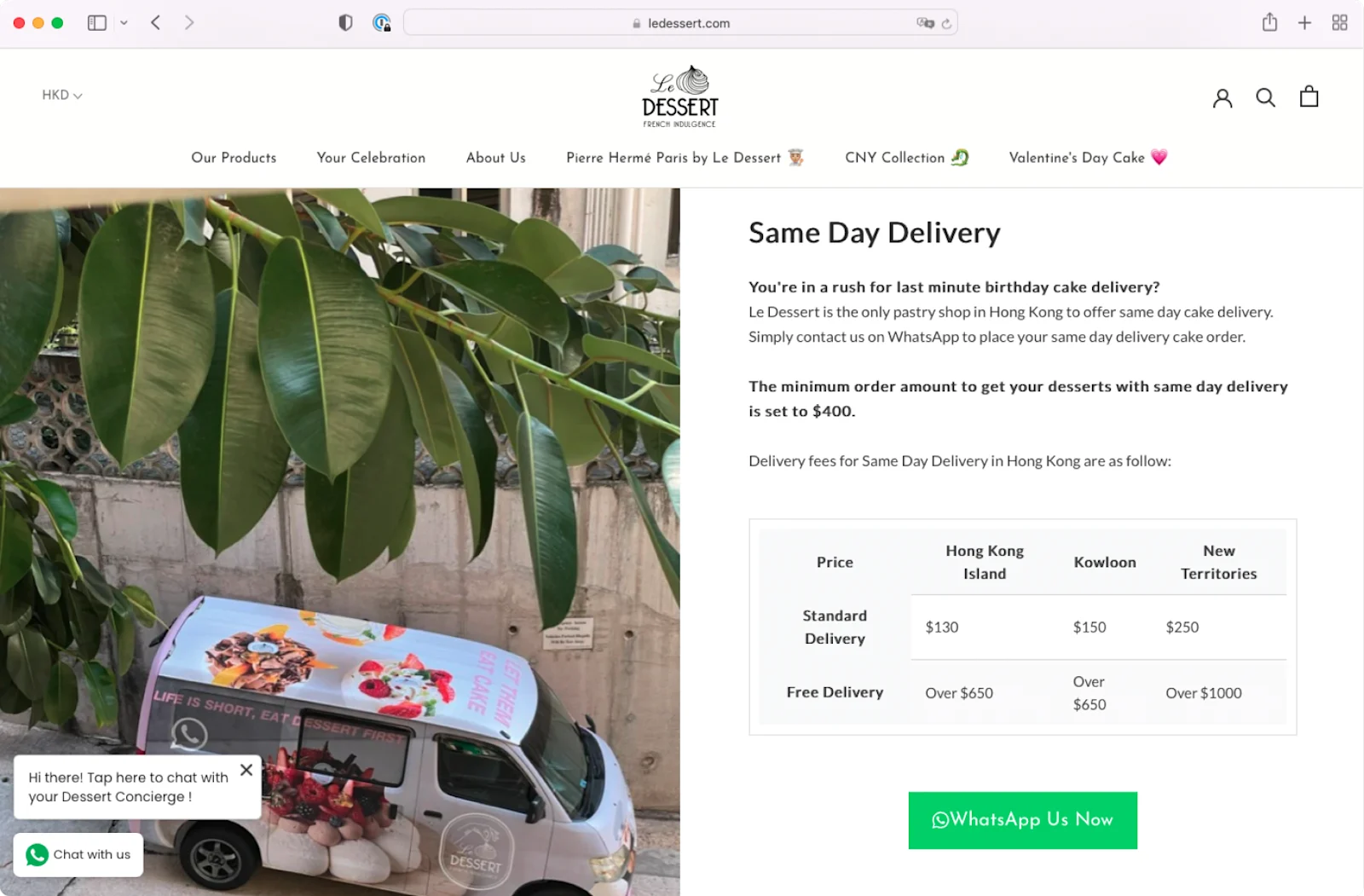
How to generate leads on WhatsApp? Offering free same-day delivery, but with an exclusive twist: this service is available only for orders placed via WhatsApp. It's a smart move to get people to share their contact info and keep coming back.
Le Dessert has been sharing its exclusive dessert magazine with all its WhatsApp contacts every month, fostering a deeper engagement with the brand. More than half of their customers are now doing the whole dance – from hello to checkout – right within WhatsApp. It's become the go-to spot for Le Dessert to nurture and manage those sweet customer relationships. This exclusive WhatsApp offer is a prime example of effective WhatsApp lead generation.
WhatsApp for contest
Everyone loves a bit of competition, particularly when it’s as easy as sending a message on WhatsApp. Participants typically engage in challenges or tasks such as sending photos, videos, or responding to quiz questions. This approach is particularly effective for retail brands, where customers often shop offline or at different points of sale without leaving much trace.
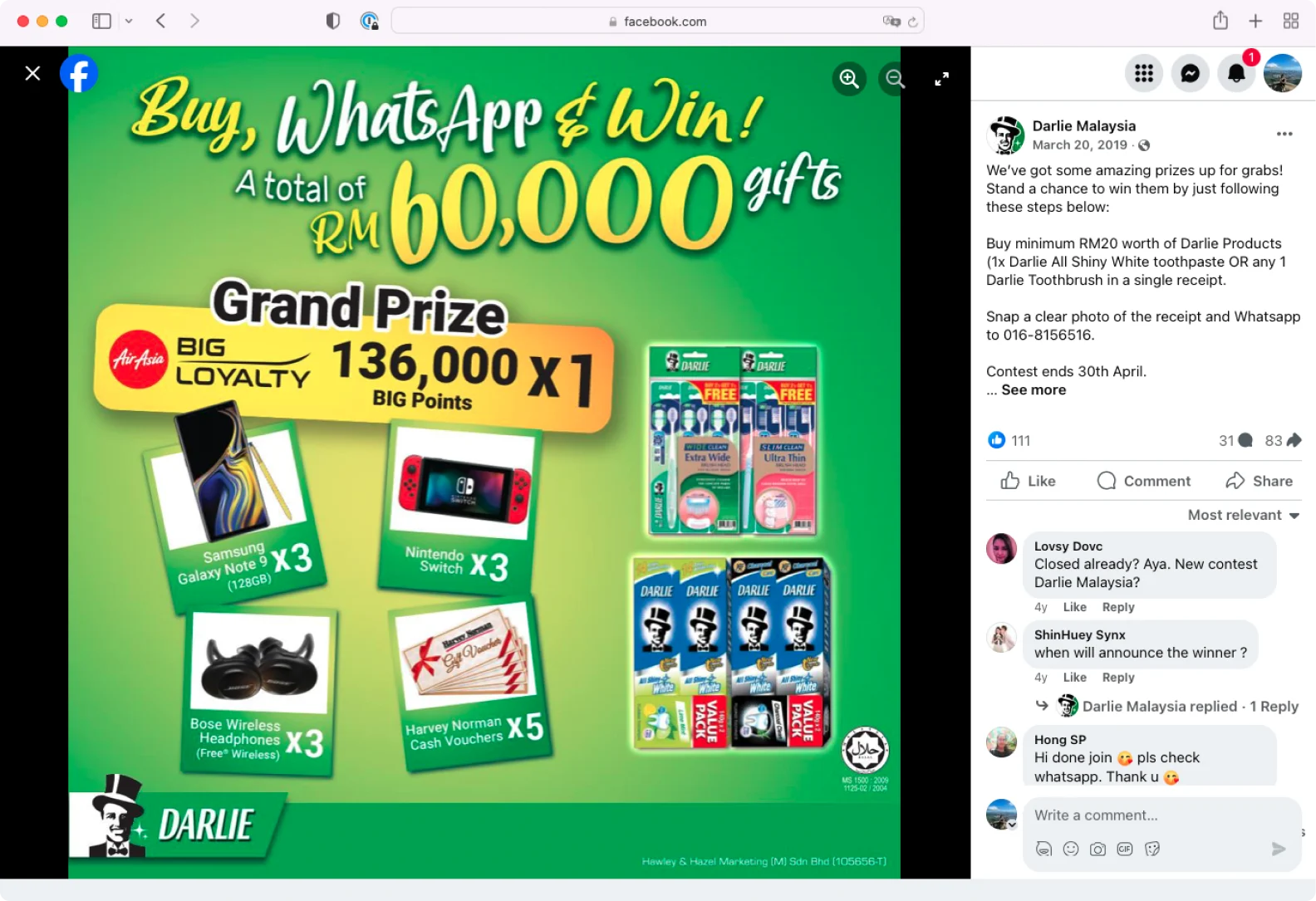
A standout example is the ‘Buy and Win Contest’ by Darlie and Dryper in Malaysia. Customers participated by sending in their receipts through WhatsApp for a chance to win enticing prizes. These contests are fantastic for ramping up excitement and also help build a large database of participants, paving the way for future CRM marketing initiatives.
WhatsApp virtual assistant
Using virtual assistants on WhatsApp is where technology meets personal touch. TKD Lingerie’s innovative virtual fitting service is a good example. Their team of bra-fitting experts offers personalized advice through WhatsApp. This strategy is not just beneficial for enhancing customer engagement; it also serves as an effective lead-generation tool by gathering insights into customer preferences and needs.
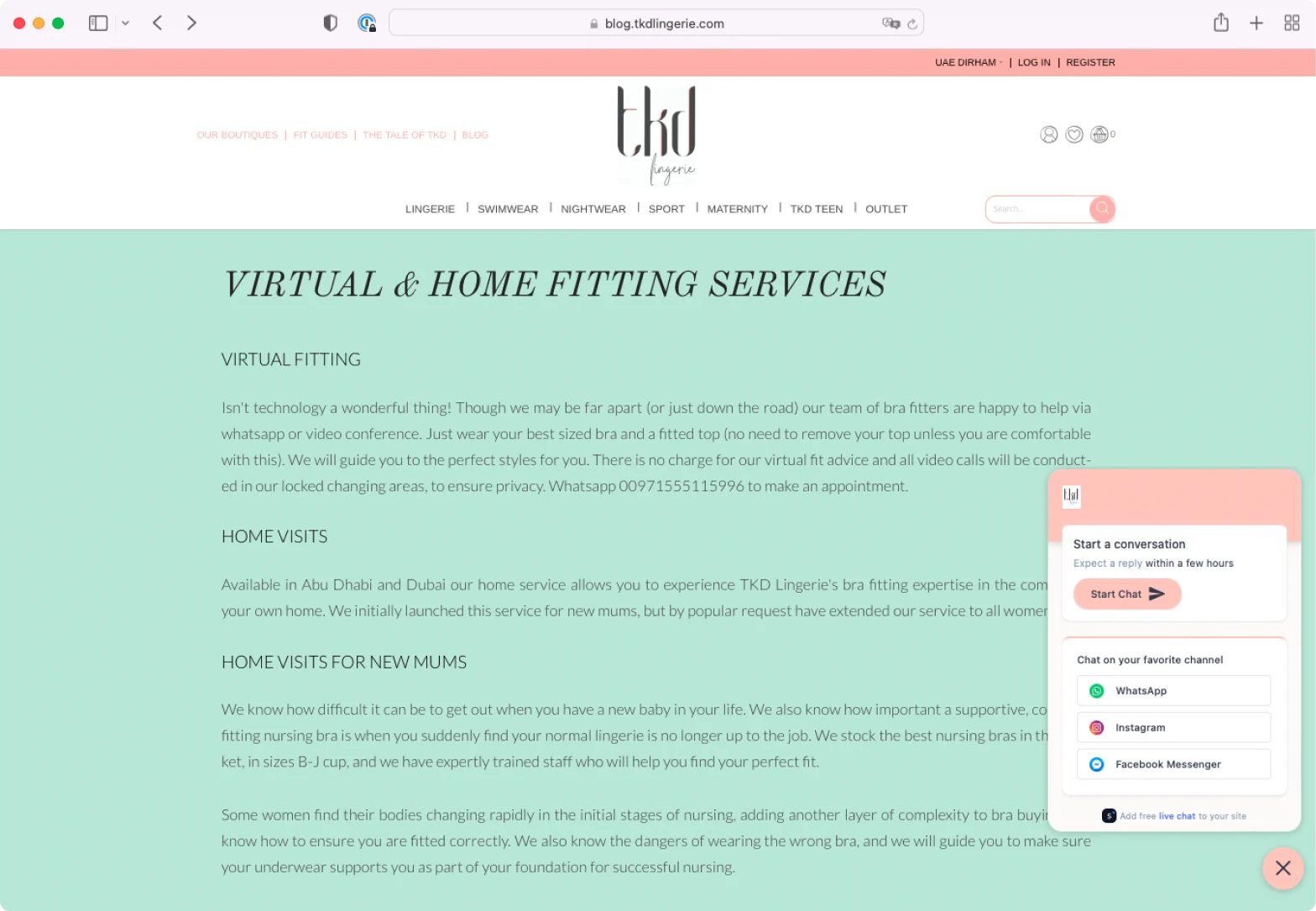
With a robust customer profile in hand, the intimate brand has sent highly converting promotional messages. Notably, in one of their ‘3-for-2 promotion campaigns’ on WhatsApp, they reported a 74% message open rate and successfully closed 78 online-to-offline sales.
WhatsApp for events
How to generate leads on WhatsApp when you’re hosting an event? Whether it’s workshops, trade shows, or exhibitions, WhatsApp is fantastic for following up with people you met at social events when you only had a brief time to interact.
Pearl Holiday Travel & Tour demonstrates how to do it effectively. They rolled out a WhatsApp marketing campaign targeted at travel expo attendees and offered online travel advice.
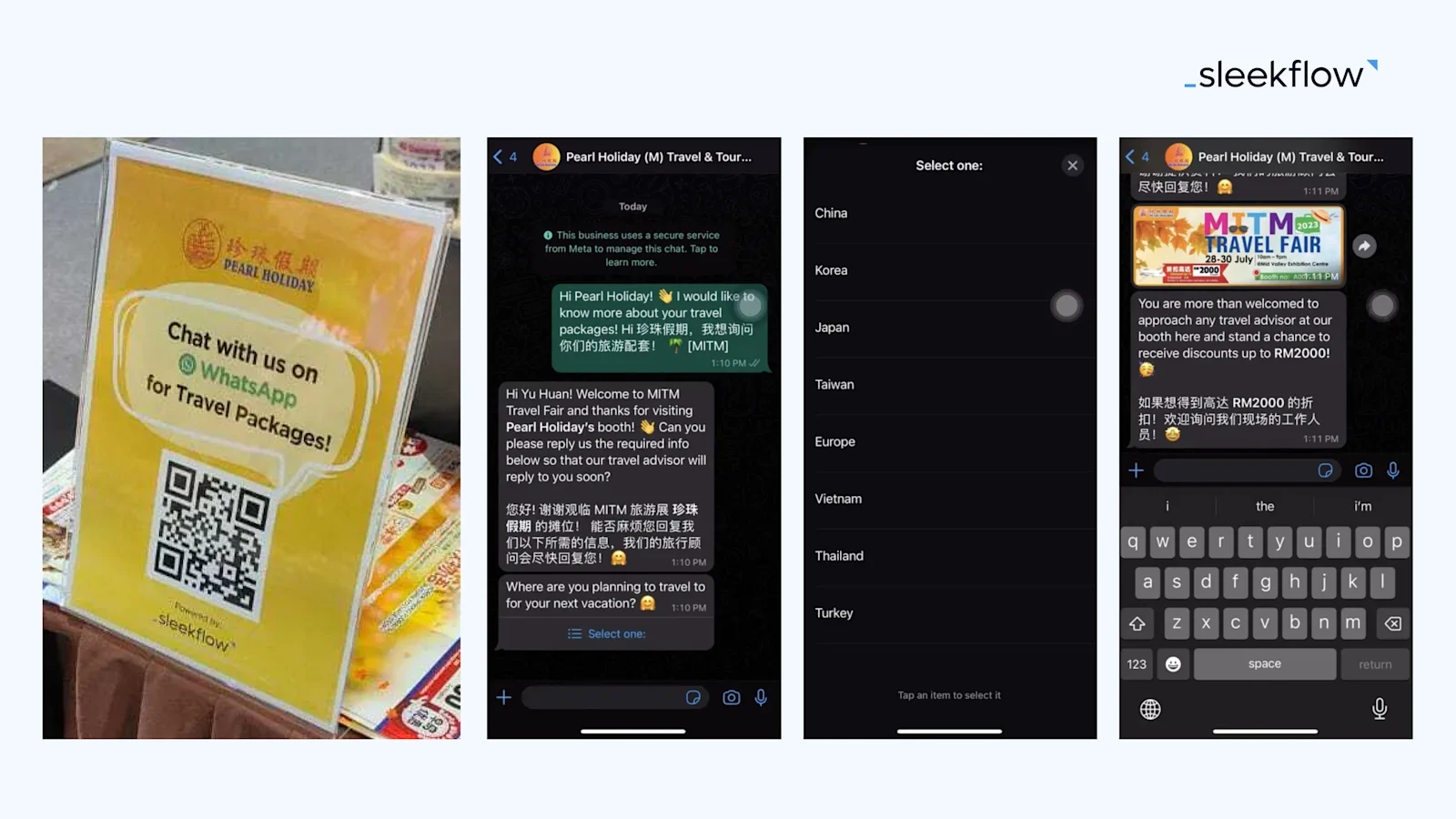
By incorporating interactive quick response options for customers to indicate their travel preferences, they expanded their lead database, turning fleeting encounters into lasting connections. For instance, during their in-house travel fair promotion later that year, they ran a WhatsApp broadcast campaign that reached over 10,000 contacts, generating an impressive 70-80% reply rate.
3 types of entry points for WhatsApp lead generation
How do you get these leads to start a conversation with you on WhatsApp? Here are three effective ways to set up entry points:
1. Integrating a WhatsApp live chat widget on your website
Your website is often the first place a potential customer interacts with your brand. By integrating a WhatsApp live chat widget on your site, you can create an immediate and convenient way for visitors to connect with you.
Imagine a customer browsing your product page and having a question. With a simple click on the WhatsApp widget, they can reach out directly for answers. This not only offers real-time assistance but also lets you collect their WhatsApp contact information seamlessly.
Here’s a free tool for you to create and embed a WhatsApp chat widget on your website in just minutes.
2. Leveraging click-to-WhatsApp social media ads
Social media platforms are goldmines for WhatsApp lead generation. Utilize click-to-WhatsApp ads on platforms like Facebook and Instagram. These ads work by providing a direct link in the ad itself that opens a WhatsApp chat with your business. It's straightforward for the user: see your ad, get intrigued, and click to chat. This method is particularly effective as it filters out casual browsers, bringing in leads who are genuinely interested and ready to engage.
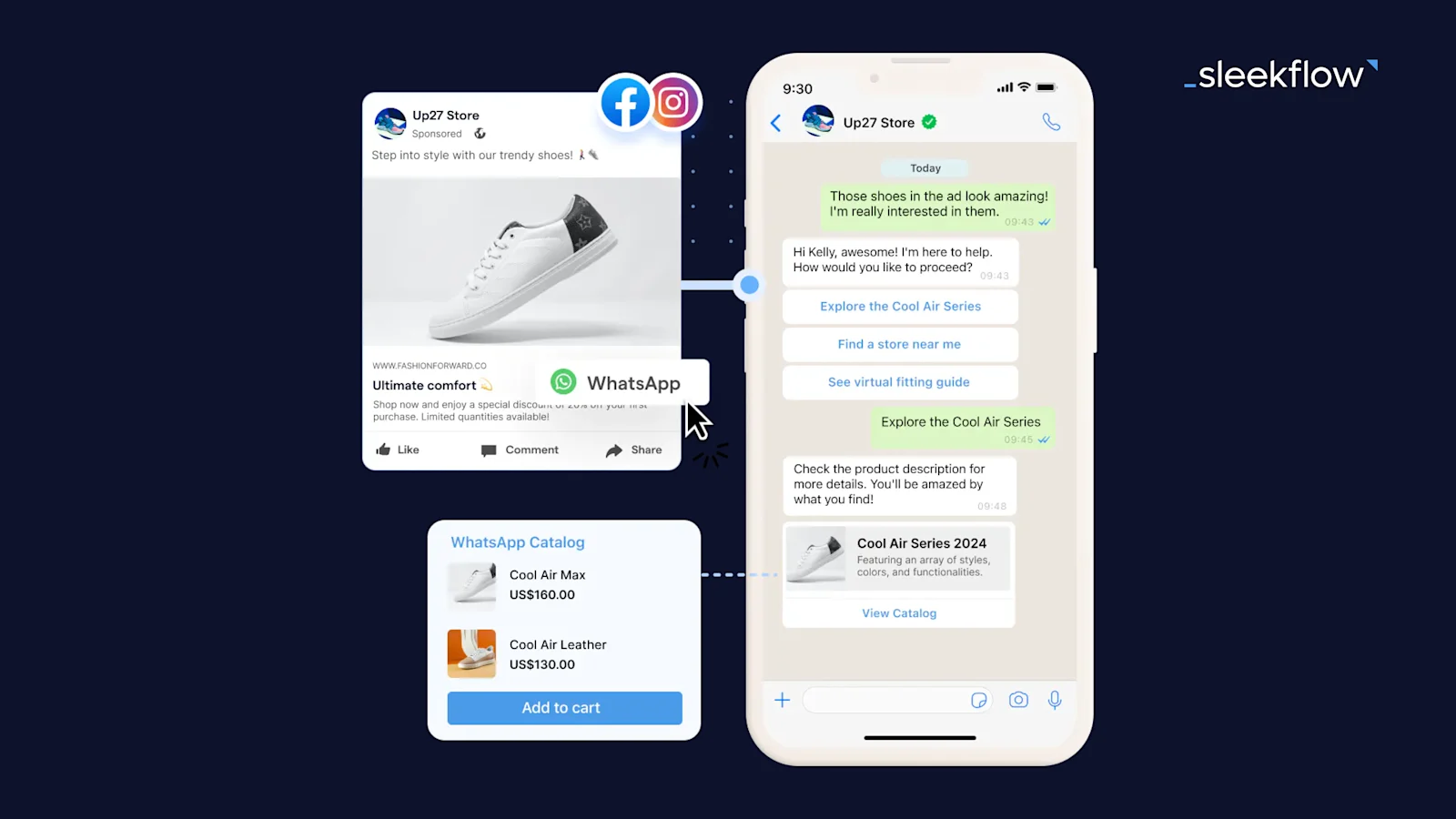
To create click-to-WhatsApp ads in the Meta Ads Manager, follow the steps:
Go to Ads Manager and click + Create.
Choose your objective: traffic or engagement, then click Continue.
Under Campaign name, enter a descriptive name in the text box, then click Next.
Select Messaging apps as your conversion location.
Under Messaging apps, select WhatsApp.
Edit your budget, schedule, audience, and placements, then click Next.
Fill in the details for your ad creative: add an image or video, the primary text, and the headline. In the call-to-action dropdown menu, select Send WhatsApp message.
In the Message template section, select Create new and then click Edit.
Under Customer actions, select Pre-filled message*. Enter the suggested text that customers can use to initiate a conversation with you.
Name your message template and check the box next to Save template if you want to use it in future campaigns. Then, click Save and finish.
Click Publish.
A pre-filled message will appear in the customer's chat window when they click the CTA button. We strongly recommend creating one, as it serves as an excellent icebreaker and enables you to set up guided chat flows that assist customers throughout their purchase journey.
How Jubin Cantik used SleekFlow’s solution to generate quality prospects from CTWA
Jubin Cantik, a Malaysian tile supplier, wanted to generate high-quality prospects. They used Click-to-WhatsApp Ads (CTWA) on Facebook and Instagram to drive high-intent traffic.
Raw clicks from social media ads often result in disorganization due to a lack of immediate context. This required sales agents to spend time on discovery questions.
They set up SleekFlow’s automation to instantly qualify leads. This solution automatically tagged them with context like campaign source and routed them to the right sales agent.
A 32% improvement in overall efficiency.
Over 2,000 qualified leads captured in just over a month.
3. Using WhatsApp print materials in your store
Let's not forget the power of offline methods. In your physical store, display QR codes that lead to a WhatsApp chat. You can place these QR codes strategically around your store, on product tags, at the cash register, or in promotional materials. When customers scan these codes with their smartphones, they’re taken directly to a WhatsApp chat with your business. It's a quick and effortless way for in-store customers to connect and engage, opening up WhatsApp for lead generation.
To create a WhatsApp QR codesimply follow these steps:
Generate a WhatsApp link: First, create your link using this free tool.
Convert to a QR code: Use a generator to turn that link into a code. You can find free tools online, like Adobe Express and Bitly.
We recommend customizing a pre-filled message when building your WhatsApp link. This message appears in the user's chat window upon clicking the link. A unique link helps identify the lead source as you can set different default messages for various entry points.
Capture leads inside WhatsApp with WhatsApp Flows
WhatsApp Flows are native, interactive forms built directly inside the WhatsApp chat interface. Unlike a back-and-forth message sequence, a Flow presents structured input fields — dropdowns, text inputs, date pickers — within a single smooth screen, all without the user ever leaving WhatsApp. Businesses using them report significantly higher completion rates compared to traditional multi-message qualification sequences. You can build and deploy WhatsApp Flows through SleekFlow's WhatsApp Flow solution.
3 WhatsApp Flow examples for lead generation:
Quote request flow: Instant data capture from ads or widgets without the back-and-forth.
Appointment booking flow: Self-scheduling for consultations with automated reminders.
Product recommendation flow: Guide customers to the right products using their preferences and budget.
How to generate leads on WhatsApp with Flow Builder
To set up a WhatsApp lead generation campaign in SleekFlow, proceed to the Flow Builder and follow the steps below. To provide a better illustration, we will use a music academy that utilizes click-to-WhatsApp ads as an entry point to generate leads interested in their music lessons as an example.
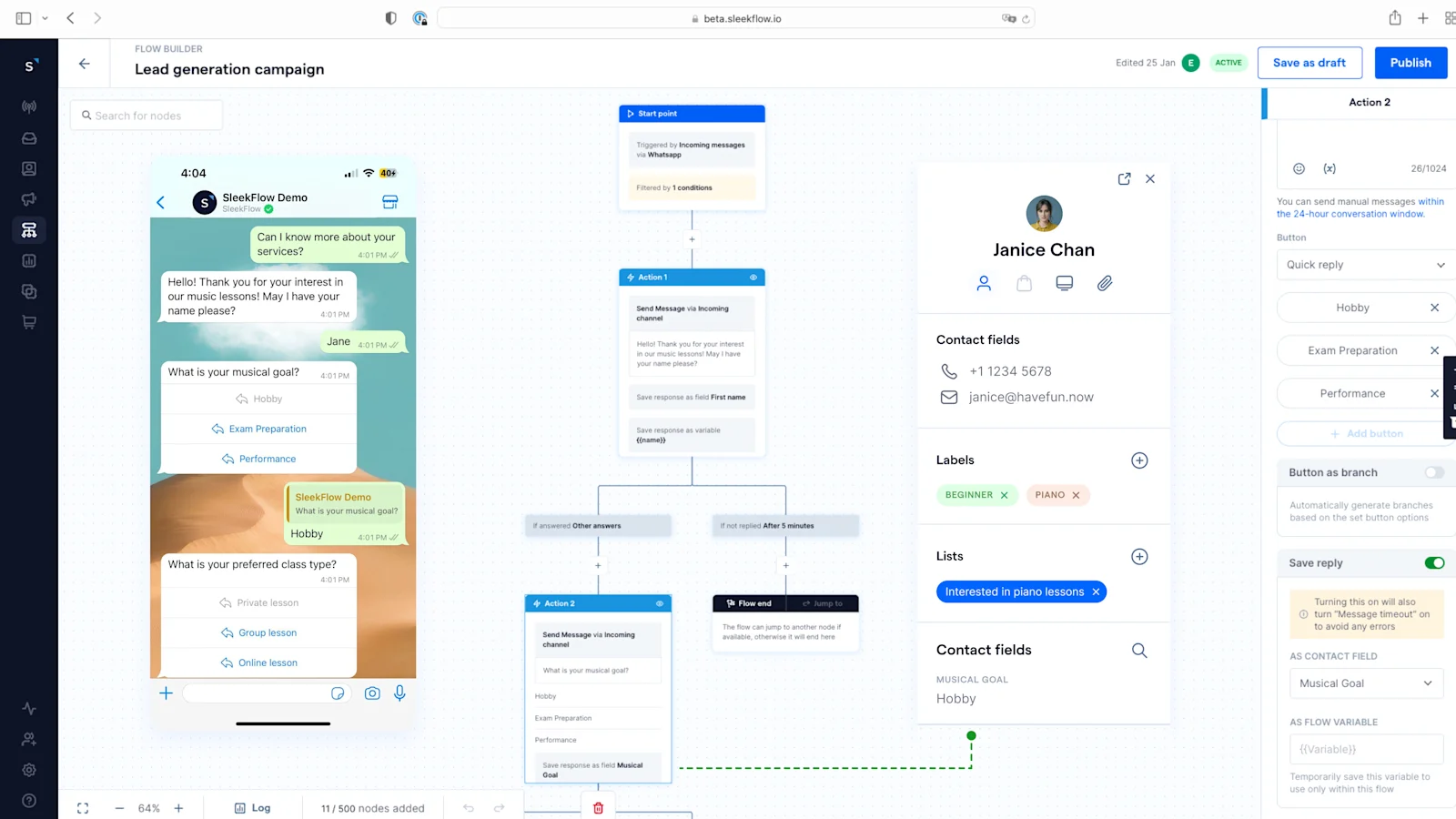
Click Create new flow > Start from scratch.
Choose Messages from a new contact.
At the Start point, enable Filter by condition, select triggered message keyword as the condition. Then select contain or contains exactly and enter the keywords. Paste the pre-filled message you suggest the ad viewer use to start the conversation here.
Click Set your first node here, select Action > Messaging > Send Message. Within the setting, enter the greeting message. For example: “Hello! Thank you for your interest in our music lessons! May I have the student's full name, please?” Turn on the Save reply to save their response as a contact field, which will be stored in SleekFlow Contacts database as your CRM data.
Then, add a second Send Message action. Here, you can begin asking questions to better personalize your services for them. You can also provide options as buttons for them to choose. In our example: “What is your musical goal?”, with 3 options: Hobby, Exam preparation, and Performance. Similarly, you can enable Save reply to store their response as a contact field, so this data is stored in your CRM for lead nurturing.
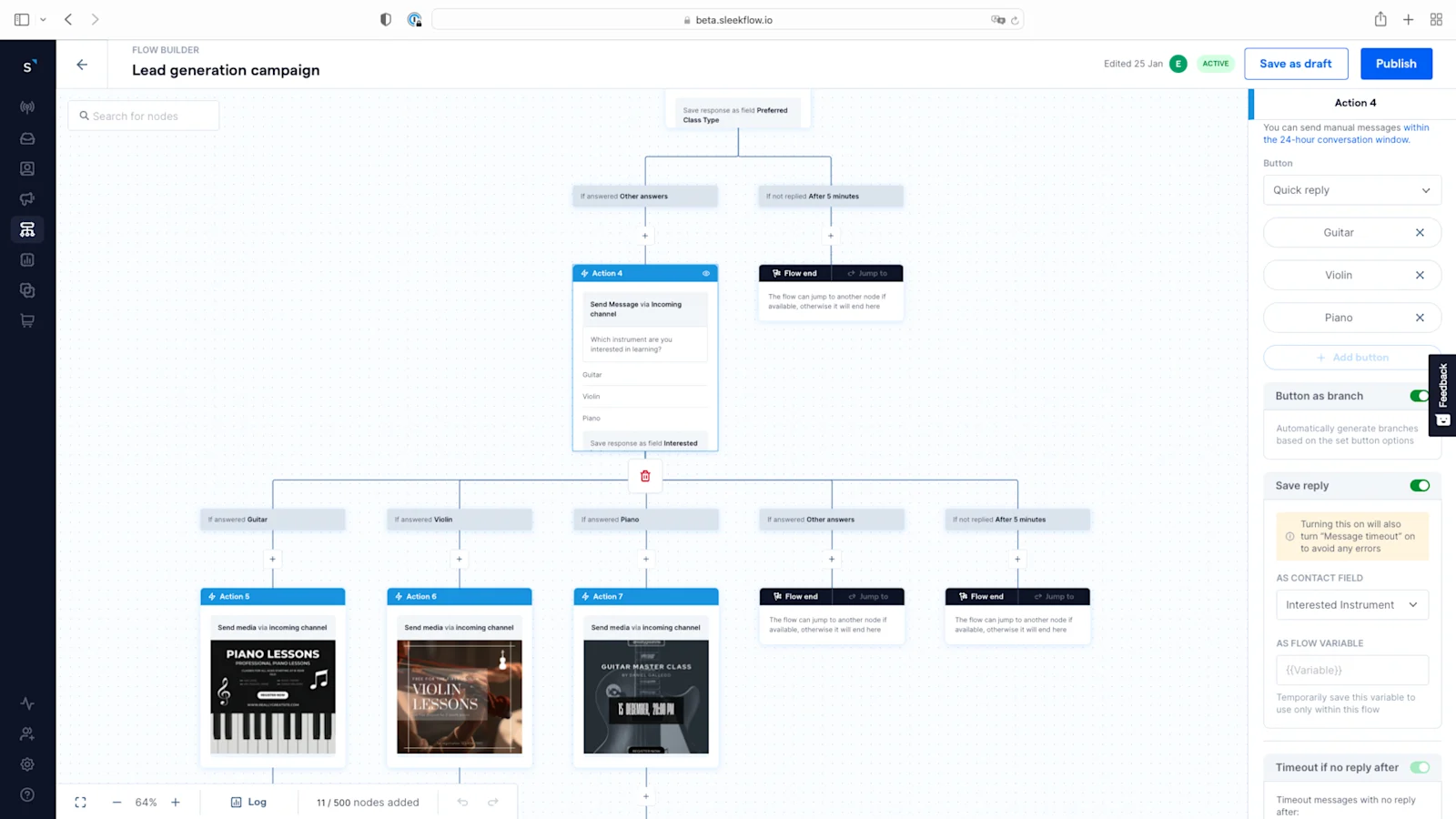
Repeat step 5 to create additional Send Message actions to ask further questions about the lead.
In this example, we will present our offer in the last action by asking, “Which instrument are you interested in?” with three options: guitar, violin, and piano. Enable Button as branch. Under each respective branch, create a new Send Message action to share the relevant offer details.
WhatsApp lead nurturing technique
With leads generated, you would want to initiate a strategic lead-nurturing process. The first crucial step is to obtain their consent to receive further communications.
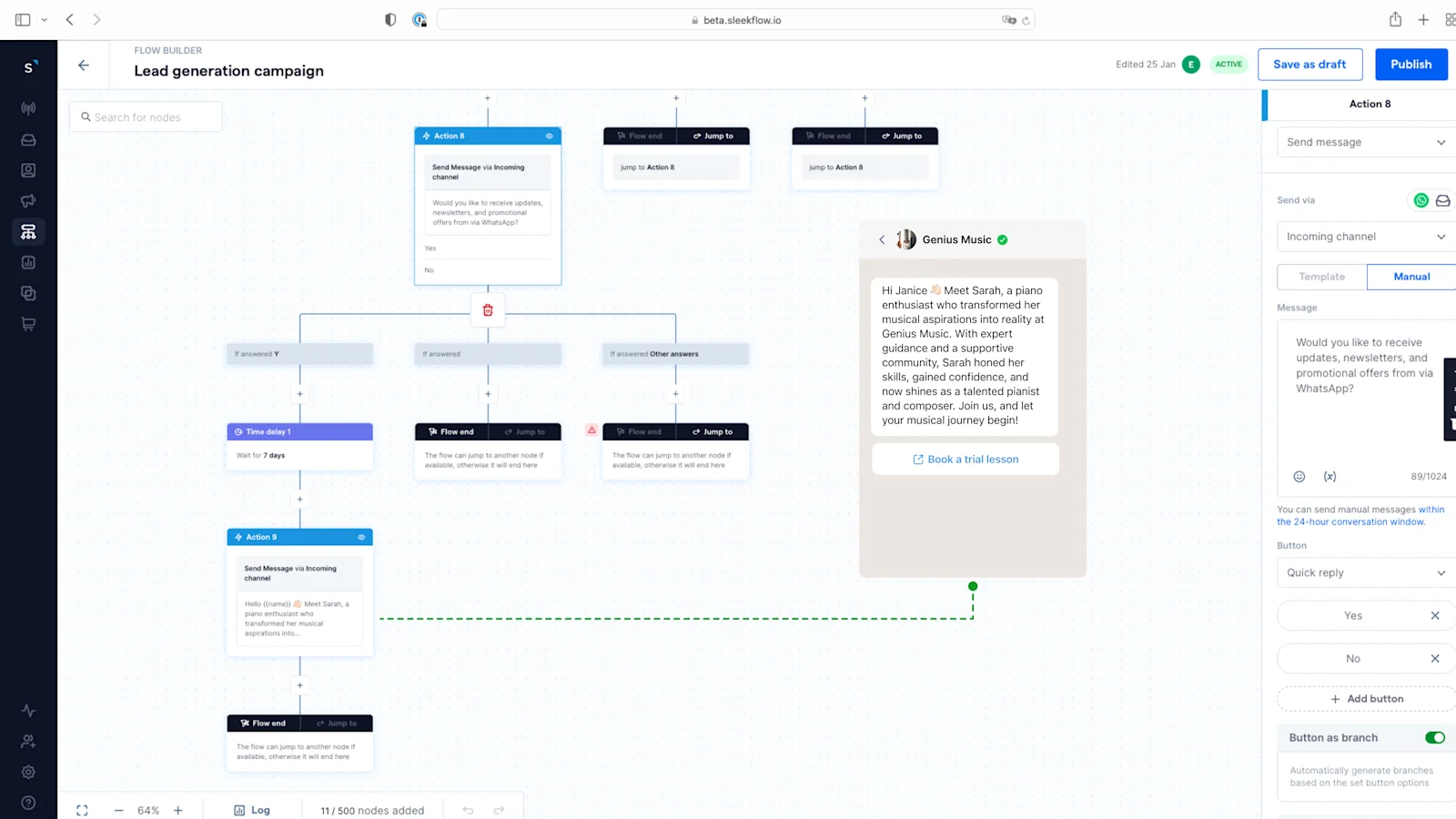
To continue building the flow:
Create a new "Send Message" action: Ask your leads, “Would you like to receive updates, newsletters, and promotional offers via WhatsApp?” and provide 'Yes' and 'No' options.
Enable "Button as branch": For leads who click 'Yes,' set a waiting period (e.g., 7 days) to give them time to absorb your initial information and engage at their convenience.
Subsequent messages should be carefully crafted to provide value, offering insights, special offers, and relevant updates that cater to the lead's specific interests. Examples for the education industry include student success stories, trial music lessons, and event invitations.
Lead generation and qualification with AI automation platforms
Traditional lead qualification can be slow and inconsistent. Here’s how AI automation platforms like AgentFlow can supercharge your process:
Autonomous scoring and qualification: Forget manual rules. AI agents analyze a lead's intent and engagement data in real time to automatically score them. By instantly filtering out low-quality inquiries, your sales team can focus on high-value prospects.
24/7 pipeline progression: Leads don’t stop searching after business hours. AI agents work around the clock to answer questions, nurture interest, and schedule meetings, keeping your pipeline moving and converting interest into immediate action.
Intelligent, context-rich handoffs: When a human needs to step in, the AI ensures a smooth transition. It provides a full summary of previous interactions and intent analysis, giving your team the complete picture so customers don't have to repeat themselves.
Knowledge-driven customization: Teach your AI using your own PDFs, website content, and internal docs to ensure every response is accurate and on-brand. You can also set guardrails to keep conversations on-topic and safe.
Mastering the WhatsApp lead generation funnel
Building a high-converting WhatsApp strategy means moving beyond simple chat and into a structured pipeline. To conclude, here is a summary of how the complete funnel works:
Acquisition: Drive traffic from diverse sources like Click-to-WhatsApp (CTWA) ads, website widgets, Instagram bio links, or offline QR codes.
Capture: Use WhatsApp Flows, interactive menus, or quick replies to gather lead data instantly within the chat interface.
Qualification: Leverage AI automation (AgentFlow) to score leads based on intent and automatically route high-value prospects to the right team.
Handoff: Seamlessly sync lead data to your CRM and notify sales agents the moment a qualified conversation is ready for human touch.
Nurture: Stay top of mind with personalized retargeting and broadcasts, turning cold inquiries into loyal, repeat customers.

Get free onboarding support with any paid plan!
Enjoy unlimited AI agents and Flow Builder with any SleekFlow AI plans. Onboard effortlessly with our free support!


