Social media chatbots: what they do, and where they stop


TL; DR: Quick Summary
- A social media chatbot handles FAQs, lead capture, and bookings well, but stalls the moment a conversation goes off-script.
- WhatsApp, Instagram, and Facebook Messenger each run their own messaging window and volume limits under Meta's APIs.
- Singapore consumers default to messaging: 73.3% prefer it over other contact methods, and 72.4% are more likely to buy from a brand that offers it.
- The global chatbot market is on track to reach US$11.8 billion in 2026, and customer service is the single biggest slice of that spend.
- Move from a chatbot to an AI agent once off-script conversations become routine, not once they merely start happening.
Your Instagram DMs go quiet after work hours, and by the time someone checks the app the next morning, that lead has already messaged two other suppliers. Or it's the opposite problem: your WhatsApp chatbot replies instantly, then a customer asks something the script never anticipated, and the conversation stalls until a one-star review shows up.
What is a social media chatbot?
A social media chatbot is a rule-based or AI-driven program that automatically replies to messages and comments on platforms such as WhatsApp, Instagram, and Facebook Messenger. It answers questions, qualifies leads, and books appointments without a person typing the reply, running on whatever script or model the business has configured.
Most businesses meet their first chatbot on WhatsApp or Instagram, since that's where customers already type first, inside a thread they already use. Rule-based versions follow a fixed decision tree: press one for sales, press two for support. AI versions read the actual words a customer types and reply in natural language, though they still only work from the knowledge someone has given them.
Which social media platforms support a social media chatbot?
WhatsApp, Instagram, and Facebook Messenger support business chatbots through Meta's official APIs, alongside website live chat as a fourth common channel. Each enforces its own messaging window and volume limits, so a flow built for one channel rarely copies over to another unchanged.
Figures come from Meta's messaging limits documentation and Messenger Platform policy; treat any number as a snapshot, not a permanent rule.
Singapore leans toward messaging by default: across the 22 markets WhatsApp surveyed for its 2026 State of Business Messaging report, Singapore included, 73.3% prefer messaging a business over other contact methods, and 72.4% are more likely to buy from a brand that offers it. Use WhatsApp when a conversation runs past one session; use Instagram or Messenger when it starts from a comment or an ad click and needs to convert fast.
What social media chatbots can and cannot do
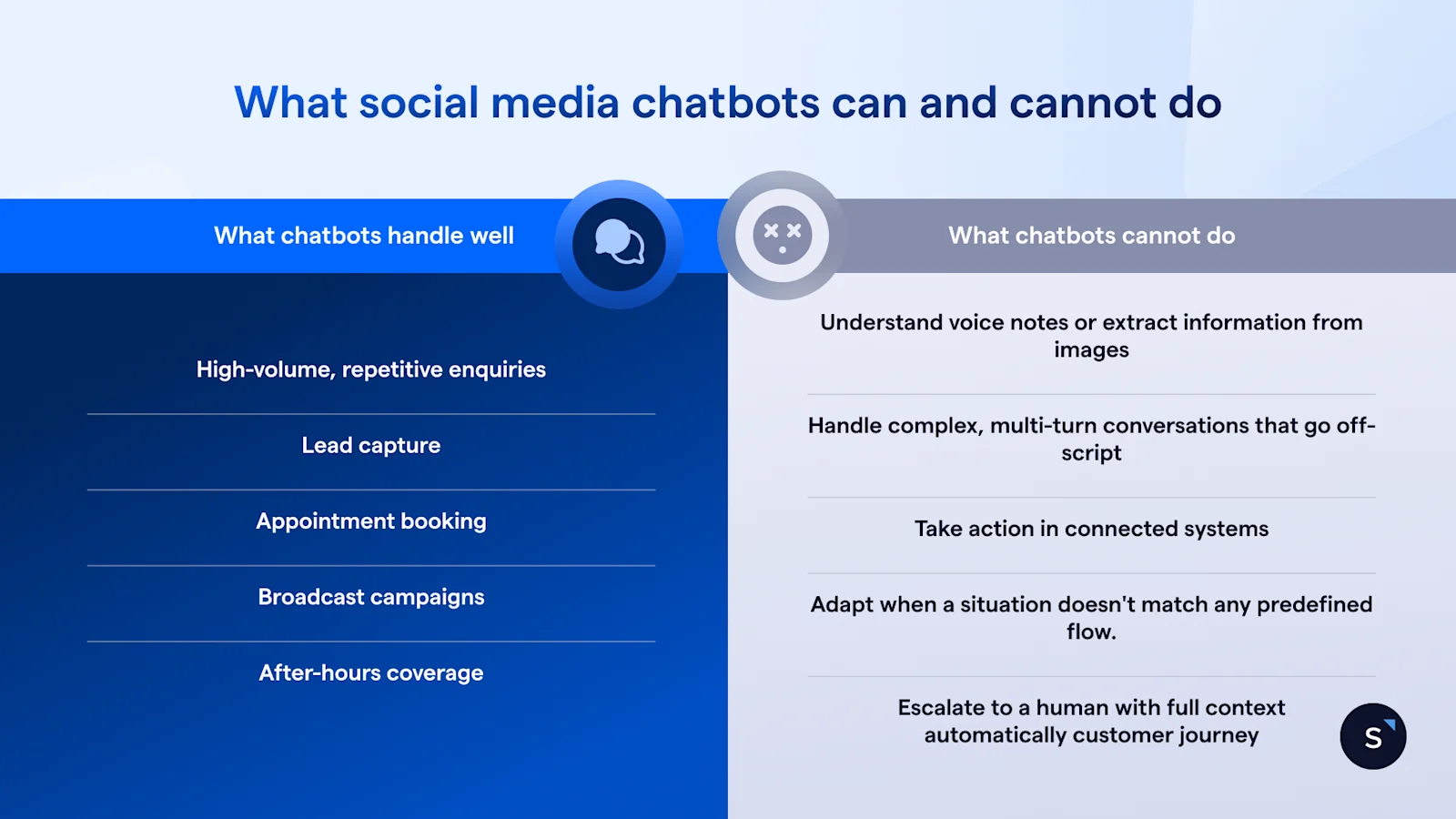
A social media chatbot handles predictable, high-volume tasks well: FAQs, lead capture, appointment booking, and after-hours coverage. It struggles the moment a request goes off-script, involves a voice note or document, or needs to change something in a connected system like Shopify or Salesforce.
What chatbots handle well
Chatbots handle 5 jobs well: repetitive questions, lead capture, appointment booking, scheduled broadcasts, and after-hours coverage. Each follows a predictable pattern, which is exactly what a scripted or lightly trained flow is built to recognise.
High-volume, repetitive enquiries. FAQs, opening hours, pricing, and order status make up most of a support inbox.
Lead capture. A structured flow collects a name, an email, and a phone number, then qualifies intent.
Appointment booking. The chatbot triggers a calendar link or booking flow inside the chat itself.
Broadcast campaigns. Scheduled messages reach opted-in contacts at scale, from a few hundred to tens of thousands.
After-hours coverage. The chatbot replies instantly at 2am, regardless of the customer's time zone.
What chatbots cannot do
Chatbots cannot do 5 things reliably: understand voice notes or scanned documents, hold a multi-turn conversation that strays off-script, take action inside a connected system, adapt to a situation with no matching flow, or hand off to a human with full context intact.
Understand voice notes or extract information from images and documents. A photo of a damaged product needs a person, or a purpose-built AI model, to interpret it.
Handle complex, multi-turn conversations that go off-script. One unanticipated follow-up and the flow loops back to the start or stalls outright.
Take action in connected systems. Updating a Shopify order or checking live inventory requires an integration or an additional step.
Adapt when a situation doesn't match any predefined flow. A chatbot only branches down paths someone has already mapped for it.
Escalate to a human with full context automatically. Most handoffs drop the customer into a queue with no memory of what was said.
When to move from a chatbot to an AI agent
Move from a chatbot to an AI agent once off-script conversations become routine rather than rare, since that signals a fixed flow can no longer cover what customers actually ask. An AI agent reads intent instead of matching keywords, calls your connected systems directly, and hands off to a person with the full thread attached.
Watch the volume of confusion, not the volume of conversations: a chatbot handling 2,000 straightforward FAQs a month is fine, but one handling 200 conversations a month where 60 go off-script is already losing you leads. Watch transaction complexity too. Booking a haircut needs a chatbot; qualifying a B2B deal needs something that can reason through the case in front of it.
Which approach is right for your business? A decision framework
The right starting point for a social media chatbot depends on volume and complexity, not on which tool looks most advanced. A low-volume, FAQ-heavy business starts with a chatbot; a business already handling complex sales qualification, refunds, or escalations should start with an AI agent, since a chatbot would only delay the upgrade it already needs.
Most Singapore businesses land in the first three rows. The honest reading of your own row matters more than any tool comparison: match the setup to what's happening in your inbox this month, not to what you expect to need next year.
Build a social media chatbot that grows into an AI agent with AgentFlow
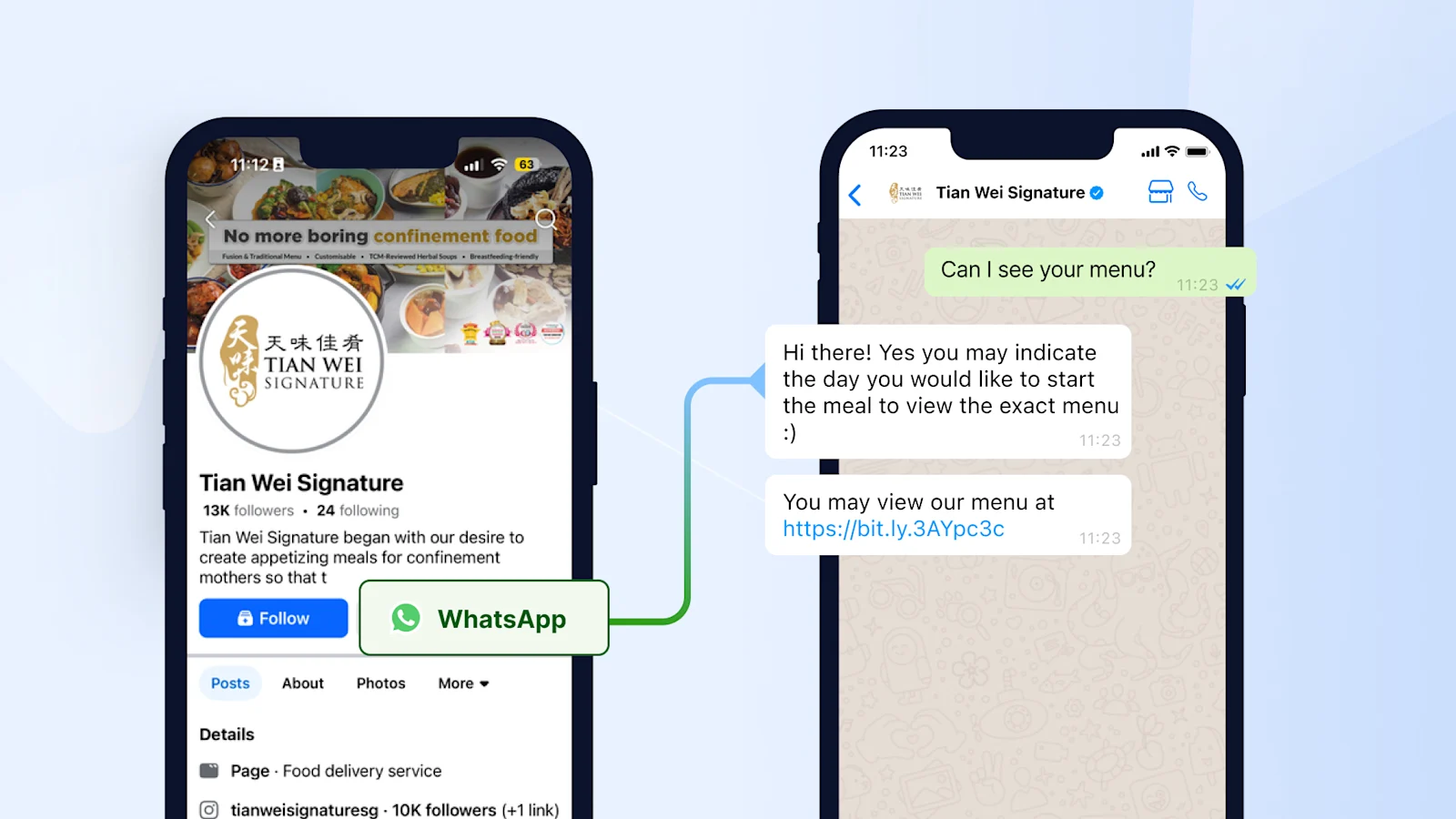
SleekFlow's WhatsApp chatbot platform lets a business start with a no-code chatbot flow across WhatsApp, Instagram, and Messenger. Some outgrow it and hand off into AgentFlow, SleekFlow's AI agent product, once that flow hits the limits above. AgentFlow reads intent instead of matching a script, connects to Shopify, HubSpot, and Salesforce to act mid-conversation, and shows the source behind every reply so a team can audit it. Two Southeast Asian brands show both ends of that path.
Tian Wei Signature, a confinement meal caterer in Singapore, set up a keyword-triggered chatbot to answer menu and booking questions around the clock, then centralised WhatsApp, Facebook, and Instagram into one inbox. Results:
2x increase in team efficiency
40% increase in response rate
20% improvement in customer satisfaction Read the full case study →

Want to outcompete your peers with SleekFlow's help?
Book your personalised demo with SleekFlow today and unlock the potential of seamless communication


