ManyChat alternative for businesses in Malaysia


TL;DR: Quick Summary
- ManyChat is great for social engagement automation (e.g., Instagram/TikTok/Messenger flows), but some Malaysia teams outgrow it when they need true omnichannel operations, deeper CRM context, and scalable WhatsApp workflows.
- If WhatsApp is your main channel in Malaysia, your tool must support the official WhatsApp Business Platform with compliant templates, opt-in handling, and reporting.
- SleekFlow is built for omnichannel + sales/support workflows, with broader channel coverage and business operations features (assignment, collaboration, customer context, analytics).
- For WhatsApp costs, Meta charges on a per delivered message basis by category (marketing/utility/authentication/service), so automation that reduces wasted sends matters.
- If you mainly want creator-style comment/DM automation on IG/TikTok, ManyChat may still be enough; if you want a system to manage conversations-to-conversion, SleekFlow will fit better for scaling teams.
Instant messaging now shapes how customers discover, ask, and buy—especially in Malaysia, where many businesses close deals inside DMs. That’s why chat management tools have become a core part of e-commerce operations: they don’t just “answer messages,” they help you capture leads, qualify intent, and keep customers moving from enquiry to purchase.
ManyChat became popular for a reason. It’s easy to pick up, and its visual builders (like Basic Builder and Flow Builder) make it simple to automate interactive conversations—especially for Instagram and Messenger-style workflows. For teams running comment-to-DM funnels or basic chatbot automation, it can be a solid starting point.
But as businesses scale, the question changes from “How do I automate DMs?” to “How do I manage conversations across channels and teams—without losing context?” That’s where many companies start looking for a ManyChat alternative: they need stronger multi-agent workflows, deeper customer context, and better support for channels that matter most in Malaysia (especially WhatsApp). In this guide, we’ll break down what ManyChat is best at, when it starts to feel limiting, and which alternatives make more sense depending on your goals.
Top 5 Manychat Alternatives
Is ManyChat enough for your business in Malaysia?
ManyChat is a good fit when you’re mainly using DMs as a growth channel, things like IG comment-to-DM, story replies, quick lead capture, and simple automations you can set up fast without a lot of ops overhead.
But teams usually switch when they need WhatsApp-first operations and stronger multi-agent + workflow features on top of the official API. Here’s a quick way to check whether ManyChat is still enough for your current stage or if you’ve outgrown it.
Keep ManyChat if…
Your main goal is social engagement automation (comment-to-DM, story mentions, simple lead capture).
Most of your automation happens on Instagram / TikTok / Messenger / WhatsApp and you don’t need a heavier “ops” layer.
You mainly need quick broadcasts and simple re-engagement flows (ManyChat supports broadcasts across channels like Messenger, Telegram, Email, and SMS).
You’re a small team and don’t need strict assignment rules, deep reporting, or complex handoffs.
Consider switching if…
You’re running WhatsApp as a serious sales/support channel and need multi-agent workflows (assignment, collaboration, internal notes, clearer ownership).
You need to manage conversations across more channels used in SEA and want one place for customer context + follow-ups.
You want WhatsApp campaigns that are easier to run and measure (segmentation, analytics, retargeting), not just “bot flows.”
You need to connect conversations to business operations (CRM/ecommerce data, pipeline stages, order events).
Now that you know whether you’re optimising for social automation or scaling WhatsApp operations, here’s where the differences between ManyChat and SleekFlow show up in real day-to-day use.
SleekFlow vs ManyChat: where the differences actually show up
ManyChat is popular because it’s easy to start with and strong for social engagement automation, especially on Instagram, WhatsApp, TikTok, and Messenger. If your main goal is comment-to-DM funnels and simple lead capture flows, it can be a solid fit.
But once you’re scaling (more agents, more channels, more follow-ups), you’ll usually want a platform that’s less “bot builder” and more “conversation operations”, especially if WhatsApp is a core channel in Malaysia. WhatsApp has more than 3 Billions users globally, so it often becomes the default support/sales channel in SEA.
1) Channels and omnichannel coverage
ManyChat: strongest for Meta-style engagement flows with WhatsApp also supported.
SleekFlow: better fit if you need WhatsApp plus additional messaging channels used in SEA (e.g., LINE/WeChat, TikTok, Instagram, Facebook, etc) and want everything managed in one workspace.
2) Inbox and team workflows
If you’re handling real sales/support volume, the inbox experience matters more than the flow builder.
SleekFlow: built for multi-agent handling—assignment, collaboration, internal notes, and richer customer context so agents don’t reply blind.
ManyChat: can handle replies, but is typically used more as an automation tool than a full “support operations” inbox for teams.
3) CRM and customer context
Both tools support basic tagging/labeling, but the difference is how “operational” the CRM layer feels.
SleekFlow: tends to surface more customer details (lead stage, priority, lifecycle fields) to support sales/support workflows.
ManyChat: works well for list-building and automation audiences, especially for social-funnel use cases.
4) WhatsApp messaging and broadcasts
WhatsApp is often where Malaysia teams want to scale campaigns, follow-ups, and reactivation.
ManyChat launched WhatsApp automation in 2022, so WhatsApp support is not “new”; your use case matters (marketing flows vs. full ops).
SleekFlow supports everything in a single system, like WhatsApp campaigns, which require reporting, retargeting, and team management
5) Integrations (SMS, tools, and data sync)
ManyChat SMS: connects via Twilio integration for SMS.
SleekFlow: stronger integration if you want messaging + CRM/ecommerce sync + automation triggers all connected (so campaigns can react to customer actions).
6) Automation and AI
ManyChat: excellent for quick social automation triggers (comment replies, mentions, DM flows) and fast iteration.
SleekFlow: strong when automation needs to connect across the whole journey, routing, qualification, follow-ups, and handoff to humans so the system moves from message → conversation → conversion.
Why businesses in Malaysia should consider using SleekFlow
Most teams don’t switch from ManyChat because it’s “bad”. They switch because their messaging becomes harder to run day to day — more channels, more agents, more follow-ups, and more pressure to prove ROI.
Here’s where SleekFlow tends to fit better for Malaysian businesses:
WhatsApp stops being one device
When enquiries grow, a single WhatsApp login becomes a bottleneck. SleekFlow supports team workflows, so chats can be owned, assigned, and handled in parallel without everyone sharing a single device.
Your chats finally connect to customer context
When conversations are separate from the CRM or store data, agents end up asking the same questions repeatedly (“What’s your order ID?” “Which product?”). With SleekFlow, teams can work with richer customer profiles and keep history in one place.
You can track what’s actually working
If you’re using multiple channels (WhatsApp, Instagram, and others), it’s hard to know what drives leads and sales without a unified view. SleekFlow helps you measure performance across campaigns and conversations so you can double down on what converts.
Campaigns become workflows, not one-off blasts
Instead of sending a message and hoping for replies, you can run automated journeys, follow-ups, routing, reminders, and retargeting, and keep it consistent across the team.
If your business is moving from “DM automation” to “conversation operations” (sales + support + retention), SleekFlow is usually the more natural next step.
SleekFlow localized experts are now available in Malaysia!
Examples of businesses that are already using SleekFlow
Lalamove uses SleekFlow to streamline its workflow
Lalamove, as one of the fastest growing delivery services across Asia, undoubtedly has a large volume of enquiries daily. Apart from the internal communication between the drivers and staff, they find SleekFlow’s end-to-end feature beneficial for saving manpower and boosting productivity. The standardisation makes workflow systematic whereas the WhatsApp broadcasting makes it easier to build trust and relationships with customers.
Learn more about how Lalamove observed quadrupled results with SleekFlow.
STACCATO Shoes uses SleekFlow to boost its remote sales
STACCATO, an iconic fashion footwear retailer, is a company with an enormous network of chain stores. After subscribing to SleekFlow, the staff in STACCATO can sell at any time and from any location using their own device. Multiple log-ins for their frontline salespeople from both the website and mobile apps are possible now. Their staff can still be on duty via WhatsApp with an independent device even if they are far away from the retail store due to quarantine or the legally restricted number of people at the workplace. They can assist clients remotely and respond to messages immediately. This, in turn, encourages workplace efficiency and nurtures customer relationships effectively.
How to get started with SleekFlow, a ManyChat alternative
There are numerous distinctions between ManyChat and SleekFlow, and not all are included in the examples above. At the end of the day, determining which choice is more appropriate for your organisation all comes down to your objectives and ambitions.
SleekFlow application is the one you should use if you want to achieve something significant. ManyChat, on the other hand, may be a better option for those who are only looking for the most basic and fundamental features and capabilities. For the time being, the only way to determine if SleekFlow is better suited for your company is to discover it yourself. So go ahead and try it out, then let us know what you think!
Step 1: Create your SleekFlow account
Visit SleekFlow’s official website and click on ‘Start Free’ button at the top right corner. Then, fill in your email address, select sign up, and fill in the information requested. No credit card information is required for the 7-day free trial of the Pro Plan!
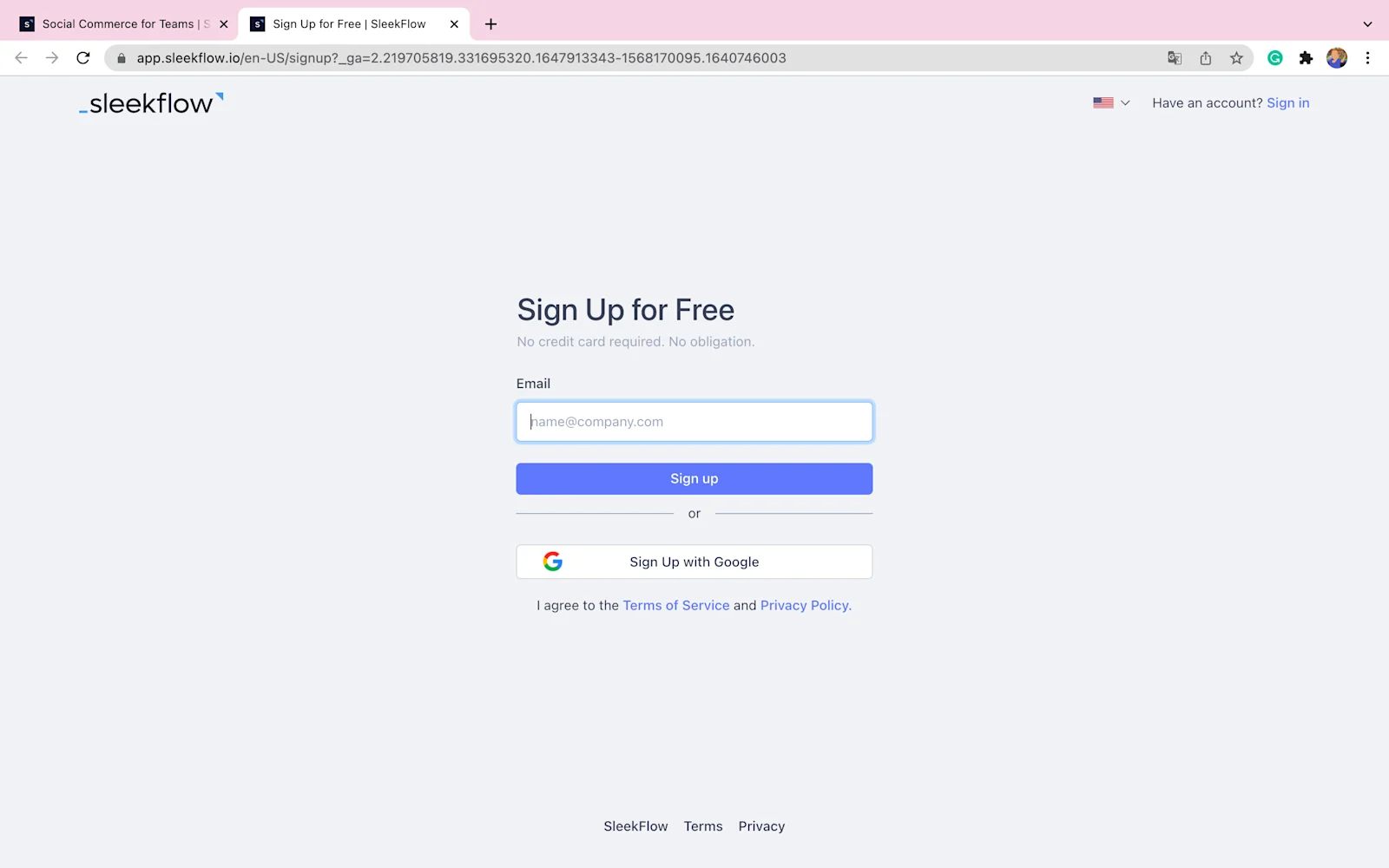
Explore the differences between SleekFlow’s free trial plan and paid versions here.
Step 2: Explore functions and features
Browse through the quick guides to find out how to get started with the wide range of functions and features according to the main goals of your company.
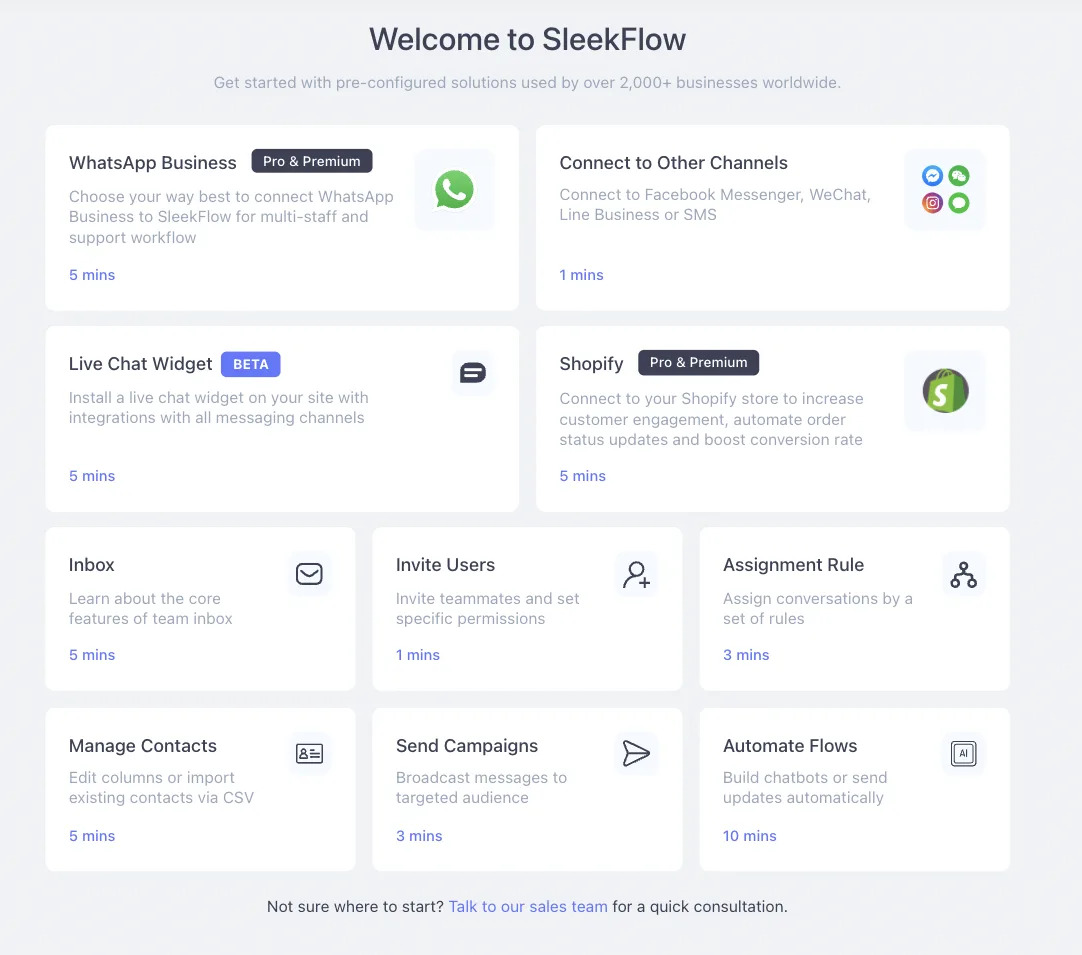
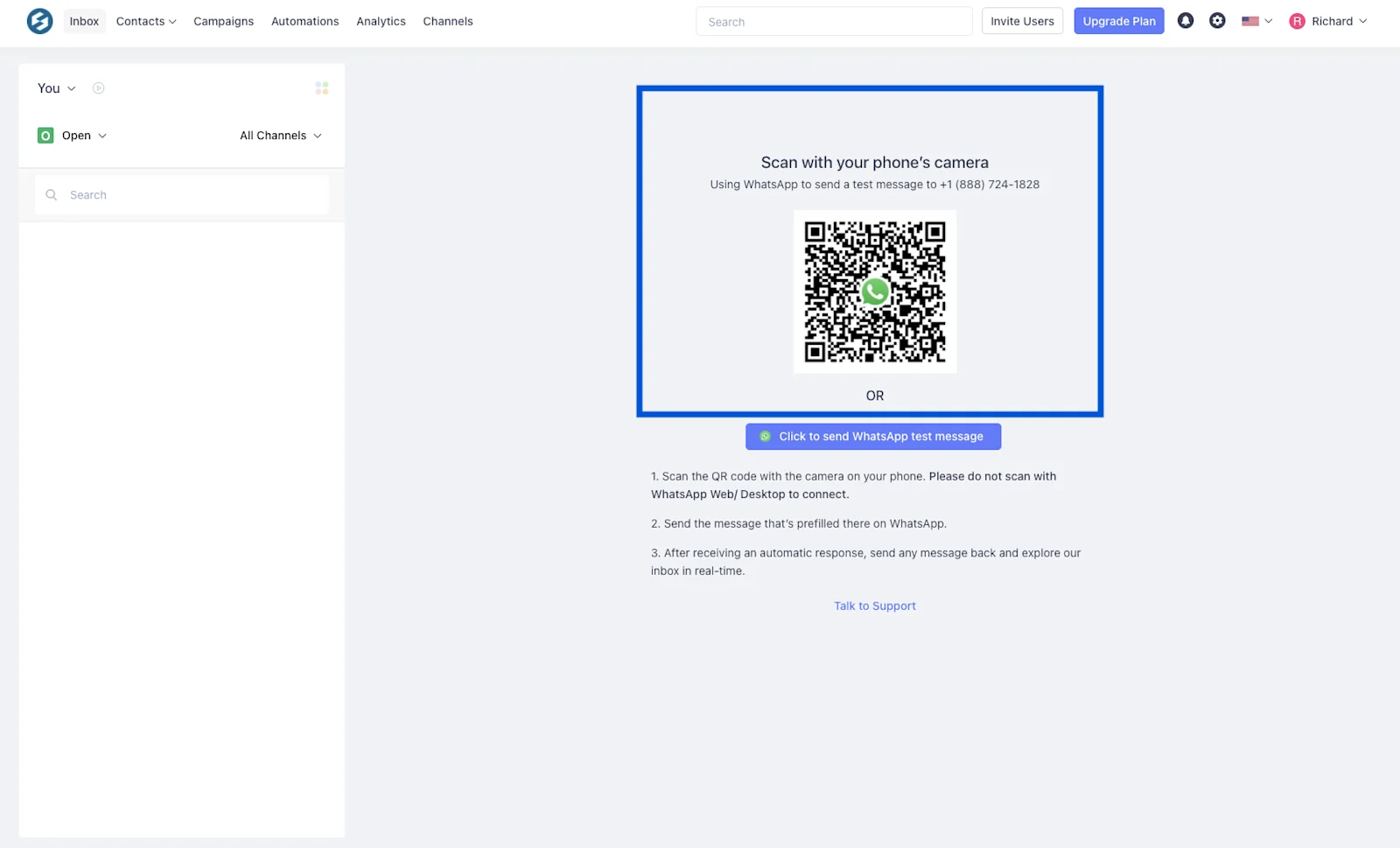
Step 3: Test your inbox and connect your channels
We’ve created a sandbox environment for you to test your inbox. In layman's terms, this sandbox is a virtual testing machine that allows you to send and receive messages using SleekFlow before connecting to your actual WhatsApp account.
Then, choose the channel (e.g. WhatsApp) you’d like to begin with!
Step 4: Begin your journey
View, reply, and assign conversations! Various automation settings and campaigns can be created. Integrate your Shopify store and start earning more!
Make everything simple by having a quick chat with our experts in Malaysia!
Further reading: A comparison of SleekFlow vs. Respond.io


