WhatsApp automation for businesses: benefits and use cases


TL; DR: Quick Summary
- WhatsApp automation helps you handle more customer conversations without adding more manual work.
- It can automate replies, lead qualification, routing, order updates, payment reminders, and support handovers.
- Basic automation works in the WhatsApp Business App, but advanced automation needs the WhatsApp Business Platform/API.
- The best-performing workflows usually focus on faster response times, better lead conversion, and fewer repetitive support tasks.
- To use it properly, you need to follow WhatsApp rules around opt-ins, the 24-hour messaging window, and message categories.
- SleekFlow lets you build these automations with no code using Flow Builder, integrations, and AI features.
- A good place to start is one simple workflow: welcome messages, lead routing, or order updates.
WhatsApp is already where your customers are. In Singapore, it's still the most-used and most-loved app, with four in five people using it every month.
For businesses, WhatsApp is more than a chat channel. It's a high-attention touchpoint: WhatsApp's own business blog reports a 98% open rate for WhatsApp messages, compared with 20% for email.
That’s why WhatsApp automation is becoming a key lever for marketing, sales, and support teams that need to scale conversations without sacrificing customer experience.
In this guide, you’ll learn:
What WhatsApp automation is (and what it isn’t)
WhatsApp Business App vs WhatsApp Business Platform/API (and which you need)
12 practical automation examples with message templates
The key rules (opt-in, 24-hour window, pricing categories) you must follow
How to build automations in SleekFlow using the no-code Flow Builder
What is WhatsApp automation?
WhatsApp automation is the use of workflows, chatbots, and system integrations to automate repeatable tasks on WhatsApp, like greeting customers, qualifying leads, routing conversations, sending order updates, collecting payments, and escalating to an agent when needed.
It helps teams respond faster, stay consistent, and handle more conversations, especially during peak hours, after office hours, or when you’re running campaigns.
Read more: WhatsApp Business API: A definitive guide for your business
WhatsApp Business App vs WhatsApp Business Platform/API
Advanced WhatsApp automation is only available on the WhatsApp Business Platform/API. Mostly, organisations that use this need multi-agent operations, reporting, and integrations, however some differences go beyond that. Here’s the practical difference:
WhatsApp Business App (good for basic automation)
Use it if you have a small team and only need simple features like quick replies and labels.
Key limitations to know:
Broadcast lists cap at 256 contacts per list.
Linked devices are limited (up to four).
Reporting and integrations are limited (harder to connect CRM/e-commerce or measure results).
WhatsApp Business Platform/API (needed for advanced automation)
Use it if you want scalable automation, multi-agent access, integrations, analytics, and compliant messaging at scale.
With SleekFlow, teams build WhatsApp automations using a no-code Flow Builder and connect to CRMs and E-commerce tools for two-way data and next-step actions like updating the CRM or scheduling.
Why WhatsApp automation matters for revenue teams
Faster responses
The first reply often decides whether a lead stays interested. Customers who message a business on WhatsApp expect a quick answer, and the longer a lead waits, the more likely they are to move on to a competitor who replied first.
Automation closes that gap. A welcome message and routing rules can answer within seconds, even when no agent is free, then hand the conversation to the right person with the details already collected.
Consistency across campaigns and support
Automation helps you:
Capture and qualify leads from click-to-WhatsApp ads, forms, and social campaigns
Route conversations by intent (sales vs support) and language/region
Send timely updates (order confirmations, delivery status, payment reminders)
Escalate complex questions to a human agent with full context
What you can automate: 12 WhatsApp automation examples (with templates)
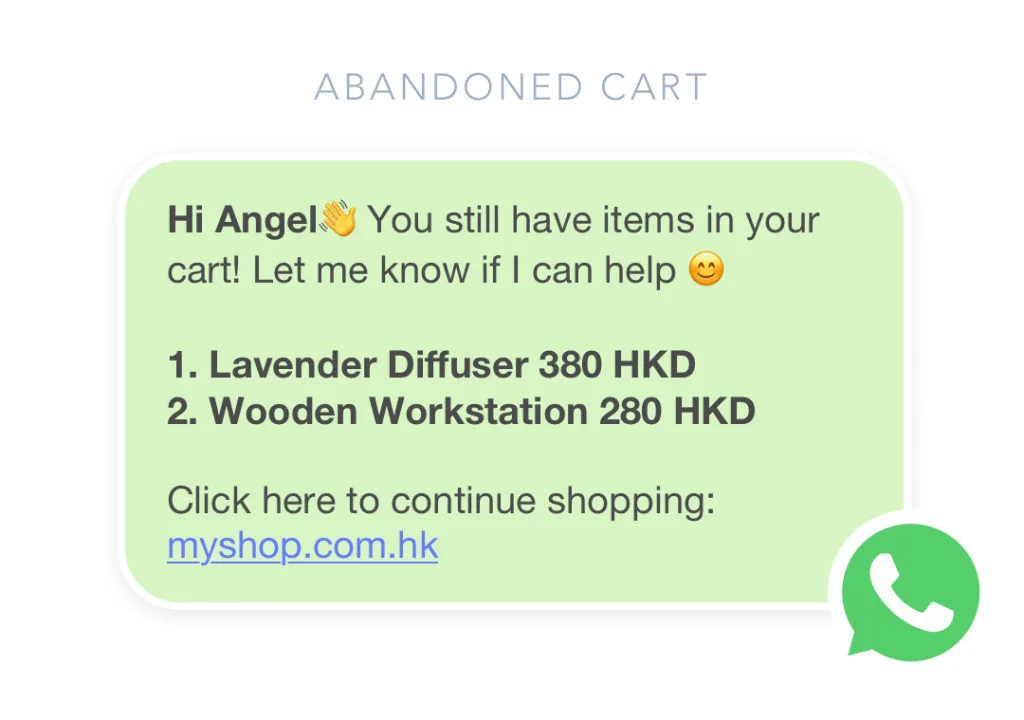
Below are examples you can copy and adapt. (Depending on your setup, some outbound messages may require pre-approved templates and must follow WhatsApp rules—covered later.)
1) Welcome message for new inbound chats
Trigger: Customer sends first message
Goal: Set expectations + guide to next step
Template (free-form within the 24-hour window):
“Hi {{first_name}} thanks for messaging {{brand}}. What can we help with today?
Product enquiry 2) Order status 3) Support”
2) Office-hours and handover automation
Trigger: Message received outside business hours
Goal: Reduce drop-offs; collect details for follow-up
Template:
“Thanks for reaching out, our team is currently offline. If you share your name + what you need help with, we’ll reply within {{SLA_time}}.”
3) Lead qualification (budget / timeline / need)
Trigger: New lead from ad or link
Goal: Qualify before routing to sales
Template:
“To recommend the best option, what are you looking for?
A) {{option_1}} B) {{option_2}} C) Not sure yet”
SleekFlow can route leads based on responses and qualifying signals, and AI nodes can help qualify or recommend next steps.
4) Smart routing by region / language / team
Trigger: Lead answers a routing question or matches a rule
Goal: Faster time-to-first-response by the right agent
Template:
“Got it, connecting you with our {{region}} specialist now.”
5) Appointment booking (with a WhatsApp Flow form)
Trigger: Customer requests appointment
Goal: Reduce back-and-forth
Template:
“Sure, please fill in this quick form and we’ll confirm your slot.”
6) Product recommendation and guided selling
Trigger: Customer expresses intent (“Looking for…” / “Recommend…”)
Goal: Shortlist products, then hand over or close
Template:
Based on what you shared, these are good options:
{{product_1}} 2) {{product_2}} 3) {{product_3}}
Which one fits you best?”
7) Abandoned cart / checkout reminder (with consent)
Trigger: Cart created but not purchased
Goal: Recover revenue
Template (usually template-category dependent):
“Need help completing checkout? Reply 1 for assistance or 2 to get the payment link again.”
8) Order confirmation
Trigger: Purchase completed
Goal: Reduce “did it go through?” tickets
Template:
“Order confirmed ✅ Order #{{order_id}}. We’ll notify you once it ships.”
9) Delivery updates / tracking
Trigger: Fulfilment status changes
Goal: Reduce WISMO (“where is my order?”) volume
Template:
“Your order #{{order_id}} is out for delivery today. Track here: {{tracking_link}}”
10) Payment reminder (invoice / deposit / renewal)
Trigger: Payment pending after X days
Goal: Reduce manual follow-up
Template:
“Reminder: payment for {{invoice_id}} is due on {{due_date}}. Pay here: {{payment_link}}”
11) Support triage + ticket creation
Trigger: Support keyword detected (“refund”, “cancel”, “broken”)
Goal: Create a ticket and prioritize
Template:
“I can help—what’s the issue type?
1)Delivery 2) Product issue 3) Billing 4) Other”
SleekFlow can automatically create tickets via Flow Builder based on conditions (e.g., keywords, unanswered conversations, or third-party logs).
12) CSAT / feedback after resolution
Trigger: Ticket marked resolved
Goal: Measure service quality
Template:
“Quick question, how satisfied are you with the support today?"
1) 😃 Great 2) 🙂 OK 3) 😕 Not great”
Rules to follow before you automate WhatsApp (opt-in, 24-hour window, pricing)
Get clear opt-ins before sending proactive messages
WhatsApp’s Business Messaging Policy requires message recipients to opt in for messages before you start sending.
Best practice: collect opt-ins at the point of value (checkout, enquiry form, membership signup, in-store QR), and be clear about what customers will receive.
Understand the 24-hour customer service window
When a user messages your business, it opens a 24-hour customer service window during which you can respond with service messages (WhatsApp notes this window resets with each user message).
Outside that window, you typically need pre-approved message templates for business-initiated outreach.
Know message categories and how pricing works
WhatsApp Business Platform pricing is structured around message categories (e.g., Marketing, Utility, Authentication, Service). Since 1 Oct 2026, Meta also charges for service messages, so automated replies inside the 24-hour window now have a cost too.
For up-to-date rates by market, use WhatsApp’s official pricing documentation.
How to automate WhatsApp Business: 3 ways to send automatic messages
There are three ways to send automatic WhatsApp messages for your business: the free WhatsApp Business app's built-in tools, the WhatsApp Business API through a provider like SleekFlow, or unofficial bulk-sender tools. Only the first two are allowed by WhatsApp.
1. Use the free WhatsApp Business app
The free app's built-in automation covers greeting messages and away messages, plus quick replies to speed up typing. You'll find all three under Settings, then Business tools.
Greeting message: turn on Send greeting message, write your message, and choose who receives it. It goes out when someone messages you for the first time, or after 14 days without messages.
Away message: turn on Send away message, write your message, and set when it runs, such as outside your business hours.
Quick replies: save answers to common questions as shortcuts, such as /price. Typing the shortcut in a chat inserts the full reply. Quick replies aren't sent automatically, but they cut typing time.
These tools only react to incoming messages. They can't qualify leads, route chats to the right person, or message a customer when their order ships.
2. Use the WhatsApp Business API with a no-code tool
With the API and a provider like SleekFlow, automatic messages can start from what customers do or from events in your other systems, such as a new chat, a form submission, a new order, or a delivery update. You can also delay a message until a set time, for example to send a reminder the day before an appointment. Messages sent outside the 24-hour customer service window need a template that Meta has approved. See how to set up a flow in SleekFlow below.
3. Avoid unofficial auto-senders and WhatsApp Web bots
Browser extensions, bulk-sender apps, and scripts that automate WhatsApp Web aren't approved by WhatsApp. Its Terms of Service don't allow automated or bulk messaging through unofficial tools, and WhatsApp bans accounts it catches using them. If you need to send automatic messages at scale, use the API.
How to overcome the limitations using SleekFlow to help your WhatsApp automation needs
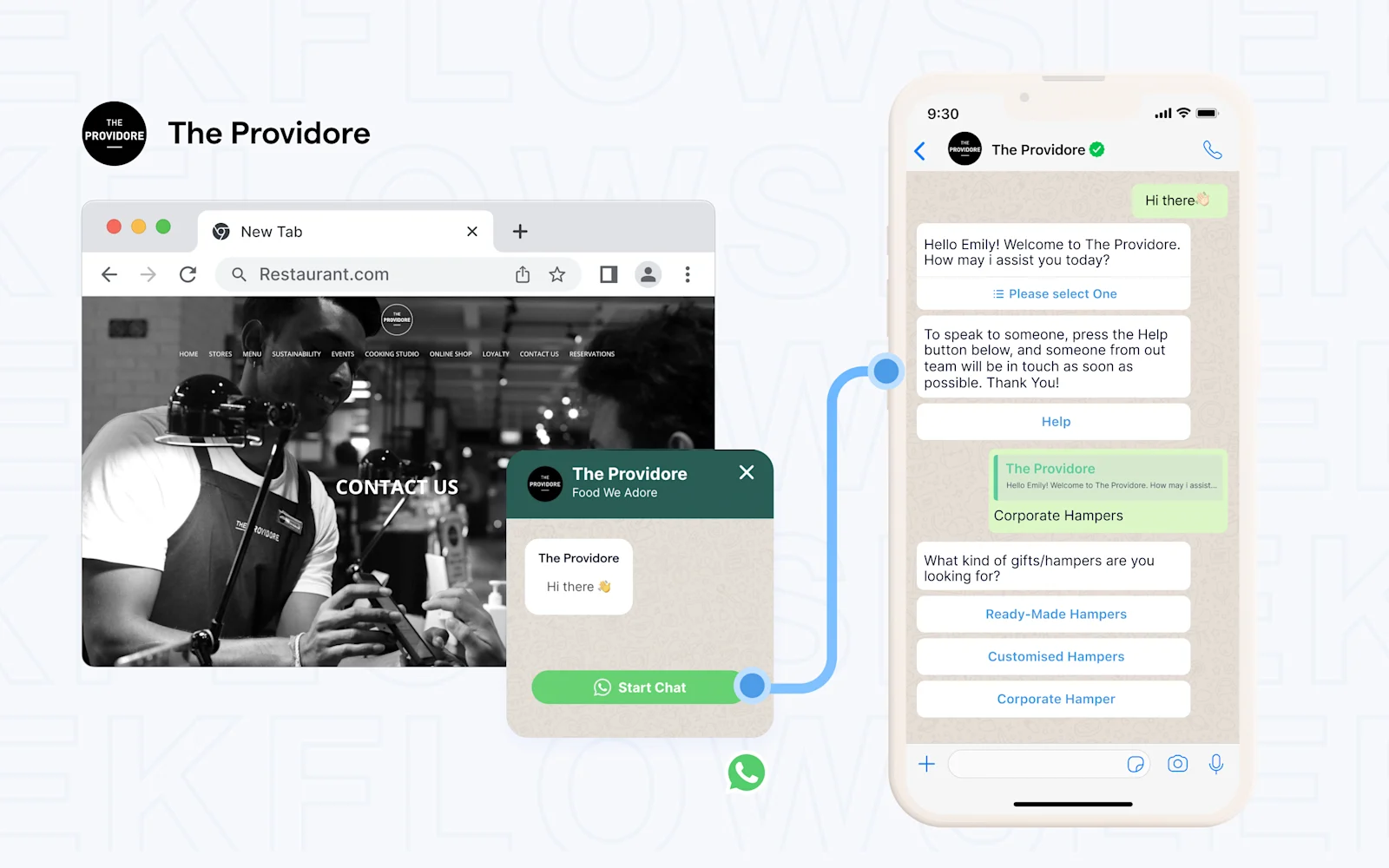
As an official WhatsApp Business Solution Provider designated by Meta, we offer a secure and reliable gateway to connect with your customers. Creating WhatsApp automations on SleekFlow is easy with our built-in templates, or design one from scratch to suit your specific needs
With SleekFlow, you can use the no-code Flow Builder to create a variety of automations besides ad automation, such as order confirmations, live delivery updates, OTP verifications, payment reminders, and many more.
SleekFlow’s Flow Builder is perfect for businesses looking to maximise the potential of WhatsApp automation as it streamlines processes, saves time and improves customer interactions.
No coding required: The Flow Builder is designed to be user-friendly, eliminating the need for technical expertise. Businesses can create complex workflows without writing a single line of code, making it accessible to all teams.
Analytics Dashboard: Our dashboard allows you to track how conversations fuel conversions with analytics dashboards. Monitor agent performance, customize metrics to fit your goals, and evaluate conversion funnels to uncover growth opportunities.
Visualise and design automation flows: The intuitive drag-and-drop interface allows businesses to map out and customise their automation flows visually. This ensures clarity and ease of use, enabling teams to build and refine workflows quickly.
Seamless integration with external platforms: Connect your WhatsApp automation with external platforms such as CRMs, e-commerce tools, or other software for two-way data transfer. This ensures that your automation is not only efficient but also integrated with your broader business operations.
AI Agent, Agentflow: Our AI Agent can take conversations to the next level. Agentflow can help you to qualify leads, recommend products, schedule meetings or update CRM — helping your team to be more efficient.
How to set up WhatsApp automations using SleekFlow (no-code)
SleekFlow is an official WhatsApp Business Solution Provider, and you can build WhatsApp automations with built-in templates or from scratch using the Flow Builder. With it, you can streamline processes, save time, and ensure every opportunity is captured. Businesses can maximise interactions on WhatsApp with WhatsApp chat flows and take their customer communication to the next level.
Here is a step-by-step on how to use WhatsApp Automation using SleekFlow’s Flow Builder.
1.
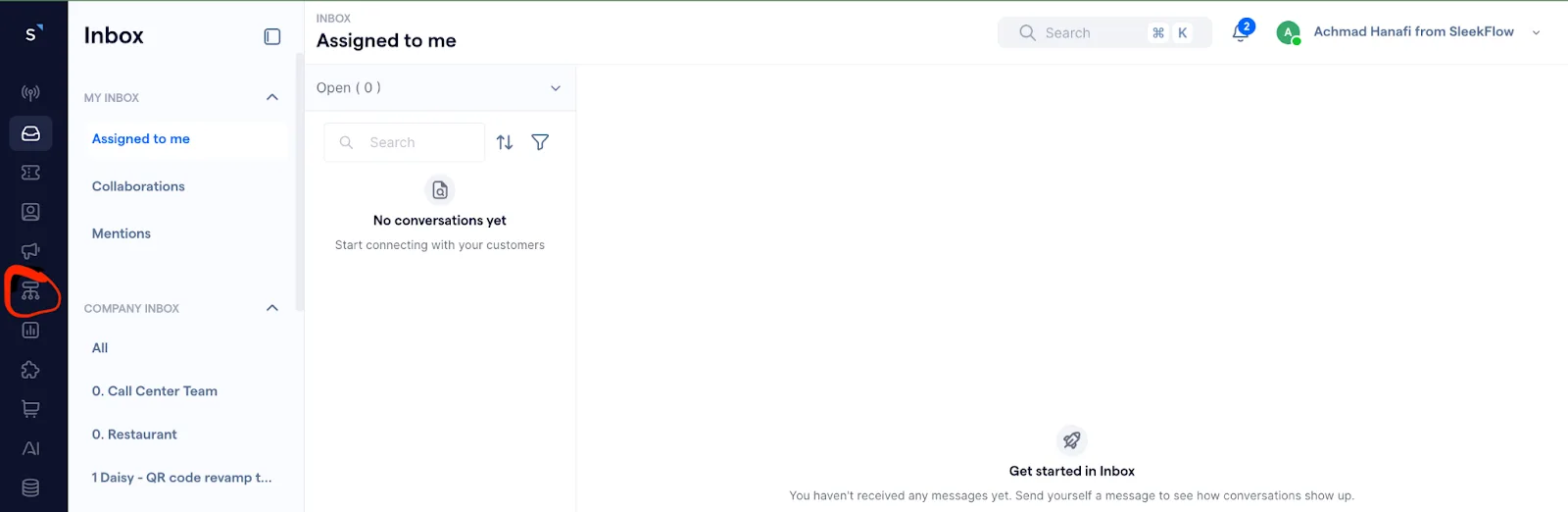
First, go to the SleekFlow dashboard and click on the Flow Builder icon.
2.
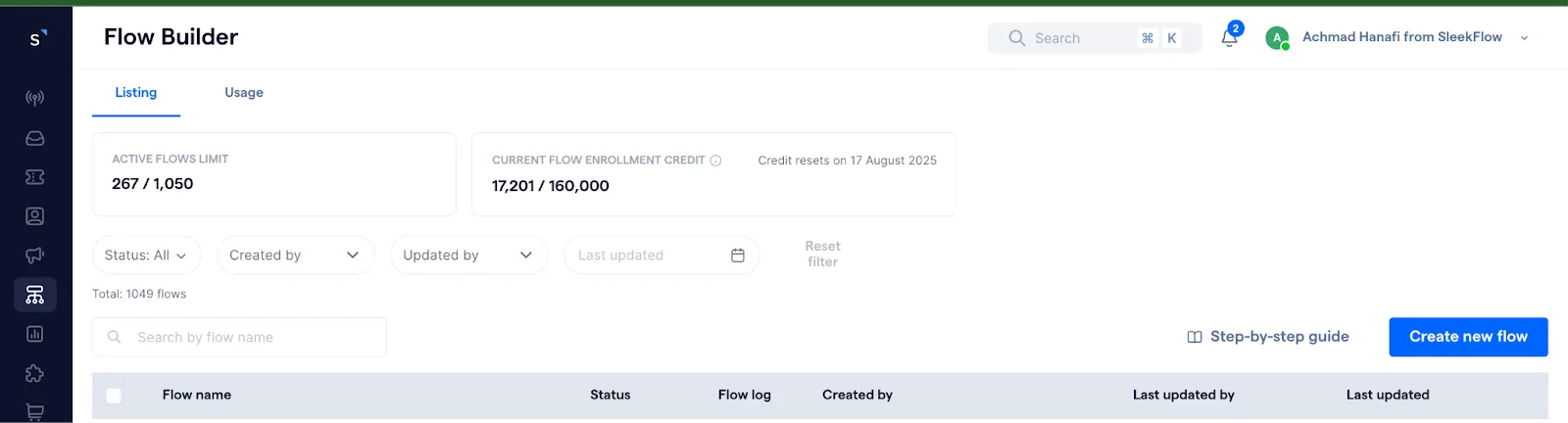
Once you are in the Flow builder tab, click the button that says ”Create new flow” on the right.
3.
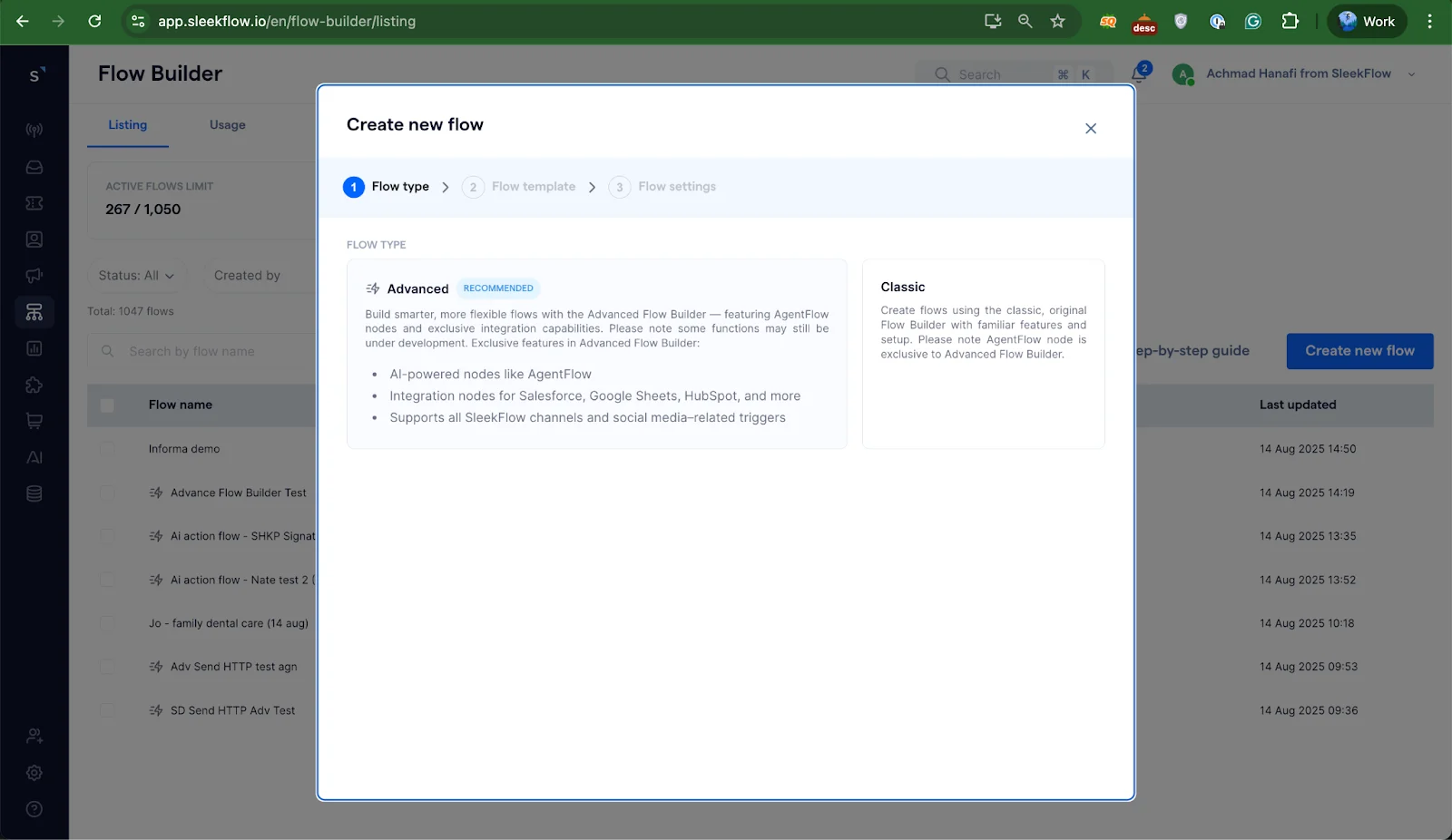
Here you can choose from either classic or advanced Flows. While both types of Flows are easy to use, Classic Flows are generally good for basic use cases, while Advanced Flows have exclusive features for smarter and more flexible flow. You will want to select “Advanced”, as here is where you can use AI Agent nodes and integration nodes.
4.
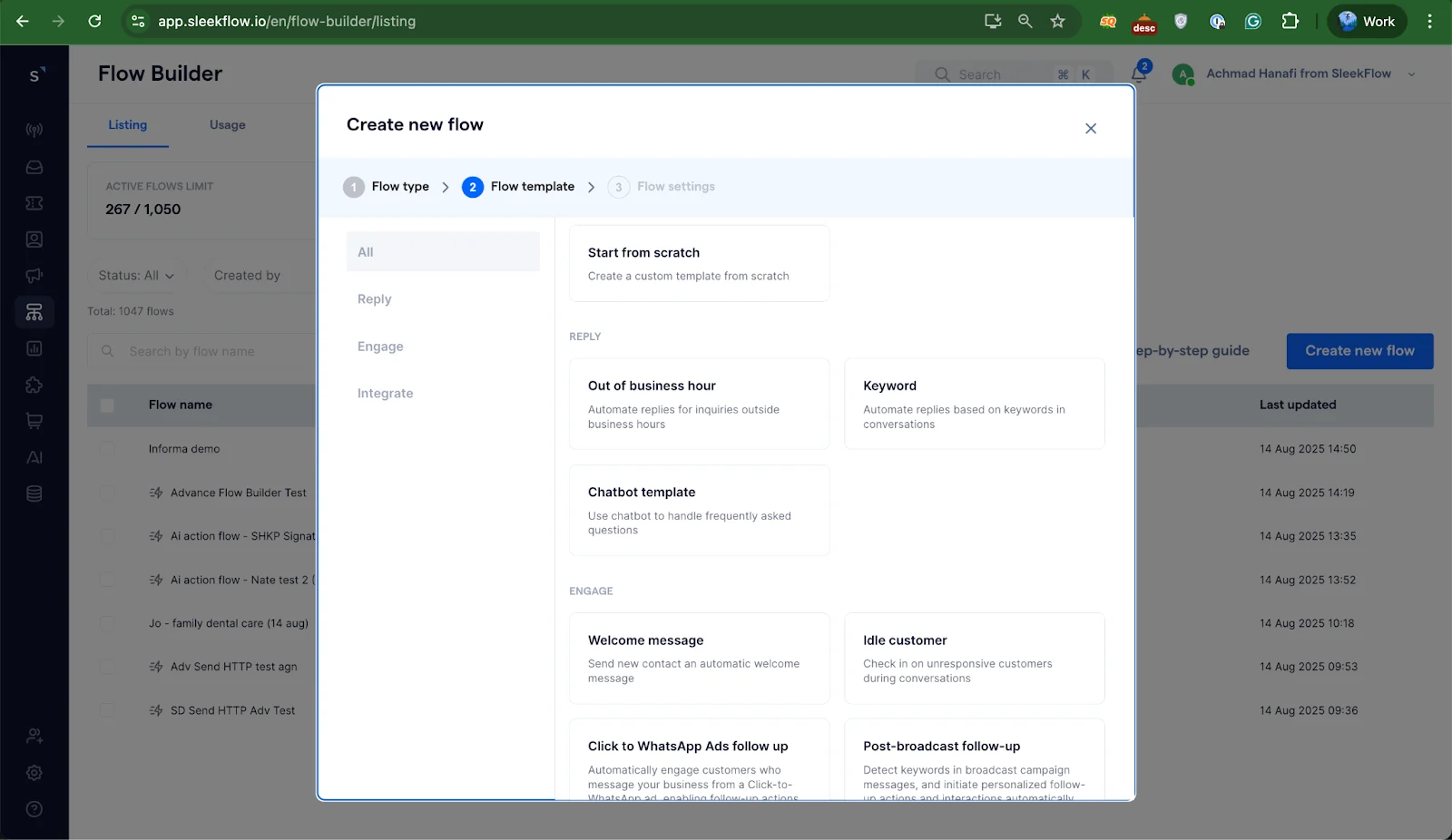
Once you choose the type of flow, you can choose from our various templates the flow that best fits your business needs. For more functions, such as order confirmation, delivery status, or tracking, we suggest using the “Start from scratch” option.
5.
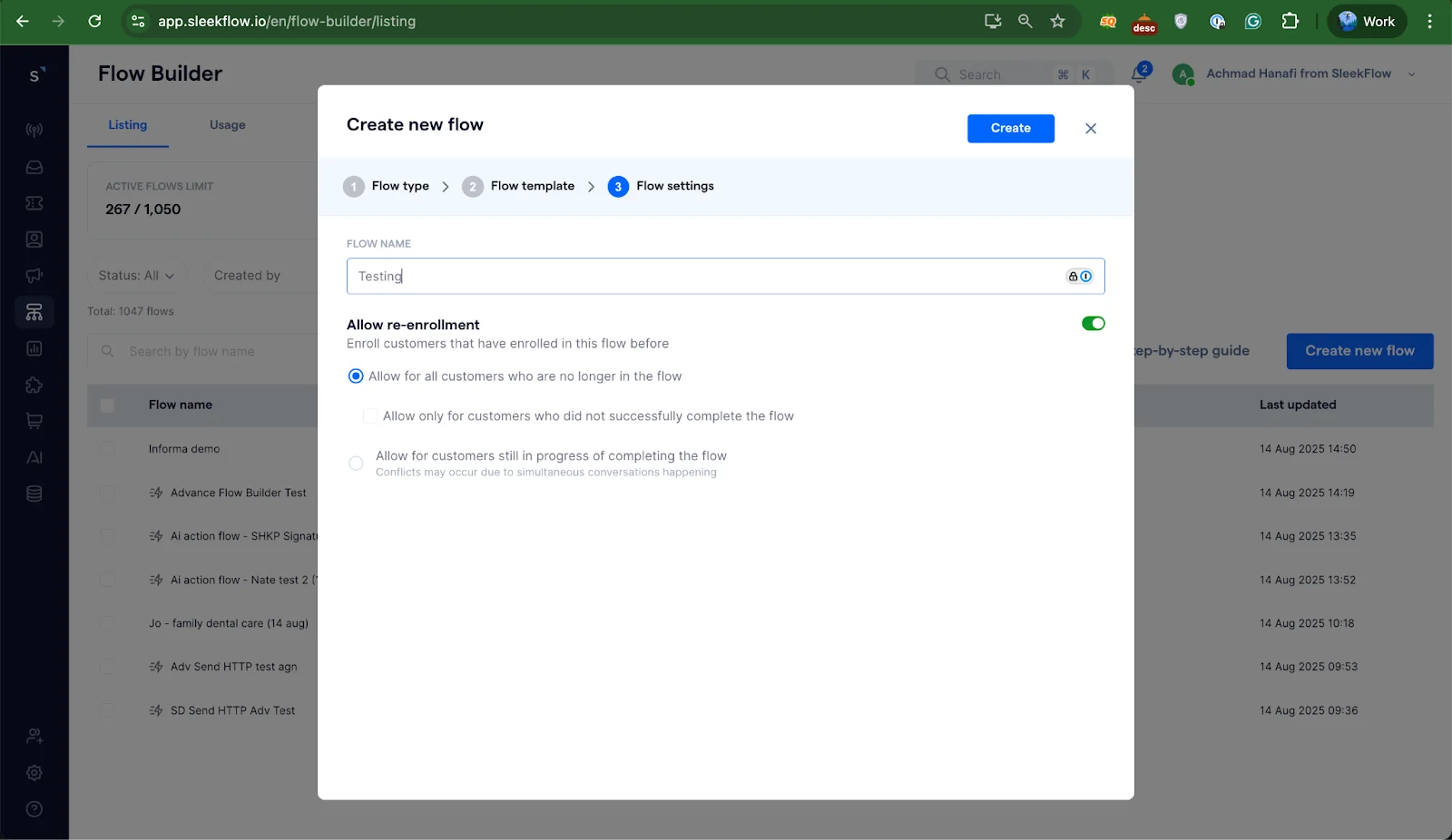
Give your flow an easily identifiable name and click “Create”.
6.
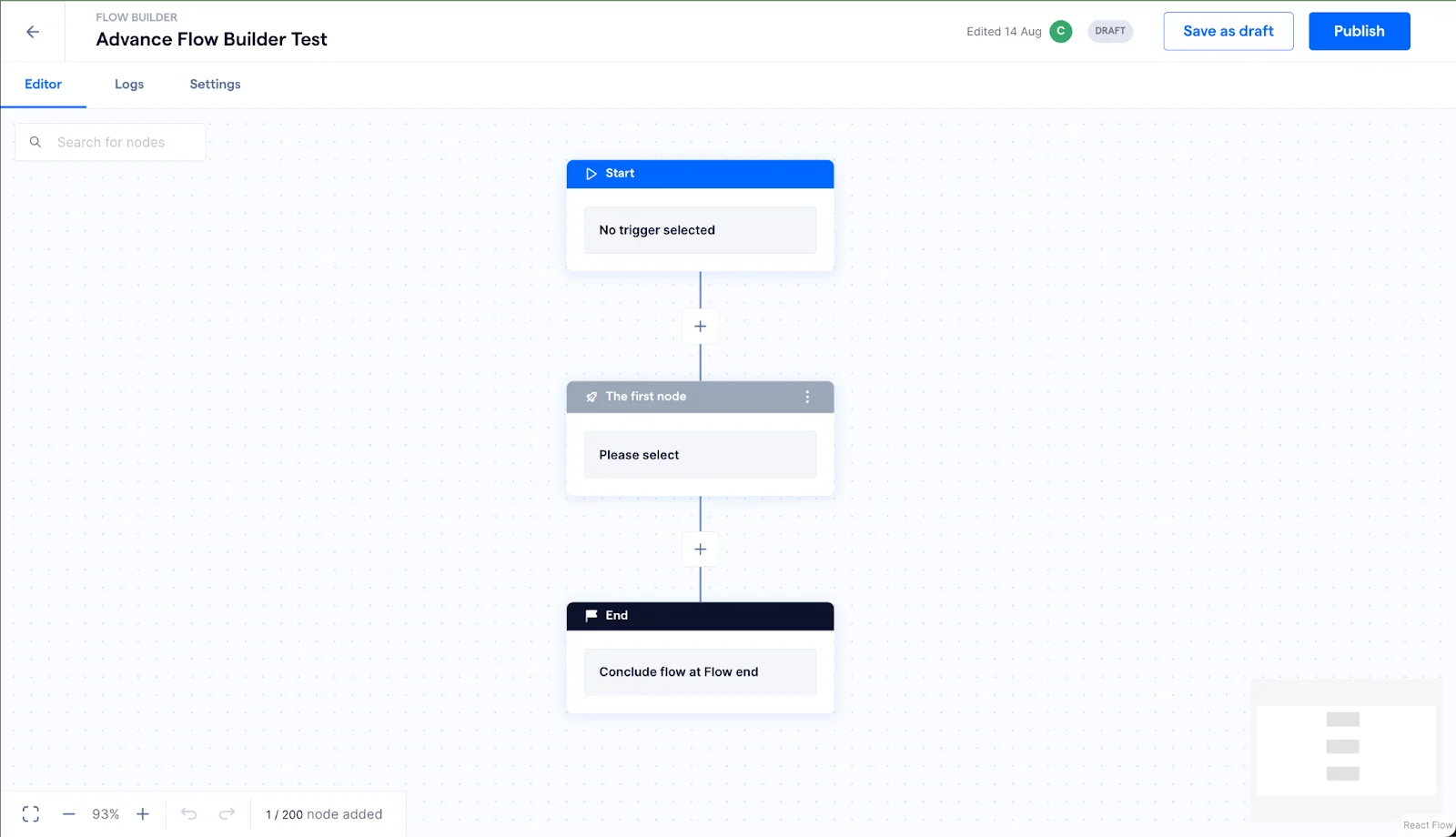
Choose a trigger, the event that starts the flow. For a welcome message, that's a customer sending you a new message on WhatsApp.
7. Add an action node to send your message. Use a free-form message for replies inside the 24-hour window, or an approved template for messages outside it.
8. Add conditions or time delays if you need them, for example to send a different reply outside business hours, or to follow up if the customer doesn't respond.
9. Click Publish to make the flow live, or save it as a draft to finish later.
For every trigger and action available, see the Help Center guide to getting started with Advanced Flow Builder.
Use cases of WhatsApp automation in Singapore
How2Design4U: Capturing warm leads through Facebook integration
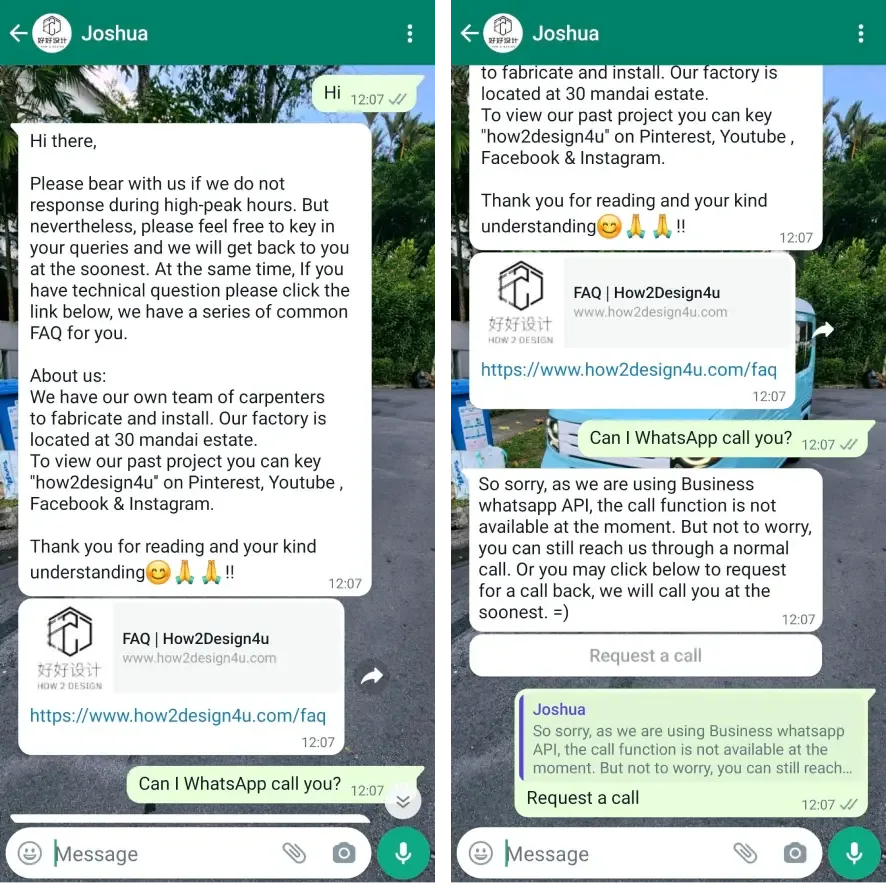
How2Design4U, an interior design company, implemented SleekFlow to streamline their lead management process. By integrating Facebook Lead Ads, all lead data is automatically mapped to SleekFlow’s CRM with detailed profiles created, including the lead source and customised fields such as “Facebook Form ID.”
With automated workflows in place, the company engages with and nurtures prospects even outside office hours on WhatsApp. Once a lead fills out the Facebook form, SleekFlow automates the chat flow to send a WhatsApp message for follow-ups, understanding their needs and routing conversations to the right salesperson based on budgets. Personalised auto replies help establish rapport with potential clients.
Results:
Captured leads outside office hours seamlessly.
Increased efficiency by reducing manual data entry.
Boosted conversion rates with personalised follow-ups.
Over 30% more qualified leads routed to the sales team.
Pristine Aroma: Enhancing engagement through automated campaigns
Pristine Aroma leveraged SleekFlow to run a successful social media giveaway campaign for their essential oils. Automated comment replies on Facebook and Instagram streamlined the management of 947 post interactions and 215 new followers within a week. SleekFlow’s personalised auto-replies ensured all new leads received prompt and tailored messages, laying the groundwork for strong customer relationships.
Results:
Gained 215 new followers and achieved 947 interactions within seven days.
Improved lead conversion rates by 20%.
Increased customer satisfaction scores by 15%.
Intriq Journey: Tailored assistance for bespoke customer service
Intriq Journey, specialising in bespoke travel, uses SleekFlow to automate client interactions and ensure a high level of service. By routing inquiries based on the client’s region, they ensure personalised assistance. During off-hours, automated messages inform customers about response timelines and provide emergency contact details for urgent inquiries.
This approach ensures no inquiry is overlooked and reinforces the brand’s commitment to customer service.
Results:
Reduced response times by 40%.
Handled 100% of regional inquiries efficiently.
Increased client satisfaction rates by 25%.
Zero loss of leads during non-business hours.
Next steps: launch your first WhatsApp automation (in 30 minutes)
If you’re getting started, don’t try to automate everything at once. Start with one workflow that removes manual effort and improves customer experience:
Welcome + intent capture (sales vs support)
Lead qualification + routing (by budget, region, language, or product)
Order updates or appointment confirmation (reduce repetitive questions)
On SleekFlow, you can build these flows in Flow Builder with no code, connect your CRM or ecommerce tools for two-way sync, and use AI Agent/AgentFlow for tasks like qualifying leads, recommending products, scheduling meetings, or updating CRM fields.
What to measure after you go live: average first reply time, resolution time, and broadcast read and reply rates, so you can prove impact and optimise fast.

Want to outcompete your peers with SleekFlow's help?
Book your personalised demo with SleekFlow today and unlock the potential of seamless communication


