WhatsApp Business integration: how it connects to your CRM and what it costs


TL; DR: Quick Summary
- WhatsApp Business integration connects WhatsApp Business App or WhatsApp Business API to a CRM, helpdesk, or online store.
- WhatsApp Business API only connects through an approved Business Solution Provider, never directly with Meta.
- Integration cost has two layers: Meta's message-based fees and the provider's platform fee.
- Setup speed depends mostly on Meta's business verification, not on the technical connection itself.
You already run WhatsApp Business. Someone replies from a phone, one chat at a time. Then a lead comes in at midnight, or three people ask the same question in the same hour, and the phone-based setup stops feeling simple and starts feeling like the bottleneck. That's usually the moment WhatsApp Business API integration stops being a phrase in a sales deck and starts being the actual next step.
What is WhatsApp Business integration?
WhatsApp Business integration is the process of connecting WhatsApp Business App or WhatsApp Business API to the systems a company already runs, typically a CRM, helpdesk, or online store, so contact data, order details, and conversations move between WhatsApp and that system automatically instead of by hand.
Meta positions the WhatsApp Business Platform as the enterprise layer built for exactly this kind of system-to-system connection, with over 2 billion people already using WhatsApp worldwide.
The free app can't do that on its own. It's built for one person on one phone. Real integration, the kind a growing team actually needs, starts once you move to WhatsApp Business API.

WhatsApp Business App vs WhatsApp Business API: which one integrates with a CRM?
WhatsApp Business App does not integrate with a CRM. It runs on up to 5 devices, but only one can be a phone, and there is no API for another system to plug into. WhatsApp Business API is built for that connection: multiple agents, automation, and a live data link to whatever platform runs the business.
Find out how PSB Academy succeeded with the integration of their existing CRM with SleekFlow.
Neither option is automatically the right one. A two-person shop answering thirty messages a day doesn't need API-level automation. A team fielding hundreds of enquiries across time zones does.
How does WhatsApp Business API actually connect to a CRM?
WhatsApp Business API never connects directly to a business. Meta requires an approved Business Solution Provider in the middle, which handles the technical connection, then layers on the shared inbox, automation, and reporting a CRM needs. Once approved, incoming WhatsApp messages sync into that provider's dashboard exactly like any other channel.
The provider is doing real work here, not just relaying messages. A WhatsApp Business Solution Provider manages Meta's platform positioning it as a business messaging tool, gets message templates approved, and gives a team one shared inbox instead of 5 separate people passing around one phone.
Setup steps look similar across providers: verify a Meta Business Portfolio, connect a dedicated number, apply for API access, then build and submit message templates for anything sent outside an open conversation window. The steps themselves are quick. Meta's business verification is usually what takes the longest, and that timeline sits outside any provider's control.
How WhatsApp Coexistence changes WhatsApp Business API integration
Integration used to mean choosing: keep the free WhatsApp Business App, or move to the API and give the app up. WhatsApp Coexistence, available since January 2026, removes that choice. It lets a business run the free app and WhatsApp Business API on the same phone number at the same time, so a team can keep the app for personal, one-to-one replies while a provider's API dashboard handles automation, broadcasts, and reporting on that same number.
That matters for integration specifically because the old trade-off was a real switching cost. Businesses lost their number's chat history and had to retrain customers on a new contact method just to get the CRM connection the API offers.
WhatsApp Coexistence removes that cost. A provider imports up to 6 months of existing chat history and contacts, so integration becomes something a team layers onto the number they already have, gradually, instead of a cutover they have to survive in one go.
How much does WhatsApp Business API integration cost?
Integrating WhatsApp Business API has two separate costs. Meta charges based on delivered messages, with rates set by message category and the recipient's market, while certain service and entry-point conversations stay free. On top of that, the Business Solution Provider charges its own platform fee for the dashboard, automation, and support layered on top of Meta's infrastructure.
According to Meta's pricing documentation, conversations a customer starts, and the 72-hour window that follows a click on a WhatsApp ad or a Facebook page's contact button, are not billed. Businesses only pay once they send a marketing, utility, or authentication message outside those free windows.
Provider fees vary by vendor and plan. As one example, SleekFlow charges a flat monthly add-on per connected number rather than a percentage of message spend, though the current amount is worth confirming directly since pricing pages change.
Why businesses connect WhatsApp Business API through SleekFlow
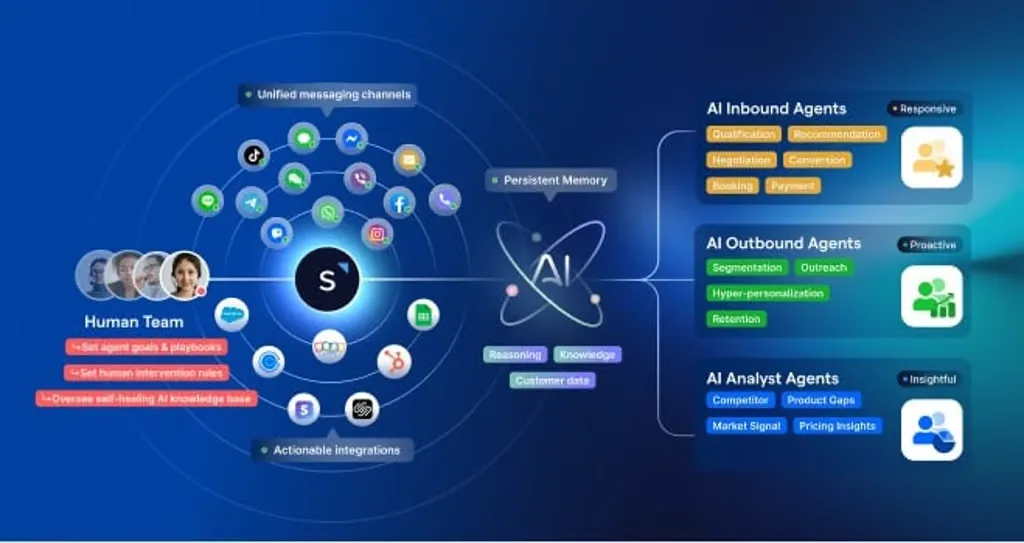
SleekFlow is a WhatsApp Business Solution Provider that connects WhatsApp Business API to a shared inbox, automation, and the rest of a company's stack, from Shopify to a support ticketing queue.
Awfully Chocolate, a Singapore dessert brand with stores across Singapore and China, needed one place to manage rising enquiries across WhatsApp, Instagram, Facebook Messenger, and website chat.
They connected their Shopify store directly to their WhatsApp integration, so agents could see a customer's order history and preferences inside the same chat. Common questions, like store hours and membership details, now answer themselves through automation.
Response speed doubled, and the team kept up with enquiry volume during festive peaks without adding headcount.
For broadcasts, WhatsApp Business is limited to 256 recipients while the latter allows messages to be sent to 100,000 users simultaneously. However, WhatsApp Business does support WhatsApp voice calls and can be used for free in contrast to WhatsApp Business API which does not support calls and payment must be made per conversation pricing.

Want to outcompete your peers with SleekFlow's help?
Book your personalised demo with SleekFlow today and unlock the potential of seamless communication

